TL;DR
- MCP (Model Context Protocol) connects AI agents to external tools and enterprise systems through standardized, reusable integration layers.
- MCP eliminates siloed AI implementations across platforms like LangChain, AWS Bedrock, Copilot Studio, and IBM watsonx.
- Enterprise MCP challenges include authentication risks, authorization gaps, scalability choices, compliance requirements, and integration complexity.
- Remote MCP servers remove maintenance overhead, ensure scalability, and provide provider-managed infrastructure with 24/7 support.
- MCP servers must be open-source, GDPR/CCPA compliant, and certified (ISO 27001, SOC 2 Type II) for enterprise use.
- Bright Data MCP offers 60+ tools for web scraping, search, data feeds, and browser automation with enterprise-grade infrastructure.
In this blog post, you will learn:
- How MCP servers work as an integration layer in enterprise AI, why they are important, and when they are useful.
- The main enterprise MCP challenges, along with practical solutions to avoid issues and disruptions.
- Alternatives to MCP for enterprises, as there are other ways to connect AI agents to third-party tools.
- Why Bright Data MCP is an excellent example of an MCP for enterprises.
Let’s dive in!
An Introduction to Enterprise MCP
Understand what enterprise MCP is, how it works, what it offers, and when it makes a difference.
MCP Servers as Integration Layers in Enterprise AI
MCP (Model Context Protocol) is an open standard devised by Anthropic (the company behind Claude) that lets AI systems connect to external tools, data sources, and services.
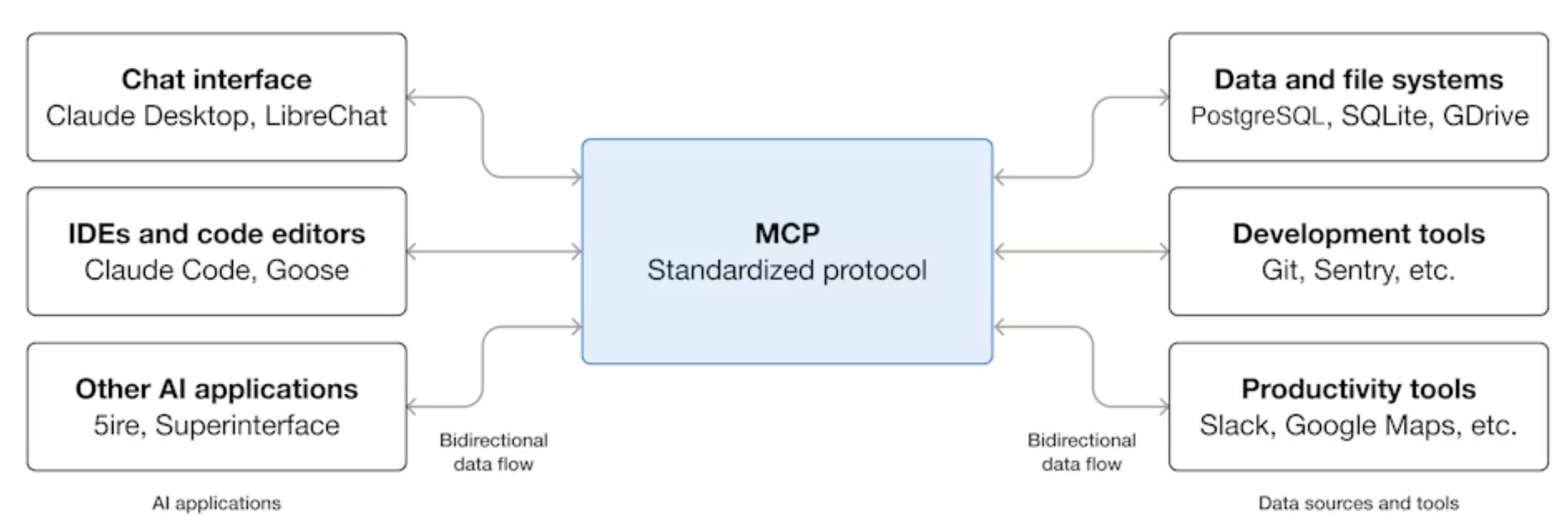
Instead of hard-coding integrations, this protocol introduces a structured way for AI agents to discover available capabilities through local or remote MCP servers and invoke them as needed. In simple terms, MCP turns external services into “tools” that AI models can understand and utilize.
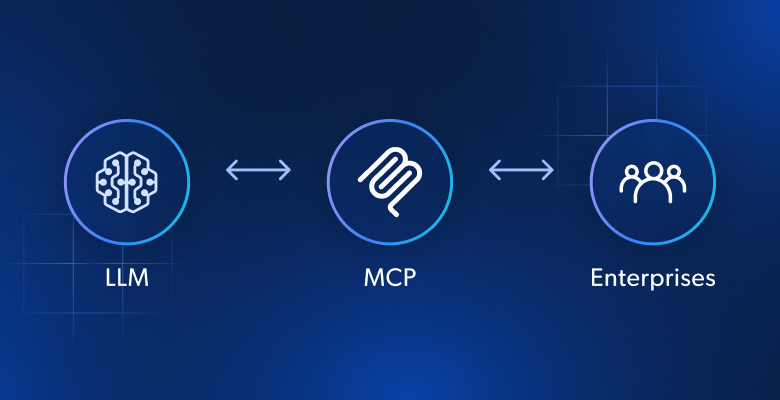
In enterprise environments, MCP acts as a modern integration layer for AI. Enterprise MCP servers sit between LLMs and internal systems such as CRMs, data warehouses, ticketing platforms, and internal APIs, or as third-party services that provide business-critical features like data retrieval, data processing, automation, and real-time decision support.
Why MCP Matters for Enterprises
In many enterprises, teams work in isolation, leading to siloed solutions. Each team may use different AI frameworks and tools to build agents and workflows, often ending up connecting them to enterprise backend services through one-off connectors. This results in a proliferation of custom integrations, which can create huge maintenance challenges.
MCP architecture solves that by decoupling AI logic from backend implementations. Integrations become reusable, governed, and auditable, allowing any team to tap into the shared MCP layer, regardless of the AI agent or enterprise system they are using.
This is possible because most solutions—from open-source libraries like LangChain, LlamaIndex, or CrewAI, to no-code tools like Agno, and enterprise-focused platforms like AWS Bedrock AgentCore, Copilot Studio, and IBM watsonx—support MCP integration. The same applies to AI models, most of which include support for tool calling via MCP.
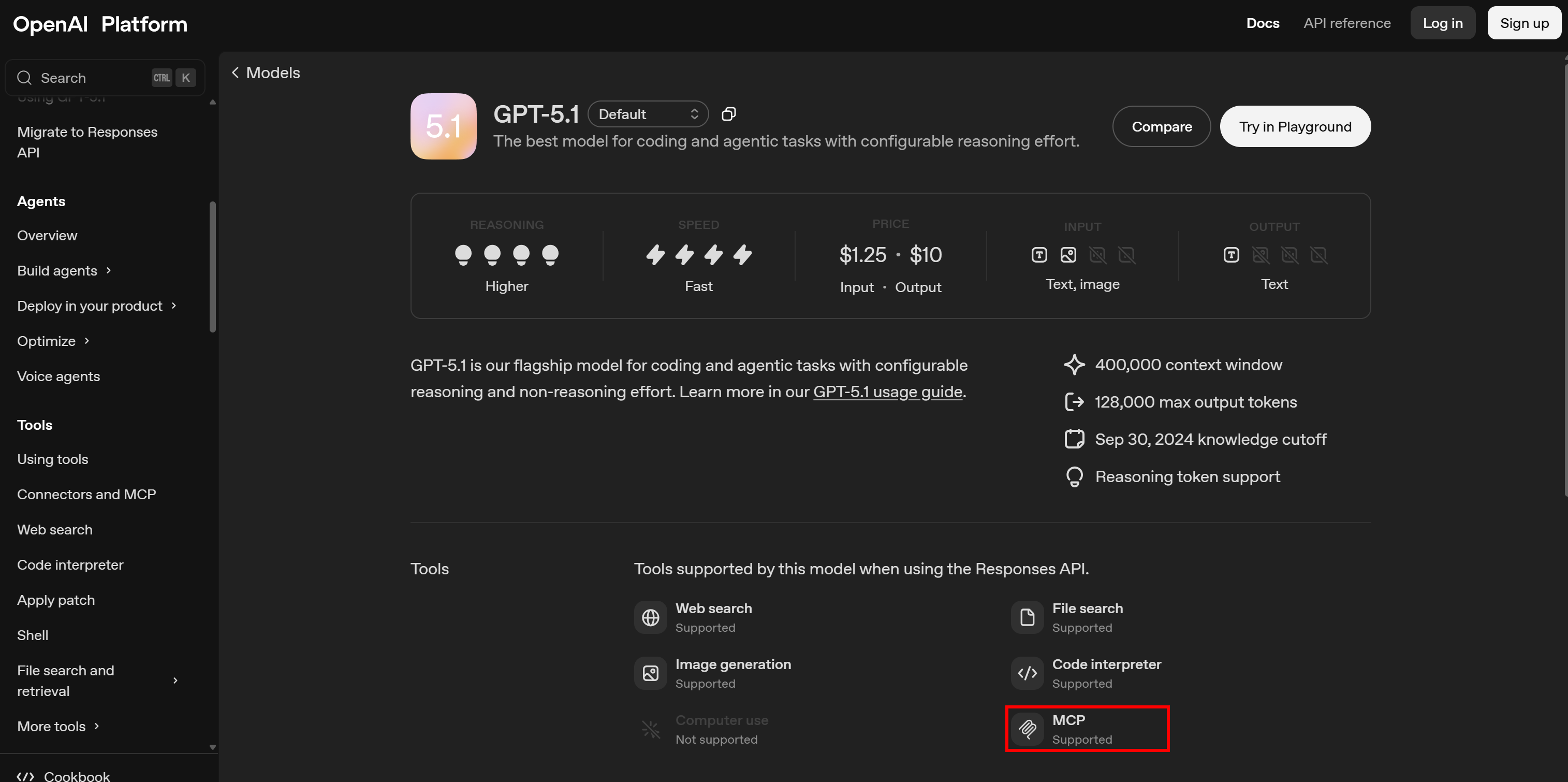
MCP has become the most widely adopted AI protocol because it standardizes access to enterprise capabilities while enabling centralized control over permissions, monitoring, and policy enforcement.
Main Enterprise MCP Use Cases
Some of the most common and relevant enterprise MCP use cases are:
- Internal knowledge access: AI agents can retrieve, summarize, and contextualize company documents, wikis, or support tickets through MCP, supporting smarter decision-making and reducing information silos.
- Web data retrieval: MCP servers allow AI agents to pull structured and unstructured data from web pages for up-to-date insights at scale. This enables grounding, SEO and GEO integrations, compliance assessments, brand monitoring, and other web data-driven RAG scenarios.
- Software development assistance: MCP enables AI to manage CI/CD pipelines, perform code reviews, and handle GitOps automation, integrating directly with tools like GitHub, Jira, Visual Studio Code (via Cline or Roo Code), or Cursor to improve developer productivity.
- Meeting management and follow-ups: Give AI agents the ability to schedule meetings, take notes, generate action items, and push updates to project management tools, enhancing organizational efficiency and accountability.
- Web interaction automation: MCP can equip AI agents with tools to navigate web pages, submit forms, or interact with SaaS platforms, automating repetitive online workflows to let employees focus on higher-value tasks.
- Supply chain and logistics optimization: AI agents use MCP to interact with scheduling systems, monitor inventory, and optimize delivery routes based on live traffic, weather, and demand data.
- Financial data analysis: MCP servers help AI securely access internal finance systems, market data feeds, and compliance platforms, automating reporting, credit scoring, and regulatory checks.
MCP in Enterprises: Main Challenges and Solutions
Now that you understand the needs of MCP in enterprises, it is time to examine the core challenges at stake and some possible solutions.
For a quick reference, view the summary table below:
| Category | Problem Description | Solution |
|---|---|---|
| Authentication | MCP servers may be unauthenticated or untrusted, risking data exposure or misuse. | Use MCP servers with strong authentication. Connect directly to trusted providers. |
| Authorization | Some tools handle sensitive data or perform high-impact actions without control. | Integrate MCP with platforms that enforce tool access restrictions and explicit approvals. |
| Scalability | Local vs remote MCP affects latency, configuration, maintenance, and integration. | Prefer remote MCP servers for easier maintenance, better scalability, and provider support. |
| Compliance | Third-party MCP servers may misuse data or violate privacy if not trusted. | Use open-source MCP servers from compliant, trusted providers with strong ethical standards. |
| Integrations | Poor or incomplete documentation can cause misconfigurations and integration issues. | Prioritize MCP servers with comprehensive documentation, tutorials, and from companies with 24/7 technical support. |
Explore the key enterprise MCP challenges (and solutions)!
Authentication
As soon as MCP was first announced, several security issues emerged. These include authentication risks, the confused deputy problem, improper permission enforcement, supply chain vulnerabilities, malicious or untrusted MCP servers, command injection, prompt injection, tool injection, lack of encryption or server verification, and more.
Since the first version (2024-11-05), the MCP specification has been updated to address many of those security concerns, with one of the most important improvements being stronger authentication mechanisms.
For enterprise use, MCP must be trusted and used only through authenticated servers—whether via HTTP headers, URL parameters, or OAuth 2.0. Providers should also offer dedicated auditing and real-time monitoring solutions to track usage and understand server activity.
Plus, notice that some services act as MCP server marketplaces, such as Smithery. These platforms are convenient because they enable you to connect to multiple MCP servers using the same interface. Still, you may prefer connecting directly to the original MCP server to prevent your data from passing through multiple layers outside your control.
Solution: Always go for MCP servers with strong authentication and avoid untrusted or unauthenticated solutions. Also, remember that it is generally safer to connect to remote MCP servers directly from the original provider.
Authorization
The best MCP servers for enterprises provide dozens of tools, each engineered to accomplish a specific task. These tools are exposed to the LLM, which can then select and use the most appropriate one(s) based on the user’s prompts.
The challenge is that some tools handle sensitive data or perform high-impact operations that should not be executed lightly. Examples include accessing or modifying enterprise data, running bulk operations that consume significant system resources, and similar actions.
For this reason, authenticating an MCP server is not enough. You also need an authorization layer to prevent misuse of the server’s tools. This is typically handled in two ways, depending on what the platform supports:
- Restricting tool access: Select a subset of tools that the LLM agent can access.
- Requiring explicit approvals: Request manual approval before executing tasks, sometimes with granular control over individual MCP tools.
Note: Some AI agent-building platforms support only one of these approaches, while the most enterprise-ready solutions provide both.
As a result, since authentication occurs at the tool level, enterprise MCP servers should expose tools as granularly as possible. That simplifies the authorization process.
Solution: Integrate the MCP server with an enterprise-grade platform that includes a reliable authorization framework, so the LLM powering the agent cannot call server-exposed tools without explicit user permissions or administrator-defined policies. Additionally, prefer MCP servers that offer well-defined, vertical tools.
Scalability
As of this writing, MCP supports two transport mechanisms:
- STDIO transport: Leverages standard input/output streams to achieve direct communication between processes on the same machine. It delivers high performance with minimal latency and no network-related overhead.
- Streamable HTTP transport: Employs HTTP POST requests for client-to-server messaging, with optional SSE (Server-Sent Events) for streaming. This transport supports remote communication and replaces the deprecated SSE-only method. Find out more about Streamable HTTP vs SSE.
In short, MCP servers can be accessed locally via STDIO or remotely via Streamable HTTP. Local MCP servers require installation and management but achieve lower latency. Remote MCP servers remove the need for maintenance but introduce some network latency.
Choosing between the two approaches is a key consideration in MCP integration, as it influences how MCP is configured in your AI agent. That also impacts scalability and maintenance requirements.
Note that most enterprise AI platforms, such as Copilot Studio or IBM watsonx, do not even allow local MCP installation. Thus, they require MCP servers to be accessed remotely.
Solution: For enterprise MCP integrations, it is recommended to rely on remote MCP servers. This avoids the overhead of installation, configuration, and maintenance, while ensuring top scalability, as the provider handles all operational aspects for you.
Compliance
Whether running locally or accessed remotely, third-party MCP servers used in enterprise environments should be open-source. That way, you can verify that the server only interacts with the provider’s services and products, without sending your enterprise data elsewhere.
Even then, you must trust the provider exposing its services as MCP tools. That is why it is fundamental to choose providers that adhere to strict GDPR and CCPA compliance, ethical data management practices, and hold certifications such as ISO 27001, SOC 2 Type II, CSA STAR Level 1, or similar.
After all, your AI agents may handle sensitive business data, and you want to avoid unauthorized third-party access due to unethical provider practices.
Solution: When integrating third-party MCP servers, prefer open-source servers from trusted providers that fully comply with privacy and security regulations and follow industry best practices.
Integrations
Most AI agent-building technologies, whether code-based, local, or no-code online platforms, support MCP connections. However, that does not guarantee comprehensive documentation. So, it is the responsibility of the MCP server author to supply detailed integration guides.
Incorrect server configuration can lead to serious issues, especially when authentication is involved. Clear visual guides and tutorials are pivotal for proper integration, whether the server is community-supported or developed by a company.
Good documentation must go beyond basic setup instructions. It should list supported tools, explain authentication mechanisms, outline available connection types (local vs remote), and provide concrete examples of integrations with widely used AI agent-building platforms.
Solution: Prefer MCP servers that come with thorough documentation and tutorials, since correct configuration is paramount for security, reliability, and seamless enterprise adoption. Also, consider providers that offer 24/7 technical support, including support for their MCP servers.
Alternatives to MCP for Enterprises
Each tool exposed by a third-party MCP server usually connects directly to the API of the corresponding service or product from the provider.
Because of this, for enterprise-grade reliability, not only must the remote MCP server be scalable, highly available, and consistently responsive, but the underlying APIs must also meet the same standards. This is why it is so important to rely on MCP servers from trusted providers.
Now, remember that MCP is nothing more than a middleware layer that simplifies integrations between AI and custom functions, third-party services, databases, and similar systems. Basically, most MCP servers expose APIs in a way that AI agents can easily call them.
What follows is that it is possible to bypass the MCP layer entirely. How? By integrating directly with the APIs through custom tool definitions! That is particularly useful for highly specific integrations.
Thus, the APIs of third-party services serve as true alternatives to enterprise MCP. This approach also minimizes exposure to unnecessary tools, avoiding reliance on middleware that could go offline. At the same time, it requires custom integrations and involves greater complexity.
Bright Data MCP: The Enterprise MCP Server for Web Data Collection and Interaction
The two biggest limitations of enterprise AI agents that prevent them from being able to “do it all” are:
- Limited knowledge of the external world, restricted to the information available when the underlying LLM was trained.
- Inability to interact with web pages like human users would.
The Bright Data MCP server from Bright Data addresses both of those limitations (and many others) with 60+ specialized tools. Specifically, it enables LLMs and AI agents to access the web, perform searches, scrape data from web pages, and navigate and interact with websites without being blocked.
Bright Data MCP achieves that by connecting to Bright Data’s enterprise data solutions, equipping LLMs with the ability to:
- Scrape any web page into Markdown (a data format ideal for data ingestion in AI agents).
- Perform web searches on Google, Bing, Yandex, DuckDuckGo, and other search engines.
- Access structured data feeds from over 40 popular sites, including Amazon, Yahoo Finance, LinkedIn, Instagram, TikTok, Walmart, and many others.
- Interact with websites via a cloud browser to perform clicks, scrolls, and other actions.
For more information, explore all 60+ Bright Data MCP tools.
Why Is Bright Data MCP for Enterprises?
The Bright Data MCP tools integrate directly with Bright Data’s services. These products are backed by unlimited scalability, 24/7 technical support, CAPTCHA solving, integration with one of the world’s largest proxy networks (150+ million IPs across 195 countries), and the reliability of the leading web data platform globally.
In detail, if you are wondering why Bright Data MCP is enterprise-ready, refer to the table below:
| Enterprise MCP Issue | Bright Data MCP Solution |
|---|---|
| Authentication | Supported via the Bright Data API key. |
| Authorization | Supported via 60+ specialized tools that provide granular control. |
| Scalability | Achieved via a dedicated remote server built on infinitely scalable enterprise-grade infrastructure. |
| Compliance | Open-source, 1.6k+ GitHub stars, CCPA & GDPR compliant, certified ISO 27001, SOC 2 Type II, CSA STAR. |
| Integrations | 50+ documented integrations available in Bright Data documentation and blog posts. |
Discover how to get started in the Bright Data MCP documentation. Otherwise, take a look at the following integration guides:
- How to Connect Bright Data MCP to Copilot Studio
- Extending Cursor AI Capabilities via Bright Data MCP
- CrewAI & Bright Data MCP: Advanced Web Scraping Guide
- Integrating Claude Code with Bright Data MCP
- Connect LangChain Agents to Bright Data MCP Easily
What if Bright Data MCP Is Not for You?
No problem! You can still integrate enterprise-ready AI agent-building platforms directly with Bright Data products via API.
For example, you can connect directly to the SERP API in enterprise AI tools, as explained in these tutorials:
- Bright Data’s SERP API in Azure AI Foundry for Search-Powered Prompt Flows
- Give AWS Bedrock Agents the Ability to Search the Web via Bright Data SERP API
- Integrate Bright Data’s SERP API into an AI Agent in Microsoft Copilot Studio
- Bedrock Agent in Python via AWS CDK with Bright Data’s SERP API
- Integrate Bright Data’s SERP API into an AI Agent in IBM watsonx
Conclusion
In this article, you realized the importance of MCP servers for implementing enterprise AI solutions. You dug into the main challenges, reviewed best practices to overcome them, and discovered alternative approaches.
For business-critical use cases, Bright Data MCP tools are ideal. Their 60+ tools provide the scalability, security, and trust required of enterprise MCP solutions.
To build advanced AI agents and workflows, explore the full suite of products and services available within Bright Data’s ecosystem for AI.
Create a free Bright Data account today and start experimenting with our AI-ready web data tools!



Technical Writer
 5.5 years experience
Antonello Zanini is a technical writer, editor, and software engineer with 5M+ views. Expert in technical content strategy, web development, and project management.