Google killed the num parameter in September 2025 with no warning. JavaScript rendering became mandatory, and AI Overviews rolled out to 200 countries and territories. If you’re scraping Google, your raw HTTP requests now return empty or degraded responses, num-based pagination is broken, and AI-generated content pushes organic results below the fold.
Every Google search URL contains parameters after the ? (like q for your query, gl for country, hl for language, tbs for time filters, and dozens more). Getting them wrong means your scraper returns data from the wrong country or empty results that are difficult to debug.
Below is every parameter that matters, with tested code and practical examples. All code was run against the live Bright Data SERP API.
TL;DR: What you need to know for 2026:
- Rank tracking:
q=...&gl=us&hl=en&pws=0&udm=14&brd_json=1(non-personalized, no AI Overviews)- Pagination:
start=10,start=20, etc. (10 results per page).numno longer works- Time filters:
tbs=qdr:d(past day),tbs=sbd:1(sort by date),tbs=li:1(verbatim)- New:
udmextendstbmwith modes likeudm=14(web-only, no AI). Both work today. Support both.- Required: JavaScript rendering. Raw
requests.get()calls return empty results since Jan 2025
Minimal working example:
curl -X POST "https://api.brightdata.com/request" \
  -H "Content-Type: application/json" \
  -H "Authorization: Bearer <API_TOKEN>" \
-d '{"zone":"<ZONE_NAME>","url":"https://www.google.com/search?q=web+scraping+tools&gl=us&hl=en&brd_json=1","format":"raw"}'(brd_json=1 in the URL tells Bright Data to parse Google’s HTML into structured JSON. format: raw in the request body returns the response as-is from Bright Data’s infrastructure, which in this case is the parsed JSON produced by brd_json=1.)
Quick reference: Google search parameters cheat sheet
| Parameter | What It Does | Status |
|---|---|---|
q |
Search query | Active |
hl |
Interface language (en, fr, de) |
Active |
gl |
Geolocation / country (us, gb, in) |
Active |
lr |
Restrict results to specific languages | Active |
cr |
Restrict results to pages hosted in specific countries | Active |
num |
Results per page | Dead (Sep 2025) |
start |
Pagination offset | Active |
tbm |
Search type (isch, nws, shop, vid) |
Active |
udm |
Content mode filter (14, 2, 39, 50) |
Active (New) |
tbs |
Time and advanced filters (qdr:d, qdr:w) |
Active |
safe |
SafeSearch filtering | Active |
filter |
Duplicate result filtering | Active |
nfpr |
Disable auto-correction | Active |
pws |
Disable personalized results (pws=0) |
Active |
uule |
Encoded location (city-level targeting) | Active |
sclient |
Search client identifier | Active (internal) |
kgmid |
Knowledge Graph entity ID | Active |
si |
Knowledge Graph tabs (opaque encoded string; not user-constructable) | Active (internal) |
ibp |
Rendering control (Jobs, Business listings) | Active |
ei, ved, sxsrf |
Internal tracking / session tokens | Active (internal) |
Google search operators (site:, filetype:, intitle:, etc.) are covered in the operators section further down.
Try basic searches in the SERP API Playground – no login required. For the full parameter set, use the API directly.
What are Google search parameters?
Google search parameters control the query, location, language, and filtering of results. They matter for SEO rank tracking, competitor analysis, ad monitoring, and feeding search results into LLM applications.
One thing that changed in 2025: Google announced in April 2025 that ccTLDs (country-code top-level domains like google.co.uk, google.de, google.ca) will redirect to google.com. The rollout is gradual, and some ccTLDs still serve results directly. Either way, use gl and hl for localization, not the domain.
Core search parameters
These are the ones you’ll set on almost every request: query, language, country, and pagination.
q – search query
Your search query goes in q.
https://www.google.com/search?q=bright+data+web+scrapingSpaces in the query are encoded as + or %20. The q parameter also supports Google’s search operators, for example:
https://www.google.com/search?q=filetype:pdf+web+scraping+guide
https://www.google.com/search?q=site:github.com+serp+api
https://www.google.com/search?q=intitle:proxy+rotation+tutorial
URL-encode your query string properly, especially non-latin characters (Chinese, Arabic, Japanese, Korean, etc.) – failing to encode these is a common cause of unexpected or empty results. If you’re using Bright Data’s SERP API, always place the q parameter first in your URL. Bright Data’s documentation requires this. Placing other parameters before q can result in slower responses and lower success rates.
Through Bright Data’s SERP API proxy method:
curl --proxy brd.superproxy.io:33335 \
  --proxy-user brd-customer-<CUSTOMER_ID>-zone-<ZONE_NAME>:<PASSWORD> -k \
  "https://www.google.com/search?q=web+scraping+tools&brd_json=1"
If you need the raw HTML preserved inside the JSON, use brd_json=html instead of brd_json=1. The Direct API supports additional output formats including Markdown, screenshots, and lightweight parsed output.
The JSON response looks like this (trimmed):
{
  "general": {
    "search_engine": "google",
    "results_cnt": 33500000,
    "search_time": 0.21,
    "language": "en",
    "mobile": false,
    "search_type": "text"
  },
  "input": {
    "original_url": "https://www.google.com/search?q=web+scraping+tools&brd_json=1"
  },
  "organic": [
    {
      "link": "https://www.reddit.com/r/automation/comments/1ncuv8k/best_web_scraping_tools_ive_tried_and_what_i/",
      "title": "Best web scraping tools I've tried (and what I learned from ...",
      "description": "Playwright: Great for structured automation and testing, though a bit code-heavy for lightweight scraping.",
      "rank": 1,
      "global_rank": 5
    }
  ]
}
The JSON groups everything by SERP section. organic results are separate from top_ads and bottom_ads, knowledge panels separate from people_also_ask, local results in snack_pack, and newer features like ai_overview each in their own fields. There are over a dozen sections total, depending on the query.
hl – host language
Short for “host language”, hl controls the language of the Google interface and how Google interprets your query.
https://www.google.com/search?q=coffee&hl=en
https://www.google.com/search?q=coffee&hl=es
https://www.google.com/search?q=coffee&hl=ja
Values are ISO 639-1 codes like hl=en (English), hl=fr (French), hl=de (German), or BCP 47 language tags like hl=en-gb (British English), hl=pt-br (Brazilian Portuguese), hl=es-419 (Latin American Spanish).
Through the SERP API, the same search looks like this:
curl --proxy brd.superproxy.io:33335 \
  --proxy-user brd-customer-<CUSTOMER_ID>-zone-<ZONE_NAME>:<PASSWORD> -k \
  "https://www.google.com/search?q=meilleurs+outils+de+scraping&hl=fr&gl=fr&brd_json=1"
This fetches French-language results for a French-language query, as if you are searching from France.
gl – geolocation
Your search location affects the results. The gl parameter simulates your geolocation (the country from which the search appears to originate). It uses ISO 3166-1 alpha-2 two-letter country codes.
https://www.google.com/search?q=pizza+delivery&gl=us
https://www.google.com/search?q=pizza+delivery&gl=gb
https://www.google.com/search?q=pizza+delivery&gl=in
Compare the same query across two countries:
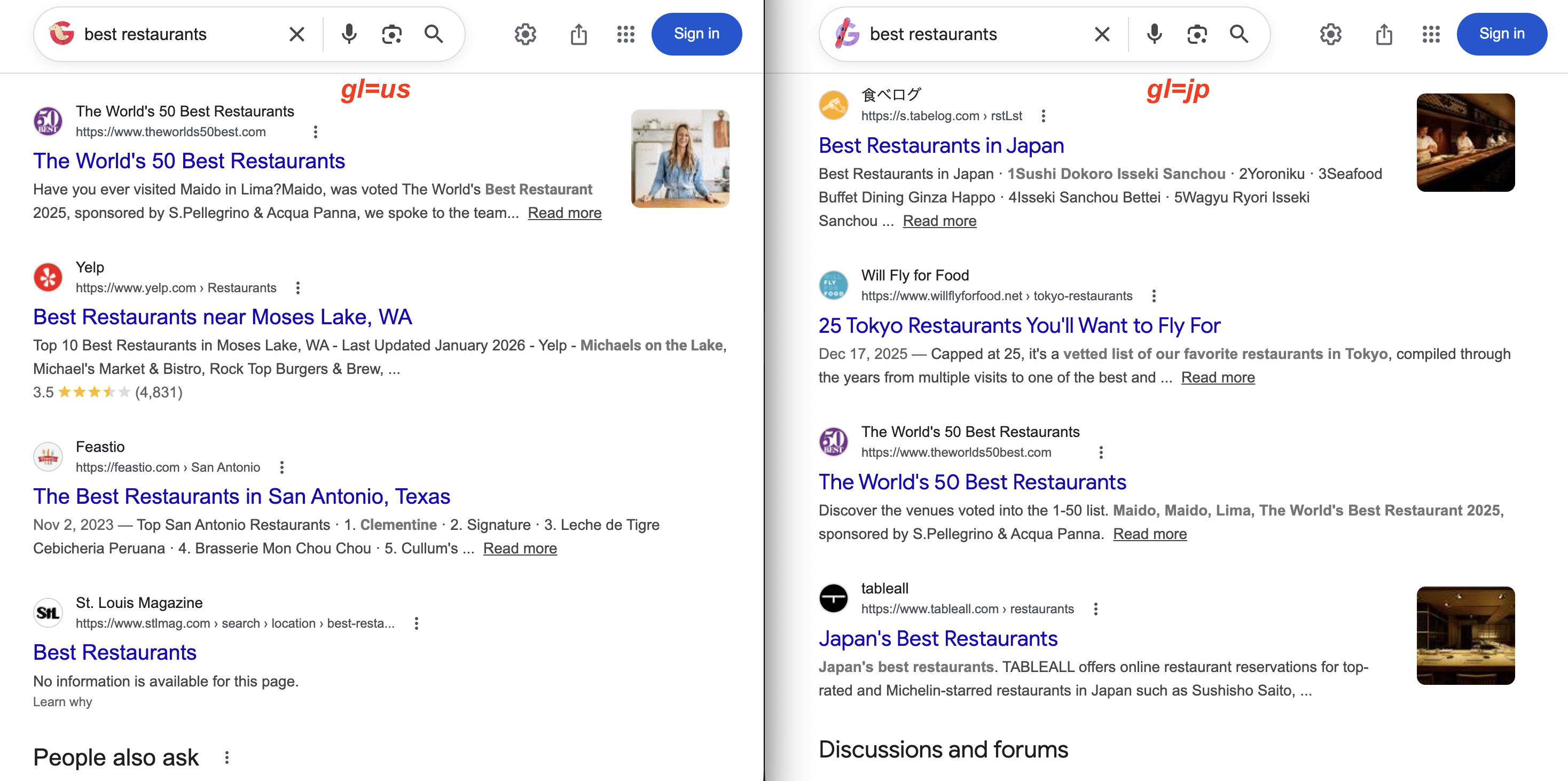
gl=us returns Yelp and US local magazines. With gl=jp, the results show 食べログ (Tabelog) and Tokyo restaurant guides instead. Same query, very different results.
lr – language restrict
Searching for machine learning with hl=en still returns papers in Chinese, Japanese, or German if Google thinks they’re relevant. The lr parameter solves this. It restricts results to pages actually written in specific languages, not just the interface.
https://www.google.com/search?q=machine+learning&lr=lang_en
https://www.google.com/search?q=machine+learning&lr=lang_en|lang_fr
Prefix the language code with lang_ (so English is lang_en, French is lang_fr). Use the pipe | to combine multiple languages.
cr – country restrict
Similar to lr, but filters by hosting country instead of content language. Use cr=countryUS for a single country, cr=countryUS|countryGB for multiple. The key distinction from gl: gl geolocates your search as if you’re in that country, cr filters to pages actually hosted there. Use both together if you need exact filtering.
num – number of results
The num parameter used to control how many search results appeared per page (e.g., num=20, num=50, num=100).
If your scraper started returning only 10 results after September 2025, this parameter change is the reason. As of September 2025, Google silently disabled the num parameter. It’s now completely ignored. Google returns 10 results per page regardless of the num value you pass, with no error or redirect. This broke SEO tools and SERP scraping workflows that relied on it. A Google spokesperson confirmed: “The use of this URL parameter is not something that we formally support”. The 2025–2026 changes section covers the workaround using Bright Data’s Top 100 Results endpoint.
You can verify this. num=100 is in the URL, but only 10 results come back:
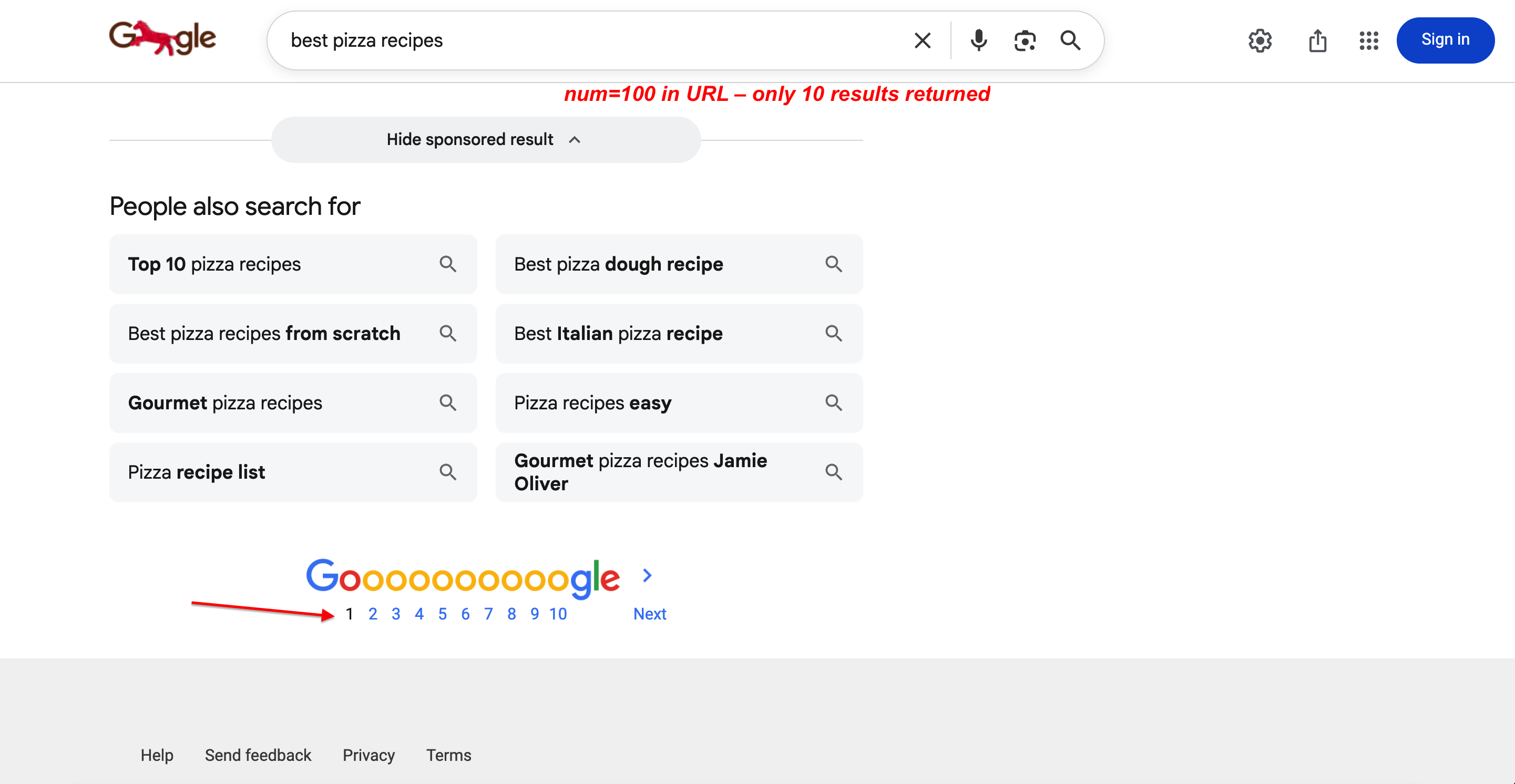
Searching with num=100 in the URL. Google still returns only 10 results per page with full pagination. The parameter is completely ignored.
start – result offset (pagination)
Since Google killed num, start is your only native pagination option. It sets the result offset, controlling which result position to start from.
https://www.google.com/search?q=web+scraping&start=0
https://www.google.com/search?q=web+scraping&start=10
https://www.google.com/search?q=web+scraping&start=20
start=0 is page 1 (the default), start=10 is page 2, start=20 is page 3.
Since Google returns 10 results per page, start=20 gives you results 21–30, start=30 gives you 31–40, and so on. When paginating across multiple pages, Google may return overlapping or slightly reordered results between pages. Deduplicate by URL before processing.
Paginating through the SERP API:
# Fetch page 3 of results
curl --proxy brd.superproxy.io:33335 \
  --proxy-user brd-customer-<CUSTOMER_ID>-zone-<ZONE_NAME>:<PASSWORD> -k \
  "https://www.google.com/search?q=serp+scraping&start=20&brd_json=1"
Search type parameters
Google has two parameters for switching between search verticals (images, news, shopping, video): tbm and udm.
tbm – search content type
The tbm parameter (commonly interpreted as “to be matched”, though Google has never confirmed the acronym) tells Google which type of search results you want. Without it, Google defaults to regular web search.
| Value | Search Type | Example |
|---|---|---|
| (empty) | Web search | q=coffee |
isch |
Image search | tbm=isch&q=coffee |
vid |
Video search | tbm=vid&q=coffee |
nws |
News search | tbm=nws&q=coffee |
shop |
Shopping search | tbm=shop&q=coffee |
bks |
Book search | tbm=bks&q=coffee |
The same query across three search types:
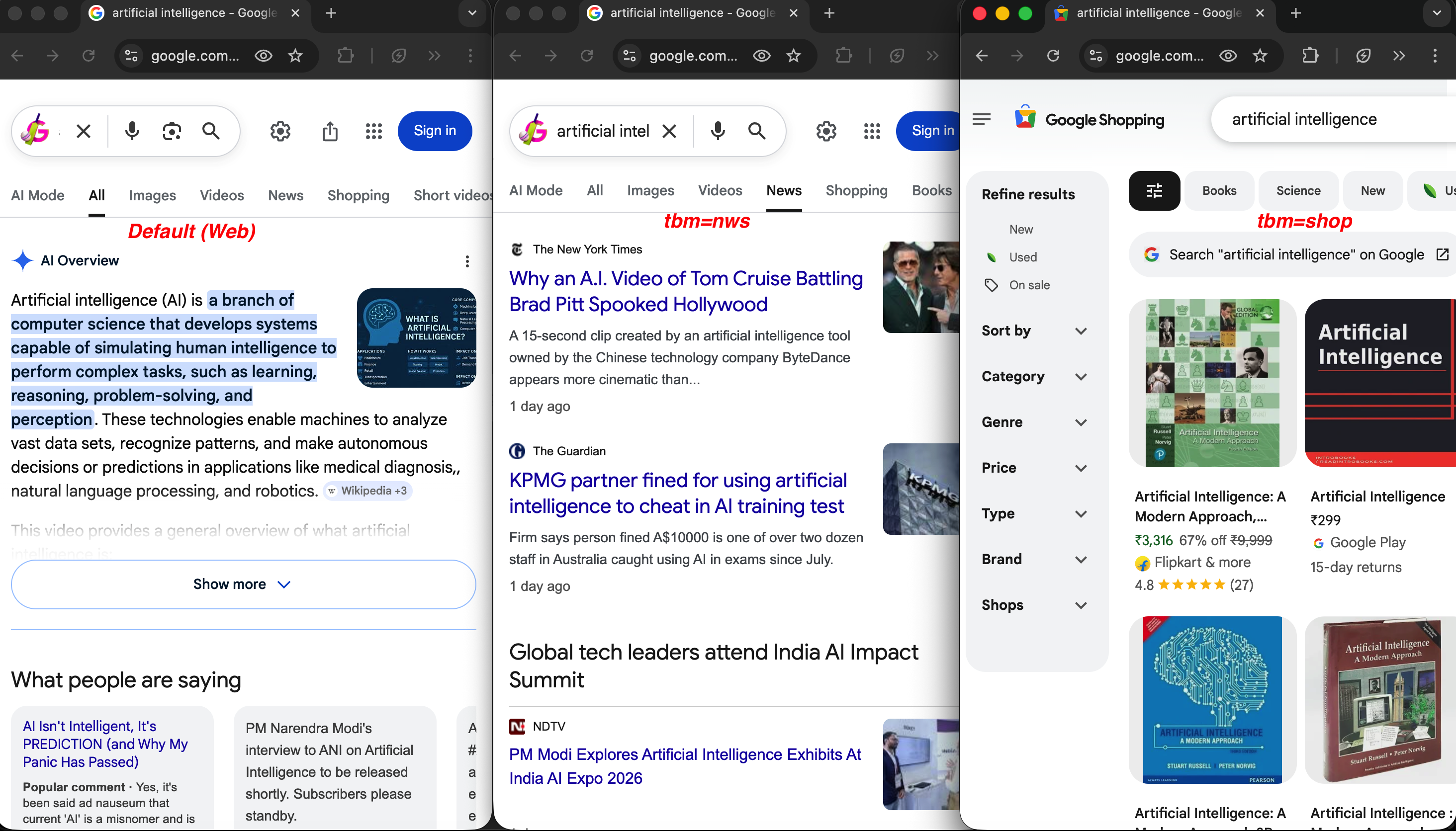
Same query, different tbm values: default web search (left) shows an AI Overview, tbm=nws (center) returns news articles from NYT and The Guardian, and tbm=shop (right) shows product listings with prices and ratings.
A news search for artificial intelligence:
https://www.google.com/search?q=artificial+intelligence&tbm=nws&hl=en&gl=usA shopping search for mechanical keyboards:
https://www.google.com/search?q=mechanical+keyboard&tbm=shop&gl=usAll these search types work natively. When parsing the JSON response, ads are separated into top_ads and bottom_ads fields, and product listings appear under popular_products, all distinct from organic results. For dedicated ad monitoring, see the Google Ads scraper. Travel and hotel parameters (hotel_occupancy, hotel_dates, brd_dates, brd_occupancy, brd_currency, etc.) are Bright Data-specific and documented in the SERP API parameter reference.
udm – user display mode
Google’s newer content mode filter is udm, which extends tbm with additional result types. It controls which “mode” of search results you see. None of the udm values are in Google’s official documentation. They are all reverse-engineered by the developer community through testing. The values below are stable and widely used, but Google could change them without notice.
| Value | Result Mode | Description |
|---|---|---|
udm=2 |
Images | Image search results |
udm=7 |
Videos | Video results; newer equivalent of tbm=vid |
udm=12 |
News | News results; newer equivalent of tbm=nws |
udm=14 |
Web | Classic web results without AI features |
udm=18 |
Forums | Discussion and forum results |
udm=28 |
Shopping | Shopping/product results |
udm=36 |
Books | Book results; newer equivalent of tbm=bks |
udm=39 |
Short videos | Short-form video content |
udm=50 |
AI Mode | Google’s AI-powered conversational search |
The most notable value is udm=14. It forces Google to display traditional web results without AI Overviews or other AI-generated content:
https://www.google.com/search?q=web+scraping+tools&udm=14The difference between default and udm=14 is visible immediately:
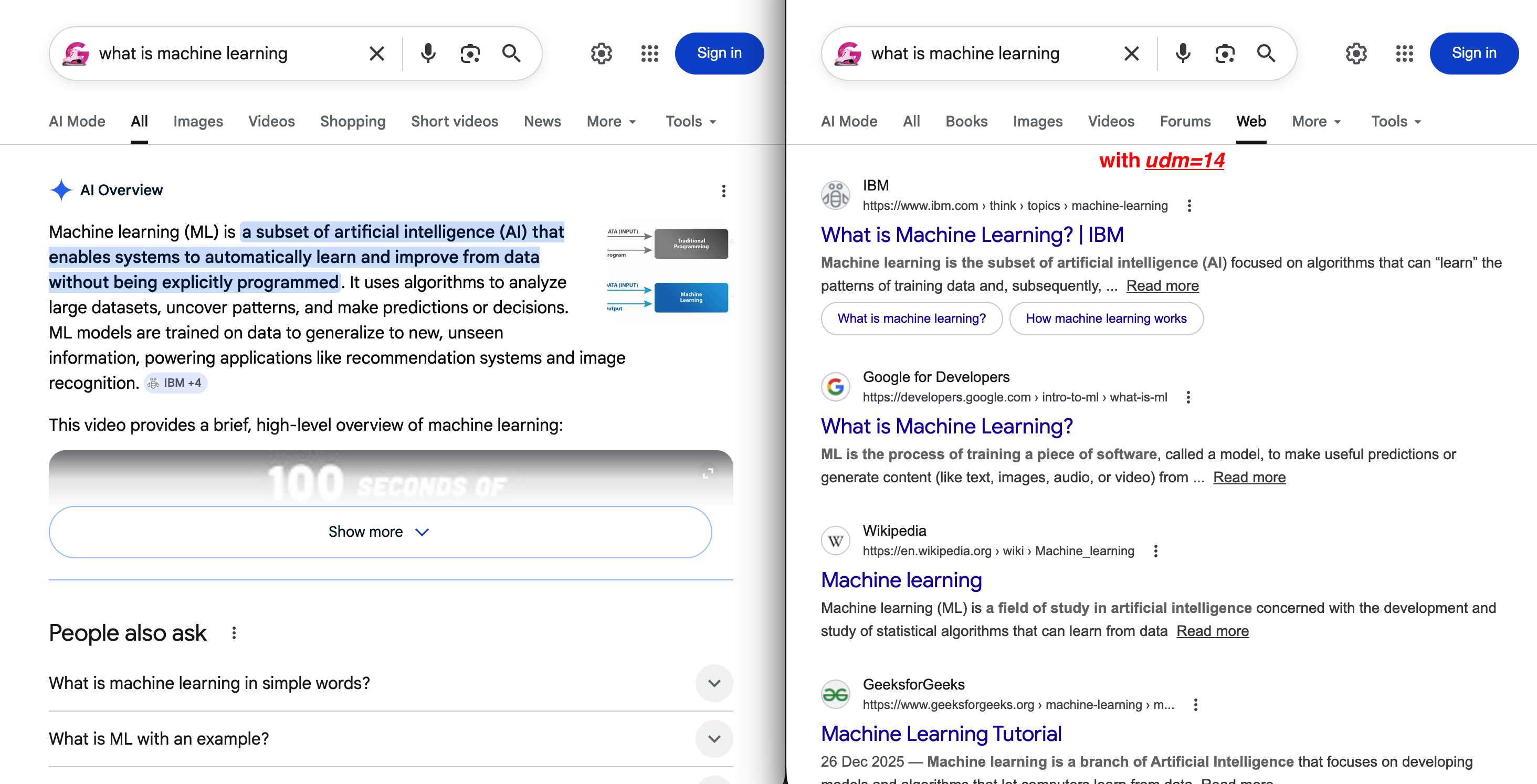
Left: the default SERP with an AI Overview pushing organic results below the fold. Right: udm=14 removes all of that and shows a clean “Web” tab with traditional blue links.
For short video results, use udm=39 (undocumented by Google; behavior may vary by region):
https://www.google.com/search?q=coffee+recipes&udm=39AI Mode (udm=50) is a very different type of search:
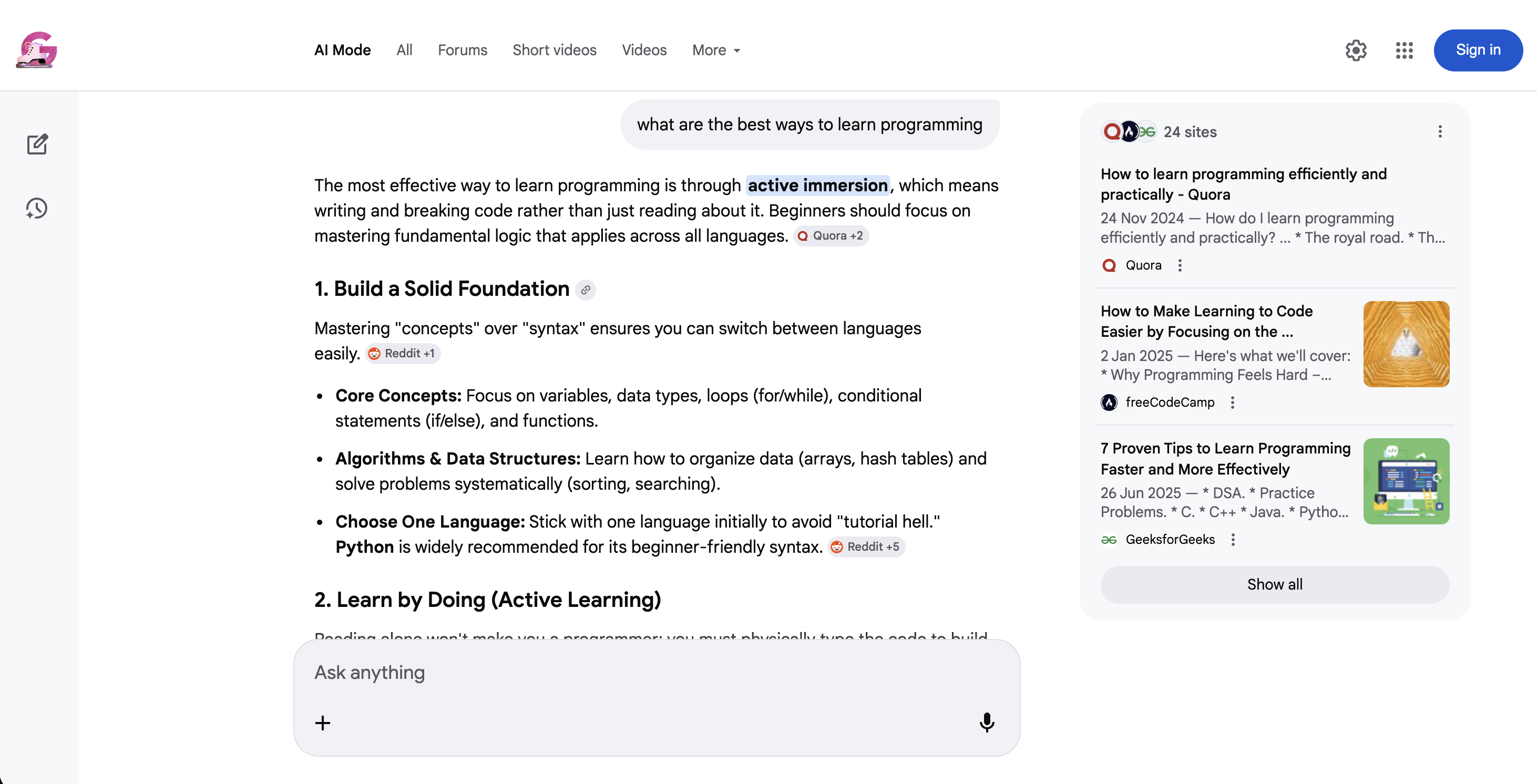
Google AI Mode (udm=50): instead of traditional results, Google returns a conversational AI response with inline source citations and suggested follow-up questions.
tbm and udm overlap for images, news, and shopping, but udm also covers modes that tbm does not (forums, short videos, AI Mode, web-only). Both work today. If you’re building new scraping workflows, support both parameters for maximum compatibility.
Filtering and sorting parameters
tbs – time-based and advanced filters
The tbs parameter (commonly interpreted as “to be searched”, though no official source confirms it) controls time filtering, date sorting, and verbatim matching.
The most common use is time filtering with qdr (query date range):
| Value | Time Range |
|---|---|
tbs=qdr:h |
Past hour |
tbs=qdr:d |
Past 24 hours |
tbs=qdr:w |
Past week |
tbs=qdr:m |
Past month |
tbs=qdr:y |
Past year |
You can also set a custom date range with tbs=cdr:1,cd_min:01/01/2025,cd_max:12/31/2025. Useful for tracking how search results change over a specific period.
Beyond time filtering, tbs has two other useful modes. tbs=sbd:1 forces Google to sort results by date (newest first) instead of relevance, which is useful for monitoring recent mentions. And tbs=li:1 enables verbatim search. Google searches for exactly what you typed without auto-corrections, synonyms, or related terms.
To monitor recent news about a topic:
curl --proxy brd.superproxy.io:33335 \
  --proxy-user brd-customer-<CUSTOMER_ID>-zone-<ZONE_NAME>:<PASSWORD> -k \
  "https://www.google.com/search?q=web+scraping+regulations&tbs=qdr:w&brd_json=1"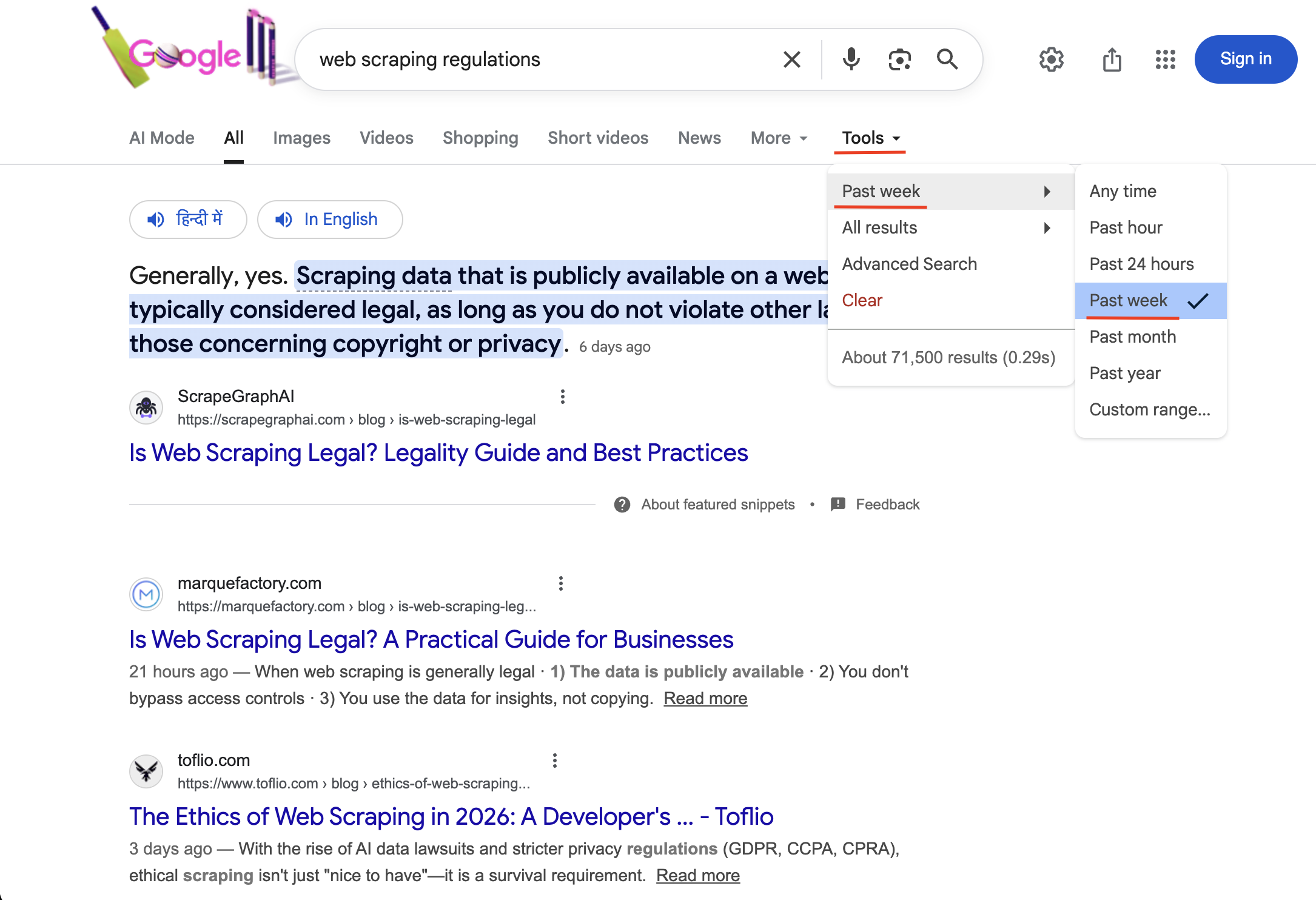
Searching with tbs=qdr:w activates the “Past week” time filter (visible under Tools with a checkmark). Only results published within the last 7 days are returned.
Tip: pair filter=0 with any tbs time filter to get all results. Without it, Google clusters similar pages and you may miss relevant coverage.
safe – SafeSearch filtering
safe=active filters explicit content, safe=off disables filtering.
https://www.google.com/search?q=photography&safe=active
https://www.google.com/search?q=photography&safe=off
filter – duplicate filtering
The filter parameter controls how Google clusters similar or duplicate results.
https://www.google.com/search?q=web+scraping&filter=0
https://www.google.com/search?q=web+scraping&filter=1
filter=0 shows all results including duplicates. filter=1 (the default) clusters similar pages together. Most useful when combined with time filters (see the tbs tip above).
nfpr – no auto-correction
Set nfpr=1 to stop Google from auto-correcting your query.
https://www.google.com/search?q=scraping+brwser&nfpr=1When set to 1, Google will search for exactly what you typed without suggesting “did you mean: scraping browser.” Useful when you’re intentionally searching for misspelled terms, brand names that Google thinks are misspellings, or technical terms that Google might try to correct. Note: nfpr=1 only suppresses auto-correction. tbs=li:1 (verbatim mode) goes further by also disabling synonyms, stemming, and related terms. Use both together for the strictest matching.
pws – personalized web search
Google personalizes search results by default. pws controls whether that personalization is active.
https://www.google.com/search?q=web+scraping+tools&pws=0Turning off personalization (pws=0) matters because personalized results vary by user, making bulk data inconsistent. For any serious SERP data collection, always include pws=0 to get the baseline, non-personalized rankings.
Location parameters
Most rank tracking only needs country-level targeting with gl. However, for local SEO, you need more precise targeting.
uule – encoded location
uule gives you city-level precision when gl isn’t granular enough.
The uule value is an encoded string based on Google Ads API Geo Targets. It uses either a canonical name encoding (from Google’s geotargeting database) or a GPS coordinate encoding (latitude/longitude).
https://www.google.com/search?q=best+restaurants&uule=w+CAIQICIGUGFyaXMGenerating uule values manually is complicated. You need to look up the location’s canonical name in Google’s Geo Targets documentation, then encode it in the specific format Google expects.
With Bright Data’s SERP API, you can skip the encoding entirely and just pass the place name as a readable string:
https://www.google.com/search?q=best+restaurants&uule=New+York,New+York,United+StatesThe API handles the lookup and encoding automatically.
Use gl for country-level targeting and uule when you need city-level precision. For most rank tracking, gl is enough. Reserve uule for local SEO audits where results differ between cities in the same country.
Device and client parameters
Google returns different results for mobile vs. desktop. These parameters control device emulation and browser identification.
sclient – search client
You’ll see sclient in almost every Google search URL. It identifies the search client that initiated the search. Common values: gws-wiz (web search), gws-wiz-serp (SERP-initiated), img (image search), psy-ab (associated with Google’s instant/predictive search). It’s used for Google’s internal analytics and doesn’t affect your results.
brd_mobile / brd_browser – device and browser emulation
The SERP API offers brd_mobile to simulate searches from specific devices:
| Value | Device | User-Agent Type |
|---|---|---|
0 or omit |
Desktop | Desktop |
1 |
Mobile | Mobile |
ios or iphone |
iPhone | iOS |
ipad or ios_tablet |
iPad | iOS Tablet |
android |
Android | Android |
android_tablet |
Android Tablet | Android Tablet |
curl --proxy brd.superproxy.io:33335 \
  --proxy-user brd-customer-<CUSTOMER_ID>-zone-<ZONE_NAME>:<PASSWORD> -k \
  "https://www.google.com/search?q=best+apps&brd_mobile=ios&brd_json=1"
If you encounter
expect_bodyerrors when usingbrd_mobilewith the proxy method, try the Direct API method instead. It tends to be more reliable for device emulation. The LangChain integration also works well here since it passesdevice_typethrough the Direct API automatically.
You can also control the browser type with brd_browser:
brd_browser=chrome(Google Chrome)brd_browser=safari(Safari)brd_browser=firefox(Mozilla Firefox, not compatible withbrd_mobile=1)
If not specified, the API picks a random browser. Combine both parameters to set the exact device + browser combination:
curl --proxy brd.superproxy.io:33335 \
  --proxy-user brd-customer-<CUSTOMER_ID>-zone-<ZONE_NAME>:<PASSWORD> -k \
  "https://www.google.com/search?q=best+smartphones&brd_browser=safari&brd_mobile=ios&brd_json=1"
Advanced and internal parameters
You don’t need to set any of these. They are Google’s internal parameters. However, if you want to know what ei, ved, and sxsrf mean when you see them in a Google URL, this section explains them.
kgmid – Knowledge Graph machine ID
The kgmid parameter serves results from Google’s Knowledge Graph and can override the q parameter entirely.
https://www.google.com/search?kgmid=/m/07gyp7This loads the Knowledge Graph panel for McDonald’s directly. Each entity has a unique machine ID, and passing it via kgmid fetches that entity’s panel.
The panel Google returns for that ID:
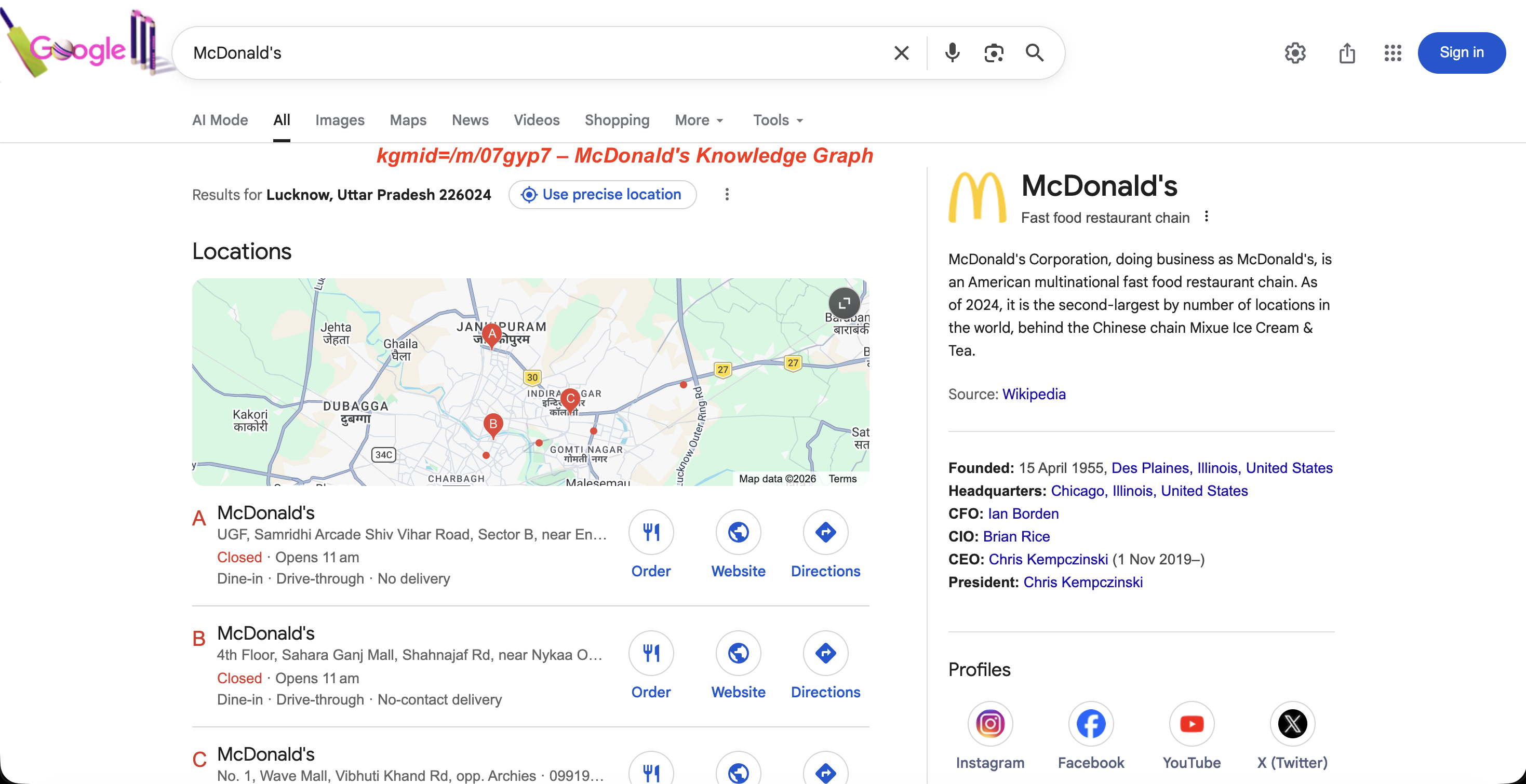
The Knowledge Graph panel for kgmid=/m/07gyp7: entity description, founding date, leadership, and social profiles.
Brand monitoring teams use this to track how Google’s Knowledge Graph panel changes over time for their company or competitors.
ibp – rendering control
Google doesn’t use ibp for regular search results. It controls how certain elements render on the SERP, particularly Google Business listings and Google Jobs.
https://www.google.com/search?ibp=gwp%3B0,7&ludocid=1663467585083384531When used with the ludocid parameter (which is the unique ID for a Google Business listing), ibp can trigger full-page views of the business listing.
For jobs searches, ibp=htl;jobs (URL-encoded as ibp=htl%3Bjobs) triggers the Google Jobs panel with full job listings:
curl --proxy brd.superproxy.io:33335 \
  --proxy-user brd-customer-<CUSTOMER_ID>-zone-<ZONE_NAME>:<PASSWORD> -k \
  "https://www.google.com/search?q=technical+copywriter&ibp=htl%3Bjobs&brd_json=1"
The Jobs panel that ibp=htl%3Bjobs triggers:
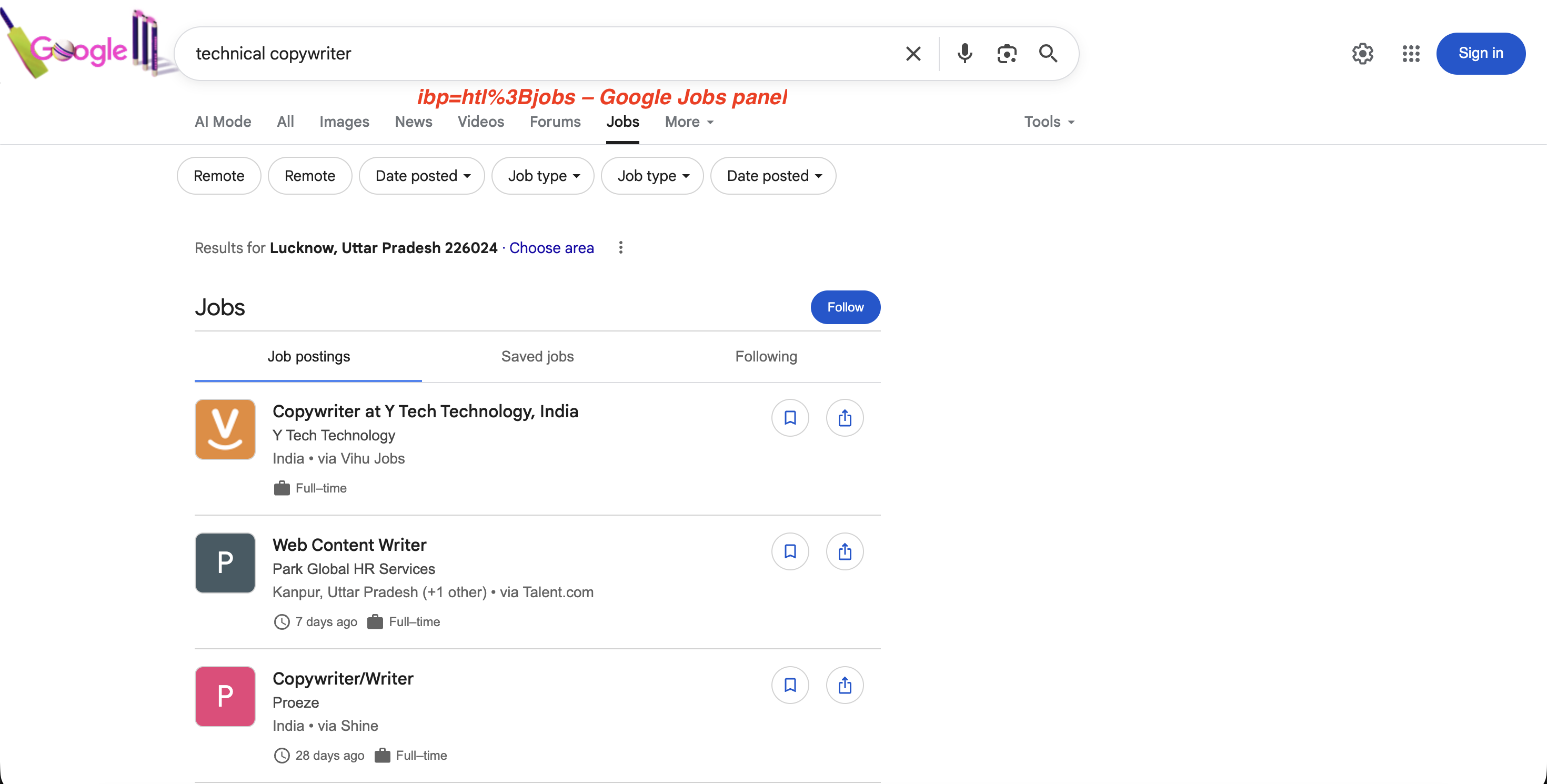
The ibp=htl%3Bjobs parameter triggers Google’s dedicated Jobs panel with job postings, filters, and a “Follow” option, all extractable via the SERP API.
The semicolon in
htl;jobsmust be URL-encoded as%3B(i.e.,ibp=htl%3Bjobs) when used in curl or any HTTP client. Without proper encoding, the request may return empty results.
ei, ved, sxsrf, oq, gs_lp – internal tracking parameters
None of these affect which results are returned. They’re safe to strip from your URLs. Here’s what each one does:
| Parameter | Purpose |
|---|---|
ei |
Session identifier containing a Unix timestamp and opaque values |
ved |
Click tracking: encodes which SERP element was clicked, its index and type |
sxsrf |
CSRF token with an encoded Unix timestamp |
oq |
Original query as typed before autocomplete modified it (e.g., oq=web+scrap when q=web+scraping+api) |
gs_lp |
Internal session data related to search client state |
ie / oe |
Input/output character encoding (almost always UTF-8; safe to ignore) |
client |
Search client type (e.g., firefox-b-d, safari); identifies the browser or app |
source |
Search source identifier (e.g., hp for homepage, lnms for mode switch) |
biw / bih |
Browser inner width/height in pixels; may influence which SERP layout variant Google serves |
Google search operators
Search operators are special commands inside the q parameter that filter results by domain, file type, title, URL, or exact phrase. Google documents some in their search refinement help page.
They’re distinct from URL parameters: operators go inside the q value, while parameters are separate key-value pairs in the URL. Here are the most useful ones for scraping and data collection:
| Operator | Function | Example |
|---|---|---|
site: |
Restrict to a specific domain | site:github.com python scraper |
filetype: |
Restrict to file type | filetype:pdf web scraping guide |
intitle: |
Search within page titles | intitle:serp api comparison |
inurl: |
Search within URLs | inurl:api documentation |
intext: |
Search within page body | intext:proxy rotation |
allintitle: |
All words in title | allintitle:web scraping python |
allinurl: |
All words in URL | allinurl:api docs scraping |
related: |
Find similar sites | related:brightdata.com |
OR |
Match either term | web scraping OR web crawling |
"exact phrase" |
Exact match | "serp api for python" |
- |
Exclude term | web scraping -selenium |
before: / after: |
Date range | AI overview after:2025-01-01 |
AROUND(n) |
Proximity search | scraping AROUND(3) python |
define: |
Dictionary definition | define:web scraping |
* |
Wildcard | "best * for web scraping" |
All of these work in API requests too. For example:
curl --proxy brd.superproxy.io:33335 \
  --proxy-user brd-customer-<CUSTOMER_ID>-zone-<ZONE_NAME>:<PASSWORD> -k \
  "https://www.google.com/search?q=site:reddit.com+web+scraping+tools+2026&brd_json=1"
Searches Reddit specifically for discussions about web scraping tools in 2026, with structured JSON output.
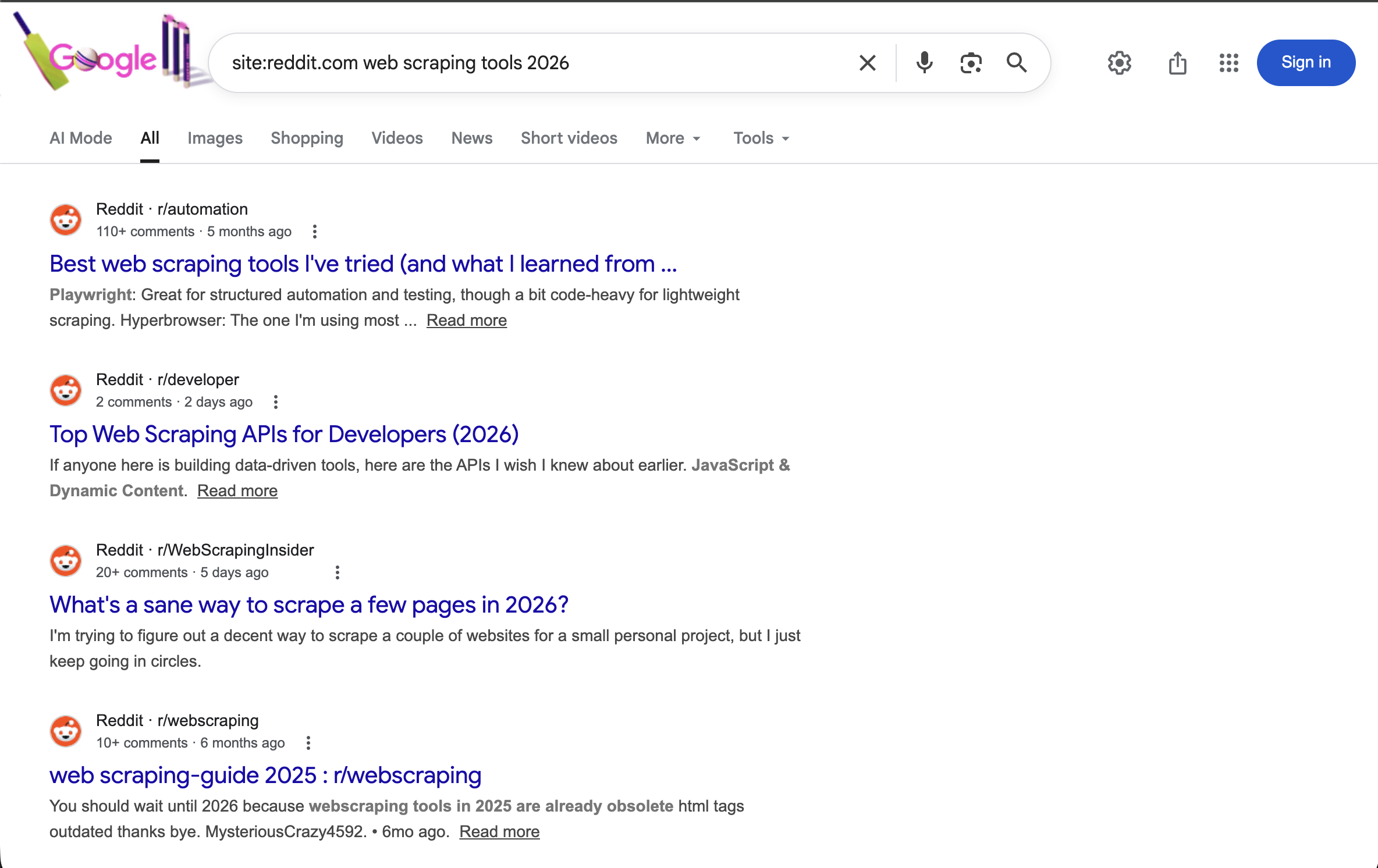
The site:reddit.com operator restricts all results to Reddit. Combined with a year term, it shows recent community discussions about web scraping tools.
Operators can be combined:
site:github.com filetype:pdf machine learningreturns only PDF files hosted on GitHub that match “machine learning.”
as_* – advanced search parameters
Google’s Advanced Search form generates as_ prefixed parameters (as_q, as_epq, as_sitesearch, as_filetype, etc.) that map to the operators above. Most engineers use the operators directly in q instead. These are mainly useful if you’re building a search form UI and want to map form fields to URL parameters without concatenating operator strings.
2025-2026 changes you need to know about
Google made three changes in 2025–2026 that broke existing scraping setups: mandatory JavaScript rendering (January 2025), num parameter removal (September 2025), and AI Overviews expanding to 200+ countries.
Google now requires JavaScript rendering
As of January 2025, Google won’t serve search results without JavaScript rendering. If you’ve been running a requests + BeautifulSoup scraper, this change is the reason. Every requests.get('https://google.com/search?q=...') now returns an empty or degraded response. You need full browser rendering, or a SERP API that handles it for you.
JavaScript rendering is automatic with the SERP API, so your API calls stay the same.
The num parameter no longer works
Between September 12–14, 2025, Google silently disabled num. The impact was wide: 87.7% of tracked sites saw impression drops in Google Search Console, according to a study covering 319 properties.
For fetching more than 10 results, Bright Data’s SERP API has a Top 100 Results endpoint that returns positions 1–100 in one request. It uses a different API surface (/datasets/v3/trigger with dataset ID gd_mfz5x93lmsjjjylob) and gives you start_page and end_page parameters to control pagination depth:
curl -X POST "https://api.brightdata.com/datasets/v3/trigger?dataset_id=gd_mfz5x93lmsjjjylob&include_errors=true" \
  -H "Authorization: Bearer <API_TOKEN>" \
  -H "Content-Type: application/json" \
  -d '[{
    "url": "https://www.google.com/",
    "keyword": "web scraping tools",
    "language": "en",
    "country": "US",
    "start_page": 1,
    "end_page": 10
  }]'
Page ranges: 1..2 = top 20, 1..5 = top 50, 1..10 = top 100 (10 results per page). The response includes AI Overview text (in the aio_text field) when Google shows one, and you can add "include_paginated_html": true to capture raw HTML alongside the parsed data. Batching is also supported. Pass an array of query objects to search multiple keywords in a single request.
AI Overviews in search results
Google’s AI Overviews (the AI-generated summaries at the top of search results) are now available in 200+ countries and 40+ languages. In January 2026, Google upgraded AI Overviews to Gemini 3. Google also added transitions from AI Overviews into AI Mode (udm=50) conversations. Capturing this content requires JavaScript rendering and specific extraction logic. An AI Overview on a live SERP:
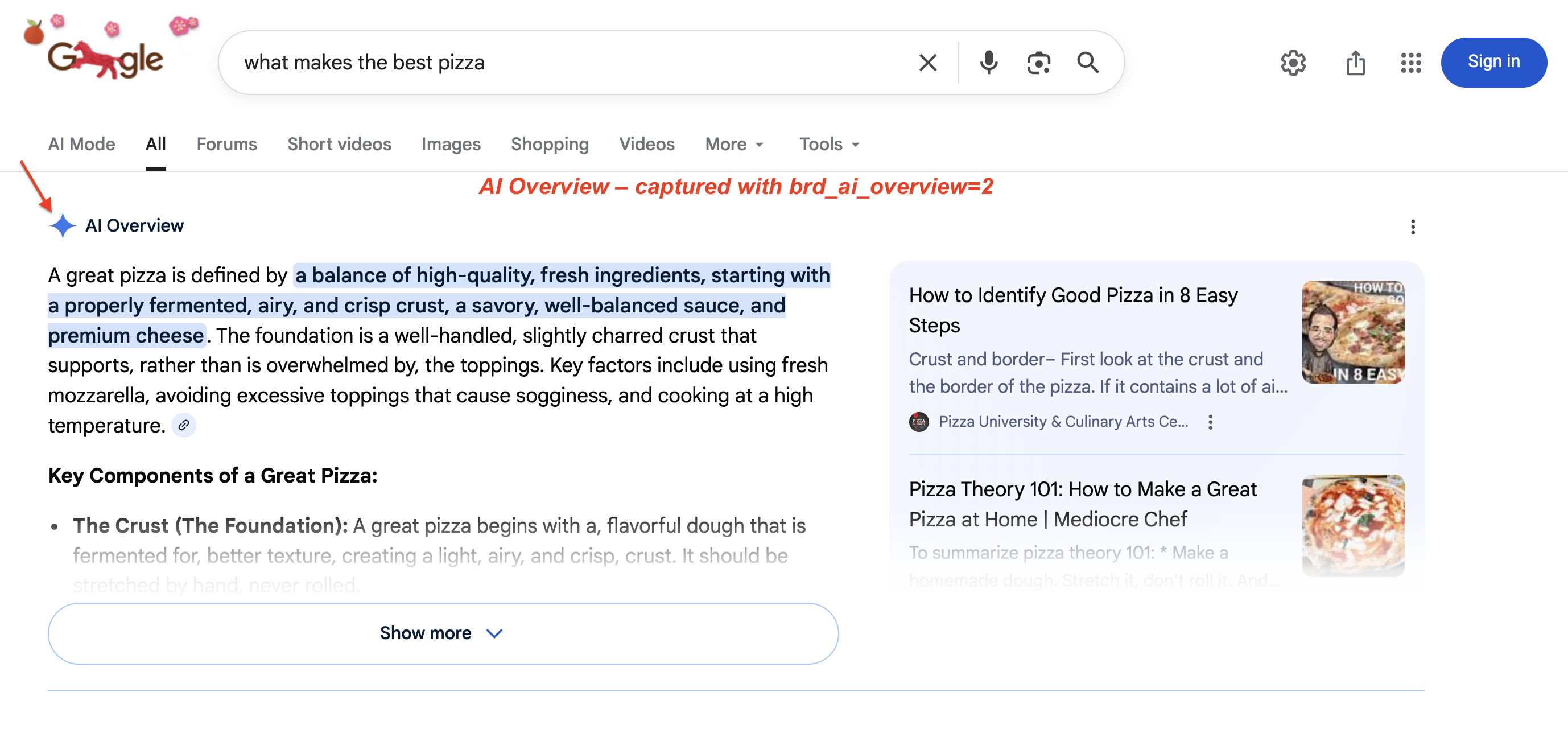
A typical AI Overview: Google generates a multi-paragraph summary with highlighted key phrases and source cards on the right. This block pushes organic results below the fold. Use brd_ai_overview=2 to capture it via the SERP API.
The AI Overview scraper works through the brd_ai_overview parameter. Set brd_ai_overview=2 to increase the likelihood of receiving AI-generated overviews in your results:
curl --proxy brd.superproxy.io:33335 \
  --proxy-user brd-customer-<CUSTOMER_ID>-zone-<ZONE_NAME>:<PASSWORD> -k \
  "https://www.google.com/search?q=what+makes+the+best+pizza&brd_ai_overview=2&brd_json=1"
In our testing (US queries), enabling AI Overview capture added 5–10 seconds to the response time. The extra latency comes from waiting for Google’s dynamically loaded AI content to finish rendering in a headless browser.
How to use Google search parameters with a SERP API
If you’re scraping at any real volume, you’ll hit CAPTCHAs, IP blocks, mandatory JavaScript rendering, and Google infrastructure changes that silently break parsers. We tested every method below against the live API to confirm they work as documented.
Four ways to use these parameters with Bright Data’s SERP API, from simplest to most advanced. If you’re just exploring, start with Method 1 (Direct API). If you’re integrating into an existing codebase with custom headers, go with Method 2 (Proxy). For AI agent workflows, skip to Method 4 (LangChain). The getting started guide walks through setup.
| Method | Best For | Response | Complexity |
|---|---|---|---|
| Direct API | Getting started, single queries | Synchronous | Low |
| Proxy Routing | Existing HTTP workflows, custom request headers | Synchronous | Low |
| Async Batch | High-volume (1,000+ queries), pagination sweeps | Queued | Medium |
| LangChain | AI agents, RAG pipelines, multi-tool workflows | Synchronous | Low |
Method 1: direct API request
The simplest method. Make a POST request with your search URL and get structured data back:
import requests
import json
from urllib.parse import urlencode

# Build the Google search URL with proper encoding (handles non-latin characters, special chars)
params = urlencode({"q": "web scraping api", "gl": "us", "hl": "en", "brd_json": "1"})
search_url = f"https://www.google.com/search?{params}"

url = "https://api.brightdata.com/request"
headers = {
    "Content-Type": "application/json",
    "Authorization": "Bearer <API_TOKEN>"
}
payload = {
    "zone": "<ZONE_NAME>",
    "url": search_url,
    "format": "raw"
}

response = requests.post(url, headers=headers, json=payload, timeout=30)
response.raise_for_status()
data = response.json()

# Validate response before processing
if "organic" not in data or len(data.get("organic", [])) == 0:
    print("Warning: no organic results returned (possible soft block or empty SERP)")

print(json.dumps(data, indent=2))
The default zone name is typically "serp". The parsed response comes back like this:
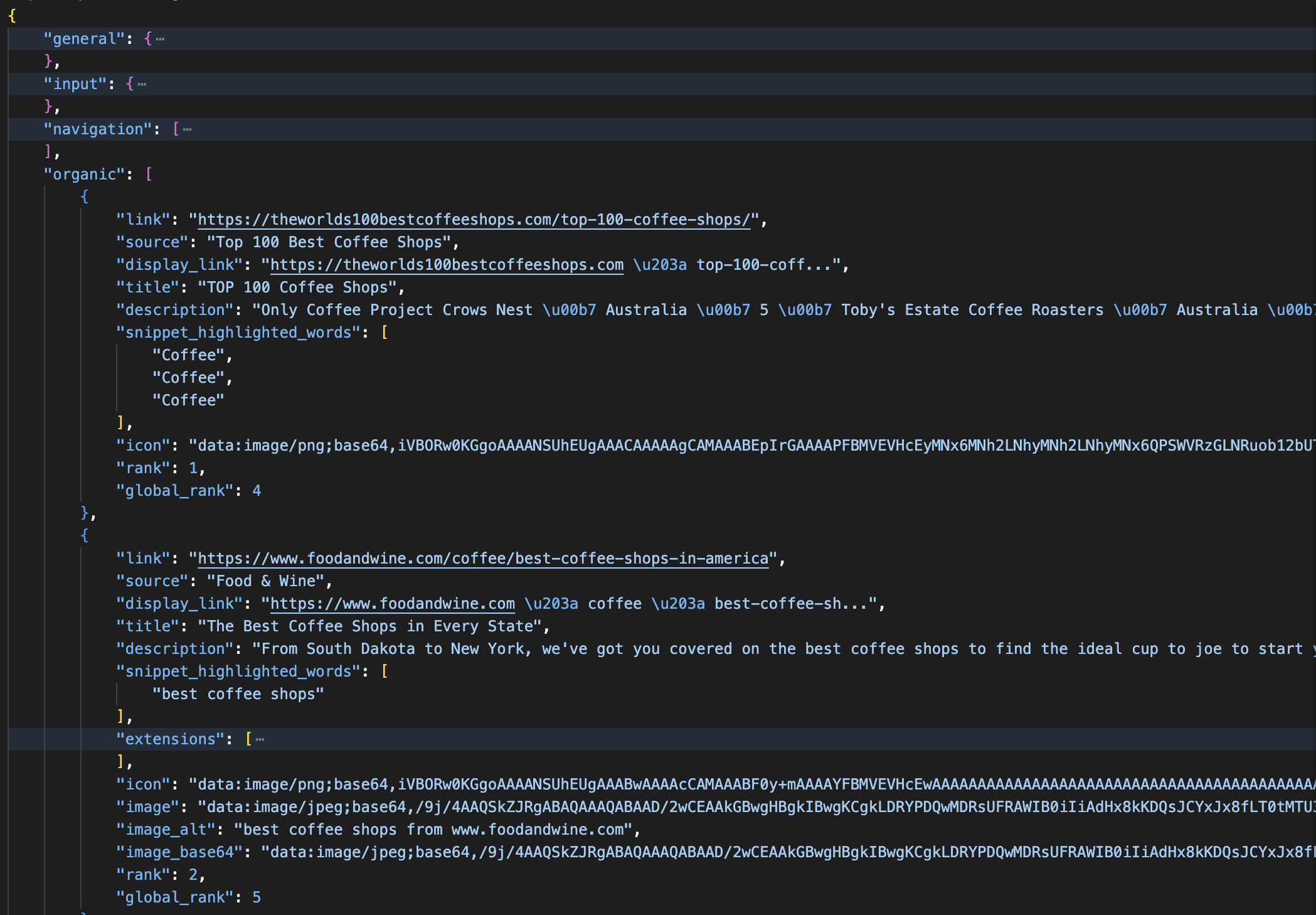
A parsed JSON response from the SERP API: each organic result includes title, link, description, rank, and global_rank fields. The response also separates ads, knowledge panels, and AI Overviews into named sections.
The Direct API also accepts a "data_format" body field (separate from "format"): "markdown" for LLM/RAG (Retrieval-Augmented Generation) pipelines, "screenshot" for a PNG capture, or "parsed_light" for just the top 10 organic results. Use brd_json=html in the URL if you want raw HTML preserved inside the JSON.
countryin the body is not the same asglin the URL."country": "us"controls the proxy exit node (the IP location of the request).gl=ustells Google which country’s results to show. For accurate geo-targeted results, set both.
Method 2: proxy routing
Route your requests through Bright Data’s proxy infrastructure. The proxy handles JavaScript rendering on its side, so even though your code makes a standard HTTP request, it gets fully rendered results back. This works with any HTTP client and lets you set custom headers, cookies, and request-level options that the Direct API doesn’t expose. With the proxy approach, you control the output format via URL parameters: append brd_json=1 to get parsed JSON back instead of raw HTML:
import requests

# Use a Session for connection pooling (reuses TCP connections across requests)
session = requests.Session()
session.proxies = {
    "http": "http://brd-customer-<CUSTOMER_ID>-zone-<ZONE_NAME>:<PASSWORD>@brd.superproxy.io:33335",
    "https": "http://brd-customer-<CUSTOMER_ID>-zone-<ZONE_NAME>:<PASSWORD>@brd.superproxy.io:33335"
}
session.verify = False  # for testing; load Bright Data's TLS/SSL cert in production

url = "https://www.google.com/search?q=serp+api+comparison&gl=us&hl=en&tbs=qdr:m&brd_json=1"

response = session.get(url, timeout=30)
response.raise_for_status()
print(response.json())
Credentials are in the SERP API zone’s “Access Details” tab in your dashboard. Always validate the response before processing. A soft block from Google can return valid JSON with empty or reduced result sets. If general.results_cnt shows millions of estimated results but the organic array is empty or has only 1–2 entries, that usually indicates a soft block rather than a genuine empty SERP.
The
verify=Falseflag (or-kin curl) skips TLS/SSL verification, which is fine for testing. For production, load Bright Data’s SSL certificate instead.
Method 3 async batch processing
For high-volume operations (1,000+ queries), use asynchronous mode. Async makes sense when you’re paginating through hundreds of keyword + location combinations using start, gl, and hl parameters (for example, tracking 500 keywords across 10 countries). You’re only charged when sending the request; collecting the response is free. Callback times vary depending on volume and peak load.
First, enable the Asynchronous requests toggle in your zone’s Advanced settings. Then use the /unblocker/req endpoint:
import requests
import json
import time

url = "https://api.brightdata.com/unblocker/req"
params = {"customer": "<CUSTOMER_ID>", "zone": "<ZONE_NAME>"}
headers = {
    "Content-Type": "application/json",
    "Authorization": "Bearer <API_TOKEN>"
}
payload = {
    "url": "https://www.google.com/search?q=web+scraping+tools&gl=us&hl=en&brd_json=1",
    "country": "us"
}

response = requests.post(url, params=params, headers=headers, json=payload, timeout=30)
response.raise_for_status()
response_id = response.headers.get("x-response-id")
print(f"Queued. Response ID: {response_id}")

# Poll for results (for production, configure a webhook URL in your zone settings instead)
# Total polling window: 30 attempts × 10s = 300s. Increase range() for large batches.
for attempt in range(30):
    time.sleep(10)  # wait before checking - results are never ready immediately
    result = requests.get(
        "https://api.brightdata.com/unblocker/get_result",
        params={"customer": "<CUSTOMER_ID>", "zone": "<ZONE_NAME>", "response_id": response_id},
        headers={"Authorization": "Bearer <API_TOKEN>"},
        timeout=30
    )
    if result.status_code == 200:
        data = result.json()
        if "organic" in data and len(data["organic"]) > 0:
            print(json.dumps(data, indent=2))
        else:
            print("Warning: response returned but contains no organic results")
        break
    elif result.status_code == 202:
        continue  # results not ready yet
else:
    print(f"Timed out after 300s waiting for response_id={response_id}")
Instead of polling, you can configure a webhook URL (either as a default in your zone settings or per-request using the webhook_url parameter). Bright Data sends a notification to your endpoint when results are ready (with the response_id and status), so you don’t need to poll the /get_result endpoint manually. Responses are stored for up to 48 hours.
Even with a managed API, respect your zone’s rate limits. The default configuration handles high throughput, but bursting thousands of concurrent sync requests without pacing can trigger HTTP 429 responses. Async mode avoids this since the API queues and paces requests internally.
Method 4: LangChain integration for AI workflows
If you’re building AI agents that need live search data, there’s an official LangChain integration (langchain-brightdata) so you can use live search as a tool in agent workflows:
pip install langchain-brightdatafrom langchain_brightdata import BrightDataSERP
serp_tool = BrightDataSERP(
bright_data_api_key="<API_TOKEN>",
zone="<ZONE_NAME>", # must match the zone name in your Bright Data dashboard
search_engine="google",
country="us",
language="en",
results_count=10,
parse_results=True
)
# Override constructor defaults for this specific request:
results = serp_tool.invoke({
"query": "best web scraping tools 2026",
"country": "de",
"language": "de",
"search_type": "shop",
"device_type": "mobile",
})A few things to watch in this integration:
results_countmaps to Google’snuminternally. Sincenumno longer works (see the num section), values above 10 have no effect.countryandlanguagemap toglandhl(which country’s results and what language). Unlike the Direct API, where"country"controls the proxy exit node, LangChain handles proxy routing automatically.zonedefaults to"serp". If your zone name is different (e.g.,"serp_api1"), set it explicitly or you’ll get a “zone not found” error.
Beyond LangChain, see integration guides for CrewAI, AWS Bedrock, and Google Vertex AI. For non-search data collection, see Bright Data’s AI web access tools.
For the full parameter list: SERP API Documentation
Why use a managed SERP API?
The SERP API handles JavaScript rendering, proxy rotation, CAPTCHA solving, and geo-targeting:
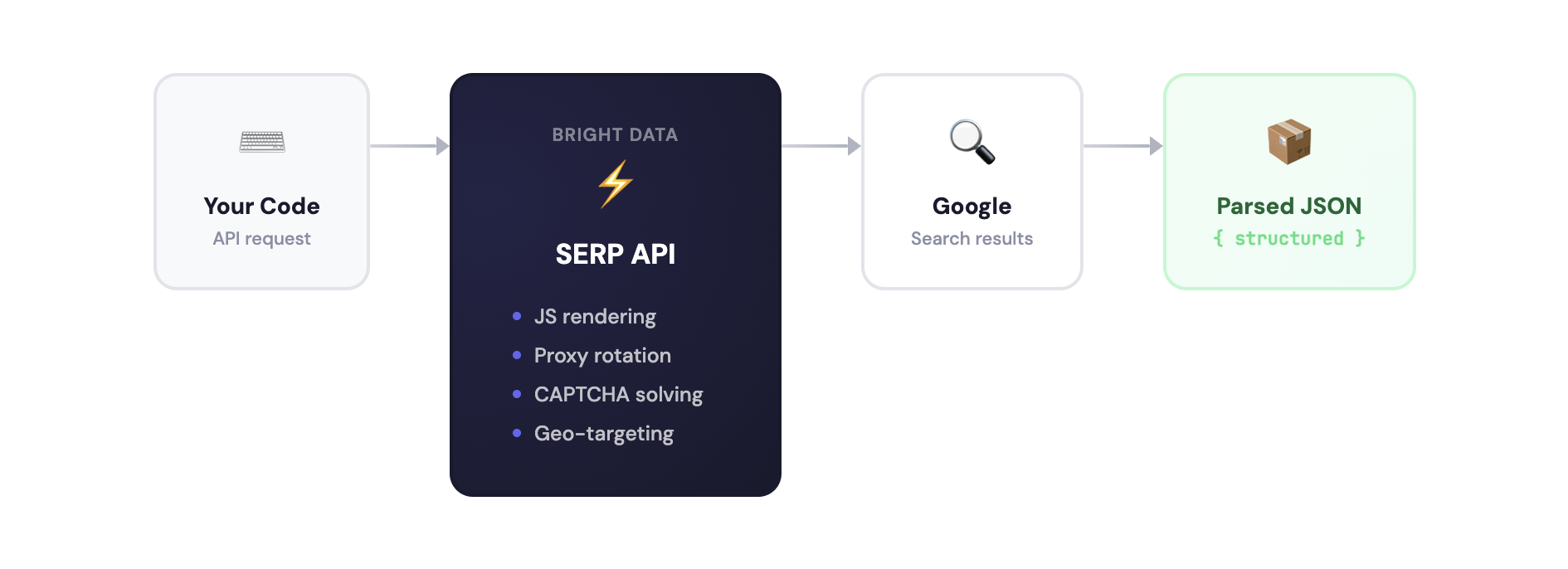
You could build this yourself with Playwright, Selenium, or Bright Data’s own Browser API. But maintaining a Google scraper means handling CAPTCHAs, IP blocks, residential proxies, JavaScript rendering, and HTML parsing that breaks whenever Google updates its markup. See managed vs. API-based scraping for a comparison of both approaches.
With the SERP API, you send a search URL and get structured JSON back. It works across Google, Bing, DuckDuckGo, Yandex, and others. See the pricing page for current rates.
The SERP API Playground lets you run basic searches without code, and the Postman workspace has pre-built requests. Here’s the Playground:
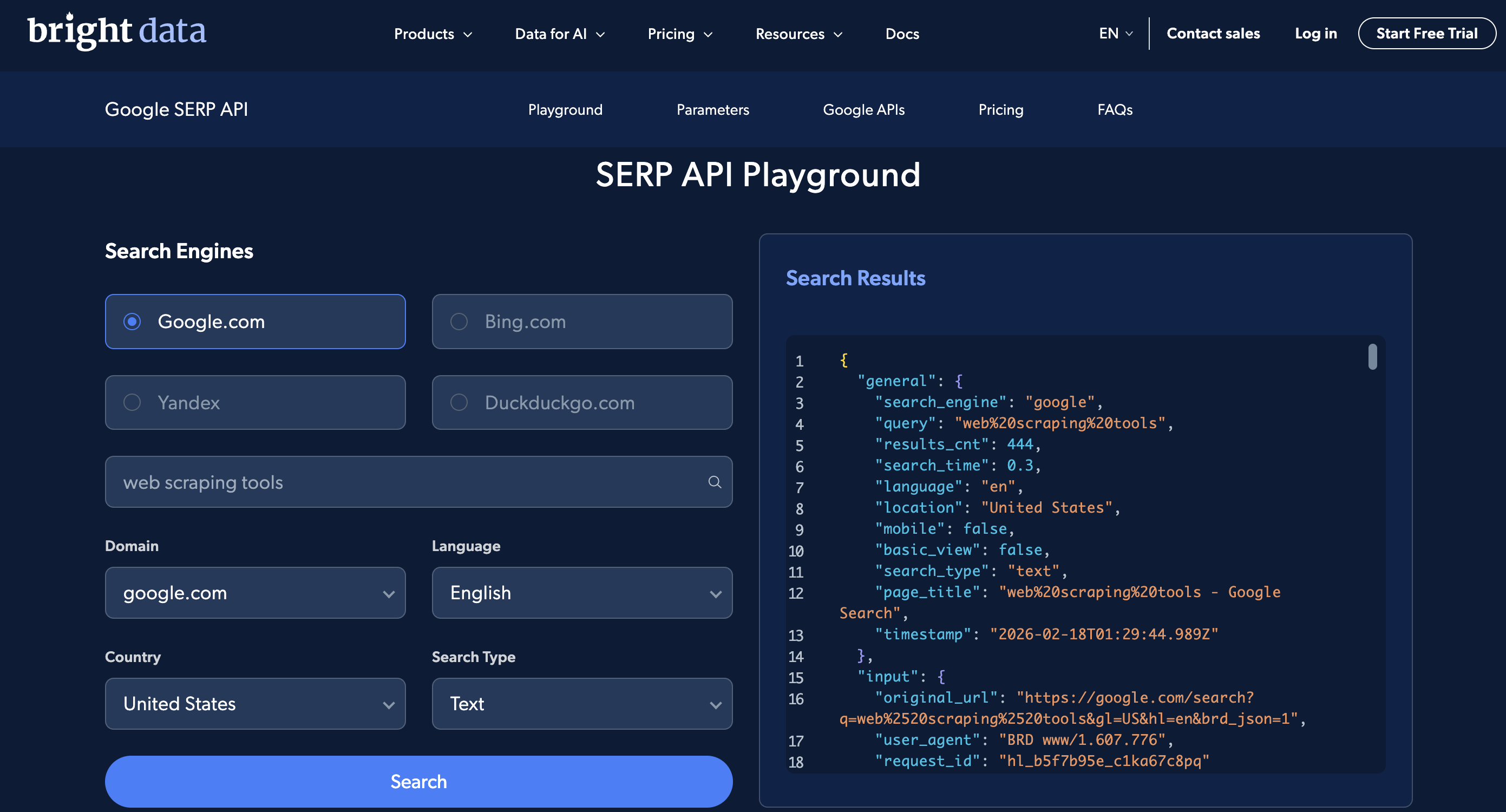
The Playground UI: pick a search engine, country, and language, enter a query, and see the parsed JSON response on the right.
Create an account to run the examples above (new accounts get free credit for testing).
Real-world use cases
These parameter combinations come up repeatedly in production scraping workflows.
SEO rank tracking
Track keyword rankings across locations by combining q, gl, hl, pws=0, udm=14, and start:
# Check "web scraping tools" ranking in US, UK, and Germany
curl --proxy brd.superproxy.io:33335 \
  --proxy-user brd-customer-<CUSTOMER_ID>-zone-<ZONE_NAME>:<PASSWORD> -k \
  "https://www.google.com/search?q=web+scraping+tools&gl=us&hl=en&pws=0&udm=14&brd_json=1"
# Then repeat with gl=gb and gl=de
# Use start=10, start=20 to check positions beyond page 1
See how to build an SEO rank tracker with v0 and SERP API for a full walkthrough.
Competitor ad monitoring
Your competitors’ ad placements change daily. Combine brand terms with tbs=qdr:d to find recent changes:
https://www.google.com/search?q=competitor+brand+name&gl=us&hl=en&tbs=qdr:d&brd_json=1The JSON response separates top_ads, bottom_ads, and popular_products (Product Listing Ads) from organic results.
Price comparison and eCommerce intelligence
For price comparison across markets, change the gl value while keeping tbm=shop:
https://www.google.com/search?q=sony+wh-1000xm5&tbm=shop&gl=us&brd_json=1
https://www.google.com/search?q=sony+wh-1000xm5&tbm=shop&gl=gb&brd_json=1
https://www.google.com/search?q=sony+wh-1000xm5&tbm=shop&gl=de&brd_json=1
News monitoring and sentiment analysis
https://www.google.com/search?q=openai&tbm=nws&tbs=qdr:h&filter=0&brd_json=1. Use tbm=nws for news, tbs=qdr:h for past hour, filter=0 to prevent Google from clustering similar articles. Run this on a cron job for hourly coverage monitoring.
AI-powered search and RAG applications
Ground LLM applications in live search data using the SERP API as a retrieval layer. The LangChain integration (Method 4 above), MCP server, and direct API calls all work. See how to build a RAG chatbot with SERP API for a working example.
Local SEO and multi-location monitoring
Local rankings can differ significantly between cities. Use uule with gl and pws=0 to compare:
# Check rankings for "plumber near me" in 3 cities
curl --proxy brd.superproxy.io:33335 \
  --proxy-user brd-customer-<CUSTOMER_ID>-zone-<ZONE_NAME>:<PASSWORD> -k \
  "https://www.google.com/search?q=plumber+near+me&uule=Chicago,Illinois,United+States&gl=us&pws=0&brd_json=1"
# Repeat with uule=Miami,Florida,United+States and uule=Seattle,Washington,United+States
Compare the snack_pack (local 3-pack) and organic results across locations to identify where your listings need improvement.
Academic and market research
https://www.google.com/search?q=site:arxiv.org+large+language+models&lr=lang_en&tbs=cdr:1,cd_min:01/01/2025,cd_max:12/31/2025&brd_json=1Combine site: with lr and date-range tbs filters to build focused research datasets. Replace arxiv.org with scholar.google.com, pubmed.ncbi.nlm.nih.gov, or any domain.
Conclusion
What actually matters from everything above:
- Use
gl+hl+pws=0+udm=14for consistent, non-personalized rank tracking across markets numis dead. Usestartfor pagination or Bright Data’s Top 100 endpoint for bulk resultsudm=14removes AI Overviews and returns classic organic results.udmextendstbmwith additional modestbshandles time filtering, date sorting (sbd:1), and verbatim search (li:1)- Special characters need URL-encoding. The semicolon in
ibp=htl%3Bjobsis the most common encoding mistake, along with non-latin queries
Google keeps changing these parameters. They removed num without warning, and they could do the same with start or deprecate tbm in favor of udm. If you’re scraping at any meaningful volume, Bright Data’s SERP API handles rendering, rotation, and parsing. Try it with the examples above.
Next steps
Recommended reading, based on your use case:
If you want to start scraping Google now:
- How to Scrape Google Search Results With Python: full Python tutorial with working code
- How to Scrape Google AI Overview: extract AI-generated summaries
- How to Scrape Google AI Mode: scrape Google’s conversational AI search
If you’re building AI applications:
- Build a RAG Chatbot with SERP API: ground LLM responses in live search data
- Build an SEO Rank Tracker with v0 and SERP API: step-by-step walkthrough
- GEO & SEO AI Agent: optimize content for AI-powered search engines
- CrewAI with SERP API: multi-agent AI workflows
If you’re evaluating SERP API providers:
- The Best SERP and Web Search APIs of 2026: side-by-side comparison of leading providers
- Managed vs. API-Based Scraping: comparison of managed services and API-based approaches
Other Google data sources:
- How to Scrape Google Trends Data
- Best Hotel Data Providers: comparison of hotel data collection services
- Best Flight Data Providers: comparison of flight data collection services
External references:
- Refine Google Searches: Google’s official guide to refining search queries
References:
- Bright Data Google Search API (GitHub)
- Bright Data SERP API (GitHub)
- Bright Data SERP API Documentation
Frequently asked questions
What are Google search parameters?
Google search parameters are key-value pairs appended to the https://www.google.com/search? URL that control how search results are generated and displayed. For example, q=pizza sets the search query, gl=us targets the United States, and hl=en sets the interface language to English. They are separated by & and follow the ? in the URL.
What is the difference between gl and hl in Google search?
The gl parameter controls geolocation (the country from which the search appears to originate), affecting which results are shown. The hl parameter controls the host language (the language of the Google interface). For example, gl=de&hl=en gives you results relevant to Germany but with the interface displayed in English.
Is the Google num parameter deprecated?
It’s not just deprecated. It doesn’t work at all. Google silently disabled it between September 12–14, 2025. Passing num=100 does nothing, and Google returns 10 results no matter what. Use start for pagination or Bright Data’s Web Scraper API Top 100 endpoint to get positions 1–100 in one request.
What is the Google udm parameter?
udm likely stands for User Display Mode (based on community reverse-engineering; Google hasn’t confirmed the acronym). You’ll mostly use udm=14, which removes AI Overviews and returns classic organic results. Other values include udm=2 (images), udm=39 (short videos), and udm=50 (AI Mode). udm extends tbm with additional modes, and both still work. All values are listed in the udm section.
What is the difference between tbm and udm?
tbm is the older parameter, udm is the newer extension. They overlap for images, news, and shopping (tbm=isch ≈ udm=2), but udm also includes features that tbm does not support: AI Mode (udm=50), forums (udm=18), short videos (udm=39). Both work today. Build new code against udm, keep tbm as a fallback.
How do I paginate Google results now that num is dead?
Use the start parameter. start=0 (or omitted) gives you results 1–10, start=10 gives results 11–20, and so on. Each page returns 10 results. For positions 1–100 in a single request, use Bright Data’s Top 100 endpoint with start_page and end_page parameters.
How do I filter Google results by date?
Use the tbs parameter. tbs=qdr:h = past hour, tbs=qdr:d = past day, tbs=qdr:w = past week, tbs=qdr:m = past month, tbs=qdr:y = past year. For a custom date range: tbs=cdr:1,cd_min:MM/DD/YYYY,cd_max:MM/DD/YYYY. Add tbs=sbd:1 to sort by date instead of relevance.
How do I scrape Google search results without getting blocked?
Maintaining a Google scraper at scale requires updating HTML parsers whenever Google changes its markup, solving CAPTCHAs, rotating IPs, and rendering JavaScript for every request since January 2025. A managed SERP API handles this infrastructure. You send a URL, get structured JSON back, and don’t maintain the parser.


Technical Writer
 5 years experience
Satyam Tripathi helps SaaS and data startups turn complex tech into actionable content, boosting developer adoption and user understanding.