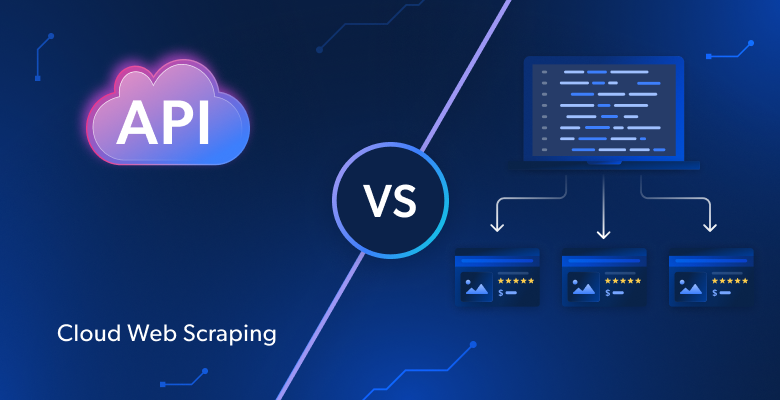
Scaling local scraping operation from 1,000 to 100,000 pages usually means more servers, proxies, and ops work. Target sites become harder to scrape. Infrastructure costs are rising. Teams spend more time fixing scrapers than shipping features. At scale, scraping stops being a script and becomes infrastructure.
The choice between local and cloud scraping affects three things: cost, reliability, and delivery speed.
TL;DR
- Local scraping runs on your machines. You have full control, but have to perform manual maintenance.
- Cloud scraping runs on remote infrastructure with auto-scaling and built-in IP rotation.
- Choose local scraping for <1,000 pages or regulated, internal-only data.
- Choose cloud scraping for 10,000+ pages, blocked sites, or 24/7 monitoring.
- IP blocking is the #1 bottleneck, 68% of teams cite it as their main challenge.
- At scale, cloud scraping can cut total costs by up to 70% by removing DevOps overhead.
- Bright Data delivers 400M+ residential IPs, 99.9% uptime, and zero-maintenance execution.
What Is Local Scraping?
Local scraping means you own the entire stack – code, IPs, browsers, but also failures and downtime. You run your scraping scripts on your infrastructure and manage the entire pipeline yourself.
There is no managed infrastructure layer, so when something breaks, you fix it.
How Local Scraping Works
Local scraping follows a simple execution loop. Your script sends requests, receives responses, and extracts data from HTML or rendered pages.
Requests originate from your own IP address or from proxies you configure. When sites block traffic, you need to rotate IPs and retry requests manually.
A simple HTTP client is enough for static pages, but for JavaScript-heavy sites, you need to run headless browsers locally to render content before extracting it.
Besides all of this, with local scraping, you typically have to manually handle CAPTCHAs and other antibot measures.
This works at small scale, but as volume grows, the simple script you started with quickly becomes complex infrastructure system you must operate and maintain.
Advantages of Local Scraping
As local scraping keeps execution entirely within your environment, it’s great if you need:
- Full execution control: You manage request timing, headers, parsing logic, and storage.
- No third-party dependency: Scraping runs without external infrastructure or providers.
- Protection of sensitive data: Data stays inside your network.
- Strong learning value: You work directly with headers, cookies, rate limits, and failures.
- Low setup cost for small jobs: A script and a laptop are enough for low-volume scraping of unprotected sites.
Limitations of Local Scraping
Local scraping becomes harder to sustain as volume and reliability requirements increase:
- Poor scalability: Higher volume requires buying additional servers and bandwidth.
- IP blocking: You must source, rotate, and replace proxies as sites block traffic.
- CAPTCHA interruptions: Manual solving breaks automation; automated solvers add cost and latency.
- JavaScript-heavy browser execution: JavaScript-heavy sites require local browsers that consume significant CPU and memory.
- Continuous maintenance: Site changes and detection updates require frequent code fixes and redeployment.
- Fragile reliability: Failures stop data collection until you intervene.
Example: Local Scraping in Python
This is what local scraping with Python looks like at small scale:
import requests
from bs4 import BeautifulSoup

def scrape_products(url):
    headers = {
        "User-Agent": "Mozilla/5.0"
    }

    response = requests.get(url, headers=headers)
    response.raise_for_status()

    soup = BeautifulSoup(response.text, "html.parser")
    return [
        {
            "name": item.find("h3").text.strip(),
            "price": item.find("span", class_="price").text.strip(),
        }
        for item in soup.select(".product-card")
    ]

products = scrape_products("https://example.com/products")
This script runs locally and uses your real IP address. It handles a few hundred pages without issue on unprotected sites.
But notice what’s missing – there is no proxy rotation, CAPTCHA handling, retry logic, or monitoring. Adding those features can easily bloat the script and make it hard to run and maintain.
What Is Cloud Scraping?
Cloud scraping moves execution outside your application. You send requests to a provider’s API and receive extracted data in response. The provider handles the operation of the proxy network and all necessary scraping infrastructure.
Infrastructures like Bright Data operate this at production scale.
How Cloud Scraping Works
Cloud scraping follows a request–execution–response model:
- You submit a scraping request through a provider’s API.
- The provider routes the request through its proxy network, on remote infrastructure, not on your machines.
- When a site requires JavaScript, the request is executed in a managed browser. The rendered page is processed before data extraction.
- Failed requests trigger retries based on provider-defined logic.
- CAPTCHA challenges are detected and resolved within the execution layer.
- You receive the extracted data as a response.
Here’s a simplified overview of how cloud scraping works: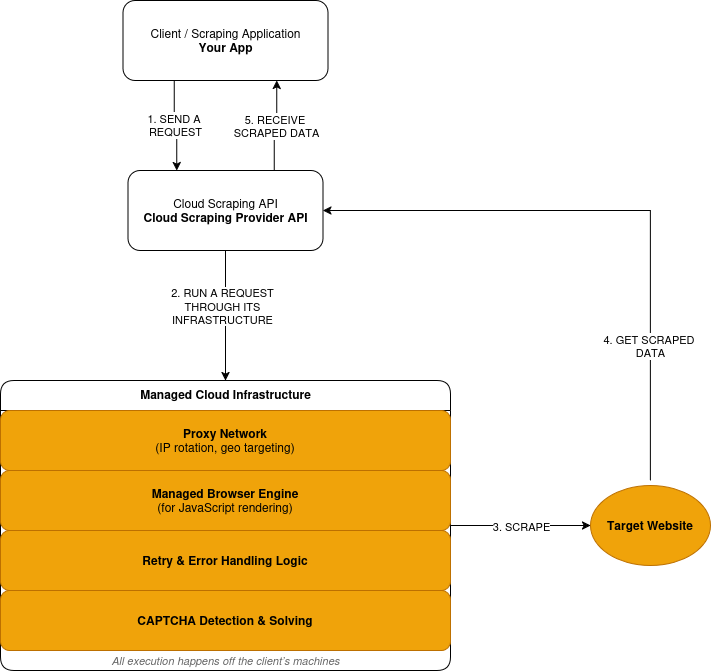
Advantages of Cloud Scraping
Cloud scraping favors scale, reliability, and reduced operational ownership:
- Managed execution: Requests run on provider-operated infrastructure.
- Built-in scalability: Volume increases without you purchasing new servers.
- Integrated anti-bot handling: IP rotation and retries occur automatically.
- Browser infrastructure included: Scraping provider handles JavaScript rendering.
- Reduced maintenance scope: Site changes no longer require constant redeployment.
- Usage-based costs: Pricing based on the request volume.
Trade-offs of Cloud Scraping
Cloud scraping reduces operational ownership but introduces external dependencies. Some control moves outside your application boundary.
- Reduced low-level control: Timing, IP choice, and retries follow provider logic.
- Third-party dependency: Availability and execution sit outside your system.
- Costs scale with usage: High volume increases spend.
- External debugging: Failures require provider visibility and support.
- Compliance constraints: Some data cannot leave controlled environments.
Example: High-Volume Scraping with Bright Data Web Unlocker
This is the same scraping task executed through a cloud-based execution layer.
import requests

headers = {
    'Content-Type': 'application/json',
    'Authorization': 'Bearer API_KEY',
}

payload = {
    'zone': 'web_unlocker1',
    'url': 'https://example.com/products',
    'format': 'json'
}

response = requests.post('https://api.brightdata.com/request', json=payload, headers=headers)
print(response.json())
At a glance, this looks similar to the local scraping example. It is still a single HTTP request. The difference is where the request runs.
With Bright Data Web Unlocker API, the request runs on managed infrastructure. IP rotation, block detection, and retries happen outside your application.
Cloud Scraping vs Local Scraping: Head-to-Head Comparison
Here’s how local and cloud scraping compare across the factors that actually impact your project.
| Factor | Local Scraping | Cloud Scraping | Bright Data Advantage |
|---|---|---|---|
| Infrastructure | DIY setup | Fully managed | Global network in 195 countries |
| Scalability | Limited | Auto-scales to billions/month | Billions of requests/month |
| IP Blocking | High risk | Auto-rotation | 400M+ residential IPs |
| Maintenance | Manual | Provider-managed | 24/7 monitoring |
| Cost Model | Fixed + hidden | Pay-as-you-go | Up to 70% cost reduction |
| Anti-bot | DIY | Built-in | 99.9% CAPTCHA success |
| Compliance | DIY | Varies | SOC2, GDPR, CCPA |
Cost Breakdown: Local vs Cloud Scraping
Local scraping looks cheap until you count everything required to keep it running. The biggest cost here is not servers, it is engineers maintaining scraping instead of shipping features.
Cloud scraping shifts those costs into per-request pricing.
Local Scraping Cost Components
Local scraping has fixed costs that accumulate over time.
- Servers: Virtual machines, bandwidth, storage.
- Proxies: Residential or mobile IP subscriptions.
- CAPTCHA solving: Third-party solving services.
- Maintenance: Engineering time for fixes and updates.
- Downtime: Missed data during failures.
These costs exist whether you scrape or not.
Cloud Scraping Cost Components
Cloud scraping uses variable pricing tied to usage.
- Requests: Per-request or per-page pricing.
- Rendering: Higher cost for JavaScript execution.
- Data transfer: Bandwidth-based charges.
Infrastructure, proxies, and maintenance are all included.
Cost Comparison
| Cost Factor | Local Scraping | Cloud Scraping | Bright Data |
|---|---|---|---|
| Server capacity | Fixed monthly cost | Included | Included |
| Proxy infrastructure | Separate subscription | Included | 400M+ IP pool |
| CAPTCHA solving | Separate service | Included | Included |
| Maintenance effort | Ongoing engineering time | Provider-managed | Zero maintenance |
| Downtime impact | Absorbed by your team | Reduced by provider | 99.9% uptime SLA |
Real-World Cost Example
Consider a workload scraping 500,000 pages per month from protected sites.
Local setup:
- Servers and bandwidth: $300/month
- Residential proxies: $1,250/month
- CAPTCHA solving: $150/month
- Engineering maintenance: $3,000/month
- Total: $4,700/month
Cloud setup:
- Requests with rendering: $1,500/month
- Data transfer: $50/month
- Total: $1,550/month
The cloud approach reduces monthly cost by ~70% at this scale.
The Break-Even Point
- Below 5,000 pages/month: local often wins
- Between 5,000–10,000 pages: costs converge
- Above 10,000 pages: cloud typically costs less
Past this point, local costs grow linearly. Cloud costs scale predictably with usage.
When to Use Local Scraping
Local scraping is the right choice when all of the following are true:
- You scrape under 1,000 pages per run
- Target sites have minimal bot protection
- Data cannot leave your environment
- You accept manual maintenance
- Scraping is not business-critical
Outside these conditions, costs and risk increase quickly.
When to Use Cloud Scraping
Cloud scraping fits when any of the following apply:
- Volume exceeds 10,000 pages per month
- Sites deploy aggressive anti-bot protection
- JavaScript rendering is required
- Data must update continuously
- Reliability matters more than execution control
At this point, infrastructure ownership becomes a liability.
How Bright Data Simplifies Cloud Scraping
Bright Data defines where scraping runs and which layers you no longer operate. It handles the infrastructure that makes scraping costly to run and maintain:
- Network access: Request routing through managed proxy infrastructure
- Browser execution: Remote browsers for JavaScript-heavy sites.
- Anti-bot mitigation: IP rotation, block detection, and retries.
- Failure handling: Execution control and retry logic.
- Maintenance: Ongoing updates as sites and defenses change.
- Session control: Maintain sticky sessions across requests.
- Geo precision: Target country, city, carrier, or ASN.
- Fingerprint management: Reduce detection via browser-level fingerprinting.
- Traffic control: Throttle, burst, or distribute load safely.
Execution Paths and Tools
Bright Data exposes this infrastructure through distinct tools depending on your needs.
Scraping Browser API
Use Scraping Browser when sites require JavaScript rendering or user-like interaction. Your existing Selenium or Playwright logic runs against Bright Data–hosted browsers instead of local instances.
Bright Data replaces local browser clusters, lifecycle management, and resource tuning.
Web Unlocker API
Use Web Unlocker for HTTP-based scraping on protected sites. Bright Data routes requests through adaptive proxy infrastructure and applies built-in block handling.
This removes the need to source proxies, rotate IPs, or write retry logic in your code.
Web Scraper APIs (Pre-built Datasets)
Use Web Scraper APIs for standardized platforms such as Amazon, Google, LinkedIn, and much more. It offers 150+ pre-built scrapers for all major e-commerce and social media platforms.
Bright Data returns structured data without browser automation or custom parsers. This eliminates site-specific scraper maintenance for common data sources.
What Disappears From Your Stack
When you use Bright Data, you no longer operate:
- Proxy pools or IP rotation logic
- Local or self-managed browser clusters
- CAPTCHA-solving services
- Custom retry and block-detection code
- Continuous fixes for site and detection changes
These operational costs accumulate quickly in local and DIY cloud setups.
Bright Data vs Other Cloud Scraping Tools
Cloud scraping platforms are not interchangeable. The right choice depends on how much scraping you do, how protected the targets are, and how much infrastructure you are willing to operate.
Head-to-Head Comparison
| Provider | Scale | IP Pool | Compliance | Best For |
|---|---|---|---|---|
| Bright Data | Enterprise (billions) | 400M+ | SOC2, GDPR, CCPA | Large-scale production |
| ScrapingBee | Small–medium | Limited | Partial | Simple projects |
| Octoparse | GUI-based | Small pool | Limited | Non-technical users |
Where Bright Data Fits
Bright Data fits workloads where scraping is continuous and operationally important.
This includes cases where:
- Volume exceeds 10,000 pages per month
- Targets deploy modern anti-bot defenses
- JavaScript rendering is required
- Data feeds downstream systems or analytics
- Scraping failures create business impact
In these cases, infrastructure ownership drives cost and risk more than API simplicity.
When Other Tools Are Sufficient
Lighter cloud tools work when constraints are lower.
API-based services fit:
- Small or periodic scraping jobs
- Sites with limited protection
- Workloads where occasional failures are acceptable
GUI-based tools fit:
- Non-technical users
- One-off or manual data collection
- Exploratory or ad hoc tasks
These tools reduce setup effort but do not remove operational limits at scale.
How to Choose
The decision mirrors the earlier cost and usage thresholds:
- If scraping is small, infrequent, or non-critical, simpler tools are often enough
- If scraping is continuous, protected, or business-critical, managed infrastructure matters
Conclusion
Start with local scraping to learn. Running a scraper on your own machine teaches you how requests, parsing, and failures work. For small jobs under 1,000 pages, this approach is often sufficient.
Move to cloud scraping when scale or protection changes the cost equation. Once volume exceeds 10,000 pages per month, targets deploy modern anti-bot defenses, or data must update continuously, infrastructure ownership becomes the constraint.
Local scraping gives you control and responsibility. Cloud scraping trades some control for predictable execution, lower operational risk, and scalable costs.
For production workloads, cloud scraping is infrastructure. You would not run your own CDN or email servers at scale. Scraping infrastructure follows the same logic.
If your use case fits that profile, infrastructures like Bright Data let you keep extraction logic while moving execution and maintenance out of your stack.
FAQs: Cloud Scraping vs Local Scraping
What is local scraping?
Local scraping runs on machines you control. You manage requests, proxies, browsers, retries, and failures yourself. It works best for small, infrequent jobs on lightly protected sites.
What is cloud scraping?
Cloud scraping runs on infrastructure operated by a third party. You send requests to an API and receive extracted data in response. Scraping provider handles execution, scaling, IP rotation, CAPTCHA solving, overcoming anti-bot measures and much more.
When should I switch from local to cloud scraping?
Switch when any of the following occur:
- IP blocks appear after limited request volume
- CAPTCHAs interrupt automation
- Volume exceeds 10,000 pages per month
- JavaScript rendering becomes necessary
- Scraping failures affect downstream systems
At that point, infrastructure ownership becomes a liability.
Is cloud scraping more expensive than local scraping?
Local setups accumulate server, proxy, maintenance, and downtime costs. Cloud pricing scales with usage and removes fixed infrastructure overhead.
- At small scale, local scraping is often cheaper
- At scale, cloud scraping typically costs less
Can cloud scraping handle JavaScript-heavy sites?
Yes. Cloud platforms operate managed browsers that execute JavaScript remotely.
Local scraping requires running headless browsers yourself, which limits concurrency and increases maintenance.
How does cloud scraping reduce IP blocking?
Cloud providers operate large proxy networks and manage request routing. IP rotation and retry logic occur at the infrastructure level.
Is cloud scraping suitable for sensitive or regulated data?
Not always. Some workloads cannot leave controlled environments due to policy or regulation. But Bright Data offers scraping solutions that are fully SOC2, GDPR, and CCPA compliant.
Can I mix local and cloud scraping?
Yes, but complexity increases.
Some teams develop and test scrapers locally, then run production workloads in the cloud. This requires maintaining two execution environments and handling differences between them.
Most teams choose one approach based on their primary constraints.
What kind of teams benefit most from cloud scraping platforms like Bright Data?
Teams that run scraping as a continuous or business-critical system. This includes workloads with high volume, protected targets, JavaScript rendering, or limited engineering bandwidth.