If you’re building a retrieval-augmented generation (RAG) application, you need fresh data about your topic – not a static PDF from a tutorial. But scraping real articles means anti-bot walls and blocked requests. Even with data, you still have to chunk, embed, index, and wire up retrieval.
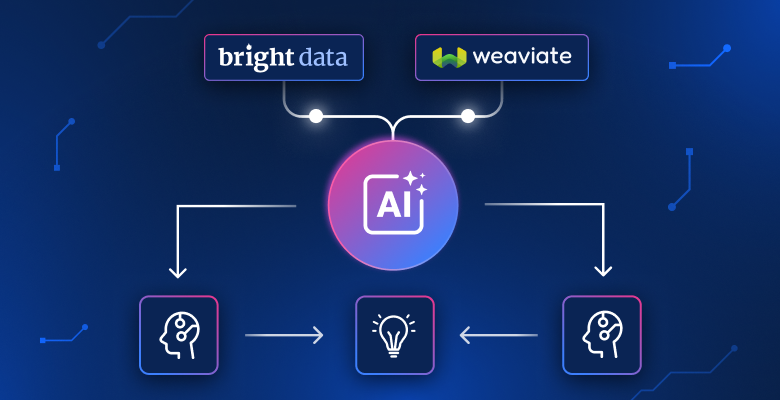
This tutorial does all of that. Bright Data finds and scrapes articles about any topic, Weaviate stores and searches them, and you get answers with citations in one Python script.
TL;DR
Turn any topic into a searchable, question-answering knowledge base – powered by live web data instead of outdated training data.
- Bright Data SERP API finds real article URLs for your topic; Web Unlocker scrapes them (even anti-bot protected sites).
- Weaviate auto-vectorizes chunks via Cohere, indexes them with hybrid search, and generates cited answers in a single API call
- Run
python3 pipeline.py, enter a topic, and get cited RAG answers within minutes. - Full source code on GitHub – clone and run
Get your API keys and try it with your own topic.
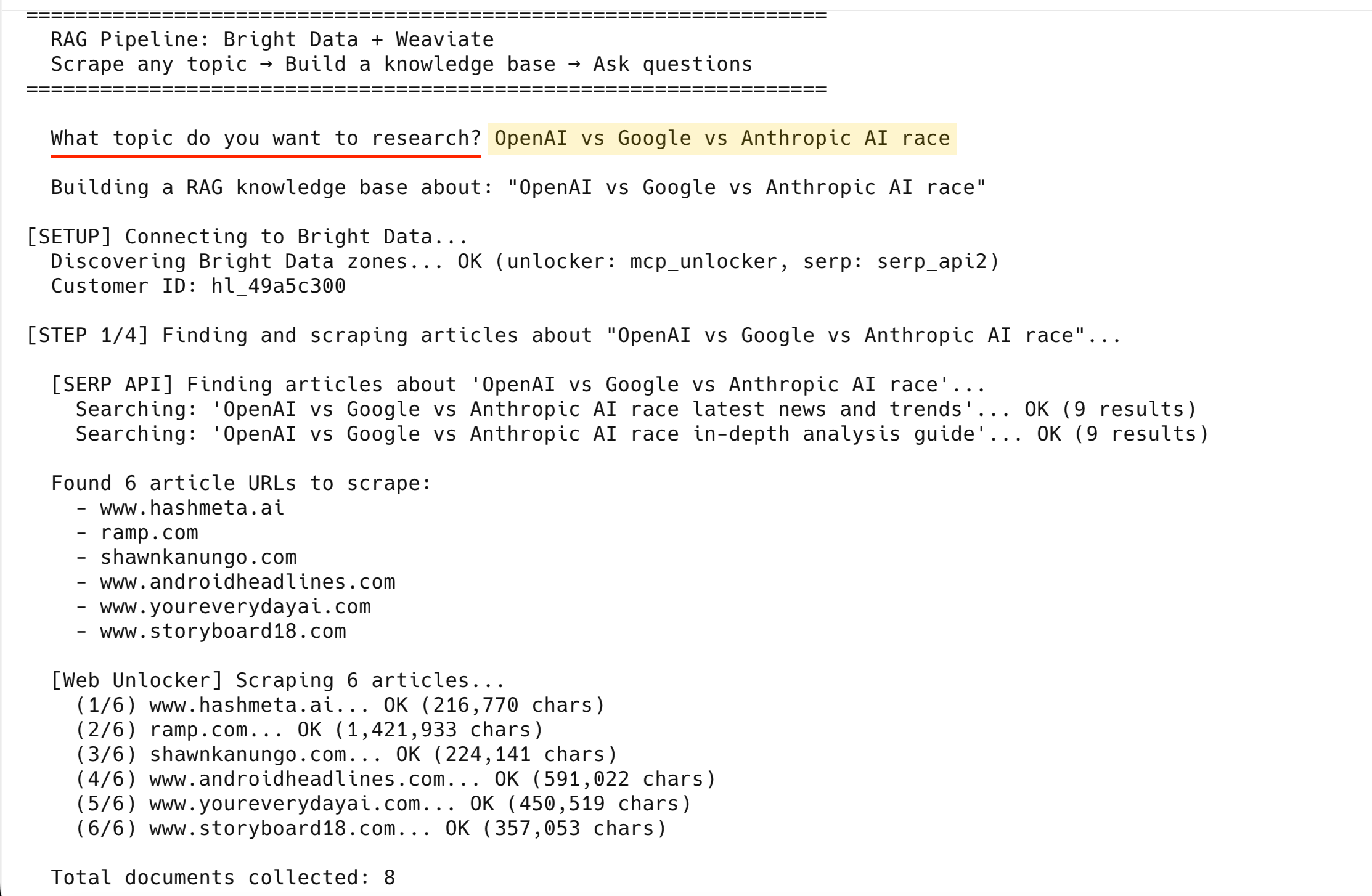
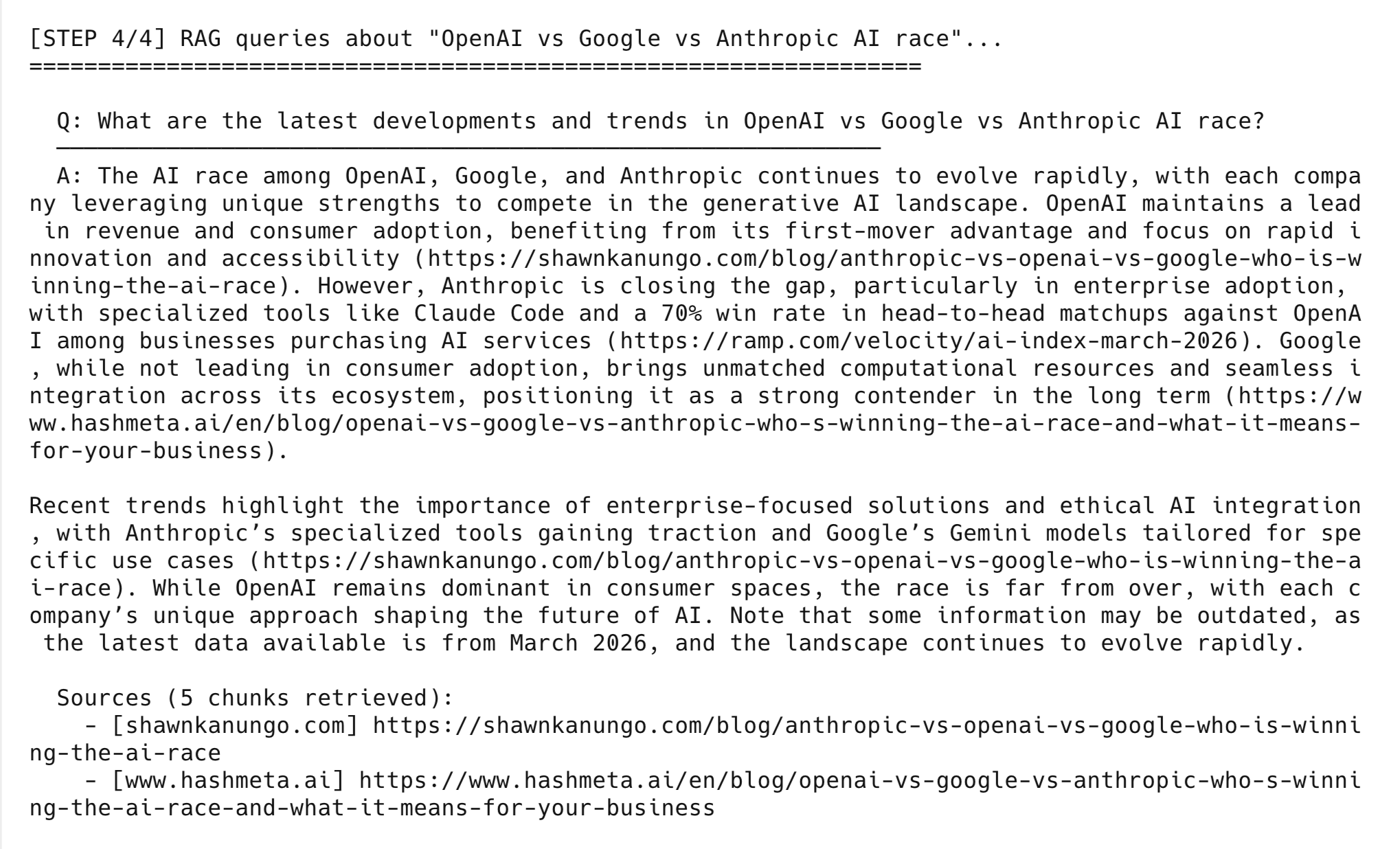
Here’s what the final output looks like:
Run the pipeline in 3–5 minutes
If you already have API keys, run the pipeline now:
# 1. Clone the repo (requires Python 3.10+)
git clone https://github.com/triposat/weaviate-bright-data-rag.git
cd weaviate-bright-data-rag

# 2. Install dependencies
pip3 install -r requirements.txt

# 3. Create your .env file
cp .env.example .env
# Edit .env and fill in your API keys (see "Get your API keys" below)

# 4. Run it
python3 pipeline.py
The pipeline asks for a topic and auto-discovers your Bright Data zones. It finds and scrapes real articles. It chunks and stores them in Weaviate (auto-vectorized via Cohere), runs demo queries, and drops into interactive mode for your own questions.
Get your API keys (free to start)
You need 3 API keys – 1 from each service. Cohere and Weaviate require no credit card; Bright Data gives you a free tier (5,000 requests/month) on sign-up.
1. Bright Data API key
Create an API key and 2 zones:
- Sign up at brightdata.com
- Go to Account Settings → Users and API keys
- Create a new API key → copy it → paste it as the
BRIGHT_DATA_API_TOKENvalue in your.envfile
The pipeline also needs 2 zones: SERP API and Web Unlocker. Check if you already have them at Proxies & Scraping → My Zones. If you don’t see them, create them:
- Go to Proxies & Scraping → select My Zones
- Select Add → choose zone type SERP API → name it anything (for example,
serp) → save - Select Add again → choose zone type Unlocker API → name it anything (for example,
unlocker) → save
You don’t need to copy zone names or passwords. The pipeline uses your API key to detect them automatically.
2. Cohere API key (free)
Cohere handles both embedding and generation in this pipeline:
- Go to dashboard.cohere.com
- Sign up with Google, GitHub, or email – no credit card needed
- Your Trial API key is shown on the dashboard – copy it
- The Trial plan is rate-limited but generous (the automated run uses fewer than 20 calls; each interactive question adds 2 more)
3. Weaviate Cloud credentials (free)
Create a free sandbox cluster to store and query your vectors:
- Go to console.weaviate.cloud
- Sign up with Google or GitHub
- Select Create Cluster → choose Sandbox (Free) → pick a region → create
- Wait ~30 seconds, then select your cluster → Details tab
- Copy the REST Endpoint (your cluster URL) and API Key
Note: Sandbox clusters expire after 14 days. If your cluster expires, create a new one and update the URL and key in your .env file. Re-run pipeline.py to re-import your data.
Once you have all 3 keys, go back to the “Run the pipeline in 3–5 minutes” section and follow the clone/install steps.
How the RAG pipeline works end-to-end
The pipeline has 4 steps – data collection, processing, vector storage, and generation:
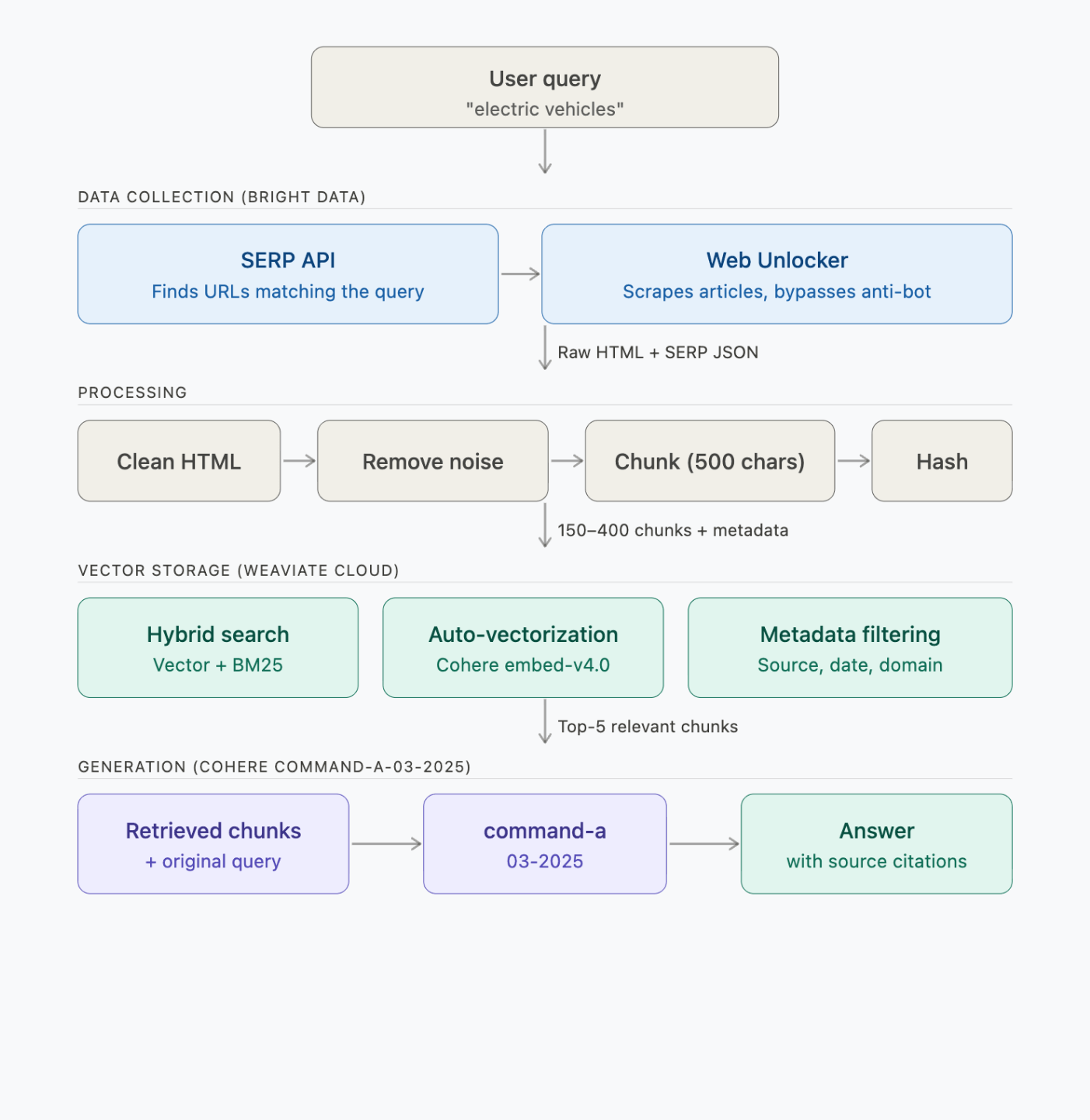
Each step makes these API calls:
| Step | What runs | Time | API calls |
|---|---|---|---|
| 1. Find + scrape | Bright Data SERP + Web Unlocker | ~2–3 min | 2 SERP + 6 scrape requests |
| 2. Process + chunk | Local (BeautifulSoup + chunker) | <1 sec | 0 |
| 3. Embed + store | Weaviate → Cohere embed-v4.0 | ~30–60 sec | ~150–400 embeddings (batched) |
| 4. Query (3 demos) | Weaviate → Cohere command-a-03-2025 | ~5 sec/query | 1 search + 1 generation per query |
What Bright Data does in the pipeline
Bright Data is a web data platform. In this pipeline, it plays 2 roles:
| Product | What it does in this pipeline |
|---|---|
| SERP API | You enter a topic, SERP API searches Google and returns real article URLs – no hardcoded URLs needed |
| Web Unlocker | Scrapes 6 articles per topic, including sites with anti-bot protection – 200K to 1.8M chars each |
This pipeline uses SERP API and Web Unlocker. For other data collection approaches, see Bright Data’s full product list.
Why use Bright Data for RAG
Here are some points that matter when you’re scraping for RAG:
- Reliable scraping. Web Unlocker handles retries, IP rotation, and browser fingerprinting automatically, so the pipeline doesn’t stall on anti-bot pages mid-run.
- LLM-ready output. The Crawl API returns clean Markdown instead of raw HTML, cutting preprocessing for embedding pipelines (this tutorial uses Web Unlocker + BeautifulSoup, but Crawl API is a faster path if you don’t need raw HTML).
- Scale. This tutorial scrapes 6 articles. In production you might need 6,000. Bright Data’s AI infrastructure supports concurrent scraping at that scale without code changes on your side.
- Compliance. Bright Data is GDPR and CCPA compliant and requires identity verification before granting full network access.
What Weaviate does in the pipeline
Weaviate is an open-source vector database. It does retrieval and generation in a single API call, so you don’t call the LLM separately.
Here, Weaviate stores the scraped chunks and vectorizes them through Cohere. When you query, it runs hybrid search and generates an answer through its generative search API.
| Feature | How it works in this pipeline |
|---|---|
| Hybrid search | Combines semantic vectors (70%) with BM25 keyword matching (30%) via tunable alpha parameter |
| Integrated generative search | Retrieves top-5 chunks and generates cited answers in a single generate.hybrid() call |
| Auto-vectorization | Weaviate calls the Cohere embedding API automatically at import – you don’t write any embedding code |
| Metadata filtering | Stores source URL, domain, scrape timestamp, content type alongside each chunk |
Weaviate at scale
Weaviate also has features this pipeline doesn’t use but that matter at scale:
- BSD 3-Clause licensed – you can self-host or fork if needed
- Multiple deployment options – Weaviate Cloud (free sandbox), Dedicated Cloud, self-hosted Kubernetes
- Multi-tenancy – 50,000+ tenants per node for SaaS applications
- Rotational quantization – 4x vector compression at 98–99% recall
Build the RAG pipeline step by step
Each step below shows the core logic from pipeline.py. The full source code is on GitHub.
Project setup and imports
Start by importing dependencies and loading credentials from your .env file:
import os
import sys
import time
import hashlib
import requests
import urllib3
from urllib.parse import quote
from datetime import datetime, timezone
from dotenv import load_dotenv
from bs4 import BeautifulSoup
import weaviate
from weaviate.classes.init import Auth
from weaviate.classes.config import Configure, Property, DataType

urllib3.disable_warnings()
load_dotenv()

# Load credentials from .env
COHERE_API_KEY = os.getenv("COHERE_API_KEY")
WEAVIATE_URL = os.getenv("WEAVIATE_URL")
WEAVIATE_API_KEY = os.getenv("WEAVIATE_API_KEY")
BD_API_TOKEN = os.getenv("BRIGHT_DATA_API_TOKEN")

COLLECTION_NAME = "WebResearch"


def clean_url(url):
    """Fix nbsp artifacts in URLs (from   encoding issues in some sites)."""
    cleaned = url.replace("nbsp", "-")
    while "--" in cleaned:
        cleaned = cleaned.replace("--", "-")
    return cleaned


def clean_generated_text(text):
    """Clean LLM-generated text for terminal display."""
    text = text.replace("**", "")
    text = text.replace("nbsp", "-")
    while "--" in text:
        text = text.replace("--", "-")
    return text
Before doing anything, the pipeline checks that all required credentials are set in your .env file:
def validate_env():
    """Check all required environment variables are set."""
    missing = []
    if not BD_API_TOKEN:
        missing.append("BRIGHT_DATA_API_TOKEN")
    if not COHERE_API_KEY:
        missing.append("COHERE_API_KEY")
    if not WEAVIATE_URL:
        missing.append("WEAVIATE_URL")
    if not WEAVIATE_API_KEY:
        missing.append("WEAVIATE_API_KEY")

    if missing:
        print("ERROR: Missing environment variables in .env file:")
        for var in missing:
            print(f"  - {var}")
        # ... prints example .env format ...
        print("\nSee the blog post for how to get each key (all free to start).")
        sys.exit(1)
You don’t configure zone names or passwords – the pipeline discovers them automatically from your API key:
def discover_bright_data_credentials():
    """
    Auto-discover Bright Data proxy credentials from the API key.
    Works for any Bright Data account. No hardcoded values needed.
    """
    headers = {"Authorization": f"Bearer {BD_API_TOKEN}"}

    # 1. Get active zones
    zones = requests.get(
        "https://api.brightdata.com/zone/get_active_zones", headers=headers
    ).json()

    # Pick the first zone of each type (if you have multiple, set the name explicitly)
    zone_names = {}
    for z in zones:
        if z["type"] not in zone_names:
            zone_names[z["type"]] = z["name"]

    # "unblocker" is the API name for the Web Unlocker product
    unlocker_zone = zone_names.get("unblocker")
    serp_zone = zone_names.get("serp")

    # 2. Get zone passwords
    unlocker_pwd = requests.get(
        f"https://api.brightdata.com/zone/passwords?zone={unlocker_zone}",
        headers=headers,
    ).json()["passwords"][0]

    serp_pwd = requests.get(
        f"https://api.brightdata.com/zone/passwords?zone={serp_zone}",
        headers=headers,
    ).json()["passwords"][0]

    # 3. Get customer ID (the cost endpoint returns {customer_id: cost_data})
    cost = requests.get(
        f"https://api.brightdata.com/zone/cost?zone={unlocker_zone}",
        headers=headers,
    ).json()
    customer_id = list(cost.keys())[0]

    return customer_id, unlocker_zone, unlocker_pwd, serp_zone, serp_pwd
Clone the repo, add your API key, and the pipeline figures out the rest.
Step 1: Find and scrape articles with Bright Data
The pipeline uses the SERP API to find article URLs for your topic, then scrapes each one through Web Unlocker:
def get_bd_proxy(customer_id, zone, password):
    """Build Bright Data proxy URL."""
    proxy = f"http://brd-customer-{customer_id}-zone-{zone}:{password}@brd.superproxy.io:33335"
    return {"http": proxy, "https": proxy}


def search_serp(query, customer_id, zone, password, num=10):
    """Search Google via Bright Data SERP API and return organic results."""
    proxies = get_bd_proxy(customer_id, zone, password)
    # brd_json=1 tells Bright Data to return structured JSON instead of raw HTML
    search_url = f"https://www.google.com/search?q={quote(query)}&brd_json=1&num={num}"

    try:
        # verify=False bypasses SSL verification for the BD proxy.
        # For production, install the Bright Data CA certificate instead:
        # https://docs.brightdata.com/general/account/ssl-certificate
        response = requests.get(search_url, proxies=proxies, timeout=30, verify=False)
        if response.status_code == 200:
            data = response.json()
            return [
                {
                    "title": item.get("title", ""),
                    "url": item.get("link", ""),
                    "description": item.get("description", ""),
                }
                for item in data.get("organic", [])
            ]
    except Exception as e:
        print(f"SERP error: {str(e)[:60]}", end=" ", flush=True)
    return []
search_serp() sends the query through the Bright Data SERP proxy and returns structured JSON (titles, URLs, descriptions). The brd_json=1 parameter tells Bright Data to parse the Google HTML into clean JSON for you.
Next, find_articles_for_topic() runs 2 SERP queries per topic and filters the results, while scrape_url() fetches each article through Web Unlocker:
def find_articles_for_topic(topic, customer_id, serp_zone, serp_pwd):
    """Use Bright Data SERP API to find real article URLs about a topic."""
    search_queries = [
        f"{topic} latest news and trends",
        f"{topic} in-depth analysis guide",
    ]

    # Skip domains that return non-article content (videos, feeds, social media)
    skip_domains = {
        "youtube.com", "twitter.com", "x.com", "facebook.com", "instagram.com",
        "reddit.com", "linkedin.com", "wikipedia.org", "amazon.com", "tiktok.com",
    }
    skip_extensions = (".pdf", ".doc", ".ppt", ".xls", ".zip", ".mp4", ".mp3")

    all_urls = []
    seen_domains = set()
    serp_docs = []

    for query in search_queries:
        results = search_serp(query, customer_id, serp_zone, serp_pwd, num=10)

        if results:
            # Save SERP titles + descriptions as a document so the LLM can
            # reference article summaries even if the full scrape fails
            serp_text = f"Google search results for: {query}\n\n"
            for r in results:
                serp_text += f"Title: {r['title']}\nURL: {r['url']}\n"
                serp_text += f"Summary: {r['description']}\n\n"
            serp_docs.append({
                "url": f"https://google.com/search?q={quote(query)}",
                "html": serp_text,
                "scraped_at": datetime.now(timezone.utc).isoformat(),
                "is_serp": True,
            })

            # Extract article URLs (1 per domain for diversity)
            for r in results:
                url = r.get("url", "")
                if not url:
                    continue

                domain = url.split("/")[2] if "://" in url else ""
                base_domain = ".".join(domain.split(".")[-2:])

                if base_domain in skip_domains:
                    continue
                if any(url.lower().endswith(ext) for ext in skip_extensions):
                    continue
                if base_domain in seen_domains:
                    continue  # One article per domain for diversity

                seen_domains.add(base_domain)
                all_urls.append(url)

    return all_urls[:6], serp_docs  # Top 6 URLs


def scrape_url(url, customer_id, zone, password, retries=2):
    """Scrape a URL using Bright Data Web Unlocker with automatic retry."""
    proxies = get_bd_proxy(customer_id, zone, password)
    # No custom headers needed: Web Unlocker manages User-Agent,
    # cookies, and fingerprints automatically.

    for attempt in range(retries + 1):
        try:
            # verify=False bypasses SSL verification for the BD proxy.
            # For production, install the Bright Data CA certificate instead:
            # https://docs.brightdata.com/general/account/ssl-certificate
            response = requests.get(
                url, proxies=proxies, timeout=60, verify=False
            )
            if response.status_code == 200:
                return {
                    "url": url,
                    "html": response.text,
                    "scraped_at": datetime.now(timezone.utc).isoformat(),
                }
            else:
                print(f"HTTP {response.status_code}", end=" → ", flush=True)
        except Exception as e:
            print(f"Error: {str(e)[:60]}", end=" → ", flush=True)

        if attempt < retries:
            time.sleep(2)

    return None
collect_data() combines both steps – SERP finds the URLs, Web Unlocker scrapes them:
def collect_data(topic, customer_id, unlocker_zone, unlocker_pwd, serp_zone, serp_pwd):
    """Find articles about the topic via SERP, then scrape them with Web Unlocker."""
    documents = []

    # 1. Use SERP API to find article URLs
    urls_to_scrape, serp_docs = find_articles_for_topic(
        topic, customer_id, serp_zone, serp_pwd
    )

    if not urls_to_scrape:
        return []

    # 2. Scrape the found articles with Web Unlocker
    for i, url in enumerate(urls_to_scrape):
        domain = url.split("/")[2] if "://" in url else url
        print(f"    ({i+1}/{len(urls_to_scrape)}) {domain}... ", end="", flush=True)
        result = scrape_url(url, customer_id, unlocker_zone, unlocker_pwd)
        if result:
            documents.append(result)
            print(f"OK ({len(result['html']):,} chars)")
        else:
            print("FAILED (skipping)")

    # 3. Add SERP results as additional documents
    documents.extend(serp_docs)

    return documents
Running with “OpenAI vs Google vs Anthropic AI race” produces this output:
  [SERP API] Finding articles about 'OpenAI vs Google vs Anthropic AI race'...
    Searching: 'OpenAI vs Google vs Anthropic AI race latest news and trends'... OK (9 results)
    Searching: 'OpenAI vs Google vs Anthropic AI race in-depth analysis guide'... OK (9 results)

  Found 6 article URLs to scrape:
    - www.hashmeta.ai
    - ramp.com
    - shawnkanungo.com
    - www.androidheadlines.com
    - www.youreverydayai.com
    - www.storyboard18.com

  [Web Unlocker] Scraping 6 articles...
    (1/6) www.hashmeta.ai... OK (216,770 chars)
    (2/6) ramp.com... OK (1,421,933 chars)
    (3/6) shawnkanungo.com... OK (224,141 chars)
    (4/6) www.androidheadlines.com... OK (591,022 chars)
    (5/6) www.youreverydayai.com... OK (450,519 chars)
    (6/6) www.storyboard18.com... OK (357,053 chars)

  Total documents collected: 8
All 6 scraped successfully – the 2 SERP result pages bring the total to 8 documents.
If Web Unlocker fails on a URL after 3 attempts, the pipeline skips it and continues with the remaining articles.
At this point you have 8 raw documents (6 articles + 2 SERP result pages). Now clean and chunk them for embedding.
Step 2: Clean and chunk the data
Raw HTML is ~90% noise. The processing step strips it to clean text and splits it into 500-character chunks (~125 tokens) that break at sentence boundaries where possible.
Chunk size controls a core RAG tradeoff: smaller chunks (200–500 chars) give precise retrieval per fact, while larger chunks (1000–2000 chars) give the LLM more surrounding context at the cost of noisier search results. The 500-character default works well for factual questions (“What is Anthropic’s win rate against OpenAI in enterprise?”). Increase chunk_size to 1500–2000 for queries that need broader context like summaries or comparisons.
The 50-character overlap prevents information loss at boundaries – without it, a sentence that spans 2 chunks gets split and neither chunk has the complete thought.
def clean_html(html, is_serp=False):
    """Strip HTML to clean text, removing navigation, ads, and boilerplate."""
    if is_serp:
        return html  # SERP results are already clean text

    soup = BeautifulSoup(html, "html.parser")

    # Remove noise elements
    for tag in soup(["nav", "footer", "header", "script", "style",
                     "aside", "iframe", "noscript", "svg", "form", "button"]):
        tag.decompose()

    # Remove common ad/cookie/popup containers
    for selector in [".ad", ".ads", ".cookie", ".popup", ".modal", ".sidebar",
                     "#cookie-banner", "#ad-container", "[role='banner']",
                     "[role='navigation']", "[role='complementary']"]:
        for el in soup.select(selector):
            el.decompose()

    text = soup.get_text(separator="\n", strip=True)
    lines = [line.strip() for line in text.splitlines() if line.strip()]
    return "\n".join(lines)


def chunk_text(text, chunk_size=500, chunk_overlap=50):
    """Split text into overlapping chunks, breaking at sentence boundaries.
    Overlap ensures sentences at chunk boundaries aren't lost between chunks."""
    if len(text) <= chunk_size:
        return [text]

    chunks = []
    start = 0
    while start < len(text):
        end = start + chunk_size

        # Try to break at a sentence boundary
        if end < len(text):
            for sep in [". ", ".\n", "\n\n", "\n", " "]:
                last_sep = text[max(start, end - 100):end].rfind(sep)
                if last_sep != -1:
                    end = max(start, end - 100) + last_sep + len(sep)
                    break

        chunk = text[start:end].strip()
        if chunk and len(chunk) > 50:
            chunks.append(chunk)
        start = end - chunk_overlap

    return chunks


def process_documents(documents):
    """Clean, chunk, and add metadata to all documents."""
    all_chunks = []
    for doc in documents:
        is_serp = doc.get("is_serp", False)
        clean_text = clean_html(doc["html"], is_serp=is_serp)

        if len(clean_text) < 100:
            continue

        chunks = chunk_text(clean_text)
        domain = doc["url"].split("/")[2] if "://" in doc["url"] else "unknown"

        for i, chunk in enumerate(chunks):
            all_chunks.append({
                "text": chunk,
                "source_url": doc["url"],
                "source_domain": domain,
                "scraped_at": doc["scraped_at"],
                "chunk_index": i,
                "total_chunks": len(chunks),
                "content_hash": hashlib.md5(chunk.encode()).hexdigest(),
                "content_type": "serp_result" if is_serp else "article",
            })
    return all_chunks
After processing, 8 documents become ~150–400 clean text chunks (depending on article length), each with metadata (source URL, domain, timestamp, content hash).
Step 3: Embed and store in Weaviate
Connect to Weaviate Cloud, create a collection with Cohere vectorization, and batch-import all chunks.
def connect_weaviate():
    """Connect to Weaviate Cloud with extended timeouts."""
    client = weaviate.connect_to_weaviate_cloud(
        cluster_url=WEAVIATE_URL,
        auth_credentials=Auth.api_key(WEAVIATE_API_KEY),
        headers={"X-Cohere-Api-Key": COHERE_API_KEY},
        additional_config=weaviate.classes.init.AdditionalConfig(
            timeout=weaviate.classes.init.Timeout(init=30, query=60, insert=120),
        ),
        skip_init_checks=True,  # Prevents gRPC timeout on idle sandboxes
    )
    if not client.is_ready():
        print("  ERROR: Weaviate cluster is not ready.")
        print("  Check your WEAVIATE_URL and WEAVIATE_API_KEY in .env")
        print("  Make sure your sandbox cluster is running at console.weaviate.cloud")
        sys.exit(1)

    return client


def setup_collection(client):
    """Create the collection with hybrid search + generative config."""
    # Deletes any existing collection with this name – re-running with a
    # new topic replaces the previous knowledge base, not adds to it.
    if client.collections.exists(COLLECTION_NAME):
        client.collections.delete(COLLECTION_NAME)
        print(f"    Deleted existing '{COLLECTION_NAME}' collection")

    client.collections.create(
        name=COLLECTION_NAME,
        description="Web articles scraped via Bright Data for RAG",

        # Cohere embed-v4.0: auto-vectorizes text at import time
        vector_config=Configure.Vectors.text2vec_cohere(
            model="embed-v4.0",
        ),

        # Cohere command-a-03-2025: generates RAG answers at query time
        generative_config=Configure.Generative.cohere(
            model="command-a-03-2025",
        ),

        properties=[
            Property(name="text", data_type=DataType.TEXT,
                     description="The chunk text content"),
            Property(name="source_url", data_type=DataType.TEXT,
                     skip_vectorization=True),
            Property(name="source_domain", data_type=DataType.TEXT,
                     skip_vectorization=True),
            Property(name="scraped_at", data_type=DataType.TEXT,
                     skip_vectorization=True),
            Property(name="chunk_index", data_type=DataType.INT,
                     skip_vectorization=True),
            Property(name="total_chunks", data_type=DataType.INT,
                     skip_vectorization=True),
            Property(name="content_hash", data_type=DataType.TEXT,
                     skip_vectorization=True),
            Property(name="content_type", data_type=DataType.TEXT,
                     skip_vectorization=True),
        ],
    )
    print(f"    Created '{COLLECTION_NAME}' collection")
A few things worth noting:
skip_vectorization=Trueon metadata fields – only thetextfield gets embedded, saving API calls and producing cleaner vectorscontent_hashstored per chunk – use it to skip re-embedding unchanged content when you add incremental re-scrape logic (the current pipeline re-imports fresh each run)
Re-run behavior: The pipeline deletes and recreates the collection on every run. Running with “AI race” then “quantum computing” replaces the AI race data. To keep multiple topics, change
COLLECTION_NAMEto a unique name per topic (for example,WebResearch_ai_race,WebResearch_quantum).
More on preparing AI-ready vector datasets in the Bright Data guide.
The store_chunks() function batch-inserts all chunks into the collection:
def store_chunks(client, chunks):
    """Batch import chunks into Weaviate (auto-vectorized via Cohere)."""
    collection = client.collections.use(COLLECTION_NAME)

    with collection.batch.fixed_size(batch_size=50) as batch:
        for chunk in chunks:
            batch.add_object(properties=chunk)

    failed = len(collection.batch.failed_objects) if collection.batch.failed_objects else 0

    if failed > 0:
        print(f"    First error: {collection.batch.failed_objects[0].message[:120]}")

    return failed
batch.fixed_size(50) batches imports for throughput instead of one-by-one inserts. In the test run, all chunks imported with 0 failures. Weaviate calls Cohere to embed each chunk at import time.
Step 4: Query with hybrid search and generation
With all chunks embedded and indexed, query them using the rag_query() function. It calls generate.hybrid() to do retrieval and generation in a single request:
def rag_query(client, question, alpha=0.7, limit=5):
    """Run a RAG query using Weaviate hybrid search + generative AI."""
    collection = client.collections.use(COLLECTION_NAME)

    response = collection.generate.hybrid(
        query=question,
        alpha=alpha,  # 0.7 = 70% semantic, 30% keyword
        limit=limit,
        grouped_task=f"""Based on the retrieved documents below, answer this question:
"{question}"

Instructions:
- Provide a clear, comprehensive answer
- Cite the source URL for each key claim
- If information seems outdated or conflicting, note it
- Keep the answer concise but informative (2-4 paragraphs)""",
    )

    print(f"\n  Q: {question}")
    print(f"  {'─' * 60}")

    if response.generated:
        print(f"  A: {clean_generated_text(response.generated)}")
    else:
        print("  A: (No response generated — check your Cohere API key)")

    # Separate article sources from SERP summary chunks
    article_sources = []
    serp_sources = []
    seen_urls = set()
    for obj in response.objects:
        url = obj.properties.get("source_url", "unknown")
        if url in seen_urls:
            continue
        seen_urls.add(url)
        content_type = obj.properties.get("content_type", "")
        domain = obj.properties.get("source_domain", "")
        if content_type == "serp_result":
            serp_sources.append((domain, url))
        else:
            article_sources.append((domain, clean_url(url)))

    print(f"\n  Sources ({len(response.objects)} chunks retrieved):")
    for domain, url in article_sources:
        print(f"    - [{domain}] {url}")
    if not article_sources and serp_sources:
        print("    (Based on SERP summaries — no article chunks matched)")

    return response
Pure vector search might miss exact terms like “GPT-5” or “Claude Code”. Pure keyword search misses semantically related content. The alpha=0.7 blend gives you both. Weaviate’s BlockMax WAND algorithm keeps the BM25 keyword component fast at scale.
With limit=5, the query retrieves the top 5 chunks – enough context for a detailed answer without overwhelming the LLM with noise. Increase to 10 for broad questions spanning multiple subtopics; decrease to 3 for precise factual lookups. The grouped_task parameter sends all retrieved chunks to Cohere in one prompt so it can write a single answer. The alternative, single_prompt, generates a response per chunk – useful for per-document summaries but not for cross-source answers.
See the Bright Data roundup on semantic search APIs for more options.
Put all 4 steps together
The main() function runs the full pipeline. You pick a topic and it handles the rest:
def main():
    print("=" * 65)
    print("  RAG Pipeline: Bright Data + Weaviate")
    print("  Scrape any topic → Build a knowledge base → Ask questions")
    print("=" * 65)

    # ── Validate environment ──
    validate_env()

    # ── Ask the user for a topic ──
    print()
    try:
        topic = input("  What topic do you want to research? ").strip()
    except (EOFError, KeyboardInterrupt):
        print("\n  Goodbye!")
        return

    if not topic:
        print("  No topic entered. Exiting.")
        return

    print(f'\n  Building a RAG knowledge base about: "{topic}"')

    # ── Discover Bright Data credentials automatically ──
    print("\n[SETUP] Connecting to Bright Data...")
    cust_id, unlocker_zone, unlocker_pwd, serp_zone, serp_pwd = (
        discover_bright_data_credentials()
    )

    # ── Step 1: Find and scrape articles about the topic ──
    print(f'\n[STEP 1/4] Finding and scraping articles about "{topic}"...')
    documents = collect_data(
        topic, cust_id, unlocker_zone, unlocker_pwd, serp_zone, serp_pwd
    )
    print(f"\n  Total documents collected: {len(documents)}")

    if not documents:
        print("  ERROR: No documents collected. Try a different topic.")
        return

    # ── Step 2: Process and chunk ──
    print("\n[STEP 2/4] Processing and chunking documents...")
    chunks = process_documents(documents)
    print(f"  Created {len(chunks)} chunks from {len(documents)} documents")

    if not chunks:
        print("  ERROR: No chunks created. Documents may be too short.")
        return

    # ── Step 3: Store in Weaviate ──
    print("\n[STEP 3/4] Storing in Weaviate (embedding + indexing)...")
    print("  Connecting to Weaviate Cloud...", end=" ", flush=True)
    client = connect_weaviate()
    print("OK")

    print("  Setting up collection...")
    setup_collection(client)

    print(f"  Importing {len(chunks)} chunks (auto-vectorizing via Cohere)...")
    failed = store_chunks(client, chunks)
    print(f"  Imported: {len(chunks) - failed} success, {failed} failed")

    # Verify count
    collection = client.collections.use(COLLECTION_NAME)
    count = collection.aggregate.over_all(total_count=True).total_count
    print(f"  Total objects in Weaviate: {count}")

    # ── Step 4: Demo queries + Interactive mode ──
    print(f'\n[STEP 4/4] RAG queries about "{topic}"...')
    print("=" * 65)

    demo_queries = [
        f"What are the latest developments and trends in {topic}?",
        f"What are the biggest challenges and risks in {topic}?",
        f"What is the future outlook for {topic}?",
    ]

    for question in demo_queries:
        rag_query(client, question)
        print()

    # ── Summary ──
    print("=" * 65)
    print("  Pipeline complete!")
    print(f'  Topic: "{topic}"')
    print(f"  - Scraped {len(documents)} sources via Bright Data")
    print(f"  - Stored {count} chunks in Weaviate")
    print(f"  - Ran {len(demo_queries)} demo RAG queries")
    print("=" * 65)

    # ── Interactive Mode ──
    print(f'\n  Your knowledge base about "{topic}" is ready!')
    print("  Ask anything. Type 'quit' to exit.\n")

    while True:
        try:
            user_question = input("  Your question: ").strip()
        except (EOFError, KeyboardInterrupt):
            print("\n  Goodbye!")
            break

        if not user_question:
            continue
        if user_question.lower() in ("quit", "exit", "q"):
            print("  Goodbye!")
            break

        rag_query(client, user_question)
        print()

    client.close()


if __name__ == "__main__":
    main()
Run it:
python3 pipeline.pyRAG answers from the AI race test run
The pipeline ran with “OpenAI vs Google vs Anthropic AI race” as the topic. These are sample RAG answers from a test run – your results will reflect whichever articles are live when you run it.
Query 1: “What are the latest developments and trends in OpenAI vs Google vs Anthropic AI race?”
The AI race among OpenAI, Google, and Anthropic continues to evolve rapidly, with each company leveraging unique strengths. OpenAI maintains a lead in revenue and consumer adoption, benefiting from its first-mover advantage. Anthropic is closing the gap in enterprise adoption, with specialized tools like Claude Code and a 70% win rate in head-to-head matchups among businesses purchasing AI services. Google brings unmatched computational resources and seamless integration across its ecosystem.
Sources: shawnkanungo[.]com, hashmeta[.]ai, ramp[.]com
Query 2: “What are the biggest challenges and risks in OpenAI vs Google vs Anthropic AI race?”
OpenAI faces the challenge of sustaining its innovation pace while maintaining independence, especially as it relies on partnerships for compute resources. Google struggles with bureaucratic inertia and risks cannibalizing its core search advertising business as conversational AI reduces ad clicks. Anthropic, positioned as safety-first, must translate its focus on interpretability into market share in a capability-driven market.
Sources: hashmeta[.]ai, shawnkanungo[.]com
Query 3: “What is the future outlook for OpenAI vs Google vs Anthropic AI race?”
OpenAI leads in revenue and consumer adoption, with its roadmap including GPT-5 and investments in reducing inference costs. Anthropic’s future success hinges on whether regulatory requirements for explainability emerge — its early investments in safety and interpretability could provide a significant edge. Google remains a strong contender, particularly in tailoring tools like Gemini for specific use cases and integrating AI into everyday workflows.
Sources: hashmeta[.]ai, shawnkanungo[.]com
Each answer is based on articles scraped during that same pipeline run. Each citation points to a source scraped in Step 1 – you can check any claim by opening the URL. If you ask about something the scraped articles don’t cover, the model says so or gives a less detailed answer.
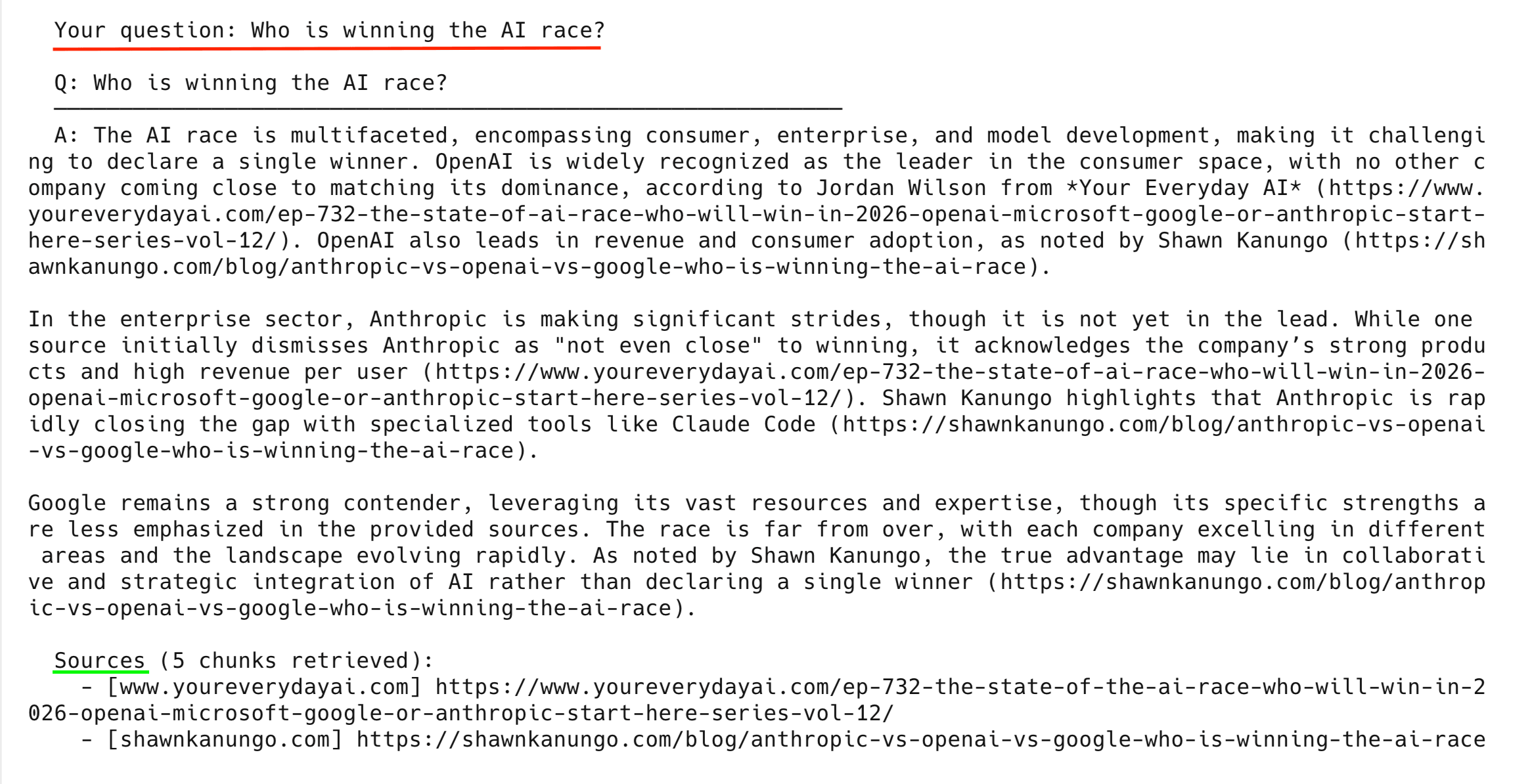
After the demo queries, the pipeline drops into interactive mode where you can ask your own questions:
Going to production
If you need this in production, you’ll want multi-tenancy, compliance, and cost controls. (For the bigger picture, see how RAG fits into a production AI agent tech stack.)
Multi-tenancy for data isolation
If you’re building RAG for multiple customers, Weaviate multi-tenancy gives each tenant a dedicated shard with isolated vector indices:
from weaviate.classes.config import Configure
from weaviate.classes.tenants import Tenant

# Enable multi-tenancy on the collection
collection = client.collections.create(
    name="WebContent",
    multi_tenancy_config=Configure.multi_tenancy(enabled=True),
    # ... vectorizer + generative config
)

# Each customer gets their own isolated tenant
collection.tenants.create([
    Tenant(name="customer_a"),
    Tenant(name="customer_b"),
    Tenant(name="customer_c"),
])

# Scrape and store data per tenant
tenant_collection = collection.with_tenant("customer_a")
with tenant_collection.batch.dynamic() as batch:
    for chunk in customer_a_chunks:
        batch.add_object(properties=chunk)
A single node supports 50,000+ active tenants – a 20-node cluster handles a million.
Cost optimization
4 techniques reduce cost as your data grows:
- Weaviate rotational quantization – 4x vector compression at 98–99% recall.
- Content hashing – the
content_hashfield enables incremental updates that skip re-embedding unchanged chunks (see Step 3 above) skip_vectorization=Trueon metadata fields – only embed what matters.- Bright Data Dataset Marketplace – use pre-collected datasets instead of scraping for common domains.
These matter once you go beyond a single-user prototype.
Common errors and how to fix them
If you hit an issue, check this table first:
| Problem | Cause | Fix |
|---|---|---|
Weaviate gRPC DEADLINE_EXCEEDED |
Sandbox cluster went idle during scraping | Re-run pipeline.py – the script reconnects automatically. If it persists, check your cluster in the Weaviate console |
Cohere API rate limit (429) |
Trial plan is rate-limited | Wait a minute and retry, or check usage on the Cohere dashboard. The automated run uses fewer than 20 calls; each interactive question adds 2 more |
No Web Unlocker zone found |
Your Bright Data account doesn’t have a Web Unlocker zone | Go to Bright Data → Proxies & Scraping → My Zones → create a Web Unlocker zone |
No SERP API zone found |
Your Bright Data account doesn’t have a SERP zone | Go to Bright Data → Proxies & Scraping → My Zones → create a SERP API zone |
HTTP 403 on all URLs |
Web Unlocker retries exhausted | Try a different topic – some niche sites use strict anti-bot blocking. See how to bypass CAPTCHAs for advanced options |
Weaviate cluster not ready |
Sandbox expired (14-day limit) | Create a new sandbox in the Weaviate console and update .env |
| Cohere model not available | command-a-03-2025 or embed-v4.0 retired |
Check available models at docs.cohere.com/docs/models and update the model= parameter in setup_collection() |
ModuleNotFoundError: No module named 'weaviate' |
Dependencies not installed | Run pip3 install -r requirements.txt from the project directory |
If your error isn’t listed, check the full output – the pipeline logs every step with details.
Use cases
The same architecture works for any topic. Some ideas:
- Competitive intelligence – topic: “competitor X pricing strategy”. The pipeline scrapes competitor websites, pricing pages, and analyst reports. Then ask: “How does Competitor X enterprise pricing compare to ours?”
- Market research – topic: “fintech trends Southeast Asia”. Scrapes regional news and industry publications, lets you ask things like “What are the top emerging fintech trends in Southeast Asia?”
- eCommerce – topic: “sustainable fashion market”. Scrapes market reports and consumer research. “What sustainable fashion brands are gaining market share?”
- Technical research – topic: “Kubernetes security best practices”. Scrapes technical blogs and security advisories so you can ask about specific CVEs or misconfigurations.
What to build next
This is a working prototype with known constraints:
- Replaces the full collection on each run (no incremental updates) – use
content_hashto add diffing - Processes text only; tables, images, and PDFs in scraped pages are dropped
- Finds content via Google search – for specific URLs, pass them directly to
scrape_url() - Runs as a single-user CLI
From here, you could:
- Scheduling – run the pipeline on a cron job to keep your knowledge base current
- Multi-tenancy – give each customer their own isolated shard (see the “Going to production” section above)
- Different data sources – use the Bright Data Web Scraper API for structured Amazon or LinkedIn data, or the Crawl API for full-site Markdown
- Frontend – wrap
rag_query()in a Flask or FastAPI endpoint and connect a chat UI - Agentic RAG – build an agentic RAG system that decides when and what to scrape on its own
- LangChain – port the pipeline to LangChain with Bright Data for built-in chain orchestration and memory
Frequently asked questions
What topics work with this pipeline?
Any topic that has articles on the open web. The pipeline uses Bright Data SERP API to search Google for your topic, then scrapes the top results. Niche topics with fewer indexed pages return fewer articles, but the pipeline still works – it just uses whatever it finds.
How much does it cost to run?
All 3 services offer free ways to get started. Cohere’s Trial plan is free with no credit card needed. Weaviate Cloud offers a free sandbox cluster, and Bright Data offers a free tier for SERP API and Web Unlocker.
Can I use a different embedding model or LLM?
Yes. Change the model parameter in setup_collection() for both embeddings and generation. Weaviate supports Cohere, OpenAI, Google, and Hugging Face vectorizers out of the box. To switch, swap text2vec_cohere for text2vec_openai, update the API key header in connect_weaviate(), and re-run the pipeline.
How do I keep the knowledge base up to date?
Run pipeline.py again with the same topic. The pipeline deletes the old collection and creates a new one with newly scraped data. For production use, add a content_hash check to skip re-embedding chunks that haven’t changed. Schedule the pipeline on a cron job to refresh data automatically on any interval.
What if I already have URLs to scrape?
Skip the SERP discovery step. In collect_data(), replace the find_articles_for_topic() call with your own URL list, and pass each URL to scrape_url(). The rest of the pipeline (chunking, embedding, querying) works the same way.
How do I scrape more than 6 articles?
Change the [:6] slice at the end of find_articles_for_topic() to a higher number (e.g., [:12]). You can also add more search queries to the search_queries list to get a wider range of results. More articles means longer scraping time and more chunks, but the rest of the pipeline handles it automatically.


Technical Writer
 5 years experience
Satyam Tripathi helps SaaS and data startups turn complex tech into actionable content, boosting developer adoption and user understanding.