
In this blog post, you will learn:
- Why Kubeflow Pipelines should include a dedicated web data collection component.
- An application of this approach to a specific TikTok sentiment analysis pipeline.
- How to implement that pipeline by connecting to TikTok comment data feeds via a specific scraping solution.
Let’s dive in!
Why Kubeflow Pipelines Benefit from Structured Web-Scraped Data
Modern machine learning and AI workflows rely heavily on high-quality data. On the contrary, traditional pipelines often ingest static datasets or preprocessed files. Yet, those sources can quickly become outdated, leaving models trained on stale information.
That is where structured web-scraped data comes in! By collecting live, contextual data from the web, pipelines can stay aligned with the latest trends, user behavior, and emerging content.
Kubeflow Pipelines, designed for modular, reproducible, and scalable ML workflows, benefit immensely from integrating web data collection components. Such components provide up-to-date, structured feeds that can be automatically ingested, filtered, and processed downstream.
Having a web data collection component in your pipeline surely helps improve model accuracy. Thus, adding a dedicated web data collection component—or even multiple components for different sources—makes strategic sense. It allows your pipelines to continuously adapt, retrain, and generate insights in near real-time, creating a solid foundation for any AI-driven project.
Presenting the Kubeflow Pipeline for TikTok Sentiment Analysis
To better understand how a web data collection component enhances Kubeflow pipelines, let’s consider a real-world example. Imagine you want to build a data analysis workflow that takes a set of TikTok posts and analyzes their content for sentiment.
You could design a two-component pipeline:
- TikTok comments data component: Retrieves structured comment data from TikTok posts via web scraping.
- Data analysis component: Enriches those comments with sentiment insights (
positive,negative, orneutral).
The problem is that scraping TikTok (or many other popular platforms) is notoriously challenging. That is because of anti-scraping measures such as CAPTCHAs, JavaScript challenges, IP blocks, and rate limits. Scaling this process only adds complexity, as throttling and bans can easily disrupt data collection.
To avoid these issues, it makes sense to power the web data collection component with a top-notch web data service like Bright Data. Bright Data enables large-scale, reliable scraping with a highly scalable infrastructure backed by 150 million proxy IPs across 195 countries, a 99.95% success rate, and 99.99% uptime.
In detail, we will leverage TikTok Scraper, a web scraping API designed to simplify structured data collection from TikTok posts. That is one of the many Web Scraping APIs available for retrieving data from popular domains. Similarly, you could use the Filter Dataset API to fetch filtered data from Bright Data datasets, powering your ML/AI pipelines with ready-to-use data.
How to Build a Kubeflow Pipeline with a Dynamic Web Scraping Data Component
In this guided section, you will see how to build the Kubeflow pipeline for TikTok sentiment analysis introduced earlier.
Follow the steps below!
Prerequisites
To follow this tutorial, you will need:
- Docker installed and running on your machine.
- Python 3.10+ installed locally.
- A Bright Data account with your API key properly configured (do not worry about setting it up right now, as you will be guided through it in a dedicated subsection).
A basic understanding of how Kubeflow Pipelines work will also help you understand the instructions below.
The recommended operating system for running the examples below is Linux, macOS, or WSL (Windows Subsystem for Linux).
Step #1: Project Setup
Start by opening your terminal and creating a new directory for the Kubeflow Pipelines project:
mkdir kfp-bright-data-pipelineMove into the project directory and create a Python virtual environment inside it:
cd kfp-bright-data-pipeline
python -m venv .venv
Next, open the project folder in your preferred Python IDE. We recommend Visual Studio Code with the Python extension or PyCharm Community Edition.
Create a new file named tiktok_sentiment_analysis_kfp_pipeline.py in the root of the project directory. Your structure should look like this:
kfp-bright-data-pipeline/
├── .venv/
└── tiktok_sentiment_analysis_kfp_pipeline.py # <-----------
In the IDE’s terminal, activate the virtual environment. On Linux or macOS, fire:
source venv/bin/activateEquivalently, on Windows, execute:
venv/Scripts/activateWith the virtual environment activated, install the required dependency:
pip install kfpThe only required library is kfp, which allows you to build and compile portable, scalable machine learning pipelines.
Finally, open tiktok_sentiment_analysis_kfp_pipeline.py and import the necessary modules:
from kfp import dsl, compiler
from kfp.dsl import Input, Output, Dataset
This is it! You now have a Python development environment where you can build your Kubeflow pipeline.
Step #2: Get Started with Bright Data
The first component in your pipeline will retrieve live web data using Bright Data’s Web Scraping APIs. Before implementing it, you need to properly configure your Bright Data account.
Since we will use the Web Scraping APIs, consider taking a few minutes to review the official docs. In short, these APIs provide structured data feeds from popular websites, ready to be consumed in ML/AI workflows (or any other supported use case).
If you do not already have an account, create one. Otherwise, sign in and open the user dashboard. From there, navigate to the “Web Scrapers” section: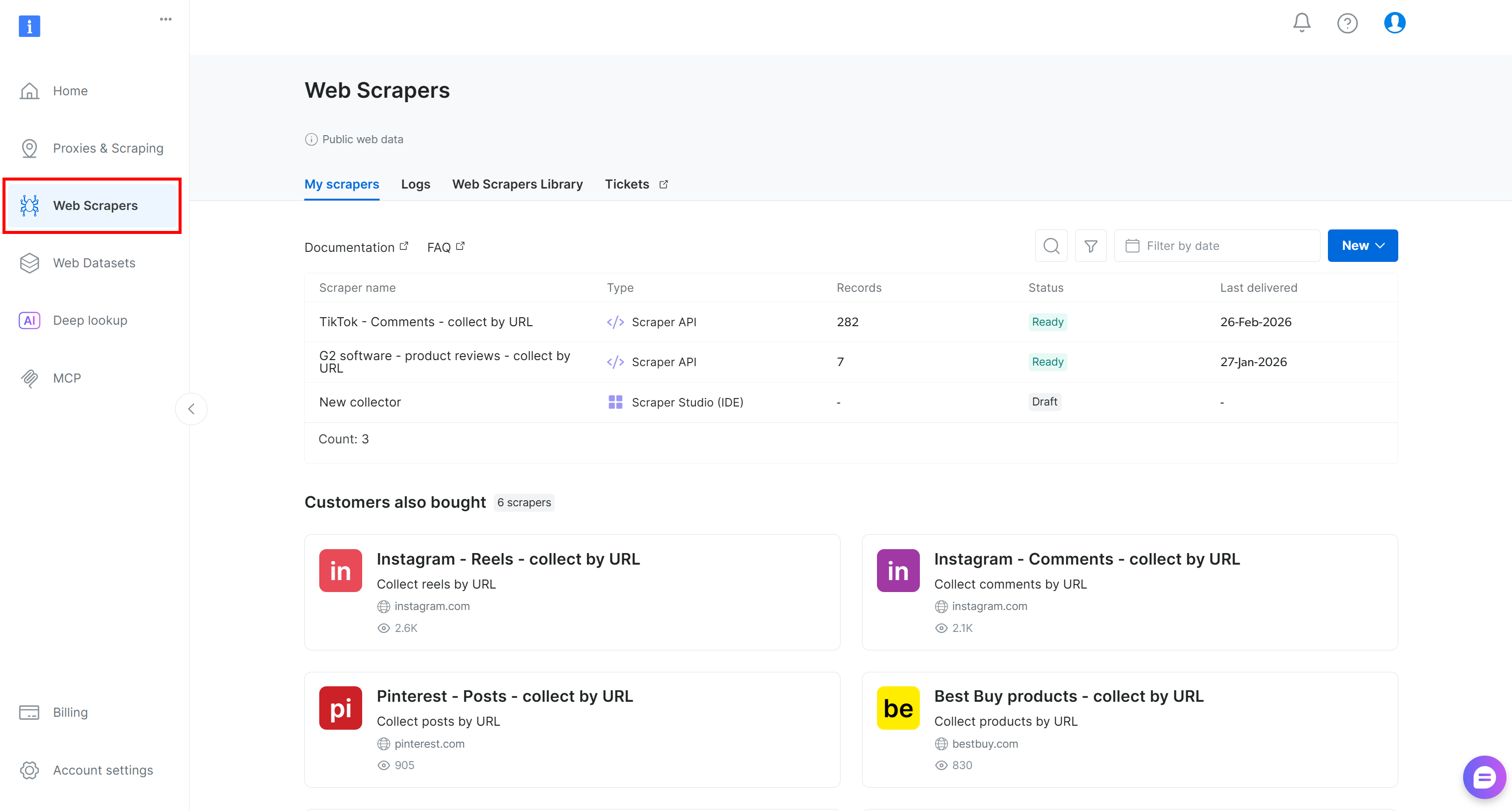
Go to the “Web Scrapers Library” tab. You will find 120+ ready-made scrapers for some of the most popular platforms on the Internet.
In this tutorial, search for “tiktok.com,” since our goal is to retrieve live comment data from TikTok posts and run sentiment analysis on it.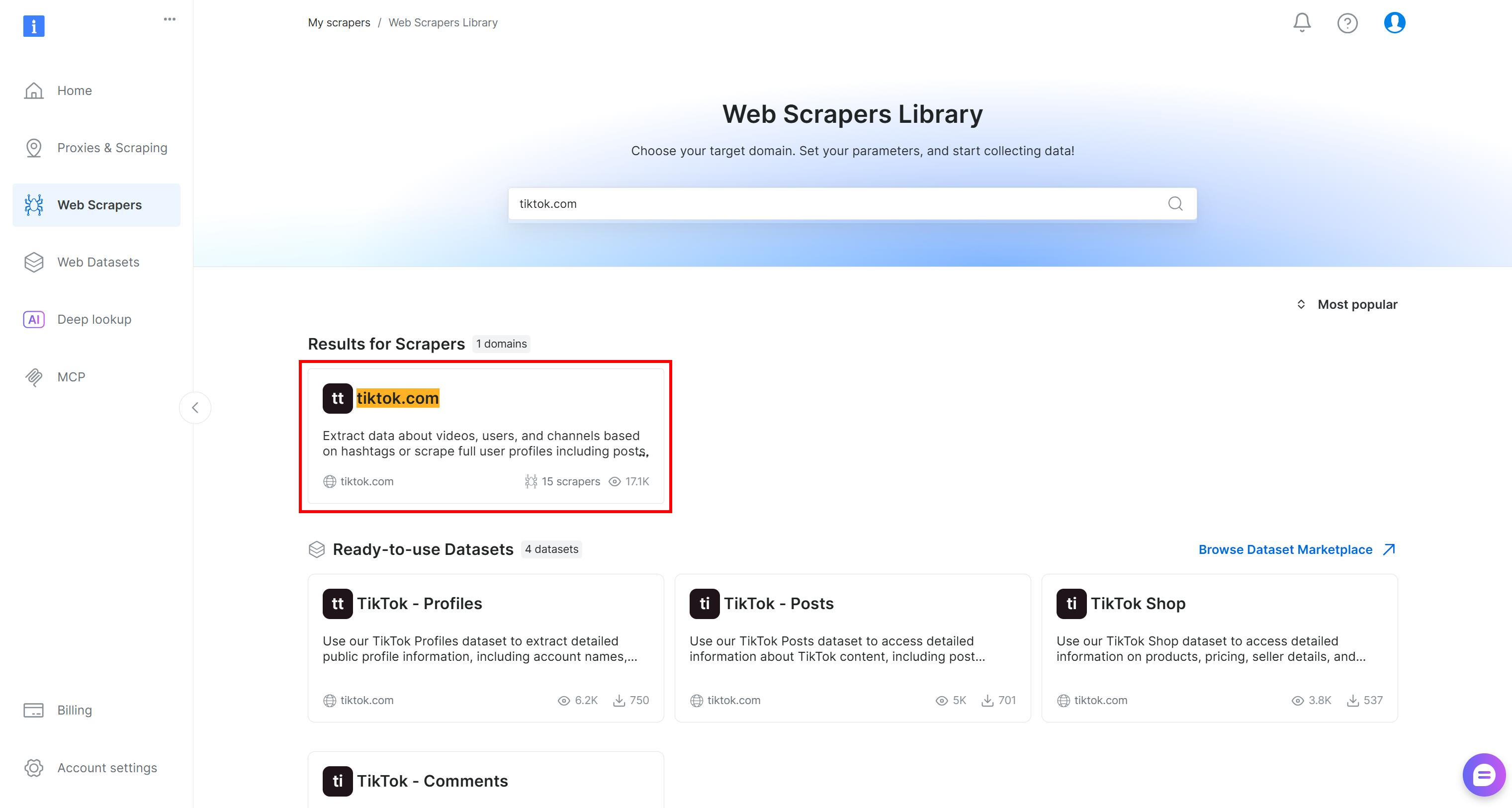
Inside the TikTok scraper page, explore the available scraping endpoints.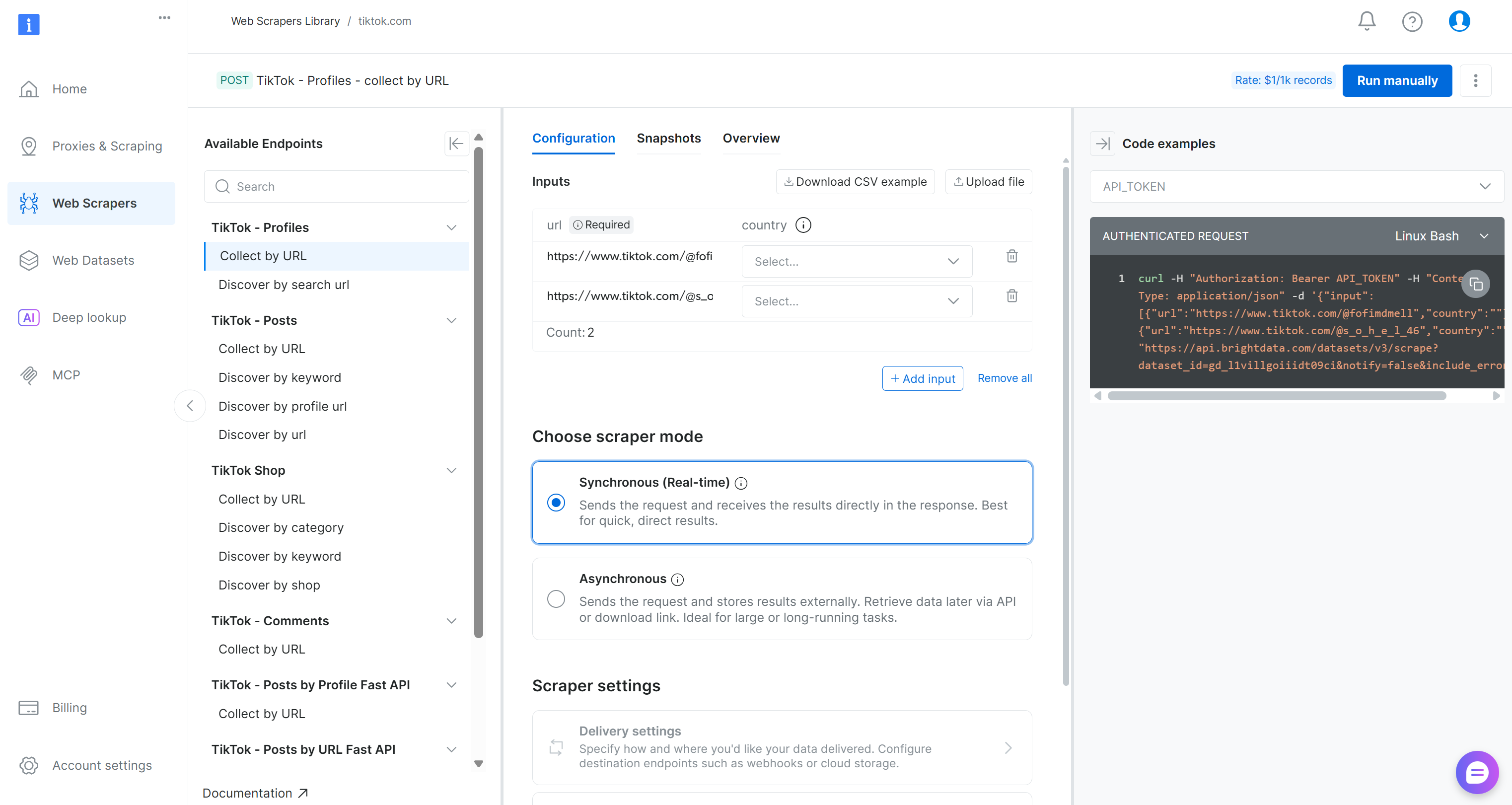
Here, you can configure input parameters, inspect request/response formats, review example API calls, and much more.
For this pipeline, locate the “Collect by URL” scraper under the “TikTok – Comments” dropdown: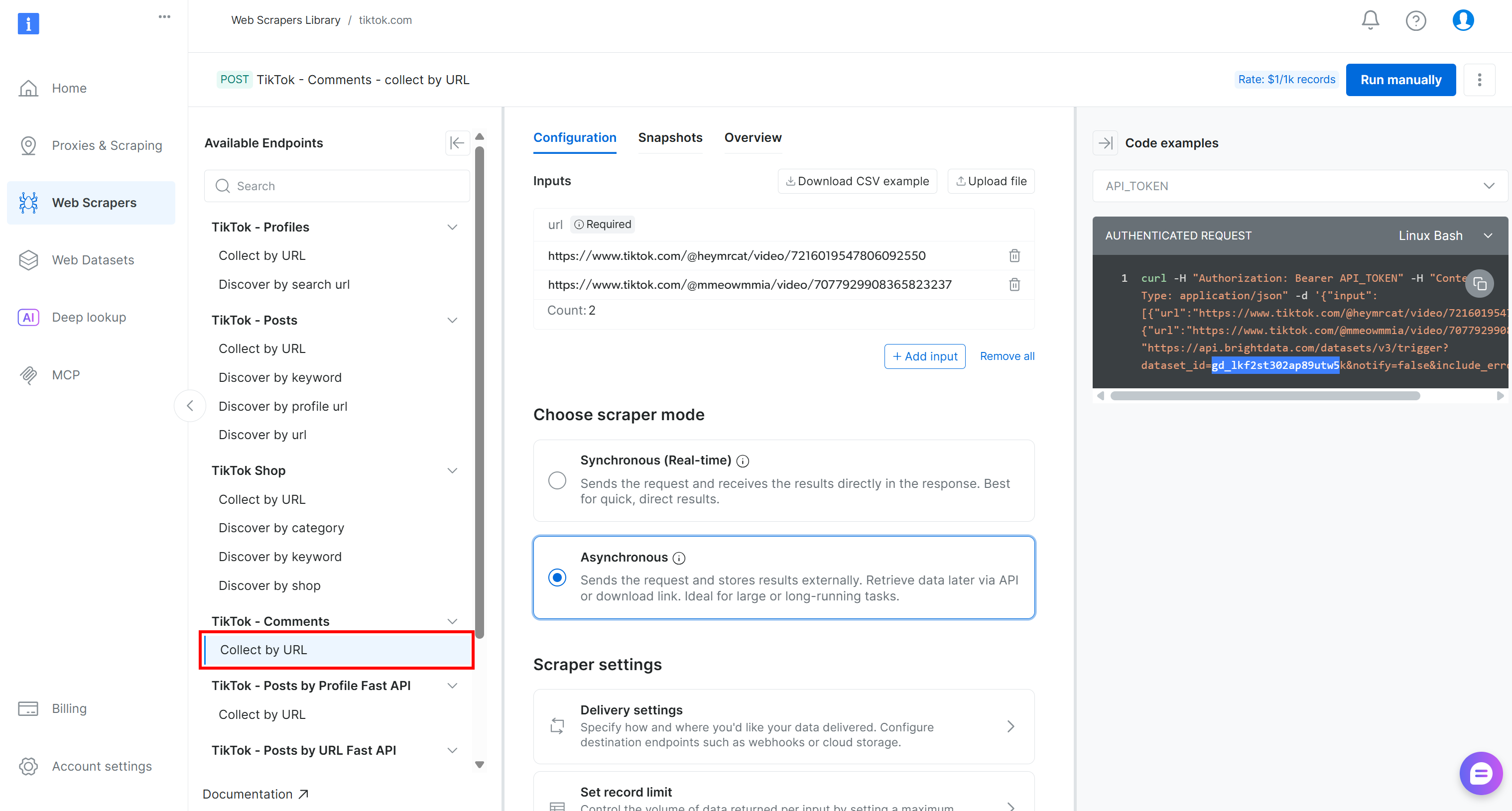
That is the Bright Data-powered endpoint you will use in the data collection component of your Kubeflow pipeline.
Take note of its dataset ID:
gd_lkf2st302ap89utw5kYou will need that to trigger the specific Web Scraping API for TikTok comment data collection.
Also, as you can see in the snippet on the right, Bright Data API calls to the Web Scraping APIs are authenticated using an API_TOKEN. This value should be replaced with your Bright Data API key, which is the recommended method for authenticating API requests.
Retrieve your API key as explained in the documentation and store it in a safe place. You will utilize it in the next step!
Step #3: Define the Web Data Collection Component
Implement the Kubeflow pipeline component for web data collection by integrating it with the Bright Data Web Scraping API for TikTok scraping:
@dsl.component(
    base_image="python:3.10",
    packages_to_install=["requests"]
)
def collect_tiktok_comments(post_urls: list, output_dataset: Output[Dataset]):
    import requests, time, json, os

    BRIGHT_DATA_API_KEY = "<YOUR_BRIGHT_DATA_API_KEY>" # Replace with your Bright Data API key
    # The ID of the "TikTok – Comments → Collect by URL" Bright Data web scraping API
    TIKTOK_DATASET_ID = "gd_lkf2st302ap89utw5k"

    # The HTTP headers common to all requests to Bright Data
    headers = {"Authorization": f"Bearer {BRIGHT_DATA_API_KEY}", "Content-Type": "application/json"}

    # Trigger the Bright Data Web Scraping API on the input TikTok posts
    trigger = requests.post(
        f"https://api.brightdata.com/datasets/v3/trigger?dataset_id={TIKTOK_DATASET_ID}",
        headers=headers,
        json={"input": [{"url": u} for u in post_urls]},
    )
    trigger.raise_for_status()
    # Retrieve the data snaptshot ID
    snapshot_id = trigger.json()["snapshot_id"]

    # Poll the snapshot endpoint to check whether the snapshot
    # containing the data of interest has been produced
    scraped_data = []
    status = "running"
    while status in ["running", "building", "starting"]:
        progress = requests.get(f"https://api.brightdata.com/datasets/v3/snapshot/{snapshot_id}?format=json", headers=headers)
        progress.raise_for_status()

        # Access the JSON response data
        response_data = progress.json()
        # If the response does not include a status, it means it contains the scraped data
        if isinstance(response_data, dict) and "status" in response_data:
            # Extract the current snapshot status
            status = progress.json()["status"]
            # Waiting for 5 seconds for the next check
            time.sleep(5)
        else:
            scraped_data = response_data
            break

    # Store the scraped dataset
    with open(output_dataset.path, "w", encoding="utf-8") as f:
json.dump(scraped_data, f, ensure_ascii=False, indent=2)Note: Make sure to replace the <YOUR_BRIGHT_DATA_API_KEY> placeholder with the Bright Data API key you retrieved earlier. In a production-ready pipeline, avoid hardcoding secrets in your components. Instead, manage them securely as explained in the documentation.
In Kubeflow Pipelines, a component is a self-contained unit (defined via the dsl.component annotation) that performs a specific task. In this case, the component retrieves web data from Bright Data. Each component is packaged in a Docker container.
For this component, the base image is a Python 3.10 environment. Then, the requests library is included because it is used to make HTTP requests to Bright Data’s API endpoints. At deployment time, when the component is built, the Python 3.10 image will be pulled, and requests will be installed automatically.
Bright Data supports both synchronous and asynchronous data delivery via its Web Scraping APIs. The synchronous method is ideal for quick data retrieval, while the asynchronous method is better suited for larger datasets. For a production-ready pipeline, it is generally recommended to rely on the asynchronous approach.
In the asynchronous method, when you request data, it may not be available immediately. Instead, Bright Data generates a snapshot of the requested data, which can take a few seconds or longer. This requires a polling mechanism, where you repeatedly check whether the snapshot is available before retrieving it.
Given this context, below is how the web data component code works, step by step:
- Send the data request: The component sends an API call to Bright Data to start generating the snapshot for the data you requested.
- Poll the snapshot endpoint: The component repeatedly calls the snapshot endpoint to check the status. If the response contains a “running”
statusfield, the snapshot is still being prepared. If thestatusfield is absent, it means the snapshot is ready and contains the scraped data. - Retrieve the data: Once the snapshot is ready, the component extracts the data from the API response and makes it available for downstream components in the pipeline.
Amazing! The Kubeflow pipeline component for web data collection is complete.
Step #4: Build the Sentiment Analysis Component
The TikTok scraped data will be retrieved as a JSON array with the following structure: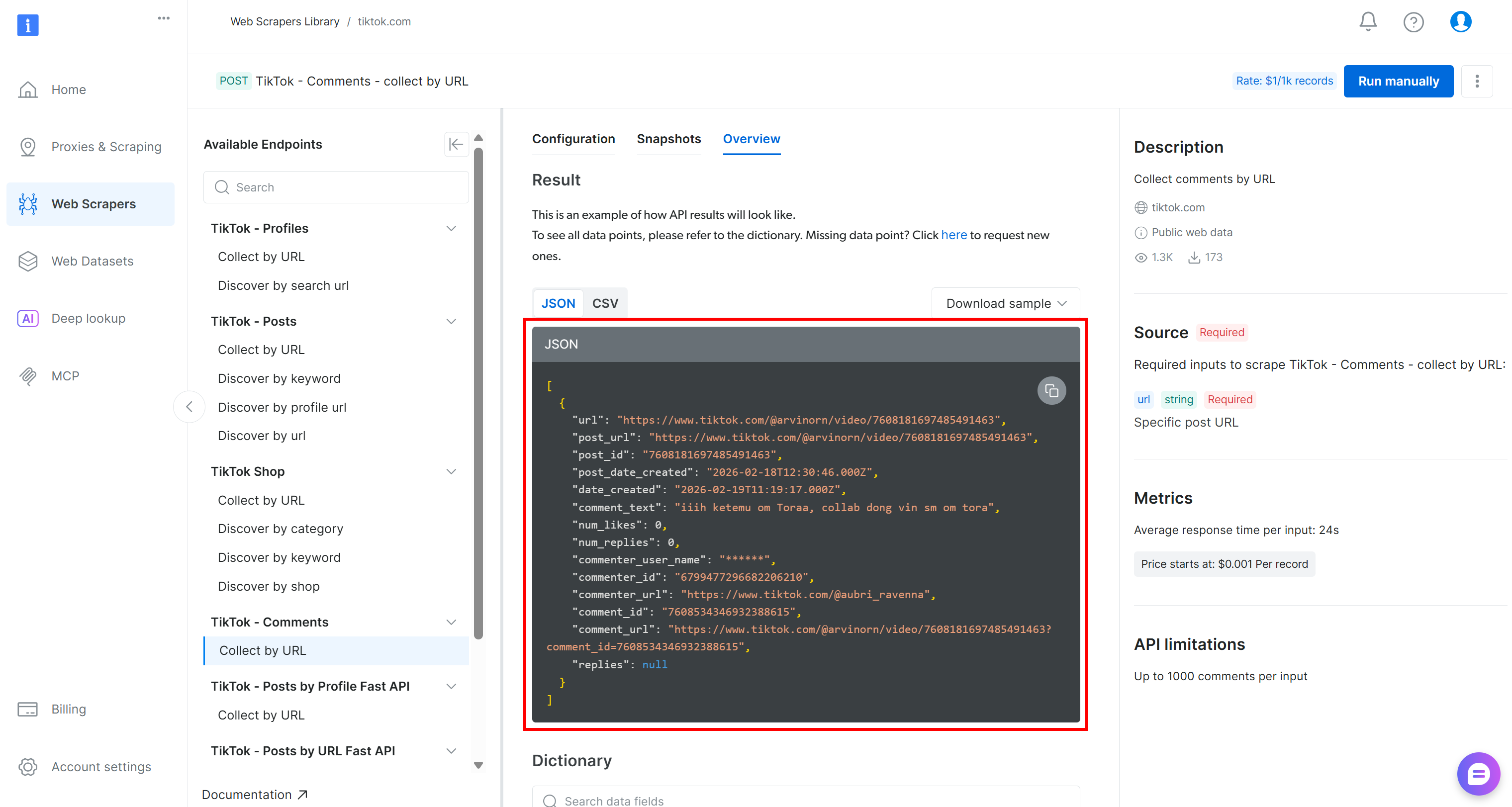
To perform sentiment analysis on that data, you can pass the comment_text field to a sentiment analysis tool like VADER Sentiment Analysis. VADER is a lexicon- and rule-based tool specifically designed to capture sentiments expressed in social media. Of course, you could also use other sentiment analysis methods, including AI-based models.
VADER is included in NLTK, one of the most popular Python toolkits for natural language processing. A typical workflow is:
- Read the input JSON array (the scraped TikTok comments) from the previous component.
- Use
pandasto simplify data filtering and selection. - Pass the text data to VADER Sentiment Analyzer via
nltk. - Save the analyzed results to be used by downstream components.
Putting it all together, the sentiment analysis component can be implemented as:
@dsl.component(
    base_image="python:3.10",
    packages_to_install=["pandas", "nltk"]
)
def sentiment_analysis(input_dataset: Input[Dataset], sentiment_output: Output[Dataset]):
    import pandas as pd
    from nltk.sentiment import SentimentIntensityAnalyzer
    import nltk

    # Download the VADER sentiment lexicon (used by NLTK for sentiment scoring)
    nltk.download("vader_lexicon")

    # Load the input dataset containing TikTok comments
    df = pd.read_json(input_dataset.path)

    # Initialize the sentiment analyzer
    sia = SentimentIntensityAnalyzer()

    # Apply sentiment analysis to each comment and classify as positive, negative, or neutral
    df["sentiment"] = df["comment_text"].apply(lambda t: (
        "positive" if sia.polarity_scores(str(t))["compound"] >= 0.05 else
        "negative" if sia.polarity_scores(str(t))["compound"] <= -0.05 else "neutral"
    ))

    # Save the results to the output dataset for downstream components
    df.to_json(sentiment_output.path, orient="records")
Cool! The two main components of the pipeline (i.e., web data collection and sentiment analysis) have now been fully implemented.
Step #5: Finalize the Kubeflow Pipeline
Now that the two components are ready, you can compose them into a single Kubeflow pipeline using a function annotated with dsl.pipeline:
@dsl.pipeline(name="TikTok Sentiment Pipeline")
def tiktok_sentiment_pipeline():
    # List of TikTok post URLs to scrape comments from
    tiktok_post_urls = [
        "https://www.tiktok.com/@nike/video/7600211777267272991",
        "https://www.tiktok.com/@nike/video/7556252854294482189"
    ]

    # Collect TikTok comments using the Bright Data web scraping component
    collect_task = collect_tiktok_comments(post_urls=tiktok_post_urls)

    # Perform sentiment analysis on the collected comments
    sentiment_task = sentiment_analysis(
        input_dataset=collect_task.outputs["output_dataset"]
    )
This pipeline first runs the TikTok comment collection component on two target videos from the same profile (@nike). In detail, the two source TikTok videos were selected because they present new shoes. Performing sentiment analysis on them is business-critical to understand what the audience thinks about the launch.
The dataset produced via the Bright Data Web Scraping API is then passed to the downstream sentiment analysis component. The sentiment analysis step processes the scraped comments and generates a new dataset containing sentiment labels (positive, negative, or neutral). That output can be used by additional downstream components, such as reporting or visualization.
Excellent! The Kubeflow pipeline is now fully defined.
Step #6: Compile the Pipeline
The final step is to compile the pipeline into a Kubeflow YAML pipeline file:
if __name__ == "__main__":
    compiler.Compiler().compile(
        pipeline_func=tiktok_sentiment_pipeline,
        package_path="tiktok_sentiment_analysis_kfp_pipeline.yaml"
    )
When you run the tiktok_sentiment_analysis_kfp_pipeline.py script, this code generates a file named tiktok_sentiment_analysis_kfp_pipeline.yaml. This YAML file contains the full pipeline specification required for Kubeflow deployment. Mission complete!
Step #7: Final Code
Below is the complete Kubeflow pipeline you should have in your tiktok_sentiment_analysis_kfp_pipeline.py file:
# tiktok_sentiment_analysis_kfp_pipeline.py
# pip install kfp

from kfp import dsl, compiler
from kfp.dsl import Input, Output, Dataset


@dsl.component(
    base_image="python:3.10",
    packages_to_install=["requests"]
)
def collect_tiktok_comments(post_urls: list, output_dataset: Output[Dataset]):
    import requests, time, json, os

    BRIGHT_DATA_API_KEY = "<YOUR_BRIGHT_DATA_API_KEY>" # Replace with your Bright Data API key
    # The ID of the "TikTok – Comments → Collect by URL" Bright Data web scraping API
    TIKTOK_DATASET_ID = "gd_lkf2st302ap89utw5k"

    # The HTTP headers common to all requests to Bright Data
    headers = {"Authorization": f"Bearer {BRIGHT_DATA_API_KEY}", "Content-Type": "application/json"}

    # Trigger the Bright Data Web Scraping API on the input TikTok posts
    trigger = requests.post(
        f"https://api.brightdata.com/datasets/v3/trigger?dataset_id={TIKTOK_DATASET_ID}",
        headers=headers,
        json={"input": [{"url": u} for u in post_urls]},
    )
    trigger.raise_for_status()
    # Retrieve the data snaptshot ID
    snapshot_id = trigger.json()["snapshot_id"]

    # Poll the snapshot endpoint to check whether the snapshot
    # containing the data of interest has been produced
    scraped_data = []
    status = "running"
    while status in ["running", "building", "starting"]:
        progress = requests.get(f"https://api.brightdata.com/datasets/v3/snapshot/{snapshot_id}?format=json", headers=headers)
        progress.raise_for_status()

        # Access the JSON response data
        response_data = progress.json()
        # If the response does not include a status, it means it contains the scraped data
        if isinstance(response_data, dict) and "status" in response_data:
            # Extract the current snapshot status
            status = progress.json()["status"]
            # Waiting for 5 seconds for the next check
            time.sleep(5)
        else:
            scraped_data = response_data
            break

    # Store the scraped dataset
    with open(output_dataset.path, "w", encoding="utf-8") as f:
        json.dump(scraped_data, f, ensure_ascii=False, indent=2)


@dsl.component(
    base_image="python:3.10",
    packages_to_install=["pandas", "nltk"]
)
def sentiment_analysis(input_dataset: Input[Dataset], sentiment_output: Output[Dataset]):
    import pandas as pd
    from nltk.sentiment import SentimentIntensityAnalyzer
    import nltk

    # Download the VADER sentiment lexicon (used by NLTK for sentiment scoring)
    nltk.download("vader_lexicon")

    # Load the input dataset containing TikTok comments
    df = pd.read_json(input_dataset.path)

    # Initialize the sentiment analyzer
    sia = SentimentIntensityAnalyzer()

    # Apply sentiment analysis to each comment and classify as positive, negative, or neutral
    df["sentiment"] = df["comment_text"].apply(lambda t: (
        "positive" if sia.polarity_scores(str(t))["compound"] >= 0.05 else
        "negative" if sia.polarity_scores(str(t))["compound"] <= -0.05 else "neutral"
    ))

    # Save the results to the output dataset for downstream components
    df.to_json(sentiment_output.path, orient="records")


@dsl.pipeline(name="TikTok Sentiment Pipeline")
def tiktok_sentiment_pipeline():
    # List of TikTok post URLs to scrape comments from
    tiktok_post_urls = [
        "https://www.tiktok.com/@nike/video/7600211777267272991",
        "https://www.tiktok.com/@nike/video/7556252854294482189"
    ]

    # Collect TikTok comments using the Bright Data web scraping component
    collect_task = collect_tiktok_comments(post_urls=tiktok_post_urls)

    # Perform sentiment analysis on the collected comments
    sentiment_task = sentiment_analysis(
        input_dataset=collect_task.outputs["output_dataset"]
    )


if __name__ == "__main__":
    compiler.Compiler().compile(
        pipeline_func=tiktok_sentiment_pipeline,
        package_path="tiktok_sentiment_analysis_kfp_pipeline.yaml"
    )
Launch the above script with:
python3 tiktok_sentiment_analysis_kfp_pipeline.pyAfter running the command, a file named tiktok_sentiment_analysis_kfp_pipeline.yaml should be generated, as shown below: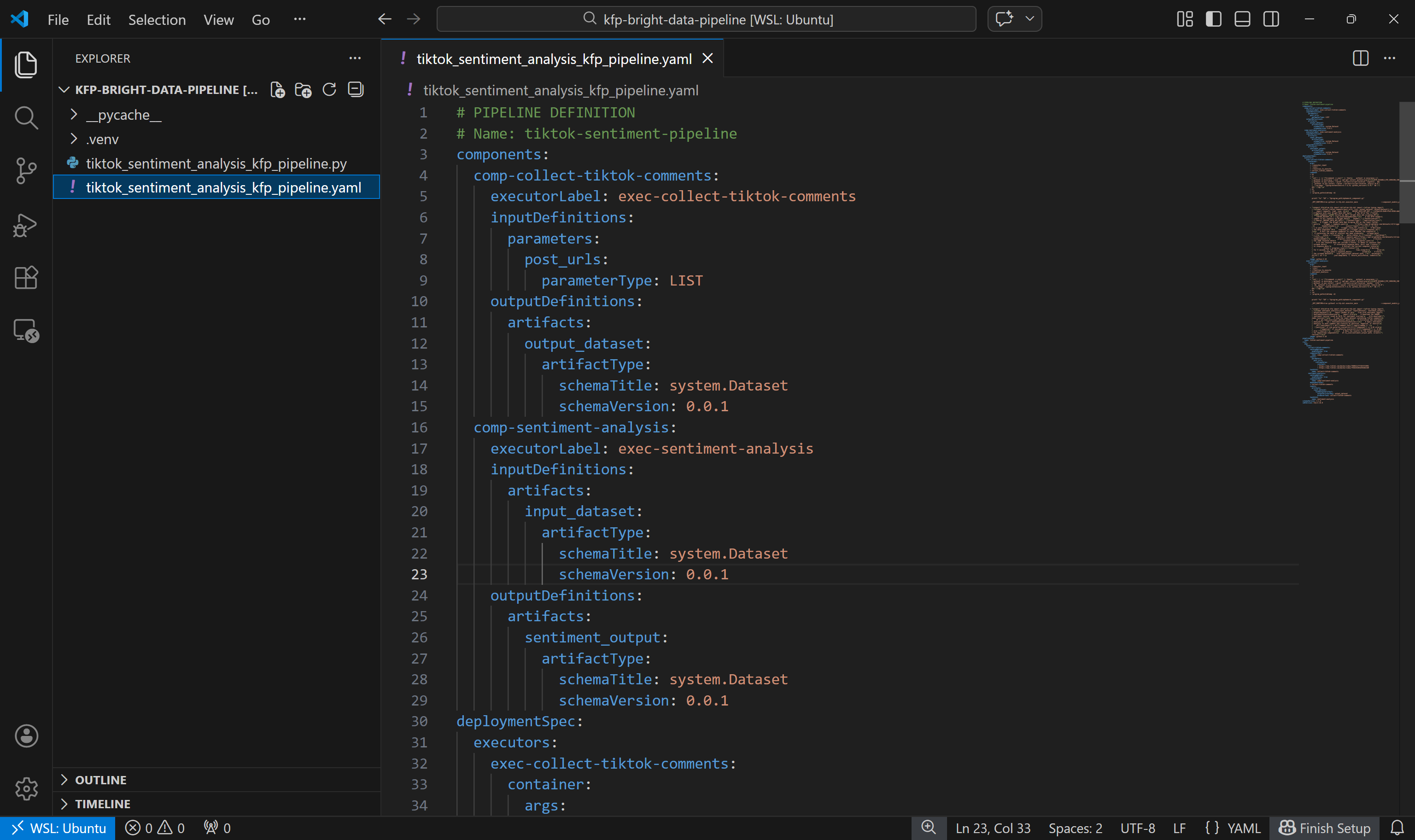
Now you can either deploy it to Kubeflow for testing or run it locally using Docker. In this guide, we will focus on the second approach.
Step #8: Test the Kubeflow Pipeline Locally
To run the Kubeflow pipeline locally, you can use the DockerRunner class. This requires Docker to be installed and running on your machine.
The DockerRunner executes each pipeline task inside a separate Docker container. In other terms, it simulates how the pipeline would run in a real Kubeflow environment.
With your virtual environment activated, start by installing the required docker library:
pip install docker Next, add a run_pipeline_local.py file to your project folder:
kfp-bright-data-pipeline/
├── .venv/
├── run_pipeline_local.py # <-----------
├── tiktok_sentiment_analysis_kfp_pipeline.py
└── tiktok_sentiment_analysis_kfp_pipeline.yaml
Populate it as follows:
# run_pipeline_local.py
# pip install docker

from kfp import local
from tiktok_sentiment_analysis_kfp_pipeline import tiktok_sentiment_pipeline

# initialize the local Docker runner
local.init(runner=local.DockerRunner())

# Run the pipeline as a Python function call
pipeline_task = tiktok_sentiment_pipeline()
This script imports the tiktok_sentiment_pipeline() function from tiktok_sentiment_analysis_kfp_pipeline.py and runs it through the local Docker runner, executing each component in its own container.
To test the pipeline, make sure Docker is running. Then, execute:
python3 run_pipeline_local.pyThe execution logs should show a success message, similar to the example below:
The pipeline output will be saved in the ./local_outputs folder. Time to explore the results!
Step #9: Exploring the Pipeline Results
After running the pipeline, open the ./local_outputs folder. Inside, you will find a subfolder for the current run containing all the produced artifacts.
Start by exploring the output dataset produced by the collect-tiktok-comments component: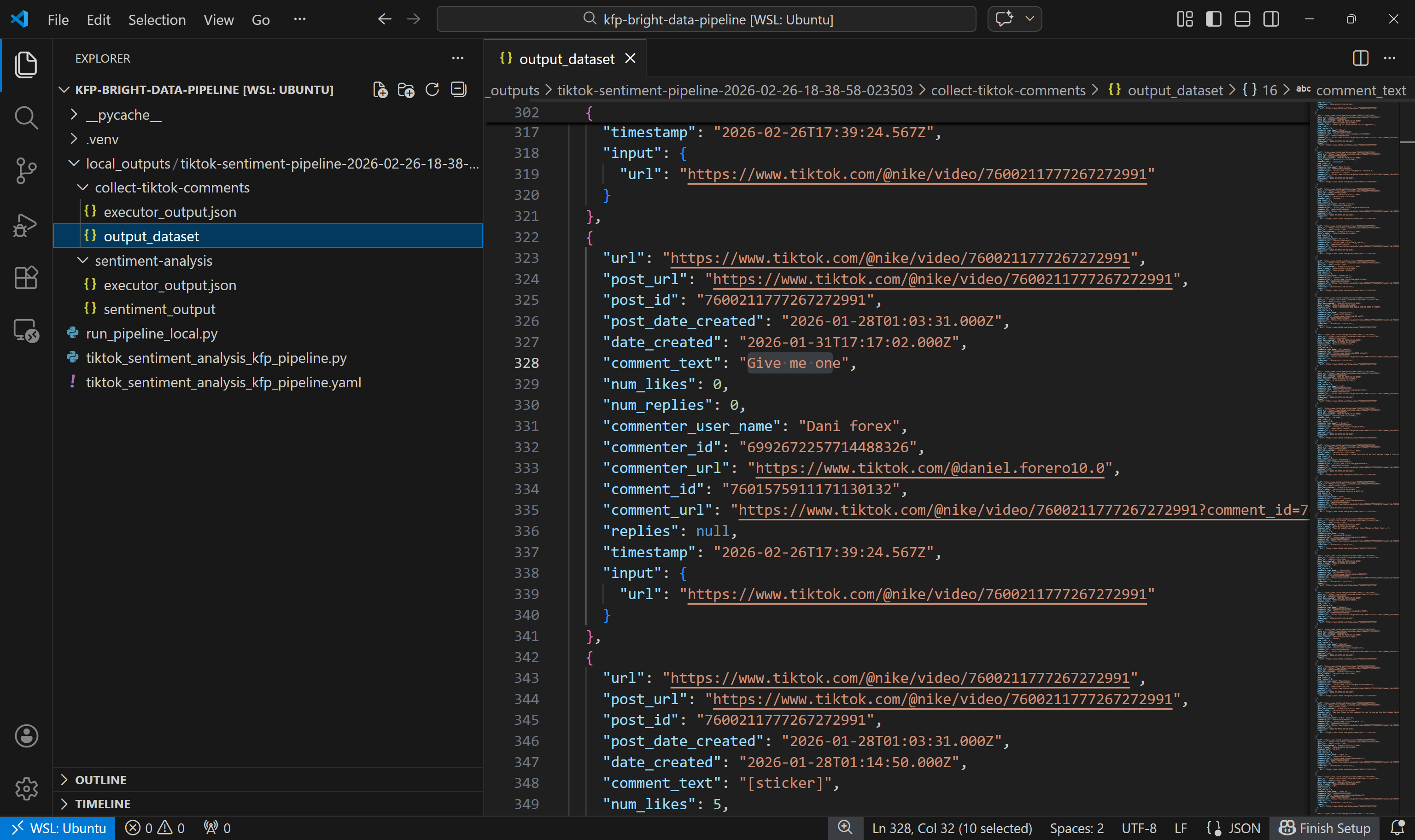
This dataset includes the comments returned by the TikTok Scraper via Bright Data for the two specified posts, as expected.
Next, look at the sentiment analysis output dataset: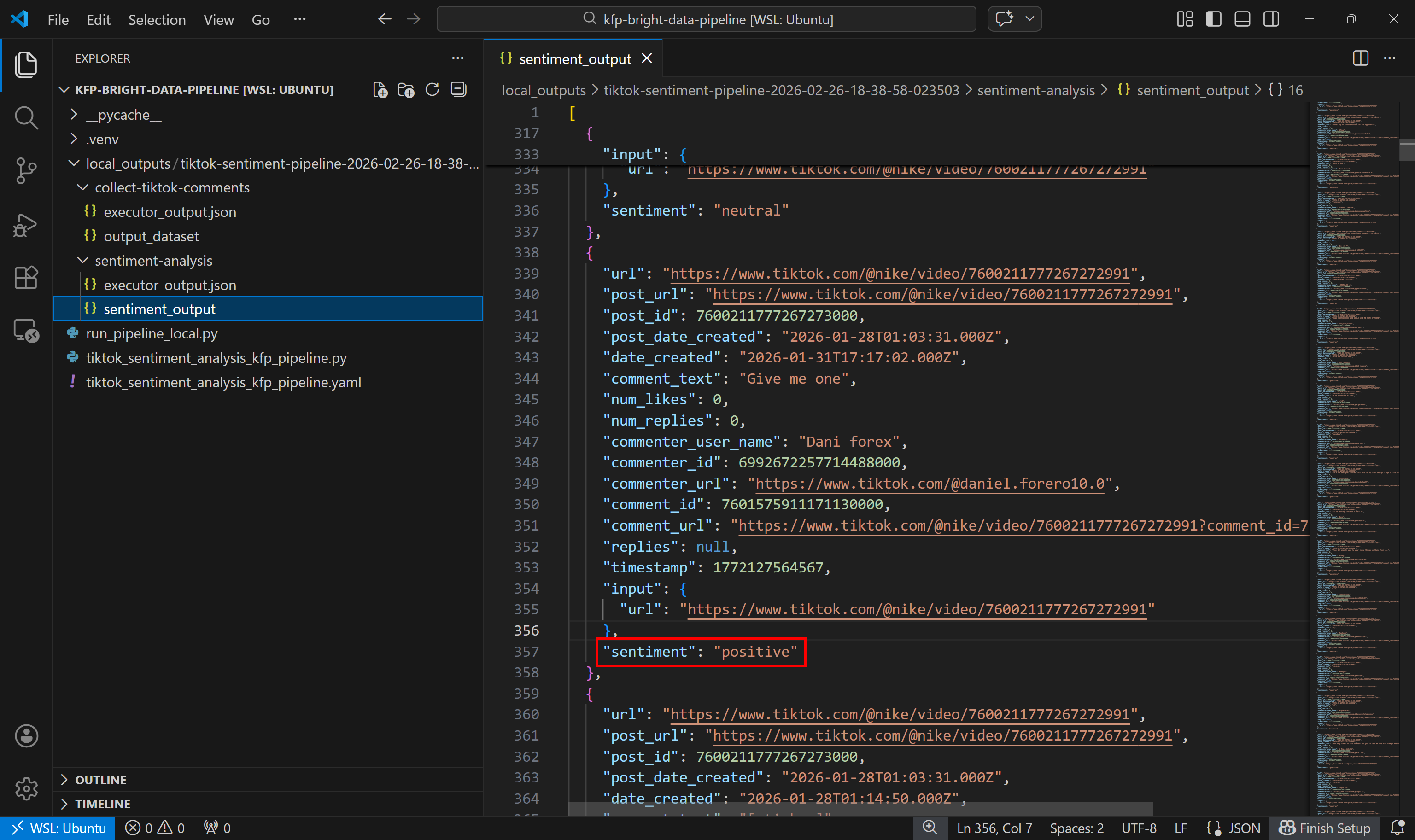
Notice how each comment has been labeled as positive, negative, or neutral by the sentiment analysis component.
Et voilà! You have just seen how to build a Kubeflow pipeline that retrieves fresh web data using Bright Data and then analyzes it.
Conclusion
In this tutorial, you understood why Kubeflow pipelines benefit from fresh data retrieved via web scraping. In particular, you saw the importance of having a dedicated component in your pipeline for collecting fresh, contextual, and structured data from the web.
Bright Data supports this through a wide range of Web Scraping APIs, which act as structured data feeds for your pipelines. As demonstrated, thanks to Bright Data’s scraping APIs, building a web data collection component in a Kubeflow pipeline is quite straightforward!
Create a free Bright Data account and start exploring our web data solutions today!



Technical Writer
 5.5 years experience
Antonello Zanini is a technical writer, editor, and software engineer with 5M+ views. Expert in technical content strategy, web development, and project management.