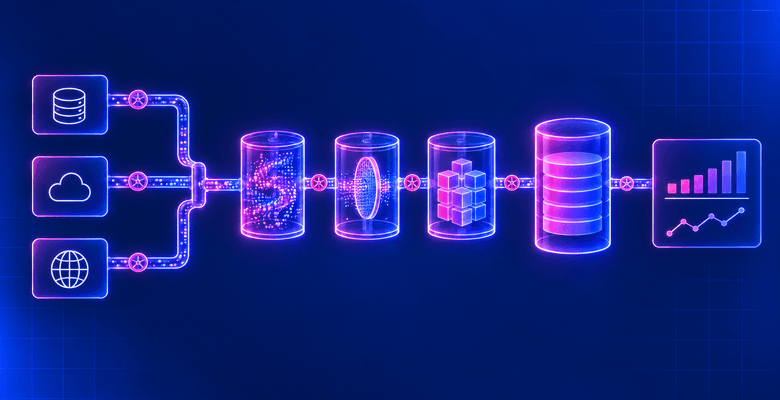
Data pipeline architecture is the design of the system that moves data from sources to people, models, and agents. It defines how data is collected, stored, checked, transformed, and served.
When public websites are a source, a pipeline can log a success while a retailer serves a country selection page instead of prices. From one home connection, each of 4 open-source clients fetched 13 search and listing pages 3 times. Of 88 success responses, 39 had no usable data.
This guide shows how to design each stage, choose a pattern, detect these failures, and decide what to build or buy.
TL;DR
- Check for the data you expect, not for block pages. A block-page detector flagged only 8 of the 39 success responses that had no data.
- Model each field at its own grain. Amazon shares one review total across a listing’s variants, so summing rows overstated the review count of 20 products by 23%.
- At high volume, let an LLM write the parser, not read every page. One Amazon page’s main content used 19 times the tokens of its 12-field record.
- Compare collectors by cost per accepted record. In the fetch test, 39 of 88 success responses had no data, so count only rows that pass your data contract.
Data pipeline architecture diagram and stages
A typical data pipeline architecture has 5 stages. Each stage does one job, and the next stage can check its output:
- Collect. Pull data from each source, using change data capture for databases, API calls for SaaS tools, and HTTP or browser requests for websites.
- Store raw. Write the data to object storage exactly as it arrived, before any parsing. In a medallion architecture, this raw data forms the bronze layer.
- Validate. Check every record against a data contract that lists required fields, types, and ranges. Send records that fail to quarantine, with a reason code.
- Transform. Deduplicate, join, and model the data in a warehouse or lakehouse. Silver tables hold validated rows, and gold tables are ready to use.
- Serve. Deliver the result to dashboards, applications, models, and AI agents.
An orchestrator such as Airflow, Dagster, or Prefect schedules the stages. Monitoring tracks freshness, volume, field fill rates, and cost per accepted record across all of them.
Data pipelining is the general term for building and running pipelines, and “data pipes” is an informal name for the pipelines themselves. ETL (extract, transform, load) is one pattern within it, and ELT is another, which loads raw data first and transforms it in the warehouse.
A big data pipeline architecture uses the same 5 stages at a volume where storage and compute must scale separately. So it usually keeps data in object storage and open table formats.
Public web data adds a discovery step that finds the URLs worth collecting, and the SERP API can run it from search results. For collection, the Bright Data Web Scraper API returns structured records from public websites. Web Unlocker handles bot defenses and returns the raw page for teams that write their own parsers.
This data pipeline architecture diagram shows how the stages connect when public websites are one of the sources:
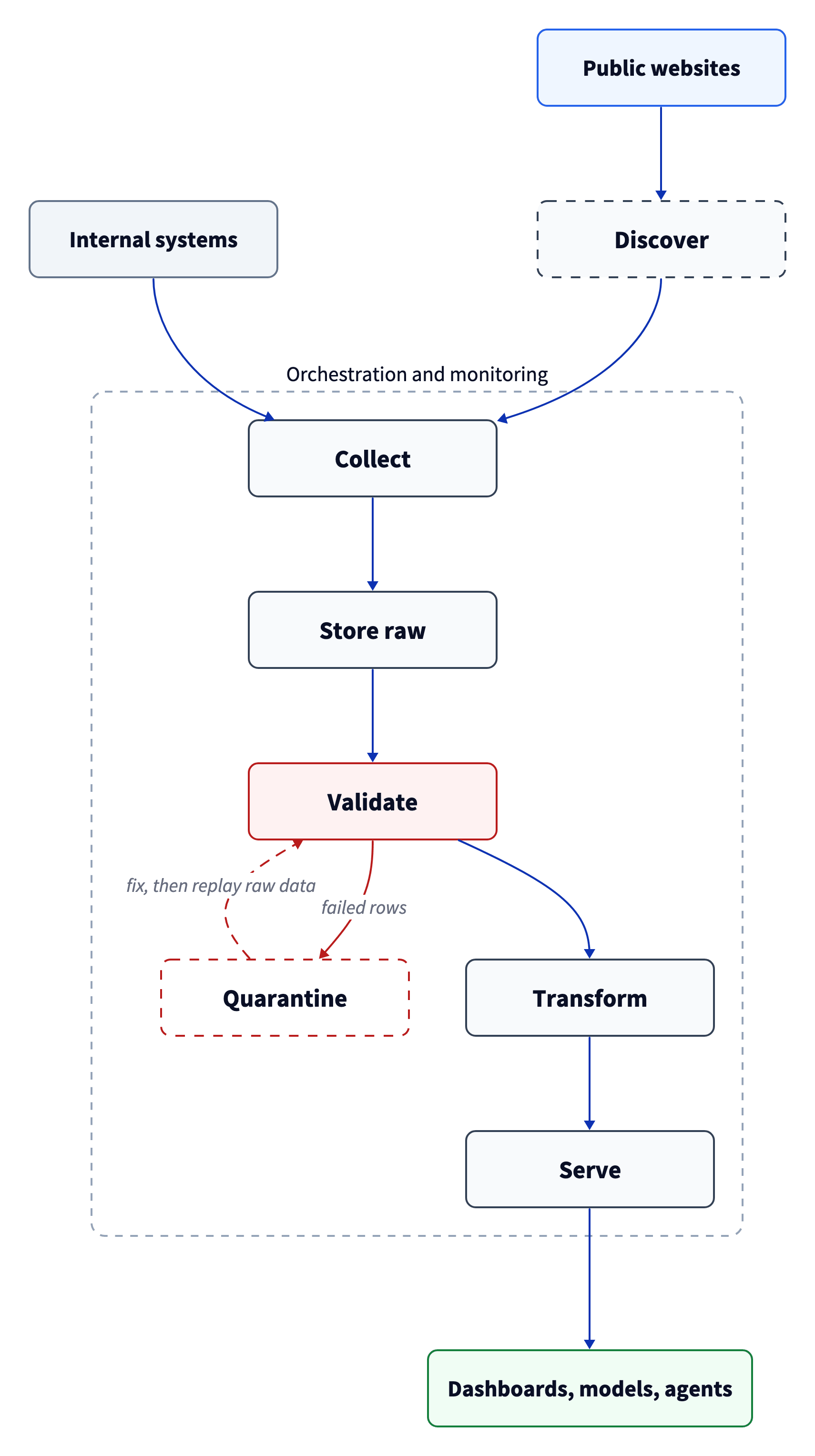
Web sources add the most work at the validate stage and on the quarantine path.
Batch, streaming, hybrid, and on-demand data pipeline architecture examples
The right pattern depends on how quickly the decision needs new data.
Batch. A retailer collects competitor prices for 50K products every night, and a repricing agent reads them in the morning. The Web Scraper API can deliver each run directly to destinations such as Amazon S3, Google Cloud Storage, or Snowflake.
Streaming. A brand team monitors social posts and news, because a mention can lose value within hours. Kafka carries the events, a stream processor such as Flink computes counts over time windows, and a connector writes the results to an Iceberg table. For a worked example with Spark, see the guide to Spark Structured Streaming with web data.
Hybrid. An investment research team keeps a daily batch of job listings for history and streams price changes for a short watchlist of products. Older designs ran these as 2 separate paths, known as the Lambda architecture. Many newer stacks write the stream into an Iceberg table, so batch and streaming jobs read the same data.
On demand. A shopping agent checks one product’s live price and stock when a user asks. The pipeline serves the latest validated row unless it’s older than the decision allows. If it is, a synchronous Web Scraper API request returns an up-to-date record in one call, and the pipeline checks it against the same contract. Give the live fetch a timeout the user can accept, and if it expires, answer with the stored row and its age.
Defaults for a modern data pipeline architecture
Start a new data pipeline design from these defaults for each layer:
| Layer | Default | Why |
|---|---|---|
| Storage and tables | Raw files in object storage, tables in an open format such as Apache Iceberg | Snowflake, Databricks, and open-source engines read the same Iceberg tables, so one copy of the data can serve them all |
| Transformation | SQL models in version control, built with a tool such as dbt | Models get code review and tests like any other code |
| Orchestration | A supported release of Airflow, Dagster, or Prefect | Check the support window before you start. Airflow 2 reached its end of life in April 2026 |
| Data contracts | A contract file for each table, in a format such as the Open Data Contract Standard (ODCS) | ODCS can also state how AI agents may use the data, so usage rules are stored with types and owners |
| Agent access | A Model Context Protocol (MCP) interface over governed tables | Most agent frameworks support MCP, and a Linux Foundation project maintains it |
If you still run AWS Data Pipeline, plan a migration, because AWS closed it to new customers in 2024.
Why public web data needs a different data ingestion pipeline
Unlike internal sources, public websites don’t coordinate their changes with your team. They can change markup and bot defenses without notice, vary content by location or client, and return a success status with no data. Internal sources usually change in planned ways, such as a schema migration or a new API version.
A success status doesn’t guarantee that data arrived
A 2xx status only shows that a server answered. A fetch test on 13 search and listing pages shows what a 2xx status can hide. The pages came from retail, travel, jobs, real estate, review, and search sites.
Each of 4 common open-source clients fetched each page 3 times, from one home internet connection in India, with no proxies. A response counted as data only if it contained the HTML patterns that mark that site’s listings. Your share of empty success responses will differ by client and network, so measure it with a content check like the one below.
| Client | 2xx responses | 2xx responses with no data | Sites with data in any of the 3 fetches (of 13) |
|---|---|---|---|
Python requests, default headers |
15 | 9 | 2 |
Python requests, Chrome headers |
24 | 10 | 5 |
curl_cffi impersonating Chrome |
29 | 9 | 7 |
| Headless Chrome (Playwright) | 20 | 11 | 3 (8 in a rerun with a normal User-Agent) |
Across all clients, 39 of the 88 success responses had no usable data, 27 with HTTP 200 and 12 with HTTP 202. A status code could flag a failed fetch but couldn’t confirm a good one.
One of the 39 was this page, which a retailer served with HTTP 200 to the home connection in India instead of search results:
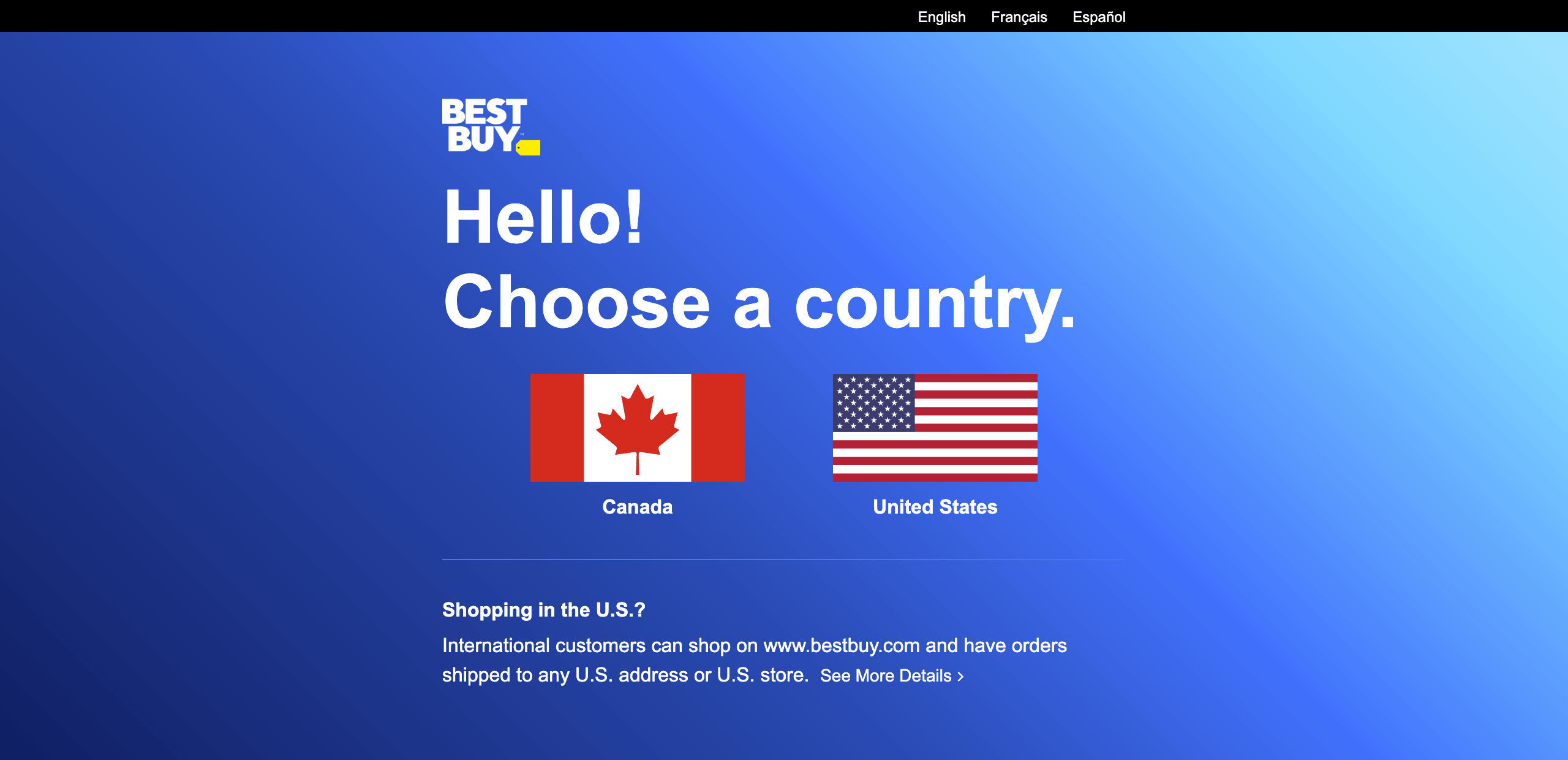
Rendered from the saved HTML of that response.
The failures didn’t look like errors. A detector built from 8 common block-page signatures, such as press-and-hold and unusual-traffic pages, flagged only 8 of the 39. The rest were challenge pages the list didn’t cover, a retailer’s country selection page, JavaScript-only pages, and 670 KB pages with empty results.
The 670 KB pages looked complete except for an empty results area:
The page headless Chrome received with HTTP 202, rendered from its saved HTML. A check on response size would have passed it.
The same detector flagged 12 of the 49 good responses as blocked. On 2 of the sites, a bot-defense script loads on normal listing pages, and its tag matched one of the signatures. Test for the data you expect, not for a block page.
Bot defenses compare clients with real browsers
Sites can identify a client before any HTML is sent, by comparing its TLS fingerprint and headers with those of real browsers. In a fingerprint check, Web Unlocker’s TLS fingerprint matched that of an up-to-date installed Chrome. At the time of testing, the newest Chrome target in the curl_cffi impersonation library was 5 major versions behind the installed Chrome. Headless Chrome got data from only 3 of the 13 sites while its User-Agent contained HeadlessChrome, and from 8 with a normal User-Agent.
From that home connection, 5 of 13 sites returned no data to any open-source client, but the test didn’t separate the client from the network. Keeping access working means tracking browser releases, fingerprints, headers, and IP reputation as they change. You either hire people for that work or buy it, through Web Unlocker for pages or the Browser API for full browser sessions.
Agents face the same defenses
On the fetch test’s 13 URLs, Claude Code’s WebFetch tool returned listings from 2 of them in a single run. Of the other 11 requests, 7 returned an error status.
The remaining 4 returned a challenge page, a country selection page, an empty page, and an error message, all with a success status. The agent has to check the content itself.
For live access, agents can use the Bright Data MCP Server, which runs searches and page fetches through the SERP API and Web Unlocker.
Some sites also let agents identify themselves and get access on agreed terms. Sites on Cloudflare can verify agents that sign their requests with Web Bot Auth. The Really Simple Licensing (RSL) standard lets a site publish licensing terms. Where a site offers either, plan to use it.
Check what the collector reports, not just the HTTP status
Web Unlocker reports each fetch’s outcome in 2 response headers. x-brd-status-code contains the target site’s status. x-brd-error contains the reason when a fetch fails, as listed in the Web Unlocker error codes. Your ingestion code should decide what to do based on these headers, the API call’s own status, and the content.
Save this check as content_check.py. It raises an error for a bad key or zone, and otherwise returns accept, retry, or quarantine in its action field:
import os, re, requests

# One marker per source, a pattern that appears only when real records are present.
MARKERS = {
    "amazon_search": r'data-component-type="s-search-result"',
    "walmart_search": r'"usItemId"',
}


def fetch_and_check(source: str, url: str, min_hits: int = 5) -> dict:
    r = requests.post(
        "https://api.brightdata.com/request",
        headers={"Authorization": f"Bearer {os.environ['BRIGHTDATA_API_KEY']}"},
        json={"zone": "web_unlocker", "url": url, "format": "raw", "country": "us"},
        timeout=(15, 240),
    )
    # A bad key or zone name. A retry won't fix it.
    if r.status_code in (400, 401, 403):
        r.raise_for_status()
    # The fetch failed or reached a rate limit. Retry later.
    if r.headers.get("x-brd-error") or r.status_code == 429 or r.status_code >= 500:
        reason = r.headers.get("x-brd-error") or f"HTTP {r.status_code}"
        return {"source": source, "action": "retry", "reason": reason[:60]}
    hits = len(re.findall(MARKERS[source], r.text))
    action = "accept" if hits >= min_hits else "quarantine"
    return {
        "source": source,
        "action": action,
        "target_status": r.headers.get("x-brd-status-code"),
        "marker_hits": hits,
        "bytes": len(r.content),
    }


if __name__ == "__main__":
    amazon = "https://www.amazon.com/s?k=noise+cancelling+headphones"
    walmart = "https://www.walmart.com/search?q=noise+cancelling+headphones"
    print(fetch_and_check("amazon_search", amazon))
    print(fetch_and_check("walmart_search", walmart))
To run it, create a Web Unlocker zone, a named setup for that product, under Web Access in the Bright Data control panel. New accounts get monthly free credits, enough to run the scripts in this guide.
Create an API key under Account settings in the control panel, and save it in an environment variable named BRIGHTDATA_API_KEY. Replace web_unlocker with your zone’s name. The name appears at the top of the zone’s page, and the page’s request example uses it:
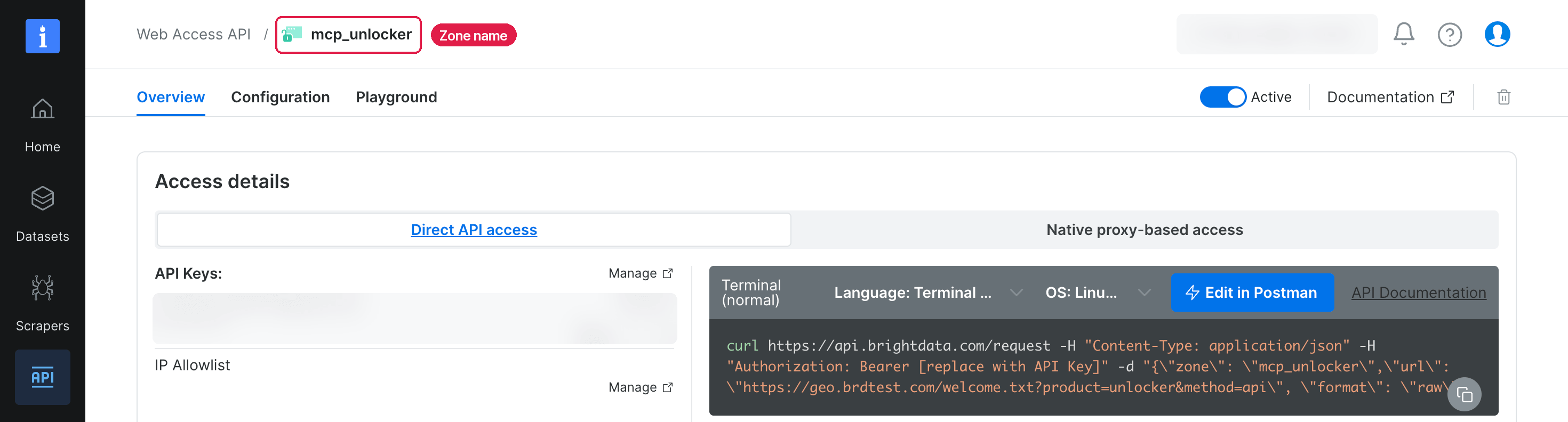
After pip install requests, run python content_check.py. A sample run accepted both pages:
{'source': 'amazon_search', 'action': 'accept', 'target_status': '200', 'marker_hits': 16, 'bytes': 1516805}
{'source': 'walmart_search', 'action': 'accept', 'target_status': '200', 'marker_hits': 395, 'bytes': 1535496}
Your pipeline repeats a retry fetch with backoff, waiting longer after each failure. A quarantine page goes to a person or a classifier, because the source may have changed. Front ends can change without notice, so when a source suddenly returns no data, first check that its marker still appears in the page’s HTML.
A reference data ingestion pipeline for web sources
The reference pipeline below uses the Web Scraper API, which returns structured records, so validation checks fields instead of parsing pages.
Filter what discovery returns
For a search on one headphone model, the SERP API returned Google’s 7 organic results, the AI Overview, videos, and People Also Ask as separate JSON fields. Google ranked only 3 retailer pages among the 7, and one of them sold a different product, the earbuds version of the same model. The AI Overview’s statement about price cited a YouTube review, not a retailer, as its first source. Treat AI answers as claims to check, and filter results by domain and by an identifier such as a model number.
Build and run the pipeline
The pipeline takes a list of product URLs, such as filtered discovery results. It starts a job with the Web Scraper API’s /trigger endpoint, tracks it with /progress, and downloads the records with /snapshot. With include_errors=true, the API reports each failed input as its own record with an error_code.
In Python, the Bright Data SDK replaces these 3 calls with one call per scraper. The script below calls the endpoints directly, so each stage stays visible, and the script works with any orchestrator. Save it as pipeline.py. Its functions follow the stages in the diagram, with collect(), store_raw(), validate(), and model() for the tables, then domain_checks() for the flags:
"""Reference web data pipeline that collects, stores raw, validates, models, and checks.

Collection: Bright Data Web Scraper API (async trigger + snapshot download).
Storage: a local folder in place of object storage (bronze), DuckDB for silver and gold.
"""
import json, os, sys, time, pathlib, datetime as dt
import duckdb, requests
from pydantic import BaseModel, Field, ValidationError

API = "https://api.brightdata.com/datasets/v3"
# Replay needs no key.
HEADERS = {"Authorization": f"Bearer {os.environ.get('BRIGHTDATA_API_KEY', '')}"}
DATASET = "gd_l7q7dkf244hwjntr0"  # Amazon products, collect by URL
LAKE = pathlib.Path("lake")


def collect(inputs: list[dict]) -> str:
    """Trigger an async collection and wait for it. Returns the snapshot ID."""
    params = {"dataset_id": DATASET, "include_errors": "true"}
    r = requests.post(
        f"{API}/trigger", headers=HEADERS, json=inputs, params=params, timeout=60
    )
    r.raise_for_status()
    snapshot_id = r.json()["snapshot_id"]
    deadline = time.time() + 3600  # fail after an hour, so the orchestrator can alert
    while time.time() < deadline:
        url = f"{API}/progress/{snapshot_id}"
        p = requests.get(url, headers=HEADERS, timeout=60).json()
        if p["status"] == "ready":
            summary = {k: p.get(k) for k in ("records", "errors", "error_codes")}
            print("progress:", summary)
            return snapshot_id
        if p["status"] in ("failed", "canceled"):
            raise RuntimeError(f"snapshot {snapshot_id} ended as {p['status']}")
        time.sleep(15)
    raise TimeoutError(f"snapshot {snapshot_id} not ready after 1 hour")


def store_raw(snapshot_id: str) -> pathlib.Path:
    """Write the snapshot unchanged to an immutable, partitioned path."""
    url = f"{API}/snapshot/{snapshot_id}"
    r = requests.get(url, headers=HEADERS, params={"format": "ndjson"}, timeout=300)
    # Anything but 200, such as 202 while the snapshot builds, isn't data.
    if r.status_code != 200:
        raise RuntimeError(
            f"snapshot {snapshot_id} not downloadable: HTTP {r.status_code}"
        )
    day = dt.datetime.now(dt.timezone.utc).date()
    path = LAKE / "bronze/amazon_products" / f"dt={day}" / f"{snapshot_id}.ndjson"
    path.parent.mkdir(parents=True, exist_ok=True)
    if not path.exists():  # a stored snapshot is never rewritten
        path.write_bytes(r.content)
    return path


class Product(BaseModel):
    """The data contract, which defines what downstream tables can receive."""
    asin: str = Field(pattern=r"^[A-Z0-9]{10}$")
    parent_asin: str | None = None
    title: str = Field(min_length=3)
    final_price: float = Field(gt=0, lt=100_000)
    currency: str = Field(pattern=r"^[A-Z]{3}$")
    rating: float | None = Field(default=None, ge=0, le=5)
    reviews_count: int | None = Field(default=None, ge=0)
    buybox_seller: str | None = None
    timestamp: dt.datetime


def validate(path: pathlib.Path) -> tuple[list[dict], list[dict]]:
    """Split a raw file into accepted rows and quarantined rows with a reason."""
    accepted, quarantined = [], []
    for line in path.read_text().splitlines():
        rec = json.loads(line)
        if rec.get("error_code"):  # failed input, reported per record
            quarantined.append({"input": rec.get("input"), "reason": rec["error_code"]})
            continue
        try:
            row = Product(**rec).model_dump()
            row["snapshot_file"] = path.name  # lineage back to the raw bytes
            accepted.append(row)
        except ValidationError as e:
            fields = ",".join(str(x["loc"][0]) for x in e.errors())
            reason = f"contract:{fields}"
            quarantined.append({"input": rec.get("url"), "reason": reason})
    return accepted, quarantined


def model(accepted: list[dict]) -> duckdb.DuckDBPyConnection:
    """Load silver idempotently, then build gold tables at the right grain."""
    con = duckdb.connect(str(LAKE / "warehouse.duckdb"))
    con.execute("SET TimeZone = 'UTC'")  # store and show every observation in UTC
    con.execute("""CREATE TABLE IF NOT EXISTS silver_prices (
        asin TEXT, parent_asin TEXT, title TEXT, final_price DOUBLE,
        currency TEXT, rating DOUBLE, reviews_count BIGINT, buybox_seller TEXT,
        observed_at TIMESTAMPTZ, snapshot_file TEXT,
        PRIMARY KEY (asin, observed_at))""")
    # The primary key makes a rerun a no-op instead of a duplicate.
    for r in accepted:
        con.execute(
            "INSERT OR IGNORE INTO silver_prices VALUES (?,?,?,?,?,?,?,?,?,?)",
            [r["asin"], r["parent_asin"] or r["asin"], r["title"], r["final_price"],
             r["currency"], r["rating"], r["reviews_count"], r["buybox_seller"],
             r["timestamp"], r["snapshot_file"]],
        )
    con.execute("""CREATE OR REPLACE VIEW latest_prices AS
        SELECT * FROM silver_prices
        QUALIFY row_number() OVER (PARTITION BY asin ORDER BY observed_at DESC) = 1""")
    # Price belongs to the variant. Reviews belong to the parent listing.
    con.execute("""CREATE OR REPLACE VIEW gold_parent_reviews AS
        SELECT parent_asin, max(reviews_count) AS reviews_count, max(rating) AS rating,
               count(DISTINCT asin) AS variants_seen
        FROM latest_prices GROUP BY parent_asin""")
    return con


def domain_checks(con: duckdb.DuckDBPyConnection) -> None:
    """Compare each product with its previous observation. Flag, never drop."""
    con.execute("""CREATE OR REPLACE TABLE flags AS
        WITH obs AS (
            SELECT *,
                lag(final_price) OVER w AS prev_price,
                lag(currency) OVER w AS prev_currency,
                lag(reviews_count) OVER w AS prev_reviews,
                lag(buybox_seller) OVER w AS prev_seller
            FROM silver_prices WINDOW w AS (PARTITION BY asin ORDER BY observed_at))
        SELECT asin, observed_at, 'price_moved_over_30pct' AS flag FROM obs
            WHERE abs(final_price - prev_price) / prev_price > 0.3
        UNION ALL SELECT asin, observed_at, 'currency_changed' FROM obs
            WHERE currency <> prev_currency
        UNION ALL SELECT asin, observed_at, 'reviews_went_down' FROM obs
            WHERE reviews_count < prev_reviews
        UNION ALL SELECT asin, observed_at, 'reviews_jumped_over_50pct' FROM obs
            WHERE reviews_count > prev_reviews * 1.5
        UNION ALL SELECT asin, observed_at, 'buybox_seller_changed' FROM obs
            WHERE buybox_seller <> prev_seller""")


if __name__ == "__main__":
    # --replay loads every bronze file into the tables again, with no new crawl.
    if sys.argv[1] == "--replay":
        raws = sorted(LAKE.glob("bronze/amazon_products/*/*.ndjson"))
    else:
        inputs = json.load(open(sys.argv[1]))
        snapshot_id = sys.argv[2] if len(sys.argv) > 2 else collect(inputs)
        raws = [store_raw(snapshot_id)]
    for raw in raws:
        ok, bad = validate(raw)
        con = model(ok)
        print(f"{raw.name}: accepted={len(ok)} quarantined={len(bad)}")
        for q in bad:
            print("quarantine:", q)
    domain_checks(con)
    print(con.sql(
        "SELECT count(*) AS rows, count(DISTINCT asin) AS asins FROM silver_prices"
    ))
    print(con.sql(
        "SELECT * FROM gold_parent_reviews WHERE variants_seen > 1 ORDER BY parent_asin"
    ))
    print(con.sql("SELECT * FROM flags ORDER BY asin"))
The DATASET value in the script is the ID of the Amazon products scraper, one of the pre-built scrapers Bright Data maintains. Its page in the control panel shows that ID in its request example, next to a zipcode input field:
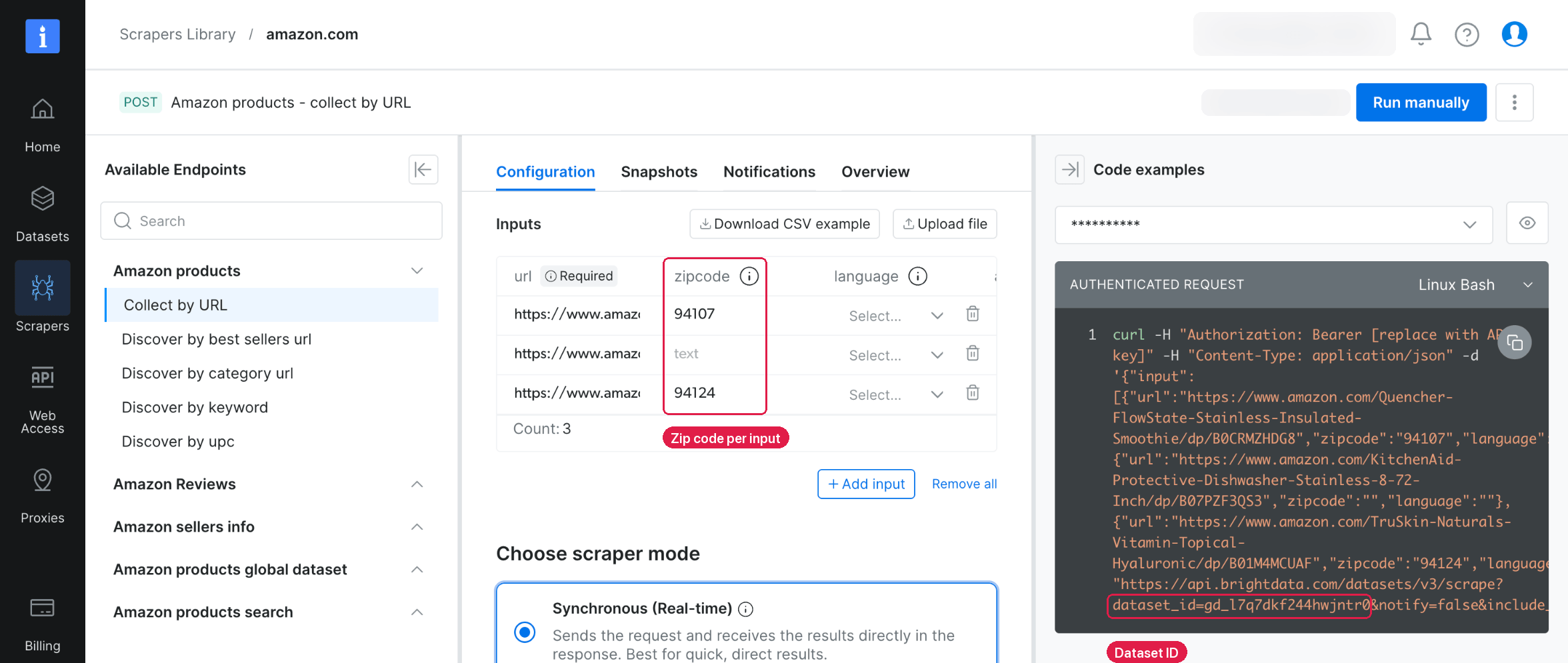
The page’s request example uses the synchronous /scrape endpoint, which returns records in the same call. The script uses /trigger instead, which runs large batches in the background and delivers the results as a snapshot.
On Python 3.10 or later, save your inputs as inputs.json in the [{"url": "https://www.amazon.com/dp/<ASIN>", "zipcode": "<ZIP>"}] format, where <ASIN> is the Amazon product ID. Then run:
pip install requests pydantic duckdb
export BRIGHTDATA_API_KEY="your_api_key"
python pipeline.py inputs.json
python pipeline.py --replay
The first python command collects and loads one run. The --replay command loads every saved raw file into the tables again, without calling the API. The output below comes from a watchlist of 20 Amazon products and 1 deliberately invalid ID, collected twice about 2 hours apart and then replayed:
sd_mvgo38o997m0dxre9.ndjson: accepted=20 quarantined=1
quarantine: {'input': {'url': 'https://www.amazon.com/dp/B0ZZZZZZZZ', 'asin': '', 'zipcode': '', 'language': ''}, 'reason': 'dead_page'}
sd_mvgsyvcx1fcvvspadf.ndjson: accepted=20 quarantined=1
quarantine: {'input': {'url': 'https://www.amazon.com/dp/B0ZZZZZZZZ', 'asin': '', 'zipcode': '', 'language': ''}, 'reason': 'dead_page'}
┌───────┬───────┐
│ rows  │ asins │
│ int64 │ int64 │
├───────┼───────┤
│    40 │    20 │
└───────┴───────┘

┌─────────────┬───────────────┬────────┬───────────────┐
│ parent_asin │ reviews_count │ rating │ variants_seen │
│   varchar   │     int64     │ double │     int64     │
├─────────────┼───────────────┼────────┼───────────────┤
│ B0FMZYMXNR  │          3015 │    4.2 │             3 │
│ B0GKGDTLG2  │           668 │    4.5 │             6 │
│ B0H1QVR9JS  │         17115 │    4.3 │             2 │
└─────────────┴───────────────┴────────┴───────────────┘

┌────────────┬────────────────────────────┬───────────────────────────┐
│    asin    │        observed_at         │           flag            │
│  varchar   │  timestamp with time zone  │          varchar          │
├────────────┼────────────────────────────┼───────────────────────────┤
│ B0FDKQZ18F │ 2026-10-20 14:53:09.044+00 │ buybox_seller_changed     │
│ B0HJ5K8WN4 │ 2026-10-20 14:53:11.293+00 │ reviews_jumped_over_50pct │
└────────────┴────────────────────────────┴───────────────────────────┘
To keep the demo simple, these runs didn’t set a zip code, but production runs should set one. The silver table kept both observations of all 20 products. Replaying again left the table at 40 rows, because the primary key blocks duplicate rows.
Design choices that find problems early
- Write raw data once and never edit it. With the raw file kept, adding a field needs no new crawl. Add it to the
Productcontract and thesilver_pricestable, deletelake/warehouse.duckdb, and run--replay. The script’s buy-box seller field, which records the merchant that wins the default Add to Cart button, was added this way. - Reject any download that isn’t HTTP 200. The snapshot endpoint returns HTTP 202 while the job is still running, as many async APIs do. Code that skips this check saves the waiting message as data. The contract then quarantines it, because the message has none of the required fields.
- Add flags after the contract check, and never drop flagged rows. A schema check detects a missing price, not a price matched to the wrong pack size. In the output above, the domain checks flagged a buy-box seller change and a review count that rose from 27 to 52. Counts can also fall, such as from 15 to 14 in a third run, which looks like reviews the site removed.
- Keep a reason code in quarantine. A
dead_pagerow means the input URL is gone, so whoever owns the input list removes it. Acontract:row means a field was missing or out of range, so a data engineer checks the source. - Keep the time zone on every timestamp. A column without one stored a 14:53 UTC observation as 20:23 local time, which breaks comparisons across sources. Use
TIMESTAMPTZand UTC.
Before you run the pipeline in production
Whoever uses your data, inside or outside the company, usually judges each delivery on coverage, freshness, provenance, and reproducibility. These practices support those 4 measures:
- Send a run summary with every delivery. List inputs, accepted rows, quarantine reasons, and flags, so users can see exactly what the dataset covers. Check coverage against an independent reference too, such as the site’s sitemap, because a run’s metrics only cover the inputs you sent.
- Alert against each source’s baseline. Send an alert when a run’s acceptance rate or a field’s fill rate drops below its baseline. Each field needs its own baseline, set from its recent history, such as a rolling median of the last 7 runs.
- Set a severity for each flag. An agent can use a wrong price before an analyst sees it. Block agents from reading rows with price or currency flags, and send less serious flags, such as a small review drop, to a person. Spot-check a daily sample of accepted rows against their source pages too, because rules only detect the errors you predicted.
- Measure the checks themselves. Track false positives, false negatives, manual review rate, and incidents per source. The block-page detector in the fetch test flagged good pages as blocked, so every check needs its own error rate.
- Keep one contract file. Ingestion code and table tests should read the same file. Tools such as the open-source
datacontract-clitest an ODCS file against tables directly. - Let the collector notify you. The Web Scraper API trigger accepts a webhook URL in
endpointwithnotifyset totrue, so the orchestrator can start validation when the snapshot is ready. - Budget for raw storage. One 2.4 MB Amazon page gzipped to 449 KB, so collecting 100K raw pages a day adds about 45 GB of storage each day. The same product’s full JSON record was 24 KB before compression, about 100 times smaller than the page. Store each raw response body with its status and headers in JSON or a WARC archive file, then move old files to cold storage.
Model each field at the grain the website uses
A table’s grain is what one row represents, such as one product variant or one parent listing. A scraped record looks like one row, but its fields can describe different things. On a marketplace, price usually belongs to the exact variant. Ratings and review counts often belong to the parent listing that groups all colors and sizes.
On the Amazon listing for one of the headphones in the watchlist, the review total appears above the color options it covers:
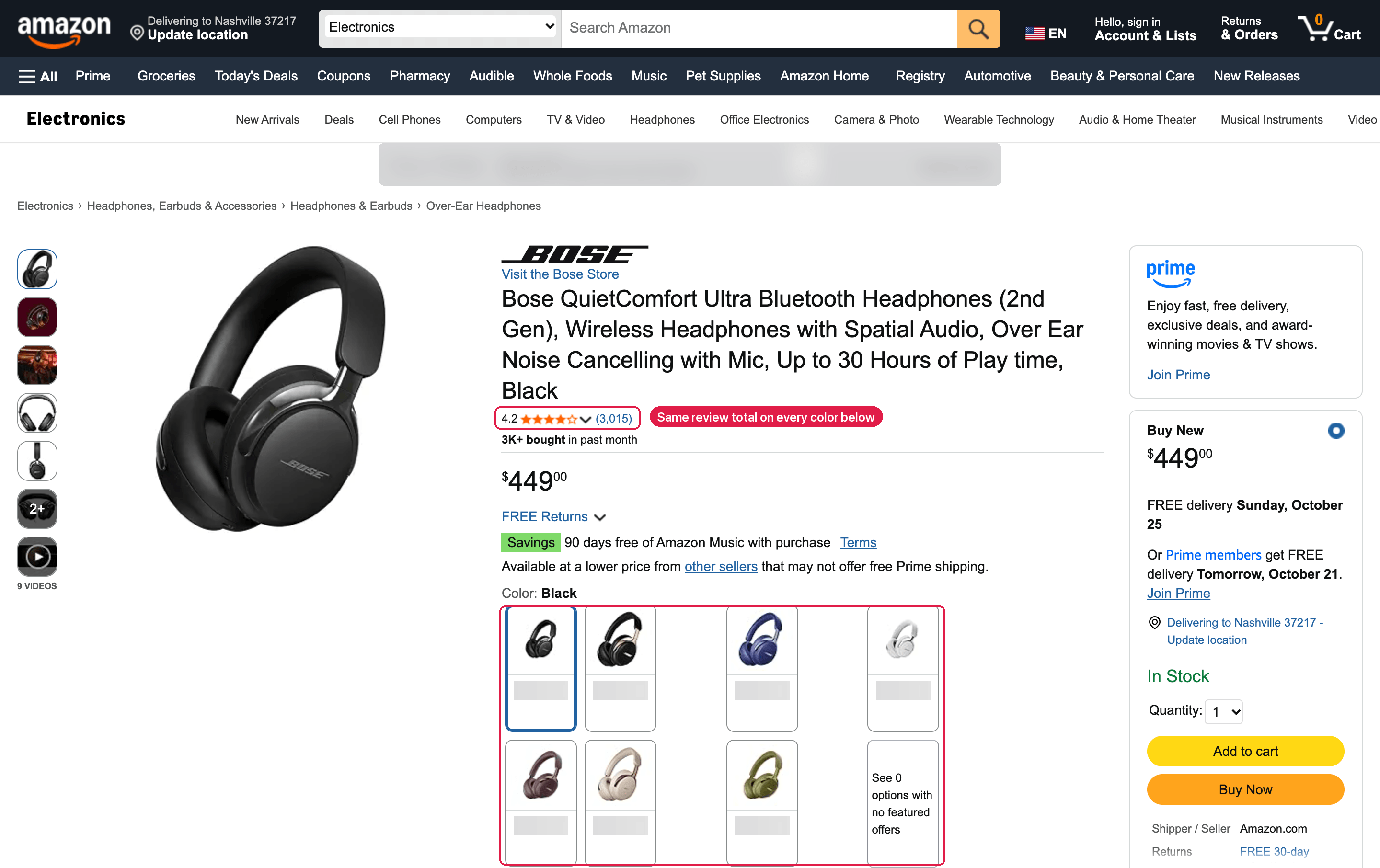
The listing as collected, rendered from its saved HTML. The 3 colors in the watchlist each reported the same 3,015 ratings.
In the 20-product watchlist, 11 products were variants of just 3 parent listings, such as 6 versions of one pair of earmuffs. So the 20 products belonged to only 12 parent listings. A row-by-row sum then counts the Bose headphones’ 3,015 ratings 3 times, once per color. Each Web Scraper API record includes a parent_asin, so a GROUP BY on it counts each review total once:
-- Wrong grain: one review total per variant row
SELECT sum(reviews_count) AS naive_variant_sum FROM latest_prices;

-- Right grain: one review total per parent listing
SELECT sum(reviews_count) AS parent_grain_sum, count(*) AS parents
FROM gold_parent_reviews;
On lake/warehouse.duckdb, the 2 queries returned:
┌───────────────────┐
│ naive_variant_sum │
│      int128       │
├───────────────────┤
│            139537 │
└───────────────────┘

┌──────────────────┬─────────┐
│ parent_grain_sum │ parents │
│      int128      │  int64  │
├──────────────────┼─────────┤
│           113052 │      12 │
└──────────────────┴─────────┘
The row-level sum overstated the review count by 23%. You can’t store price at the parent level either, because the earmuff variants ranged from $12.95 to $14.99. Write the grain of each field into the data contract, and build one gold table per grain.
Location is part of the grain as well. Offers and delivery estimates can change with the buyer’s location. Set the zip code or country on every input, and store it with each record. The Amazon products scraper takes a zipcode on each input.
Price is often several fields. The coupon_description field, for example, held a multi-buy offer on 1 of the 20 products. On 5 others, it held a free Amazon Music trial, which isn’t a price discount. The Savings badge in the Bose screenshot above is one of those trials.
Store list price, sale price, deal type, and coupon text separately, and parse a coupon before you count it as a discount. Declare the types too, because JSON writes $449 as 449, and a loader that infers types from a sample can make price an integer.
Match products across retailers
A title match can join a pair of headphones with the earbuds that share its product name, so match on identifiers. But identifiers are often missing or inconsistent. Only 7 of the 20 Amazon listings displayed a UPC (Universal Product Code) on the page. Sony also wrote one base model 2 ways, as WH-CH720N/P and WHCH720N/W.
So match in order of confidence. Start with a GTIN (Global Trade Item Number), such as a UPC. Next, try brand plus a normalized model number, then a title match with a confidence threshold. Normalize model numbers by removing separators and color suffixes.
Of the 20 products, only 6 had neither a UPC nor a model number, and all 6 were variants of one product. So only that one product’s title matches needed a person’s review.
Set refresh schedules by how fast data changes
Web data loses value at different speeds, and the refresh schedule should match. Even the fields of one record change at different speeds. The watchlist’s hourly runs show how much:
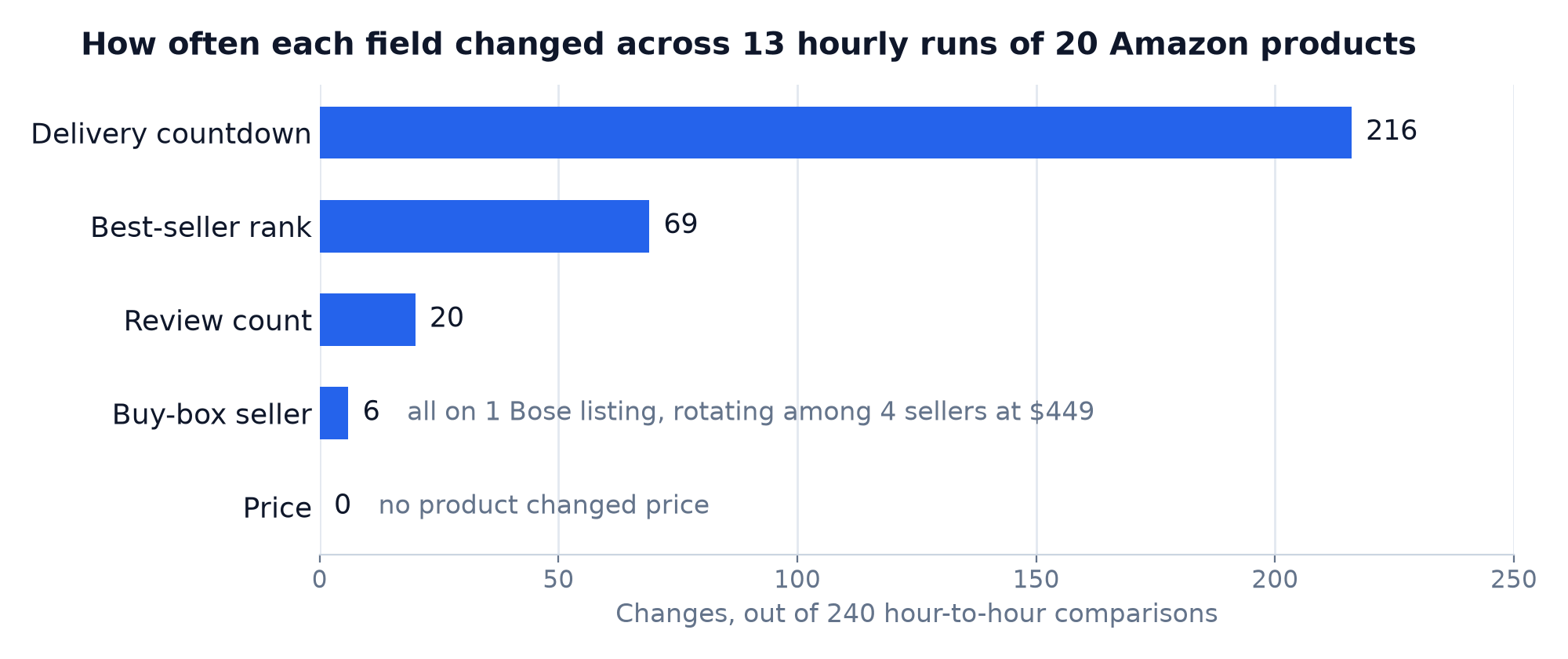
Collected with the Web Scraper API. The delivery countdown is Amazon’s “Order within 2 hrs 44 mins” message.
On one Bose listing, the buy box moved between 4 sellers 6 times while the price stayed at $449. A monitor that tracked only price would have missed every change.
Group products by how fast their key fields change, and give each group its own collection schedule, so spend goes where the data changes. Run a small job several times a day, at varied hours, on products where the buy box matters, and a daily job for the rest.
Incremental crawling lowers the cost of freshness by re-collecting only pages likely to have changed, using signals such as the lastmod dates in sitemaps. After collection, compare a hash of the fields your contract uses, so later stages reprocess only changed records.
In the fetch test, the raw HTML hash differed on every repeat fetch. Across the 240 hour-to-hour comparisons of the hourly runs, a full-record hash changed in 239. Most of those changes came from the delivery countdown. A hash of the 8 contract fields other than the timestamp changed only 26 times, each a real change in review count or buy-box seller.
A low median age can hide a few very old records. So measure freshness as a distribution, with p50 and p99 age per source, and alert on the p99.
Data pipeline architecture for AI and agents
An AI pipeline uses the same 5 stages, usually with a model or an agent at the serve stage.
Let an LLM write parsers for high-volume sources
The main question is whether a large language model should extract data from every page. One Amazon product page, counted with the o200k_base tokenizer, helps answer it:
| Form of the same product page | Bytes | Tokens |
|---|---|---|
| Full page as raw HTML | 2,446,738 | 911,129 |
| Full page as markdown | 236,088 | 97,977 |
| Main content only, extracted from the raw HTML | 17,339 | 3,252 |
| Full JSON record, all fields | 23,923 | 7,692 |
| Trimmed JSON record (12 fields) | 501 | 171 |
Full-page markdown suits an agent reading one page, but at high volume, teams usually reduce pages to their main content before extraction. Reduced this way, the page still used 19 times the tokens of the 12-field record. At an example $0.10 per 1M input tokens, 100K such pages a day cost about $33 in model input. Reading the 12-field records instead would cost about $2.
Both figures exclude collection, which each path pays for at a different rate. So compare total cost, not token cost alone. The extracted main content opened with a warranty upsell, and a model reading it can still pick the wrong price or variant. A Web Scraper API record delivers price and variant as separate fields, so no model has to pick them out of page text.
Choose the approach by volume and risk. For a source collected thousands of times a day, use the model to write the parser and fix it when it breaks. Ordinary code then runs that parser on every page and returns the same output for the same page. Scraper Studio runs this pattern as a service, building a scraper from a plain-language prompt, with one-click self-healing when the site changes.
For low-volume sites whose layouts change often, per-page LLM extraction can cost less than maintaining a parser. Either way, check the output against the same contract.
When validation fails, a coding agent can propose a parser fix and replay it over the raw pages in the bronze layer. The replay shows how many quarantined rows the fix recovers and whether any accepted row changed, and a human reviews both before merging.
Serve agents from validated tables
For agents, a live fetch is riskier than a table read, because a blocked fetch can stop an agent’s task while a user waits. In September 2026, for example, Cloudflare changed the defaults for newly added domains to block AI agents and training bots on pages that show ads. So serve agents from validated tables first, through an MCP interface that includes the contract’s usage rules.
Agents also need a prompt-injection check, because page text, including review and title fields in your tables, can contain instructions aimed at an agent. For live reads, the Bright Data MCP Server has a content gate, on by default. It asks the user to confirm before returning page text that looks like instructions to change the server’s configuration.
Track AI answers as a data source
AI assistants are a data source too, because their answers can reach a buyer before any search result does. In one test, ChatGPT’s first recommendation for the same shopping question was Bose in 3 of 5 runs and Sony in 2. So sample each prompt several times, and keep the country the same on every run so the results stay comparable. The Web Scraper API’s AI chat scrapers collect answers from ChatGPT, Copilot, Gemini, Perplexity, and Grok, with their citations as structured JSON.
Build or buy the collection layer
Most data pipeline infrastructure, including storage, transformation, and orchestration, runs on well-established tools. Collection from protected websites is different, because it has to change whenever browsers and bot defenses change.
Compare costs per accepted record, not per request. Web Unlocker bills only for successful results, and the Web Scraper API only for delivered records. Divide total spend by the records that pass your contract.
On the build side, include the engineer hours spent on proxies, parser fixes, and unblocking. On both sides, count what a bad delivery costs, such as a repricing decision based on wrong prices.
Benchmark collectors on your own URLs
Get these costs from a benchmark, the way many buying teams evaluate vendors in a proof of concept. Run your current collector and each candidate on the same URLs for several days, from the network and at the concurrency your pipeline really uses. Compare each candidate on the same measures:
| Measure | How to count it |
|---|---|
| Accepted records | Rows that pass your data contract, per source |
| Failures by reason | Blocks, challenges, and success responses that fail your content check, such as empty or wrong-region pages |
| Cost per 1K accepted records | All spend, including retries, proxies, and the engineer hours below, per 1K accepted rows |
| Latency | p50 and p95 time to deliver, for batch jobs and live fetches |
| Engineer hours | Time spent on blocks, parser fixes, and alerts during the test |
Bright Data’s monthly free credits can cover a first test on a sample of your URLs.
Decide per source
Decide for each source separately, because one pipeline usually mixes unprotected and protected sites. Count a site as protected when your own client fails the content check on it during the benchmark:
| Situation | Build | Buy |
|---|---|---|
| A few unprotected sites, collected occasionally | Yes | Start on free credits, then move to pay-as-you-go as volume grows |
| Protected sites, collected on a schedule | Only with a team that tracks browser releases, and usually with residential proxies | Web Unlocker or Browser API handles access, so your team only writes the parsers |
| Sites where you need records, not pages | Often not worth it unless the site is central to your product | Web Scraper API returns structured JSON, and Scraper Studio builds custom scrapers from a prompt |
| Data you need but don’t need to collect yourself | No | Datasets, refreshed on a schedule with only new or updated records, or the Web Archive API for pages already collected |
| Agents that browse or search live | Only for small internal tools | MCP Server, which uses the SERP API and Web Unlocker |
A data contract also makes the collector easy to change, so trying a new one is low-risk. Downstream tables, flags, and alerts depend only on the contract’s fields. Switching means connecting the collect stage to a new collector and rerunning the benchmark on your own URLs. Keep tracking each source’s acceptance rate, because sites change their defenses over time.
For budget planning, the Web Scraper API pricing page lists current pay-as-you-go rates and volume plans. The guide to data quality metrics helps define “accepted” before you compare costs.
Compliance and provenance
Collect only public data, without logging in and at request rates each site can handle. Collect personal data only where you have a legal basis, and check the copyright status of anything you republish or train on.
Keep provenance with every record, including source URL, collection time, method, code version, and the terms of service that applied. Then you can show where and how any record was collected.
Bright Data holds ISO 27001 certification and a SOC 2 Type II report, both listed on its security overview.
How the tests were run
Every test ran against live sites and services, which change over time:
| Test | Setup |
|---|---|
| Fetch test | Each of 4 open-source clients fetched 13 search and listing pages 3 times. The clients were Python requests with default headers, requests with Chrome headers, curl_cffi with its Chrome 150 target, and headless Chrome 155 through Playwright. All ran from one home internet connection in India, with no proxies. A response counted as data when it had the HTML patterns that mark the site’s listings, and a separate detector checked 8 block-page signatures. A headless rerun with a normal User-Agent fetched each page 2 times. |
| Fingerprint check | TLS handshakes from Web Unlocker, Python requests, curl_cffi (Chrome 150 target), and installed Chrome 155, compared on tls.peet.ws |
| Agent fetch | The same 13 URLs, one run through the WebFetch tool that Claude Code agents use |
| Reference pipeline | 20 Amazon products plus 1 deliberately invalid ID, Web Scraper API, 2 runs about 2 hours apart and a third about 17 hours later |
| Hourly runs | The same 20 products, 13 runs an hour apart, 240 hour-to-hour comparisons |
| Discovery | A Google search for one headphone model through the SERP API |
| Token counts | One Amazon product page through Web Unlocker (HTML and markdown) and the Web Scraper API (JSON), o200k_base tokenizer, main content extracted with trafilatura 2.3 |
| AI answers | One shopping question to ChatGPT through the Web Scraper API, 5 runs with no country set |
Final thoughts
When a data pipeline collects from public websites, a response can have a success status and no data, and one record can mix several grains.
Store raw data unchanged, check content against a data contract, flag unusual changes, and replay any parser fix an agent proposes before you merge it. If the collection layer costs more in engineer time than in requests, the Web Scraper API can run that stage for your team. Start by running a content check on your least reliable source, and count how many of its success responses contain usable records. Then run the same URLs through Web Unlocker or the Web Scraper API on a free Bright Data account, and compare cost per accepted record.
FAQ
What are data pipes?
“Data pipes” is an informal name for data pipelines, the systems that move data from its sources to the tools that use it. A typical one collects, stores, checks, transforms, and serves data. Data pipeline architecture is their design, which defines the stages, the tools, and the checks between them.
What is data pipelining?
Data pipelining is the practice of building and running data pipelines, which move data from sources to the tools that use it. The work covers collecting, storing, checking, transforming, and serving data, plus scheduling and monitoring each stage. It isn’t the same as instruction pipelining in CPUs, which overlaps processor steps inside a chip.
What are the 5 steps of a data pipeline?
The 5 steps of a typical data pipeline are collect, store raw, validate, transform, and serve. Collection pulls data from sources, and raw storage keeps it unchanged. Validation checks it against a data contract, transformation models it into tables, and serving delivers it to dashboards, models, or agents.
What is a modern data pipeline architecture?
A modern data pipeline architecture usually stores raw data in object storage and keeps tables in an open format such as Apache Iceberg. It transforms data with a tool such as dbt and schedules stages with an orchestrator such as Airflow. A data contract controls what enters the tables, and agents can read them through the Model Context Protocol (MCP).
What are some examples of data pipelines?
A nightly batch of competitor prices loaded into a warehouse is a common example. A stream of social posts processed in minutes for brand monitoring is another. A hybrid keeps daily history and streams changes for a short watchlist, and an on-demand pipeline fetches live data when an agent asks. All 4 use the same 5 stages.
Can AI create data pipelines?
Yes, a coding agent can write most of a pipeline’s code while a human reviews each change. For collection, Bright Data’s Scraper Studio builds a scraper from a plain-language prompt. Per-page LLM extraction works if each output passes the data contract, but it uses more tokens. An Amazon page’s main content was 3,252 tokens, against 171 for a 12-field record.
What is a data ingestion pipeline?
A data ingestion pipeline, the first part of a data pipeline, collects and stores data from sources. Web sources need a content check. In a test of open-source clients on 13 sites, 39 of 88 success responses had no data. For sites with bot defenses, Bright Data’s Web Unlocker returns the page, or the Web Scraper API returns structured records.
What is a big data pipeline?
A big data pipeline is a data pipeline built for volumes where storage and compute must scale separately. It usually stores data in object storage and keeps it in open table formats such as Apache Iceberg or Delta Lake. Distributed engines such as Spark or Flink process it.


Technical Writer
 5 years experience
Satyam Tripathi helps SaaS and data startups turn complex tech into actionable content, boosting developer adoption and user understanding.