In this tutorial, you will learn:
- Why it makes sense to retrieve data from Bilibili through web scraping.
- What types of data you can scrape from Bilibili.
- How to build a Bilibili scraping and downloading pipeline to collect video data for AI training (and other use cases).
- Why a dedicated Bilibili scraper is a better choice for production-ready, enterprise-grade applications.
Skip the complexity: Bright Data’s Bilibili Scraper delivers ready-to-use video data at enterprise scale, with built-in anti-bot bypass and 99.99% uptime.
Let’s dive in!
Why Scrape Bilibili: Possible Use Cases
Bilibili is a Shanghai-based video platform often described as the “YouTube of China.” Launched in 2009, it has grown into a Gen-Z powerhouse with over 294 million monthly active users and more than 3 billion daily video views.
Originally centered on ACG (Anime, Comics, and Games), it now spans technology, education, lifestyle, music, esports, and livestreaming. Bilibili is known for its real-time “danmu” bullet comments and highly engaged community. It combines user-generated content, influencer culture, gaming, and advertising into the same digital ecosystem.
Given how fast-growing Bilibili is, gaining access to data from the platform supports many use cases, such as:
- Video AI training: Large-scale Bilibili video datasets can power computer vision, speech recognition, multimodal LLMs, recommendation systems, and content moderation models. That is possible thanks to rich metadata, transcripts, engagement signals, and raw audiovisual content.
- Trend and content intelligence: Analyze categories, tags, views, and engagement metrics to identify emerging topics, fast-growing creators, and viral formats within Gen-Z audiences and ACG-driven communities.
- Creator and influencer analytics: Track uploader performance, follower growth, engagement ratios, and publishing frequency to benchmark KOL (Key Opinion Leader) impact and optimize influencer marketing strategies in China.
- Audience sentiment analysis: Mine danmu (bullet comments) and standard comments to understand viewer reactions, emotional tone, cultural references, and real-time feedback patterns at scale.
- Competitive benchmarking: Compare brand channels, sponsored campaigns, and category leaders by monitoring views, interactions, and content strategies across similar niches.
- Market entry and localization research: Evaluate content preferences, language usage, and trending themes to tailor products, campaigns, and messaging for China’s digital-native audience.
Data You Can Retrieve from Bilibili
When scraping Bilibili, there are several data fields you can target. These depend on the specific types of pages you are collecting from and your overall goals. So, there are multiple interesting Bilibili data categories worth exploring.
Video Metadata
When targeting a specific Bilibili video, you can gather:
- Basic information: Title, description, cover image URL, video ID, video duration, etc.
- Upload details: Publication timestamp and category/partition (e.g., “Anime,” “Tech,” or “Music”).
- Categorization: Tags, keywords, and whether the video is marked as original content or a reprint.
- Engagement statistics: Total views, likes, coins, favorites, and shares.
- Comments: The comments displayed directly on the video. This includes the comment text, timestamp, color, font size, and display mode.
- Subtitles: AI-generated or uploader-provided transcripts.
User and Creator Profiles
When focusing on a Bilibili creator page, you can scrape:
- Identity information: Username, user ID, gender, profile picture, etc.
- Social metrics: Follower count, following count, and total likes received across all videos.
- Personal details: User bio, birthday, and account level.
- Account status: Verification badge (e.g., “Official Musician”) and membership tier (e.g., VIP/Big Member).
- Works list: All publicly uploaded videos from a specific creator.
Search and Discovery Data
You can also leverage Bilibili’s search system to retrieve:
- Search results: Lists of videos, users, or live streams matching specific keywords.
- Trending data: Hot search keywords and daily/weekly leaderboard rankings.
- Live stream information: Room ID, stream title, live status, and concurrent viewer count (popularity index).
Building a Bilibili Scraper and Video Download Pipeline in Python: A Step-by-Step Guide
In this guided section, you will learn how to scrape Bilibili video metadata from the “Tech” category page: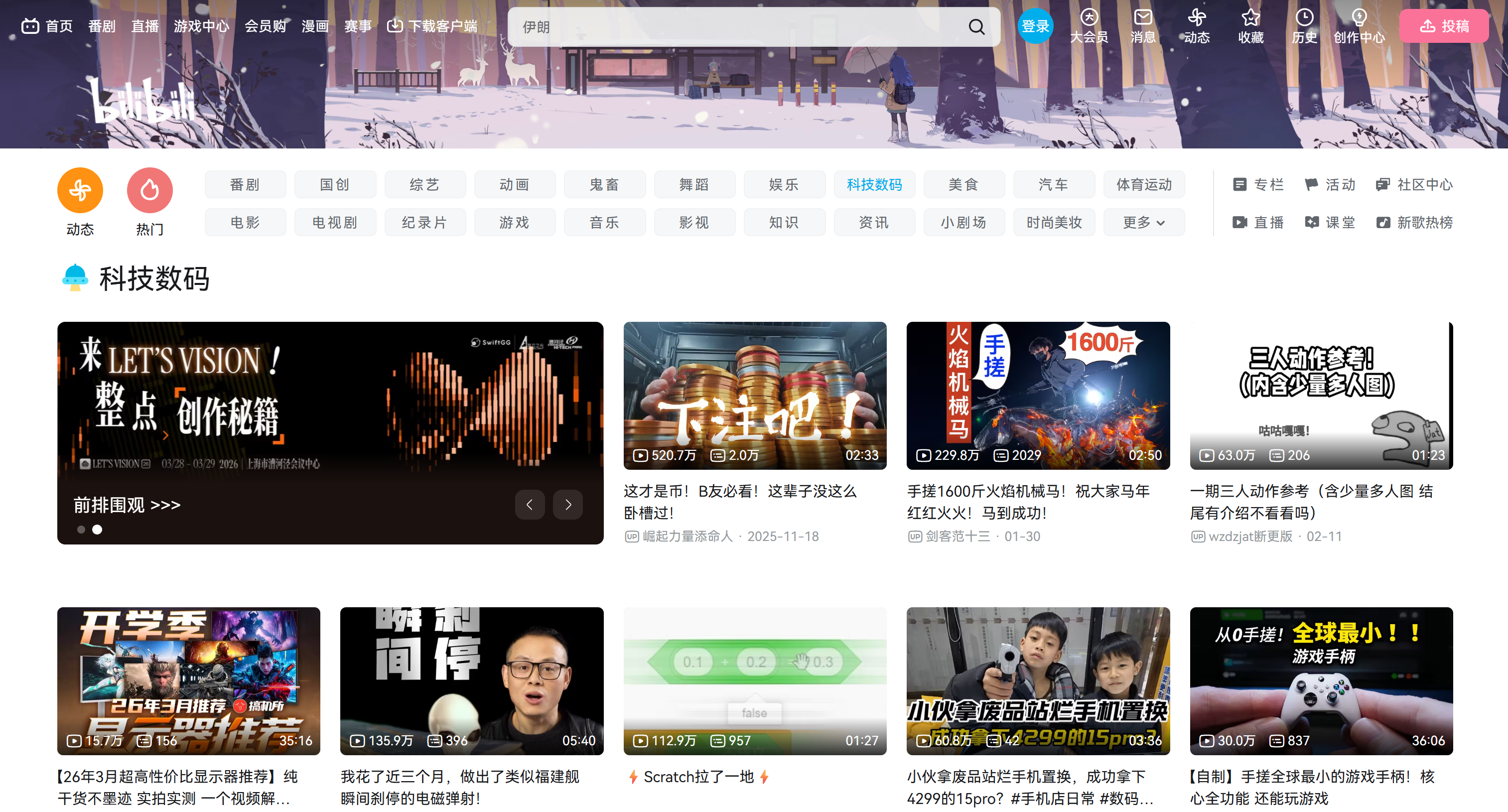
Note that this is just an example. The same logic can be applied to any other category page, including the main homepage.
Using the video URLs extracted from that page, you will then build a second script to download them one by one. With the downloaded video files, you will finally be able to feed them directly into your AI/ML training pipelines.
Follow the instructions below!
Prerequisites
To follow this tutorial, make sure you have:
- Python 3.10 installed locally.
- FFmpeg installed locally.
- Familiarity with how browser automation works.
- A basic understanding of how
yt-dlpworks.
Verify that FFmpeg is installed on your machine with this command:
ffmpeg -versionYou should see something similar to this: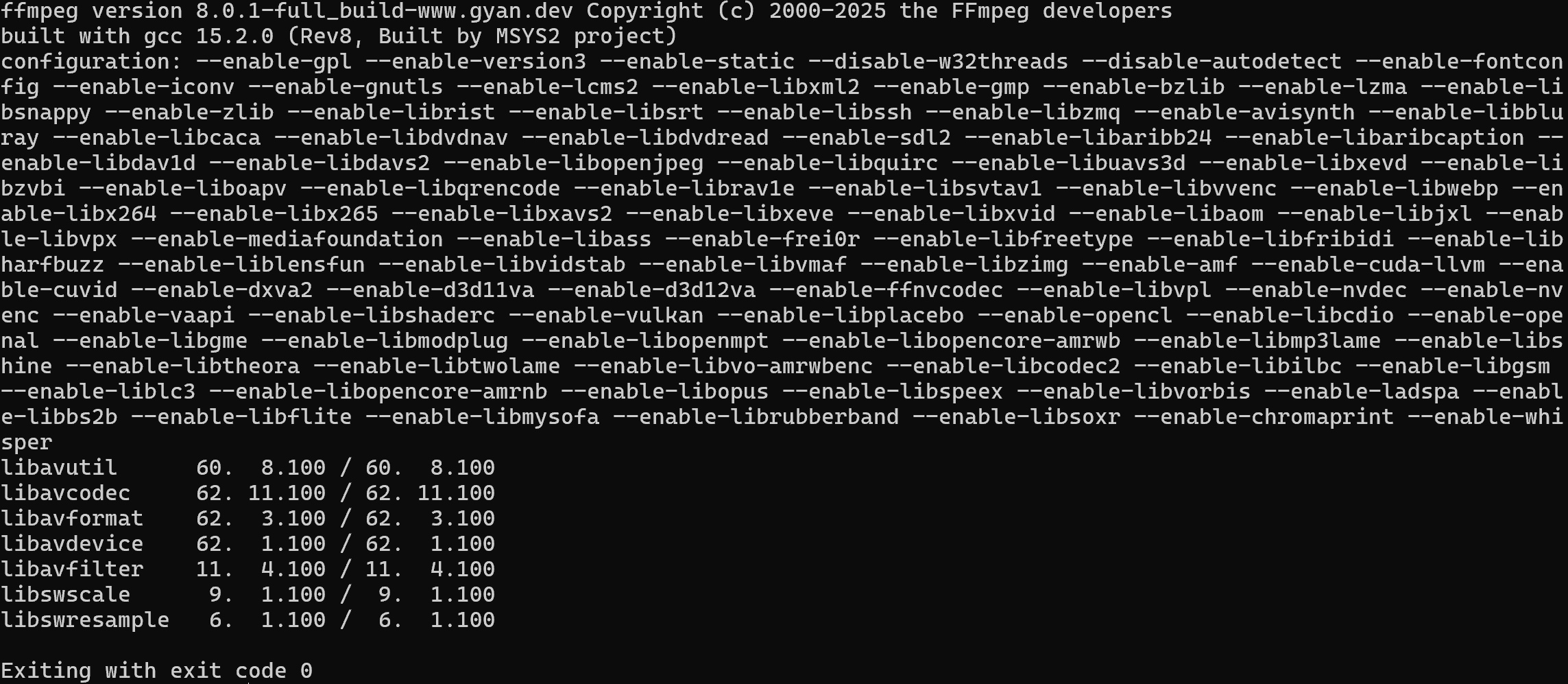
If you get an error instead, install FFmpeg by following the official installation guide for your operating system.
Step #0: Get Familiar with Bilibili
Before writing any code, spend some time exploring the target site. You need to understand whether it is static or dynamic, because your web scraping roadmap depends on that.
If the site is static, a simple HTTP client plus HTML parsing approach may be enough. If it is dynamic, you need a browser automation tool. Learn more in our guide on static vs dynamic content for web scraping.
Visit the target page in your browser and start interacting with it. Notice how the page uses an infinite scrolling UI pattern: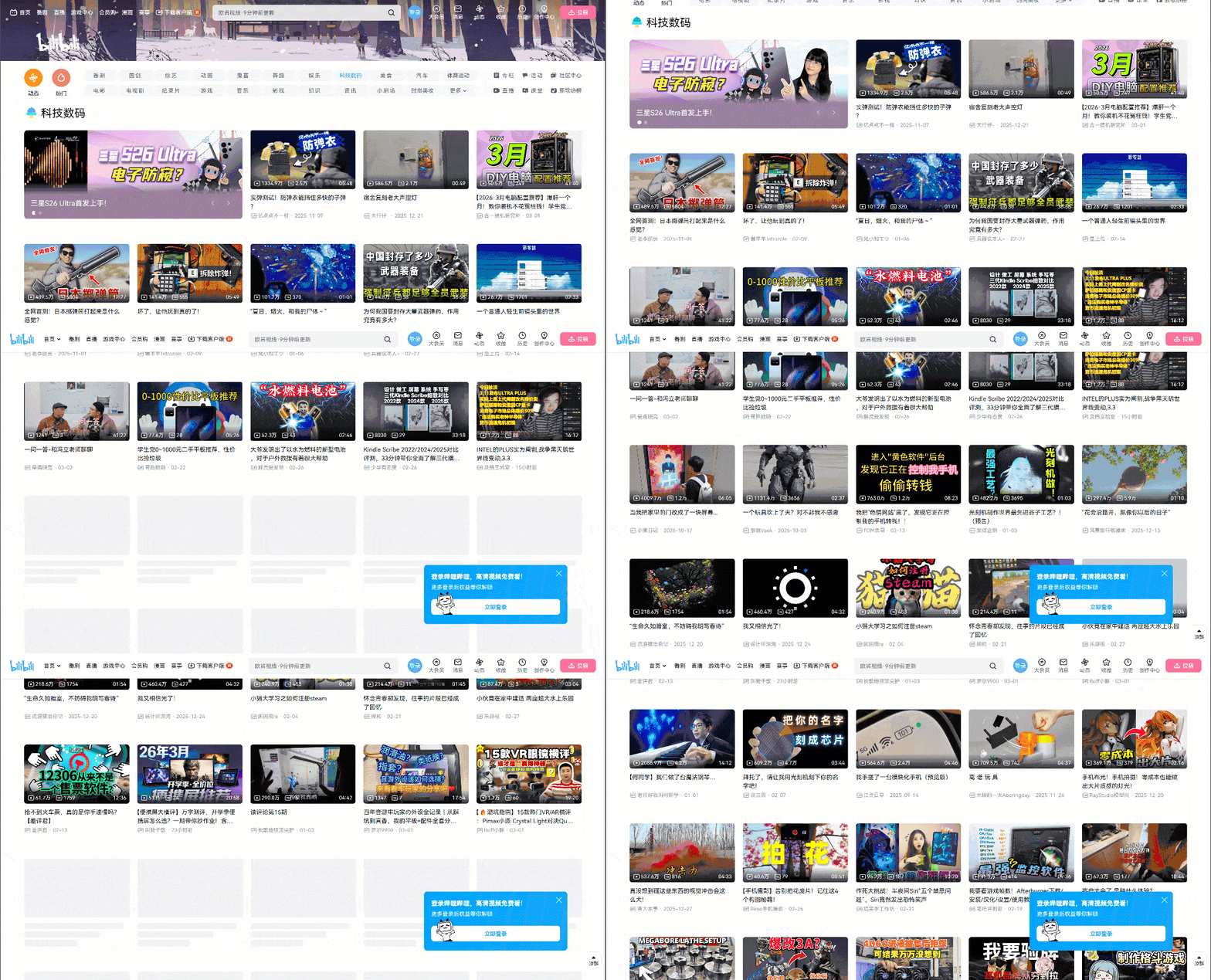
As you scroll down, new video cards are loaded automatically. This behavior is an indicator that the website is dynamic. In detail, it relies on JavaScript to fetch and render new data based on user interaction.
Because of that, a simple HTTP request will not be enough. You need a browser automation tool to properly render and scrape the content. In this tutorial, we will use Playwright, but tools like Selenium, SeleniumBase, or NODRIVER would also work.
Step #1: Set Up Your Playwright Project
Begin by launching your terminal and creating a new directory for your Bilibili scraper:
mkdir bilibili-scraperMove into the project directory and create a Python virtual environment inside it:
cd bilibili-scraper
python -m venv .venv
Then, load the project folder in your preferred Python IDE. Visual Studio Code with the Python extension and PyCharm Community Edition are both good options.
Create a new file named scraper.py in the root of the project directory, which should look like this:
bilibili-scraper/
├── .venv/
└── scraper.py # <-----------
In your IDE’s integrated terminal, activate the virtual environment. On Linux/macOS, execute:
source .venv/bin/activateEquivalently, on Windows, run:
.venv/Scripts/activateWith the virtual environment activated, install playwright with:
pip install playwrightComplete the installation by downloading the required browser binaries:
python -m playwright installNow, add the following basic Playwright setup to scraper.py:
import asyncio
from playwright.async_api import async_playwright

async def main():
    async with async_playwright() as p:
        # Launch a controlled Chromium instance in headful mode
        browser = await p.chromium.launch(headless=False) # Set to True in production
        context = await browser.new_context()
        page = await context.new_page()

        # Scraping logic...

        # Close the browser and release its resources
        await browser.close()

if __name__ == "__main__":
    asyncio.run(main())
This snippet initializes a Chromium browser instance and lets Playwright control it.
During development, it is helpful to keep headless=False so you can visually follow what the browser is doing. In production, consider setting headless=True to reduce resource usage and speed up execution by enabling headless mode.
Well done! You now have a Python environment ready for Bilibili web scraping via browser automation.
Step #2: Connect to the Target Site
Use Playwright to navigate to the target web page, which is the Bilibili “Tech” category page:
# The target "Technology" Bilibili page
target_bilibili_page = "https://www.bilibili.com/c/tech/"

# Navigate to the target page
await page.goto(target_bilibili_page)
The goto() function instructs the controlled browser to visit the specified URL and wait for the page to load.
This is it! You are now connected to the Bilibili destination page.
The next step is to automate the scrolling interaction so that new video cards load dynamically. Once the additional content appears, you will be ready to extract the data from those HTML elements.
Step #3: Load New Video Cards
As mentioned earlier, Bilibili’s homepage and category pages rely on the infinite scrolling UI pattern. Initially, only a few video cards are visible. As you scroll down, more content is loaded dynamically via JavaScript.
Specifically, the page initially loads with a fixed number of video card elements inside a .head-cards HTML element: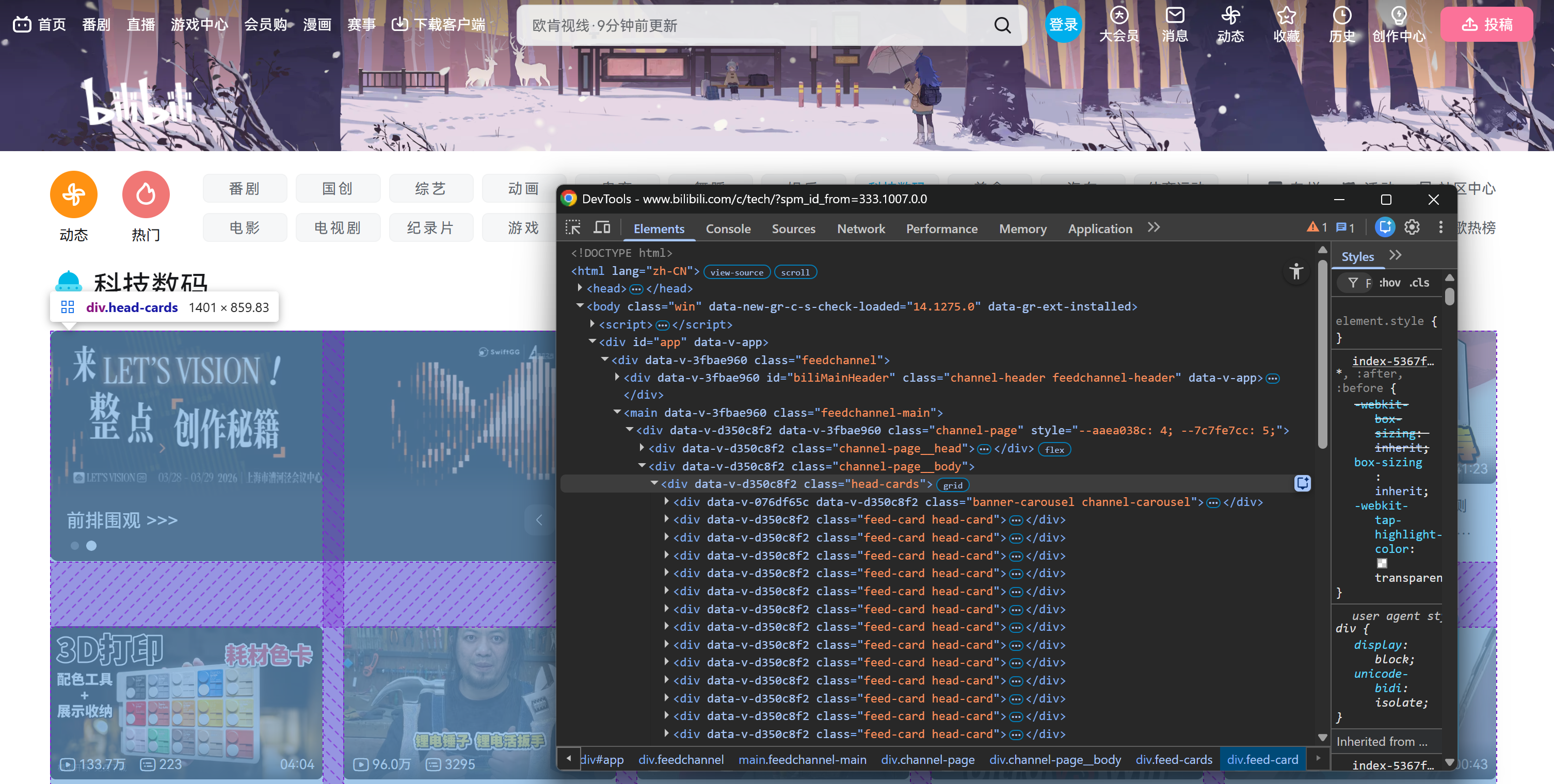
After scrolling down, a .feed-cards container is added to the page. That section is dynamically populated with new video cards as you continue scrolling: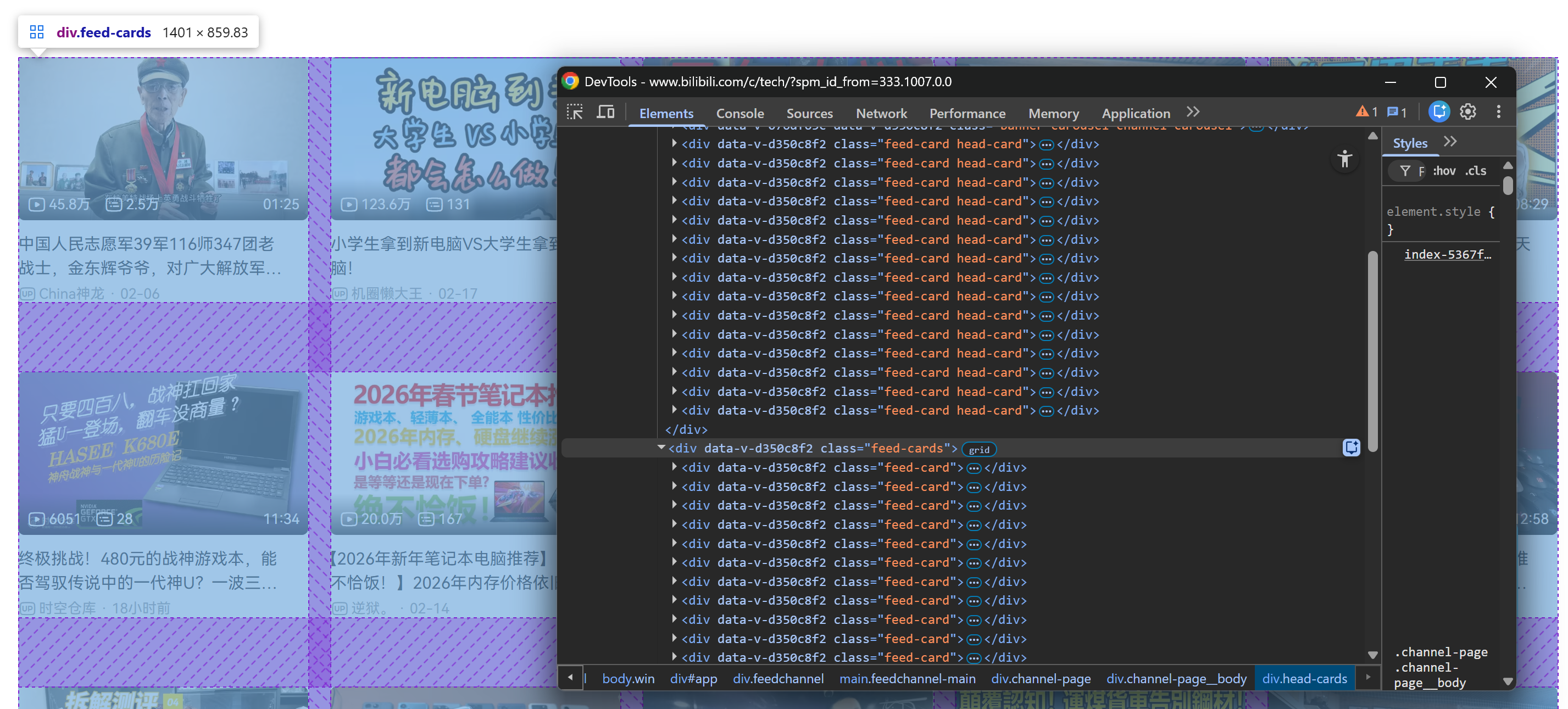
What matters here is that all video cards (whether statically present on the initial page load or dynamically loaded during scrolling) can be selected through this CSS selector:
.feed-cardIn this Bilibili scraping tutorial, let’s assume you want to retrieve at least 50 videos. To achieve that, you need to simulate multiple scroll interactions. Playwright does not provide a specific API for scrolling, so you will execute a simple JavaScript script directly in the page context:
for _ in range(3):
    # Allow lazy loading
    await asyncio.sleep(1)
    await page.evaluate("window.scrollTo(0, document.body.scrollHeight)")
    # Allow lazy loading
    await asyncio.sleep(2)
This loop executes window.scrollTo() three times, scrolling from the top to the bottom of the page on each iteration. The asyncio.sleep() calls are important because:
- They make the scrolling behavior appear more natural.
- They reduce the risk of triggering anti-bot mechanisms.
- They give lazy-loaded content time to fully render before the next scroll.
Since video cards are loaded dynamically, you cannot assume they are present immediately after scrolling. Instead, you must explicitly wait until the 50th card is attached to the DOM. In Playwright, do that with:
fiftieth_card = page.locator(".feed-card").nth(49)
await fiftieth_card.wait_for(state="attached")
This code creates a Playwright locator for the 50th .feed-card element (nth(49) because indexing starts at 0). Then, it waits until that element is attached to the DOM with wait_for().
Now, if you run the script in headful mode (headless=False), you will see the browser autonomously scrolling three times: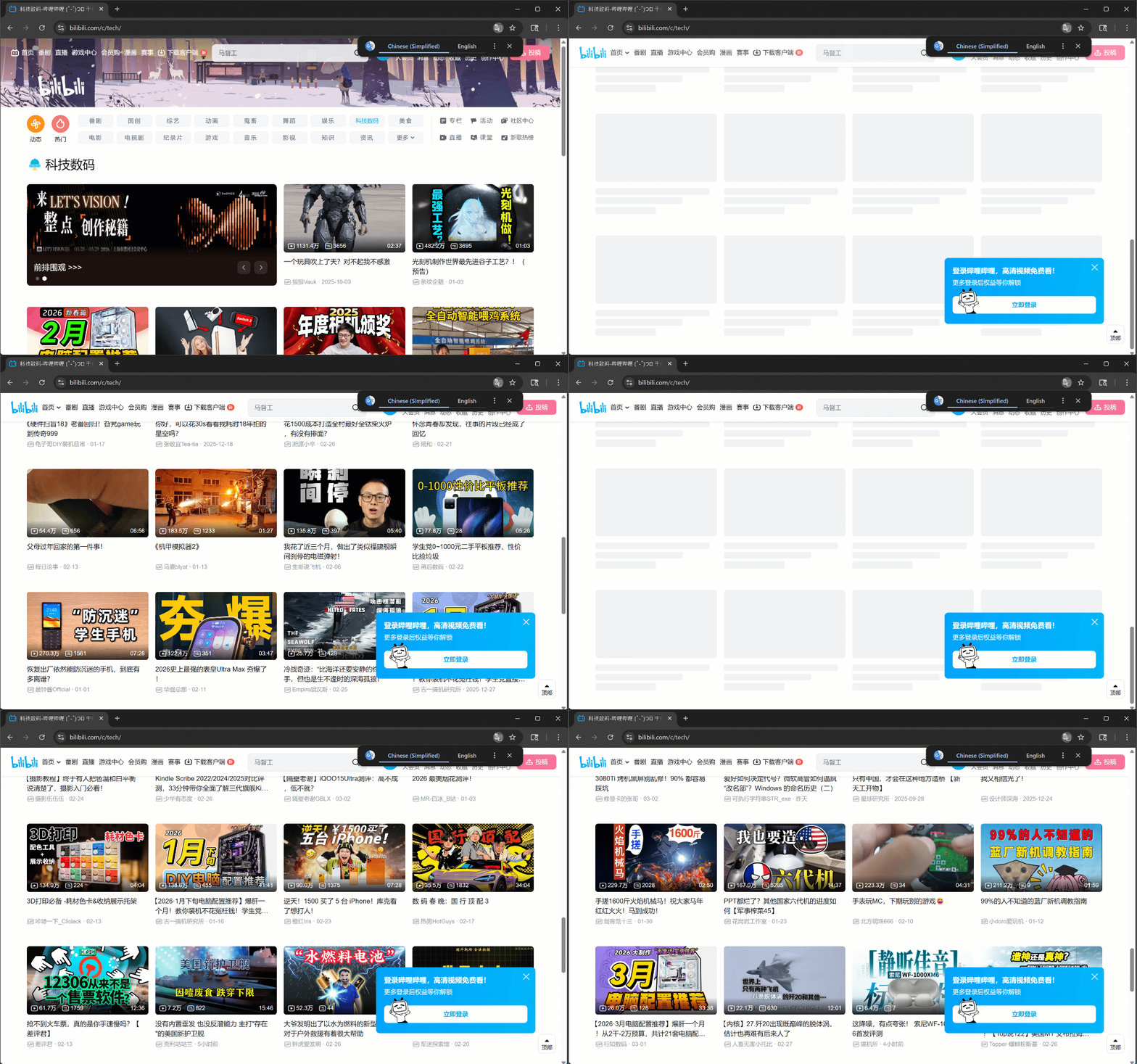
As intended, new video cards load after each scroll.
After this step, you can be confident that at least 50 video cards are present on the page. Fantastic!
Step #4: Familiarize Yourself with the Video Card Structure
To extract the right data, you first need to understand how each video card is structured in the DOM.
Start by right-clicking on one of the video cards inside the .head-cards section and inspecting in the browser’s developer tools: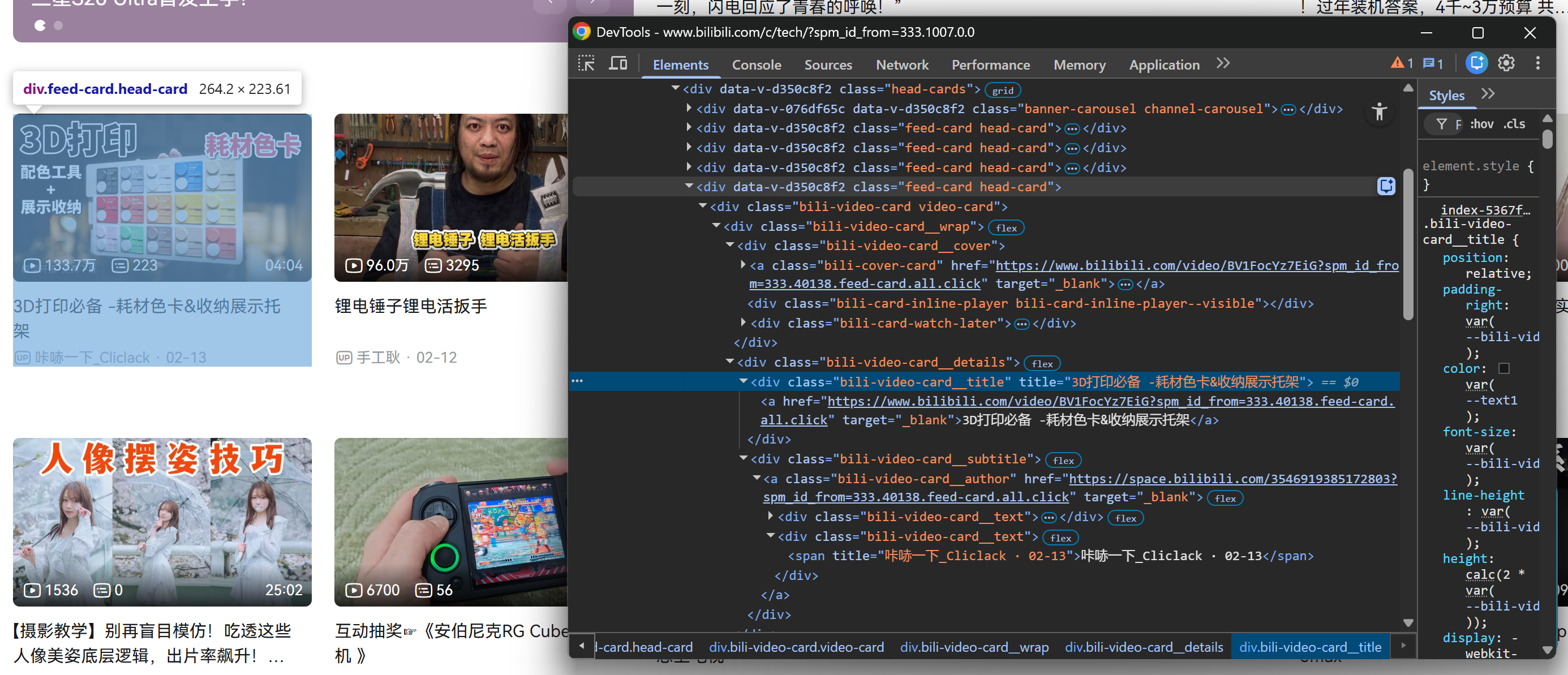
Then, repeat the same process for a video card inside the loaded .feed-cards section: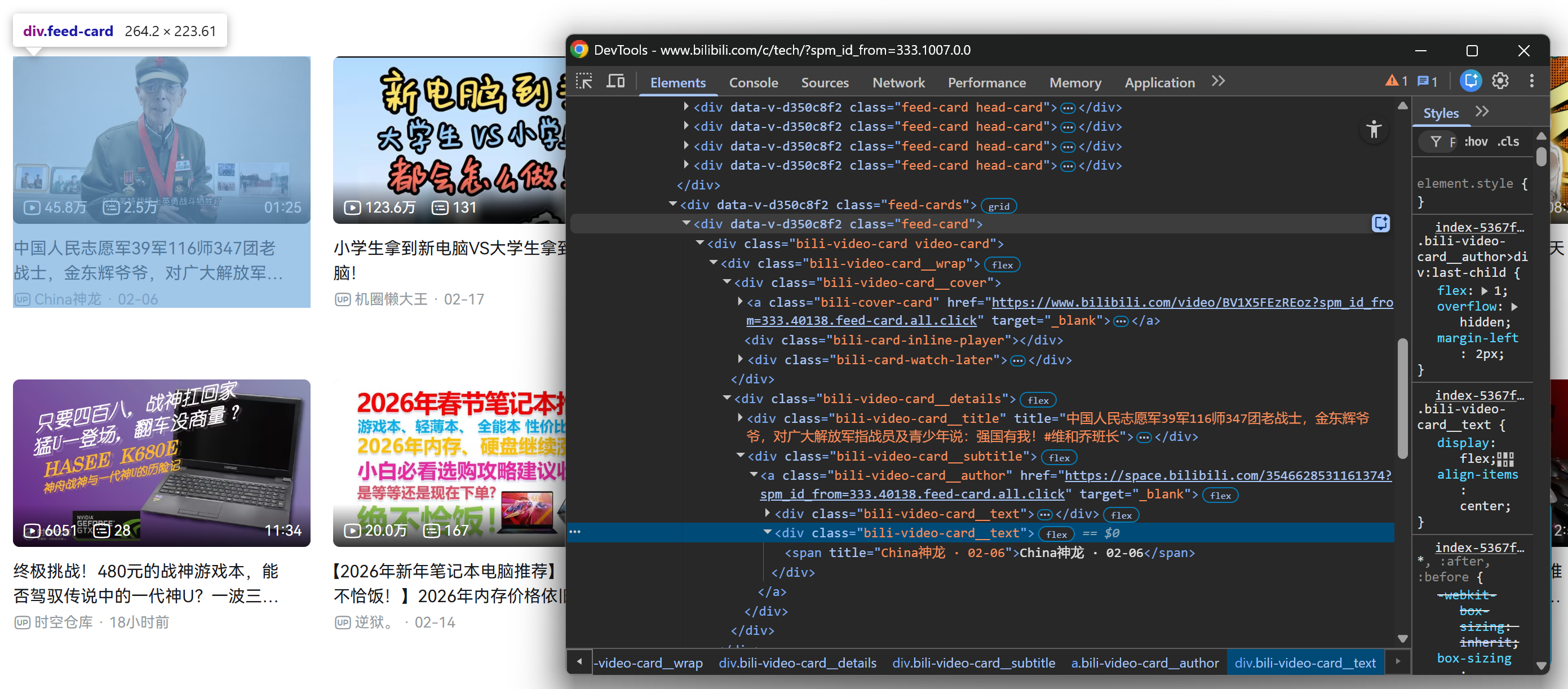
Luckily, all .feed-card elements share the same internal structure. That means you do not need to distinguish between video cards loaded on the initial page render and video cards loaded dynamically after scrolling. You can target them all using the same selectors!
Notice how, from each video card, you can collect:
- The video title from the
.bili-video-card__title aelement. - The video URL from the
hrefattribute of the same title<a>node. - The raw subtitle (which contains author name + publication date) from
.bili-video-card__subtitle span[title]. - The author profile URL from
.bili-video-card__authorelement.
Perfect! Now that you understand the DOM structure, the next step is to translate this knowledge into programmatic Bilibili data scraping logic.
Step #5: Scrape the Video Data
Remember that the target page contains multiple video cards. Thus, you first need a data structure to store the scraped results. A list is perfect for that:
videos = []Next, iterate over all video cards and apply the extraction logic described earlier:
for i in range(feed_card_count):
    # Get the current video card to extract data from
    card = feed_cards.nth(i)

    title_locator = card.locator(".bili-video-card__title a")
    title = await title_locator.inner_text() if await title_locator.count() else None
    video_url = await title_locator.get_attribute("href") if await title_locator.count() else None

    subtitle_locator = card.locator(".bili-video-card__subtitle span[title]")
    subtitle = await subtitle_locator.inner_text() if await subtitle_locator.count() else None

    author_locator = card.locator(".bili-video-card__author")
    author_url = await author_locator.get_attribute("href") if await author_locator.count() else None

    author_name = None
    date = None
    if subtitle and "·" in subtitle:
        parts = [p.strip() for p in subtitle.split("·")]
        if len(parts) >= 2:
            author_name = parts[0]
            date = parts[1]

    # Store the scraped data
    video = {
        "title": title,
        "video_url": video_url,
        "subtitle": subtitle,
        "author": {
            "name": author_name,
            "url": author_url
        },
        "date": date
    }
    videos.append(video)
The above snippet goes through each video card and:
- Extracts the title, video URL, raw subtitle, and author profile URL.
- Parses the subtitle string (which follows the format
"<AUTHOR_NAME> · <DATE>") to separately extract the author name and video date. - Builds a structured
videodictionary and appends it to thevideoslist.
By the end of the for loop, the videos list will contain 50+ structured Bilibili video objects. Terrific!
Step #6: Export the Scraped Data
To make it easier to process the scraped data, export it to a videos.json file:
import json

with open("videos.json", "w", encoding="utf-8") as f:
    json.dump(videos, f, ensure_ascii=False, indent=2)
If you run scraper.py now, it should generate a videos.json file containing structured Bilibili video data, like this: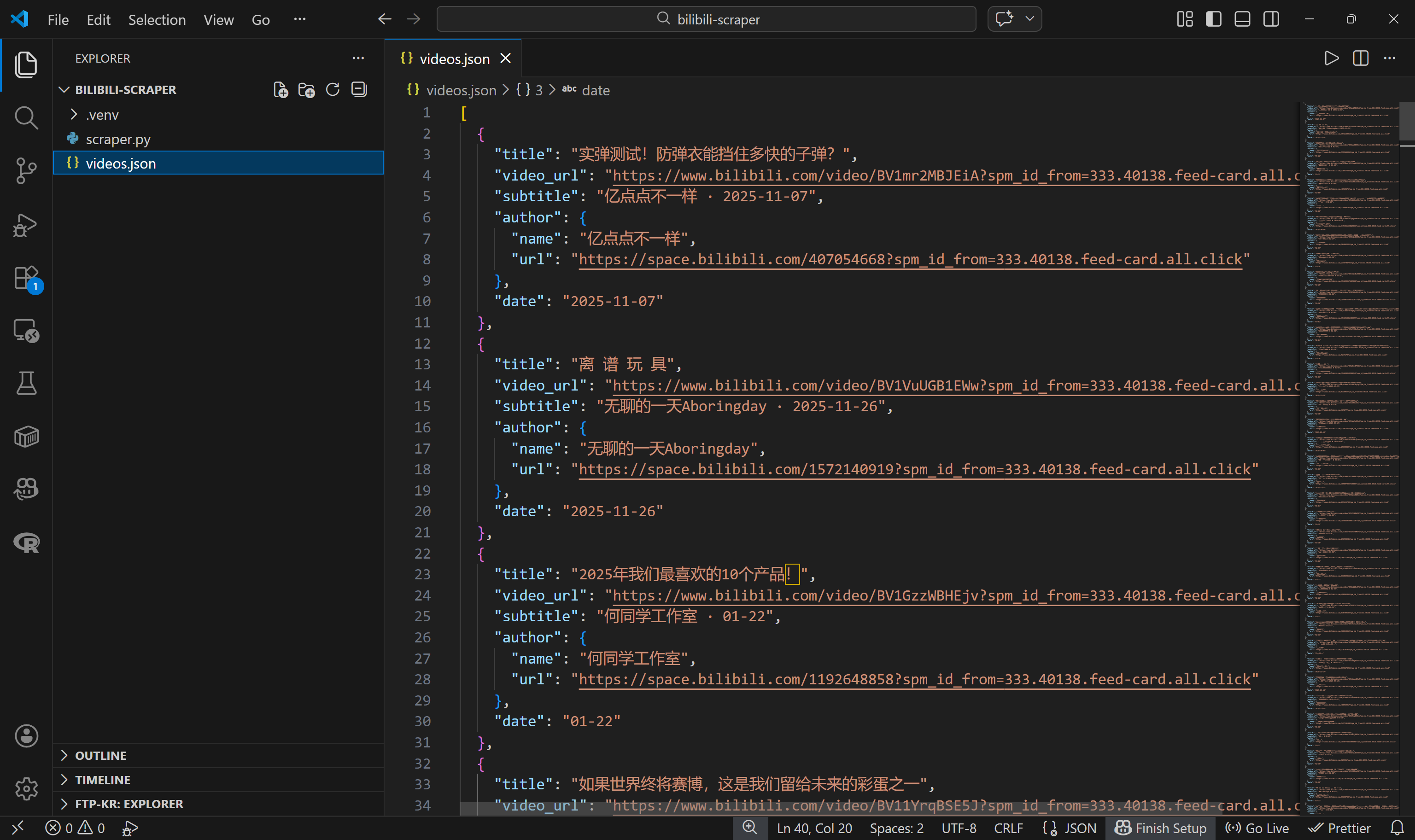
Mission complete! You started with a page containing many video cards and now have their metadata stored in a structured JSON file.
If your goal is simply to scrape Bilibili, the tutorial could end here (just make sure to check the final step for the complete script). If you want to go the extra mile and actually download the videos themselves, keep reading…
Step #7: Get Ready to Download the Bilibili Videos
The easiest way to download Bilibili videos from the URLs you scraped earlier is by utilizing yt-dlp.
yt-dlp is a feature-rich audio/video downloader that supports hundreds of websites, including Bilibili. It can be used both from the command line and via a programmatic Python API. Here, we will harness it programmatically via its Python API.
With your virtual environment activated, install yt-dlp:
pip install yt-dlpThen, add a new file called video-downloader.py to your project root:
bilibili-scraper/
├── .venv/
├── scraper.py
└── video-downloader.py # <-----------
This file will contain the yt-dlp-powered Bilibili video downloading logic.
The video-downloader.py script needs to:
- Read the
videos.jsonfile. - Extract the
video_urlfor each video. - Use the
YoutubeDLclass fromyt_dlpto download the video files.
Below is the implementation:
import os
import json
from yt_dlp import YoutubeDL

INPUT_FILE = "videos.json"
OUTPUT_DIR = "./videos"

# Load the video data from the input JSON file
with open(INPUT_FILE, "r", encoding="utf-8") as f:
    videos = json.load(f)

print(f"Loaded {len(videos)} videos from {INPUT_FILE}\n")

# Ensure that the output folder exists
os.makedirs(OUTPUT_DIR, exist_ok=True)

ydl_opts = {
    "format": "bestvideo+bestaudio/best",
    "outtmpl": f"{OUTPUT_DIR}/%(title)s.%(ext)s",
    "merge_output_format": "mp4",
}

with YoutubeDL(ydl_opts) as ydl:
    for index, video in enumerate(videos, start=1):
        video_url = video.get("video_url")
        print(f"[{index}/{len(videos)}] Downloading: {video.get('title')}")

        try:
            ydl.download([video_url])
            print(f"Video #{index} downloaded\n")
        except Exception as e:
            print(f"Video #{index} download failed: {e}\n")
Wow! Fewer than 35 lines of code were enough to achieve the goal.
Step #8: Download the Video Files
Make sure ffmpeg is installed locally, then run the video-downloader.py script. In the terminal, you should see something like this: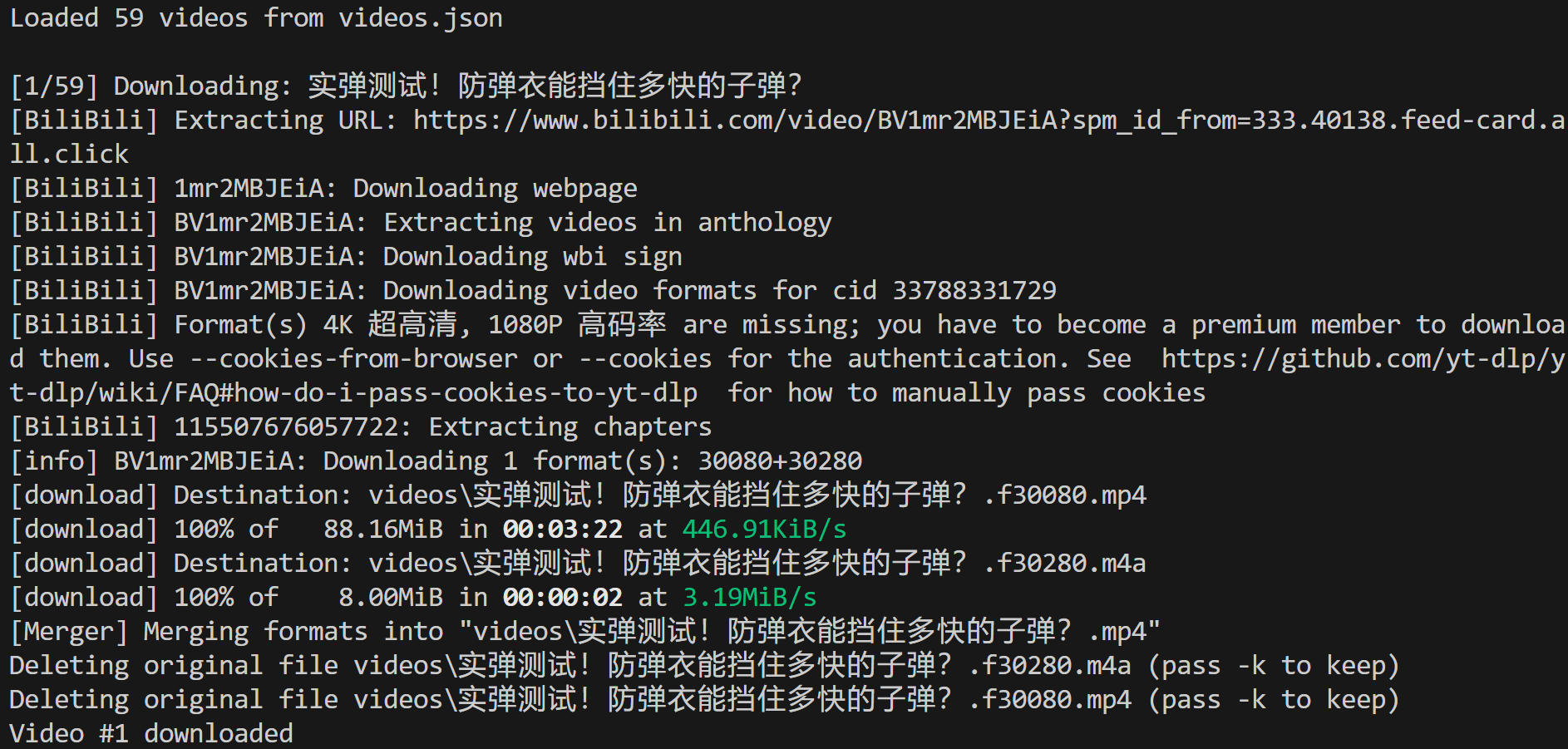
This shows that 59 videos were loaded from the videos.json input file, and the first one was successfully downloaded to the local path:
./videos/实弹测试!防弹衣能挡住多快的子弹?.mp4In Visual Studio Code, you will see the MP4 video file appear in that exact path: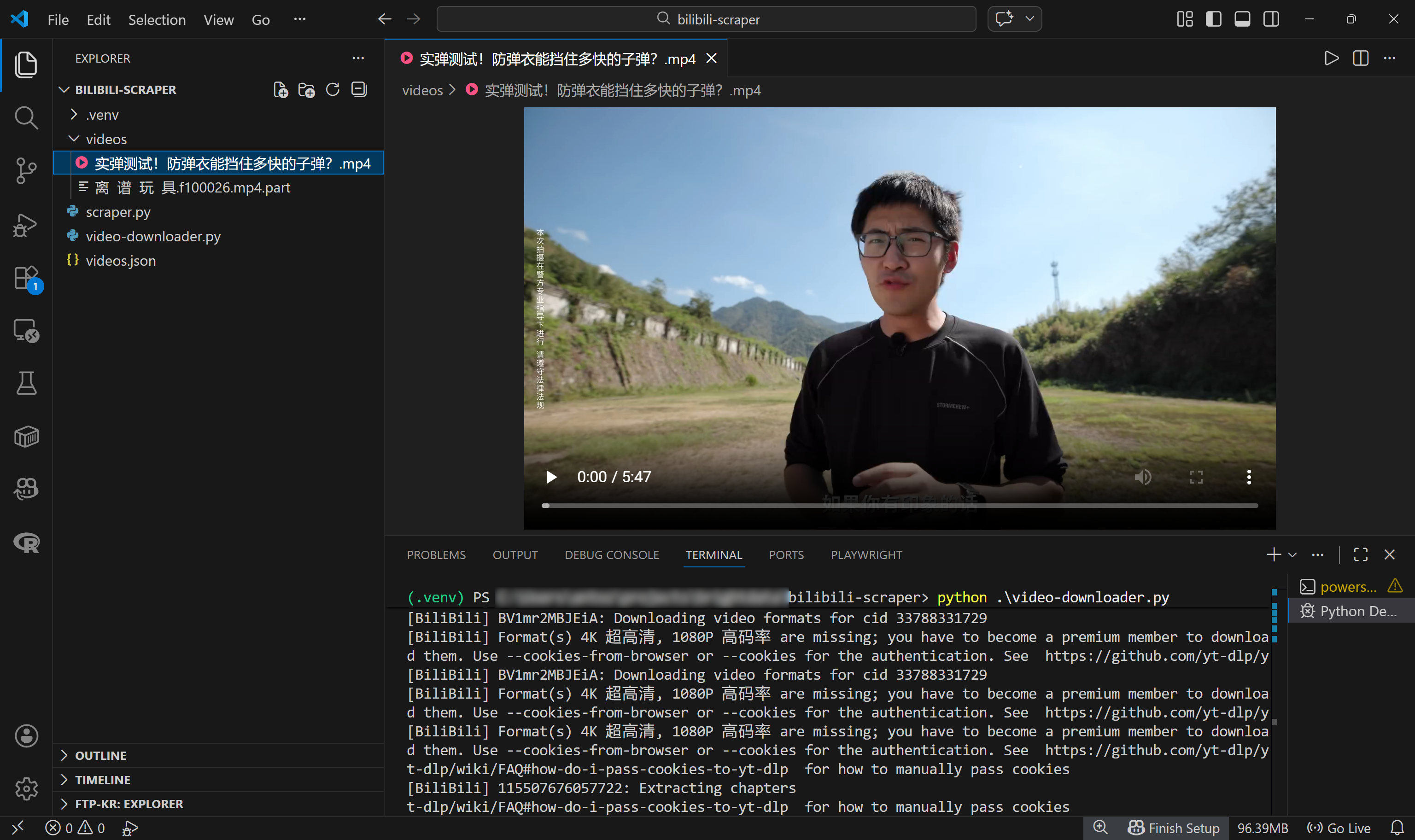
Amazing! You now have a fully automated Bilibili system that not only discovers new videos but also downloads them. With these files, you can even train AI models via a multi-modal ML pipeline.
Step #9: Final Code
The scraper.py file will contain the following code:
# scraper.py

# pip install playwright
# python -m playwright install

import asyncio
from playwright.async_api import async_playwright
import json


async def main():
    async with async_playwright() as p:
        # Launch a controlled Chromium instance in headful mode
        browser = await p.chromium.launch()
        context = await browser.new_context()
        page = await context.new_page()

        # The target "Tech" Bilibili page
        target_bilibili_page = "https://www.bilibili.com/c/tech/"

        # Navigate to the target page
        await page.goto(target_bilibili_page)

        # Scroll down the entire page 3 times
        for _ in range(3):
            # Allow lazy loading
            await asyncio.sleep(1)
            await page.evaluate("window.scrollTo(0, document.body.scrollHeight)")
            # Allow lazy loading
            await asyncio.sleep(2)

        # Wait until the 50th video card element is attached to the DOM
        fiftieth_card = page.locator(".feed-card").nth(49)
        await fiftieth_card.wait_for(state="visible")

        # Select all feed cards via locator
        feed_cards = page.locator(".feed-card")
        feed_card_count = await feed_cards.count()

        print(f"{feed_card_count} feed cards loaded.")

        # Where to store the scraped data
        videos = []

        # Apply the Bilili data scraping logic on each video card
        for i in range(feed_card_count):
            # Get the current video card to extract data from
            card = feed_cards.nth(i)

            title_locator = card.locator(".bili-video-card__title a")
            title = await title_locator.inner_text() if await title_locator.count() else None
            video_url = await title_locator.get_attribute("href") if await title_locator.count() else None

            subtitle_locator = card.locator(".bili-video-card__subtitle span[title]")
            subtitle = await subtitle_locator.inner_text() if await subtitle_locator.count() else None

            author_locator = card.locator(".bili-video-card__author")
            author_url = await author_locator.get_attribute("href") if await author_locator.count() else None

            author_name = None
            date = None
            if subtitle and "·" in subtitle:
                parts = [p.strip() for p in subtitle.split("·")]
                if len(parts) >= 2:
                    author_name = parts[0]
                    date = parts[1]

            # Store the scraped data
            video = {
                "title": title,
                "video_url": video_url,
                "subtitle": subtitle,
                "author": {
                    "name": author_name,
                    "url": author_url
                },
                "date": date
            }
            videos.append(video)

        # Close the browser and release its resources
        await browser.close()

        # Export the scraped data to a JSON file
        with open("videos.json", "w", encoding="utf-8") as f:
            json.dump(videos, f, ensure_ascii=False, indent=2)

        print(f"{len(videos)} scraped Bilibili videos exported to videos.json")

if __name__ == "__main__":
    asyncio.run(main())
Launch it with:
python scraper.pyThis will generate a videos.json file containing the scraped Bilibili video data. You can then download those videos using this video-downloader.py script:
# video-downloader.py

# pip install yt-dlp

import os
import json
from yt_dlp import YoutubeDL

INPUT_FILE = "videos.json"
OUTPUT_DIR = "./videos"

# Load the video data from the input JSON file
with open(INPUT_FILE, "r", encoding="utf-8") as f:
    videos = json.load(f)

print(f"Loaded {len(videos)} videos from {INPUT_FILE}\n")

# Ensure that the output folder exists
os.makedirs(OUTPUT_DIR, exist_ok=True)

ydl_opts = {
    "format": "bestvideo+bestaudio/best",
    "outtmpl": f"{OUTPUT_DIR}/%(title)s.%(ext)s",
    "merge_output_format": "mp4",
}

with YoutubeDL(ydl_opts) as ydl:
    for index, video in enumerate(videos, start=1):
        video_url = video.get("video_url")
        print(f"[{index}/{len(videos)}] Downloading: {video.get('title')}")

        try:
            ydl.download([video_url])
            print(f"Video #{index} downloaded\n")
        except Exception as e:
            print(f"Video #{index} download failed: {e}\n")
Execute it with:
python video-downloader.pyThe result will be a ./videos folder containing the MP4 files for each discovered Bilibili video.
Et voilà! You just learned how to build a Bilibili scraper and use it to feed scraped video data into a downloader. This process helps you retrieve the actual video files for AI training or any other use case.
Next Steps
Now that you have both structured metadata and the actual video files, you can pass that data to an AI training pipeline. For example, you could extract frames for computer vision tasks, generate transcripts for NLP model fine-tuning, analyze audio signals, or build recommendation systems based on video content and metadata. The combination of titles, authors, dates, and raw video files gives you a rich multimodal dataset ready for experimentation.
Also, to speed up the download phase, consider parallelizing the process so multiple videos are downloaded simultaneously. This approach helps fully utilize your available bandwidth, resulting in faster download times.
A Production-Ready Solution for Bilibili Scraping: Get Video Data for AI
If you run the downloading script on a large number of videos, you may eventually start seeing errors like:
Unable to download webpage: HTTP Error 412: Precondition Failed (caused by <HTTPError 412: Precondition Failed>)This occurs because Bilibili has anti-bot protections in place. When the platform detects suspicious traffic (such as too many automated requests coming from the same IP), it starts returning a 412 Precondition Failed response.
The error page looks like this: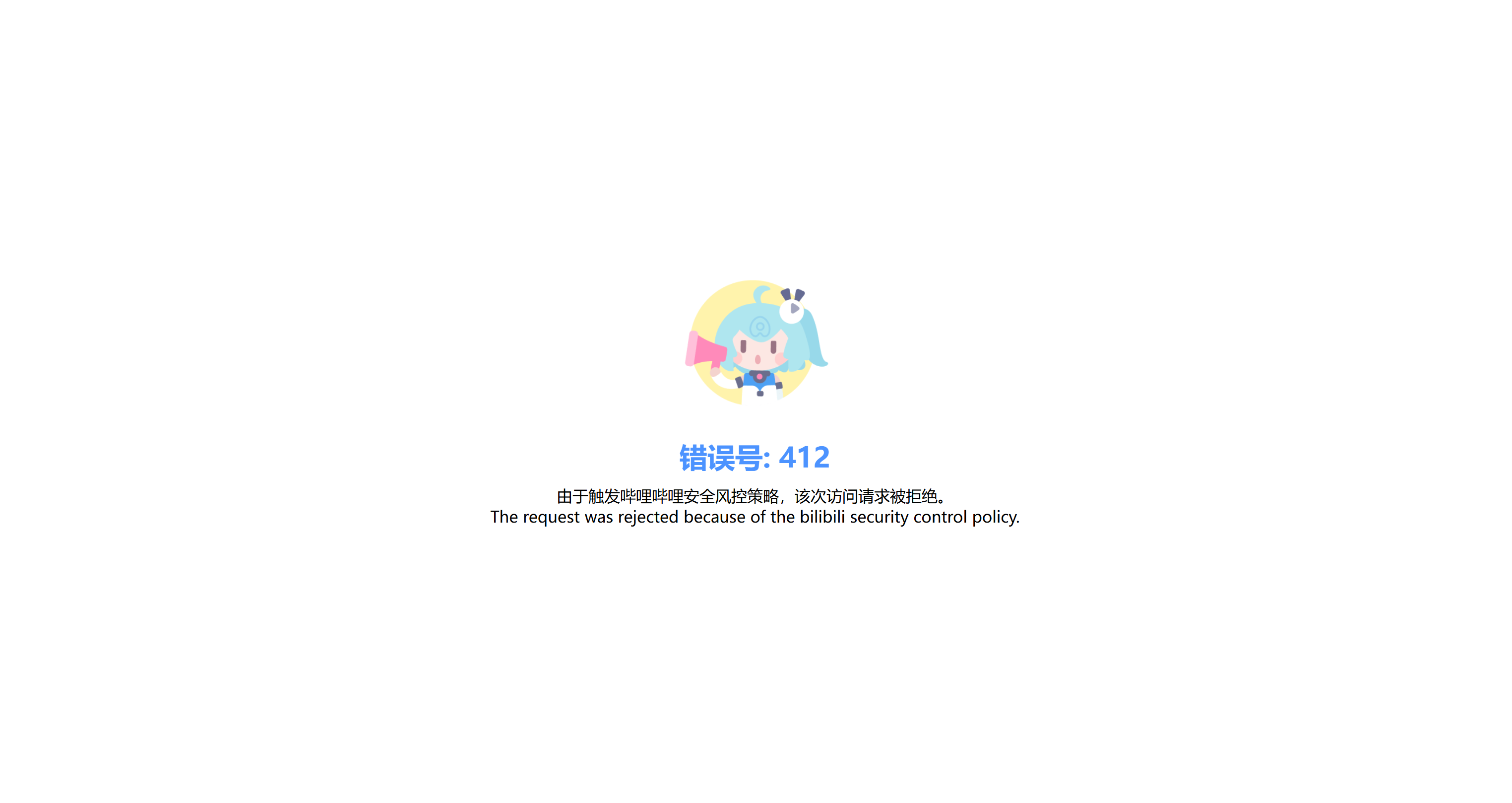
That is just one of the challenges you have to face when scraping Bilibili. Other common issues include structural changes to the target pages, fingerprint-based detection, and more. While a custom Playwright + yt-dlp setup works well for small-scale projects, maintaining it over time can become complex and fragile.
To scrape Bilibili reliably at scale, you need a more robust infrastructure that handles IP rotation, browser fingerprinting, CAPTCHA solving, and automatic retries. That is precisely what Bright Data’s Bilibili Scraper offers.
This web scraping API, also available as a no-code scraper, retrieves video titles, upload dates, views, likes, comments, favorites, durations, uploader names, descriptions, URLs, and more. All that while automatically bypassing anti-bot mechanisms for you.
What makes Bilibili Scraper unique is that it runs on top of a proxy infrastructure with over 150 million IPs across 195 countries, achieving 99.99% uptime, 99.95% success rate, and supporting unlimited concurrency. This enables large-scale, enterprise-level scraping scenarios, which is fundamental considering that multimodal AI training requires massive volumes of video data.
After retrieving the video URLs, integrate Bright Data’s Web Unlocker API into automated yt-dlp workflows to avoid 412 errors and download videos with no blocks. Thanks to Bright Data, you can forget about rate limits, blocks, or yt-dlp failures to get more videos for training your AI/ML models.
Conclusion
In this blog post, you saw what kind of data you can scrape from Bilibili and the main use cases it supports. One of the most interesting scenarios is AI training on video data. With hundreds of millions of videos available on the platform, Bilibili represents a massive source of publicly accessible multimedia content.
The process starts with a Bilibili scraper that you learned to build step by step. That collects structured video metadata, including video URLs. You can then pass those URLs into a yt-dlp-powered workflow to download the actual video files, as demonstrated in this guide.
Bright Data supports Bilibili scraping through a dedicated scraper and direct yt-dlp integration options for reliable, uninterrupted downloads. For more information, take a look at our solutions for accessing large-scale video data for LLM training.
Sign up for Bright Data today and explore our video data collection solutions!



Technical Writer
 5.5 years experience
Antonello Zanini is a technical writer, editor, and software engineer with 5M+ views. Expert in technical content strategy, web development, and project management.