In this guide, you will see:
- What Containers as a Service is and what it manages for you.
- How CaaS works and the importance of container orchestration in this model.
- The main advantages and drawbacks of this approach to cloud service.
- Why CaaS is well suited to web data retrieval workloads.
- How to build a scalable web data pipeline with CaaS and Bright Data.
Let’s dive in!
CaaS (Containers as a Service) Explained
Before looking at how CaaS can support web data pipelines and AI agents, you need to understand what it is and what it actually handles.
What Is CaaS?
CaaS, short for Containers as a Service, is a cloud service model that provides a managed environment for deploying, running, and scaling containerized applications. It sits between infrastructure and application-level services.
To understand where CaaS fits, consider what happens when you build a container. A container image represents a portable unit of your application that can run consistently across environments.
The image is then employed to create running containers. Now, operating those containers reliably in production requires infrastructure for deployment, networking, scaling, monitoring, and lifecycle management.
CaaS bridges the gap between a finished container image and a production-ready runtime. Instead of manually configuring servers and managing individual containers, you can deploy your container images to a CaaS platform, which defines how they should run and orchestrates them.
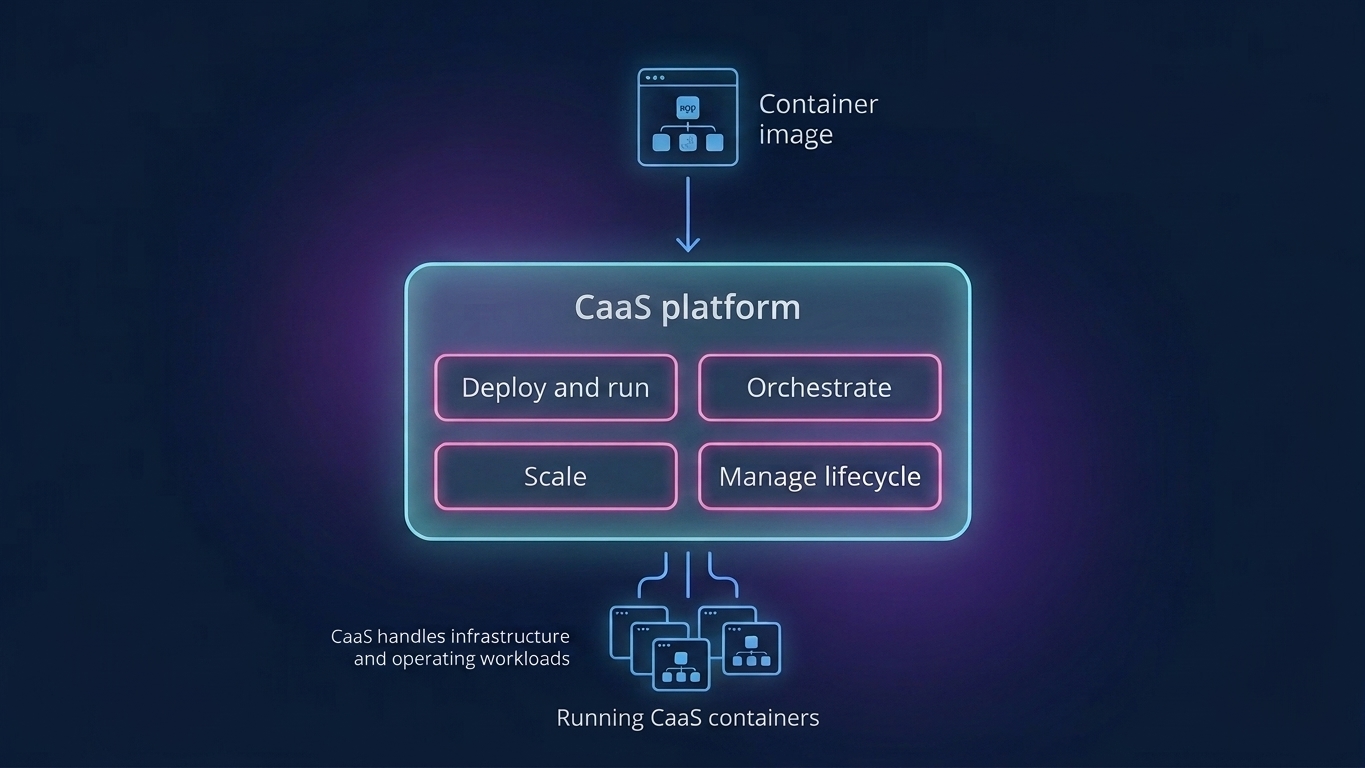
In other words, this model is more than simply running Docker on a virtual machine. With Docker alone, you still need to manage the underlying infrastructure and coordinate containers yourself. A CaaS solution offers the additional features needed to operate containerized workloads at scale.
What Does CaaS Manage?
A CaaS platform typically handles container deployment, orchestration, scaling, networking, service discovery, health checks, and lifecycle operations.
In practical terms, you define your desired workload, such as how many container instances should run and what resources they require. Then, the platform handles much of the execution for you.
This approach reduces operational overhead and makes it easier to run distributed applications reliably, particularly when workloads need to scale or change frequently.
How Does CaaS Work?
Now that you know what CaaS is, it is time to understand how it works.
From Container Image to Production Workload
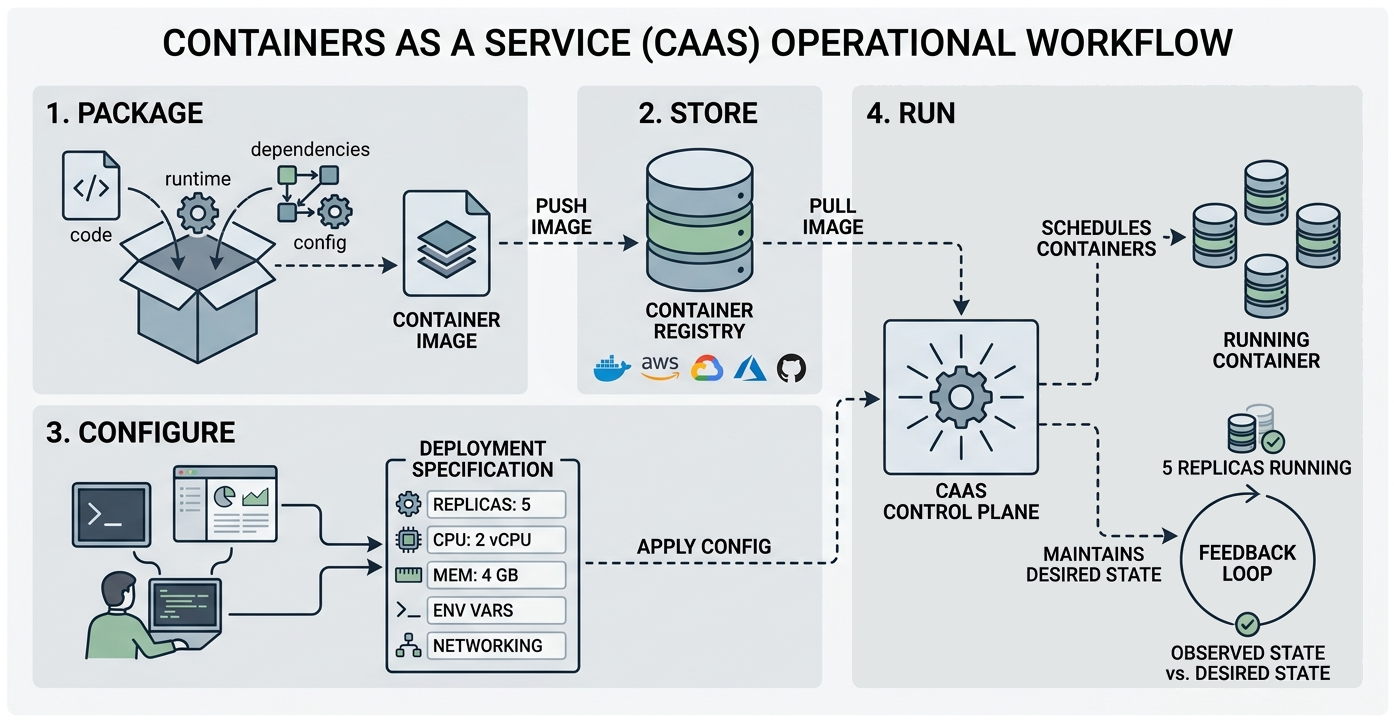
The first step in deploying an application with CaaS is to package the application and everything it needs to run into a container image. This includes the application code, dependencies, runtime, configuration, and other required components.
The image is generally stored in a container registry, such as Docker Hub, Amazon ECR, Google Artifact Registry, Azure Container Registry, or GitHub Container Registry. A registry acts as a centralized system for storing, managing, and distributing container images. When deploying an application, the required image is retrieved from the registry and used to spawn containers.
You then specify how the application should run. Depending on the CaaS solution, this can include the number of container instances, CPU and memory requirements, networking rules, environment variables, and other configuration settings. These parameters can usually be provided through a web interface, command-line tool, configuration file, or API.
The CaaS service turns this configuration into a running workload. It schedules containers across the available underlying infrastructure and continuously works to maintain the desired state.
The Role of Container Orchestration
Running a single container is relatively simple. However, as an application grows, you might need to run dozens or even hundreds of containers. In most cases, these containers need to communicate with each other, scale based on demand, or recover automatically when something goes wrong. Managing all of this manually quickly becomes challenging.
This is where container orchestration comes in. Orchestration automates the tasks required to run and coordinate multiple containers. It can automatically add or remove containers as demand changes, check whether they are healthy, replace failed instances, and enable services to find and communicate with each other.
Kubernetes is the most widely recognized technology for container orchestration and is commonly leveraged as the foundation for modern CaaS solutions. It exposes the mechanisms needed to deploy, schedule, scale, and maintain containerized workloads across a cluster of machines.
Still, keep in mind that CaaS and Kubernetes are not the same thing. Kubernetes is the go-to technology for orchestrating containers, while CaaS offers a managed way to use container infrastructure without having to operate everything yourself.
Benefits and Challenges of CaaS
The Containers as a Service model can simplify the deployment and operation of containerized applications, but it also introduces new considerations.
Key benefits:
- Applications run identically across development, testing, and multi-cloud environments, preventing deployment bugs caused by configuration mismatches.
- Automated horizontal scaling instantly adjusts container counts to match traffic spikes, optimizing server resource consumption.
- Offloading cluster management and host OS provisioning eliminates infrastructure maintenance burdens for internal engineering teams.
- Granular component isolation allows independent deployment, scaling, and failure recovery for modular microservices-based architectures.
- Native integration with continuous deployment pipelines accelerates release cycles by automating testing and container creation.
Main challenges:
- Shared OS kernel architecture introduces container escape vulnerabilities, expanding the overall attack surface compared to virtual machines.
- Complex network, storage, and orchestration configurations create steep learning curves and require specialized operational expertise.
- Vendor-specific APIs and proprietary orchestration tooling complicate workload migration across different cloud service providers.
CaaS for Web Data and AI Workflows
Learn why Containers as a Service is particularly well suited to web data collection and workflows that prepare fresh data for AI applications.
Common Applications
One of the most popular scenarios for CaaS is running microservices. Each service can run in its own container, allowing you to deploy, update, and scale individual components separately.
The model is also useful for application modernization, continuous deployment, hybrid infrastructure, and workloads with variable resource requirements. Containers provide consistent execution environments, while the CaaS layer provides the infrastructure needed to run and scale them.
Another natural fit is any workload involving repeated or parallel tasks. Instead of processing everything one task at a time, you can distribute individual jobs across multiple containerized workers. That approach works particularly well for data pipelines, where workers can independently retrieve, transform, validate, enrich, or process data.
CaaS for Web Data Collection
Web scraping is a good example of a workload that can benefit from containerized execution. Imagine you need to retrieve data from thousands of URLs. Rather than processing them sequentially in a single application, you can distribute the URLs across multiple containerized workers.
Each worker can process its assigned tasks autonomously, allowing you to increase collection capacity by running more containers. A task queue can further improve this architecture by distributing jobs dynamically as workers become available.
CaaS for AI Data Processing Workflows
The aforementioned architecture can extend beyond data collection. Containerized workers can retrieve fresh web data, process and enrich it, and route the resulting information into analytics systems, databases, RAG pipelines, or AI applications.
In detail, a queue could distribute thousands of data-collection tasks across workers. Once collected, another set of workers could clean and structure the results before passing them to an AI agent or LLM.
Scaling Web Data Collection With CaaS and Bright Data
CaaS provides the execution infrastructure for containerized scraping workers, but it does not solve the challenges of accessing websites at scale. Browser automation, proxy management, IP rotation, website blocking, and anti-bot mechanisms all require additional infrastructure.
This is where Bright Data fits into the architecture. Its web data infrastructure provides access to a large proxy network and managed APIs for web access, search, browser automation, and structured data extraction.
Bright Data is backed by a proxy network of more than 400 million IPs, unlimited concurrency, 99.99% uptime, and a 99.95% success rate across its network.
The idea is to separate the two layers:
- CaaS provides scalable compute for your application.
- Bright Data brings the infrastructure needed to access and collect web data.
Learn more about how to combine CaaS and Bright Data to build production-ready data pipelines and AI workflows!
Step #1: Choose the Right Bright Data API
The first step is to choose the Bright Data products that match the type of data you need to collect. These include:
- Web Scraping API: Extract structured data from 800+ supported domains using 1,500+ pre-built scrapers.
- Web Unlocker API: Retrieve content from web pages while handling many access challenges, including proxies, blocks, and CAPTCHAs.
- SERP API: Retrieve structured search results from engines such as Google, Bing, Yandex, and more.
- Browser API: Run managed browser sessions for websites that require JavaScript execution, clicking, scrolling, or other browser automation.
Note: All of these are included in Bright Data’s monthly recurring free tier, so you can use them for free.
Step #2: Build a Containerized Scraping Worker
After selecting the appropriate web data API, you can package your application as a container. This just needs to send requests to the chosen Bright Data APIs and optionally process the returned data.
For instance, a Python worker can use the Web Unlocker API to retrieve LLM-ready Markdown content from a web page:
# worker.py

import os
import requests

def fetch_page(url):
    response = requests.post(
        "https://api.brightdata.com/request",
        headers={
            "Authorization": f"Bearer {os.environ['BRIGHTDATA_API_KEY']}",
            "Content-Type": "application/json",
        },
        json={
            "zone": os.environ["BRIGHTDATA_WEB_UNLOCKER_API"], # Replace with your Bright Data Web Unlocker API name
            "url": url,
            "format": "raw",
            "data_format": "markdown",
        },
    )

    response.raise_for_status()

    return response.text
For more guidance on the integration, see the Bright Data Web Unlocker documentation.
Notice that there is nothing Docker-specific about this request. The application uses a standard HTTP request through the Python requests library. Thus, the same code can run locally, on a virtual machine, or inside a container managed by a CaaS service.
Then, you can list the required dependencies in a requirements.txt file. This will contain:
requests==2.34.2To containerize the worker, you can then write a simple Dockerfile:
FROM python:3.14-slim

WORKDIR /app

COPY requirements.txt .
RUN pip install --no-cache-dir -r requirements.txt

COPY . .

CMD ["python", "worker.py"]
You also need to provide the Bright Data API key and Web Unlocker API name separately from your application code. During local development, you can use a .env file:
BRIGHTDATA_API_KEY=<BRIGHTDATA_API_KEY>
BRIGHTDATA_WEB_UNLOCKER_ZONE=<BRIGHTDATA_WEB_UNLOCKER_API>
For production deployments, you should use your CaaS provider’s secret-management functionality to inject the API key into the container.
Well done! Similarly, you can containerize applications that call other Bright Data API-based products.
Step #3: Distribute the Work Across Containers
Once the scraping worker is working correctly, the architecture can scale the number of worker instances according to the workload.
Now, imagine a scraping queue containing 100,000 URLs. The CaaS service can run multiple instances of the worker and distribute the tasks among them. As the workload grows, more workers will be added to process requests concurrently. This is much better than processing them sequentially in a single application.
Remember that the Web Unlocker API, just like any other Bright Data product, is designed for large-scale data collection. This means you can scale the number of containerized workers without worrying about concurrency issues.
Step #4: Process and Use the Returned Data
The final architecture looks like this:
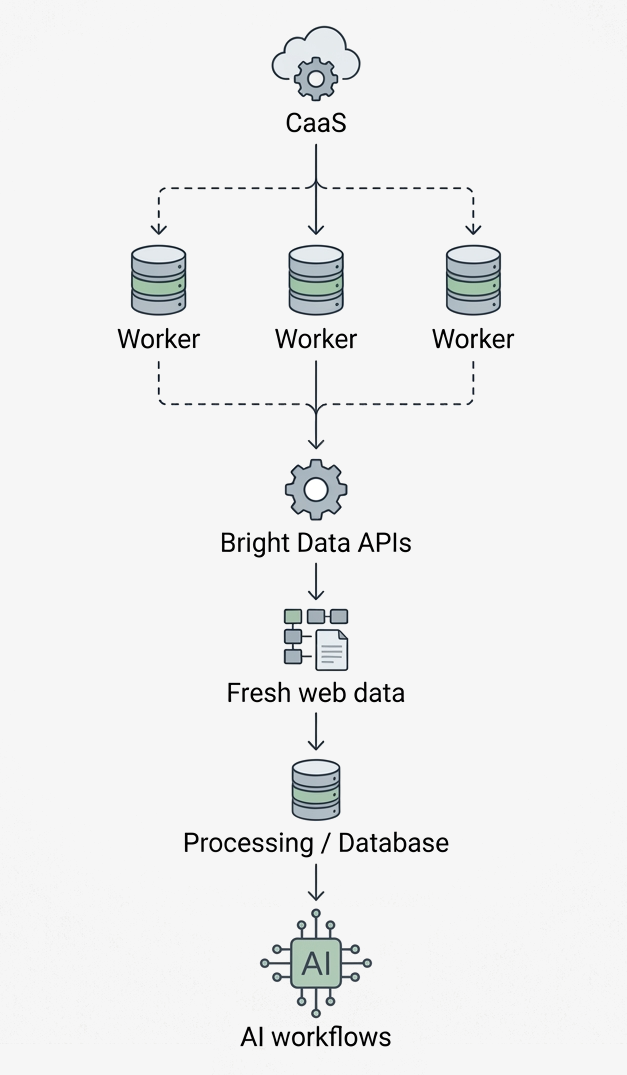
A task queue can sit between the application and the workers, allowing jobs to be distributed dynamically as containers become available. If the workload increases, you can run more workers. When demand decreases, you can scale them back down.
This creates a clean separation of responsibilities:
- CaaS: Provides the compute environment and scales the containerized workers.
- Docker: Packages the application and its dependencies into a portable runtime.
- Bright Data: Provides the specialized infrastructure for accessing and collecting web data at scale.
- Your application: Processes the returned data and sends it to databases, ML-based systems, or AI agents.
Note that CaaS does not make web retrieval easier by itself. It makes the applications web scraping easier to deploy and scale. Combined with managed web data infrastructure such as Bright Data, it lets you build scalable web data pipelines for analytics and AI without managing every layer of the web access stack yourself. Amazing!
Conclusion
In this article, you learned how to use Containers as a Service (CaaS) to build scalable web data pipelines and AI workflows. As shown here, combining CaaS with Bright Data allows you to scale both the compute and web data layers of your architecture.
This integration lets you distribute data collection across containerized workers, retrieve fresh web data through Bright Data APIs, and send the results to downstream components.
Create a new Bright Data account and start using our APIs to build scalable data and AI processing pipelines!
FAQ
What is the difference between CaaS and a DIY container infrastructure?
With CaaS, the cloud provider manages much of the underlying infrastructure and container operations. With a DIY approach, you are responsible for setting up, maintaining, scaling, and securing the container environment.
| CaaS | DIY | |
|---|---|---|
| Infrastructure | Managed by provider | Managed by your team |
| Orchestration | Managed or integrated | Set up and maintained by your team |
| Scaling | Built-in automation | Configure and maintain yourself |
| Maintenance | Lower | Higher |
| Control | Less infrastructure-level control | Greater control |
| Expertise | Less required | More required |
In short, CaaS reduces operational overhead, while DIY provides greater control and customization. Discover more about the managed vs DIY debate.
CaaS vs IaaS vs PaaS vs FaaS vs SaaS: What is the difference?
Cloud service models differ mainly in how much infrastructure and application management they leave to the user:
| Model | What it provides | You manage | Provider manages | Typical use |
|---|---|---|---|---|
| IaaS (Infrastructure as a Service) | Virtualized computing, storage, and networking | OS, middleware, runtime, applications, and data | Physical infrastructure and virtualization | Custom infrastructure and applications |
| CaaS (Containers as a Service) | Managed environment for containerized applications | Container images, applications, and configurations | Infrastructure, container orchestration, and scaling | Containerized applications and microservices |
| PaaS (Platform as a Service) | Managed application platform and runtime | Application code and data | Infrastructure, OS, runtime, and platform | Application development and deployment |
| FaaS (Function as a Service) | Serverless, event-driven function execution | Individual functions and their code | Servers, runtime, scaling, and infrastructure | Short-lived, event-driven tasks |
| SaaS (Software as a Service) | Complete, ready-to-use software | Configuration and data | Entire application stack and infrastructure | End-user applications |
CaaS sits between IaaS and PaaS, giving you control over containerized applications while the provider manages much of the underlying infrastructure and orchestration.
Does Bright Data support the CaaS cloud service model?
Bright Data complements CaaS by providing the web data infrastructure needed for large-scale data collection, while CaaS provides the compute infrastructure to run and scale your containerized workers.



Technical Writer
 5.5 years experience
Antonello Zanini is a technical writer, editor, and software engineer with 5M+ views. Expert in technical content strategy, web development, and project management.