The NVIDIA AI-Q Blueprint is an open-source AI deep research agent. AI-Q plans a research job, runs researcher agents across web and enterprise data, and writes a citation-backed report. NVIDIA also lists AI-Q as the Deep Researcher Agent.
Each job gets a fixed budget of data source calls. A block page or a two-line SERP snippet costs a call but adds little evidence. A full page gives more evidence but can add navigation links as citable sources.
This guide shows what the AI-Q code expects from a search tool and how to give AI-Q live web data with Bright Data.
TL;DR
- NVIDIA AI-Q Blueprint
v2.2.1gives each deep research job 100 data source calls, and a circuit breaker stops searching after 8 consecutive failed calls. The config can lower both limits but not raise them. - AI-Q treats URLs in tool output as citable sources. One Markdown page can add over 170 citable URLs.
- AI-Q batches up to 4 queries by default for tools with one string argument.
- The Bright Data source you build returns page text and keeps one URL per document. Live Google results come from the SERP API, and the Web Unlocker API handles CAPTCHAs and anti-bot challenges.
How the NVIDIA AI-Q Blueprint runs a deep research job
AI-Q sends each request through an intent classifier first. Quick factual questions go to a shallow researcher. Questions that need a full report go to a deep researcher. The deep researcher splits the job across several agents. An optional source router suggests sources, a planner builds a research plan, researcher workers query the sources concurrently, and a writer produces the report. Before deep research starts, a clarifier agent can run a search and ask the user a clarifying question.
Agents get their tools from a data source registry in the workflow YAML. An agent with no explicit tool list inherits every tool in the registry, except the tools in its exclude_tools list. In v2.2.1, AI-Q includes 2 web search tools, and the default CLI config assigns them to different researchers:
| Tool name | Used by | Default setting |
|---|---|---|
web_search_tool |
Shallow researcher | 5 results per query, each limited to 1,000 characters |
advanced_web_search_tool |
Deep researcher | 2 results per query |
A new search source can be a drop-in replacement for these 2 tools. If the new tools keep the same names, every agent setting that refers to them stays valid. AI-Q is built on the NeMo Agent Toolkit (NAT). For details on NAT functions and YAML configuration, see our walkthrough of NVIDIA NeMo with Bright Data.
What the AI-Q code expects from a web search tool
The AI-Q source code has 4 behaviors that affect whether a search tool adds evidence or wastes the job’s budget. All 4 behaviors are in the aiq_agent package at v2.2.1.
In v2.2.1, these limits apply to each deep research job. The settings sit under deep_research_agent in the workflow config:
| Limit | Config setting | Default | Config can raise it |
|---|---|---|---|
| Data source calls per job | resource_limits.max_source_tool_calls |
100 | No |
| Consecutive failed results before the circuit breaker opens | resource_limits.max_consecutive_source_tool_failures |
8 | No |
| Wall-clock timeout per job | resource_limits.max_execution_seconds |
1 hour | No |
| Concurrent data source calls, all workers | max_concurrent_source_tool_calls |
5 | Yes |
| Queries per batch | max_source_tool_batch_size |
4 | Yes |
A job gets 100 data source calls, and the config can lower that number but not raise it. Every query that an agent sends to a search or data tool uses one of those calls. The AI-Q code and logs use the term source-tool calls. In resource_limits.py, the default of each limit is also its maximum. If you set resource_limits.max_source_tool_calls to 200, NAT rejects the whole workflow config before AI-Q starts:
Invalid configuration: functions: Input should be less than or equal to 100To lower the limit, set max_source_tool_calls under resource_limits in the deep research agent config:
functions:
  deep_research_agent:
    resource_limits:
      max_source_tool_calls: 50
To raise one of the first 3 limits, change its DEFAULT_MAX_* constant in resource_limits.py, and reapply the change after AI-Q upgrades.
A call uses the same amount of budget whether it returns 2 short snippets or 5 full pages. Every call should return page text with a length limit that fits the researcher’s context window.
By default, a circuit breaker stops searching for the rest of the job after 8 consecutive failed results. AI-Q counts the result that a tool returns, not each HTTP retry inside the tool. Once the circuit breaker opens, each later query returns Source request skipped because the source circuit is open. An expired API key or a provider allowlist that blocks the server IP doesn’t crash the job, but the report has little web evidence.
To decide whether a call failed, AI-Q checks the text that the tool returns, not the HTTP status of the page. AI-Q classifies 5 common outputs this way:
| Text that the tool returned | Counted as a failed call |
|---|---|
Error: HTTP 403 |
Yes |
{"status_code": 403} |
Yes |
Search returned no results |
Yes |
| An “Access Denied” HTML page (the site sent HTTP 403) | No |
| A JavaScript challenge page (the site sent HTTP 200) | No |
The last 2 rows show what a site with anti-bot protection can send to HTTP clients that it flags as bots. In both cases, the report gets no useful evidence from that page. If the tool returns a block page unchanged, AI-Q treats the block page as evidence. If the tool reports the block page as an error, the error counts toward the circuit breaker. A search tool avoids both outcomes when it returns the public page that a regular browser sees.
Every URL in a tool’s output can become a citable source. In v2.2.1, only knowledge-layer tools, which search your own documents, get a special parser that AI-Q selects by tool name. For other tools, AI-Q extracts every http and https URL from the result and adds each URL to the job’s citation registry. The citation registry is the list of URLs that the report may cite. The citation verifier later keeps any citation whose URL is in that registry.
Pages converted to Markdown keep their links, so AI-Q registers navigation, footer, and related-article links as sources. A single survey report page fetched as Markdown can add more than 170 citable URLs.
Some navigation menus also trigger an extractor error. The AI-Q source extractor can raise ValueError: Invalid IPv6 URL when a menu uses multi-line Markdown links, such as [\n\nDocs\n\n](https://docs.example.com). In v2.2.1, AI-Q runs that extractor without a try block, so the researcher worker for that query fails instead of recording a failed call. The job continues but loses the notes for that query. A safe pattern is to strip link URLs from page text and keep a single URL per document.
A tool with a single string argument gets batch mode. Before the deep researcher sees a source tool, AI-Q checks the input schema of the tool. If the only argument is a string, AI-Q wraps the tool so the model can send a batch of up to 4 queries by default. The queries run concurrently. Tools with more arguments get no batch mode. For a single-string tool, the model sees one list argument:
advanced_web_search_tool -> model-facing args: ['queries']Batching reduces the number of model calls. Batching doesn’t reduce budget use, because each query in a batch still uses one data source call.
Together, the 4 behaviors define 3 design rules:
- Return page text from several results, so each call adds evidence instead of a block page or a snippet.
- Keep a single URL in each document, so the citation registry gets one source per document.
- Take a single query, so AI-Q gives the tool batch mode.
Install a pinned AI-Q release
Before you start, have these ready:
- Python 3.11 to 3.13 and
uv0.11.25 or newer - An
NVIDIA_API_KEYfrom build.nvidia.com - A Bright Data account with an API key, plus a zone for the SERP API and a zone for the Web Unlocker API. A zone is the named configuration that receives your requests.
- Network egress to
api.brightdata.com,www.google.com,google.com, andintegrate.api.nvidia.com(the NVIDIA model endpoints) - If a zone uses an IP allowlist, the egress IP of your server on that allowlist
NVIDIA renamed the GitHub repository from aiq to deep-researcher-agent, and the develop branch also renames the Python package and the environment variable prefix.
Release v2.2.1, its container images, and its AI-Q documentation still use the AI-Q names, so pin v2.2.1 and follow every step below with that release. Clone that tag and run the setup script:
git clone --branch v2.2.1 https://github.com/NVIDIA-AI-Blueprints/deep-researcher-agent.git aiq
cd aiq
./scripts/setup.sh
The setup script creates the .venv virtual environment, installs the main bundled data sources, and copies deploy/.env.example to deploy/.env.
The default config uses the NVIDIA_API_KEY for the hosted Nemotron models. Those hosted endpoints are subject to the NVIDIA API trial terms, which allow NVIDIA to collect inputs and outputs to improve its products and models. Use the hosted endpoints to test AI-Q on public questions, and self-host the models as NVIDIA NIM microservices for confidential data.
Build a Bright Data web search source for AI-Q
You can connect AI-Q to Bright Data in 2 ways. For page text, copy the NAT function below. The function follows the 3 design rules above and replaces both default web search tools. For questions that need structured records, the Bright Data Model Context Protocol (MCP) server adds pre-built scrapers without code.
The MCP server also has search and scrape tools for general agents. For AI-Q, the NAT function searches, reads the top pages, and keeps one URL per document in a single call.
Each call runs a live Google search through the Bright Data SERP API and fetches the top result pages through the Web Unlocker API. The Web Unlocker API handles proxy rotation, browser fingerprints, CAPTCHA solving, and anti-bot challenges, and it returns each page as Markdown. The SERP API returns parsed JSON results. Because the Bright Data APIs do that work, the tool code can focus on the AI-Q design rules. The output follows the <Document> format of the bundled AI-Q search tools, so the rest of AI-Q needs no code changes. Here is the flow of one call:
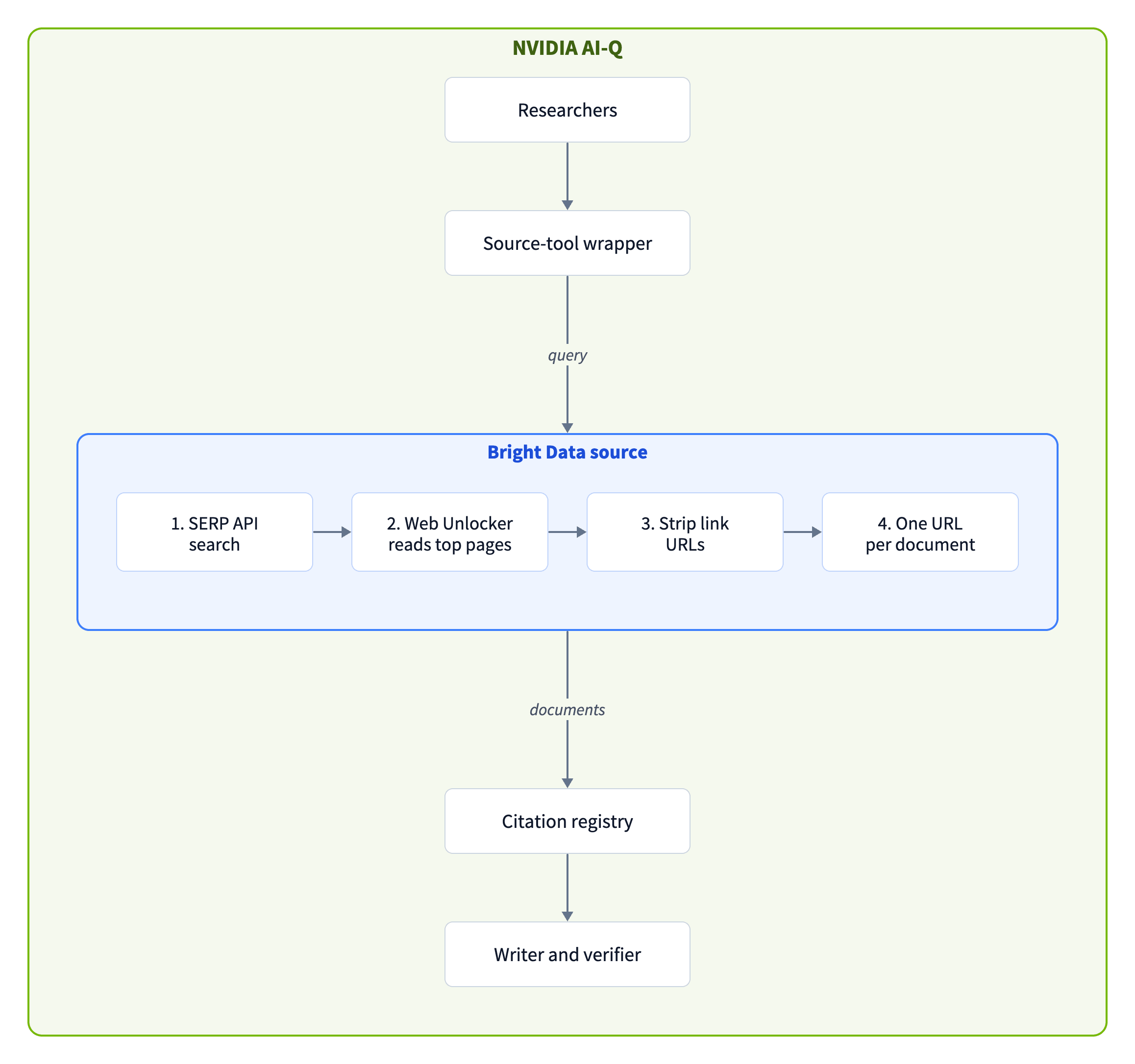
For a security review, here is the data flow. The Bright Data source runs inside the AI-Q process as a NAT function, so it needs no separate service. User questions go to the model endpoint. The search queries that the agents write go to the SERP API, which runs them on Google or Bing. The Web Unlocker API then fetches the top result pages from their sites. Apart from the Bright Data APIs, the tool contacts only www.google.com and google.com to resolve Google redirect links. If your network restricts egress, allow both hosts. The Bright Data Trust Center has the compliance reports and certifications for your vendor review, including SOC 2, ISO 27001, and ISO 27701.
Create the Bright Data zones
Create a free Bright Data account and get an API key. You also need a zone for each API. The free tier includes monthly credits that you can use for the SERP API, Web Unlocker API, and Web Scraper API.
To create the zones, open Web Access in the control panel and select Create API, which opens the Add API page. On Choose API type, select SERP API, click Continue, and complete the Configure API and Test API steps. Repeat the flow for Web Unlocker API:
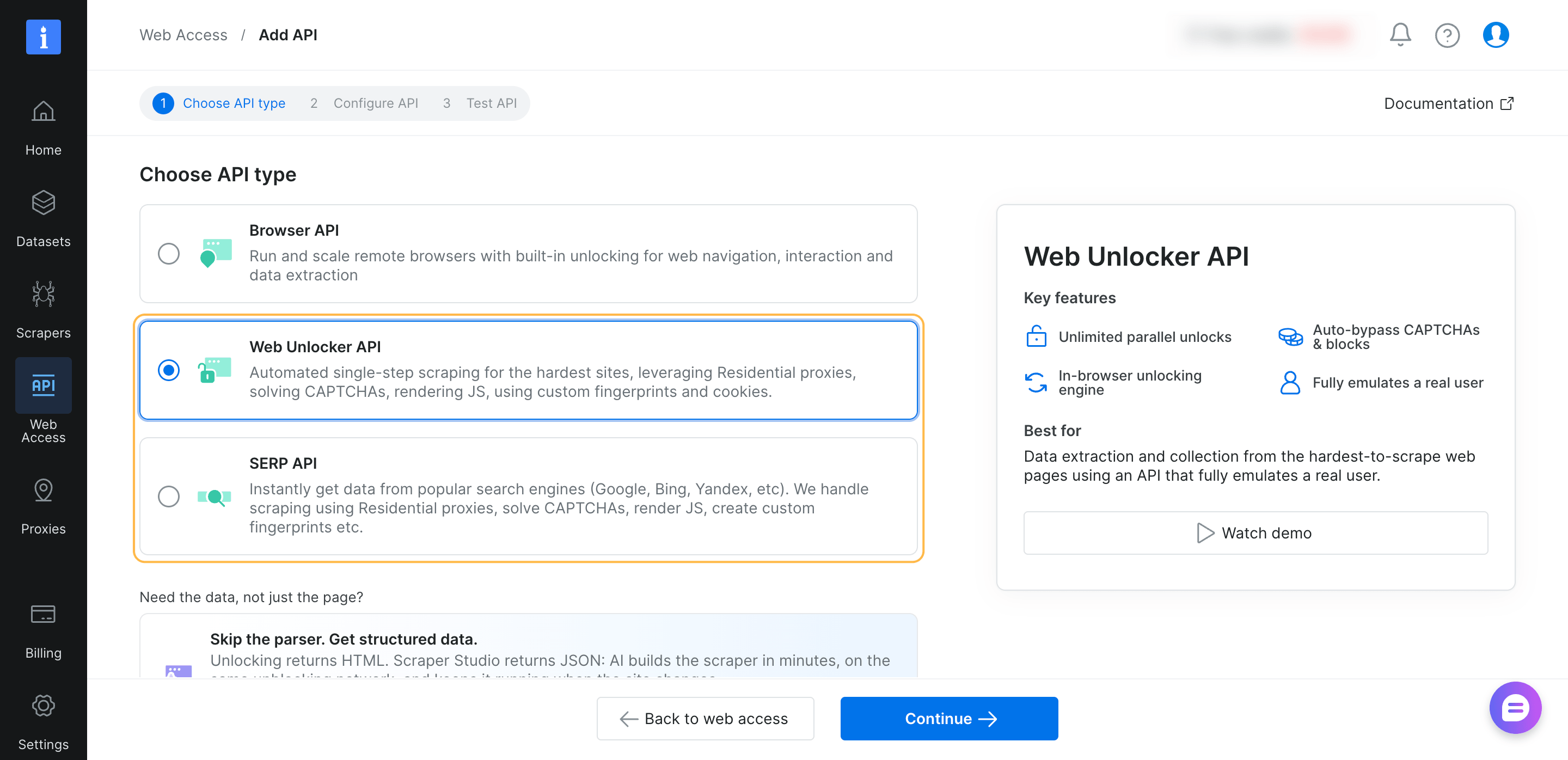
Account details in the header are blurred.
Copy the name of each new zone from the Web Access page. The smoke test and the .env file use both names.
Create the package
The package registers one NAT function, brightdata_web_search. The config later creates 3 search tools from that function. Create the package next to the bundled sources, in the same directory layout:
sources/brightdata_web_search/
├── pyproject.toml
└── src/
    ├── __init__.py
    ├── client.py
    └── register.py
NAT discovers the function through the nat.plugins entry point when a workflow starts:
[build-system]
build-backend = "setuptools.build_meta"
requires = ["setuptools >= 64"]

[tool.setuptools]
packages = ["brightdata_web_search"]
package-dir = {"brightdata_web_search" = "src"}

[project]
name = "brightdata-web-search"
version = "0.1.0"
description = "NAT web search source for NVIDIA AI-Q: Bright Data SERP API plus Web Unlocker API"
requires-python = ">=3.11,<3.14"
license = {text = "Apache-2.0"}
dependencies = ["httpx>=0.27", "pydantic>=2.0"]

[project.entry-points."nat.plugins"]
brightdata_web_search = "brightdata_web_search.register"
Leave src/__init__.py empty, and put the search, redirect, and fetch logic in src/client.py. Four parts of the file are designed for AI-Q behavior:
clean_markdown()removes every link URL. The citation registry sees one URL per document, and menus can’t trigger the extractor error. Link text stays, so a researcher can still search for a linked source by name.search()retries a failed request and can send the query to Bing through the same SERP API. Only the final result counts toward the circuit breaker.- A minimum-length check detects pages with little text, such as a sign-in page. For those pages, the document keeps the SERP snippet instead of the page text. Without the check, the researcher would read a near-empty page as the evidence for that URL. If your sources often return longer notices, such as paywall teasers, raise
MIN_PAGE_CHARSinclient.py. - An in-memory page cache with a 15-minute TTL shares fetched pages across the Bright Data search tools in one process. Researchers often find the same page through different queries, and a cached page sends no new request.
Here is src/client.py:
"""Bright Data SERP API + Web Unlocker API client shaped for AI-Q.

One call searches, resolves the real result URLs, reads the top pages as
Markdown, and returns one <Document> block per result with one URL in it.
"""

import asyncio
import html
import re
import time
from collections import OrderedDict
from urllib.parse import urlencode, urlsplit

import httpx

API_URL = "https://api.brightdata.com/request"
# Google uses at most 32 words of a query, so cut long agent-written ones
MAX_QUERY_WORDS = 32
MIN_PAGE_CHARS = 600
RECENCY = {"hour": "h", "day": "d", "week": "w", "month": "m", "year": "y"}
# Researchers in one job often reach the same page. Every tool in the
# process shares fetched pages for 15 minutes, so a repeat sends no request.
PAGE_CACHE_SECONDS = 900
PAGE_CACHE_SIZE = 256
_pages: OrderedDict[str, tuple[float, str]] = OrderedDict()

_XML_INVALID = re.compile(
    r"[\x00-\x08\x0b\x0c\x0e-\x1f\ud800-\udfff\ufffe\uffff]"
)
_MD_IMAGE = re.compile(r"!\[[^\]]*\]\([^)]*\)")
_MD_LINK = re.compile(
    r"\[([^\]]*)\]\((?:[^()\s]|\([^()\s]*\))*(?:\s+\"[^\"]*\")?\)"
)
_BARE_URL = re.compile(r"https?://\S+")
_LINK_ROW = re.compile(r"^[\s\-*•|>#]*(\[[^\]]*\]\([^)]*\)[\s|•·,/-]*)+$")


def _xml(value: object) -> str:
    text = _XML_INVALID.sub("", "" if value is None else str(value))
    return html.escape(text, quote=True)


def render_document(url: str, title: str, content: str) -> str:
    """The <Document> shape that AI-Q's bundled search tools return."""
    return (
        f'<Document href="{_xml(url)}">\n<title>\n{_xml(title)}\n</title>\n'
        f"{_xml(content)}\n</Document>"
    )


def clean_markdown(markdown: str, max_chars: int) -> str:
    """Keep the text, drop link URLs: each document keeps one URL."""
    rows = [r for r in markdown.splitlines() if not _LINK_ROW.match(r)]
    text = _MD_IMAGE.sub("", "\n".join(rows))
    text = _MD_LINK.sub(lambda m: " ".join(m.group(1).split()), text)
    text = _BARE_URL.sub("", text)
    text = re.sub(r"\n\s*\n+", "\n\n", text).strip()
    if len(text) > max_chars:
        text = text[: max_chars - 3] + "..."
    return text


class BrightDataSearchClient:
    def __init__(
        self,
        api_key: str,
        serp_zone: str,
        unlocker_zone: str | None,
        *,
        country: str = "us",
        recency: str = "any",
        max_retries: int = 2,
        timeout: float = 60.0,
    ):
        self._headers = {
            "Authorization": f"Bearer {api_key}",
            "Content-Type": "application/json",
        }
        self.serp_zone, self.unlocker_zone = serp_zone, unlocker_zone
        self.country, self.recency = country, recency
        self.max_retries, self.timeout = max_retries, timeout

    def _search_url(self, engine: str, query: str) -> str:
        if engine == "bing":
            params = {"q": query, "cc": self.country, "brd_json": 1}
            return "https://www.bing.com/search?" + urlencode(params)
        params = {"q": query, "hl": "en", "gl": self.country, "brd_json": 1}
        if self.recency in RECENCY:
            params["tbs"] = "qdr:" + RECENCY[self.recency]
        return "https://www.google.com/search?" + urlencode(params)

    async def _post(self, http: httpx.AsyncClient, body: dict):
        return await http.post(
            API_URL, headers=self._headers, json=body, timeout=self.timeout
        )

    async def search(self, http: httpx.AsyncClient, query: str) -> list[dict]:
        """Retry here, then try Bing. AI-Q counts the tool's result,
        not each HTTP attempt inside it."""
        query = " ".join(query.split()[:MAX_QUERY_WORDS])
        last_error = "no response"
        # The recency filter is a Google parameter, so filtered searches
        # use Google only
        engines = ("google",) if self.recency in RECENCY else ("google", "bing")
        for engine in engines:
            for attempt in range(self.max_retries):
                url = self._search_url(engine, query)
                body = {"zone": self.serp_zone, "url": url, "format": "raw"}
                try:
                    resp = await self._post(http, body)
                except httpx.HTTPError as exc:
                    last_error = type(exc).__name__
                    await asyncio.sleep(1.5 * (attempt + 1))
                    continue
                # The SERP API reports request errors in x-brd-* headers
                error = resp.headers.get("x-brd-error", "")
                if resp.status_code != 200:
                    error = error or f"HTTP {resp.status_code}"
                if "ip_forbidden" in error or resp.status_code in (401, 403):
                    raise RuntimeError(f"{self.serp_zone} refused: {error}")
                if not error:
                    try:
                        return resp.json().get("organic", [])
                    except ValueError:
                        error = "response was not JSON"
                last_error = error
                # Try the next engine instead of repeating this query
                if "recently failed" in error:
                    break
                await asyncio.sleep(1.5 * (attempt + 1))
        raise RuntimeError(f"search failed ({last_error})")

    async def resolve(self, http: httpx.AsyncClient, link: str) -> str | None:
        """Google can wrap result links in google.com/goto redirects.
        Cite the destination page."""
        parts = urlsplit(link)
        on_google = parts.hostname in ("google.com", "www.google.com")
        if not on_google or parts.path != "/goto":
            return link
        try:
            resp = await http.get(link, follow_redirects=False, timeout=15)
        except httpx.HTTPError:
            return None
        location = resp.headers.get("location", "")
        if location.startswith("http") and "google.com/" not in location:
            return location
        return None

    async def fetch_markdown(
        self, http: httpx.AsyncClient, url: str
    ) -> str | None:
        body = {
            "zone": self.unlocker_zone,
            "url": url,
            "format": "raw",
            "data_format": "markdown",
        }
        hit = _pages.get(url)
        if hit and time.monotonic() - hit[0] < PAGE_CACHE_SECONDS:
            return hit[1]
        for attempt in range(self.max_retries):
            try:
                resp = await self._post(http, body)
            except httpx.HTTPError:
                await asyncio.sleep(1.5 * (attempt + 1))
                continue
            target = int(resp.headers.get("x-brd-status-code") or 200)
            if resp.status_code == 200 and target < 400 and resp.text.strip():
                _pages[url] = (time.monotonic(), resp.text)
                _pages.move_to_end(url)
                if len(_pages) > PAGE_CACHE_SIZE:
                    _pages.popitem(last=False)
                return resp.text
            if resp.status_code < 500 and resp.status_code != 429:
                return None
            await asyncio.sleep(1.5 * (attempt + 1))
        return None

    async def research(
        self,
        query: str,
        *,
        max_results: int,
        fetch_top_k: int,
        max_content_length: int,
    ) -> str:
        async with httpx.AsyncClient() as http:
            results, seen = [], set()
            for item in await self.search(http, query):
                link = item.get("link") or ""
                url = None
                if link.startswith("http"):
                    url = await self.resolve(http, link)
                if not url or url in seen:
                    continue
                seen.add(url)
                results.append(
                    {
                        "url": url,
                        "title": item.get("title", ""),
                        "snippet": item.get("description", ""),
                    }
                )
                if len(results) == max_results:
                    break
            if not results:
                return "Search returned no results"

            k = fetch_top_k if self.unlocker_zone else 0
            pages = await asyncio.gather(
                *(self.fetch_markdown(http, r["url"]) for r in results[:k])
            )
            docs = []
            for i, r in enumerate(results):
                page = pages[i] if i < k else None
                text = clean_markdown(page, max_content_length) if page else ""
                # A page with almost no text is not evidence. Keep the snippet,
                # cleaned the same way, so each document keeps one URL.
                if len(text) < MIN_PAGE_CHARS:
                    text = clean_markdown(r["snippet"], max_content_length)
                title = clean_markdown(r["title"], max_content_length)
                docs.append(render_document(r["url"], title, text))
            return "\n\n---\n\n".join(docs)
resolve() replaces each Google redirect link with its destination URL, so every document that the tool returns cites the source page directly. If you want to limit sources to an allowlist of domains, filter results in research() before the if not results check. Include enough domains in the allowlist for your questions, because a call with no results left after the filter counts as a failed call.
Next, src/register.py registers the client as a NAT function with a single string argument, so AI-Q gives the function the batch wrapper:
"""NeMo Agent Toolkit registration for the Bright Data web search source."""

import logging
import os
from typing import Literal

from pydantic import Field
from pydantic import SecretStr

from nat.builder.builder import Builder
from nat.builder.function_info import FunctionInfo
from nat.cli.register_workflow import register_function
from nat.data_models.function import FunctionBaseConfig

from .client import BrightDataSearchClient

logger = logging.getLogger(__name__)


class BrightDataWebSearchConfig(
    FunctionBaseConfig, name="brightdata_web_search"
):
    """Live search results from the Bright Data SERP API, with the top
    pages read through the Bright Data Web Unlocker API."""

    api_key: SecretStr | None = Field(
        default=None, description="Falls back to BRIGHTDATA_API_KEY."
    )
    serp_zone: str = Field(description="SERP API zone name.")
    unlocker_zone: str | None = Field(
        default=None, description="Web Unlocker zone. Unset: snippets only."
    )
    max_results: int = Field(default=5, ge=1, le=10)
    fetch_top_k: int = Field(default=3, ge=0, le=10)
    max_content_length: int = Field(default=6000, ge=1000)
    country: str = Field(default="us")
    recency: Literal["any", "hour", "day", "week", "month", "year"] = "any"
    max_retries: int = Field(default=2, ge=1, le=5)
    timeout: float = Field(
        default=60.0, ge=5, le=300, description="Seconds per HTTP request."
    )


@register_function(config_type=BrightDataWebSearchConfig)
async def brightdata_web_search(
    config: BrightDataWebSearchConfig, builder: Builder
):
    api_key = os.environ.get("BRIGHTDATA_API_KEY")
    if config.api_key:
        api_key = config.api_key.get_secret_value()

    if not api_key:
        logger.warning("BRIGHTDATA_API_KEY is not set")

        async def _unavailable(question: str) -> str:
            """Web search (unavailable: BRIGHTDATA_API_KEY is not set)."""
            return "Error: BRIGHTDATA_API_KEY is not set."

        yield FunctionInfo.from_fn(
            _unavailable, description=_unavailable.__doc__
        )
        return

    client = BrightDataSearchClient(
        api_key,
        config.serp_zone,
        config.unlocker_zone,
        country=config.country,
        recency=config.recency,
        max_retries=config.max_retries,
        timeout=config.timeout,
    )

    async def _search(question: str) -> str:
        """Searches the live web and reads the top result pages. Use it for
        current facts, figures, prices, and recent announcements.

        Args:
            question (str): One focused search query of 32 words or fewer.

        Returns:
            str: One <Document href="..."> block per result.
        """
        try:
            return await client.research(
                question,
                max_results=config.max_results,
                fetch_top_k=config.fetch_top_k,
                max_content_length=config.max_content_length,
            )
        except Exception as exc:
            # AI-Q counts a result that starts with "Error:" as a failed call
            return f"Error: web search failed: {exc}"

    yield FunctionInfo.from_fn(_search, description=_search.__doc__)
Install and check the package
Install the package into the AI-Q virtual environment:
uv pip install -e ./sources/brightdata_web_searchRerun this install after every uv sync. The sync resets the environment to uv.lock and removes the editable install. For the container image, add uv pip install --no-deps -e ./sources/brightdata_web_search to the RUN step in deploy/Dockerfile that installs the bundled sources.
To smoke-test the function without starting AI-Q, save this script as check_source.py. The script builds the function with NAT, calls the function like an agent, and sends the output to the AI-Q source extractor:
import asyncio
import os

from aiq_agent.common.citation_verification import (
    extract_sources_from_tool_result,
)
from nat.builder.workflow_builder import WorkflowBuilder
from nat.runtime.loader import PluginTypes
from nat.runtime.loader import discover_and_register_plugins

from brightdata_web_search.register import BrightDataWebSearchConfig

QUESTION = "GB300 NVL72 lead times for enterprise buyers"


async def main():
    discover_and_register_plugins(PluginTypes.ALL)
    config = BrightDataWebSearchConfig(
        serp_zone=os.environ["BRIGHTDATA_SERP_ZONE"],
        unlocker_zone=os.environ["BRIGHTDATA_UNLOCKER_ZONE"],
    )
    async with WorkflowBuilder() as builder:
        await builder.add_function("advanced_web_search_tool", config)
        tool = await builder.get_tool(
            "advanced_web_search_tool", wrapper_type="langchain"
        )
        args = tool.tool_call_schema.model_json_schema()["properties"]
        print("arguments:", list(args))

        output = await tool.ainvoke({"question": QUESTION})
        for doc in output.split("\n\n---\n\n"):
            print(doc.splitlines()[0][:72], f"{len(doc):,} chars")

        sources = extract_sources_from_tool_result(
            "advanced_web_search_tool", output
        )
        print(output.count("<Document "), "documents,", len(sources), "sources")


asyncio.run(main())
Export BRIGHTDATA_API_KEY, BRIGHTDATA_SERP_ZONE, and BRIGHTDATA_UNLOCKER_ZONE in your shell. Then run the script from the AI-Q repository root with .venv/bin/python check_source.py, which prints output like this:
arguments: ['question']
<Document href="https://verda.com/blog/nvidia-gb300-nvl72-early-adopters 5,981 chars
<Document href="https://www.investing.com/news/company-news/coreweave-be 6,258 chars
<Document href="https://www.linkedin.com/posts/sonic-components-32511620 6,214 chars
<Document href="https://discover.vultr.com/cloud-gpu-gb300-nvl72-datashe 271 chars
4 documents, 4 sources
AI-Q replaces the question argument with the queries list for batch mode. The first 3 documents contain page text from the Web Unlocker API, and max_content_length limits each page to 6,000 characters. Each printed length also includes the title and the <Document> tags. The fourth document is a SERP snippet, because fetch_top_k is set to 3. The tool skips results that it can’t cite or that repeat a URL, so a run can return fewer than 5 documents. The script prints the first 72 characters of each document’s first line. Live results also change between runs, so your URLs can differ. In every run, the document and source counts on the last line should match. Matching counts mean that every citable URL belongs to a document that the tool returned.
If a zone uses an IP allowlist, a missing server IP shows in this output. A SERP API zone that blocks the IP returns an Error: line that names the zone. A Web Unlocker API zone that blocks the IP leaves every document as a short SERP snippet.
Configure AI-Q and run a deep research job
In deploy/.env, set the NVIDIA API key and add the Bright Data credentials:
NVIDIA_API_KEY=your_nvidia_api_key
BRIGHTDATA_API_KEY=your_bright_data_api_key
BRIGHTDATA_SERP_ZONE=your_serp_zone
BRIGHTDATA_UNLOCKER_ZONE=your_unlocker_zone
Copy configs/config_cli_default.yml to configs/config_cli_brightdata.yml. The replacement below adds a third tool, recent_web_search_tool, which filters results to the past week with a Google search URL parameter. The data source registry gets a new source named web_search_recent for the new tool.
Under functions, replace the data_sources, web_search_tool, and advanced_web_search_tool entries with the following:
functions:
  data_sources:
    _type: data_source_registry
    sources:
      - id: web_search
        name: "Web Search"
        description: "Search the live web and read the top result pages."
        tools:
          - web_search_tool
          - advanced_web_search_tool
      - id: web_search_recent
        name: "Web Search (past week)"
        description: "Search pages from the past week."
        tools:
          - recent_web_search_tool

  web_search_tool:
    _type: brightdata_web_search
    serp_zone: ${BRIGHTDATA_SERP_ZONE}
    unlocker_zone: ${BRIGHTDATA_UNLOCKER_ZONE}
    fetch_top_k: 1
    max_content_length: 2000

  advanced_web_search_tool:
    _type: brightdata_web_search
    serp_zone: ${BRIGHTDATA_SERP_ZONE}
    unlocker_zone: ${BRIGHTDATA_UNLOCKER_ZONE}
    fetch_top_k: 3
    max_content_length: 6000

  recent_web_search_tool:
    _type: brightdata_web_search
    serp_zone: ${BRIGHTDATA_SERP_ZONE}
    unlocker_zone: ${BRIGHTDATA_UNLOCKER_ZONE}
    recency: week
With this config, each tool returns up to 5 results per query. The other settings differ by tool:
| Tool | Used by | Pages fetched | Text per page | Recency | Billed requests per query |
|---|---|---|---|---|---|
web_search_tool |
Shallow researcher | Top page | Up to 2,000 characters | Any time | Up to 2 |
advanced_web_search_tool |
Deep researcher | Top 3 pages | Up to 6,000 characters | Any time | Up to 4 |
recent_web_search_tool |
Both researchers | Top 3 pages | Up to 6,000 characters | Past week | Up to 4 |
The shallow researcher is the fast path, so its tool fetches only the top page. Results without a page fetch keep their SERP snippets. The existing exclude_tools lists limit each researcher to its own tool, so the agent settings need no changes. Because no list includes recent_web_search_tool, both researchers can use the past-week tool.
At these settings, one deep research query can return up to about 19,000 characters. A full batch of 4 queries can add about 76,000 characters, or roughly 20,000 tokens, to the researcher’s context window. Lower fetch_top_k or max_content_length if prompt tokens matter more than page coverage.
To get search results for another country, set the country field of a tool, such as country: de for Germany. The tool also sends hl=en, which sets the Google interface language to English. To change it, edit hl in _search_url() in client.py.
Start the CLI with the new config:
./scripts/start_cli.sh --config_file configs/config_cli_brightdata.ymlTo confirm that each document still contains a single URL, watch the log during a deep research run. AI-Q logs [CitationRegistry] Captured N source(s) from advanced_web_search_tool once for each batch that returns sources. With the default batch size, a batch contains up to 4 queries with up to 5 results each, so N should stay at or below 20. A much larger N means that page links are still added to the citation registry.
What to expect from an AI-Q run
In 3 test runs on the NVIDIA trial endpoints, a question about GB300 NVL72 availability took 13 to 27 minutes. The runs used 44 to 83 of the 100 data source calls. In the 27-minute run, the report cited 58 URLs from 35 domains, and each URL linked directly to its source page.
The NVIDIA trial endpoints also enforce rate limits. When many agents call the model at once, the NVIDIA model API can return HTTP 429 (Too Many Requests). If the writer step exhausts its retries, the job ends without a report. For long or concurrent jobs, self-host the models as NVIDIA NIM microservices.
The AI-Q citation verifier finds the source list by its heading. If the AI-Q writer uses a numbered heading, such as ## 8. Sources, the verifier logs No source section found. The verifier then appends a second ## Sources list with the source URLs. In the test runs, the list under the numbered heading had citation numbers instead of URLs. If a report ends with 2 source lists, post-process the report to remove the list that has no URLs.
Run AI-Q in web mode
The web UI and the REST API run together from ./scripts/start_e2e.sh, which loads configs/config_web_default_llamaindex.yml by default. Edit that file, and keep its knowledge_layer source under data_sources. Then copy 3 changes from the CLI config. Add the web_search_recent source to data_sources, replace both tool entries, and add recent_web_search_tool.
The web UI runs at http://localhost. In the Data Sources panel, the 2 web search sources appear as Web Search and Web Search (past week). Both sources are enabled by default, and users can toggle each source per message:
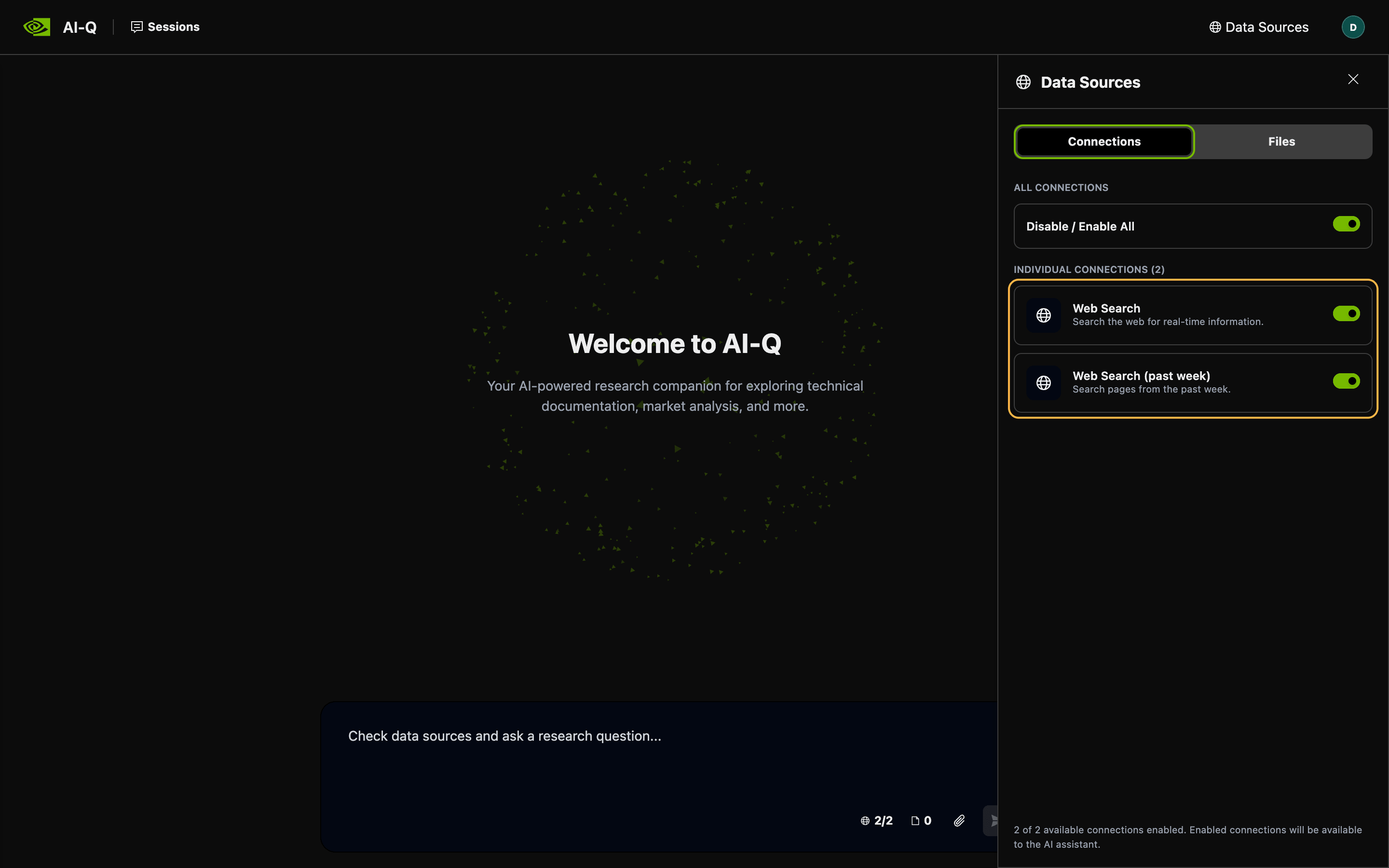
Both sources run the brightdata_web_search function that you built, and the past-week source adds a recency filter.
To run headless jobs, submit them through the REST API. A job whose request body has no data_sources field gets every registry source, so list only the sources you want. This request limits a job to the past-week source:
curl -X POST http://localhost:8000/v1/jobs/async/submit \
  -H "Content-Type: application/json" \
  -d '{
    "agent_type": "deep_researcher",
    "input": "How have GB300 NVL72 lead times changed for enterprise buyers this quarter?",
    "data_sources": ["web_search_recent"]
  }'
The response contains a job ID. GET /v1/jobs/async/job/{job_id}/state then returns the job’s outputs, every source URL that the tools found, and the URLs that the report cites. Use the state endpoint to audit the cited pages before you share a report.
In the web UI, the Report tab ends each finished report with the same list of cited URLs. A separate web-mode run on GB300 NVL72 lead times cited 60 URLs from 44 domains, and each source had a direct link to its page:
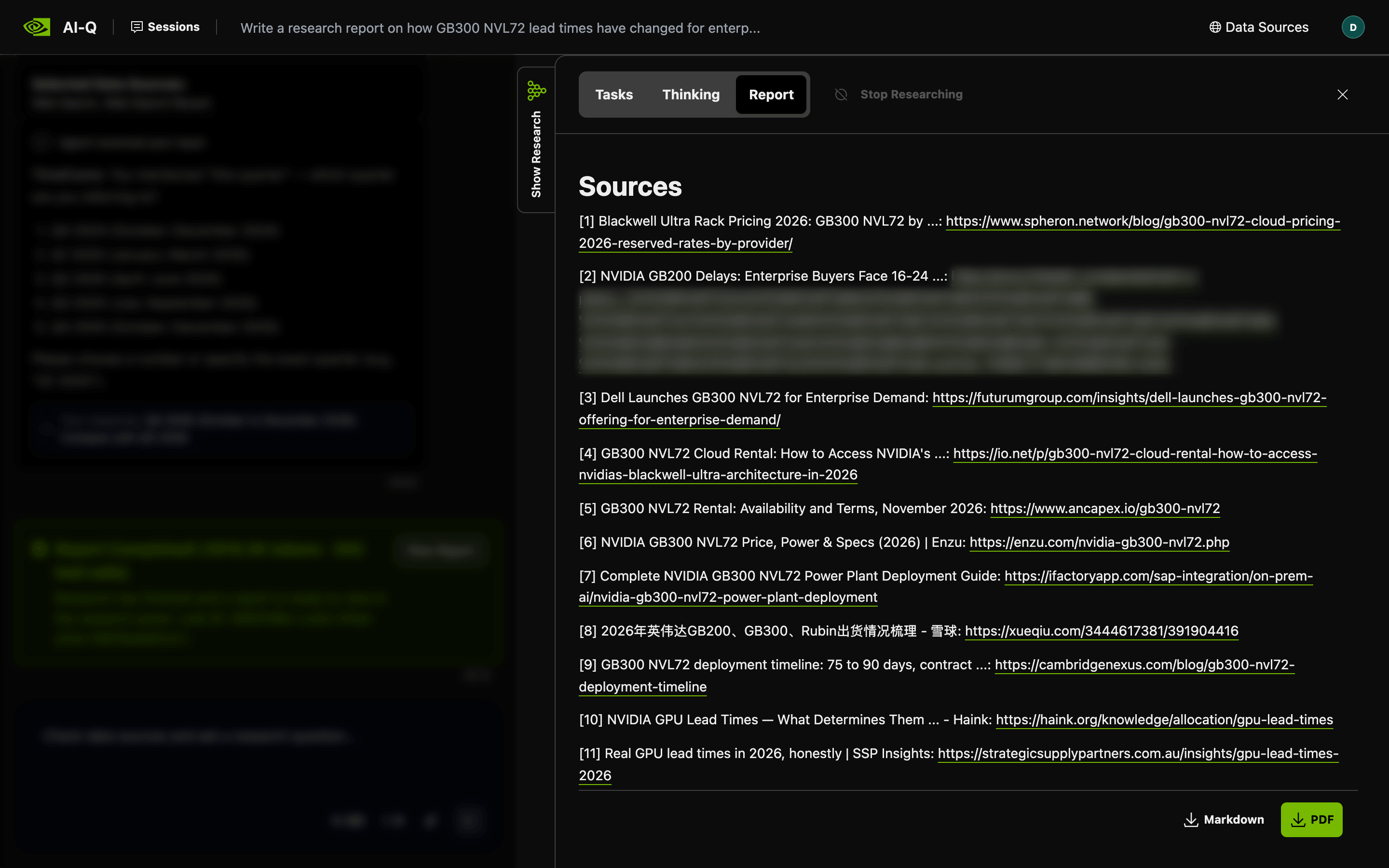
The chat column is dimmed, and one URL is blurred for privacy.
What a deep research report costs in web requests
With the search tools above, the 100-call budget sets the maximum web cost of the deep research phase. Bright Data bills only successful requests. Each search call is billed for at most 1 SERP API request. A search call from the deep researcher is also billed for up to 3 Web Unlocker API requests. At 100 calls, the deep research phase uses at most 400 billable requests. Clarifier searches don’t count toward the 100-call budget, so they can add requests above that limit. A REST job with agent_type set to deep_researcher makes no clarifier searches, because it runs the deep researcher directly. The current rates are on the SERP API pricing page and the Web Unlocker API pricing page.
In the 27-minute GB300 NVL72 run, the job made 175 billed requests. Of those, 55 were SERP API requests and 120 were Web Unlocker API requests. The page cache handled 14 more page fetches without sending a request. The same job sent 2.56 million prompt tokens to Nemotron 3 Ultra. Multiply the request and token counts by your current rates to see what one report costs.
To track both costs in one place, use the AI-Q tokenomics report, which builds a cost report from nat eval profiler traces. The report assigns $0 to any tool that matches no key in its pricing YAML, so add the 3 search tools under tokenomics.pricing.tools. Set each cost_per_call to the price of one query. One query uses 1 SERP API request plus 1 Web Unlocker API request for each page that the tool fetches:
tokenomics:
  pricing:
    tools:
      # USD per query. Replace each 0.0 with your current rates.
      web_search_tool:           # 1 SERP API + 1 Web Unlocker API request
        cost_per_call: 0.0
      advanced_web_search_tool:  # 1 SERP API + 3 Web Unlocker API requests
        cost_per_call: 0.0
      recent_web_search_tool:    # 1 SERP API + 3 Web Unlocker API requests
        cost_per_call: 0.0
Use the full tool names as keys. The report checks for an exact name first and then matches keys as substrings. If you start from the AI-Q sample pricing file, its web_search key gives all 3 tools one price unless you add these keys. Some queries fetch fewer pages, so the report gives an upper bound for web cost. For exact billed counts, check the zone usage in the Bright Data control panel.
Add the Bright Data pre-built scrapers through MCP
Some research questions need a field as the answer, such as a price, a rating, or an employee count. Bright Data has pre-built scrapers for public pages on sites such as Amazon and LinkedIn. The scrapers return those fields as structured records instead of page text. Bright Data maintains these scrapers, so you don’t write or update parsing code for those sites.
AI-Q loads MCP tools through a NAT function group of type mcp_client. The function group is one YAML entry and needs no code. The Bright Data MCP server lets you select tools from its tool list with the tools and groups query parameters. Load only the tools that the agent needs, because an agent sends every tool schema with each model call. Create a separate Bright Data Agent API key for AI-Q in Account settings. Set the MCP URL in deploy/.env with that key and only the scraper tools:
BRIGHTDATA_MCP_URL="https://mcp.brightdata.com/mcp?token=your_agent_api_key&tools=search_scrapers,get_scraper_details,run_scraper,get_scraper_progress,get_scraper_results"Give AI-Q logs the same access controls as the key, because NAT logs the full MCP server URL when a workflow starts. Set an expiration date on the agent key. Because only AI-Q uses the agent key, you can rotate the agent key without changing your other keys. If your network restricts egress, also allow mcp.brightdata.com. Next, add the function group and a matching entry in the data source registry:
function_groups:
  brightdata_mcp:
    _type: mcp_client
    server:
      transport: streamable-http
      url: ${BRIGHTDATA_MCP_URL}

functions:
  data_sources:
    _type: data_source_registry
    sources:
      # web_search and web_search_recent entries stay as they are
      - id: brightdata_scrapers
        name: "Bright Data scrapers"
        description: "Structured records from pre-built scrapers, such as Amazon products and public LinkedIn company pages."
        tools:
          - brightdata_mcp
At startup, AI-Q logs a line such as Found available tool: brightdata_mcp__run_scraper for each loaded tool, so check that all 5 tools appear.
To get a record, the agent finds a scraper with search_scrapers, reads the scraper input schema with get_scraper_details, and starts the scraper with run_scraper. For longer runs, the agent also polls progress with get_scraper_progress and fetches the records with get_scraper_results. AI-Q counts these calls toward the same 100-call budget as search. Bright Data bills the pre-built scrapers per delivered record, at the rates on the Web Scraper API pricing page.
In one test, the question asked for the price, star rating, and review count of a product on Amazon. The shallow researcher chose the scrapers automatically and answered from one Amazon record:
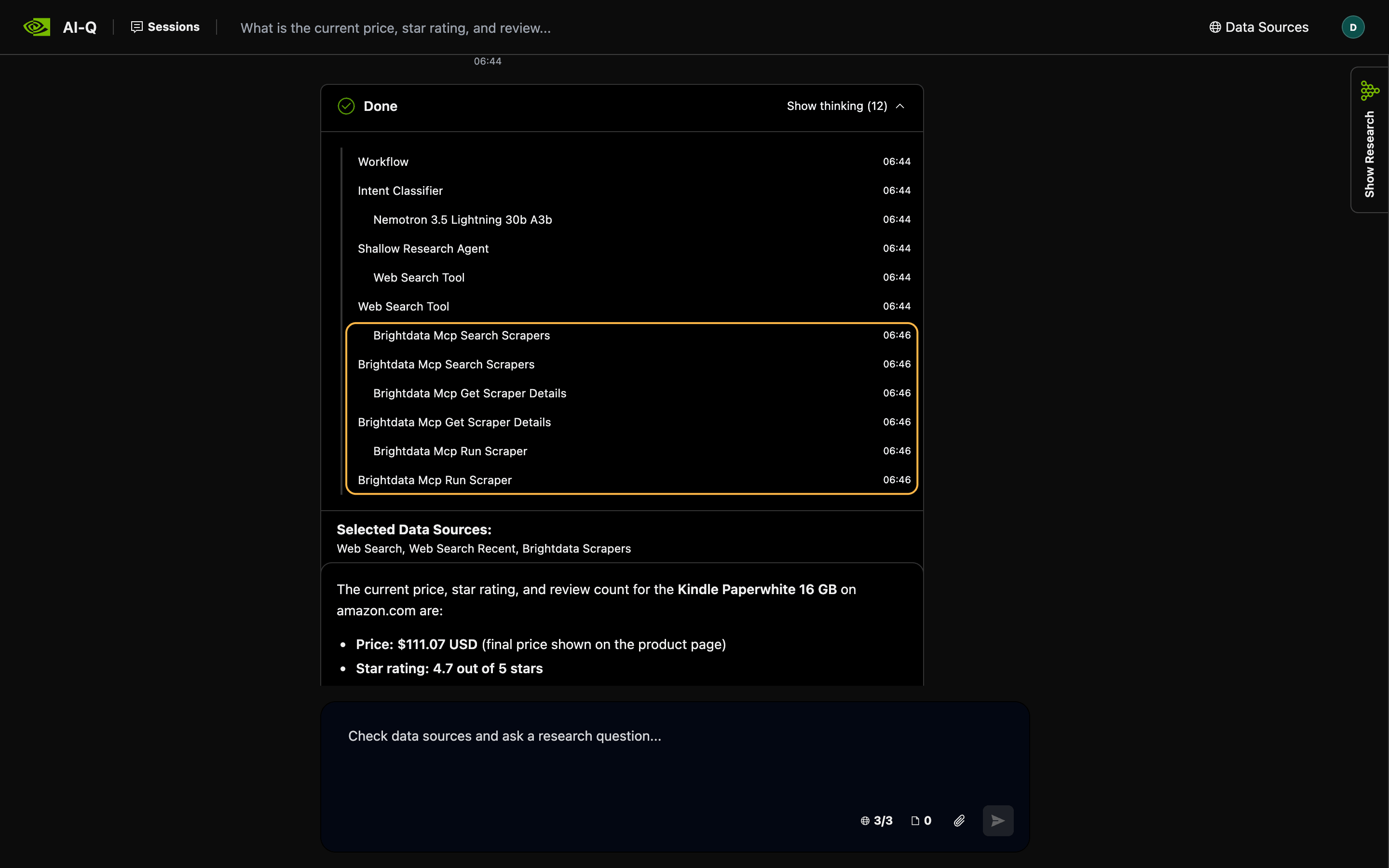
The thinking trace shows each source by its registry ID, so brightdata_scrapers appears as Brightdata Scrapers.
Final thoughts
The NVIDIA AI-Q Blueprint gives each deep research job a fixed budget of data source calls and treats tool output as evidence. A web search source for AI-Q should return more evidence per call and give the citation registry one URL per document. The Bright Data source meets both goals by adding Web Unlocker API page text to live SERP API results and stripping link URLs. The Bright Data MCP server also adds pre-built scrapers for questions where a structured record is more useful than page text. Create a free Bright Data account, add the source to a pinned AI-Q release, and rerun a question that your team already answered manually.
FAQ
What is NVIDIA AI-Q?
NVIDIA AI-Q is an open-source NVIDIA AI Blueprint for AI deep research agents, built on the NeMo Agent Toolkit. AI-Q routes each question to a fast shallow researcher or to a multi-agent deep researcher that plans, searches, and writes a citation-backed report. NVIDIA also lists AI-Q as the Deep Researcher Agent.
What are NVIDIA AI Blueprints?
NVIDIA AI Blueprints are reference workflows with code samples for AI applications. Many blueprints on build.nvidia.com are agents, such as the Deep Researcher Agent (AI-Q), a video search and summarization agent, and a voice agent. Blueprints can run on NVIDIA-hosted model endpoints or self-hosted NIM microservices.
Is NVIDIA AI-Q free?
The AI-Q code is free under the Apache 2.0 license. NVIDIA’s hosted model endpoints are for trial use only, so production needs paid or self-hosted model inference. For live web data, the Bright Data free tier includes monthly credits for the SERP API and the Web Unlocker API.
Where is the NVIDIA AI-Q blueprint on GitHub?
The code is at github.com/NVIDIA-AI-Blueprints/deep-researcher-agent, and the old aiq repository URL redirects there. Release v2.2.1 uses the aiq_agent package and the AIQ_ variable prefix, while develop renamed them to deep_researcher_agent and DEEP_RESEARCHER_. Pin a release tag before you add custom data sources.
Does a deep research agent need a web search API key?
Yes, the bundled AI-Q web search tools need a search provider API key and return an error until the key is set. Microsoft retired the Bing Search APIs in 2025, and Google scheduled the end of its Custom Search JSON API for January 1, 2027. A Bright Data API key covers both the SERP API and the Web Unlocker API.


Technical Writer
 5 years experience
Satyam Tripathi helps SaaS and data startups turn complex tech into actionable content, boosting developer adoption and user understanding.