Google closed its Custom Search JSON API to new customers, with existing customers’ access ending January 1, 2027. So is there a Google search API you can still sign up for? Not for full-web results, because Google’s public options search chosen sites or return Gemini answers based on Google Search. Bright Data’s SERP API returns full-web Google results as JSON.
Custom Search JSON API returns a 403 to new projects. Direct HTTP requests to google.com failed silently in testing, with status 200 and 0 results.
This guide compares Google’s options, explains why direct requests fail, and shows how to migrate.
TL;DR
- Google sells no self-serve full-web search API to new developers. Custom Search JSON API’s end date is January 1, 2027.
- Grounding with Google Search returns Gemini answers, not result lists. Its terms forbid caching or analyzing the results, or indexing their links.
- Direct HTTP requests to Google Search got no results in testing. Browsers on the same connection then got a CAPTCHA.
- Bright Data’s SERP API returns Google’s results page as JSON. 5K requests a month are free, then $1.50 per 1,000 successful requests. A drop-in adapter converts
cse.list()calls.
Which Custom Search API replacement fits your code
Find what your code needs:
| If your code needs | Use |
|---|---|
| Google search results for the full web | Bright Data SERP API |
| Search limited to a fixed list of sites | Bright Data SERP API with site: filters, or Agent Search, from Google |
To keep existing cse.list() parameters |
The adapter in step 3 |
| Google Images results | The adapter in step 3 with searchType="image" |
| An MCP (Model Context Protocol), LangChain, or n8n search tool | Bright Data Web MCP, a LangChain tool, or the n8n node |
| A Gemini answer shown to the user who asked | Grounding with Google Search |
| A fix for an error message | The troubleshooting table |
What happened to the Google Custom Search JSON API
Google announced the shutdown on January 20, 2026. Its Custom Search JSON API overview marks the API “closed to new customers” and gives existing customers until January 1, 2027.
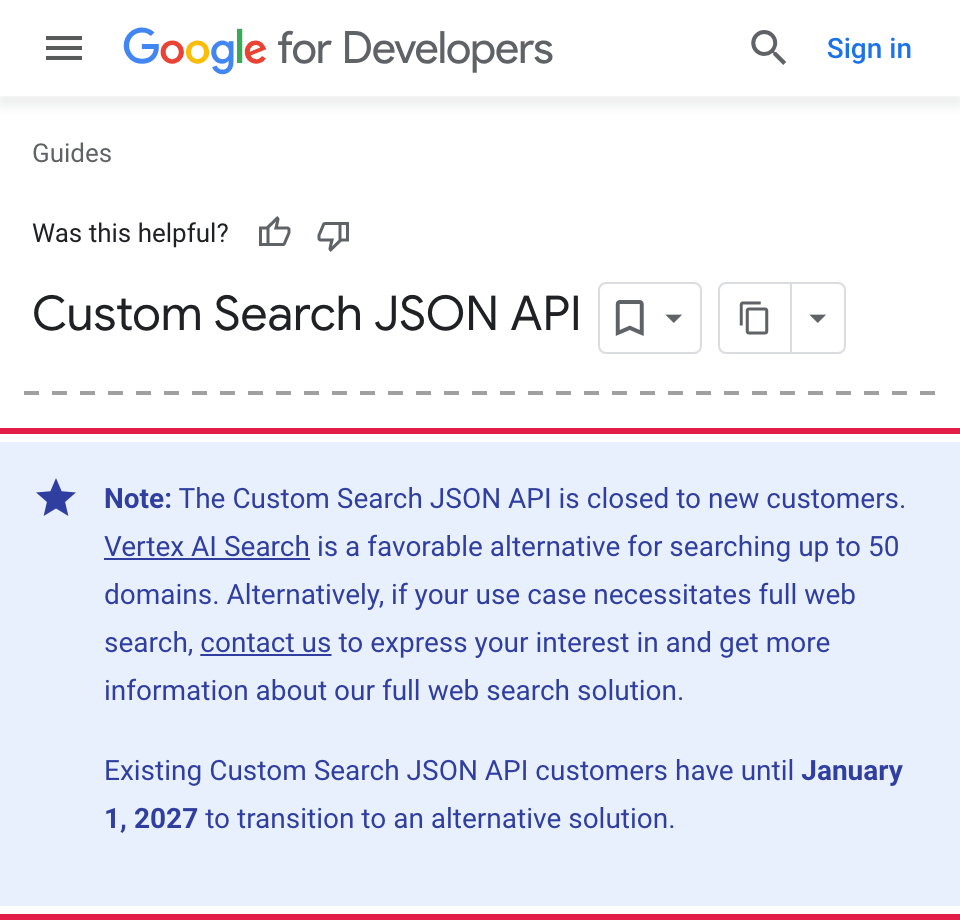
New projects already get a 403 from Custom Search JSON API, even before the 2027 deadline. This is the response, shortened to its main fields.
{
  "error": {
    "code": 403,
    "message": "This project does not have the access to Custom Search JSON API.",
    "status": "PERMISSION_DENIED"
  }
}
On Google’s developer forum, one developer reports this 403 on an existing project after a billing change.
The table puts Google’s documented limits next to the Bright Data SERP API:
| Custom Search JSON API | Bright Data SERP API | |
|---|---|---|
| Free usage | 100 queries a day, about 3K a month | 5K requests a month, no credit card |
| Paid usage | $5 per 1,000 queries, up to 10K a day | $1.50 per 1,000 successful requests, unlimited concurrency |
| Results per request | Up to 10 | A full Google results page |
| Results per query | Up to 100 | Paginate with start, or get positions 1 to 100 in one call |
| Location | gl boosts results from a country |
Results as seen by a user in the country you set |
| What the API returns | Results from a Programmable Search Engine, which searches a subset of Google’s index | Google’s results page, including ads and People Also Ask when Google shows them. One extra parameter adds the AI Overview |
The migration is easier than it looks, because Custom Search results already differed from google.com results. Google’s help page says a full-web engine searches only “a subset of the total Google Web Search corpus” and excludes real-time results. So you don’t need to reproduce old results exactly. Check the new results against google.com, and use saved Custom Search results to find bugs in your migration.
Google’s own Custom Search API alternatives
Google directs Custom Search users to Agent Search and a full-web interest form. Grounding with Google Search, a Gemini API feature, also appears when you search for a replacement:
| Product and scope | What it returns | List price |
|---|---|---|
| Agent Search (also called Vertex AI Search), for up to 50 domains | Results and answers from those sites | $4 per 1,000 website search queries |
| Grounding with Google Search (Gemini API), for Google Search | A Gemini answer with links | $14 per 1,000 search requests |
| Full web search solution, for Google’s full index | Not documented publicly | Interest form only |
If your engine searched a fixed list of sites, you have 2 options. The Bright Data SERP API accepts the same list as site: filters, and Agent Search supports up to 50 domains.
Grounding is the closest product to web search, but its terms limit what you can build. The Gemini API terms require you to show grounded results to the user who asked. They forbid you to “cache, frame, syndicate, resell, analyze, train on, or otherwise learn from” those results or index their links.
Microsoft also retired its Bing Search APIs in August 2025. Our guides to Bing Search API alternatives and the best SERP APIs compare the other providers.
None of Google’s self-serve products gives new customers full-web search results. The Bright Data SERP API does.
Why direct requests to Google Search fail
With Custom Search closing, the obvious fallback is to request the Google results page directly. Google Search has required JavaScript since January 2025. In testing from 1 home broadband connection, 10 requests from HTTP clients and then several real browsers got no search results:
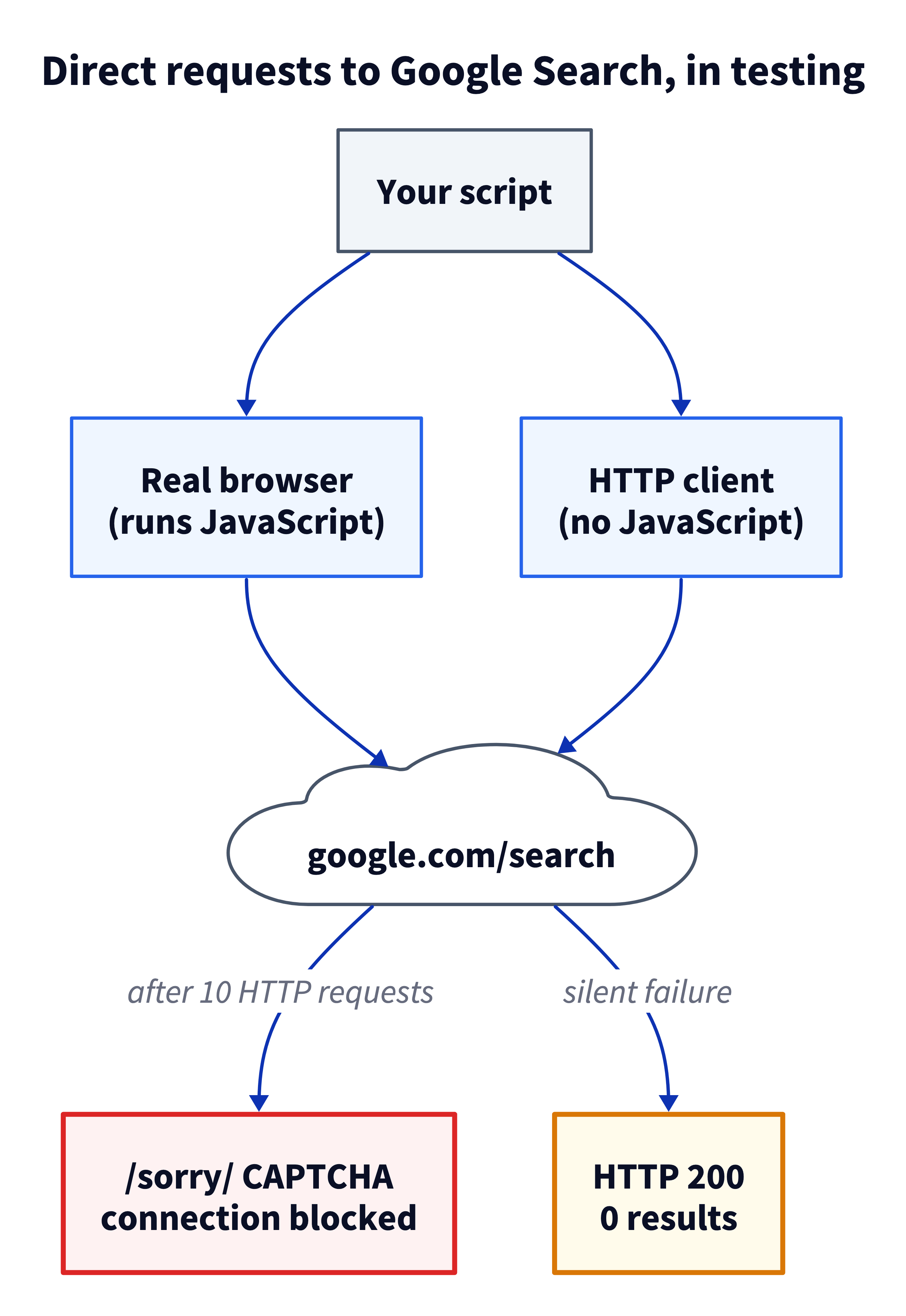
The HTTP clients fail in the way that’s hardest to detect. The 10 requests came from 5 common HTTP client configurations, including curl and Python httpx. All 10 got status 200 and no results, so a scraper that checks only status codes logs a success and stores nothing. The page contained only a script that has to run in a JavaScript engine before any results appear.
Check every response for results, not just the status code.
Every browser tested, including headless Chromium and Chrome, ran the JavaScript but got Google’s /sorry/ CAPTCHA page on its first query. They ran after those 10 HTTP requests, and the block applied to the whole connection for 40 minutes or more.
At production volume, you would have to run Google’s JavaScript for every search and maintain parsers for changing markup. Bright Data’s SERP API handles the browsers and parsers for you and returns parsed results.
How to migrate Custom Search JSON API code to Bright Data’s SERP API
You send a normal Google search URL, and the response is that page as JSON. Steps 1 to 3 are the core migration.
Step 1: Set up and send a first request
You need a free Bright Data account, an API key, and a SERP API zone. A zone is a named set of settings that your requests use. If your security team reviews new vendors first, send the team the Bright Data Trust Center link. That page lists SOC 2 and SOC 3 reports, ISO 27701 certificates, and GDPR documentation.
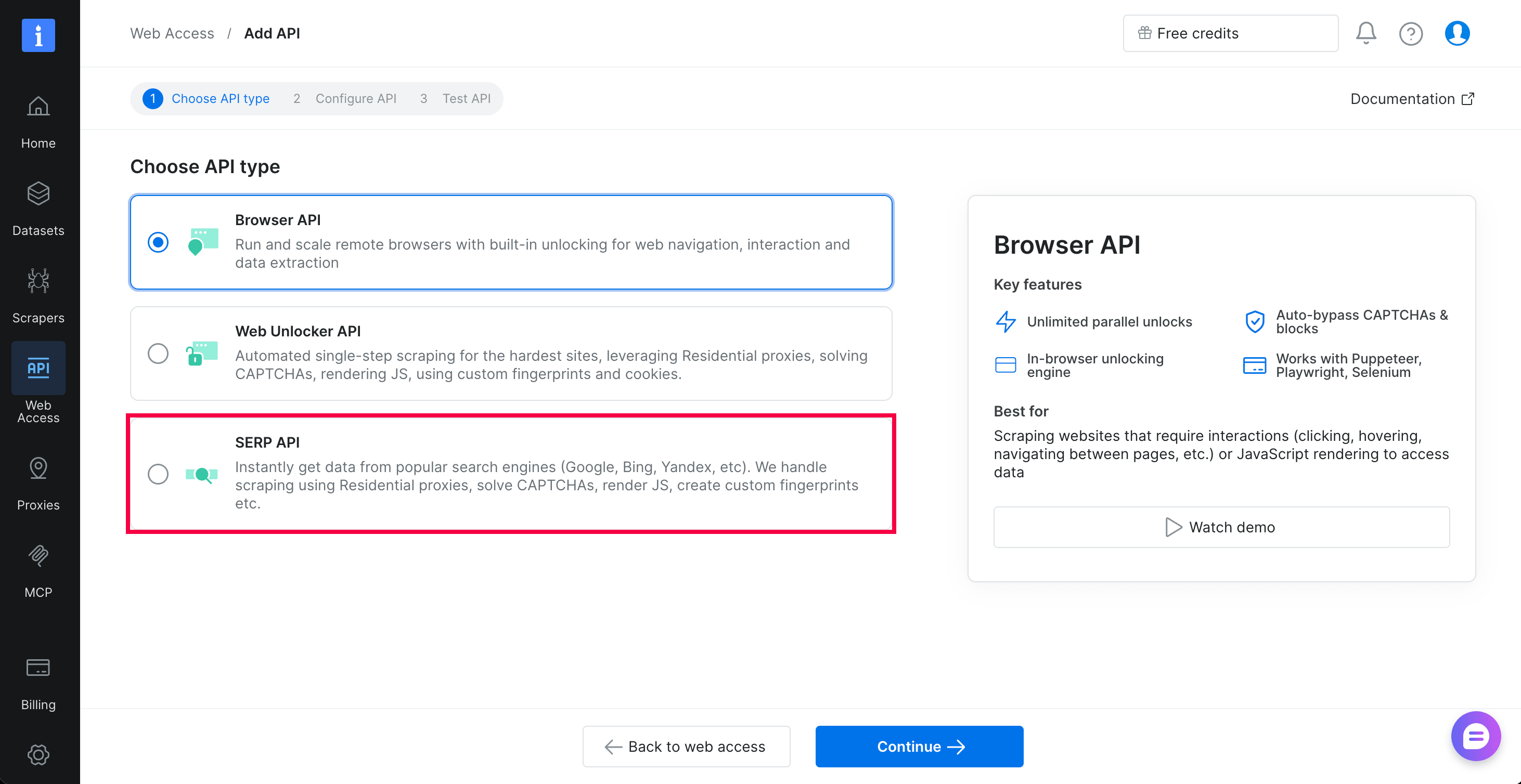
In the control panel, a zone is called an API. Open Web Access, select Create API, choose SERP API, and select Continue:
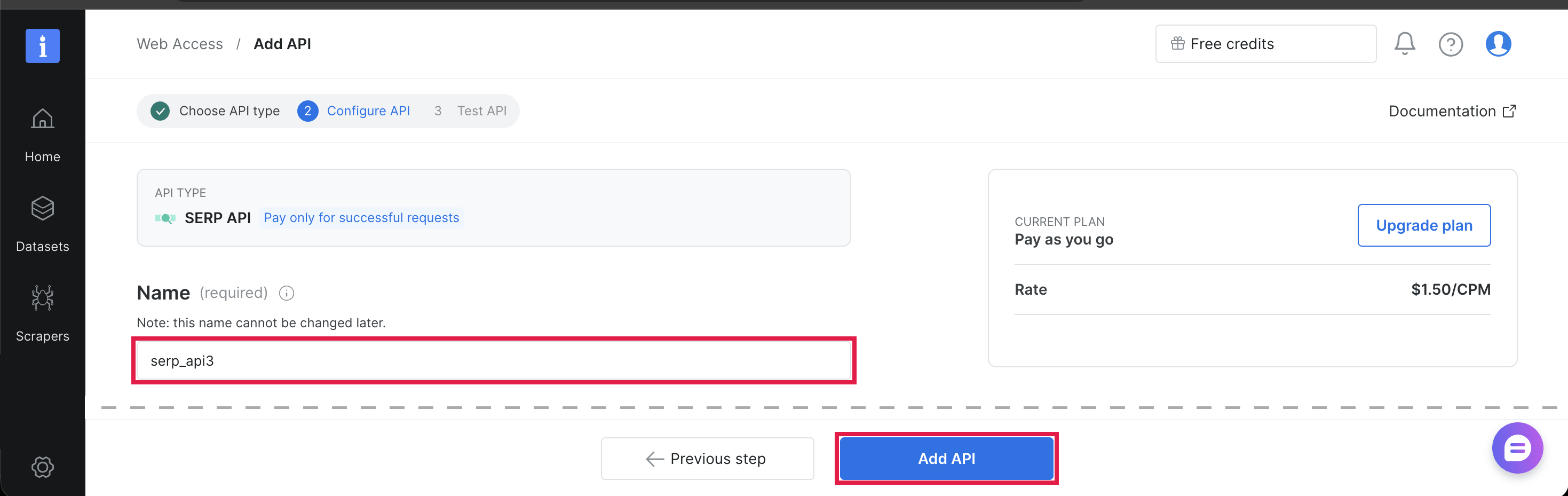
Give the API a name, make sure the data format is Raw HTML, and select Add API. The JSON comes from a parameter in each request, not from this setting. The API name you chose is your zone name, which you set in BRIGHTDATA_SERP_ZONE below:
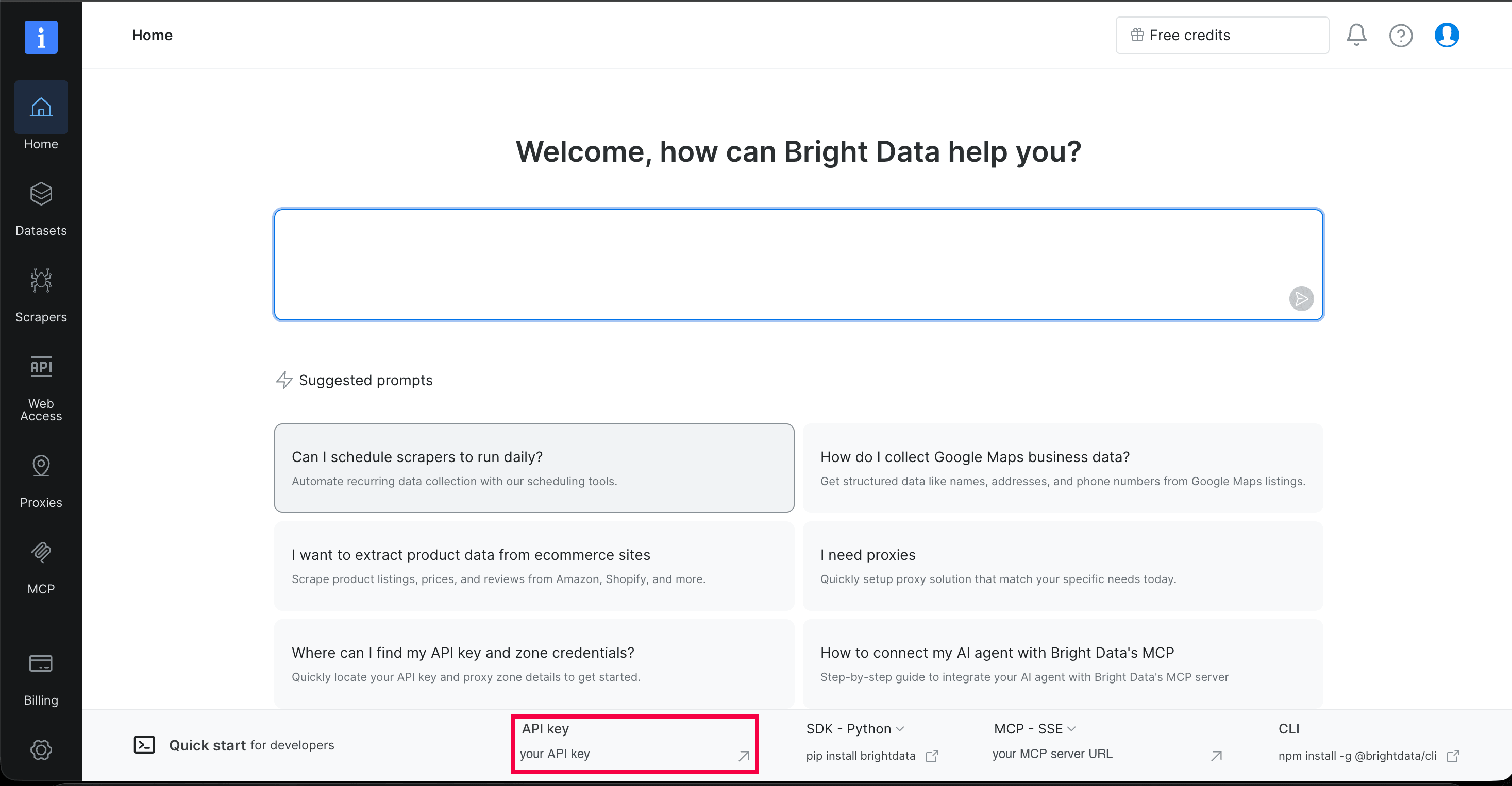
The API key is in the Quick start bar at the bottom of the Home page:
Create a virtual environment, set the key and the zone name, and install the only Python dependency. Replace both values with your own key and zone name:
python3 -m venv .venv && source .venv/bin/activate
export BRIGHTDATA_API_KEY="your-api-key"
export BRIGHTDATA_SERP_ZONE="serp_api1"
python -m pip install "httpx>=0.27,<1"
On Windows PowerShell, use this block instead:
python -m venv .venv; .venv\Scripts\Activate.ps1
$env:BRIGHTDATA_API_KEY = "your-api-key"
$env:BRIGHTDATA_SERP_ZONE = "serp_api1"
python -m pip install "httpx>=0.27,<1"
With uv, skip the virtual environment and start each script with uv run --with "httpx>=0.27,<1" python, followed by the script name.
A single POST to Bright Data’s /request endpoint fetches a Google URL through your zone and returns one results page. This curl command sends that request and pretty-prints the response:
curl https://api.brightdata.com/request \
  -H "Authorization: Bearer $BRIGHTDATA_API_KEY" \
  -H "Content-Type: application/json" \
  --data @- <<EOF | python -m json.tool
{
  "zone": "$BRIGHTDATA_SERP_ZONE",
  "url": "https://www.google.com/search?q=is+there+a+google+search+api&gl=us&hl=en&brd_json=1",
  "format": "raw"
}
EOF
The brd_json=1 parameter converts the page to parsed JSON, and "format": "raw" returns that JSON unchanged. The response below is shortened:
{
  "general": {
    "search_engine": "google",
    "query": "is there a google search api",
    "language": "en",
    "country_code": "US"
  },
  "organic": [
    {
      "link": "https://developers.google.com/custom-search/v1/overview",
      "title": "Custom Search JSON API | Google for Developers",
      "description": "The Custom Search JSON API lets you develop websites and applications to retrieve and display search results from Programmable Search Engine ...",
      "rank": 1
    }
  ],
  "pagination": {
    "current_page": 1,
    "next_page": 2,
    "next_page_start": 10
  }
}
The same response also contained 8 related searches and 4 People Also Ask questions. The Custom Search response has no fields for either.
Step 2: Map Custom Search parameters to Google parameters
Bright Data’s Google query parameter reference and its list of Google search URL parameters and operators explain Google’s parameters in detail. Response fields are in items[] in Custom Search and in organic[] in the SERP API response:
| Custom Search JSON API | Google, through the SERP API |
|---|---|
q |
q |
num (maximum 10) |
Removed by Google. The adapter requests more pages |
start (counts from 1) |
start (counts from 0, in steps of 10) |
gl (boosts results from a country) |
gl (runs the search as a user in that country) |
hl (interface language) |
hl |
siteSearch=a.com |
site:a.com added to q |
siteSearchFilter=e |
-site:a.com added to q |
exactTerms=a b |
"a b" added to q |
excludeTerms=a |
-"a" added to q |
fileType=pdf |
filetype:pdf added to q |
dateRestrict=d7 |
tbs=qdr:d7, and the same for w, m, and y |
safe=active |
safe=active |
searchType=image |
udm=2 (Google Images) |
title, link |
title, link |
snippet |
description |
displayLink |
Host name of link |
queries.nextPage |
Computed by the adapter |
On Google, 3 parameters work differently:
Google counts offsets from 0. Custom Search treats start=11 as the top of page 2, and Google treats start=10 as page 2. Send start in steps of 10 and discard the results before your start position in code, as the adapter does.
Google removed num. The SERP API docs say Google deprecated num on September 11, 2025. Each Google page contains about 10 results, and the adapter requests as many pages as num needs. For more results per query, Bright Data can return the top 100 Google results, positions 1 to 100, in one call.
On Google, gl sets the search country. The query “cloud hosting pricing” returned UK, German, and Indian top results that shared no URLs with the US top results. Set gl on every request to the country your users search from.
Step 3: Add a drop-in adapter for cse.list()
The adapter sends cse.list() calls to the Bright Data SERP API and runs on Python 3.9 and later. It accepts the Custom Search parameters in the table and keeps the title, link, snippet, and displayLink fields in items. It ignores cx with a warning, because Google search has no engine ID, and it adds attempts and timeout settings.
At each call site, the change looks like this:
# Before, with the Google API client
res = service.cse().list(q=query, cx=CX, num=10).execute()

# After, with the same core items fields, no engine ID, and gl and hl set
from cse_to_serp import cse_list

res = cse_list(q=query, num=10, gl="us", hl="en")
Check 3 more things at each call site:
- If your engine searched a fixed list of sites, put them in the query as
(site:a.com OR site:b.com). A query restricted to 2 documentation sites this way returned 10 results, all from those 2 hosts. - In a web request handler, pass
attempts=1and atimeoutthat fits the handler’s time budget. - Where you caught
HttpError, catch(httpx.HTTPError, ValueError, RuntimeError)instead.
Save the adapter as cse_to_serp.py, or clone the companion repo on GitHub, which also contains the other scripts below and offline tests. Here is the full file:
"""Replace Google Custom Search JSON API calls with the Bright Data SERP API.

Same cse.list() parameters and core items fields.
"""

import math
import os
import time
import warnings
from urllib.parse import urlencode, urlparse

import httpx

API_URL = "https://api.brightdata.com/request"
API_KEY = os.environ.get("BRIGHTDATA_API_KEY")
if not API_KEY:
    raise RuntimeError("Set the BRIGHTDATA_API_KEY environment variable "
                       "to your Bright Data API key (step 1).")
ZONE = os.environ.get("BRIGHTDATA_SERP_ZONE", "serp_api1")
RETRY_STATUSES = {429, 500, 502, 503, 504}


def fetch_serp(params: dict, attempts: int = 4, timeout: float = 60) -> dict:
    """Fetch one Google results page as parsed JSON."""
    url = "https://www.google.com/search?" + urlencode(params)
    body = {"zone": ZONE, "url": url, "format": "raw"}
    headers = {"Authorization": f"Bearer {API_KEY}"}
    for attempt in range(attempts):
        try:
            resp = httpx.post(API_URL, json=body, headers=headers,
                              timeout=timeout)
        except httpx.TransportError:  # timeout or dropped connection
            if attempt == attempts - 1:
                raise
            time.sleep(16 + attempt * 10)
            continue
        error = (resp.headers.get("x-brd-error")  # API-level errors
                 or resp.headers.get("x-brd-err-msg"))  # proxy-level errors
        if resp.status_code == 200 and not error:
            page = resp.json()
            if "general" not in page:  # not a parsed results page
                raise ValueError("Unexpected response: " + resp.text[:200])
            return page
        if not error and resp.status_code not in RETRY_STATUSES:
            break  # wrong key, zone, or URL, so retrying will not help
        if attempt < attempts - 1:
            # Back off before resending the same query.
            time.sleep(16 + attempt * 10)
    resp.raise_for_status()
    code = (resp.headers.get("x-brd-error-code")  # maps to the error catalog
            or resp.headers.get("x-brd-err-code"))
    raise RuntimeError(f"SERP API error {code}: {error or resp.status_code}")


def cse_list(q, num=10, start=1, gl=None, hl=None, siteSearch=None,
             siteSearchFilter="i", exactTerms=None, excludeTerms=None,
             fileType=None, dateRestrict=None, safe="off", searchType=None,
             attempts=4, timeout=60, **extra):
    """Accept cse.list() parameters, return a dict in cse.list() format."""
    if extra.pop("cx", None):  # no engine ID, so every call searches Google
        warnings.warn("cx is ignored. Add (site:a.com OR site:b.com) to q "
                      "if your engine searched a fixed list of sites")
    if extra:  # fail loudly instead of ignoring a filter
        raise TypeError(f"No mapping for: {sorted(extra)}")
    if exactTerms:  # Custom Search filters become Google search operators
        q = f'{q} "{exactTerms}"'
    if excludeTerms:
        q = f'{q} -"{excludeTerms}"'
    if fileType:
        q = f"{q} filetype:{fileType}"
    if siteSearch:
        exclude = "-" if siteSearchFilter == "e" else ""
        q = f"{q} {exclude}site:{siteSearch}"
    params = {"q": q, "brd_json": 1}  # brd_json=1 returns parsed JSON
    if gl:
        params["gl"] = gl
    if hl:
        params["hl"] = hl
    if safe == "active":
        params["safe"] = "active"
    if dateRestrict:  # "d7" -> qdr:d7 (past 7 days), "m6" -> qdr:m6
        params["tbs"] = "qdr:" + dateRestrict
    if searchType == "image":
        return image_list(params, num, start, attempts, timeout)
    if searchType:
        raise ValueError(f"No mapping for: searchType={searchType}")

    # Custom Search counts from 1 (start=11 is page 2), Google from 0
    # (start=10 is page 2). Track each result's Google position.
    first = start - 1
    offset = first // 10 * 10  # the Google page that contains `start`
    items, next_start = [], None
    # Fetch the pages for positions first to first + num - 1, 1 request each
    for _ in range(math.ceil((num + first - offset) / 10)):
        params["start"] = offset
        page = fetch_serp(params, attempts, timeout)
        for i, result in enumerate(page.get("organic", [])):
            position = offset + i
            if position < first or not result.get("link"):
                continue
            if len(items) == num:
                next_start = position + 1  # convert to 1-based
                break
            items.append({
                "title": result.get("title", ""),
                "link": result["link"],
                "snippet": result.get("description", ""),
                "displayLink": urlparse(result["link"]).netloc,
            })
        if next_start:
            break
        offset = (page.get("pagination") or {}).get("next_page_start")
        if not offset:  # Google has no further pages for this query
            break
    else:
        next_start = offset + 1  # continue at the next Google page

    response = {"items": items, "queries": {}}
    if next_start:
        response["queries"]["nextPage"] = [{"startIndex": next_start}]
    return response


def image_list(params, num, start, attempts, timeout):
    """Google Images returns the whole image grid in one request."""
    params["udm"] = 2
    page = fetch_serp(params, attempts, timeout)
    images = [i for i in page.get("images") or [] if i.get("original_image")]
    items = [{
        "title": image.get("image_alt", ""),
        "link": image["original_image"],
        "snippet": image.get("image_alt", ""),
        "displayLink": urlparse(image["original_image"]).netloc,
    } for image in images[start - 1:start - 1 + num]]
    response = {"items": items, "queries": {}}
    if start - 1 + num < len(images):
        response["queries"]["nextPage"] = [{"startIndex": start + num}]
    return response


if __name__ == "__main__":
    res = cse_list("httpx timeout configuration", num=10,
                   gl="us", hl="en")
    for i, item in enumerate(res["items"], start=1):
        print(i, item["displayLink"], "|", item["title"][:60])
Running python cse_to_serp.py printed these as its first 5 results. Results come from Google’s live page, so yours can differ.
1 www.python-httpx.org | Timeouts
2 github.com | Proposal: Add a Global Timeout Setting in httpx #3356
3 www.python-httpx.org | QuickStart
4 stackoverflow.com | python - Httpx requests timing out when it shouldn't
5 oneuptime.com | How to Use httpx for Async HTTP Requests
With num=10, each nextPage call fetches a single Google page, so it costs 1 request.
With searchType="image", 1 request for “ergonomic office chair” returned 100 images, while Custom Search returned at most 10 per request. Each adapter call fetches the full image grid and returns num images from it.
Replace the search tool in MCP agents, LangChain, and n8n
Agents that connect to tools over MCP need no adapter. The Bright Data Web MCP server exposes Google search as its search_engine tool, and the hosted server is one URL with a free tier. In Claude Code, you add it with one command:
claude mcp add --transport http brightdata https://mcp.brightdata.com/mcpMCP clients that support OAuth, such as Claude Code and Cursor, sign in through your browser, with no API key in a config file. For CI jobs and scripts, use https://mcp.brightdata.com/mcp?token=YOUR_API_KEY instead. Add &tools=search_engine,scrape_as_markdown to that URL to give the agent search plus a tool that reads each result page as Markdown.
Coding agents can also use Bright Data’s CLI. Install it with npm install -g @brightdata/cli, then run brightdata login to sign in through your browser. The agent gets a brightdata search command.
For code that already calls LangChain, the GoogleSearchAPIWrapper.results() method returns dicts with title, link, and snippet. The adapter’s items have the same keys. Install LangChain’s core package, which needs Python 3.10 or later, with python -m pip install "langchain-core>=1.0,<2". Save this file as langchain_tool.py next to the cse_to_serp.py adapter, and pass google_search in your agent’s tool list.
"""LangChain tool that replaces GoogleSearchAPIWrapper.results()."""

from langchain_core.tools import ToolException, tool

from cse_to_serp import cse_list


@tool
def google_search(query: str) -> list[dict]:
    """Search Google and return the top results with title, link, snippet."""
    try:  # 2 attempts and a 20 s timeout limit each search
        return cse_list(q=query, num=10, gl="us", hl="en",
                        attempts=2, timeout=20)["items"]
    except Exception as exc:
        raise ToolException(f"Google search failed: {exc}") from exc


google_search.handle_tool_error = True  # the agent gets the error as text
For a full agent built this way, see Using LangChain and Bright Data for Web Search.
No-code workflows that call Custom Search get the same 403, and the n8n community forum has a thread about that exact error. Bright Data’s official n8n node installs as the @brightdata/n8n-nodes-brightdata community node. It has a Web Search operation that sends the query to Google through the zone you select, such as your SERP API zone. Replace the workflow’s Custom Search request with that operation.
Run searches at production volume
Batch jobs, and agents that send many searches in one task, need to run several queries at the same time. The companion repo’s serp_batch.py module runs an async version of the adapter’s request and retry loop in parallel. Separately, the SERP API itself offers an asynchronous mode for batches of 1K queries or more.
The file’s main block sends the same 10 queries twice, and the second run is served from its in-memory cache.
{'queries': 20, 'cache_hits': 10, 'empty': 0, 'failed': 0}Its search_many() function has 3 settings and a set of counters.
concurrencysets how many requests run at once. The SERP API has no concurrency limit, so set it to the load your own system can handle.deadlinelimits the total time for one query, so keep it short for an agent tool and longer for a batch job.ttlsets how long a cached page stays valid.- Counters show cache hits, empty results, and failures, so a wrong
site:filter orglvalue appears early as empty results.
A call returns a dict that maps each query to its parsed page, or to None if the query failed.
import asyncio

from serp_batch import search_many

pages = asyncio.run(search_many(["redis cache ttl", "nginx rate limiting"],
                                concurrency=20, gl="us", hl="en"))
Get the AI Overview and People Also Ask questions
Agents, RAG pipelines, and SEO teams can need more than a list of 10 links. Google’s page for “what is retrieval augmented generation” shows an AI Overview and People Also Ask questions, which Custom Search never returned.
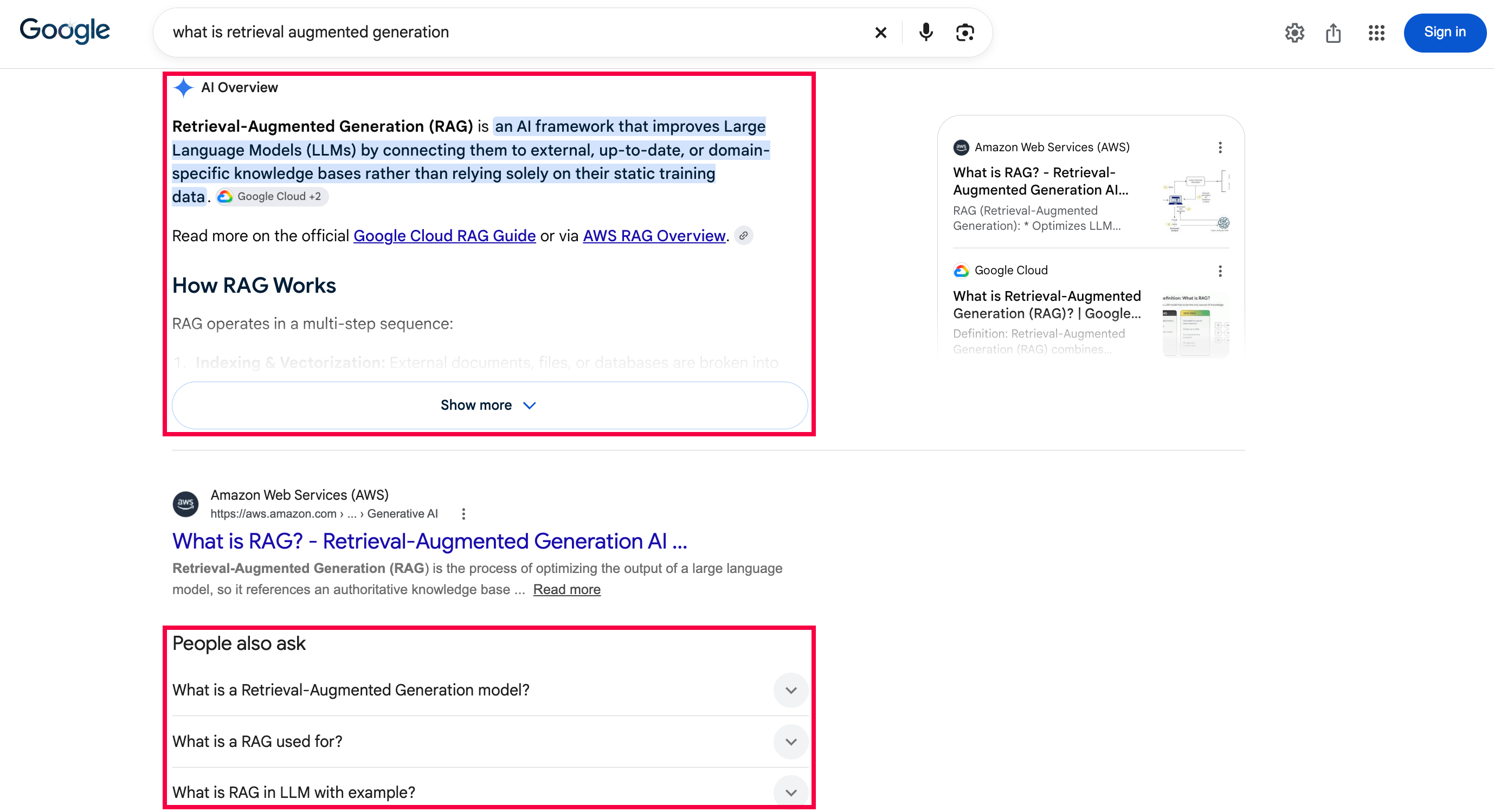
One extra parameter requests the AI Overview, and the same response contains any People Also Ask questions. Save this script next to the cse_to_serp.py adapter from step 3.
"""Read the AI Overview and People Also Ask questions from one Google query."""

from cse_to_serp import fetch_serp

page = fetch_serp({
    "q": "what is retrieval augmented generation",
    "gl": "us",
    "hl": "en",
    "brd_json": 1,
    "brd_ai_overview": 2,  # requests the AI Overview
})

overview = page.get("ai_overview") or {}
print("AI Overview text blocks:", len(overview.get("texts", [])))
print("AI Overview sources:", len(overview.get("references", [])))
questions = dict.fromkeys(  # keeps each question once, in order
    item["question"] for item in page.get("people_also_ask", [])
    if item.get("question")
)
for question in list(questions)[:2]:
    print("People also ask:", question)
The script printed this output. Google’s page is live, so your questions can differ from the screenshot.
AI Overview text blocks: 3
AI Overview sources: 8
People also ask: Does ChatGPT use Retrieval-Augmented Generation?
People also ask: What is RAG in LLM with example?
Each references entry contains the cited page’s href and title, so SEO teams can track which sites the AI Overview cites. Bright Data’s Google AI Overview API page explains the parameter in detail. For Google’s AI Mode, the Google Scraper API returns AI Mode Search results as JSON.
A RAG pipeline that reads the result pages can fetch them through the same /request endpoint. Use a Web Unlocker zone and the same API key.
Migration checklist before January 1, 2027
Run these steps while your Custom Search key still works, because item 2 needs it.
- Find every call site. Search your code for
customsearch/v1,cse().list, and wrappers such asGoogleSearchAPIWrapper. In a large codebase, a coding agent can run that search and make the step 3 change at each call site. - Save the Custom Search results for a sample of real production queries, so you keep a baseline after the key stops working. If the key has already stopped working, save google.com results for the same
glandhlinstead. - Start on the free tier, then budget 1 SERP API request per results page.
- Let the adapter convert 1-based
startvalues to Google’s 0-based values, or convert them yourself and request whole pages. - Set
glandhlon every request. - Compare old and new results as sets of URLs, not by exact rank. For agents, also rerun your task evals and score the final answers. Expect some differences, because the new results come from Google’s full results page, not Custom Search’s subset of the index.
- Switch behind a feature flag, run both paths in parallel for a few days, then delete the Google key.
For item 6, the compare_baseline.py helper scores each query from 0 to 1. The score is the share of the saved top 10 URLs that still appear in the new top 10.
First, run each query twice through the SERP API and score the 2 runs against each other. Google’s ranking can change between calls, so a score just under 1.0 can be normal. In testing, 2 runs of a query with the same gl scored 1.0, and a US run against a UK run scored 0.0. Then score every saved query, review the lowest scores by hand, and check gl and site: filters for any score near 0.
Troubleshoot migration errors
These are first-run setup issues or Google behavior.
| Symptom | Cause | Fix |
|---|---|---|
| Google returns 403 on Custom Search calls | API closed to new customers | A new key won’t help. Migrate to the Bright Data SERP API |
RuntimeError: Set the BRIGHTDATA_API_KEY environment variable… |
Variable not set in this terminal | Set BRIGHTDATA_API_KEY as in step 1 |
| 401 “Invalid token” | Wrong Bright Data API key | Copy the key from the Quick start bar on Home |
400 zone "..." not found |
Wrong zone name | Use the name you gave the API in step 1 |
UserWarning: cx is ignored… |
Google search has no engine ID | Remove cx. If the engine searched a fixed list of sites, add (site:a.com OR site:b.com) to q |
TypeError: No mapping for: [...] |
A parameter not in the step 2 table | Add the Google equivalent to q or to the adapter’s params, or remove the parameter |
KeyError on pagemap or searchInformation |
The adapter returns 4 core fields | Remove the code that reads the field, or map it from the SERP API response |
items has fewer than num results |
Google’s page contained fewer organic results | Follow queries.nextPage |
items is empty |
No match, or a wrong site: filter or gl value |
Try the query on google.com |
| Results differ from Custom Search | Custom Search searched a subset of Google’s index | Compare URL sets. Run each query twice first to see normal variation |
A RuntimeError: SERP API error… message includes the x-brd-error-code or x-brd-err-code value. Find the code in the SERP API error catalog.
Final thoughts
Google’s full-web search product isn’t public, and Custom Search JSON API’s end date is January 1, 2027. Google’s public options search a fixed list of domains or return Gemini answers, and the Gemini terms forbid caching or analyzing the results. Direct HTTP requests got no results in testing, so the Bright Data SERP API is the practical replacement when your code needs the results page.
The adapter in step 3 handles Google’s 0-based start and removed num, so your code mainly needs gl on every call. Run your saved queries through the Bright Data SERP API free tier, with no credit card, and compare them with your Custom Search baseline or with google.com.
FAQ
Is the Google Custom Search API discontinued?
Yes, in 2 stages. Google closed Custom Search JSON API to new customers in January 2026, with existing customers’ access ending January 1, 2027. Google suggests Agent Search for up to 50 domains. The Bright Data SERP API returns full-web Google results as JSON.
Does Google have a search API?
Not a full-web search API that new developers can sign up for. Google offers Agent Search for up to 50 domains and Grounding with Google Search, which returns Gemini answers with links. Google’s full-web search product isn’t public. For Google results as JSON, use Bright Data’s Google Search API, part of its SERP API.
Is the Google search API free?
Not for new developers who need full-web results. Custom Search JSON API gives existing customers 100 free queries a day, then charges $5 per 1,000, until January 1, 2027. Bright Data’s SERP API returns Google results as JSON, with 5K free requests a month.
What can replace the Google Custom Search API?
The Bright Data SERP API replaces Custom Search JSON API directly, because it returns Google’s full results page as JSON. Google’s own options return AI answers or search a fixed list of domains. An open-source, drop-in Python adapter converts your cse.list() calls to Google parameters.
How can I scrape Google search results?
Not with an HTTP client alone. Google Search requires JavaScript, so in testing, HTTP clients got a 200 page with no results. Browsers on the same connection then got a CAPTCHA page. The Bright Data SERP API returns Google’s results page as parsed JSON, with no browsers or parsers for you to maintain.
Why does the Custom Search API return 403?
Google closed Custom Search JSON API to new customers in January 2026, so a new key or project won’t fix the 403 error. On Google’s developer forum, one developer also reports an existing project losing access after a billing change. Move the calls to the Bright Data SERP API, which returns Google results as JSON.


Technical Writer
 5 years experience
Satyam Tripathi helps SaaS and data startups turn complex tech into actionable content, boosting developer adoption and user understanding.