
DSPy is a Python framework that improves language model programs with data. DSPy loads agent tools from Model Context Protocol (MCP) servers. With the Bright Data MCP server, an agent searches Google and reads pages as Markdown, while the server handles bot protection.
DSPy’s MCP tutorial pattern works well for a single agent run. DSPy’s evaluator and GEPA, its prompt optimizer, run agents on worker threads, where async tool calls failed silently in testing and the agent answered from memory.
This guide shows you how to build that agent, run its tools in parallel, and measure what web data adds.
TL;DR
- Web data raised accuracy. With the Bright Data MCP server,
gpt-5.4-minianswered 54-58 of 60 questions correctly, up from 14, and all 8 on events after its knowledge cutoff, up from 0. - Choose 2 tools and add an elicitation callback. Fewer tools keep prompts small. The callback approves pages marked as possible prompt injection.
- Give threaded runs synchronous tools. Async tools failed silently or hung in
dspy.Evaluateand GEPA. A background event loop fixed both. - Fix the tools first. GEPA copied training answers into its instructions without raising the score. On 6 long-page questions, a
findargument halved prompt tokens.
What you need
The agent connects over HTTP to Bright Data’s Web MCP, the hosted Bright Data MCP server, so Python is the only runtime to install. The server runs on the Web Unlocker API, which handles proxy rotation and bot protection for the agent. For the code, the companion GitHub repository has every script and data file, including evaluate.py and post_cutoff_questions.csv for the evaluation steps. You need:
- Python 3.10 or later, and uv to install packages
- A free Bright Data account and its API key from Account Settings
- An OpenAI API key, or a key for another provider that
dspy.LMsupports with tool calling
Copy the Bright Data key from the API keys table on the Users and API keys tab:
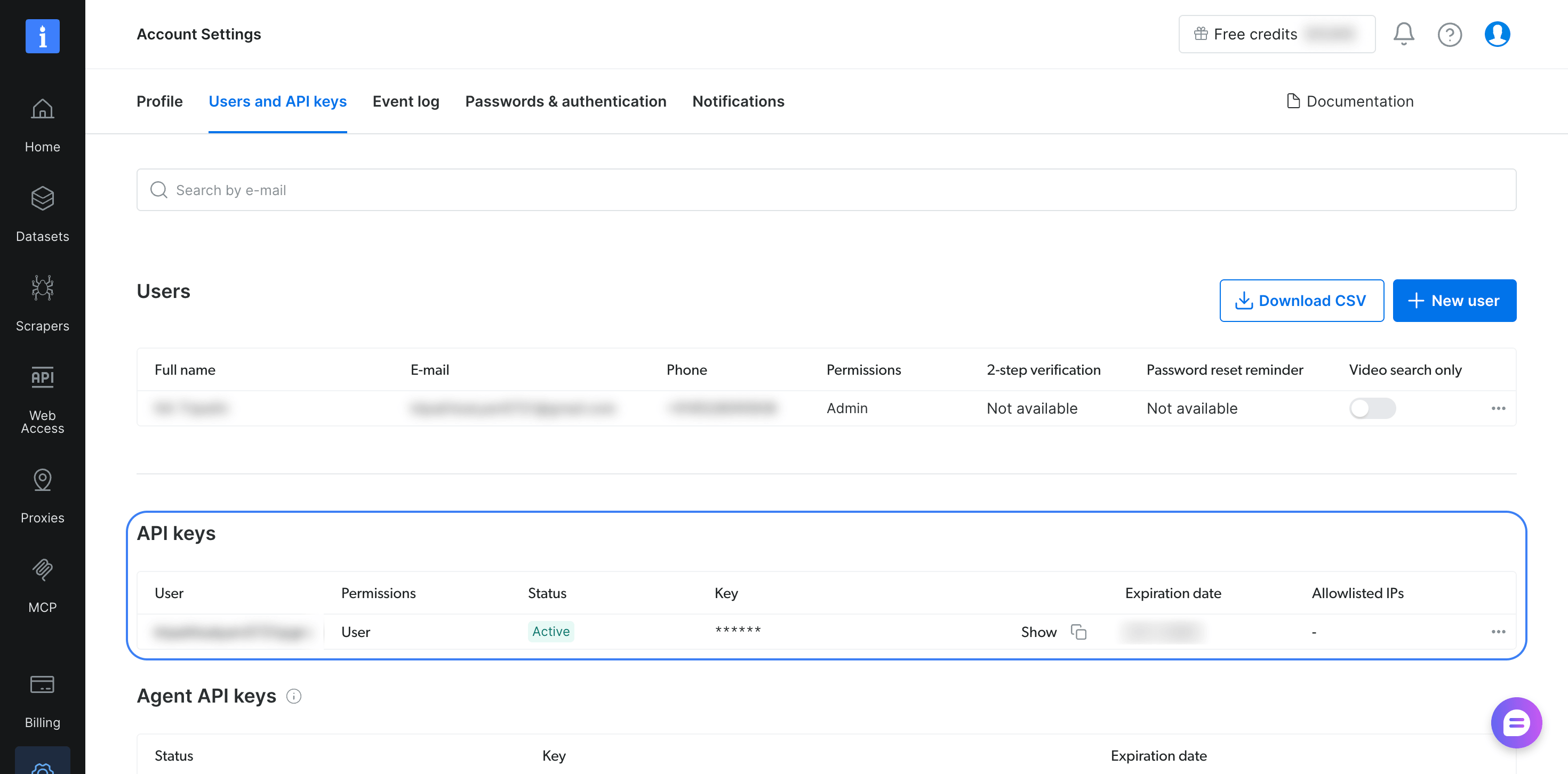
The same key works with the hosted server and the local server.
Clone the repository, install DSPy with its MCP extra, pinned to the tested versions, and export both keys:
git clone https://github.com/triposat/dspy-bright-data-research-agent && cd dspy-bright-data-research-agent
uv venv && source .venv/bin/activate
uv pip install "dspy[mcp]==3.4.1" "mcp==2.3.0"
export BRIGHTDATA_API_TOKEN="your-bright-data-api-key"
export OPENAI_API_KEY="your-openai-api-key"
The command pins the MCP Python SDK to the tested 2.3.0 release, because the dspy[mcp] extra in DSPy 3.4.1 does not pin the SDK version. You can start with free monthly requests, and the MCP server pricing page lists the current allowance.
Connect the Bright Data MCP server to DSPy
dspy.Tool.from_mcp_tool converts each tool that an MCP server lists into a DSPy tool, so the agent sees each tool’s name, description, and argument schema. The script below, agent.py in the repository, connects to the hosted Bright Data MCP server and loads its search and scrape tools. It then asks about an event after the model’s knowledge cutoff:
import asyncio
import os

import dspy
from mcp import types
from mcp.client import Client
from mcp.client.streamable_http import create_mcp_http_client, streamable_http_client

dspy.configure(
    lm=dspy.LM("openai/gpt-5.4-mini", temperature=1.0, max_tokens=16000),
    adapter=dspy.ChatAdapter(use_native_function_calling=True),
)

SERVER_URL = "https://mcp.brightdata.com/mcp?tools=search_engine,scrape_as_markdown"
HEADERS = {"Authorization": f"Bearer {os.environ['BRIGHTDATA_API_TOKEN']}"}


async def approve_page(context, params):
    # The server asks before returning a page that contains MCP setup
    # instructions. This agent's tools only read the web, so return it.
    return types.ElicitResult(action="accept", content={"return_content": True})


class ResearchQuestion(dspy.Signature):
    """Answer the question with facts found on the web."""

    question: str = dspy.InputField()
    answer: str = dspy.OutputField(desc="a short, direct answer")
    sources: list[str] = dspy.OutputField(desc="URLs of the pages that support the answer")


async def main():
    async with create_mcp_http_client(headers=HEADERS) as http:
        transport = streamable_http_client(SERVER_URL, http_client=http)
        async with Client(transport, elicitation_callback=approve_page) as client:
            mcp_tools = (await client.list_tools()).tools
            tools = [dspy.Tool.from_mcp_tool(client, t) for t in mcp_tools]
            agent = dspy.ReActV2(ResearchQuestion, tools=tools, max_iters=8)

            question = "Who won the 2026 FIFA World Cup final, and what was the score?"
            pred = await agent.acall(question=question)
            for event in pred.history.messages:
                for call in getattr(event.get("tool_calls"), "tool_calls", []):
                    print(f"{call.name}: {call.args}")
            print("\nAnswer:", pred.answer)
            print("Sources:", pred.sources)


asyncio.run(main())
Running python agent.py printed 2 searches, then the final submit call:
search_engine: {'query': '2026 FIFA World Cup final winner score', 'engine': 'google', 'cursor': '', 'geo_location': 'us'}
search_engine: {'query': '2026 FIFA World Cup final winner score site:en.wikipedia.org OR site:fifa.com', 'engine': 'google', 'cursor': '', 'geo_location': 'us'}
submit: {'answer': 'Spain won the 2026 FIFA World Cup final, defeating Argentina 1–0 after extra time.', 'sources': ['https://www.fifa.com/en/tournaments/mens/worldcup/canadamexicousa2026/final', 'https://www.fifa.com/en/tournaments/mens/worldcup/canadamexicousa2026/articles/spain-argentina-final-report-highlights']}

Answer: Spain won the 2026 FIFA World Cup final, defeating Argentina 1–0 after extra time.
Sources: ['https://www.fifa.com/en/tournaments/mens/worldcup/canadamexicousa2026/final', 'https://www.fifa.com/en/tournaments/mens/worldcup/canadamexicousa2026/articles/spain-argentina-final-report-highlights']
Without tools, gpt-5.4-mini said the 2026 World Cup final is after its knowledge cutoff.
The script is based on the DSPy MCP tutorial, which uses a local demo server, and adds 3 settings for the hosted server.
Send the API key in a header. create_mcp_http_client sends the key as an Authorization header on every request, so the key does not appear in URLs, which proxies and logs record.
Choose the tools the agent needs. The Bright Data MCP server offers tools for search, scraping, batch jobs, browser automation, and prebuilt scrapers that return structured JSON for sites such as Amazon and LinkedIn. The tools URL parameter selects the ones the agent sees, and the MCP server tool reference lists each name, such as search_engine_batch and scraping_browser_navigate. Each selected tool’s schema is sent with every model call, so this agent selects only search_engine and scrape_as_markdown to keep the prompt small.
Answer the server’s elicitation requests. The Bright Data MCP server includes a prompt-injection safeguard. When a scraped page contains instructions to change an MCP configuration, the server asks the client to confirm through MCP elicitation before it returns the page. Pass an elicitation callback to Client with the elicitation_callback argument so the DSPy client can answer.
approve_page approves every request because this agent only reads the web. For an agent that can write files or change its own configuration, send the request to a person to approve.
To run the server locally instead, install Node.js and pass StdioServerParameters(command="npx", args=["-y", "@brightdata/mcp@latest"], env=...) to the same Client, with API_TOKEN and TOOLS in env. With @latest, npx fetches the release that the latest tag points to each time it starts. For reproducible evaluations, replace it with the version you tested from the Bright Data MCP releases.
In a Jupyter notebook, replace asyncio.run(main()) with await main(), because Jupyter already runs an event loop.
The script uses dspy.ReActV2, which the DSPy ReAct docs list as the implementation that dspy.ReAct uses starting with DSPy 3.5, with the ReActV2 name removed in 3.6. ReActV2 returns history instead of trajectory and finishes with a submit tool. When you upgrade, change dspy.ReActV2 to dspy.ReAct and rerun your evaluation.
The same server also works with other agent frameworks, such as AutoGen, LangGraph, and Pydantic AI.
Run the DSPy MCP tools with threads and GEPA
In DSPy 3.4.1, dspy.Evaluate runs your program synchronously on worker threads, and GEPA uses it to evaluate each candidate instruction. Tools from from_mcp_tool are async functions that are bound to the event loop that opened the MCP session. In testing, calling them from sync worker threads failed in 2 ways that are easy to miss.
With tools loaded as in DSPy’s MCP tutorial, Evaluate finished without an exception. Every tool call failed before it reached the server, and Python printed only a warning that a coroutine was never awaited. The agent answered from memory, and Evaluate still reported a score. With DSPy’s allow_tool_async_sync_conversion setting enabled, the run hung and was still waiting 9 minutes later.
The fix keeps a single MCP session open on a background event loop and gives DSPy synchronous functions that send each call to that loop:
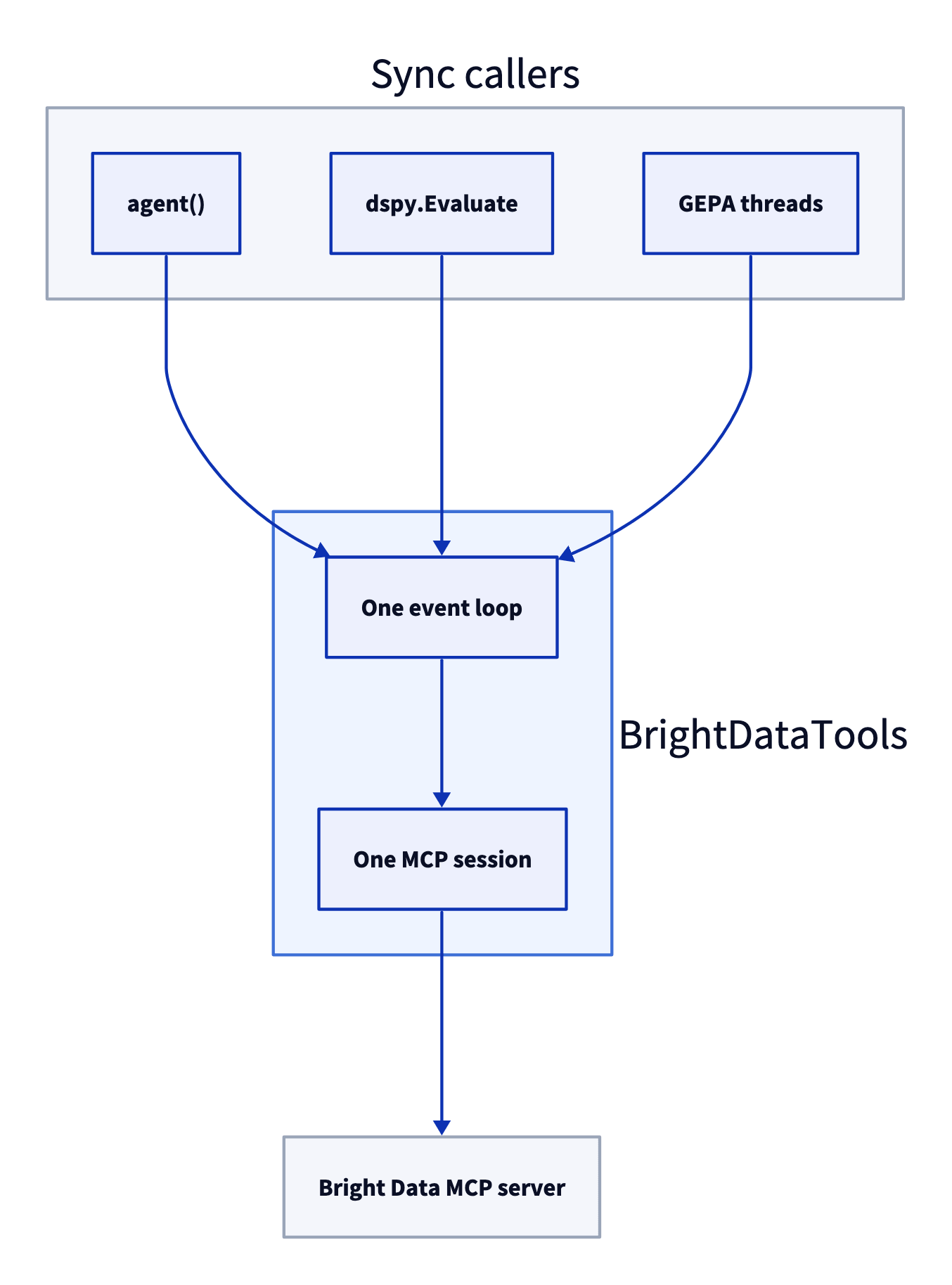
Each sync call is sent to the loop with run_coroutine_threadsafe, so only the event loop that opened the MCP session uses that session.
The class is in brightdata_tools.py, the module that the evaluation and optimization scripts import:
import asyncio
import json
import os
import re
import threading
from urllib.parse import urlparse

import dspy
from mcp import StdioServerParameters, types
from mcp.client import Client
from mcp.client.streamable_http import create_mcp_http_client, streamable_http_client

SERVER_URL = "https://mcp.brightdata.com/mcp?tools=search_engine,scrape_as_markdown"
# The Bright Data MCP server wraps results in a security notice and two markers
WRAPPED = re.compile(r"(=====UNTRUSTED_\w+_BEGIN=====\n)(.*)(\n=====UNTRUSTED_\w+_END=====)", re.S)


async def approve_page(context, params):
    # Read-only tools, so pages with MCP setup text are returned as data
    return types.ElicitResult(action="accept", content={"return_content": True})


class BrightDataTools:
    """One MCP session on a background event loop, exposed as sync dspy.Tools."""

    def __init__(self, country="us", max_chars=20_000, retries=2,
                 blocked_domains=(), timeout=180, cache=False, remote=True):
        self.country = country
        self.max_chars = max_chars
        self.retries = retries
        self.blocked = tuple(blocked_domains)
        self.timeout = timeout
        self.cache = {}  # pages always, searches too when cache=True
        self.keep_all = cache  # reuse search results while optimizing
        self.lock = threading.Lock()
        self.stats = {"calls": 0, "sent": 0, "errors": 0}
        self.error = None  # why the MCP session failed to start or stopped
        self.remote = remote
        self.loop = asyncio.new_event_loop()
        self.ready = threading.Event()
        self.thread = threading.Thread(target=self.loop.run_until_complete,
                                       args=(self._serve(),), daemon=True)
        self.thread.start()
        self.ready.wait()
        if self.error:
            raise RuntimeError("Could not connect to the MCP server") from self.error

    async def _serve(self):
        try:
            await self._connect()
        except Exception as e:  # report it instead of waiting forever
            self.error = e
        finally:
            self.ready.set()

    async def _connect(self):
        token = os.environ["BRIGHTDATA_API_TOKEN"]
        if self.remote:  # hosted server over streamable HTTP
            async with create_mcp_http_client(headers={"Authorization": f"Bearer {token}"}) as http:
                async with Client(streamable_http_client(SERVER_URL, http_client=http),
                                  elicitation_callback=approve_page) as client:
                    await self._hold(client)
        else:  # local server, latest release
            local = StdioServerParameters(
                command="npx", args=["-y", "@brightdata/mcp@latest"],
                env={"API_TOKEN": token, "TOOLS": "search_engine,scrape_as_markdown",
                     "PATH": os.environ["PATH"]})
            async with Client(local, elicitation_callback=approve_page) as client:
                await self._hold(client)

    async def _hold(self, client):
        self.client = client
        self.mcp_tools = (await client.list_tools()).tools
        self.stop = asyncio.Event()
        self.ready.set()
        await self.stop.wait()

    def close(self):
        self.loop.call_soon_threadsafe(self.stop.set)
        self.thread.join(timeout=30)  # let the session shut down cleanly

    def _is_blocked(self, url):
        host = urlparse(url).netloc.lower()
        return any(host == d or host.endswith("." + d) for d in self.blocked)

    def call(self, name, args):
        start = int(args.pop("start", 0) or 0)  # where to resume a long page
        find = args.pop("find", "") or ""  # phrase to look for in a long page
        if name == "search_engine":
            args = {**args, "geo_location": self.country}
        if name == "scrape_as_markdown" and self._is_blocked(args.get("url", "")):
            return "This domain is excluded for this task. Use another source."
        key = (name, json.dumps(args, sort_keys=True))
        with self.lock:
            self.stats["calls"] += 1
            text = self.cache.get(key)
        if text is None:
            try:
                text = self._send(name, args)
            except Exception:
                with self.lock:
                    self.stats["errors"] += 1  # the agent sees an error, not a page
                raise
            with self.lock:
                self.stats["sent"] += 1
                if self.keep_all or name == "scrape_as_markdown":
                    self.cache[key] = text  # pages stay cached, so reading on is free
        wrapped = WRAPPED.search(text)
        head, body, tail = (text[:wrapped.start(2)], wrapped.group(2), text[wrapped.end(2):]
                            ) if wrapped else ("", text, "")
        if name == "search_engine" and self.blocked:
            data = json.loads(body)
            data["organic"] = [r for r in data.get("organic", [])
                               if not self._is_blocked(r["link"])]
            body = json.dumps(data, indent=1)
        if find:
            spans = [(max(0, m.start() - 1500), m.end() + 1500)
                     for m in re.finditer(re.escape(find), body, re.I)][:6]
            body = ("\n...\n".join(body[a:b] for a, b in spans)
                    or f"[{find!r} not found in the {len(body)}-character page]")
        end = start + self.max_chars
        if len(body) > end:
            body = (body[start:end] + f"\n[showing characters {start} to {end} of {len(body)}. "
                    f"Call {name} again with start={end} to read on, or with "
                    "find='a word or phrase' to get matching passages from the whole page]")
        elif start:
            body = body[start:] + f"\n[end of page: characters {start} to {len(body)}]"
        return head + body + tail

    def _send(self, name, args):
        if self.error or not self.thread.is_alive():
            raise RuntimeError("The MCP session is closed") from self.error
        for _ in range(self.retries + 1):
            future = asyncio.run_coroutine_threadsafe(
                self.client.call_tool(name, args), self.loop)
            try:
                result = future.result(self.timeout)
            finally:
                future.cancel()  # a timed-out call stops instead of running on
            text = "\n".join(c.text for c in result.content if hasattr(c, "text"))
            wrapped = WRAPPED.search(text)
            body = wrapped.group(2) if wrapped else text
            if not result.is_error and body.strip():
                return text
        raise RuntimeError(text[:500] or "empty result")

    def tools(self):
        out = []
        for t in self.mcp_tools:
            spec = dspy.Tool.from_mcp_tool(self.client, t)  # name, description, args
            args, types, desc = dict(spec.args), dict(spec.arg_types), spec.desc
            if t.name == "scrape_as_markdown":  # let the agent read beyond the character limit
                args["start"] = {"type": "integer", "default": 0,
                                 "description": "Character offset to read from, for long pages"}
                args["find"] = {"type": "string", "default": "",
                                "description": "Word or phrase to find; returns matching passages"}
                types["start"], types["find"] = int, str
                desc += (f" Returns {self.max_chars} characters at a time; pass find to search"
                         " the whole page for a word or phrase.")

            def run(_name=t.name, **kwargs):
                return self.call(_name, kwargs)

            out.append(dspy.Tool(run, name=spec.name, desc=desc,
                                 args=args, arg_types=types))
        return out
BrightDataTools().tools() returns 2 synchronous tools that keep the server’s tool names, descriptions, and arguments. The scrape tool gets 2 extra arguments, start and find, so the agent can read text beyond the character limit that max_chars sets. The Bright Data MCP server wraps results in a security notice that marks the page text and tells the model to treat it as data. The class filters and truncates only the marked text, so the model still receives the full notice.
The constructor’s settings:
remote=Falseuses the local server instead of the hosted one.countrysetsgeo_locationon every search, so every run gets results for the same country.max_charslimits each result to 20,000 characters, because some sites publish very long pages, such as full Wikipedia articles. Without the limit, 1 model request had 491,564 tokens and exceeded the model’s context window. With it, no question used more than 58,651 prompt tokens in 2 evaluation runs. Pages stay cached, so a call withstartorfindsends no new request.retriesandtimeouthelp long evaluation runs finish. A call that returns an error is resent up to 2 times, and a call still running aftertimeoutseconds is canceled instead of continuing in the background. Each call that still fails is counted instats["errors"], whichevaluate.pyandoptimize.pyprint. Check it before you trust a score, because the agent answers from memory when its tools fail.blocked_domainsremoves chosen sites from search results and blocks scrapes of those sites. Use it during evaluation, and leave it empty in production.cache=Truealso reuses search results, andoptimize.pyenables it.
BrightDataTools is built for sync, threaded jobs such as dspy.Evaluate and GEPA, and it works unchanged in a Jupyter notebook. In an async web service, such as a FastAPI endpoint, run an agent built on BrightDataTools in a worker thread with await asyncio.to_thread(agent, question=question), so the event loop keeps serving other requests.
Evaluate the agent on SimpleQA Verified
GEPA improves a program by evaluating it with a metric, so the agent needs questions with known answers first. SimpleQA Verified provides them. It is a public, MIT-licensed set of 1,000 short fact questions with verified answers.
Download the questions into the repository folder:
curl -L -o simpleqa_verified.csv https://huggingface.co/datasets/google/simpleqa-verified/resolve/main/simpleqa_verified.csvresearch.py holds the agent, a SimpleQA-style LLM judge named grader, and the metric that GEPA uses:
import csv
import random

import dspy

# Hosts that publish the benchmark answers, excluded while evaluating
EVAL_BLOCKLIST = ("huggingface.co", "github.com", "raw.githubusercontent.com",
                  "kaggle.com", "openaipublic.blob.core.windows.net")

AGENT_LM = dspy.LM("openai/gpt-5.4-mini", temperature=1.0, max_tokens=16000)
JUDGE_LM = dspy.LM("openai/gpt-5.4-mini", temperature=1.0, max_tokens=16000)


class ResearchQuestion(dspy.Signature):
    """Answer the question with facts found on the web."""

    question: str = dspy.InputField()
    answer: str = dspy.OutputField(desc="a short, direct answer")
    sources: list[str] = dspy.OutputField(desc="URLs of the pages that support the answer")


def make_agent(tools):
    return dspy.ReActV2(ResearchQuestion, tools=tools, max_iters=8)


def load_examples(path="simpleqa_verified.csv", seed=7):
    rows = list(csv.DictReader(open(path)))
    random.Random(seed).shuffle(rows)
    return [dspy.Example(question=r["problem"], gold=r["answer"]).with_inputs("question")
            for r in rows]


class Grade(dspy.Signature):
    """Grade a predicted answer against the gold answer, SimpleQA style.
    CORRECT: the prediction contains the gold answer's meaning and does not contradict it.
    Small spelling or formatting differences are fine; for numbers and dates the value must match.
    INCORRECT: the prediction states a different or contradictory answer, or hedges between several.
    NOT_ATTEMPTED: the prediction does not give an answer."""

    question: str = dspy.InputField()
    gold_answer: str = dspy.InputField()
    predicted_answer: str = dspy.InputField()
    grade: str = dspy.OutputField(desc="CORRECT, INCORRECT, or NOT_ATTEMPTED")


grader = dspy.Predict(Grade)


def tool_calls(pred):
    calls = []
    history = getattr(pred, "history", None)
    for event in (history.messages if history else []):
        for call in getattr(event.get("tool_calls"), "tool_calls", []):
            if call.name != "submit":
                calls.append((call.name, call.args))
    return calls


def metric(gold, pred, trace=None, pred_name=None, pred_trace=None):
    """Score for GEPA, plus feedback that never shows the reference answer."""
    answer = getattr(pred, "answer", "") or ""
    with dspy.context(lm=JUDGE_LM):
        grade = grader(question=gold.question, gold_answer=gold.gold,
                       predicted_answer=answer).grade.strip().upper()
    correct = grade.startswith("CORRECT")
    calls = tool_calls(pred)
    searches = [args.get("query") for name, args in calls if name == "search_engine"]
    pages = [args.get("url") for name, args in calls if name == "scrape_as_markdown"]
    feedback = (f"Grade: {'CORRECT' if correct else 'INCORRECT'}. Agent answered: {answer!r}. "
                f"Searches ({len(searches)}): {searches}. Pages opened ({len(pages)}): {pages}.")
    if not correct and not pages:
        feedback += " The agent answered without opening a page."
    return dspy.Prediction(score=float(correct), feedback=feedback)


def leaked_answers(instruction, examples):
    """Reference answers (4+ characters) that an optimized instruction repeats."""
    text = instruction.lower()
    return sorted({ex.gold for ex in examples if len(ex.gold) >= 4 and ex.gold.lower() in text})
The judge uses the agent’s own small model to assign SimpleQA’s 3 grades, which are correct, incorrect, and not attempted. The metric returns a score and written feedback that lists the agent’s searches and pages, but not the reference answer. During evaluation, EVAL_BLOCKLIST blocks the sites that publish the benchmark’s answers, so the agent has to find each answer on the open web.
evaluate.py in the repository runs the agent on a slice of the shuffled questions, 8 at a time, and saves every answer to results.json. By default, it evaluates the 60 test questions. --no-tools evaluates the model alone, and --local uses the local server. The runs gave these results:
Setup, all with gpt-5.4-mini |
Correct, of the same 60 SimpleQA Verified questions |
|---|---|
| Model alone, no tools | 14 (1 run) |
Agent with Bright Data tools, local server, without find |
58, 55, 58, 54 (4 runs) |
Agent with Bright Data tools, hosted server, with find |
57 (1 run) |
All 46 errors from the model alone were specific wrong answers, such as Omaha for a painter born in Beatrice, Nebraska. The model’s wrong answers looked like correct ones.
Repeating runs of the same agent shows how much of any single score is noise. The agent’s 4 runs differed partly because of random model sampling and the judge’s grading. The agent named different instruments for the same John Cage piece across runs, and the judge graded “4½ points” as correct but “4.5” as incorrect for the same chess score.
Treat a change of up to 4 questions out of 60 as noise, and compare programs question by question in their saved results, not by totals. DSPy caches model calls by default, so set cache=False on both LMs before you repeat a run.
Spot-check the judge’s grades too, especially when the judge is the same model as the agent. In a manual review of 1 other run, all 60 grades were correct when checked against the reference answers.
What a run costs. A 60-question run averaged 2.3 tool calls per question, fewer than 200 requests to Bright Data, and $0.29 of gpt-5.4-mini calls for the agent. The full evaluation fits in the free monthly requests.
Test the agent on events after the model’s knowledge cutoff
SimpleQA Verified’s stable questions aren’t designed to test facts from after the model’s knowledge cutoff. For these facts, post_cutoff_questions.csv in the repository contains 14 questions about 2025 and 2026 events, with answers checked against Wikipedia. Run python evaluate.py --csv post_cutoff_questions.csv --start 0 --n 14, then again with --no-tools. Each setup ran once:
| Questions about, 1 run each | gpt-5.4-mini alone |
gpt-5.4-mini with Bright Data tools, hosted server |
|---|---|---|
| 2025 events | 5 of 6 | 6 of 6 |
| 2026 events | 0 of 8 | 8 of 8 |
Without tools, the model said several 2026 events hadn’t happened yet. It knew 5 of 6 facts from 2025, although it said its knowledge cutoff was June 2024. Test what a model knows instead of trusting its stated knowledge cutoff, and add questions from your own use case whose answers appear only on recently published pages.
Optimize the agent with GEPA
GEPA is DSPy’s reflective prompt optimizer. It runs the program on small batches of training questions. Then it shows the failed runs and the metric’s feedback to a stronger reflection model, which is gpt-5.5 in these runs. GEPA keeps the new instructions that perform best on a validation set.
GEPA needs wrong answers to learn from. When the agent answers every sampled training question correctly, GEPA proposes no new instruction.
So build the training set from questions the agent gets wrong. Run python evaluate.py --start 108 --n 400 --out pool.json on questions outside the test set. optimize.py then combines 12 wrong answers with 12 correct answers for the training set and builds the validation set the same way:
import json
import random

import dspy
from brightdata_tools import BrightDataTools
from research import AGENT_LM, EVAL_BLOCKLIST, leaked_answers, make_agent, metric

dspy.configure(lm=AGENT_LM, adapter=dspy.ChatAdapter(use_native_function_calling=True))

# Half wrong, half correct answers from an evaluate.py run outside the test set
pool = json.load(open("pool.json"))
misses = [r for r in pool if not r["correct"] and not r.get("error")]
hits = [r for r in pool if r["correct"]]
random.Random(0).shuffle(hits)


def to_ex(rows):
    return [dspy.Example(question=r["question"], gold=r["gold"]).with_inputs("question")
            for r in rows]


half = min(12, len(misses) // 2)
trainset = to_ex(misses[:half] + hits[:half])
valset = to_ex(misses[half:2 * half] + hits[half:2 * half])

bd = BrightDataTools(blocked_domains=EVAL_BLOCKLIST, cache=True)
agent = make_agent(bd.tools())
gepa = dspy.GEPA(
    metric=metric,
    reflection_lm=dspy.LM("openai/gpt-5.5", temperature=1.0, max_tokens=32000),
    max_metric_calls=300,
    num_threads=8,
    track_stats=True,
    log_dir="gepa_logs",
)
optimized = gepa.compile(agent, trainset=trainset, valset=valset)
optimized.save("optimized_agent.json")

instruction = optimized.react.signature.instructions
print(instruction)
print("Training answers in the instruction:", leaked_answers(instruction, trainset + valset))
print("Tool calls:", bd.stats["calls"], "| requests sent:", bd.stats["sent"],
      "| errors:", bd.stats["errors"])
bd.close()
Run it with python optimize.py. The cache in BrightDataTools matters here, because GEPA asks the same questions many times. In 1 GEPA run, the cache answered 524 of 994 tool calls without a new request.
These 4 GEPA runs each used 24 training questions, 24 validation questions, and the same 60 test questions:
| Training set | Expected answer in the feedback | Validation score, of 24 | Training answers copied into the instruction | Test score, of 60 |
|---|---|---|---|---|
| 24 random questions | Yes | 21 to 23 | 3 | 55, 52 |
| 24 random questions | No | 24, no new instruction | 0 | Not measured |
| 12 wrong, 12 correct answers | Yes | 18 to 21 | 3 | 57, 55 |
| 12 wrong, 12 correct answers | No | 20 to 21 | 3 | Not measured |
GEPA can write training answers into the instruction. The instruction from the first run ended like this:
Known facts that may be useful for repeated questions:
- Galip Ulsoy received the Charles Russ Richards Memorial Award from ASME and Pi Tau Sigma in 2013. ...
- The Koshi/Kosi River basin size is commonly listed as about 74,500 km². ...
- For the April 25, 2015 Nepal/Gorkha earthquake, a Mw 6.6 aftershock occurred about 34 minutes after the initial Mw 7.8 event ...
Each line answers 1 training question, and every instruction that GEPA proposed in that run had a similar block. Hiding the expected answer didn’t stop it. The reflection model then took the answers from the agent’s own correct runs, such as the number of households in Weston, Ohio, in the 2000 census.
Rerun wrong answers before you train on them. On the validation set built from wrong answers, the baseline agent already scored 18 to 20 of 24. So at least 6 of its 12 wrong answers were correct on a rerun. Keep only the questions that the agent gets wrong in more than one run.
Measure the result on held-out questions. Validation scores rose in every run that proposed an instruction. On the 60 test questions, the optimized programs scored 52 to 57, and the baseline agent with Bright Data tools scored 54 to 58. GEPA’s instruction changes did not measurably raise the score, and the first run alone cost $3.31 of model calls for the gpt-5.4-mini agent and the gpt-5.5 reflection model.
Check the instruction for copied answers. leaked_answers in research.py detects reference answers of 4 or more characters that an instruction repeats. In these runs, it found most copied answers, but a string match does not detect short numbers or reworded answers. Read the whole instruction, and delete any line about a specific training question.
Find tool fixes with error analysis
GEPA only rewrites instructions, so it can’t fix a problem in the tools themselves. Error analysis of the wrong answers finds these problems. Here, the wrong answers clustered on dates and numbers. Across 3 runs and 519 graded questions, the agent got about 15% of date and number questions wrong, compared with 7% of questions about people and places.
Those runs limited each page to 20,000 characters with the agent’s own max_chars setting. In 24 of its 62 wrong answers, the agent had opened a page longer than the limit. When fetched again in full, 6 of those pages had the answer after the limit:
| Page the agent opened | Answer starts at character (agent’s limit is 20,000) | Agent’s answer | Correct answer |
|---|---|---|---|
| Wikipedia, Equinox | 38,604 | equinox | equilux |
| Wikipedia, ChromeOS | 24,709 | October 2011 | August 2011 |
| Wikipedia, Cannibal Corpse | 25,566 | March 1993 | February 1993 |
| Aseprite release notes | 59,987 | v1.2.22 | v1.3-rc8 |
| Baseball-Reference, Tim Wakefield | 65,663 | 2.25 | 12.27 |
| RuPaul’s Drag Race Wiki, Season 1 | 99,250 | “I Will Survive” | “Stronger” |
In all 6, the agent cited the page that contained the correct answer. A citation shows where the agent looked, not what the page says.
In BrightDataTools, the wrapper class, start returns the next 20,000 characters, and find returns up to 6 passages of about 3,000 characters around each match of a word or phrase. A note at the end of a truncated page tells the agent about both arguments. Paging alone was not enough. In a separate test with only start, the agent requested the next part of a page in 3 of 18 runs.
Each setup ran 8 times per question:
| Setup, same 6 long-page questions | Correct, of 48 runs | Prompt tokens per run | gpt-5.4-mini cost, all 48 runs |
|---|---|---|---|
| Character limit only | 24 | 23,023 | $0.52 |
Character limit with start and find |
33 | 11,908 | $0.35 |
The agent called find in 28 of the 48 runs. The accuracy gain is promising but not yet statistically significant at 48 runs per version (p ≈ 0.10).
Verify sources before you show them to users. The agent often cited search results it never opened. In the local runs, it had opened fewer than 1 in 4 of the URLs it cited. To check a source, call the BrightDataTools scrape tool with find and a distinctive part of the answer.
Trace every tool call with MLflow
A trace shows every search the agent ran and every page it read. With it, you can see how the agent produced each answer and quickly find the step that caused a wrong one. The MLflow DSPy integration records each module, model call, and tool call as a span. Install the tested MLflow release:
uv pip install "mlflow==3.17.1"Then add these lines to agent.py, before the agent runs:
import mlflow

mlflow.set_tracking_uri("sqlite:///mlflow.db")
mlflow.dspy.autolog()
MLflow 3.17 needs a database backend, so the tracking URI is set to a local SQLite file. Run mlflow ui --backend-store-uri sqlite:///mlflow.db to view the traces. This span tree is from 1 question:
CHAIN       ReActV2.forward
LLM         Predict.forward          x6
CHAT_MODEL  LM.__call__              x6
PARSER      ChatAdapter.format       x6
TOOL        Tool.search_engine       x4
TOOL        Tool.scrape_as_markdown  x1
TOOL        Tool.submit              x1
Each TOOL span stores the arguments that the model sent and the text that the Bright Data MCP server returned. Selecting the first search span in the MLflow UI shows both for that call:
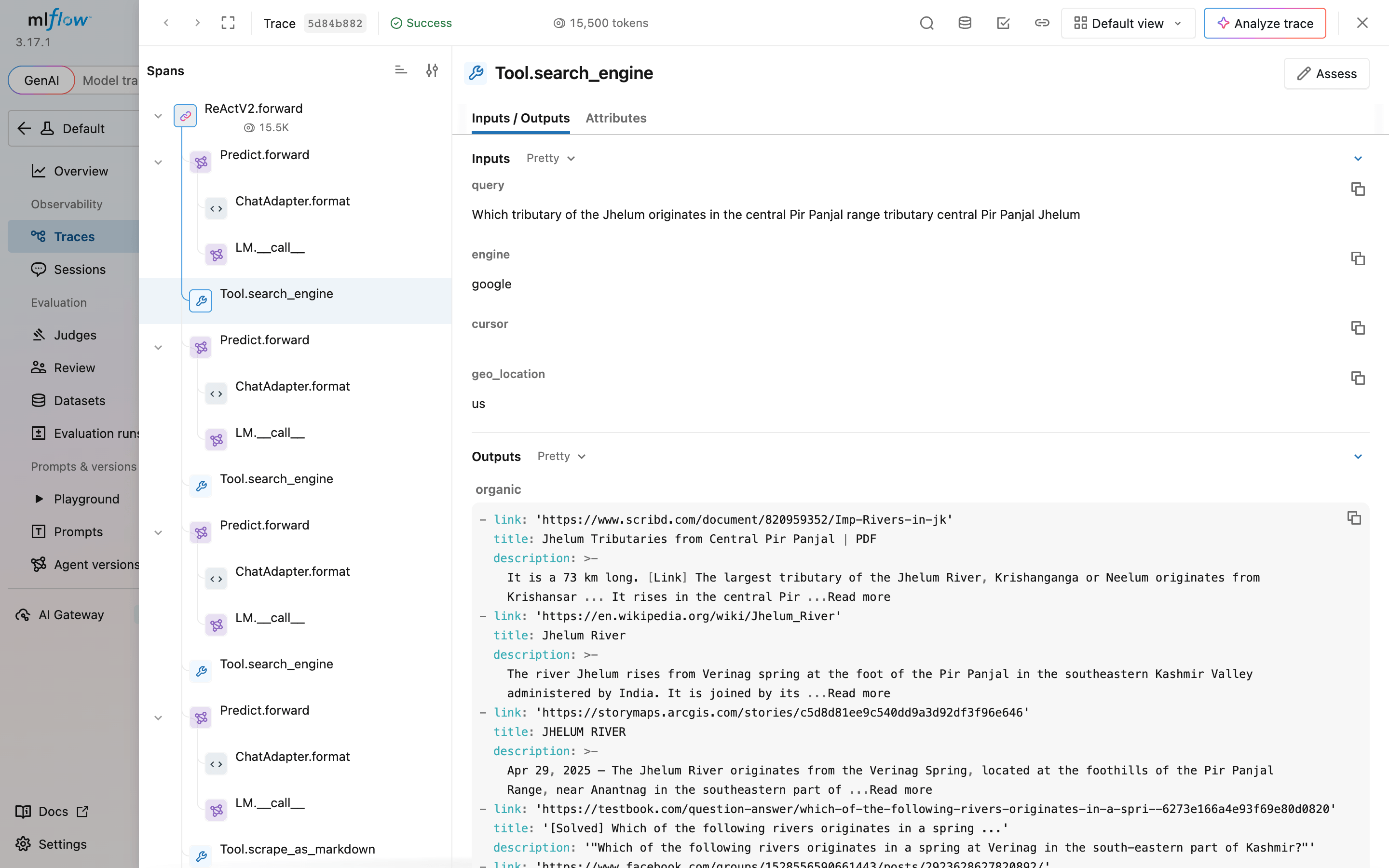
For a wrong answer, this view shows whether the agent’s query found a page with the correct answer.
Final thoughts
With the Bright Data MCP server, this DSPy agent answered 54 to 58 of 60 benchmark questions correctly, up from 14, and all 8 questions about events after its knowledge cutoff. To evaluate and optimize it, keep the MCP session on its own event loop, because dspy.Evaluate and GEPA call tools from worker threads. Review the wrong answers before you optimize, because 6 of them here had the answer beyond the agent’s own character limit, and find lets the agent search the whole page. GEPA can help most when wrong answers share a cause that an instruction can fix, and you should check its output for copied answers. Create a free Bright Data account, run agent.py on a question your model can’t answer from memory, and run evaluate.py on your own questions.
FAQ
Does DSPy support MCP servers?
Yes. With dspy.Tool.from_mcp_tool and a client from the MCP Python SDK, DSPy converts the tools of an MCP server, such as the Bright Data MCP server, into DSPy tools. Install the MCP extra with pip install "dspy[mcp]". In DSPy 3.4.1, MCP tools are async, so call agents with acall. On worker threads, use sync wrappers on a background event loop.
Is DSPy an MCP client?
No, not by itself. DSPy uses a client from the MCP Python SDK, and dspy.Tool.from_mcp_tool converts that client’s tools into DSPy tools. DSPy builds and optimizes the agent program, and MCP connects the agent to servers such as the Bright Data MCP server.
How do I add web search to a DSPy agent?
Connect the Bright Data MCP server and pass its search and scrape tools to dspy.ReActV2, the implementation that dspy.ReAct uses starting with DSPy 3.5. The agent searches Google, reads pages as Markdown, and returns its source URLs. A Python function that calls the Bright Data SERP API, which returns search results as JSON, also works as a DSPy tool.
Which web search tool works with DSPy?
The Bright Data MCP server gives a DSPy agent Google results and full pages as Markdown through a single connection, and the server handles bot protection. On 60 SimpleQA Verified questions, gpt-5.4-mini answered 54-58 correctly with it, up from 14 without it. Other search tools also work, and the comparison of search tools for AI agents covers them.
What is DSPy ReActV2?
dspy.ReActV2 is the experimental DSPy agent module built on native tool calling. It keeps structured history, can make several tool calls per turn, and finishes with a submit tool. The DSPy docs list it as the implementation that dspy.ReAct uses starting with DSPy 3.5, with the ReActV2 name removed in 3.6.
Is DSPy still relevant?
Yes, for programs that you can evaluate with a metric. DSPy keeps the task separate from the prompt, so you can switch models and re-optimize with a metric and an optimizer such as GEPA. With default settings, GEPA proposes changes only when the program still answers some training questions incorrectly, so evaluate the program first.
Is DSPy production ready?
Yes, when you pin versions and make the tool calls robust. Pin dspy and any MCP server, limit tool output size, let the agent search text beyond that limit, add retries, timeouts, and error counts to tool calls, and trace runs with MLflow. Experimental modules such as ReActV2 can change between minor releases.
Can DSPy be used for prompt optimization?
Yes. DSPy optimizers such as GEPA rewrite a program’s instructions based on evaluated examples. GEPA reviews evaluated runs and their written feedback and proposes new instructions, then keeps the ones that perform best on a validation set. Review the result before you deploy it, because GEPA can sometimes copy training answers into the instruction.


Technical Writer
 5 years experience
Satyam Tripathi helps SaaS and data startups turn complex tech into actionable content, boosting developer adoption and user understanding.