Browserbase is a cloud browser platform for AI agents. Agents spend much of each session waiting for LLM responses, and Browserbase bills those idle minutes. Its default sessions exit from datacenter IPs, and many bot-protected sites block those IPs or show a CAPTCHA.
For those sites, pick Bright Data Browser API. It routes sessions through residential proxies, includes CAPTCHA solving, and bills only for traffic, so idle time is free.
This guide matches 9 Browserbase alternatives to the problems they solve and includes tests of exit IPs, browser fingerprints, latency, page weight, and token counts.
TL;DR
- With residential proxies enabled, traffic costs more than browser hours on bot-protected and JavaScript-heavy pages. At Browserbase Developer plan prices, proxy traffic would be 97% of the cost of a 10-minute Amazon session that I measured. The plan’s list price for proxy traffic was $12 per GB in November 2026. Bright Data Browser API pricing is per GB of traffic, starts below that rate, and includes a free tier.
- Every Chrome DevTools Protocol (CDP) command includes a network round trip to the vendor’s entry point, the server your agent connects to. From India, the same minimal CDP command took 66 ms through the nearby entry point that Bright Data picked for speed. Through Browserbase’s default US West region, the command took 282 ms. Pick a vendor with an entry point near your agent.
- Exit IPs and browser fingerprints differ more than vendor pages suggest. In my tests, Bright Data Browser API exited from US residential IPs and reported consumer GPUs that varied by session. A default Browserbase session, without its paid proxies, exited from AWS datacenter IPs. Kernel, another cloud browser, reported a datacenter GPU in every test session.
- Verified identity and unblocking solve different problems. Cloudflare Browser Run signs every request with Web Bot Auth so sites can identify the agent, and each site still decides whether to allow it. For unblocking, Bright Data Browser API loaded an Amazon product page in all 3 test sessions, with CAPTCHA solving built in.
Quick comparison of Browserbase alternatives
Each tool here is a cloud browser for AI agents.
| # | Tool | Pick it if | Billing model |
|---|---|---|---|
| 1 | Bright Data Browser API | Your agents read and interact with bot-protected public sites, at high concurrency, with country, state, or city geo-targeting | Per GB of traffic, idle time free |
| 2 | Kernel | Your agent can disconnect during LLM calls, or your agents sign in on behalf of users | Per second of active browser time, standby free |
| 3 | Browser Use Cloud | You already run Browser Use agents | Per browser-minute plus per-GB traffic |
| 4 | Steel | You must self-host the browser server, or you need a HIPAA Business Associate Agreement (BAA) without an enterprise contract | Per browser-minute plus per-GB proxy traffic |
| 5 | Cloudflare Browser Run | You use Cloudflare Workers and your target sites accept signed agents | Per browser-hour, plus a monthly fee for each concurrent browser above 10, based on the monthly average |
| 6 | AWS AgentCore Browser | Your agent and its data must stay inside your AWS account | Per second of vCPU and memory |
| 7 | Browserless | You have Puppeteer or Playwright code and want to self-host Browserless under a commercial license | Per 30-second unit of browser time, plus proxy traffic |
| 8 | Anchor | Your agents sign in to business apps and you need on-prem or your own cloud | Per browser-hour, plus a fee per browser started, plus per-GB proxy traffic |
| 9 | Driver | You want headful Chrome on physical machines | Per GB of traffic only |
Why teams evaluate Browserbase alternatives
The first reason is the bill. Browserbase bills browser time per minute, including idle minutes, with a 1-minute minimum per session. Overage costs $0.10 to $0.12 per browser hour. Built-in residential proxies add $10 to $12 per GB, and the Free plan doesn’t include them.
The second reason is access to bot-protected sites. Sessions exit from datacenter IPs unless you enable proxies, and many bot-protected sites flag those IPs. Only the Scale plan includes Verified, the Browserbase agent identity feature. Support for Web Bot Auth, the signed-agent protocol, is in beta and available on request.
The third reason is concurrency. Self-serve plans allow 3 to 100 concurrent browsers, and higher limits need the Scale plan.
Browserbase has real strengths. It created Stagehand, an open-source AI browser-automation framework that also runs on other cloud browsers. Its Contexts feature saves cookies and local storage, so agents stay signed in between sessions. The right alternative depends on the problem that started your search.
How to choose a cloud browser for AI agents
In production, cloud browsers for AI agents differ in how they solve 8 problems:
| Problem | What to check | Built for it |
|---|---|---|
| Cost of idle time in agent sessions | Billing for a connected but idle browser, the minimum charge per session | Bright Data Browser API, Driver, and Kernel (if your agent disconnects while idle) |
| Bot-protected public sites at high concurrency | Concurrency limits per plan, residential IPs with country, state, and city geo-targeting, browser fingerprint management, CAPTCHA solving, how fast the vendor updates to new Chrome versions | Bright Data Browser API |
| Latency in the agent loop | Round-trip time from your agent to the browser, session startup time | Bright Data Browser API, which picks its entry point for speed, or any vendor with a region near your agent |
| Compliance | Proxy IP sourcing and consent, SOC 2 report type, session recording defaults | Bright Data Browser API, AWS AgentCore Browser, Kernel, Browserless, Browser Use Cloud, Steel |
| Login automation on behalf of users | Persistent browser profiles, credential vaults, time-based one-time password (TOTP) and email one-time codes, password manager integration | Kernel, Anchor, Browser Use Cloud, Browserless |
| Verified agent identity | Web Bot Auth signing, whether it is enabled by default, which plan includes it | Cloudflare Browser Run, Kernel, Anchor |
| Human-in-the-loop handoff | Interactive live view, session recordings | Kernel, Browserless, Cloudflare Browser Run, Anchor, Browser Use Cloud, AWS AgentCore Browser |
| Self-hosting or your own cloud | Self-hosted, on-prem, or inside your own cloud account | Steel, Browserless, Anchor, AWS AgentCore Browser, Browser Use Cloud, Kernel |
If you have 2 or 3 of these problems at once, prioritize the one that blocks your agent today.
Verified identity vs unblocking
Web Bot Auth lets an agent sign each request with its private key, using HTTP Message Signatures (RFC 9421). Bot-management vendors such as Cloudflare, Akamai, and DataDome verify those signatures.
A signature tells the site which agent sent the request. The site can still allow, rate-limit, or block that agent.
For public data on bot-protected sites, an agent usually needs residential proxies, a consistent browser fingerprint, and CAPTCHA solving. Bright Data Browser API includes all three.
The 9 Browserbase alternatives and when to pick each
Plans and features are current as of November 2026.
1. Bright Data Browser API
Bright Data Browser API runs Chrome sessions in the cloud for public web data, with its proxy network, fingerprint management, and automatic retries included. CAPTCHA solving runs automatically, plans include unlimited concurrent sessions, and sessions exit from residential IPs in 195 countries, with country, state, or city targeting. It works with Playwright, Puppeteer, and Selenium, and you can inspect any live session in Chrome DevTools. The Bright Data Model Context Protocol (MCP) server gives agents tools that control Browser API, plus a tool that fetches pages as Markdown.
In my tests, Browser API loaded pages from bot-protected sites such as Amazon, Walmart, Best Buy, Zillow, Nike, and Indeed in concurrent sessions.
Several features solve specific agent problems:
- Billing per GB. Idle time is free, and each session is billed only for the traffic it uses. In my tests, a session connected in about a second, so an agent can open a new one for each task. Browser API pricing includes a free tier and lower per-GB rates on monthly plans, and a spending limit keeps spending within your budget. The session logs API returns each session’s billed traffic, so you can measure the cost of each completed task.
- Sticky IPs across sessions.
Proxy.useSessionlets a new session reuse an earlier session’s residential IP. An agent that returns to a site can then keep the same IP that it had when the site set its cookies. Many anti-bot systems link session cookies to the IP that received them.Proxy.useSessionis one of the custom CDP functions of Browser API, which also control CAPTCHA solving, ad blocking, and file downloads. - Compliance. Bright Data has a SOC 2 Type II report and ISO 27001, 27017, and 27018 certifications. It also complies with GDPR and CCPA.
- Consent-based residential IPs. Bright Data sources every residential IP from a user who opted in on a dedicated consent screen and can opt out at any time. PwC, a Big Four firm, has independently audited the network’s operations. Consent-based sourcing answers a question that many security reviews now ask, after takedowns of proxy networks that ran on devices without their owners’ consent.
Pick it if your agents read and interact with bot-protected public sites, across countries and at high concurrency.
2. Kernel
Kernel works well when your agent can disconnect while it waits for LLM responses. It bills each browser per second of active time, and a disconnected browser enters standby, where billing pauses. Every plan includes stealth mode with a default ISP proxy and a CAPTCHA solver. However, in my test sessions, Kernel’s browser reported a datacenter GPU, which anti-bot systems can flag.
Kernel is also a good choice for agents that sign in on behalf of users. It can re-authenticate eligible logins automatically with managed auth, generate TOTP codes, and let users approve each login in 1Password. Its compliance record includes a SOC 2 Type II report, ISO 27001 certification, and a HIPAA BAA on the Enterprise plan. Start-Up and Enterprise customers can also request Web Bot Auth signing.
Pick it if your agent can disconnect during LLM calls, or your agents sign in on behalf of users.
3. Browser Use Cloud
Browser Use Cloud is the hosted browser from the team that builds the open-source Browser Use agent library. By default, each browser is a stealth Chromium fork that runs with a US residential proxy and CAPTCHA solving enabled.
Agents can reuse persistent browser profiles for logins, sign in through 1Password, and generate TOTP codes automatically. When an agent cannot finish a step, a person can watch or take control through the browser’s live view URL. Browser Use Cloud has a SOC 2 Type II report and an EU region in Frankfurt, and enterprise customers can deploy it on-prem.
The open-source library connects to any browser over CDP, and our Browser Use guide shows how to run it on Bright Data Browser API.
Pick it if you already use the Browser Use library and want the hosted browser that the library is optimized for.
4. Steel
Steel is an open-source option for teams whose browser server must run on their own infrastructure. Its server, steel-browser, is licensed under Apache-2.0 and is published as a Docker image. A self-hosted Steel server runs one browser session at a time, and you manage proxy IPs, CAPTCHA solving, and stored credentials yourself. Bright Data residential proxies can supply those IPs.
Steel Cloud adds CAPTCHA solving and stored credentials. Sessions without a proxy exit from a datacenter IP, and the custom Stealth Browser is available only on the Enterprise plan. For healthcare work, the Scale plan includes a HIPAA BAA, so you don’t need an enterprise contract.
Pick it if you must self-host the browser server, or you need a BAA without an enterprise contract.
5. Cloudflare Browser Run
Cloudflare Browser Run is built for verified identity, not unblocking. It adds Web Bot Auth signature headers to every request, and you can’t remove or override them for any site. Browser Run doesn’t offer stealth mode, CAPTCHA solving, or per-request IP rotation.
A Cloudflare Worker accesses the browser through a Workers binding. Browser Run also offers Live View and Human in the Loop handoff, and its session recording is in beta. Until April 15, 2026, Cloudflare called this product Browser Rendering.
Pick it if you use Cloudflare Workers and your target sites accept signed agents.
6. AWS AgentCore Browser
AgentCore Browser is AWS’s managed browser service for agents whose data must stay inside your AWS account. The browser uses your IAM roles and VPC, logs API calls to CloudTrail, and can save session recordings to your S3 bucket. Live View lets a person watch and control each session in real time. AgentCore Browser is HIPAA eligible and in scope for FedRAMP and SOC 2.
On bot-protected sites, AgentCore Browser needs extra setup. Sessions exit from AWS datacenter IPs, so route them through Bright Data residential proxies. The browser has no stealth mode or CAPTCHA solving, and its Web Bot Auth support is in preview and disabled by default. While the browser is idle, vCPU time is free, but memory is billed for the whole session.
Pick it if your agent and its data must stay inside your AWS account.
7. Browserless
Browserless runs Puppeteer and Playwright scripts in its cloud or on your own servers, including air-gapped ones. Its cloud service bills browser time in 30-second units, so idle time is billed. Stealth mode is opt-in through separate endpoints, and CAPTCHA solving is billed per successful solve.
Browserless also supports login automation with Authenticated Profiles, 1Password sign-in, and email one-time codes that it reads from your inbox over IMAP. On every plan, including Free, a person can watch and control a session through a Live URL. For regulated buyers, Browserless has a SOC 2 Type II report and offers a HIPAA BAA on the Enterprise plan.
Pick it if you have existing Puppeteer or Playwright scripts and want to self-host Browserless under a commercial license.
8. Anchor
Anchor is built for agents that sign in to business apps on behalf of their users. Managed Authentication gives each user account its own mailbox for email one-time codes, so an agent can complete those logins without human help. Managed Authentication also supports TOTP, 1Password, and custom MFA. Each session can sign its requests with Web Bot Auth, which is disabled by default.
Isolation is the other reason to pick Anchor. Each session runs in its own ephemeral VM, and Enterprise customers can run Anchor in their own cloud or on-prem. By default, live view is interactive and session recordings are enabled, so check whether the recordings capture passwords or customer data.
Pick it if your agents sign in to business apps on behalf of your users and you need on-prem or your own cloud.
9. Driver
Driver runs headful Chrome on physical machines and bills only for traffic. Idle time is free, but an idle session still uses one of your concurrency slots. By default, sessions exit through Driver-operated ISP IPs, with country-level geo-targeting.
Security reviewers should note that Driver launched in 2026 and lists no SOC 2 report. Its master services agreement and SLA are part of the Custom plan, and a data processing agreement is available on request. Treat each session’s live view URL like an API key, because anyone who has it can control the browser.
Pick it if you want headful Chrome on physical machines and your security review doesn’t require a SOC 2 report.
Hands-on tests: fingerprints, latency, traffic, and tokens
Vendor pages describe their browsers in similar terms, so I tested what a site actually sees from each browser. From India, I ran 3 sessions each on Bright Data Browser API, Browserbase, and Kernel and recorded the exit IP, browser fingerprint, and CDP timings. Browserbase’s row shows a default session on its Free plan, without its paid proxy network. The Steel and Browserless rows show their open-source Docker images as you would self-host them, not their cloud services.
Fingerprints and exit IP types
A site reads the exit IP from the connection and the other three values from JavaScript:
| Browser | Exit IP type | Operating system (navigator.platform) |
GPU (WebGL renderer) | Automation flag (navigator.webdriver) |
|---|---|---|---|---|
| Bright Data Browser API | US residential IPs, a new one per session by default | Windows | Consumer GPUs that vary by session, like separate home PCs | false |
| Browserbase (Free plan, no proxy) | AWS datacenter IPs in Oregon | Linux | Mesa Intel UHD 630 in every test session | false |
| Kernel (stealth mode enabled) | US ISP IPs, a new one per session | Linux | NVIDIA L40S-2Q, a virtual datacenter GPU, in every test session | false |
| Steel (self-hosted image) | Your server’s IP | Linux | The renderer string says NVIDIA GTX 1070, but its launch flags make it render with SwiftShader software | false |
| Browserless (self-hosted image) | Your server’s IP | Linux, with HeadlessChrome in the user agent |
Software rendering (SwiftShader) | true |
A datacenter IP, a datacenter GPU, or Chrome’s SwiftShader software renderer can each show that the browser runs on a server. Anti-bot systems combine these signals with request patterns and behavioral analysis, so test your own target list before you choose a vendor.
A self-hosted image gives you the browser runtime. You still supply the IPs and keep the browser fingerprint consistent, and that work is ongoing, because anti-bot vendors update their detection methods often. A self-hosted browser can use Bright Data residential proxies through its standard proxy settings. Browser API manages both the IPs and the fingerprint for you.
The exit country can also change what a site shows. Bright Data Browser API loaded the same Amazon URL with a US exit and with a UK exit, and Amazon returned different offers:
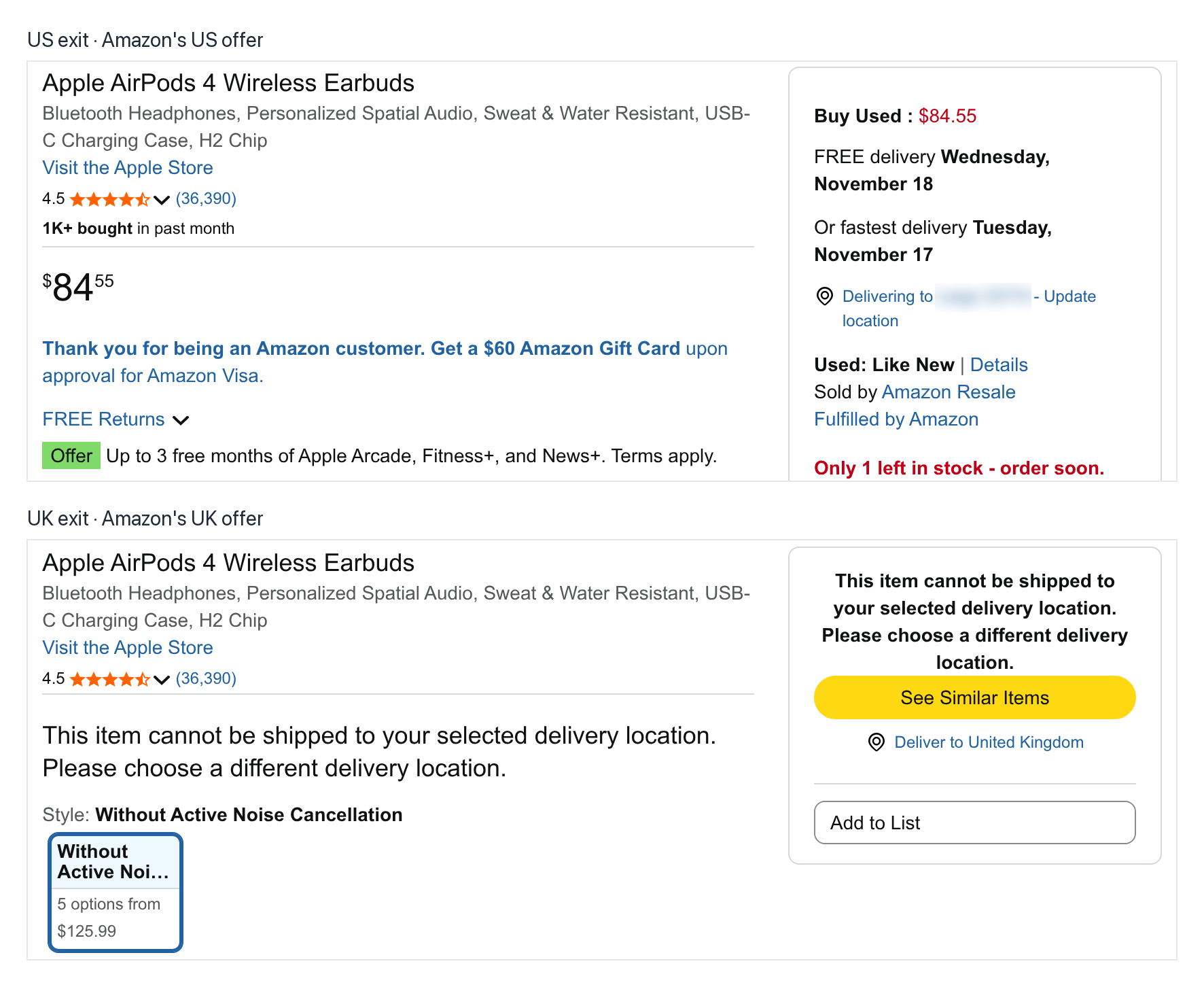
Bright Data sets the exit country with a username suffix such as -country-us, and only that suffix changed between the two sessions. The US delivery location is blurred.
Latency in the agent loop
An agent waits for the browser at every step, so the round-trip time of each CDP command matters:
| Vendor | Session startup time | CDP round-trip time (minimal command) | TCP round-trip time (network only) |
|---|---|---|---|
| Bright Data Browser API | 1.1 to 1.3 s, in a single connect call | 66 to 67 ms | 61 to 67 ms, to Bengaluru |
| Browserbase | 2.8 to 3.2 s, to create and then connect | 282 to 286 ms | 273 to 279 ms, to US West (Oregon), the default region |
| Kernel | 2.1 to 3.5 s, to create and then connect | 246 to 314 ms | 245 to 313 ms, to New York |
Each CDP round trip took about as long as the TCP round trip. That means the distance to the entry point explains most of the difference between vendors. From India, the agent connected through a Bright Data entry point in Bengaluru, and pages still loaded from US residential IPs. The entry point and the exit IP are separate:
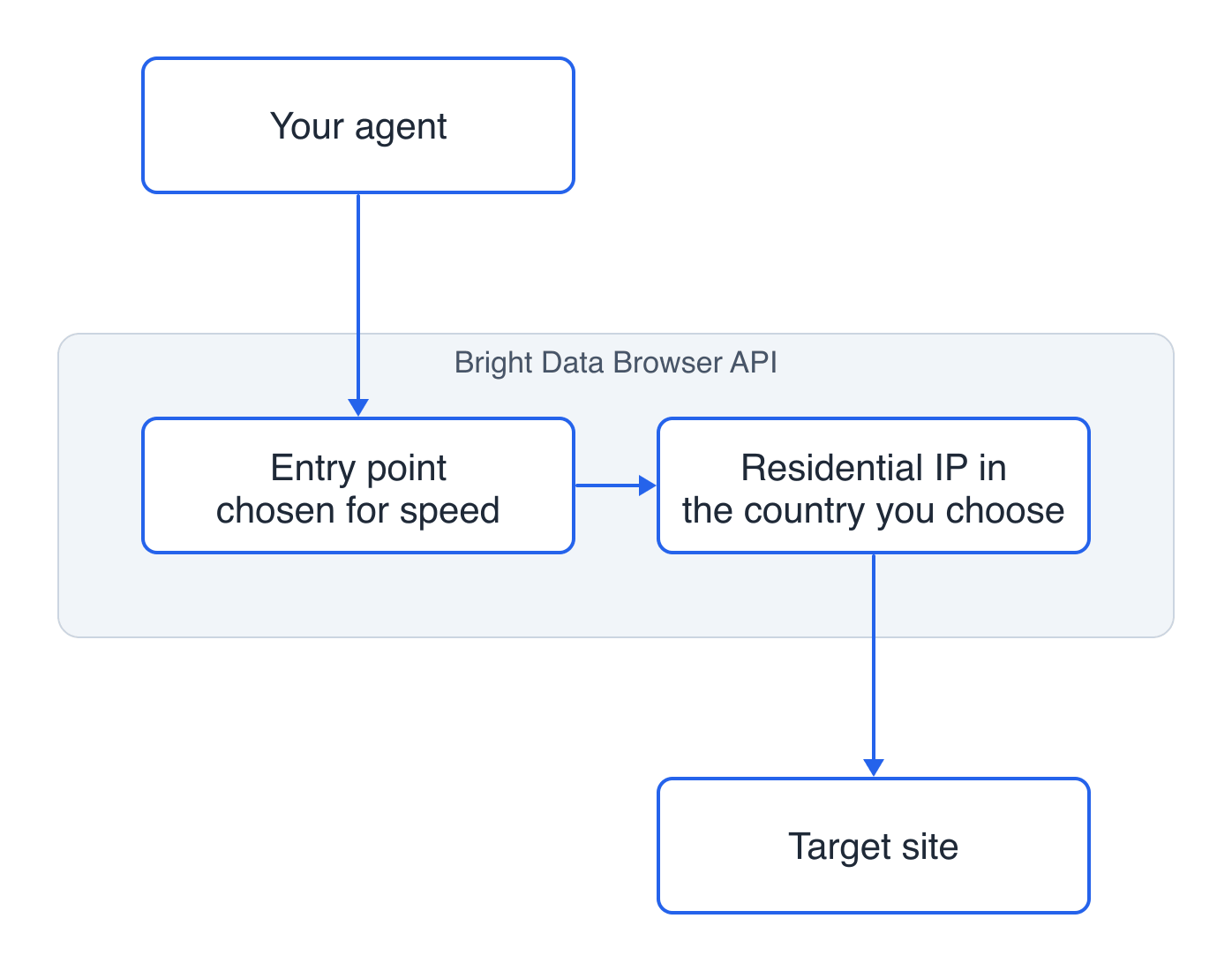
The entry point affects latency, and the exit country affects which version of a site loads.
One agent action often sends several CDP commands, so the difference grows with every step. Pick a vendor with an entry point near your agent.
Billed traffic per page
Page weight depends mostly on the site, not on the browser vendor. Bright Data session logs show how much traffic each page type used:
| Page type | Examples | Median billed traffic per loaded page |
|---|---|---|
| Static HTML | Wikipedia, Hacker News, Python docs, GOV.UK | 0.03 MB |
| JavaScript-heavy | Airbnb search, YouTube search, eBay search, Etsy | 2.9 MB |
| Bot-protected | Amazon, Walmart, Best Buy, Zillow, Nike, Indeed | 3.5 MB |
A bot-protected page used more than 100 times the traffic of a static HTML page. Most vendors bill residential proxy traffic per GB, so static pages add almost no traffic cost. On heavy pages, blocking ad and media requests saves the most traffic.
LLM input tokens per page
The browser bill depends on a page’s traffic, and the LLM bill depends on the page’s size in tokens. I loaded the same 6 bot-protected pages through Bright Data Browser API and fetched them as Markdown through Web Unlocker API.
The browser versions of each page are the rendered HTML from page.content() and an accessibility snapshot from Playwright’s locator.ariaSnapshot(). The snapshot is a compact YAML representation of the page’s accessibility tree. I counted tokens with the open-source tiktoken tokenizer and the o200k_base encoding:
| Page | Rendered HTML tokens | Accessibility snapshot tokens | Web Unlocker API Markdown tokens |
|---|---|---|---|
| Amazon product | 533,000 | 11,000 | 11,000 |
| Walmart product | 506,000 | 34,000 | 4,000 |
| Best Buy search | 300,000 | 5,000 (9 products loaded) | 21,000 (all 69 products) |
| Zillow search | 527,000 | 10,000 | 4,000 |
| Nike category | 718,000 | 21,000 | 18,000 |
| Indeed search | 628,000 | 23,000 | 13,000 |
The rendered HTML of each page is larger than a 200,000-token context window. Passing page.content() to the LLM either overflows the context window or uses hundreds of thousands of tokens per step. The accessibility snapshot uses about 15 to 60 times fewer tokens.
Web Unlocker API returned Markdown of a similar size, 4,000 to 21,000 tokens, from one HTTP request and without opening a browser session. Best Buy’s Markdown was larger because it included all 69 listed products. The snapshot included only the 9 products rendered at page load.
At $3 per million input tokens, one read of the median snapshot, about 16,000 tokens, costs about 5 cents. That cost is more than the 4 cents of proxy traffic for a median bot-protected page (3.5 MB) at Browserbase Developer list prices. The page data that the browser returns to the LLM can cost as much as the browser itself.
What you pay for in a 10-minute agent session
Consider an agent that opens 10 Amazon product pages, scrolls each one, takes a screenshot, and reads the title. Between steps, it waits 55 seconds for each LLM call. A real run of that agent on Bright Data Browser API lasted 605 seconds. The browser was active for 109 of them, and Bright Data billed 51.1 MB of traffic.
Here is when each billing model charges during those 605 seconds:
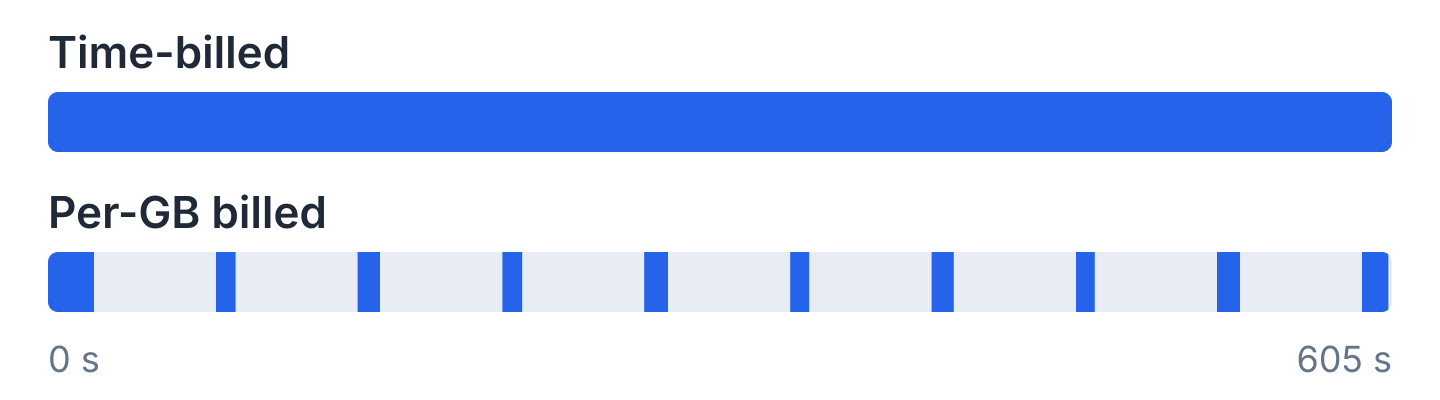
Blue shows when charges happen. The bars do not show the amount. Per-GB billing charges only for traffic.
In this run, the browser was idle 82% of the time. With 10-second LLM calls, it would still be idle about 45% of the time, 90 of about 200 seconds.
Of the billing models here, only 2 make idle time free. The first is per-GB billing (Bright Data Browser API, Driver), which charges only for the traffic a session uses.
The second is Kernel’s per-second billing with standby. Standby starts after 5 seconds without activity, but a connected CDP client prevents it. To stop charges, the agent must disconnect during each LLM call, and common agent frameworks don’t disconnect by default.
Check the minimum charge too, because short tasks pay it on every session:
| Vendor | Billed while idle | Minimum charge per session | Concurrency limit on self-serve plans | CAPTCHA solving |
|---|---|---|---|---|
| Bright Data Browser API | Only traffic is billed | Billed per GB of traffic, with no time-based minimum | Unlimited | Included |
| Browserbase | Yes, per minute | 1 minute | 3 to 100, and 250 or more on Scale | Included on paid plans |
| Kernel | Not billed in standby, but a connected CDP client prevents standby | None stated, billed per second | 5 to 150 | Included with stealth mode |
| Browser Use Cloud | Yes, per minute | 1 minute | 10, rising to 1,000 as your total spending grows | Included |
| Steel | Yes, until the session times out or is released | 1 minute, because time rounds up to whole minutes | 10 to 1,000 or more | Billed per solve |
| Cloudflare Browser Run | Yes, until the inactivity timeout | None per session. The monthly total is rounded to the nearest hour | Up to 200 per account. Concurrent browsers above 10 cost extra, based on the monthly average | Not offered |
| AWS AgentCore Browser | Memory only. vCPU time is free | 1 second | 1,000 per account | Not offered |
| Browserless | Yes, in 30-second units | 30 seconds | 5 to 100 | Billed per solve |
| Anchor | Billed by active session time. Its pricing doesn’t say whether idle time is billed | Rounded to the nearest minute, plus a fee per browser started | 5 to 200 | Starter plan and above |
| Driver | Only traffic is billed | Billed per GB of traffic, with no time-based minimum | 5 to 100 | Optional, disabled by default |
These lessons apply beyond this one run:
- Compare traffic prices before hourly rates. At Browserbase Developer list prices, this session’s 51.1 MB would cost about 60 cents, and its browser time would cost about 2 cents. Where vendors bill proxy traffic per GB, compare their cost for the same 51.1 MB with Browser API pricing, not their hourly rates.
- Measure task success rate, not HTTP status codes. Judge each vendor by the percentage of tasks whose output passes your validation checks. Bright Data session logs record each session’s CAPTCHA status and errors, so you can audit what happened in every task.
- Resource blocking reduces any per-GB bill. Blocking images, fonts, media, and ads on the same 10 pages reduced billed traffic from 51.1 MB to 36.1 MB, 29% less. Don’t block scripts or the anti-bot script’s own requests, because bot detection depends on them. On Bright Data Browser API, the custom
Unblocker.enableAdBlockfunction blocks ads in one call. - Use Web Unlocker API for read-only steps. It returned full Amazon, Walmart, Best Buy, Zillow, Nike, and Indeed pages in one request each, as HTML or Markdown, billed per successful request. Route read-only steps there, or through the Bright Data MCP server, and keep the browser for clicks and forms.
How to switch from Browserbase
Bright Data Browser API provides a standard CDP WebSocket endpoint, so the main change in a Playwright or Puppeteer script is the connection call. To get credentials, sign up for free, then create a Browser API under Web Access in the Bright Data control panel. The Access details card on its Overview tab shows the host, username, and password:
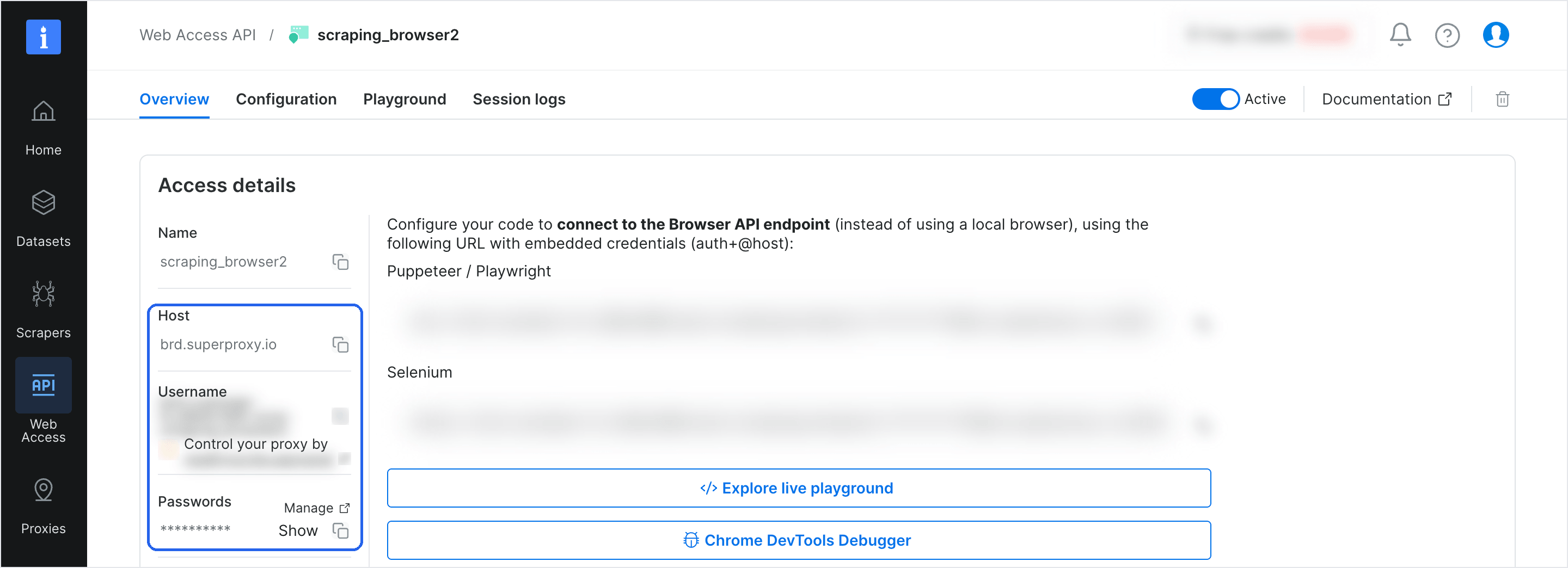
The Access details card contains everything the WebSocket URL needs.
To try Browser API before you write code, select Explore live playground on the same Overview tab. It runs example scripts and shows the browser session in real time.
This Playwright script reads the credentials from the BRD_AUTH environment variable, connects with US geo-targeting, and prints a product title:
// switch.mjs: install with `npm i playwright-core`, run with `node switch.mjs`
import { chromium } from 'playwright-core';

// Browserbase: chromium.connectOverCDP(session.connectUrl)
// Bright Data: username and password from Access details on the Browser API's
// Overview tab, with -country-us appended to the username
// BRD_AUTH format: brd-customer-<id>-zone-<zone>-country-us:<password>
const AUTH = process.env.BRD_AUTH;
const endpoint = `wss://${AUTH}@brd.superproxy.io:9222`;
const browser = await chromium.connectOverCDP(endpoint);

const page = await browser.newPage();
await page.goto('https://www.amazon.com/dp/B0DGHMNQ5Z', { timeout: 120_000 });
console.log(await page.title());
await browser.close();
The script prints the product page title:
Amazon.com: Apple AirPods 4 Wireless Earbuds | Bluetooth Headphones, Personalized Spatial Audio, Sweat & Water Resistant, USB-C Charging Case, H2 Chip : ElectronicsFor agents that connect to the browser through an MCP server, switching is a config change. Playwright MCP accepts the new endpoint through its --cdp-endpoint flag, and chrome-devtools-mcp accepts it through --wsEndpoint. Our chrome-devtools-mcp guide shows that setup on Browser API. The Bright Data MCP server also gives agents tools that control Browser API.
Stagehand, the open-source AI browser-automation framework from Browserbase, is MIT-licensed and connects to any CDP endpoint. Our guide to running Stagehand on Browser API shows the full setup.
If your agents also call the Browserbase Search or Fetch APIs, Bright Data SERP API replaces Search, and Web Unlocker API replaces Fetch. For a fetch, add one request field, data_format, to get Markdown that the LLM can read directly:
# Web Unlocker API: zone name and API key are under Access details in the control panel
curl https://api.brightdata.com/request \
  -H "Content-Type: application/json" \
  -H "Authorization: Bearer $BRD_API_KEY" \
  -d '{"zone": "YOUR_ZONE", "url": "https://www.amazon.com/dp/B0DGHMNQ5Z", "format": "raw", "data_format": "markdown", "country": "us"}'
Also considered
None of these tools is the best choice for any of the 8 problems above:
- Hyperbrowser offers cloud browsers and sandboxes that share one credit balance, and it has a SOC 2 Type I report.
- Lightpanda is a headless browser written in Zig, not based on Chromium or any other existing browser. It released version 1.0 in October 2026 and is licensed under AGPL-3.0. It runs JavaScript without graphical rendering, so it suits fast page reads that need no screenshots. You bring your own residential proxies.
- Cloudflare Kitesurf is a lightweight, stateless browser engine inside Browser Run for pages without bot protection. It is free during its beta.
- Notte and TinyFish offer cloud browsers as part of their agent platforms.
- Airtop set November 13, 2026 as the end date of its service, so older lists that recommend it are outdated.
Final thoughts
Browserbase alternatives mostly differ in idle-time billing, the exit IP type, the browser fingerprint, the entry point’s location, and verified agent identity. Bright Data Browser API offers free idle time, residential exit IPs, fingerprint management, and an entry point chosen for speed.
Choose verified identity where sites accept signed agents, and choose unblocking where they don’t. Compare vendors by the cost per completed task, including LLM tokens.
Test your own target list on the free tier of Bright Data Browser API, then compare the cost with your current Browserbase bill.
FAQ
What is the best Browserbase alternative?
The best Browserbase alternative depends on why you are leaving. For bot-protected public sites, pick Bright Data Browser API, with per-GB billing and free idle time. Pick Kernel if your agent can disconnect during LLM calls, and pick Anchor for business app logins. To self-host, pick Steel or Browserless.
Are there open-source Browserbase alternatives?
Yes. Steel’s browser server and Kernel’s browser image are Apache-2.0, though self-hosted Steel runs one browser at a time. Lightpanda is AGPL-3.0, and Browserless uses the Server Side Public License (SSPL) or a commercial license. You self-host the browser, and Bright Data residential proxies can supply the IPs.
Is there a free Browserbase alternative?
Several Browserbase alternatives have free tiers. Bright Data Browser API has a free monthly tier with residential proxies and CAPTCHA solving. Cloudflare Browser Run gives 10 minutes a day on Workers Free, and Kernel and Browserless have free plans. Self-hosted Steel or Lightpanda costs only hosting and proxy fees.
What does Reddit recommend instead of Browserbase?
Reddit threads recommend Steel when self-hosting is required, and they recommend free local browsers for small projects. Users also batch short tasks into one session to avoid Browserbase’s 1-minute billing minimum. Bright Data Browser API bills per GB, with no such minimum. Try it free on your own target sites.
Browserbase vs Browserless: which should I use?
Choose Browserless to run Puppeteer or Playwright scripts on your own servers under a commercial license. Choose Browserbase for managed browsers, recordings, and saved contexts. Both cloud services bill for idle time. For bot-protected public sites, choose Bright Data Browser API instead, which bills only for traffic.
Can I keep Stagehand if I leave Browserbase?
Yes. Stagehand runs on any cloud browser with a CDP endpoint, so when you leave Browserbase, you change the WebSocket URL and keep the agent code. Stagehand’s act, extract, and observe methods control the new browser over that connection. Our Stagehand guide shows this setup on Bright Data Browser API.


Technical Writer
 5 years experience
Satyam Tripathi helps SaaS and data startups turn complex tech into actionable content, boosting developer adoption and user understanding.