In this article, you will learn:
- What Ruflo is, its main features and capabilities, and its biggest limitations.
- How to address those limitations with an AI-ready web data infrastructure solution like Bright Data.
- The two main ways to integrate Bright Data and Ruflo into a Claude Code or OpenAI Codex setup.
- How to get started with Ruflo by setting it up in a local Claude Code-powered project.
- How to add Bright Data enterprise-level web search, data retrieval, and website interaction to the setup via MCP.
- How to achieve the same integration using Bright Data Claude skills.
- What this Ruflo + Bright Data setup enables in an agentic coding assistant.
Let’s dive in!
An Introduction to Ruflo: The Agent Orchestration Platform for Claude
You will soon see how and why to combine Ruflo with Bright Data’s web data retrieval and search capabilities. But first, take a moment to understand what Ruflo is and what it brings to the table!
What Is Ruflo?
Ruflo (formerly Claude Flow) is an AI orchestration framework engineered to turn Claude Code (and OpenAI Codex) into a feature-rich multi-agent orchestration framework.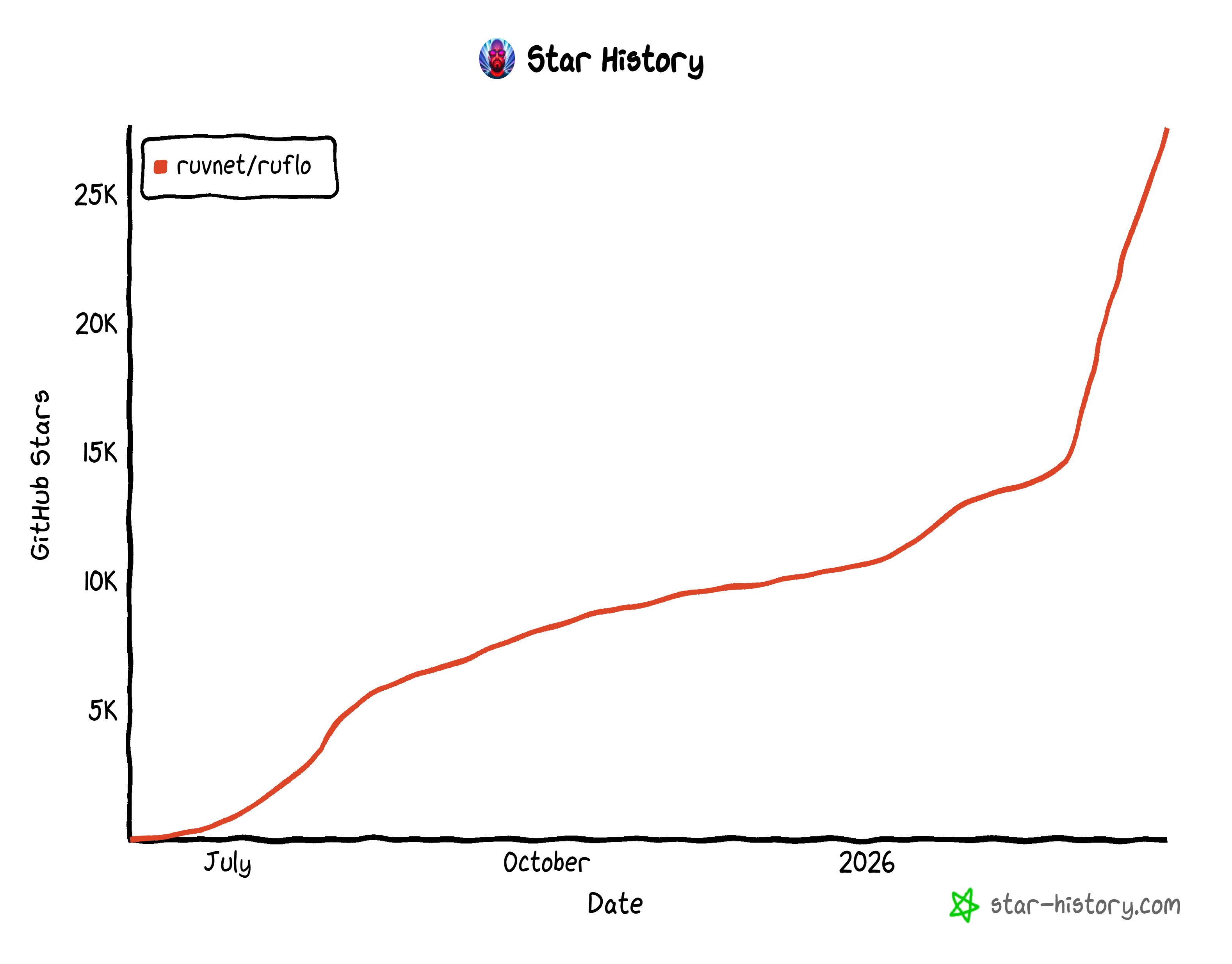
In detail, it equips agentic coding assistants with a coordinated set of around 100 specialized AI agents working in parallel. This enables Claude Code and OpenAI Codex to handle complex software tasks via intelligent routing, shared memory, and self-learning workflows.
As an open-source project, Ruflo boasts over 27k GitHub stars and more than 6,000 commits. This rapid growth highlights how quickly Ruflo has gained traction within the developer community.
How Ruflo Takes AI Agentic Coding Assistants to the Next Level
At a high level, the main features provided by Ruflo are:
- Multi-agent orchestration at scale: Deploy and coordinate ~100 specialized AI agents working in parallel on complex development tasks.
- Swarm-based collaboration: Agents operate in structured “swarms” with hierarchical coordination, consensus mechanisms, and shared objectives.
- Self-learning and adaptive routing: Learns from past executions and dynamically routes tasks to the most effective agents using pattern recognition.
- Persistent memory and knowledge graphs: Combines vector search (HNSW), shared memory, and knowledge graphs to retain context across sessions.
- Intelligent cost and performance optimization: Uses multi-tier routing (WASM + LLMs) to reduce latency and cut API costs by up to ~75%.
- Multi-LLM support with Failover: Works with Claude, GPT, Gemini, and local models, automatically selecting the best provider per task.
- Production-ready security and extensibility: Built-in protections (prompt injection, validation) plus a plugin system for extending agents, hooks, and workflows.
This leads to a major difference when comparing Claude Code with and without Ruflo:
| Claude Code Alone | Claude Code + Ruflo | |
|---|---|---|
| Agent collaboration | Agents work independently | Agents collaborate with shared memory |
| Coordination | Manual task management | Queen-led hierarchy with automated coordination |
| Hive mind | Not available | Collective intelligence across agents |
| Consensus | No multi-agent decisions | Fault-tolerant voting with majority rules |
| Memory | Session-only | Persistent vector memory + knowledge graph |
| Vector database | None | RuVector PostgreSQL, fast search and high QPS |
| Knowledge graph | Flat lists | Highlights key insights using PageRank and community detection |
| Collective memory | No shared knowledge | Shared knowledge base across agents |
| Learning | Static, no adaptation | Self-learning with fast adaptation and insights transfer |
| Agent scoping | Single project only | Multi-level memory (project/local/user) with cross-agent transfer |
| Task routing | Manual agent selection | Intelligent routing based on learned patterns |
| Complex tasks | Manual breakdown required | Automatic decomposition across multiple domains |
| Background workers | None | Auto-dispatch on triggers like file changes or patterns |
| LLM provider | Anthropic only | Multiple providers with failover and cost optimization |
| Security | Standard protections | Hardened: validation, encryption, CVE mitigation |
| Performance | Baseline | Faster via parallel swarms and smart routing |
Biggest Limitations and How to Address Them
Regardless of how rich and resourceful the ~100 agents and overall capabilities of Ruflo are, there is a fundamental limitation. That lies in the nature of LLMs themselves. These models are trained on static datasets that stop at a specific point in time, which inherently limits their knowledge.
Sure, Ruflo includes a dedicated browser automation agent for web search, interaction, and data extraction. Now, the problem is that most websites today have anti-bot systems that block automated requests. That includes requests coming from AI-driven browser agents. Thus, Ruflo’s knowledge retrieval can fail or access only a portion of the content it needs.
That is a critical problem because accurate, fresh, and contextual knowledge is what makes multi-agent systems truly effective. To overcome the issue, your AI coding assistant needs tools specifically designed for live web search, data extraction, and unblocked web interaction.
That is exactly what Bright Data provides!
Bright Data Web Data Tools as the Solution
As the leading web data platform on the market, Bright Data offers AI-agent-ready tools such as:
- SERP API: Gather search engine results from Google, Bing, and others to fuel informed responses.
- Web Unlocker API: Access raw HTML or Markdown from any site, bypassing CAPTCHAs, IP bans, and anti-bot measures.
- Browser API: Programmatically control a remote browser for automated, unblocked interaction with any site.
- Web Scraping APIs: Collect structured data from platforms like Amazon, Instagram, LinkedIn, Yahoo Finance, and many others.
- Crawl API: Convert entire websites into structured datasets for downstream AI workflows.
What sets Bright Data apart is its enterprise-grade infrastructure. Built on a global proxy network of over 400 million IPs across 195 countries, it supports unlimited scalability while maintaining 99.99% uptime and a 99.95% success rate.
Bright Data works together with Ruflo to give your agentic coding system the ability to explore, retrieve, and reason over live web data. All that, at scale and without encountering blocks!
How to Combine Bright Data and Ruflo: Two Approaches
Technically, you can integrate Bright Data directly into Ruflo using the plugin SDK. You would need to define custom tools that connect to each Bright Data product you want to use. Yet, that is not the fastest approach!
Instead of reinventing the wheel, it is much easier to rely on:
- Bright Data MCP: An all-in-one, open-source server exposing 60+ tools for web search, navigation, data extraction, and interaction without blocks.
- Bright Data skills: Prebuilt capabilities that teach your coding agent how to perform AI-powered scraping, search, and structured data retrieval. They include a connection to the Bright Data MCP.
These can be added directly to Claude Code (or OpenAI Codex), leading to a unified coding setup that combines both Ruflo and Bright Data. The underlying LLM can then use tools from both solutions in a coordinated and synergic way.
Note: The examples below use Claude Code, but you can easily adapt them to OpenAI Codex.
Now let’s see how to extend Claude Code with Bright Data and Ruflo using either MCP or skills. But first, set up Ruflo!
Getting Started with Ruflo
Follow the instructions below to learn how to configure Ruflo in your coding project.
Prerequisites
To follow along with this section, make sure you have:
- Claude Code installed and configured locally.
- Node.js 20+ installed locally (the latest LTS version is recommended).
Step #1: Configure Ruflo
Create a new folder for your coding project (e.g., bright-data-ruflo-project). That is where you will initialize Ruflo. Then, navigate into the folder in your terminal:
mkdir bright-data-ruflo-project
cd bright-data-ruflo-projectNote: You can also start from an existing project folder. In most cases, this is what you will do. You will add Ruflo to your project to take advantage of its features.
Launch the following command in your terminal to start the Ruflo installation wizard via npm:
npx ruflo@latest init --wizardThe installation of the ruflo package may take a few minutes, so please be patient.
This is the output you should get: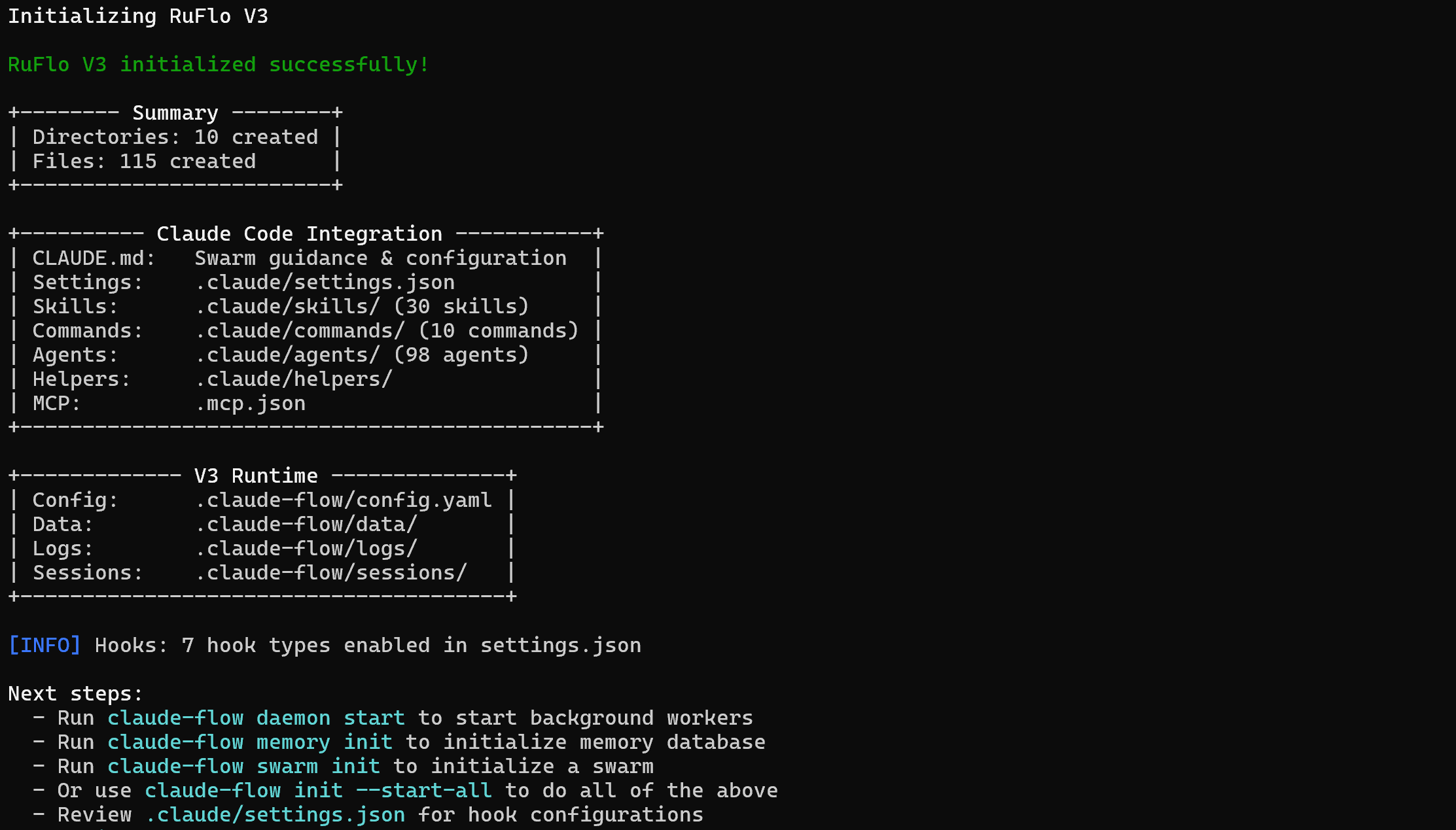
Note: The output in the CLI may suggest using claude-flow commands to initialize backend services, memory databases, or swarms. However, that is not accurate. When installing Ruflo via npm, the correct base command is:
npx ruflo@latestYour project’s folder will now store:
bright-data-ruflo-project/
├─── .claude/
│   ├─── agents/
│   ├─── commands/
│   ├─── helpers/
│   └─── skills/
├─── .claude-flow/
├─── .swarm/
├─── .mcp.json
└─── CLAUDE.md
Basically, bright-data-ruflo-project contains all the files Claude Code needs for project-level access to new skills, commands, and agents. In other words, Ruflo has fully integrated into your local Claude Code setup. Well done!
Step #2: Launch Ruflo
Ruflo has added several agents, commands, and skills. Yet, for Claude Code to be able to run them, you must first start Ruflo. Achieve that with:
npx ruflo@latest startYou should see output like this: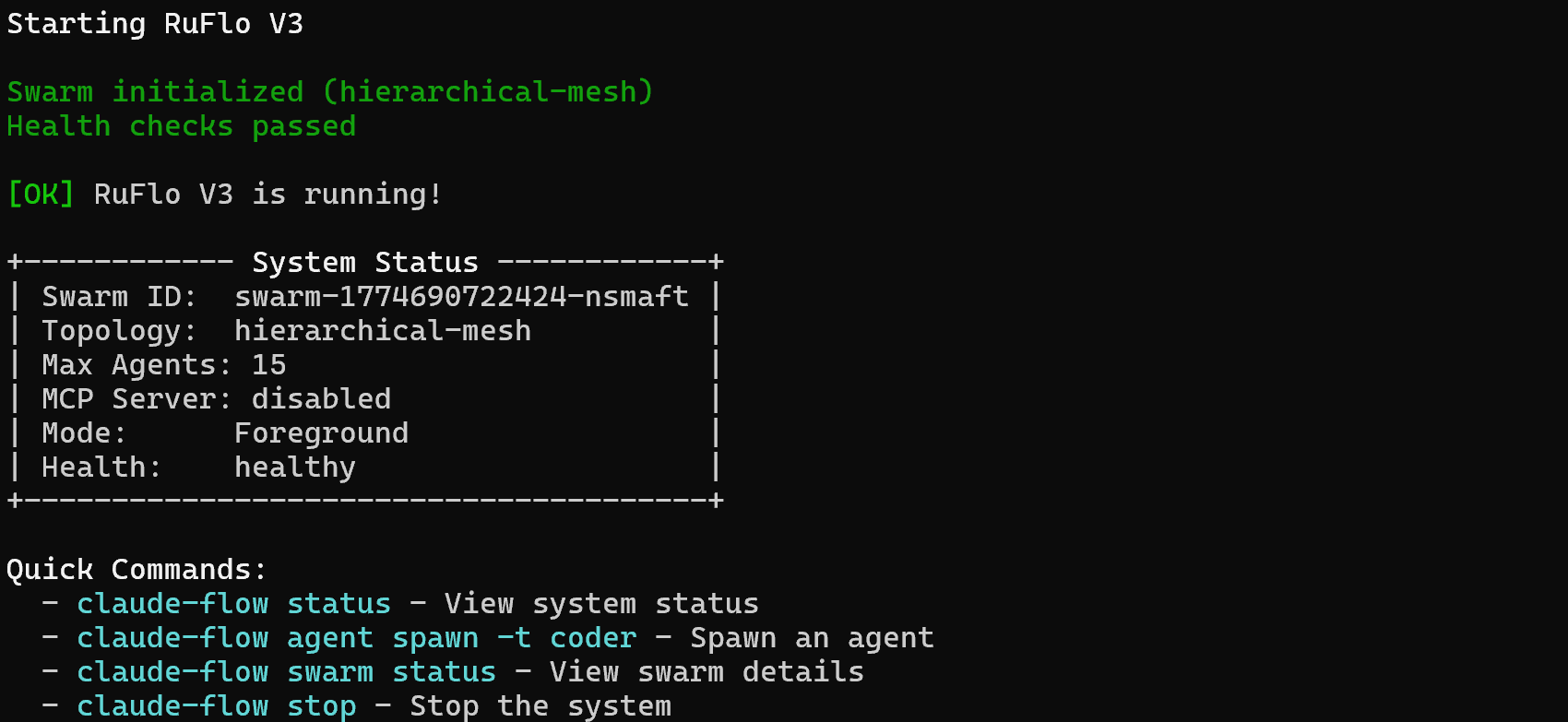
Fantastic! Your Claude Code setup can now leverage the extended functionality provided by Ruflo.
Step #3: Verify the Integration
In your project directory, launch Claude Code:
claudeYou may receive a message like this:
Select option 1 or option 2. This way, Claude Code will start the Ruflo MCP server and connect to it on launch.
Next, you will see logs clearly showing that Ruflo is available in Claude Code: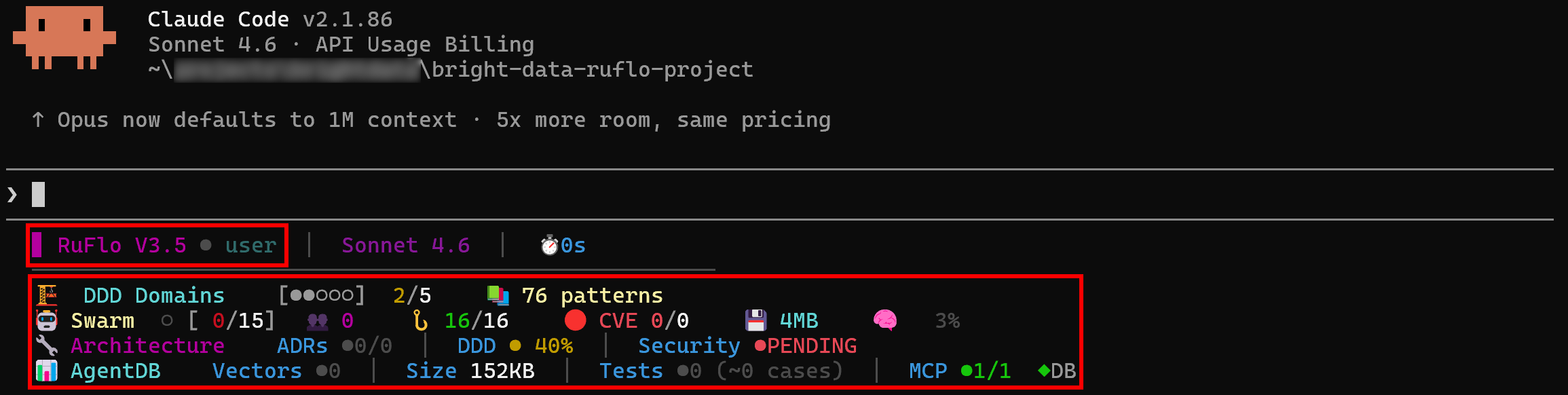
Type “/agent”, and you should see some of the additional Ruflo commands:
Awesome! Claude Code successfully connected to Ruflo, confirming that the integration works.
Integration Approach #1: Ruflo MCP + Bright Data MCP
In this section, you will learn how to add both Ruflo and Bright Data capabilities to your Claude Code setup via MCP.
Prerequisites
To keep this section concise, we will assume you have already integrated Bright Data MCP into your Claude Code setup.
If you have not done that yet, follow the detailed tutorial ”Integrating Claude Code with Bright Data MCP” or the documentation guide “Claude Code MCP Server Integration.” Just make sure to add the required configuration to the local .mcp.json file created by Ruflo during the init command.
Familiarity with how MCP works and how to connect MCP servers to Claude Code is also a strong prerequisite.
Step #1: Check the Available MCP Servers
By default, the Ruflo MCP server is configured in the local .mcp.json file. This file should also contain the configuration to connect to the Bright Data MCP.
The expected behavior is that Claude Code automatically detects and connects to both MCP servers. To verify that, launch Claude Code in your project folder and run the /mcp command:
You should see:
bright-data-web-mcp(or whatever name you gave the Bright Data MCP in the.mcp.jsonconfiguration).claude-flow(the name of the Ruflo MCP server).
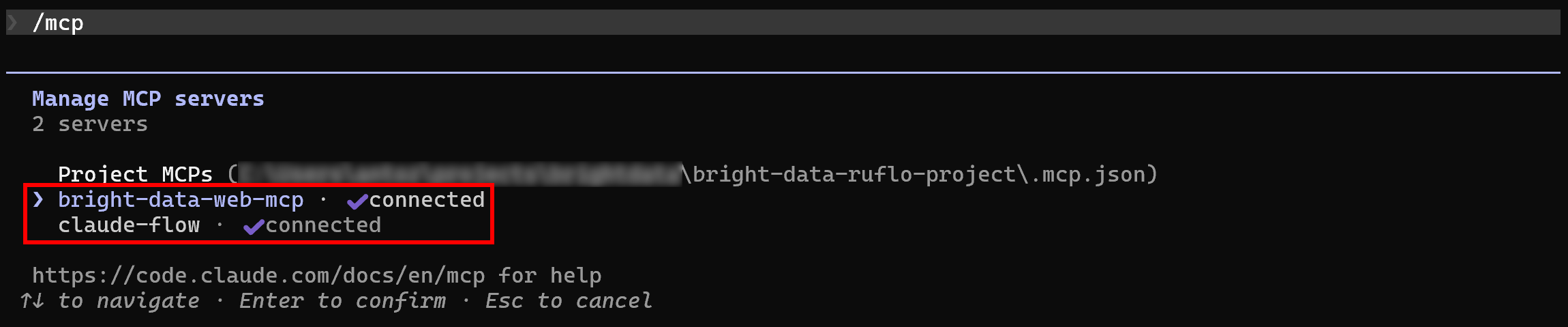
Great! Claude Code is now connected to both MCP servers as expected.
Step #2: Inspect the Bright Data MCP Server
Select the bright-data-web-mcp entry (or whatever name you gave to it):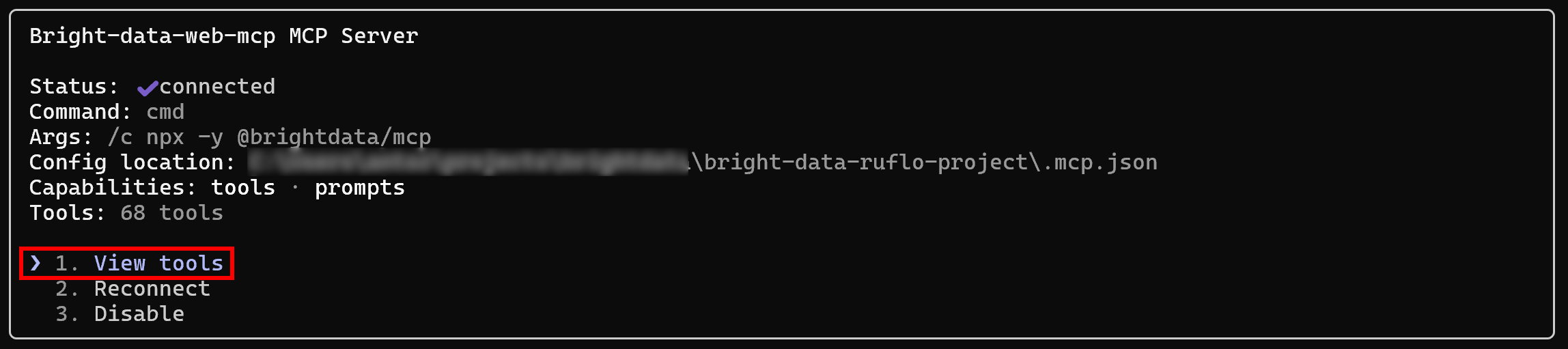
Choose the “View tools” option to see all available tools. If you configured it in Pro mode, you will get all 65+ tools:
Otherwise, you will see only 4 tools (scrape_as_markdown, search_engine, and their 2 batch versions).
Excellent! The Bright Data MCP is exposing its tools as expected.
Step #3: Inspect the Ruflo MCP Server
Repeat the same procedure as above, but for the claude-flow MCP. You should see:
Notice how Ruflo MCP exposes an impressive total of 254 tools. Wow!
Integration Approach #2: Ruflo Skills + Bright Data Skills
Here, you will be guided through the process of adding Ruflo and Bright Data capabilities to your Claude Code setup via skills.
Prerequisites
To follow this section, make sure you have:
- Claude Code set up in a Unix-based operating system (macOS, Linux, or WSL).
- Git installed locally.
- A Bright Data account with a Web Unlocker zone set up and an API key configured.
- A basic understanding of what Claude skills are and how to configure them in Claude Code.
- Familiarity with the skills available in the official Bright Data Claude skills repository.
Note: Do not worry about setting up a Bright Data account just yet, as you will be guided through it in the following step.
Then, install curl and jq, the two prerequisites required by Bright Data Claude skills. On macOS, run:
brew install curl jqEquivalently, on Linux, execute:
sudo apt-get install curl jqBy default, after setting up Ruflo in your local project, Claude Code will already list its 118 skills. Verify this by running the /skills command: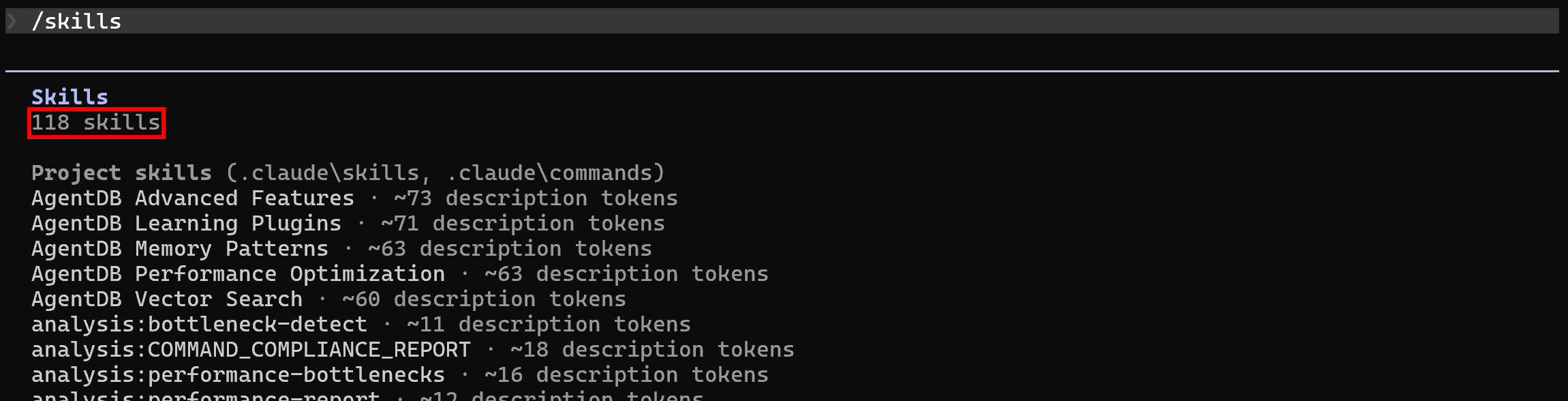
Step #1: Set Up Your Bright Data Account
As explained in the docs, Bright Data Claude skills require the following two secrets to be set as global environment variables:
BRIGHTDATA_API_KEY: Your Bright Data API key.BRIGHTDATA_UNLOCKER_ZONE: The name of the Web Unlocker zone configured in your account.
For guidance, you can refer to the “Quick Start Guide for Bright Data’s Web Unlocker API” documentation page. Alternatively, follow the instructions below.
If you do not have a Bright Data account, create one. Otherwise, just log in. Reach the control panel, and go to the “Proxies & Scraping” page. Take a look at the “My Zones” table: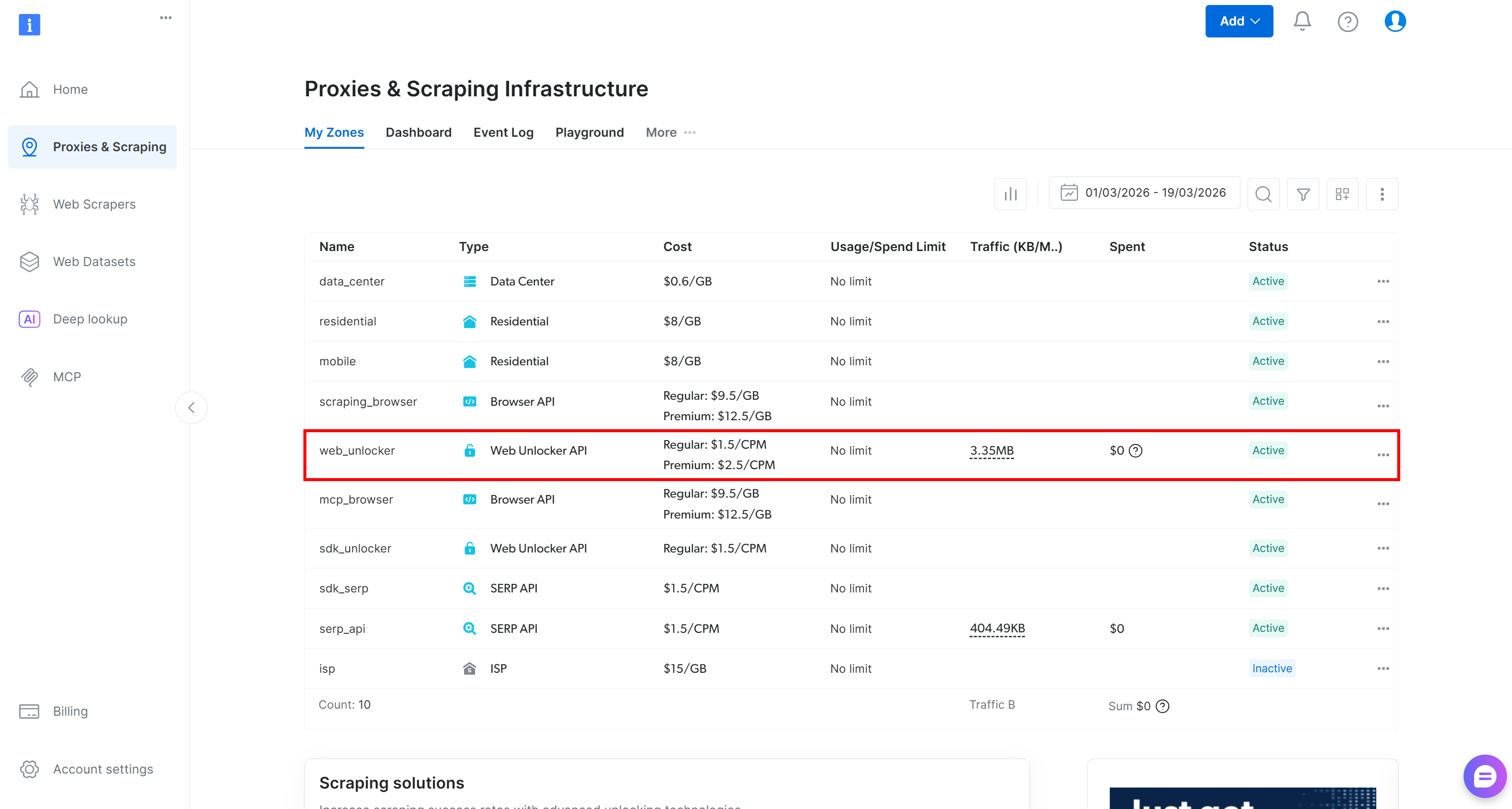
If a Web Unlocker API zone (e.g., web_unlocker) exists, you can continue to the API key definition.
If it is missing, create a new one. To do so, scroll to the “Unblocker API” card, click “Create zone”, and follow the wizard.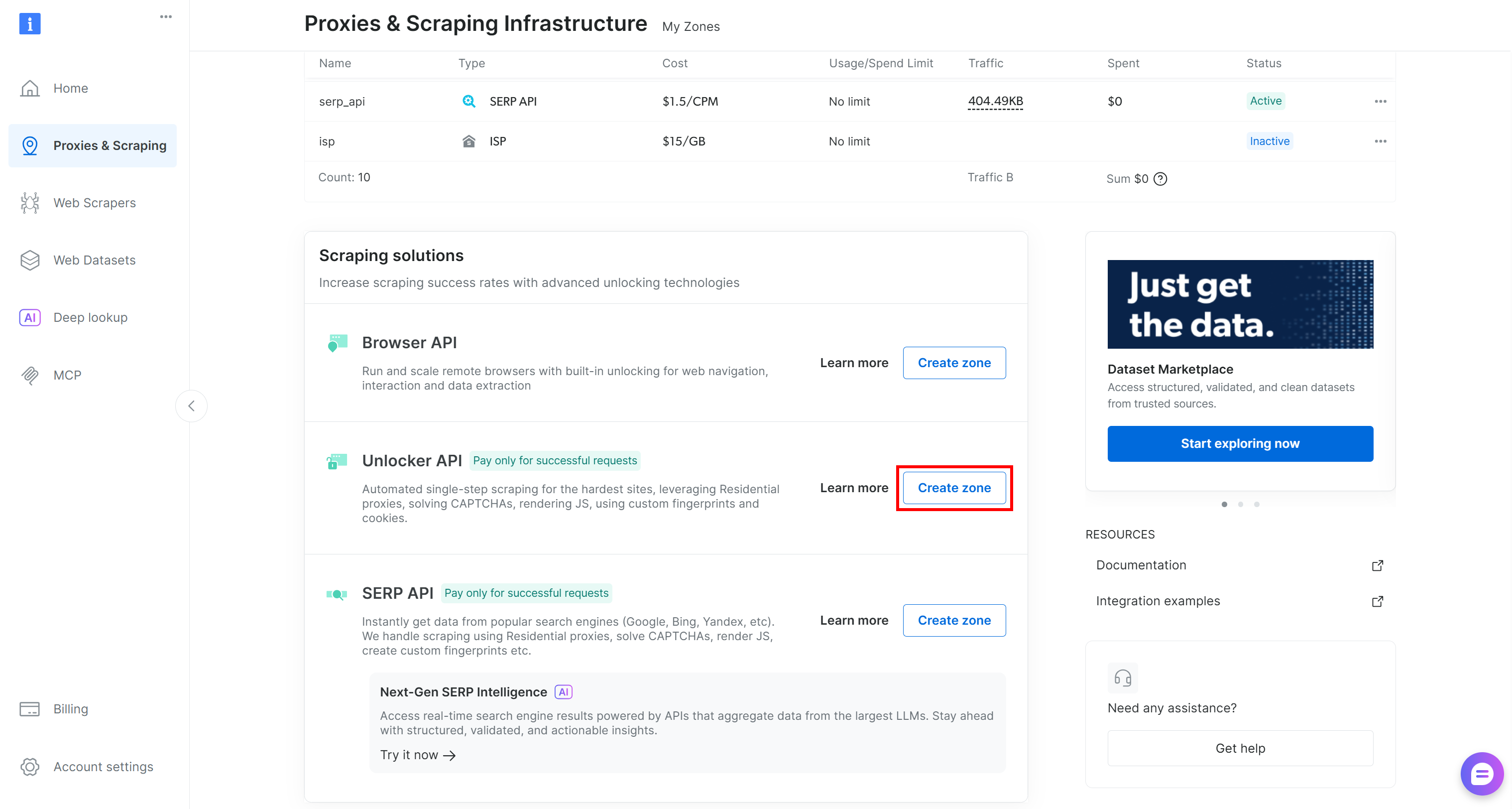
Follow the instructions in the wizard, giving your zone a meaningful name (e.g., web_unlocker).
Finally, generate your Bright Data API key. Now, with your API token and zone name, define two global environment variables like this:
export BRIGHTDATA_API_KEY="<YOUR_BRIGHTDATA_API_KEY>"
export BRIGHTDATA_UNLOCKER_ZONE="<YOUR_BRIGHTDATA_UNLOCKER_ZONE>"
Terrific! Bright Data Claude skills can now connect to your account and work properly.
Step #2: Retrieve the Bright Data Skills
To add new skills to your setup, copy their folders into the local .claude/skills directory.
Start by cloning the Bright Data Claude Skills repository into a folder of your choice:
git clone https://github.com/brightdata/skillsThe cloned structure should look like this:
skills/
├── .claude-plugin
├── skills/
│   ├── bright-data-best-practices/
│   ├── bright-data-mcp/
│   ├── brightdata-cli/
│   ├── data-feeds/
│   ├── design-mirror/
│   ├── python-sdk-best-practices/
│   ├── scrape/
│   ├── scraper-builder/
│   └── search/
├── .gitignore
├── LICENSE
└── README.md
The Bright Data Claude skills are:
search: Query Google and return structured JSON results including titles, links, and descriptions.scrape: Extract any webpage as clean Markdown while automatically bypassing bot detection.data-feeds: Pull structured data from 40+ websites with automated polling and updates.bright-data-mcp: Orchestrate 60+ Bright Data MCP tools for search, scraping, structured extraction, and browser automation.scraper-builder: Build production-ready scrapers, including site analysis, API selection, selectors, pagination, and implementation.bright-data-best-practices: Reference for Web Unlocker, SERP, Web Scraper, and Browser APIs.python-sdk-best-practices: Guide for thebrightdata-sdkPython package: async/sync clients, scrapers, datasets, error handling, and patterns.brightdata-cli: Terminal guide for Bright Data CLI: scrape, search, extract data, manage proxy zones, and check account.design-mirror: Replicate design system tokens and components for consistent, high-quality UI implementation.
Copy the folders inside skills/ (bright-data-best-practices/, bright-data-mcp/, etc.) into the local .claude/skills in your project directory. Do that manually or through this command:
cp -r skills/skills/* <PATH_TO_YOUR_PROJECT>/.claude/skills/Perfect! The Bright Data Claude skills have been added to your project.
Step #3: Check the Available Skills
Launch Claude Code again in your project folder and run the /skills command: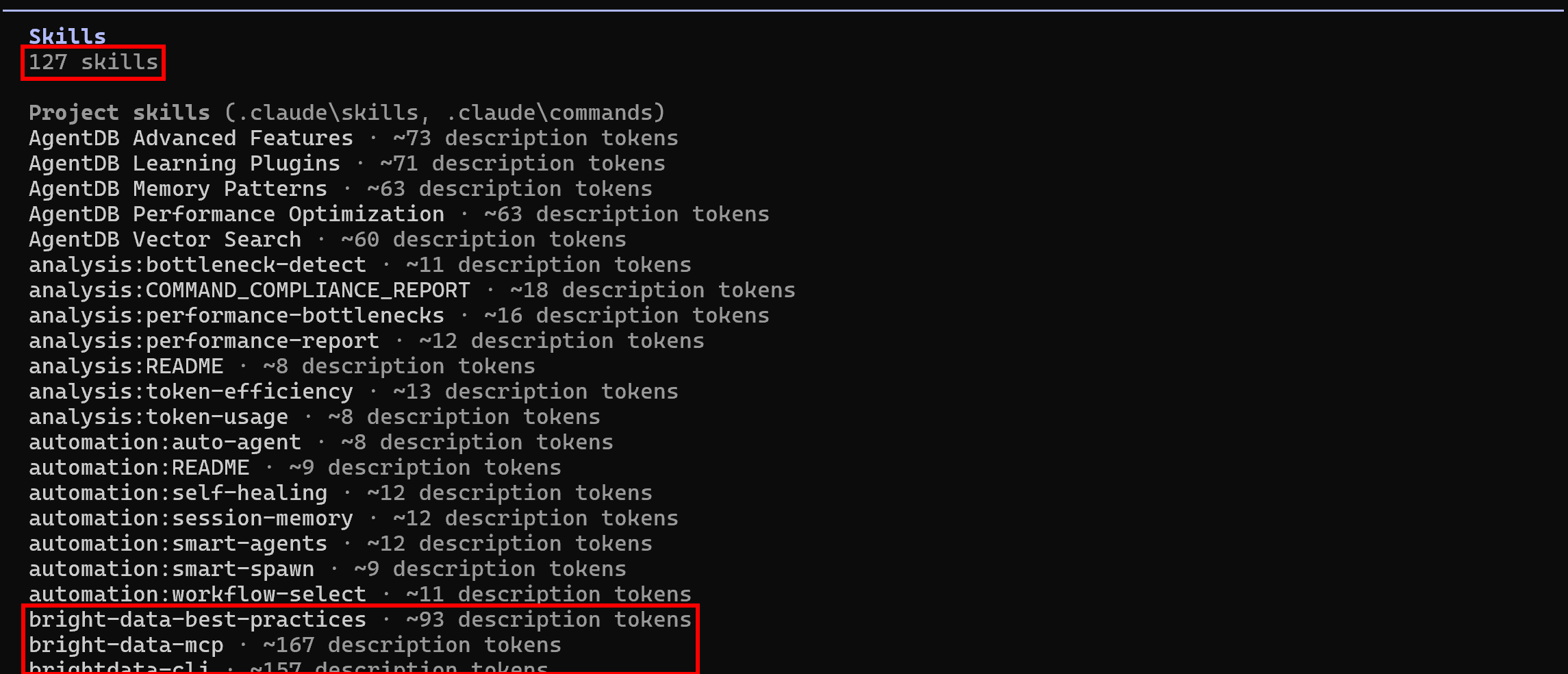
This time, the available skills should be 127 (up from the initial 118), showing that the Bright Data skills are being read successfully. Mission complete! Your agentic coding system can now leverage Bright Data skills for programmatic web data extraction, web exploration, and much more.
Ruflo + Bright Data: Putting It All Together
Your Claude Code setup now has access to over 300 MCP tools or more than 125 skills. These enable coordinated coding efforts while also letting agents autonomously search the web, scrape data, and interact with web pages—all without blocks or scalability limitations.
This unlocks many new possibilities, including:
- Retrieving live search engine results (SERP) and embedding contextual links into
README.mdand other documentation pages. - Discovering relevant tutorials or documentation based on your current coding tasks to improve your codebase efficiently.
- Scraping fresh public data from websites and saving it locally for mocking, analysis, or further processing.
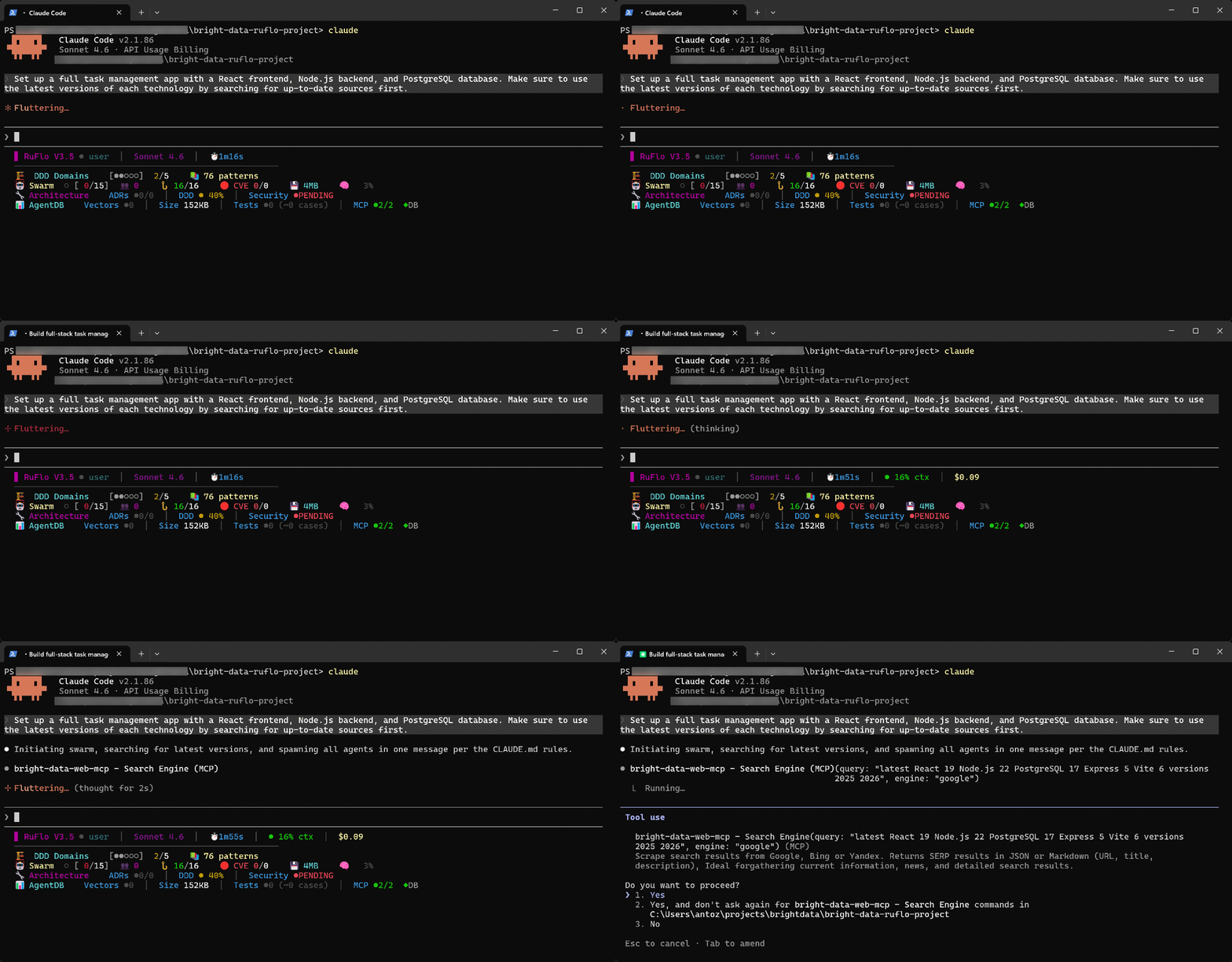
These examples demonstrate the synergistic advantage of using Bright Data with Ruflo in your Claude Code / OpenAI Codex setup. This integration extends Ruflo’s already impressive feature set even further, while supporting enterprise-level use cases thanks to Bright Data’s infrastructure.
Conclusion
In this blog post, you understood what Ruflo (formerly known as Claude Flow) is and how it transforms the agentic experience in Claude Code and OpenAI Codex. With an enterprise-grade infrastructure of around 100 agents working in parallel, Ruflo dramatically improves performance, including speed, token efficiency, and output quality.
However, these tools lack an enterprise-ready solution for web data retrieval, web search, and programmatic interaction with websites. This is where Bright Data comes in, thanks to a dedicated Bright Data MCP server and an official set of Claude Skills. These make it simple to connect to Bright Data’s full suite of tools, services, and infrastructure built for AI.
Here, you learned how to configure a powerful Ruflo + Bright Data setup in Claude Code to maximize efficiency and effectiveness for coding assistance.
Create a Bright Data account for free today and start exploring AI-ready web data solutions!



Technical Writer
 5.5 years experience
Antonello Zanini is a technical writer, editor, and software engineer with 5M+ views. Expert in technical content strategy, web development, and project management.