In this article on OpenOSINT, you will learn:
- What the OSINT framework is.
- What OpenOSINT is, its main features, and tools.
- How Bright Data empowers OpenOSINT.
- How to use OpenOSINT with Bright Data, step-by-step.
Let’s get into this!
What is OpenOSINT?
OSINT (Open-source intelligence) is the practice of collecting and analyzing publicly available information to answer an investigative question. In the context of web scraping, data collection is the familiar part of the process. OSINT adds an investigative workflow on top: it defines the scope, collects information, follows connections, verifies findings, and documents the results.
OpenOSINT is an open-source, MIT-licensed, AI-powered OSINT framework. The product connects existing OSINT utilities, intelligence APIs, search services, and web scraping capabilities. Users can work through an interactive terminal, a command-line interface, a browser-based interface, or an MCP server to connect to compatible tools and third parties.
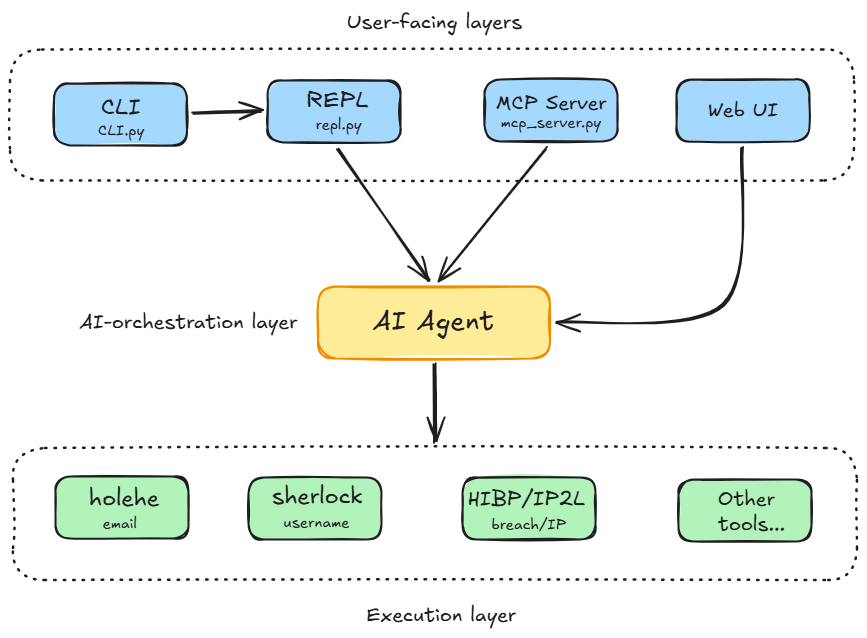
Its architecture is built on a layered design where no layer imports from one above it. This ensures modular tool execution and structural separation between AI reasoning and tool calls:
OpenOSINT Main Features
The software primarily serves OSINT investigators, security researchers, and analysts who conduct authorized investigations, providing them with the following:
- 20 integrated tools: Investigates emails, usernames, domains, IP addresses, and phone numbers through a unified interface that connects OSINT utilities, intelligence APIs, and web collection services.
- Markdown and PDF reporting: Automatically saves investigation reports in Markdown and generates PDF reports.
- Parallel execution: Runs complementary tools concurrently with the
--paralleloption to collect different types of information at the same time. - Persistent session history: Automatically saves interactive terminal sessions and browse previous investigations through the history command.
- Flexible AI backends: Runs inference locally through Ollama, uses Anthropic Claude, or connects to an OpenAI-compatible endpoint.
- Native MCP integration: Exposes all 20 investigation tools through OpenOSINT’s built-in MCP server for use by compatible AI clients, without writing new code.
The table below reports and describes the tools currently supported:
| Tool | Powered by | Tool description |
|---|---|---|
search_email |
holehe | Checks online services for accounts associated with an email address. Helps investigators identify the target’s presence across those services. |
search_username |
sherlock | Searches for a username across more than 300 platforms and returns matching profiles for further investigation. |
search_breach |
HaveIBeenPwned v3 API | Checks whether an email address appears in known data breaches and identifies the breaches and categories of exposed data. |
search_whois |
python-whois | Retrieves domain registration information, including available registrant details, the registrar, registration and expiration dates, and name servers. |
search_ip |
ipinfo.io | Retrieves an IP address’s geolocation, autonomous system number (ASN), and hostname to help investigators understand its network context. |
search_domain |
sublist3r | Enumerates subdomains associated with a domain, helping investigators discover related hosts such as mail servers, development environments, and API endpoints. |
generate_dorks |
built-in | Generates 12 targeted Google search URLs for a target. It prepares queries for further research but does not execute searches or make network calls. |
search_paste |
psbdmp.ws | Searches indexed Pastebin dumps for mentions of a target and returns matching references for further review. |
search_phone |
phoneinfoga | Retrieves information about a phone number, including its country, carrier, and line type. It accepts numbers in the international E.164 format. |
search_shodan |
Shodan API | Looks up an IPv4 address to retrieve exposed ports, service banners, and reported vulnerabilities. It also supports keyword and banner searches for discovering matching infrastructure. |
search_virustotal |
VirusTotal API v3 | Checks an IP address, domain, URL, or file hash against results from more than 70 antivirus engines. It automatically detects the input type and reports security verdicts. |
search_ip2location |
IP2Location.io API | Retrieves IP geolocation, ISP, and ASN information. The provider’s Security Plan adds VPN, proxy, Tor, and datacenter indicators. This integration is sponsored. |
search_censys |
Censys Search API | Investigates internet-facing infrastructure. For IPv4 addresses, it retrieves ports, services, and ASN information; for domains, it searches certificate information, including alternative names and issuers. |
search_abuseipdb |
AbuseIPDB v2 API | Checks an IP address’s abuse reputation and returns an abuse confidence score, report count, country, ISP, and the timestamp of the latest report. |
search_github |
GitHub REST API | Retrieves public profiles and repositories for a username and discovers email addresses in commit data. It also supports keyword searches for users and repositories. |
search_dns |
dnspython (built-in) | Queries A, AAAA, MX, NS, TXT, CNAME, and SOA records to examine a domain’s DNS configuration. It also analyzes SPF, DMARC, and DKIM email security settings. |
search_gdelt_geo |
GDELT GEO 2.0 API | Retrieves worldwide geolocated news coverage and returns GeoJSON output, allowing investigators to work with news results that include geographic information. |
search_dorks_live |
Bright Data SERP API | Executes Google dork queries and returns structured search results with titles, URLs, and snippets. Unlike generate_dorks, it performs live searches rather than only preparing search URLs. |
scrape_url |
Bright Data Web Unlocker | Fetches public web pages through a service that handles access barriers such as Cloudflare and CAPTCHAs, then returns the page content as clean Markdown. |
search_footprint |
Bright Data SERP API | Detects whether a target is an email address, username, domain, phone number, or full name, then runs tailored Google queries. It returns structured results and Entity Correlation Graph nodes and edges for discovered domains and profiles. |
What Does OpenOSINT Do?
Thanks to its features, the product supports several types of research:
- Account and identity research: Find services associated with an email address, search for usernames across platforms, and examine public GitHub profiles and repositories.
- Breach exposure checks: Query HaveIBeenPwned for data breaches associated with an email address.
- Infrastructure research: Retrieve WHOIS and DNS records, discover subdomains, and investigate internet-facing services, ports, and certificates.
- IP and threat intelligence: Gather geolocation and network information, check IP abuse reports, and query security services such as Shodan, VirusTotal, and Censys.
- Search and web collection: Generate targeted search queries, retrieve live search results, scrape public URLs into Markdown, and collect a target’s public search-engine footprint.
The AI agent chains these actions into an investigation. For example, it can begin with an email address, discover a username, and search for that username across other platforms. The application executes the underlying tools and APIs rather than asking the model to generate lookup results on its own.
How Bright Data Powers OpenOSINT
OpenOSINT integrates natively with Bright Data through the three built-in tools presented above. Under the hood, the integration calls Bright Data’s REST APIs. This means users can enable the integration with an API key and the relevant Bright Data zone settings.
Without Bright Data, OpenOSINT supports account discovery, breach checks, infrastructure research, and its other independent tools. It can also generate targeted Google search URLs, but generating a query does not retrieve its results. Bright Data closes that gap with its tools.
Together, they help move investigations from prepared search queries to collected search results and readable source material, reducing manual searching and page extraction. The benefit is practical: Bright Data handles search retrieval, data extraction, and protected-page access, while OpenOSINT places that collection within an AI-assisted investigation workflow.
Using OpenOSINT With And Without the Bright Data Integration
For the sake of being practical, consider an analyst reviewing their organization’s public exposure at example.com.
This is the flow without using Bright Data:
- The analyst asks OpenOSINT to investigate
example.com. - The agent can use
search_whoisto retrieve registration details,search_dnsto examine DNS records and email security settings, andsearch_domainto enumerate subdomains. - To extend the investigation to indexed web content, the analyst uses
generate_dorksto produce targeted Google search URLs.
The process is straightforward. However, the limitation is that OpenOSINT does not execute the searches or collect results. This means the analyst must open those URLs and review the resulting pages manually.
So, OpenOSINT supports infrastructure research without Bright Data, but its generated search links leave the web search and page review steps to the analyst.
On the other hand, here is the workflow when Bright Data’s integration is activated:
- The analyst asks OpenOSINT to investigate
example.com. - Alongside the infrastructure checks,
search_footprintrecognizesexample.comas a domain and runs domain-specific Google queries through the Bright Data SERP API. - It returns structured results for discovered domains and profiles.
- The analyst can also use
search_dorks_liveto execute targeted searches and collect titles, URLs, and snippets. If a search returns a relevant public page (for example, an indexed documentation page), the analyst can usescrape_urlto retrieve its content as clean Markdown through Web Unlocker, which handles access barriers such as Cloudflare and CAPTCHAs.
So, in this case, the analyst can collect search results and retrieve relevant source pages within OpenOSINT, rather than manually opening each search and copying page content. Furthermore, the software returns the results in both Markdown and PDF, ready to be shared with stakeholders.
Building an OSINT Workflow With OpenOSINT and Bright Data: Step-by-step Tutorial
In this section, you will learn how to use OpenOSINT. The target website is https://openosint.tech/:
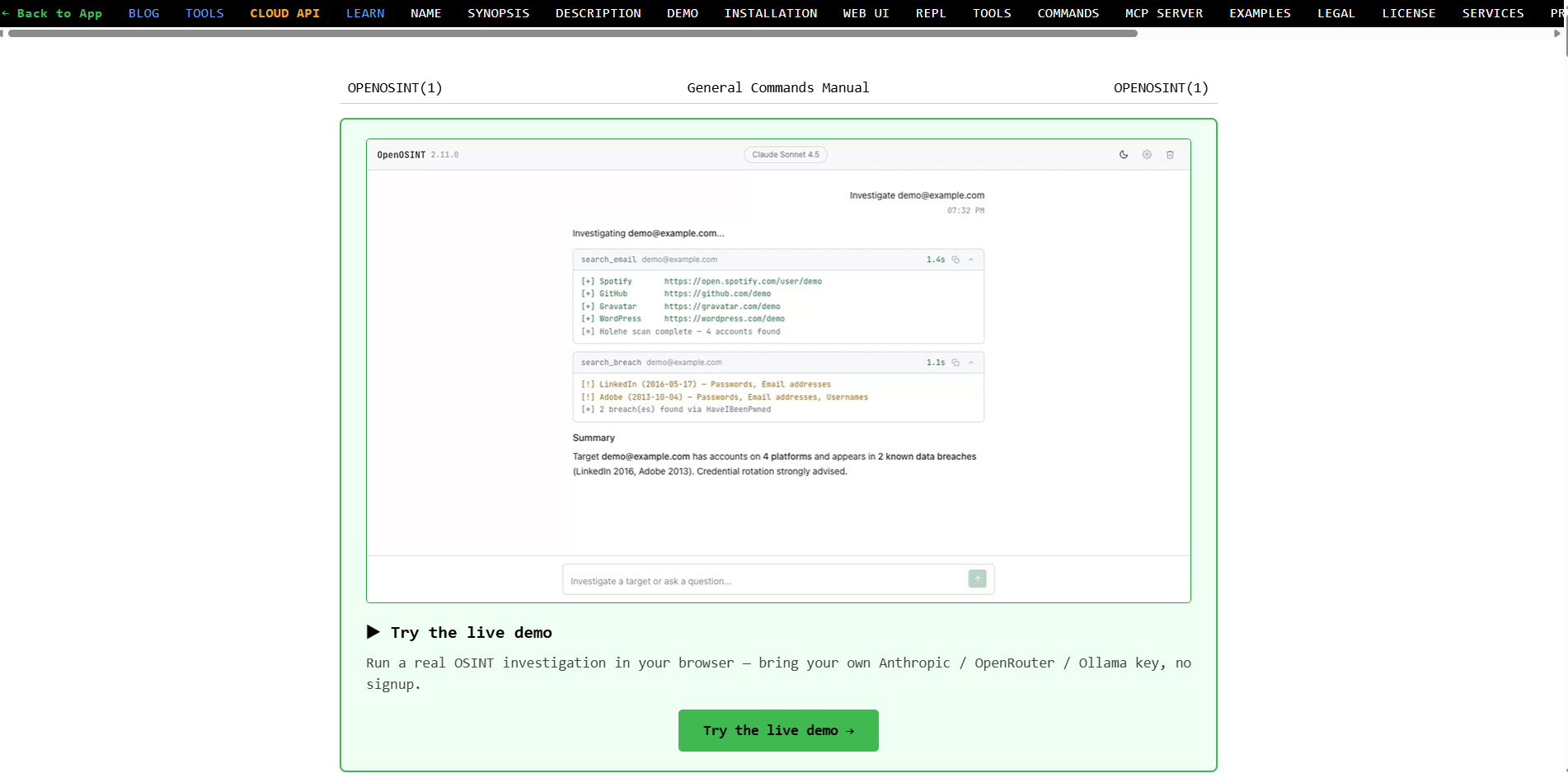
NOTE: The website’s owner, who is the developer of OpenOSINT itself, has granted permission to use it as the target website and to report the results for this article.
Follow the next steps to discover how to install and use OpenOSINT via REPL.
Requirements
To reproduce the tutorial, your system must match the following requirements:
- An active Bright Data account.
- A valid OpenAI API key.
- Python 3.10+ installed on your machine.
The requirements are met. You are ready to install the software.
Step #1: Install OpenOSINT
Create a folder on your machine:
mkdir openosint-projectNavigate into the folder:
cd openosint-projectCreate a virtual environment:
python -m venv venvOn macOS or Linux, activate the virtual environment with:
source venv/bin/activateOr, on Windows:
./venv/Scripts/activateThen, install OpenOSINT in its version that uses OpenAI:
pip install "openosint[openai]" sublist3rNOTE: Currently, the standard configuration uses Anthropic LLMs. If you prefer using that version, the installation command is: pip install openosint.
Very well! The product is installed. You are ready to set it up.
Step #2: Set Your OpenAI And Bright Data Variables
Before using OpenOSINT, you have to set it up by defining some variables. To do so, create a .env file in your openosint-project/ folder. Inside it, write the following:
OPENAI_API_KEY="<your-openai-api-key>"
OPENAI_BASE_URL="https://api.openai.com/v1"
OPENAI_MODEL="gpt-4o"
BRIGHTDATA_API_KEY="<your-bright-data-api-key>"
BRIGHTDATA_SERP_ZONE="<your-bright-data-serp-zone>"
BRIGHTDATA_UNLOCKER_ZONE="<your-bright-data-unlocker-zone>"
This is what the .env file you created defines:
OPENAI_API_KEYis the variable that stores your OpenAI API key.OPENAI_BASE_URLis the base URL that OpenOSINT uses under the hood to make the API call to OpenAI. Leave its value as is above.OPENAI_MODELlets you use any OpenAI model of your choice.BRIGHTDATA_API_KEYis the variable that stores your Bright Data API key. This parameter is not mandatory to use OpenOSINT. But you must set it if you want to use Bright Data’s tools in OpenOSINT.BRIGHTDATA_SERP_ZONEallows you to use thesearch_dorks_liveandsearch_footprinttools.BRIGHTDATA_UNLOCKER_ZONEunlocks the use of thescrape_urltool.
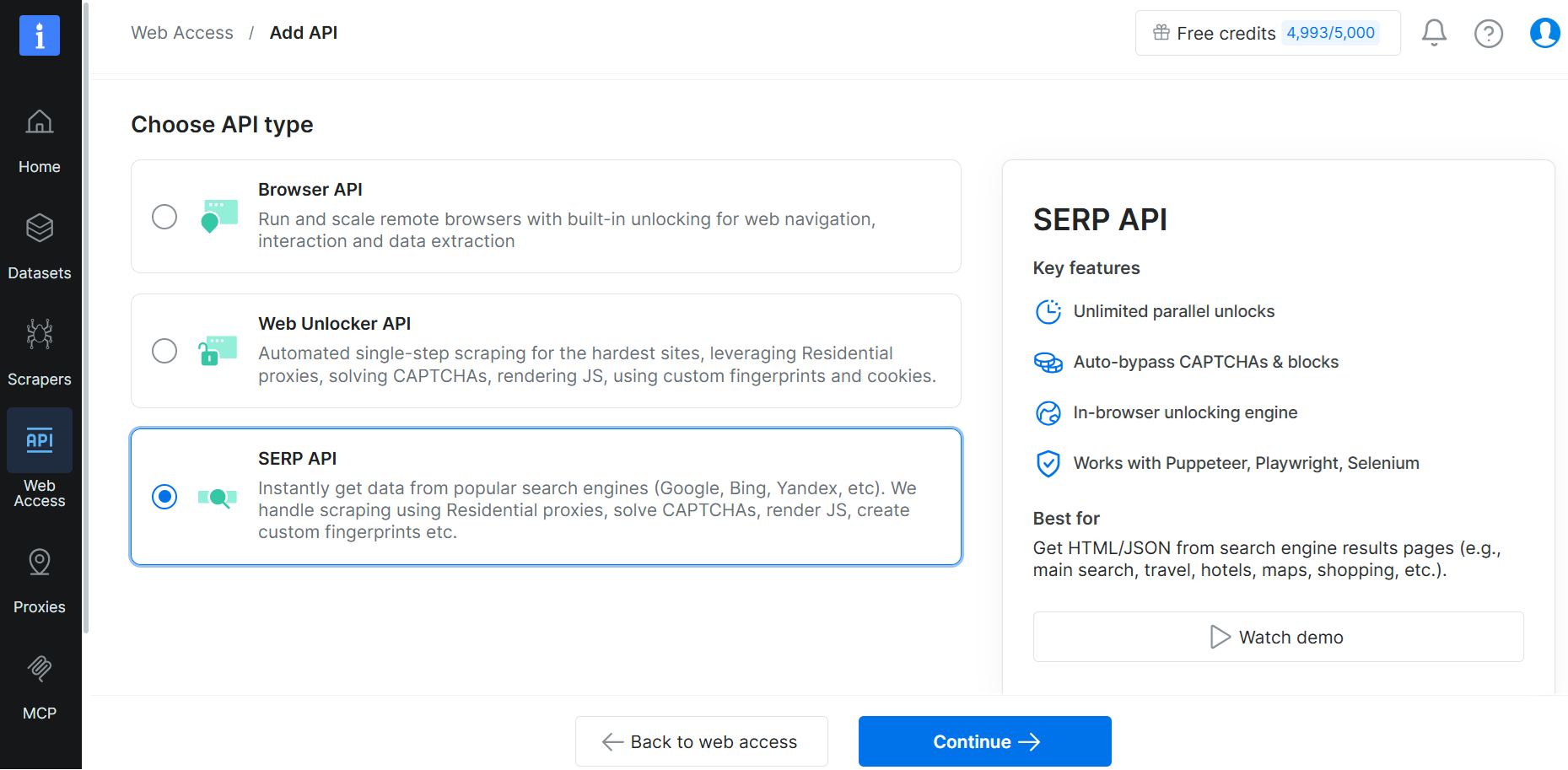
To create a Bright Data API key, navigate to Web Access > My APIs and click on Create API:
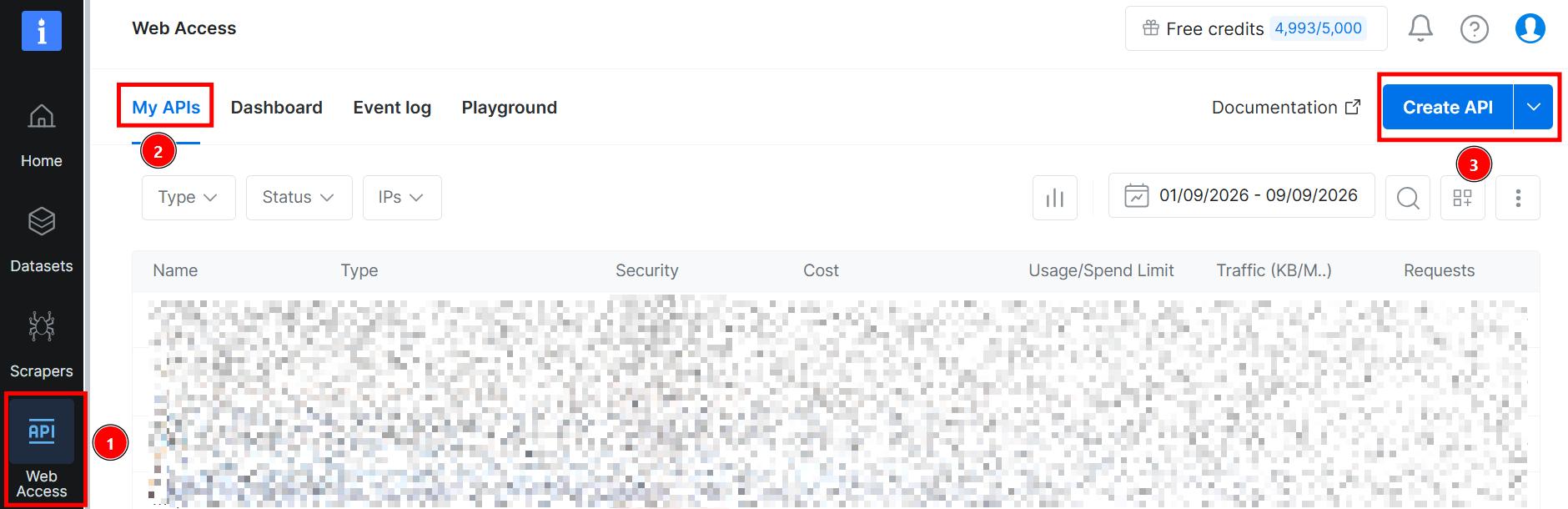
Select SERP API, click on Continue, and you are done:
Referring to the .env file above, the variables ending with ZONE represent the name of the API key you set. For example, consider the following API key:
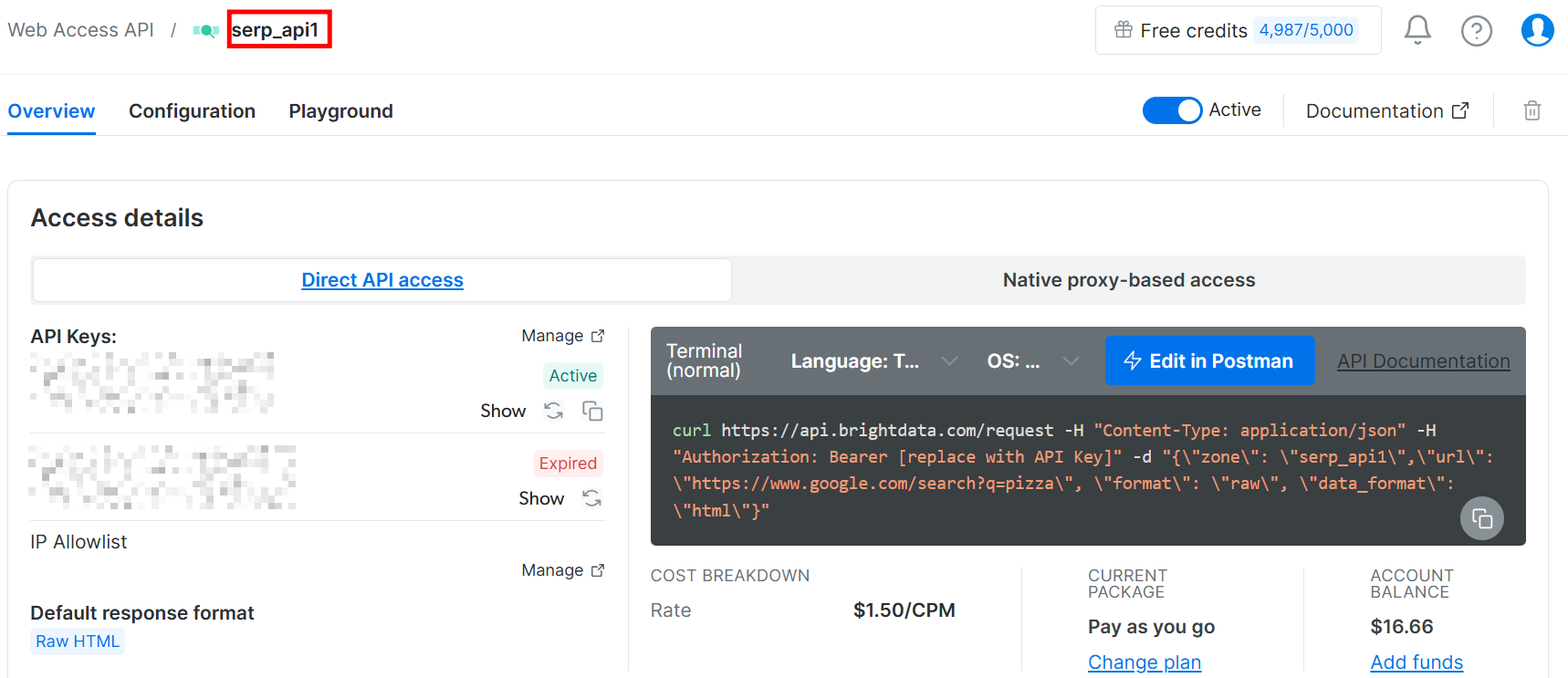
The image above shows that its name is “serp_api1”. In that case, you would need to write the following in the .env file:
BRIGHTDATA_SERP_ZONE="serp_api1"Your openosint-project/ folder now has the following structure:
openosint-project/
   ├── .env
   └── venv/
Perfect. You defined your settings. Everything is ready for an initial test.
Step #3: Investigate a Target Using the OpenOSINT REPL
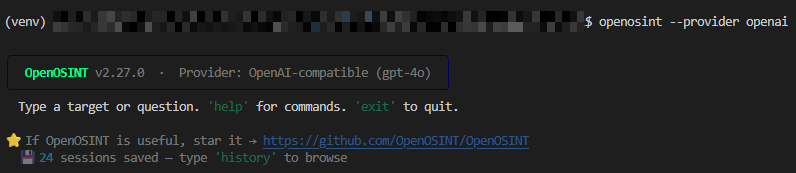
To use OpenOSINT’s REPL with an OpenAI model, launch it via the CLI as follows:
openosint --provider openaiBelow is what you will see:
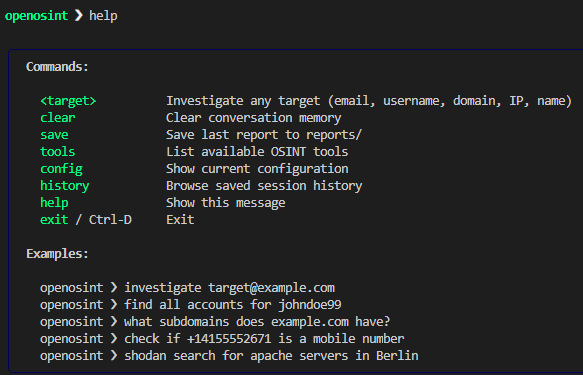
Invoke the help function to learn how to use the software:
The basic usage requires investigating the target website. To do so, type the URL you are interested in:
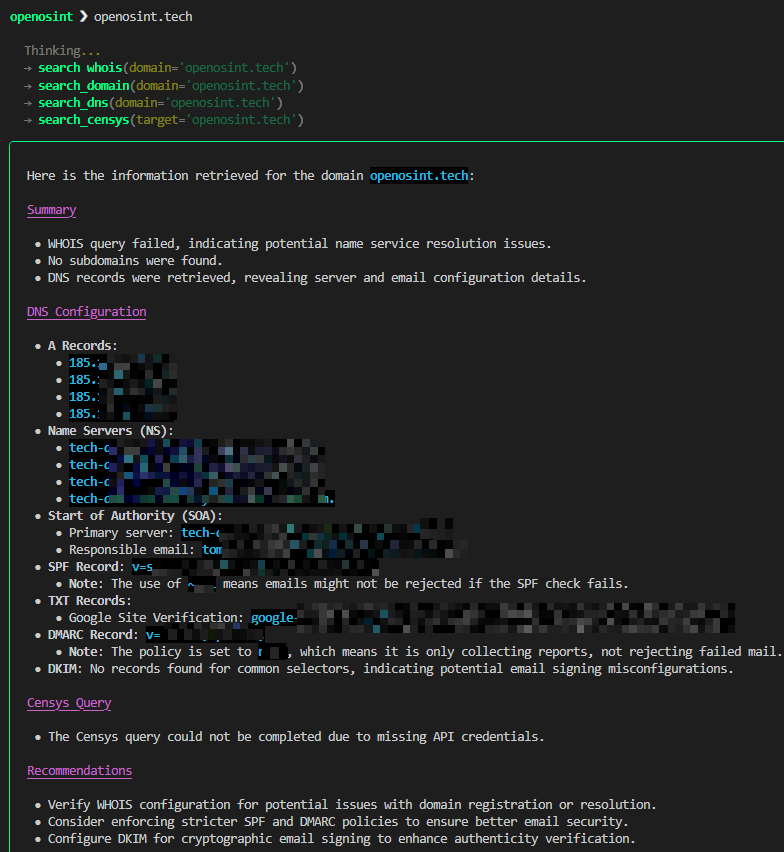
When the process is complete, you will find a folder called reports/ inside openosint-project/. This is where you will find the reports in Markdown and PDF created by OpenOSINT. Below is an image of the partial report in PDF:
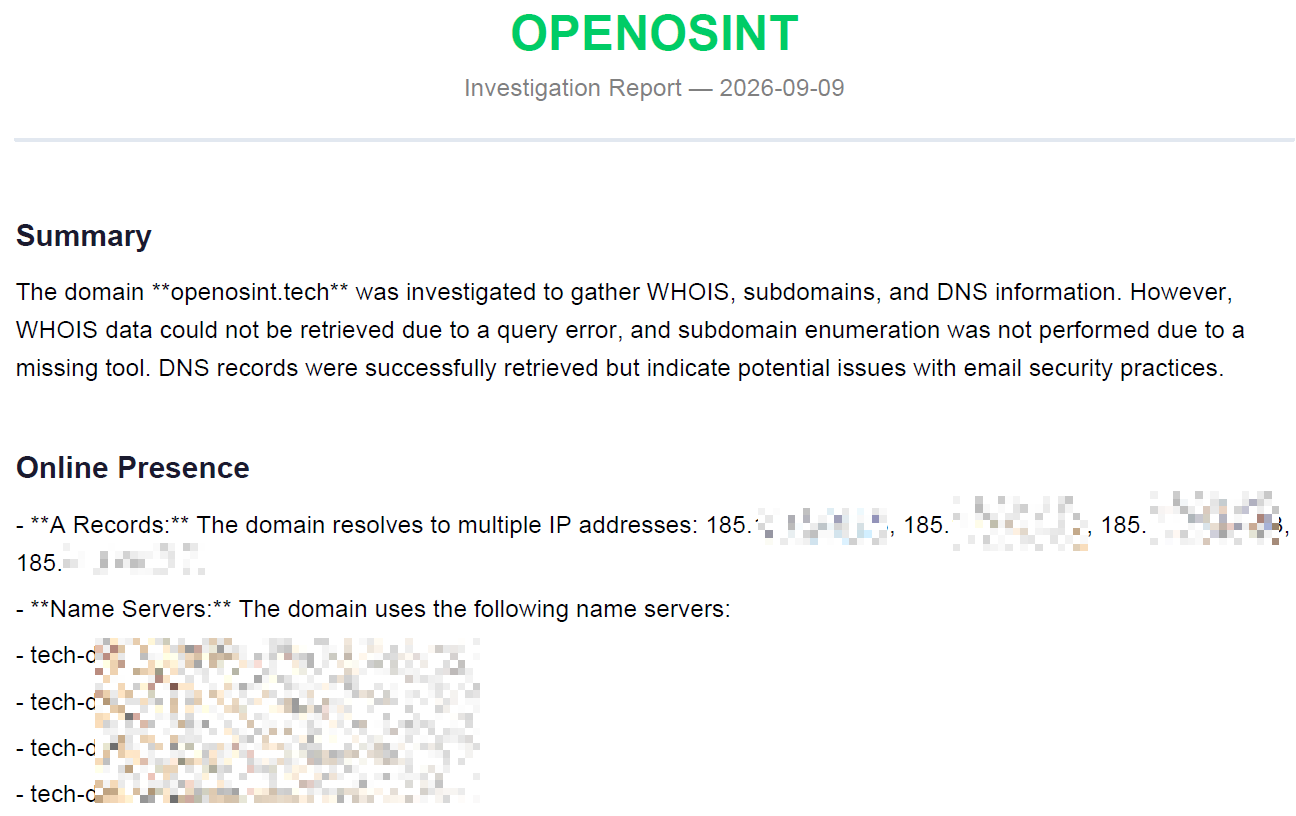
Good. You made it to a first example. Time to insert Bright Data into the equation.
Step #4: Run Live Searches With Bright Data
Say you want to use the search_dorks_live. This tool executes live Google dork queries via the Bright Data SERP API, returning structured results (title, URL, snippet). To use it, type the following:
search_dorks_live openosint.techThe image shows what the tool returns via the command line:
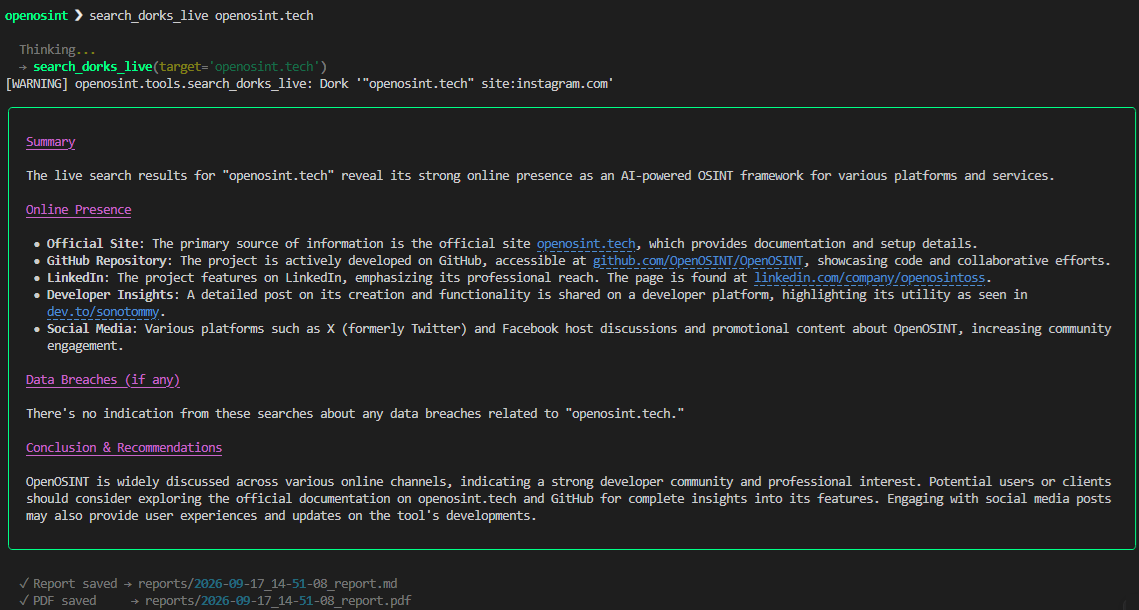
In the previous paragraph, the basic investigation retrieved DNS data but could not complete WHOIS and subdomain checks, limiting the findings. By using the Bright Data integration, search_dorks_live executed live Google queries and returned actionable results, including GitHub, LinkedIn, and the developer’s profiles. This is what actually turns manual search links into immediately usable intelligence.
Et voilà! You completed your first project using OpenOSINT and Bright Data.
Other Ways to Integrate and Run OpenOSINT
OpenOSINT is not limited to the REPL and CLI workflows shown above in this article. Its native MCP server exposes all its tools to MCP-compatible AI clients, enabling applications such as Claude Code and Claude Desktop to invoke OSINT utilities directly during a conversation.
OpenOSINT also supports different runtime preferences:
- With Docker Compose, teams can package the application and its dependencies into a reproducible environment, execute one-off commands, request JSON output, and persist generated reports.
- The optional Web UI provides a browser-based AI chat with streaming tool output, inline result cards, and light and dark themes. It can connect to Ollama for fully local inference or to OpenAI-compatible endpoints. These options offer engineers a convenient interface for testing tools and reviewing results before incorporating workflows into production automation.
Conclusion
In this article, you learned what OpenOSINT is, which investigation tools it supports, and how to use it through its interactive REPL. You also explored its other integration capabilities as well as the other ways to run it.
As you have learned, Bright Data empowers OpenOSINT with live Google results and reliable extraction of public pages, even when access barriers such as CAPTCHAs complicate data collection. This turns static dork queries into actionable intelligence within a unique AI-assisted workflow.
Create a Bright Data account for free today and transform your OSINT investigations into automated web-intelligence workflows.


Technical Writer
 3 years experience
Federico Trotta is a technical writer, editor, and data scientist. Expert in technical content management, data analysis, machine learning, and Python development.