
A Playwright script that loads one page at a time moves from headless Chrome to Lightpanda with a one-line connection change. Some results differ silently. For example, Lightpanda 1.0.2 clicked a button that an overlay covered.
Lightpanda is an open-source headless browser that runs JavaScript and builds the DOM. Version 1.0.2 skips layout and paint to save CPU and memory. Playwright connects to it as it does to Chrome, so “Lightpanda vs Playwright” is a choice of browser.
This guide shows which Playwright calls differ, what Lightpanda saves, and when plain HTTP or Bright Data Browser API is better.
TL;DR
- Lightpanda can replace Chrome for text extraction on sites that pass a per-site check. Lightpanda 1.0.2 returned at least 90% of the distinct words that full Chrome showed on 15 of 19 pages, or 16 with one extra flag.
- Keep Chrome for screenshots, dialogs, hover menus, and overlays. Lightpanda matched Chrome on 22 of 44 Playwright checks by default and 30 with 4 flags, and most differences raised no error. Its user agent couldn’t be set to look like Chrome’s.
- The main gain is memory, not speed. In a 16-page test on ARM Linux, Lightpanda used under half the CPU time of Chrome’s headless shell, but neither was consistently faster. Up to 8 concurrent pages, each extra page added about 14 MB against 69 MB in Chrome, and each Lightpanda server takes one authenticated proxy. Blocking images in Chrome saved about as much proxy traffic as switching.
- Route each site to plain HTTP, Lightpanda, or Bright Data Browser API, which handles full rendering, geo-targeting, and scale.
Lightpanda vs Playwright: run Lightpanda as Playwright’s browser
Playwright drives Chrome over the Chrome DevTools Protocol (CDP), and Lightpanda implements CDP. So Playwright, Puppeteer, and the Go library chromedp connect to Lightpanda the same way they connect to a remote Chrome.
The useful comparison is Lightpanda vs headless Chrome with one script. Lightpanda vs Puppeteer is the same question if you use Puppeteer instead of Playwright.
Download a release and start its CDP server. The --load-resources stylesheet flag fetches external stylesheets, which Lightpanda skips by default. Every script in this guide connects to this server:
curl -L -o lightpanda https://github.com/lightpanda-io/browser/releases/download/1.0.2/lightpanda-x86_64-linux
chmod a+x lightpanda
./lightpanda serve --host 127.0.0.1 --port 9222 --load-resources stylesheet
Other platforms use the same URL with aarch64-linux, aarch64-macos, or x86_64-macos in place of x86_64-linux. On ARM Linux, the 1.0.2 binary needs glibc 2.38 or later, which ships with Debian 13 and Ubuntu 24.04. Keep the server running in its own terminal.
With Docker, start the same server from the project’s image:
docker run -d -p 127.0.0.1:9222:9222 lightpanda/browser:1.0.2 \
  /bin/lightpanda serve --host 0.0.0.0 --port 9222 --load-resources stylesheet
To send Lightpanda’s traffic through a proxy, add --http-proxy http://user:password@host:port to the server command. That proxy is server-wide. With a rotating proxy, a sticky session keeps a page’s requests on one IP, but every page on that server then shares it.
Playwright’s per-context proxy option worked with a proxy that needs no password, but failed with CouldntConnect when the proxy required authentication. To give each session its own authenticated proxy, start one server per proxy. Each server starts in about 65 ms and uses about 11 MB of memory before it loads a page.
Then connect your Playwright scraper to that server with connect_over_cdp() instead of launch(). You don’t need to run playwright install for this. Each Lightpanda 1.0.2 connection holds 1 browser context with 1 page, so open a new connection for each page that you load in parallel:
"""Load one page in Lightpanda through Playwright.

uv init && uv add playwright==1.64.1 httpx selectolax
uv run python quickstart.py

The calibration scripts later in this guide use httpx and selectolax.
"""
import asyncio

from playwright.async_api import async_playwright


async def main():
    async with async_playwright() as pw:
        browser = await pw.chromium.connect_over_cdp("ws://127.0.0.1:9222")
        # Each Lightpanda 1.0.2 connection holds 1 browser context with 1 page
        context = await browser.new_context()
        page = await context.new_page()
        await page.goto("https://news.ycombinator.com/")
        titles = await page.locator(".titleline").count()
        print(f"{await page.title()}: {titles} titles")
        await browser.close()


asyncio.run(main())
The script printed:
Hacker News: 30 titles
Each new browser context starts with empty storage, so add your session cookies to each one with context.add_cookies().
Puppeteer connects the same way, through puppeteer.connect() and one createBrowserContext() per connection. With Puppeteer 25.16, the same page returned 30 titles. Selenium connects through WebDriver instead, after you start the server with --protocol webdriver.
Lightpanda vs headless Chrome: CPU, memory, time, and proxy traffic
Lightpanda’s own benchmark reported 9 times the speed and 16 times less memory than Chrome on its demo site with 25 parallel processes. On public pages, with real network latency, the difference is smaller.
I tested 16 public pages, such as Wikipedia, MDN, BBC News, and Walmart, in a Debian 13 container on an Apple M3 Mac. The test compared Lightpanda 1.0.2 with Playwright 1.64.1’s Chrome 156 headless shell, the standalone build of Chrome’s old headless mode. Each browser loaded the pages sequentially and then at a concurrency of 8, with a 1.5-second wait after DOMContentLoaded on each page. Values are medians of 3 runs, with wall-time ranges in parentheses, and memory is the peak proportional set size (PSS) of the browser processes only:
| Linux container, median of 3 runs | Lightpanda 1.0.2 | Chrome headless shell |
|---|---|---|
| CPU time, sequential | 10.2 s | 21.3 s |
| Peak memory (PSS), sequential | 286 MB | 559 MB |
| Wall time, sequential | 48 s (45 to 49) | 42 s (41 to 50) |
| CPU time, concurrency 8 | 8.7 s | 19.7 s |
| Peak memory (PSS), concurrency 8 | 387 MB | 1,042 MB |
| Wall time, concurrency 8 | 10 s (9 to 17) | 17 s (8 to 18) |
With default flags, Lightpanda used 44% to 48% of the headless shell’s CPU time and 37% to 51% of its peak memory. Chrome loaded each concurrent page in a new context of one browser, and Lightpanda in a new connection to one server. From sequential to a concurrency of 8, each extra concurrent page added about 14 MB on Lightpanda and 69 MB on the headless shell. The stylesheet flag added 3% to 11% to Lightpanda’s CPU time in a macOS test.
Neither browser was consistently faster in wall time. Most of each run went to network time and the fixed 1.5-second waits, which depend little on the browser. Both browsers got the same wait, so the CPU figures cover the same time window. On a slow page, that window can end before rendering finishes.
By default, Puppeteer 25.16 launches Chrome in the new headless mode, which runs the full browser. On macOS, that mode used 1.6 to 2.1 times the headless shell’s CPU time. So if you use Puppeteer with its defaults, Lightpanda’s CPU saving is larger than this table shows.
Blocking images in Chrome saves about as much proxy traffic as switching to Lightpanda. If traffic is your main cost, try that before you switch browsers. For the 15 pages other than Walmart, Chrome used a median total of 29.9 MB of proxy traffic and Lightpanda 24.1 MB. With images, fonts, and media blocked through page.route() request interception, Chrome used 22.3 MB, and its CPU time stayed the same in a macOS test.
Walmart is excluded from these numbers, because it returned a short page to Chrome’s headless shell and its full results page to Lightpanda. Lightpanda skips images, but it can download more scripts and data. On Vercel’s pricing page, it prefetched React Server Components (RSC) payloads for 21 linked pages, against 4 in Chrome. Next.js prefetched each link that entered the viewport, and Lightpanda reported every observed link as inside the viewport.
Lightpanda’s CPU saving was about 12 CPU-minutes per 1,000 pages. If you pay for proxy traffic, the 1.6 to 2 GB that 1,000 such pages use costs more than those 12 CPU-minutes. The larger gain is memory per concurrent page, which limits how many concurrent sessions one server can run.
Before you plan server capacity, run a soak test on your own workload and hardware to check memory growth and stability. For the pages that need Chrome, Browser API runs the sessions, so they don’t use your servers.
Lightpanda vs Chrome in Playwright: which calls match and which differ
I ran the same 44 Playwright checks in Python on a local test site, once on Chrome 156’s headless shell and once on Lightpanda. A check passed only when Lightpanda returned the same value as Chrome.
With default settings, Lightpanda matched Chrome on 22 of the 44 checks. It matched on 30 with 4 flags, passed as --load-resources stylesheet --load-resources iframe --load-resources worker --timezone America/New_York. In serve mode, Lightpanda 1.0.2’s default settings don’t fetch external stylesheets, iframe documents, worker scripts, or images unless you pass --load-resources.
Skipping external stylesheets changes results silently. On the test site, an external CSS file hid one element. Without --load-resources stylesheet, Lightpanda reported that element as visible, and inner_text("body") included its text. Most sites load their CSS from external files, so pass --load-resources stylesheet to remove much of the hidden price, menu, and modal text from your data.
The table groups the 44 checks by what Lightpanda returned:
| Result on Lightpanda 1.0.2 | Checks | Playwright features |
|---|---|---|
| Same as Chrome with default settings | 22 | goto, client-side rendering with fetch(), click, fill, select_option, check, keyboard input, shadow DOM, get_by_role, XPath, route.fulfill, cookies, localStorage, IndexedDB, file upload, WebSocket, history.pushState, redirects and status codes, Shift_JIS encoding, networkidle, console events, aria_snapshot |
| Same with the 4 flags | 8 | is_visible and inner_text with external CSS, same-origin and cross-origin iframes, request events for CSS and frames, request interception for stylesheets, web workers, time zone emulation |
| A different value, with no error | 11 | Bounding boxes, clicks on covered elements, CSS :hover, @media rules after a viewport change, confirm() dialogs, canvas and WebGL, navigator properties, user agent, screenshots, PDFs, Playwright traces |
| An error or a missing API | 3 | A second page in one browser context, file downloads, service workers |
Separately, capturing API responses with page.on("response") and response.json() worked as on Chrome. Lightpanda 1.0.3, released after these tests, fixed file downloads, and every other check stayed in the same table row. The Python and Puppeteer examples ran unchanged, so the commands also work with 1.0.3 in place of 1.0.2.
The silent differences need the most care, because a test can pass on Lightpanda while the same page behaves differently in Chrome:
- Lightpanda clicked buttons under overlays. A fixed-position overlay covered a button. On Chrome, Playwright’s actionability check failed and the click timed out, because another element would receive it. Clicking through an overlay can help a scraper, but a script tested only on Lightpanda can then stop at a cookie consent banner on Chrome.
confirm()returned false. A test page calledconfirm(), and on Lightpanda the call returnedfalse. Playwright’s dialog handler then raised “No dialog is showing”, so a flow that waits for the user to confirm is cancelled.- CSS hover menus stayed closed.
page.hover()fired themouseoverevent, but a submenu shown with CSS:hoverstayed hidden. - Lazy-loaded content appeared without scrolling. On a test page, an
IntersectionObserveradded 10 items at load on Lightpanda, and none on Chrome before a scroll. With no layout, Lightpanda 1.0.2 reported each observed element as inside the viewport, so a scraper can skip scrolling on pages with a fixed list. On infinite-scroll pages, the page can keep loading instead, as YouTube did in the page test below. - Layout values differed. Bounding boxes kept their size but not their position, and CSS
@mediarules didn’t apply after a viewport change. WebGL was unavailable, andnavigatorreported its own values, such as 4 CPU cores.
Run flows on Chrome when they depend on dialogs, hover menus, overlays, or element positions.
What to check before you switch to Lightpanda: rendering, standards, and operations
Each point below applies to Lightpanda 1.0.2, and later releases may change it.
Screenshots show text, not the rendered page. page.screenshot() returns a PNG, but Lightpanda draws only the page’s text in one column, with no CSS layout, images, or colors. page.pdf() returns the same kind of output. In this IKEA example, Lightpanda ran with --load-resources stylesheet:
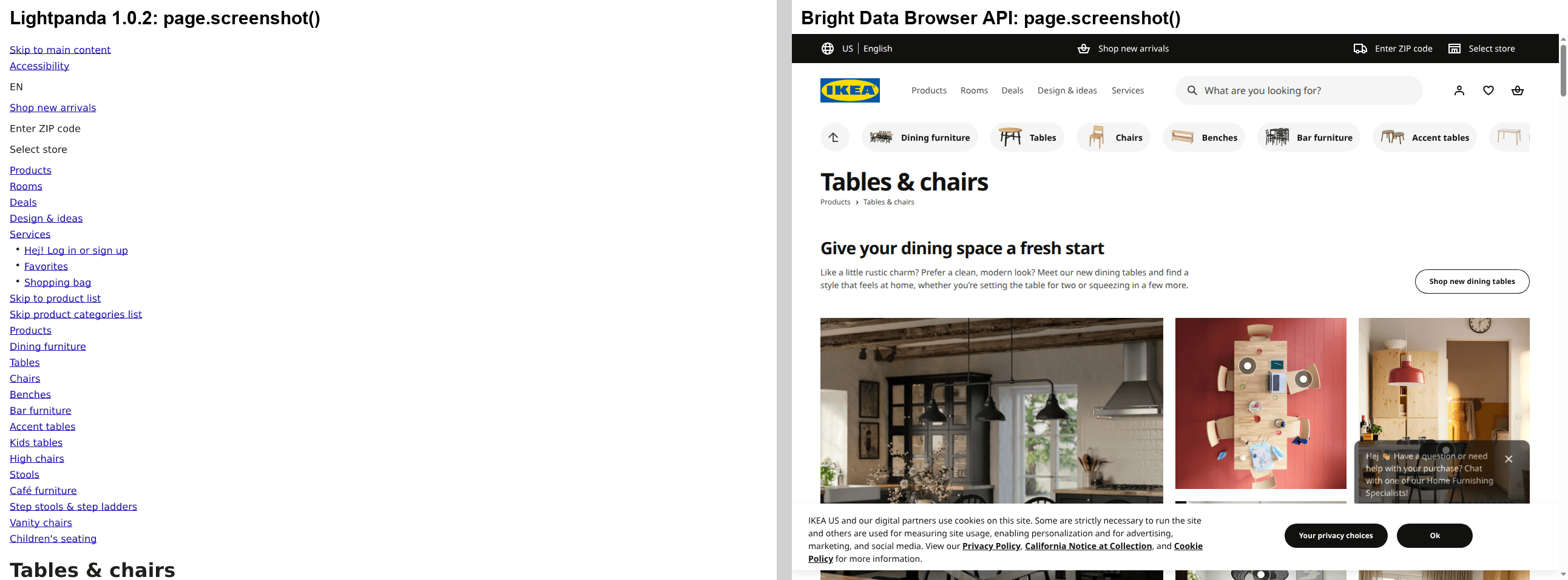
Same URL and viewport in both browsers.
Visual regression tests, image-based extraction, and computer-use agents that act on screenshots need a browser that renders the full page, as Browser API did on the right.
A fingerprint that differs from Chrome’s. Lightpanda sends User-Agent: Lightpanda/1.0 and, over HTTPS, the client hint Sec-Ch-Ua: "Lightpanda";v="1". Its --user-agent flag rejects any value that contains “Mozilla”, and Playwright’s user_agent option doesn’t change the header. Its TLS and HTTP/2 fingerprints also differ from Chrome’s.
Sites with bot detection can recognize every Lightpanda request, so test those sites at production volume before you move them to Lightpanda. That user agent is right for a crawler that identifies itself. Lightpanda can sign its requests with Web Bot Auth through its --web-bot-auth-* flags, and Cloudflare verifies them for bots that register their public key. Verification tells a site who is crawling, and the site still decides whether to allow it.
Fewer web-standards passes than Chrome, especially on CSS. Lightpanda 1.0 reports passing about 80% as many subtests as Chrome on the Web Platform Tests (WPT), the cross-browser conformance test suite. Most of those passes were generated character-encoding tests, and with them removed for both browsers, my count gives Lightpanda roughly 57% as many as Chrome. On CSS tests, it passed 24% as many, so expect the largest differences on CSS-heavy pages.
One proxy and one process per server, and one page per connection. In 1.0.2, --http-proxy applies to the whole server, and Playwright’s per-context proxy failed with authenticated proxies. Each connection holds 1 page, and all sessions on a server share one process, so a crash stops all of them. Plan one server per proxy identity and one connection per parallel page.
No native Windows or Alpine build in 1.0.2. Release 1.0.2 shipped Linux and macOS binaries plus Debian packages, and the project publishes a Docker image. On Windows, Lightpanda runs inside WSL2. Its Linux binaries link against glibc, so they don’t run on stock Alpine, which uses musl.
AGPL-3.0 license. If you modify Lightpanda and let users interact with it over a network, the license requires you to offer them your modified source. Many companies restrict AGPL software in their open-source license policies even when it runs unmodified, so ask your legal team before you deploy it.
Telemetry is on by default. Each Lightpanda process sends usage events to telemetry.lightpanda.io, with one event for every page or iframe navigation. In 1.0.2, the event definitions contained no URLs. Set LIGHTPANDA_DISABLE_TELEMETRY=true to disable it, for example on servers with strict egress rules.
Is Lightpanda enough for your pages? A test on 19 public pages
A page test shows whether the differences in the 44 checks change your data, by comparing the text that Lightpanda and Chrome return for the same public pages.
Bright Data Browser API rendered each page in full Chrome on Bright Data’s infrastructure, geo-targeted to India to match my test connection. That render is the reference for every comparison below. Plain HTTP, Lightpanda, and Lightpanda with the stylesheet flag then fetched each page after the reference, from a residential connection in the same country. Every browser waited until the page’s text stopped changing, as the scripts below do.
A distinct word is a unique word of 3 or more letters. The table shows each option’s word recall in 2 runs, which is the share of the reference’s distinct words that the option also returned:
| Page | Plain HTTP | Lightpanda | Lightpanda, stylesheet flag |
|---|---|---|---|
| Wikipedia article | 98%, 98% | 99%, 99% | 98%, 98% |
| MDN reference page | 100%, 100% | 100%, 100% | 100%, 100% |
| Python docs page | 86%, 86% | 100%, 100% | 100%, 100% |
| React docs page | 100%, 100% | 99%, 99% | 99%, 99% |
| Next.js docs page | 71%, 69% | 92%, 88% | 78%, 76% |
| Hacker News | 100%, 100% | 100%, 100% | 100%, 100% |
| BBC News | 100%, 100% | 99%, 99% | 99%, 99% |
| The Verge | 90%, 91% | 97%, 97% | 97%, 100% |
| Medium tag page | 0%, 0% | 2%, 25% | 2%, 22% |
| GitHub repository | 88%, 88% | 99%, 99% | 99%, 99% |
| Vercel pricing | 97%, 100% | 97%, 100% | 97%, 100% |
| Figma pricing | 95%, 95% | 99%, 99% | 99%, 99% |
| IKEA category page | 93%, 93% | 100%, 100% | 91%, 91% |
| Amazon search | 0%, 0% | 96%, 94% | 95%, 94% |
| Zara category page | 1%, 1% | 100%, 100% | 100%, 100% |
| Booking.com search | 0%, 0% | 92%, 87% | 73%, 72% |
| YouTube search | 1%, 1% | 100%, 88% | 100%, 99% |
| IMDb Top 250 | 0%, 0% | 94%, 94% | 94%, 94% |
| TradingView quote page | 81%, 91% | 95%, 95% | 94%, 94% |
At a 90% recall threshold, Lightpanda passed 15 of the 19 pages in both runs with default settings, and 16 with the stylesheet flag. Bold cells are below that threshold in at least 1 run.
The wait mattered as much as the browser. With a fixed wait of 3 seconds after the DOMContentLoaded event, YouTube returned an empty body and IMDb about a quarter of its chart. Both pages were still rendering. Waiting until the text stopped changing raised both above 90%.
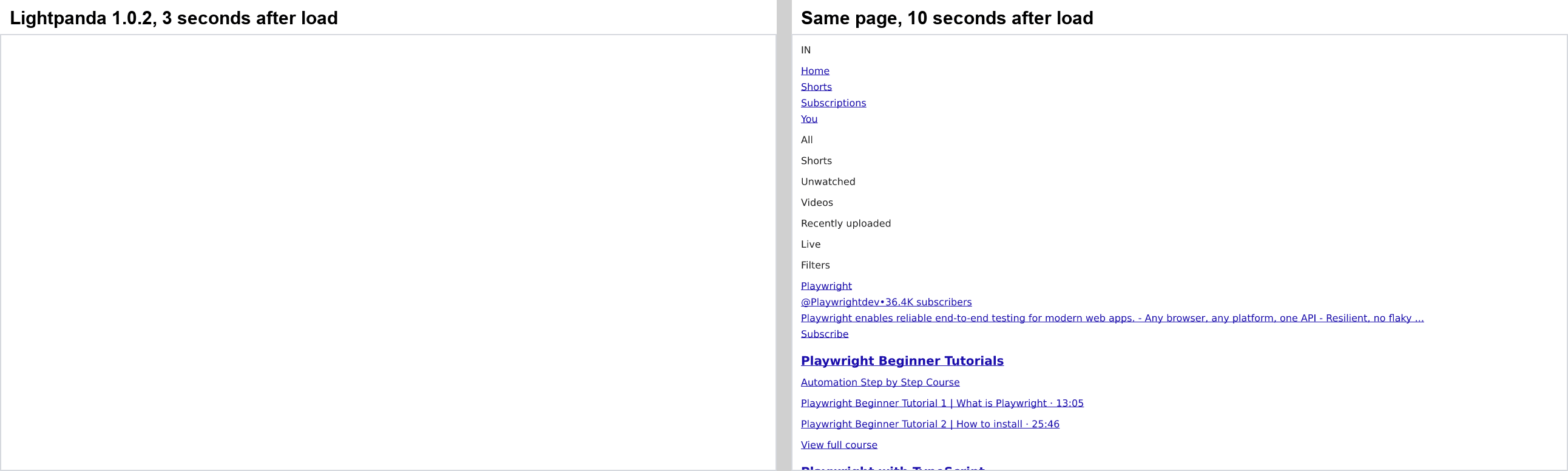
At 3 seconds the page was still rendering, so a fixed wait would have scored it as empty.
Recall does not count extra text, such as hidden menus or prices for other sizes. Extra text lowers precision, costs LLM tokens, and can mislead a model. The stylesheet flag changed both measures:
Effect of --load-resources stylesheet |
Pages |
|---|---|
| Less extra text, so higher precision | 11 of the 19 pages |
| More extra text | Vercel’s pricing page, where precision fell from 78% to 64%, and Booking.com |
| Lower recall, by 9 points or more | IKEA, Next.js, and Booking.com |
| Slower | TradingView, about 28 seconds with the flag against about 6 without |
Start with the flag, because it passed one more page than default settings and kept much of the CSS-hidden text out of your data.
Medium, YouTube, and Booking.com show 3 different failure modes:
- A page that returned little text. Medium’s tag page gave Lightpanda at most 179 distinct words, and at most 25% of the words in the Chrome reference.
- A page that keeps loading. YouTube passed with the stylesheet flag, but it kept adding results, because Lightpanda reported each observed element as inside the viewport. The wait reached its time limit, and half to two-thirds of Lightpanda’s words were extra text that Chrome didn’t show.
- A page the flag made worse. Booking.com reached 87% to 92% recall with default settings and 72% to 73% with the stylesheet flag.
Route pages like Medium and Booking.com to Chrome. On pages like YouTube, where recall stays high but extra text grows, check your fields as well.
Prices and item counts need field-level checks, because word recall ignores numbers and can’t show whether a list is complete. On the IKEA and Zara category pages, Lightpanda showed every price that the reference showed. Stores can show a different currency than you expect, so set the currency and delivery location before you compare. This Steam search shows the same results in 2 currencies:
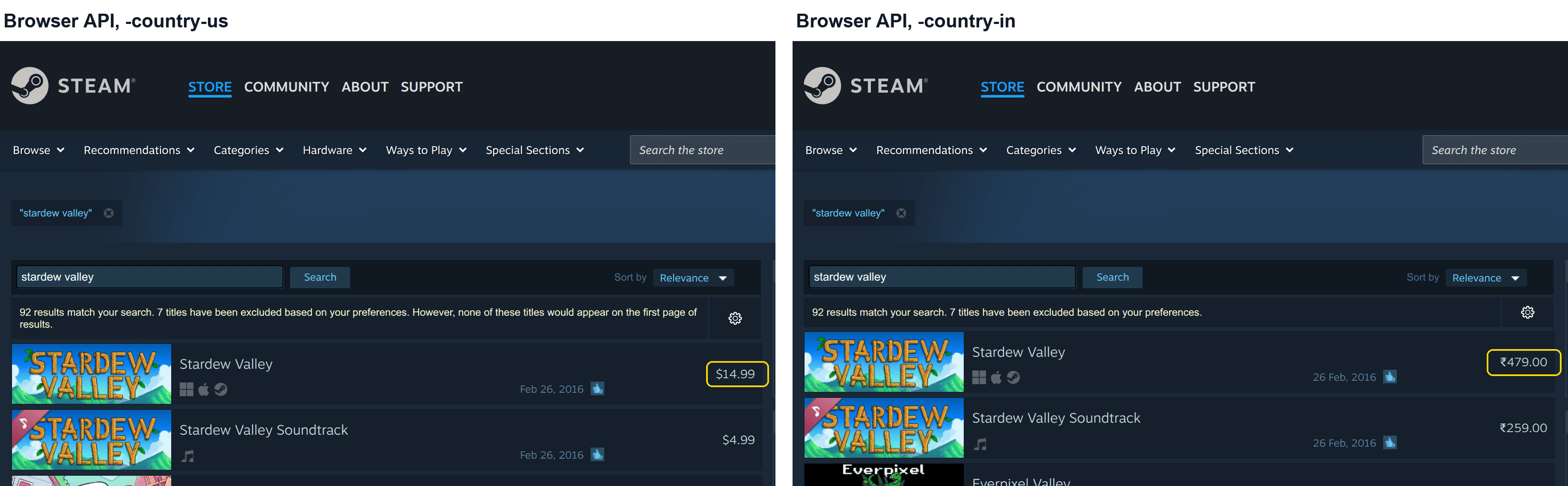
The same Steam search URL through Browser API, with only the geo-targeting country changed.
Do your pages need a browser at all?
Many pages are static or server-rendered, so they don’t need a browser. Plain HTTP reached at least 90% word recall on 9 of the 19 pages in both runs. The plain HTTP requests named the crawler in their user agent, so other clients and headers can get different results.
Lightpanda with default settings passed 6 more pages. Only Medium stayed below 90% recall in every column and every run.
Many pages also embed their data as JSON in the HTML, or load it from the site’s internal API. To a plain HTTP request, 10 of the 19 pages returned JSON-LD or hydration data, such as Next.js __NEXT_DATA__, in their HTML. YouTube contained 10 to 19 search results in its ytInitialData object, readable without running the page’s JavaScript.
The calibration scripts measure visible text and drop <script> tags, so they don’t count this JSON. A site-specific parser is worth building when you scrape that site at high volume. That JSON is undocumented and can change without notice, so validate your parser’s output on every run. If you’d rather not maintain a parser, Bright Data’s Web Scraper APIs return structured data from popular sites, including YouTube and Amazon.
Through content negotiation, some sites return a version written for agents when a request sends Accept: text/markdown. Of the 19 pages, the Next.js docs and Vercel’s pricing page returned Markdown, and the React docs returned their source file as plain text. On all 3 pages, that text used about 23 to 157 times fewer tokens than the raw HTML, counted with OpenAI’s o200k_base tokenizer. Each is a separate document, though, and reached 71% to 93% word recall against Chrome, so test each one like any other option.
Lightpanda, headless Chrome, or Browser API: choose by workload
Use the lightest option that returns your data, and move a page to Chrome when it needs layout or paint:
| Your workload | Use |
|---|---|
| Static or server-rendered pages, such as many docs and news pages | A plain HTTP client, with no browser |
| Client-side rendered pages that reach at least 90% word recall on Lightpanda | Lightpanda, self-hosted, with the flags you tested |
| Pages below 90% word recall on Lightpanda | Bright Data Browser API, or headless Chrome on your own servers |
| A few pages that need layout, hover, or dialogs, on servers you already run | Headless Chrome |
| Screenshots, PDFs, visual regression tests, or computer-use agents | Bright Data Browser API, or headless Chrome on your own servers |
| Many concurrent full-browser sessions or geo-targeted renders, without running a Chrome fleet | Bright Data Browser API |
| Page text for an LLM | Markdown through content negotiation where the site offers it, otherwise plain HTTP or Lightpanda with the stylesheet flag, tested per site |
| DOM-based agents that click and fill forms | Lightpanda, through Playwright or lightpanda mcp, after you test overlays and dialogs on your sites |
| Agents that need full rendering | Bright Data Browser API through its Model Context Protocol (MCP) server, or headless Chrome |
Lightpanda 1.0.2 also ships an MCP server for AI agents, lightpanda mcp. On 6 pages, its markdown tool used 2 to 6 times as many o200k_base tokens as Chrome’s innerText, such as 14,277 against 6,341 on Wikipedia. Playwright’s aria_snapshot(), the accessibility-tree format behind Playwright MCP, was even larger on all 6. Send innerText or your parsed fields when token cost matters most, and Markdown when an agent needs the links and headings.
Route each site to plain HTTP, Lightpanda, or Browser API
Comparing all 3 options, or tiers, on every page multiplies the work. Pages built from the same template, such as all product pages on one site, often behave alike. So compare a few sample pages per site in advance, a step called calibration, and save the result.
Calibrate each site with calibrate.py
The first script, calibrate.py, fetches each sample with the full Chrome reference, plain HTTP, and Lightpanda, all within the same minute. It routes each site to the lowest tier that reaches 90% word recall on all samples in every run. It saves the routes in routes.json.
Browser API renders the reference on Bright Data’s servers instead of yours, from the country you choose. It’s self-service. In the Bright Data control panel, create a Browser API zone, which is a named configuration with its own credentials. Copy the zone’s username and password into the BRD_AUTH environment variable as username:password, where the scripts read them.
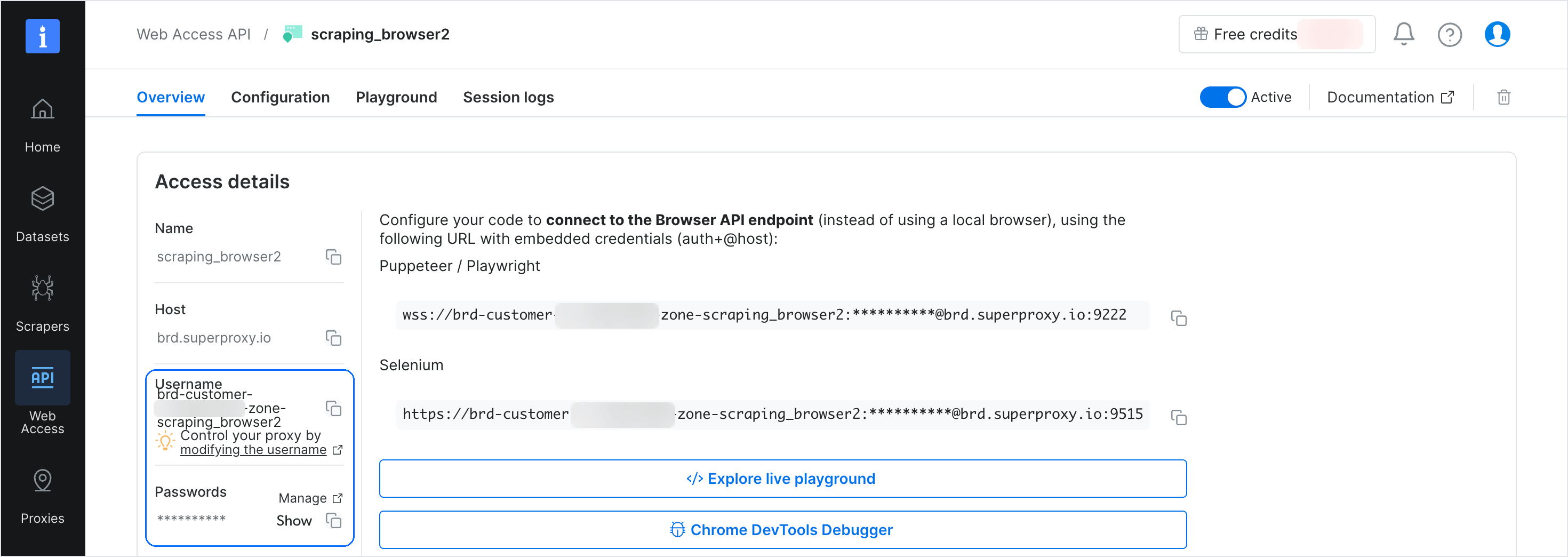
The zone’s Overview tab, with the account ID blurred.
To render the reference with Chrome on your own servers instead, start it with --headless, --remote-debugging-port=9224, and its own --user-data-dir, then set REFERENCE_CDP=http://127.0.0.1:9224.
Set COUNTRY to the country of your servers, because many sites change prices, languages, and layouts by country. Start calibrate.py while your Lightpanda server is running. A run takes about 2 to 3 minutes, because the script waits until each page’s text stops changing:
"""Find the lowest tier that returns what a full Chrome render shows.

Run it in the quickstart's project, with the same Lightpanda server:
./lightpanda serve --host 127.0.0.1 --port 9222 --load-resources stylesheet
BRD_AUTH="brd-customer-<id>-zone-<zone>:<password>" uv run python calibrate.py
"""
import asyncio
import json
import os
import re
from urllib.parse import urlsplit

import httpx
from playwright.async_api import async_playwright
from selectolax.lexbor import LexborHTMLParser

LIGHTPANDA = "ws://127.0.0.1:9222"
# Render the reference from the country your servers run in
COUNTRY = "in"
# Browser API renders the reference unless REFERENCE_CDP names another Chrome
USER, PASSWORD = os.environ.get("BRD_AUTH", ":").split(":", 1)
BROWSER_API = os.environ.get("REFERENCE_CDP") or (
    f"wss://{USER}-country-{COUNTRY}:{PASSWORD}@brd.superproxy.io:9222")
# Name your crawler and give a contact URL
HTTP_UA = "Mozilla/5.0 (compatible; example-crawler/1.0; +https://example.com)"
TIERS = ["http", "lightpanda", "browser_api"]  # lowest first
WORDS = re.compile(r"[^\W\d_]{3,}")

# One URL per page template you scrape, such as a search page and a product page
SAMPLE = [
    "https://docs.python.org/3/library/asyncio.html",
    "https://github.com/microsoft/playwright",
    "https://www.ikea.com/us/en/cat/chairs-fu002/",
    "https://www.amazon.com/s?k=laptop",
    "https://www.amazon.com/s?k=headphones",
    "https://www.youtube.com/results?search_query=playwright",
    "https://www.tradingview.com/symbols/NASDAQ-AAPL/",
]


def words(text):
    return set(WORDS.findall(text.lower()))


async def settle(page, quiet=2.0, cap=15):
    # Wait until the page's text stops changing instead of a fixed sleep.
    # Placeholders under 200 characters don't count. After cap seconds, it
    # stops waiting and uses whatever has rendered
    size, stable = 0, 0.0
    for _ in range(int(cap / 0.5)):
        await asyncio.sleep(0.5)
        try:
            now = await page.evaluate(
                "document.body ? document.body.innerText.length : 0")
        except Exception:  # the page navigated, so start counting again
            now = 0
        stable = stable + 0.5 if now == size and now >= 200 else 0.0
        size = now
        if stable >= quiet:
            return


async def http_words(client, url):
    try:
        resp = await client.get(url)
        tree = LexborHTMLParser(resp.text)
        for node in tree.css("script, style, noscript, template"):
            node.decompose()
        return words(tree.body.text(separator=" ") if tree.body else "")
    except Exception:
        return set()


async def browser_words(pw, endpoint, url):
    browser = await pw.chromium.connect_over_cdp(endpoint)
    try:
        # Close the context before disconnecting, and block service workers
        # on a local Chrome, so it starts the next sample clean
        sw = "block" if endpoint == os.environ.get("REFERENCE_CDP") else "allow"
        async with await browser.new_context(service_workers=sw) as context:
            page = await context.new_page()
            await page.goto(url, wait_until="domcontentloaded",
                            timeout=120_000)
            await settle(page)
            return words(await page.evaluate(
                "document.body ? document.body.innerText : ''"))
    except Exception:
        return set()
    finally:
        await browser.close()


async def main():
    # Each run keeps the higher tier and the lower min_words from earlier runs,
    # so run this script several times before you trust a route
    routes = {}
    if os.path.exists("routes.json"):
        with open("routes.json") as f:
            routes = json.load(f)
    async with async_playwright() as pw, httpx.AsyncClient(
            headers={"User-Agent": HTTP_UA}, follow_redirects=True,
            timeout=30) as client:
        for url in SAMPLE:
            # Fetch all 3 tiers within the same minute, because live pages
            # change between fetches
            full = await browser_words(pw, BROWSER_API, url)
            if not full:  # no page text to compare, so skip this sample
                print(f"no page text, skipped  {url}")
                continue
            plain = await http_words(client, url)
            # Retry Lightpanda once, so one transient error doesn't move
            # the site up a tier on every later run
            light = (await browser_words(pw, LIGHTPANDA, url)
                     or await browser_words(pw, LIGHTPANDA, url))
            # Word recall: share of the full render's words each tier also returned
            share = {t: len(full & w) / len(full)
                     for t, w in (("http", plain), ("lightpanda", light))}
            engine = next((t for t in TIERS[:2] if share[t] >= 0.9),
                          "browser_api")
            site = urlsplit(url).hostname
            if site in routes:  # keep the highest tier any sample needs
                engine = max(engine, routes[site]["engine"], key=TIERS.index)
            # A page under a quarter of the smallest sample's words is likely
            # empty or an error page, so the router moves it up one tier
            min_words = len(full) // 4
            if site in routes:
                min_words = min(min_words, routes[site]["min_words"])
            routes[site] = {"engine": engine, "min_words": min_words}
            print(f"{share['http']:5.2f}  {share['lightpanda']:5.2f}  "
                  f"{engine:<11}  {url}")
    with open("routes.json", "w") as f:
        json.dump(routes, f, indent=2)


asyncio.run(main())
The first of 3 runs printed the word recall of plain HTTP and of Lightpanda, and each site’s tier:
 0.86   1.00  lightpanda   https://docs.python.org/3/library/asyncio.html
 0.88   0.99  lightpanda   https://github.com/microsoft/playwright
 0.93   0.91  http         https://www.ikea.com/us/en/cat/chairs-fu002/
 0.00   0.98  lightpanda   https://www.amazon.com/s?k=laptop
 0.00   0.95  lightpanda   https://www.amazon.com/s?k=headphones
 0.01   0.91  lightpanda   https://www.youtube.com/results?search_query=playwright
 0.81   0.94  lightpanda   https://www.tradingview.com/symbols/NASDAQ-AAPL/
Plain HTTP reached 1% recall or less on Amazon and YouTube, while Lightpanda reached at least 91% on both. TradingView scored 81% over plain HTTP and 94% on Lightpanda, so it routes to Lightpanda too. The router below checks every page, so when a route stops working at high volume, its pages move up a tier. Sites near the threshold can change tiers between runs, so run the script several times, on different days, before you trust a route.
Calibrate from the servers you run in production, because sites can serve datacenter IP addresses different pages than residential ones. If you extract fields such as prices, run your parser on the reference and on each tier, and compare field values instead of word recall.
Route every page with scrape.py
The second script, the router in scrape.py, reads routes.json and starts each URL at its site’s tier. A page moves up one tier when the HTTP or Lightpanda request fails or returns fewer distinct words than the site’s min_words value:
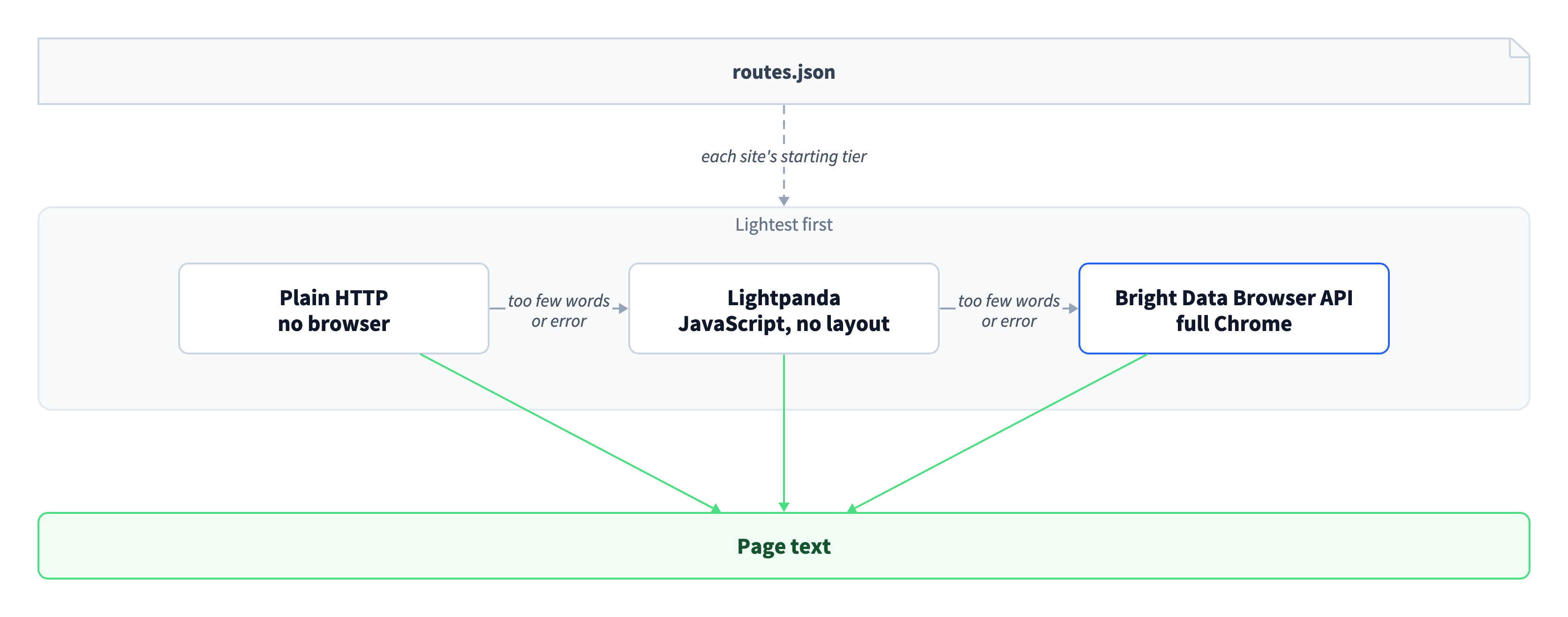
A higher tier runs only when the tier below it fails or returns too few words.
The min_words value is a quarter of the smallest sample’s word count, which detects empty and error pages without rejecting shorter pages of the same template. The router logs each move, and a deleted page with a 404 or 410 status stops without moving up a tier:
"""Start each URL at its site's tier, and move up when a tier fails.

Needs routes.json from calibrate.py and the same Lightpanda server:
BRD_AUTH="brd-customer-<id>-zone-<zone>:<password>" uv run python scrape.py
"""
import asyncio
import json
import os
import re
from urllib.parse import urlsplit

import httpx
from playwright.async_api import async_playwright
from selectolax.lexbor import LexborHTMLParser

COUNTRY = "in"
USER, PASSWORD = os.environ["BRD_AUTH"].split(":", 1)
LIGHTPANDA = "ws://127.0.0.1:9222"
BROWSER_API = (f"wss://{USER}-country-{COUNTRY}:{PASSWORD}"
               "@brd.superproxy.io:9222")
HTTP_UA = "Mozilla/5.0 (compatible; example-crawler/1.0; +https://example.com)"
TIERS = ["http", "lightpanda", "browser_api"]
WORDS = re.compile(r"[^\W\d_]{3,}")
# Stay under Lightpanda's --cdp-max-connections, which defaults to 16 in 1.0.2
LIGHTPANDA_SLOTS = asyncio.Semaphore(8)
# Your own cap on parallel Browser API sessions, separate from Lightpanda's.
# Set it for your workload
BROWSER_API_SLOTS = asyncio.Semaphore(20)
with open("routes.json") as f:
    ROUTES = json.load(f)

URLS = [
    "https://docs.python.org/3/library/pathlib.html",
    "https://github.com/microsoft/playwright-python",
    "https://www.ikea.com/us/en/cat/tables-desks-fu004/",
    "https://www.amazon.com/s?k=monitor",
    "https://www.youtube.com/results?search_query=lightpanda",
    "https://www.tradingview.com/symbols/NASDAQ-NVDA/",
    # Not calibrated
    "https://en.wikipedia.org/wiki/Headless_browser",
    "https://www.zara.com/us/en/woman-dresses-l1066.html",
]


class Gone(Exception):
    """A 404 or 410: no tier can fetch the page, so don't move it up a tier."""


def word_count(text):
    return len(set(WORDS.findall(text.lower())))


async def settle(page, quiet=2.0, cap=15):
    # Wait until the page's text stops changing instead of a fixed sleep.
    # Placeholders under 200 characters don't count. After cap seconds, it
    # stops waiting and uses whatever has rendered
    size, stable = 0, 0.0
    for _ in range(int(cap / 0.5)):
        await asyncio.sleep(0.5)
        try:
            now = await page.evaluate(
                "document.body ? document.body.innerText.length : 0")
        except Exception:  # the page navigated, so start counting again
            now = 0
        stable = stable + 0.5 if now == size and now >= 200 else 0.0
        size = now
        if stable >= quiet:
            return


async def http_text(client, url):
    resp = await client.get(url)
    if resp.status_code in (404, 410):
        raise Gone
    resp.raise_for_status()  # other errors move the URL up one tier
    tree = LexborHTMLParser(resp.text)
    for node in tree.css("script, style, noscript, template"):
        node.decompose()
    return tree.body.text(separator=" ") if tree.body else ""


async def browser_text(pw, url, endpoint, timeout, slots):
    async with slots:
        browser = await pw.chromium.connect_over_cdp(endpoint)
        try:
            page = await (await browser.new_context()).new_page()
            resp = await page.goto(url, wait_until="domcontentloaded",
                                   timeout=timeout)
            if resp and resp.status in (404, 410):
                raise Gone
            # A generic page has no selector to wait for. With your own
            # parser, wait for the element you extract instead
            await settle(page)
            return await page.evaluate(
                "document.body ? document.body.innerText : ''")
        finally:
            await browser.close()


async def fetch(pw, client, url):
    # A site you have not calibrated starts at plain HTTP and moves up
    # when a page returns fewer than 100 distinct words
    route = ROUTES.get(urlsplit(url).hostname,
                       {"engine": "http", "min_words": 100})
    # From the site's tier up to Lightpanda. Browser API comes after the loop
    for tier in TIERS[TIERS.index(route["engine"]):-1]:
        try:
            if tier == "http":
                text = await http_text(client, url)
            else:
                text = await browser_text(pw, url, LIGHTPANDA, 30_000,
                                          LIGHTPANDA_SLOTS)
            if word_count(text) >= route["min_words"]:
                return tier, text
            reason = "too few words"
        except Gone:
            return "gone", ""
        except Exception as e:
            reason = type(e).__name__
        # A rising rate of these lines for a site means the site changed
        print(f"{tier} -> next tier ({reason}): {url}")
    # Browser API is the last tier, so give hard pages more time and retry
    # before giving up
    for attempt in range(3):
        try:
            text = await browser_text(pw, url, BROWSER_API, 120_000,
                                      BROWSER_API_SLOTS)
            if word_count(text) >= route["min_words"]:
                return "browser_api", text
            error = "too few words"
        except Gone:
            return "gone", ""
        except Exception as e:
            error = str(e).splitlines()[0]
        await asyncio.sleep(2 ** attempt)
    return "failed", error


async def main():
    async with async_playwright() as pw, httpx.AsyncClient(
            headers={"User-Agent": HTTP_UA}, follow_redirects=True,
            timeout=30) as client:
        results = await asyncio.gather(
            *(fetch(pw, client, url) for url in URLS))
    for url, (tier, text) in zip(URLS, results):
        print(f"{tier:<11}  {word_count(text):>5} words  {url}")


asyncio.run(main())
The first 6 URLs are new pages from the calibrated sites, not the samples, and the last 2 come from sites without calibration. The first run printed the tier that served each page and the distinct words it returned:
http -> next tier (HTTPStatusError): https://www.zara.com/us/en/woman-dresses-l1066.html
lightpanda -> next tier (too few words): https://www.amazon.com/s?k=monitor
lightpanda    1076 words  https://docs.python.org/3/library/pathlib.html
lightpanda     240 words  https://github.com/microsoft/playwright-python
http           351 words  https://www.ikea.com/us/en/cat/tables-desks-fu004/
browser_api    505 words  https://www.amazon.com/s?k=monitor
lightpanda     887 words  https://www.youtube.com/results?search_query=lightpanda
lightpanda     818 words  https://www.tradingview.com/symbols/NASDAQ-NVDA/
http           490 words  https://en.wikipedia.org/wiki/Headless_browser
lightpanda     473 words  https://www.zara.com/us/en/woman-dresses-l1066.html
All 8 pages returned text, and a second run sent each page to the same tier. Amazon passed calibration on Lightpanda, but a later Amazon page returned too few words, so the router moved it up to Browser API. Track each site’s escalation rate, the share of its pages that move up a tier, and set an alert when it rises.
Run the router in production
The router caps Lightpanda concurrency at 8 sessions, which stays under Lightpanda 1.0.2’s default limit of 16 CDP connections, set by --cdp-max-connections. One Lightpanda server runs all its sessions in one process, so a crash stops every session on that server. At high volume, run several servers on separate ports under a process supervisor that restarts a crashed one, and split the URLs between them. Also send the HTTP and Lightpanda tiers through rotating proxies, so rate limiting on one IP doesn’t look like broken pages.
For crawls, set --obey-robots and --http-nav-delay, which are off by default in 1.0.2, and apply the same per-host rate limits to plain HTTP requests.
Calibration shows each site at one point in time, and sites can change their front ends without notice. For about 1% of the pages that a lower tier serves, also fetch the page through Browser API and compare the results. If the lower tier’s word recall starts to fall, you see the site change before it affects many pages.
Routes only move up, because each calibration run keeps the higher of the old and new tier. Re-run calibration from an empty routes.json on a schedule, so a site can move back down when a lower tier starts working. At larger scale, teams replace static routes with adaptive routing based on each site’s recent success rate per tier.
This per-site setup works best with a known list of target sites. On a broad crawl across thousands of domains, uncalibrated sites start at plain HTTP and move up when a page returns under 100 distinct words. A minimum word count checks quantity, not completeness, so a partial page can still pass. In production, move a page up a tier when your parser’s required fields are empty.
When to use Bright Data Browser API
Bright Data Browser API, also called Agent Browser, runs full Chrome sessions on Bright Data’s infrastructure. Playwright, Puppeteer, and Selenium scripts connect to it, and the router’s browser_text() function runs on it unchanged. Browser API provides the following:
- Full rendering. Pages render with their CSS layout and images, as in the IKEA screenshot above. In a test, it returned a real PDF from
page.pdf()and a full-page screenshot. - Managed browsers at scale. Bright Data runs and maintains the Chrome sessions, so you set concurrency from your script instead of managing a browser fleet.
- Less traffic per page. The
page.route()handler that blocks images works on Browser API too. On an IKEA page, it blocked every image, font, and media request, and the page kept all its text. - Geo-targeting. Each connection sets its own country in the username, such as
-country-us. One script rendered the Steam search above from the US and India, with no separate server per location. The proxy location docs list the countries you can choose. - MCP tools for agents. The Bright Data MCP server includes browser tools for agents, such as navigation, clicks, form filling, and screenshots.
- Live debugging. You can open a running session in Chrome DevTools, with the remote page beside the Elements panel.
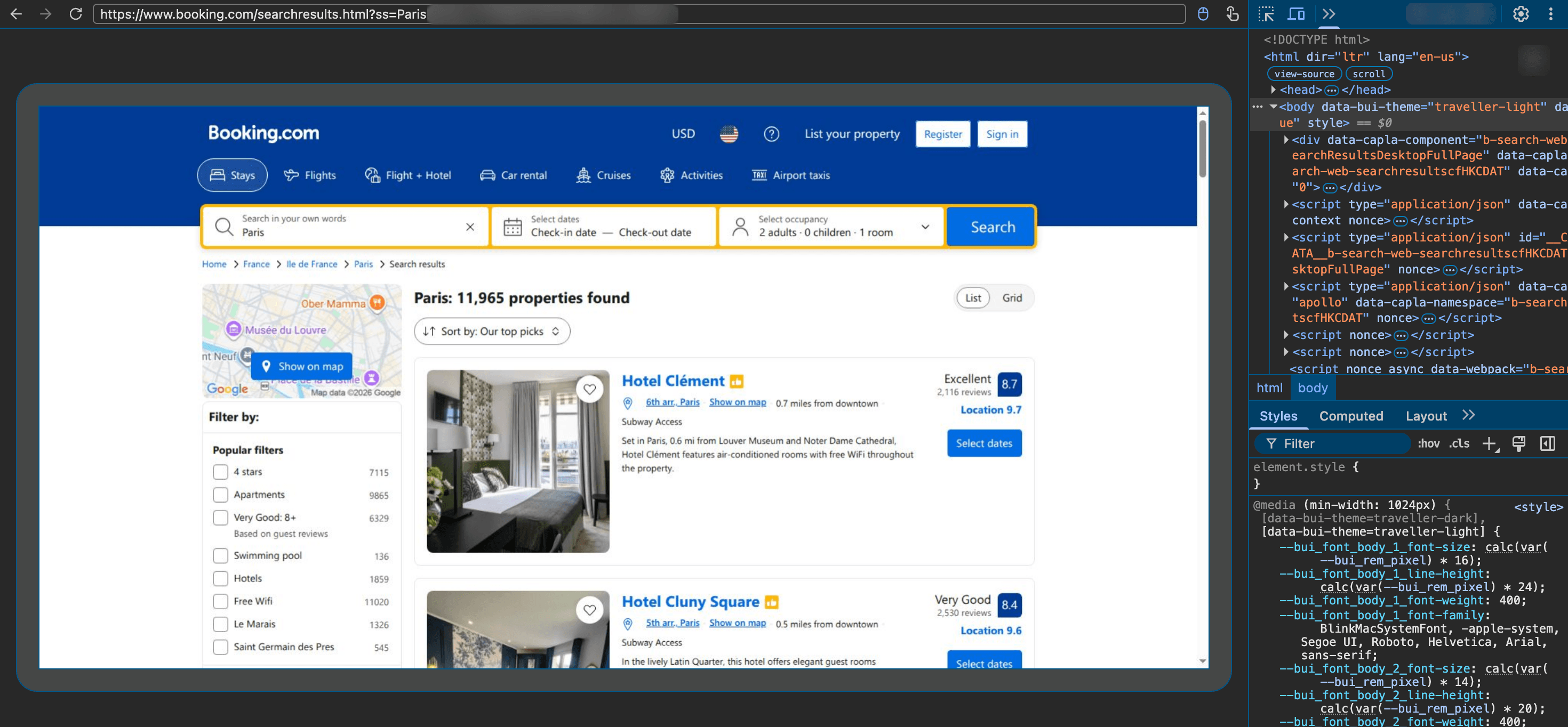
You inspect the remote page and its DOM while your script runs.
Our guide to Browser API vs self-hosted headless browsers compares the 2 setups in more detail.
The router sends Browser API the pages that need Chrome, plus the calibration renders and the 1% spot check for site changes. To estimate your Browser API traffic, multiply the number of those pages by your average page weight. Compare tiers by cost per successful page, counting retries and pages that move up a tier, not by unit price.
Browser API is billed by traffic, and self-service plans include a free monthly allowance and pay-as-you-go pricing. The pricing page lists current rates.
Final thoughts
Treat Lightpanda as the middle tier for your Playwright scripts, between plain HTTP and Chrome, and choose the tier per site. It works best on pages that need JavaScript but not layout, and Chrome stays the better choice for screenshots, dialogs, hover menus, and overlays. These results come from Lightpanda 1.0.2 and Chrome 156, and both change often, so run the checks again after each upgrade. The routing method still holds across releases, because calibration measures each site against a full Chrome render. Start by calibrating a few of your sites on the free allowance of Browser API, which renders the reference and the pages that need Chrome.
FAQ
Does Lightpanda replace Playwright?
No, it replaces the browser behind Playwright, not Playwright itself. Your script connects to Lightpanda with connect_over_cdp() instead of launching Chrome. Lightpanda 1.0.2 matched Chrome on 22 of 44 Playwright checks by default and 30 with 4 flags. Test dialogs, overlays, and screenshots on your sites first.
Is Lightpanda free?
Yes. Lightpanda 1.0.2 is open source under the AGPL-3.0 license, and you can run it on your own servers at no cost. If you modify Lightpanda and users interact with your copy over a network, the license requires you to offer them your source code.
Can Lightpanda take screenshots?
Not of the rendered page. Lightpanda 1.0.2 returns a PNG from page.screenshot(), but the image shows only the page’s text, with no CSS layout, images, or colors. For screenshots of the rendered page, use Bright Data Browser API, which runs full Chrome at scale, or headless Chrome on your own servers.
Does Lightpanda work on Windows?
Not natively. Lightpanda 1.0.2 ships binaries for Linux and macOS only, plus Debian packages and a Docker image. On Windows, run the Linux binary or the Docker image inside WSL2. Scripts on Windows can also drive a local Chrome, or connect to Bright Data Browser API, which runs Chrome on Bright Data’s infrastructure.
What user agent does Lightpanda use?
Lightpanda 1.0.2 sends User-Agent: Lightpanda/1.0 and a Sec-Ch-Ua client hint with the Lightpanda brand. The --user-agent flag changes it, but Lightpanda rejects any value that contains “Mozilla”. Playwright’s user_agent option has no effect either, so sites can identify Lightpanda requests from these headers.
Is Lightpanda faster than Chromium?
Not always, though it uses less CPU time and memory. On 16 public pages, Lightpanda 1.0.2 used under half the CPU time of Chrome’s headless shell, and neither browser was consistently faster. Lightpanda’s own benchmark reported 9 times Chrome’s speed on its demo site, with 25 parallel processes.
Does Lightpanda work with Puppeteer?
Yes. Puppeteer connects with puppeteer.connect() and the WebSocket endpoint ws://127.0.0.1:9222. Puppeteer 25.16 read all 30 Hacker News titles from Lightpanda 1.0.2. Open a new connection for each page that you load in parallel, because each Lightpanda 1.0.2 connection holds 1 browser context with 1 page.
Does Lightpanda work with Selenium?
Yes, through WebDriver. Start the server with --protocol webdriver, then pass its address to Selenium’s webdriver.Remote(). Selenium 4.52 read all 30 Hacker News titles from Lightpanda 1.0.2. The 44 checks in this guide used Playwright, so test your Selenium flows, or run them on Bright Data Browser API.


Technical Writer
 5 years experience
Satyam Tripathi helps SaaS and data startups turn complex tech into actionable content, boosting developer adoption and user understanding.