The Parallel web search API answers an agent’s query from Parallel’s own index, with ranked URLs and Markdown excerpts. Bright Data’s SERP API fetches the live search engine results page (SERP) from Google and other engines. It returns the page that a user in a chosen country or city would see.
Google’s first result for “emergency plumber” in Chicago was a map pack of 3 local businesses. Parallel returned ranked pages with no map pack, so the agent would miss what Chicago users see first.
This guide compares both on results, location, pricing, and full-page content, with runnable code.
TL;DR
- Choose Bright Data when the answer depends on what Google shows. It returns Google’s page, and Parallel’s Advanced mode returned 35 to 43% of that page’s URLs across 30 queries.
- Choose Parallel when Google’s ranking doesn’t matter. Advanced mode returned a median of 4,082 tokens of excerpts per 10 results.
- Local results often change by city. Google’s pages for 3 cities shared no organic URLs on 3 of 4 queries, and Parallel’s location setting accepted countries, not cities.
- Adding Bright Data needs one MCP config entry. One key works for search and scraping. The free tier needs no credit card.
What Bright Data and Parallel return
Bright Data and Parallel answer the same agent request from different sources. Bright Data fetches the search engine’s live results page, and Parallel queries its own search index.
With a live SERP, the agent can also fetch the full pages it chooses:
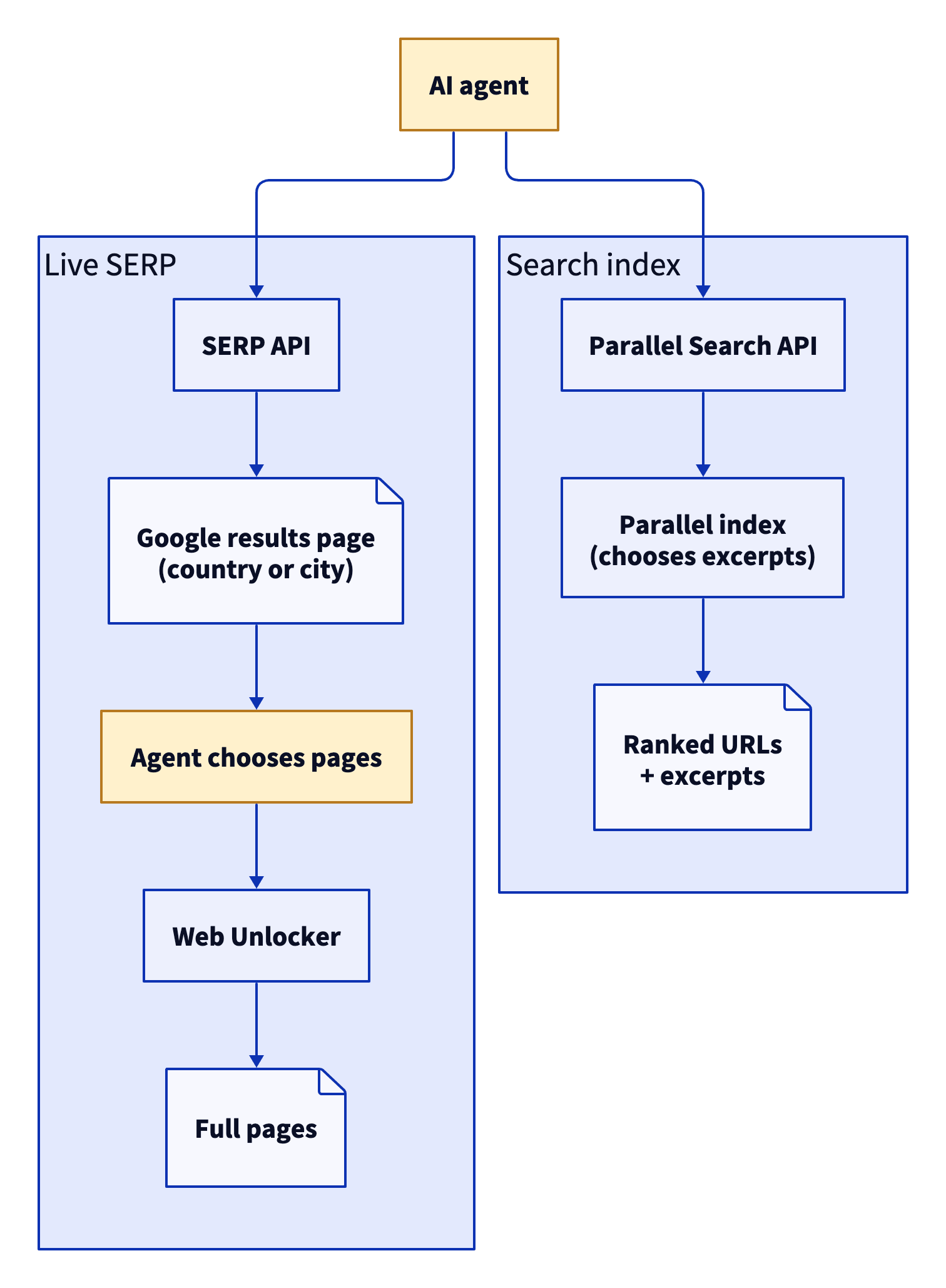
With a live SERP, the agent chooses which pages to read. With a search index, the index chooses the excerpts.
Bright Data: live results and full pages for agents
The SERP API returns the live results page as parsed JSON, raw HTML, or Markdown, including SERP features such as the map pack (Google’s local business listings) and AI Overview. Web Unlocker fetches the pages that those results link to and is built for pages with bot protection. The Bright Data MCP server wraps search and scraping as Model Context Protocol (MCP) tools for agents, and both tools use one API key.
Parallel: ranked excerpts from its own index
Parallel’s Search API accepts a natural-language objective plus short search_queries, and returns ranked URLs with Markdown excerpts chosen for the objective. Its turbo, fast, basic, and advanced modes give a choice between latency and quality, and advanced was the default when tested. Parallel also sells an Extract API for full-page content, plus other agent APIs.
Bright Data vs. Parallel: head-to-head comparison
Bright Data returns the search engine’s live results page plus the pages it links to, and Parallel ranks pages from its own search index. Every fact about Parallel in this table comes from Parallel’s own docs or pricing page, checked during testing. The SERP API page lists Bright Data’s current engines, locations, and plans.
| Bright Data | Parallel | |
|---|---|---|
| Results source | Live results page from the search engine | Parallel’s own index, with a live fetch when its cached copy is older than a configured maximum age |
| Ranking | The engine’s own ranking | Parallel’s relevance ranking for the objective |
| Engines | Google, Bing, and other major engines | Its own index |
| Location | Country and city-level targeting | Country code, from a fixed list. Other codes are ignored with a warning |
| Output | Parsed JSON, HTML, or Markdown of the full results page | URL, title, publish date, Markdown excerpts |
| SERP features | Organic, map pack, AI Overview, People Also Ask, shopping, ads | Not applicable (ranked list only) |
| Page content | Full-page Markdown through Web Unlocker or the MCP server | Excerpts in the same call, full text through Extract |
| Pages with bot protection | Web Unlocker, built for bot-protected sites | No unblocker, and no access to sites that block it, per Parallel |
| MCP server | Hosted or local MCP, free to start with no credit card | Search MCP, free without an API key |
The comparison with the Brave Search API and the comparison with Exa test the same 2 approaches with other index APIs. For a wider shortlist, see the best SERP and web search APIs and the best search tools for AI agents.
Pricing and rate limits: Bright Data SERP API vs. Parallel Search API
The SERP API bills only successful requests, so you pay for the results you receive. You can start on self-serve, pay-as-you-go pricing, and larger monthly plans lower the rate per 1K requests. Parallel priced each search by mode when tested, and its default Advanced mode cost 5 times as much as Turbo and Fast.
Check the Parallel pricing page and the Bright Data SERP API pricing page for current rates before you plan your budget:
| Bright Data SERP API | Parallel (list prices when tested) | |
|---|---|---|
| Search price | Self-serve pay-as-you-go pricing, or monthly Scale plans with a lower rate as volume grows (current rates on the pricing page) | $1 per 1K requests for Turbo and Fast, and $5 per 1K for Basic and Advanced. Each price included 10 results, and extra results cost $1 per 1K |
| Full-page content | Web Unlocker, through the MCP server or its own API (current rates) | Extract at $1 per 1K URLs |
| Free tier | Recurring monthly free tier, no credit card required (current allowance on the pricing page) | $5 in credits a month, for organizations that added a credit card |
| Billing | Only successful requests are billed | Per 1K requests, by mode |
| Rate limits and concurrency | Scale plans list unlimited concurrency | 600 requests per minute by default, custom on enterprise plans |
The unit price is only part of an agent’s bill. Every result, excerpt, and page that the model reads also adds model tokens to the bill. In a loop that searches, reads, and searches again, the model re-reads earlier results on each turn, and those tokens are billed again. Compare the cost per answer, which is API spend plus model token cost, divided by the answers your agent actually uses.
For example, an agent that runs 3 searches and reads 3 pages makes 6 API calls per answer. Multiply those calls by each API’s current rates, then add the model tokens that the agent reads, to compare the cost per answer.
Same query, different results: Parallel’s overlap with Google
Parallel’s default Advanced mode returned 35 to 43% of the URLs on Google’s first page. Its Turbo and Fast modes returned 6 to 18%.
I sent the same 30 US queries to Google, through the SERP API, and to all 4 Parallel modes, then compared the top 10 URLs. The table shows the share of Google’s top URLs that each Parallel mode also returned, with each group’s query count in brackets. Google’s first page changed between runs, so a range shows the results of 2 runs:
| Group (queries) | Advanced | Basic | Fast | Turbo |
|---|---|---|---|---|
| Factual (5) | 35 to 61% | 33 to 53% | 15 to 18% | 11 to 17% |
| Technical docs (5) | 50 to 63% | 64% | 27% | 11% |
| News (4) | 25 to 36% | 31 to 42% | 26 to 39% | 5 to 8% |
| Brand and SEO (6) | 21 to 42% | 29 to 52% | 12 to 16% | 3 to 8% |
| Commercial (6) | 35 to 52% | 37 to 53% | 8 to 10% | 0 to 2% |
| Local (4) | 17 to 25% | 17% | 0% | 0% |
| All queries (30) | 35 to 43% | 39 to 45% | 15 to 18% | 6% |
Parallel’s SDK recommended a natural-language objective and 2 or 3 search queries per call. With those settings, Advanced mode returned 34% and Fast mode returned 11%, so the recommended settings didn’t raise the overlap. Each group has 4 to 6 queries, so treat each group row as a rough indicator and the 30-query row as the overall figure.
Parallel ranks pages for the objective, which works well for open research questions. Rank tracking, AI visibility tracking, brand monitoring, and ad monitoring need the page that users actually see. That page is Google’s results page, which the SERP API returns.
City-level targeting: Google’s results in Chicago, Austin, and Seattle
Google’s results changed by city on 3 of 4 local queries, and Parallel’s location setting accepted countries, not cities, in testing. The SERP API fetched Google’s first page for 4 local-intent queries in Chicago, Austin, and Seattle:
| Query | Organic URLs shared between any 2 cities | Map pack businesses shared |
|---|---|---|
| emergency plumber | None | None |
| best pizza | None | None |
| dentist open saturday | None | None |
| car insurance quotes | 6 of 9 | Google showed no map pack |
Above the map pack, Google’s page for Chicago shows the location that it applied:
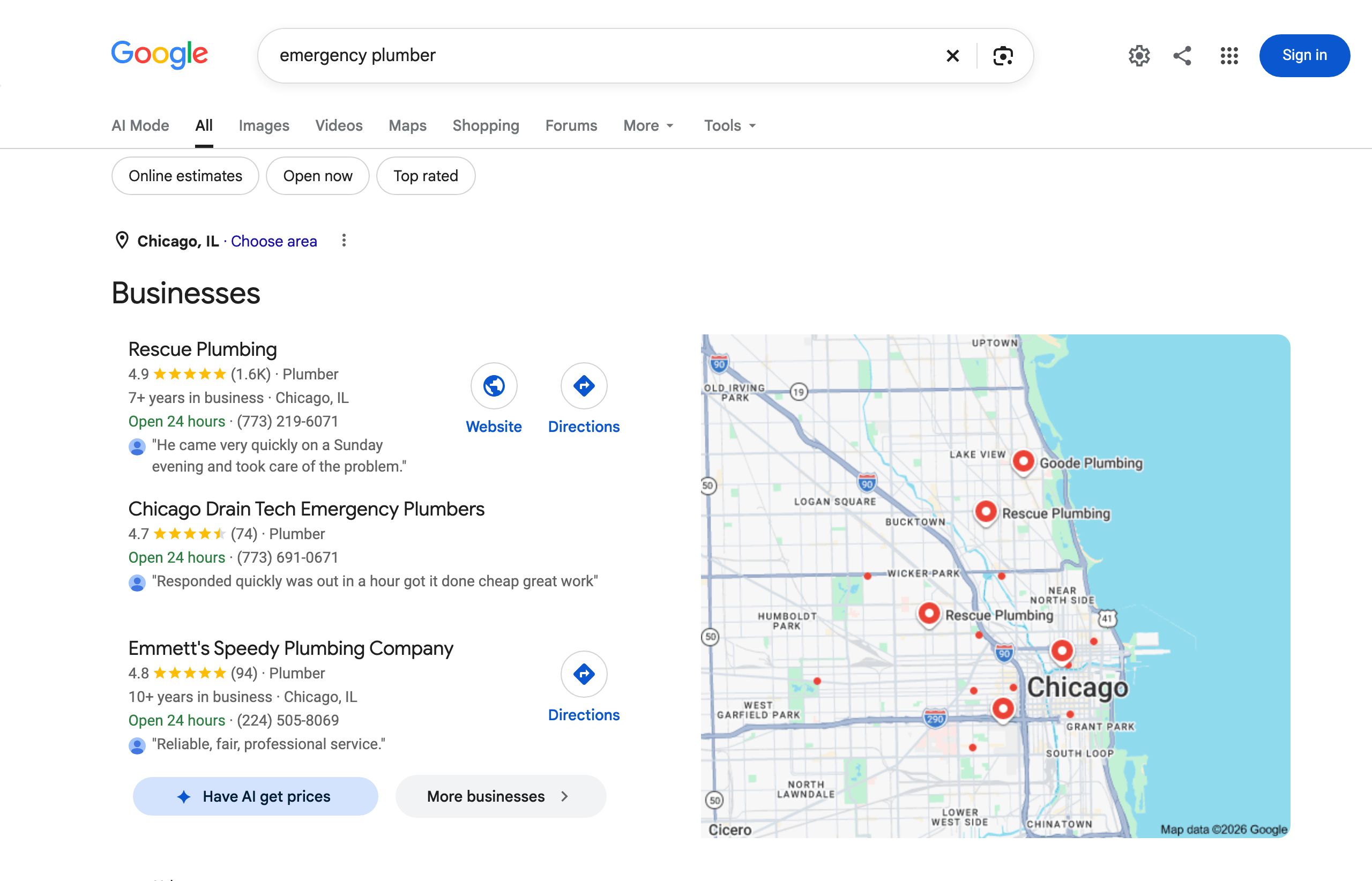
The location label confirms the targeting.
Austin’s page for the same query lists other businesses:
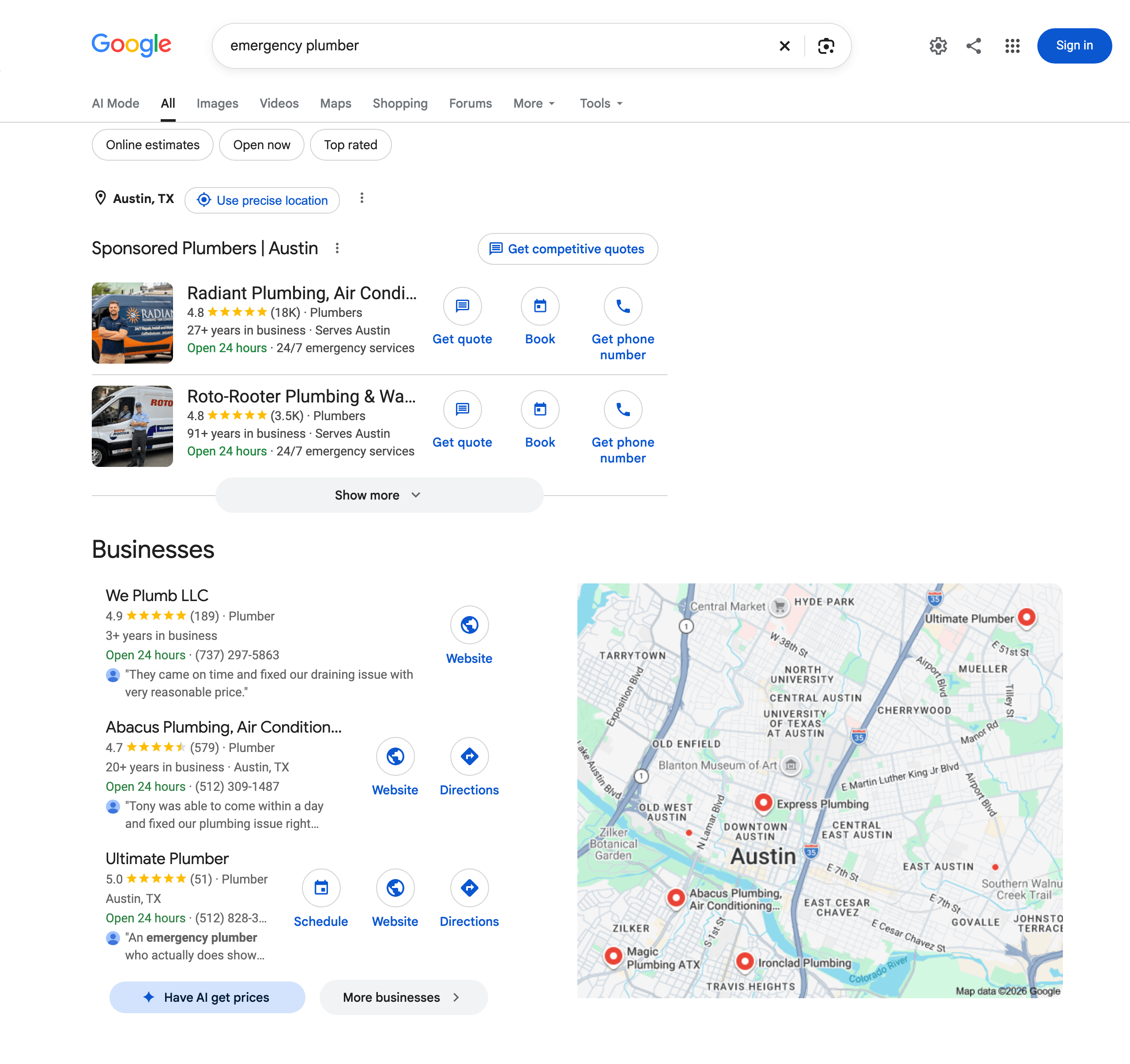
Same query and engine, no shared businesses. A country-level setting can’t request either city’s page.
For “dentist open saturday” with location set to the US, Parallel’s results included a Los Angeles page and a Yelp search for Port St. Lucie, Florida. Adding the city name to the query text helped Parallel match more of Google’s local results. With the city name added to each query, Advanced mode returned 39 of the 107 URLs on Google’s city-targeted pages. Parallel’s excerpts named 4 of the 27 businesses in Google’s map packs.
With location set to the UAE, Vietnam, or Nigeria, Parallel still returned results, plus a warning that the location “is not currently supported. Ignoring the location parameter.” If you use Parallel, check the warnings field, because those results had no country applied. The SERP API applies the country on each request, and the same query returned local map packs in all 3 countries.
City targeting in the SERP API uses Google’s uule parameter. The SERP API accepts a plain canonical location name, such as Chicago,Illinois,United States, with no extra encoding. Add brd_mobile=1 to the search URL to get the mobile results page, since many rank trackers report mobile and desktop results separately.
SERP features that a search index doesn’t return
Across the 30 test queries, Google’s pages showed these SERP features, and Parallel’s index returned none of them:
| SERP feature | Queries that showed it |
|---|---|
| People Also Ask | 21 of 30 |
| AI Overview | 15 of 30 |
| Video results | 8 of 30 |
| Map pack | 4 of 30 |
| Shopping results | 4 of 30 |
| Ads | 3 of 30 |
An agent that reports what Google tells users needs the AI Overview itself. The overview for “best crm for small business” recommended HubSpot, Pipedrive, and Zoho, and listed its sources in a panel beside the answer:
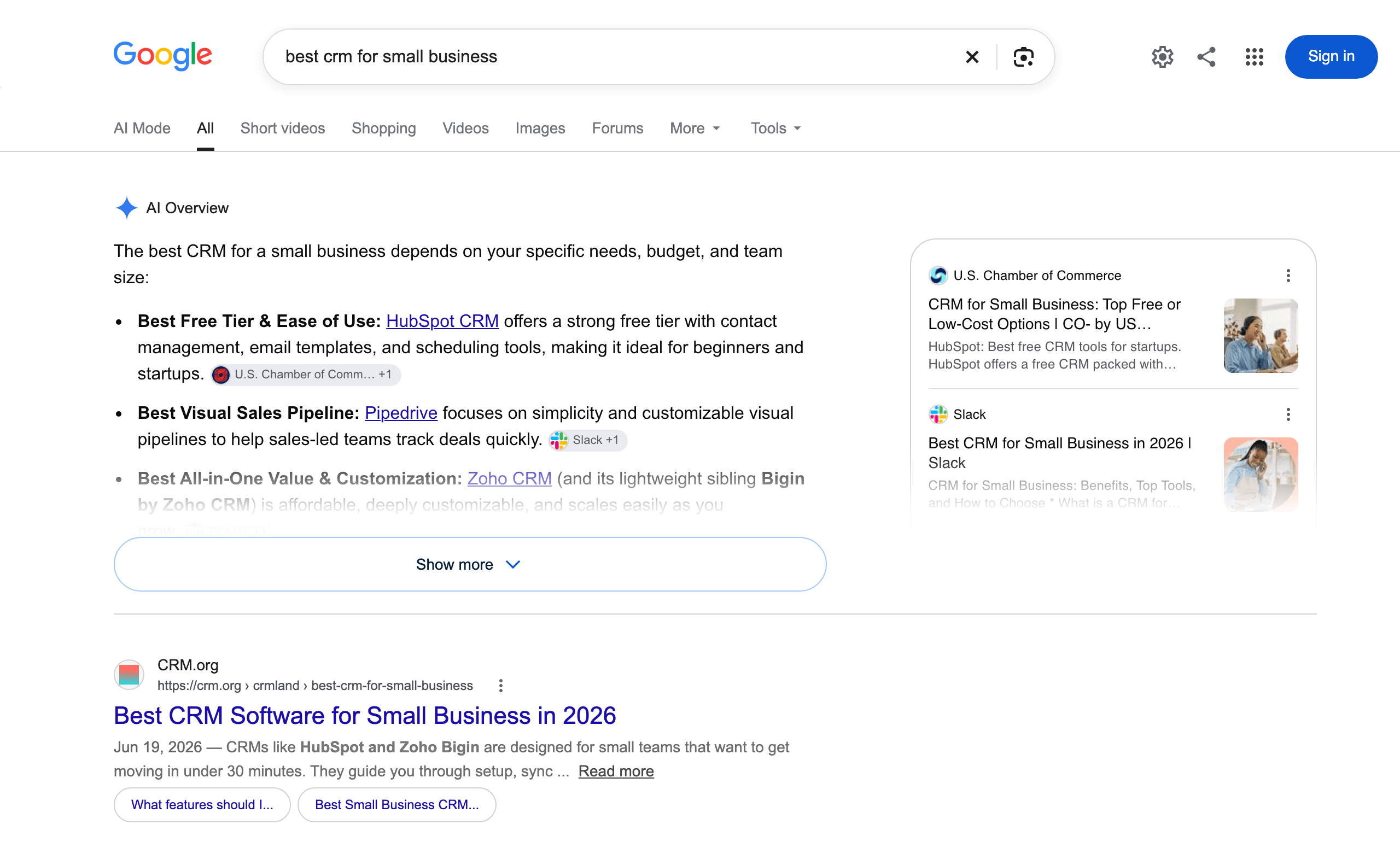
Google updates the overview over time, so the answer can change between runs.
The 15 overviews cited 64 sources, and Parallel’s Fast and Advanced results for the same queries included 7 of them. About 9 in 10 of the pages that Google’s AI cited were not in Parallel’s results.
The SERP API with brd_json=1 returns the full page as parsed JSON, with the overview in an ai_overview field and its sources under references. An agent can quote the overview and check which pages Google cited.
Live SERP vs. search index: recency, cached copies, and blocked pages
The SERP API fetches Google’s page at request time, so its results include new stories as soon as Google shows them. For 14 news stories that Google News labeled 20 minutes to 17 hours old, I queried Parallel with key terms from each headline. Advanced mode returned the exact story URL for 9 of the 14, including a story published 55 minutes earlier. Fast mode returned 6, and the 2 modes together found 10.
The 14 stories came from Google News through the SERP API, with tbm=nws for news results and tbs=qdr:d for the past day. For news monitoring, where every missed story counts, query Google News the same way.
For full pages, Parallel’s Extract API returned content for 15 of 18 retail, travel, and listings pages in 2.1 seconds or less. Parallel’s pricing page listed 1 to 3 seconds for cached pages and 60 to 90 seconds for live fetches. That timing matches cached copies, and a cached copy can show the wrong location for your user.
The copies that Extract returned showed a delivery location that the requests didn’t ask for. The Target page showed “Ship to 51503 Council Bluffs” near the top, and the Walmart page showed “Sacramento, 95829” in the same place. If an agent quotes prices, stock, or delivery times to a user in Austin, the agent needs the page for that user’s location. The SERP API accepts the country or city on each request, and Web Unlocker fetches the page at request time from the country you choose.
Parallel’s website described Parallel as having “no ability to reach a site that has decided to block you” and no unblocker for those sites. Web Unlocker is built for pages with bot protection, and the MCP server’s scrape_as_markdown and scrape_batch tools route requests through it.
Full pages through the MCP server: the agent chooses what to read
In the Bright Data MCP server, search_engine returns Google’s results list. scrape_batch then returns the pages the agent chooses as full Markdown in a single call. One API key and one free tier work for both tools.
The results list is compact, with link, title, and description per result. Across the 30 test queries, the list had a median of about 720 tokens with the o200k_base tokenizer. Parallel returned excerpts with every search instead. A 10-result response had a median of 5,438 tokens in Fast mode and 4,082 tokens in Advanced mode.
With excerpts, every search adds the excerpt text to the context. With the compact results list, only the pages the agent opens add page text. The agent decides how many pages to open, so it controls how much page text each answer adds.
Full pages keep the tables, code blocks, and prices that an excerpt may leave out. Split long pages into chunks and keep the most relevant ones before the model writes the answer. The context window then contains what the question needs.
Connect the hosted MCP server and load only the 2 tools that this workflow uses. Each loaded tool adds its definition to the agent’s context before the first call, so fewer tools keep the context small.
This .mcp.json for Claude Code reads the key from the BRIGHTDATA_API_KEY environment variable. The key is not stored in the file or shown in logged URLs:
{
  "mcpServers": {
    "bright-data": {
      "type": "http",
      "url": "https://mcp.brightdata.com/mcp?tools=search_engine,scrape_batch",
      "headers": {
        "Authorization": "Bearer ${BRIGHTDATA_API_KEY}"
      }
    }
  }
}
Save it as .mcp.json in your project root. Clients that support custom headers accept the same URL and header in their own config format. Get an API key from your Bright Data account settings. The MCP tools reference documents the tools and tool groups.
In testing, the hosted server wrapped the output of search_engine and scrape_batch in markers that label it as untrusted web data. The markers tell the model to treat each page as data rather than as instructions. They add a layer of protection against prompt injection that works alongside the agent’s own defenses.
When to choose Bright Data or Parallel
The right choice depends on the job the search tool does inside your agent.
Choose Bright Data when the agent needs the live results page or the full page:
- What Google shows at request time, including rankings, AI Overviews, People Also Ask, ads, shopping results, and the map pack
- Results for a specific country or city
- Engines beyond Google, such as Bing, Baidu, Yandex, and Naver
- High-volume batch jobs, with unlimited concurrency listed for Scale plans
- Full pages through Web Unlocker, built for bot-protected sites, on the same key as search
Choose Parallel when the agent needs ranked excerpts to answer from:
- Ranked pages with excerpts in a single call
- Low-latency Turbo and Fast modes
- A low price per search in Turbo and Fast
- Open research questions where Google’s ranking doesn’t matter
Some agents do both jobs. In that case, wrap both in a single search tool that routes each query by intent. Local, commercial, and “what does Google show” questions go to the SERP API, and open research questions go to Parallel. The same wrapper is a good place to log every call and set spending limits.
Some questions don’t need a search. When the agent checks the same known pages on a schedule, such as a pricing page every morning, fetch them directly through Web Unlocker. A direct fetch avoids paying for the same search on every check.
Both start free. The SERP API has a recurring monthly free tier with no credit card required. Parallel offered $5 in credits a month when tested.
Test methodology
The overlap and SERP feature results come from one setup:
- The same 30 queries, in 6 groups, went to Google through the SERP API and to all 4 Parallel modes.
- Location was set to the US, and Google returned English desktop results.
- Each query was Parallel’s objective and its only search query.
- The comparison used the top 10 URLs from each API, after removing tracking tags such as Google’s
srsltid. - Each overlap figure is the average share per query in one run. Advanced and Fast ran twice, and Turbo and Basic ran once, a few hours later.
- SERP feature counts come from the first run. In the second run, Parallel’s results included 6 of the 61 sources that the AI Overviews cited.
Measure overlap with Google on your own queries
Parallel’s overlap with Google depends on the queries. Sample 100 or more queries from your agent’s logs, split by type such as local, commercial, and technical. Logged queries include the variety that hand-written test queries miss. Use the SERP API free tier for the Google half of the test.
Before you run the script, get a Parallel API key and the name of your SERP API zone. A zone is the named product configuration that each Bright Data request specifies. To add one, open the Bright Data control panel and choose Create API > SERP API. Copy the zone name from its Overview tab:
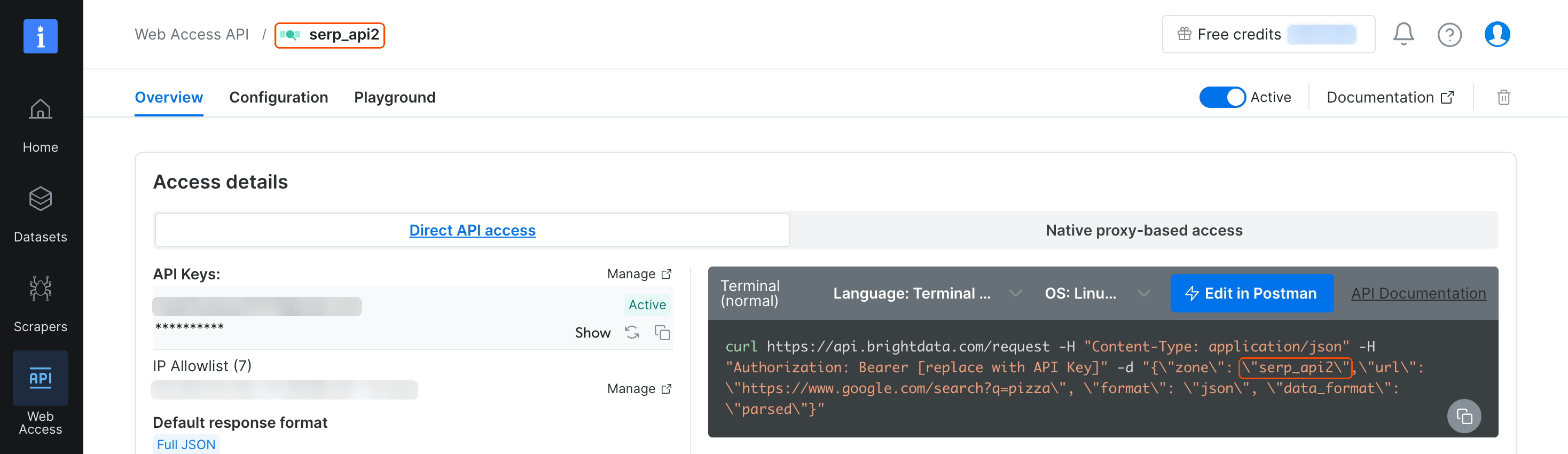
The API key comes from the Manage link on the same page.
Save this script as overlap_check.py. It accepts queries as arguments and prints how many of Google’s top URLs also appear in Parallel’s top 10:
# /// script
# requires-python = ">=3.9"
# dependencies = ["requests"]
# ///
# Prints how many of Google's top 10 URLs (from the Bright Data SERP API)
# also appear in Parallel's top 10. Needs BRIGHTDATA_API_KEY,
# BRIGHTDATA_SERP_ZONE, and PARALLEL_API_KEY in the environment.
import json
import os
import sys
import time
import urllib.parse
from concurrent.futures import ThreadPoolExecutor

import requests
from requests.adapters import HTTPAdapter
from urllib3.util import Retry

BRIGHTDATA_API_KEY = os.environ["BRIGHTDATA_API_KEY"]
BRIGHTDATA_SERP_ZONE = os.environ["BRIGHTDATA_SERP_ZONE"]
PARALLEL_API_KEY = os.environ["PARALLEL_API_KEY"]
MODE = os.environ.get("PARALLEL_MODE", "advanced")
# Optional canonical location name, e.g. "Chicago,Illinois,United States"
LOCATION = os.environ.get("GOOGLE_LOCATION", "")


session = requests.Session()
# Retry 429 (too many requests), waiting as long as Retry-After asks
session.mount("https://", HTTPAdapter(max_retries=Retry(
    total=3, status_forcelist=[429], allowed_methods=None,
    backoff_factor=1, raise_on_status=False)))


def post(url, headers, body, timeout):
    resp = session.post(url, headers=headers, json=body, timeout=timeout)
    resp.raise_for_status()
    return resp


def key(url):
    # Compare URLs without scheme, "www.", fragment, trailing slash, or
    # tracking tags such as Google's srsltid, which can differ between requests
    parts = urllib.parse.urlsplit(url.lower().split("#")[0])
    query = urllib.parse.urlencode(
        [(k, v) for k, v in urllib.parse.parse_qsl(parts.query)
         if not k.startswith(("utm", "srsltid"))])
    host = parts.netloc.removeprefix("www.")
    return (host + parts.path).rstrip("/") + ("?" + query if query else "")


def google_top10(query):
    params = {"q": query, "gl": "us", "hl": "en", "brd_json": "1"}
    if LOCATION:
        params["uule"] = LOCATION
    body = {"zone": BRIGHTDATA_SERP_ZONE, "format": "raw",
            "url": "https://www.google.com/search?"
                   + urllib.parse.urlencode(params)}
    headers = {"Authorization": f"Bearer {BRIGHTDATA_API_KEY}"}
    resp = post("https://api.brightdata.com/request", headers, body, 120)
    # Bright Data reports request status in the x-brd-error header
    if resp.headers.get("x-brd-error"):
        raise RuntimeError(resp.headers["x-brd-error"])
    serp = resp.json()
    # Confirm Google applied the location before using the results
    city = LOCATION.split(",")[0]
    applied = serp.get("general", {}).get("location", "")
    if city and not applied.startswith(city):
        raise RuntimeError(f"Google did not apply the location {LOCATION}")
    return [r["link"] for r in serp.get("organic", [])][:10]


def parallel_top10(query):
    body = {"objective": query, "search_queries": [query], "mode": MODE,
            "advanced_settings": {"location": "us", "max_results": 10}}
    resp = post("https://api.parallel.ai/v1/search",
                {"x-api-key": PARALLEL_API_KEY}, body, 60)
    return [r["url"] for r in resp.json()["results"]][:10]


def with_retries(fetch, query, attempts=3, pause=15):
    # Retry either API a few times, with a pause between attempts
    for attempt in range(attempts):
        try:
            return fetch(query)
        except (RuntimeError, requests.RequestException) as err:
            # A 4xx response means the request itself needs fixing
            response = getattr(err, "response", None)
            if response is not None and response.status_code < 500:
                raise
            if attempt == attempts - 1:
                raise
            time.sleep(pause)


def compare(query):
    google = with_retries(google_top10, query)
    parallel = with_retries(parallel_top10, query)
    shared = {key(u) for u in google} & {key(u) for u in parallel}
    return {"query": query, "mode": MODE, "location": LOCATION,
            "shared": len(shared), "total": len({key(u) for u in google}),
            "google": google, "parallel": parallel}


def safe_compare(query):
    # Keep the other queries' results if one query fails
    try:
        return compare(query)
    except (RuntimeError, requests.RequestException) as err:
        return {"query": query, "error": str(err)}


# Queries come from the arguments, or one per line on stdin
queries = sys.argv[1:] or [line.strip() for line in sys.stdin if line.strip()]
# Run the queries concurrently and print results in input order
with ThreadPoolExecutor(max_workers=8) as pool:
    results = list(pool.map(safe_compare, queries))
# Keep the raw URLs so the results can be re-scored without new requests
with open("overlap_results.jsonl", "a") as f:
    f.writelines(json.dumps(r) + "\n" for r in results)
ok = [r for r in results if "error" not in r]
for r in results:
    if "error" in r:
        print(f"Error ({r['error']}): {r['query']}")
    else:
        print(f"{r['shared']}/{r['total']} of Google's top URLs also in "
              f"Parallel ({MODE}): {r['query']}")
mean = sum(r["shared"] / max(r["total"], 1) for r in ok) / max(len(ok), 1)
noun = "query" if len(ok) == 1 else "queries"
print(f"Average across {len(ok)} {noun}: {mean:.0%} of Google's top "
      "URLs also in Parallel")
The script has 6 parts:
google_top10fetches Google’s first page through the SERP API withbrd_json=1and checks that Google applied the location.parallel_top10sends the same query to Parallel’s Search API in the mode you choose.keynormalizes each URL, so the same page matches even when tracking tags differ.with_retriesretries either API a few times, with a pause between attempts.comparecounts the shared URLs per query, and the last lines print the results and save the raw URLs.safe_comparerecords the error when a query fails, so the results for the other queries are kept.
Pass queries as arguments, or pipe a file into the script with one query per line. uv installs requests from the script’s header on the first run. Without uv, install requests in a virtual environment and run the script with python instead of uv run. Set the zone name and both API keys, then run the script:
export BRIGHTDATA_API_KEY="your-bright-data-api-key"
export BRIGHTDATA_SERP_ZONE="your-serp-zone-name"
export PARALLEL_API_KEY="your-parallel-api-key"
uv run overlap_check.py "best crm for small business" \
  "postgres jsonb index performance" "dentist open saturday"
# To read one query per line from a file instead, run:
# uv run overlap_check.py < queries.txt
# To test another Parallel mode, set it first, for example:
# export PARALLEL_MODE=fast
If a line shows a 4xx error, check the zone name and both API keys. For those 3 queries, one run printed:
2/9 of Google's top URLs also in Parallel (advanced): best crm for small business
4/9 of Google's top URLs also in Parallel (advanced): postgres jsonb index performance
1/9 of Google's top URLs also in Parallel (advanced): dentist open saturday
Average across 3 queries: 26% of Google's top URLs also in Parallel
The last line averages the per-query share, the same measure as the overlap table. The 9 in each line is the number of organic results on Google’s first page for that query. Results change between runs, and the Postgres query shared 0 to 6 URLs across 9 runs. Base a decision on many queries, and run each query more than once.
Each run also appends the raw URLs to overlap_results.jsonl. You can re-score those results later, for example with a different URL-matching rule, without paying for new requests. When your agent or its traffic changes, rerun the check on a new sample from your logs.
Set GOOGLE_LOCATION to a canonical location name to run the check for a single US city:
GOOGLE_LOCATION="Chicago,Illinois,United States" \
  uv run overlap_check.py "emergency plumber"
With Chicago, the script printed:
0/9 of Google's top URLs also in Parallel (advanced): emergency plumber
Average across 1 query: 0% of Google's top URLs also in Parallel
For open research queries, where Google’s ranking doesn’t matter, add 2 more checks to the overlap measure. Check whether the retrieved pages contain the evidence the answer needs, and whether the answer is complete. Use an LLM judge with a written rubric, and check the judge against a sample of human labels.
Final thoughts
Bright Data’s SERP API returns the page a person would see in a given city, with features such as the map pack and AI Overview. In 30 queries run twice, Parallel’s Advanced mode returned 35 to 43% of Google’s first-page URLs, so your choice changes what your agent reads.
For full-page content, the MCP server fetches pages with the same API key through Web Unlocker, built for sites with bot protection. Parallel’s ranked excerpts are a good fit for open research questions where Google’s ranking doesn’t matter. Run the overlap script on your agent’s logged queries with the SERP API free tier, then connect the MCP server to your agent.
FAQ
What is Parallel web search?
Parallel web search is a search API that Parallel Web Systems built for AI agents. It answers queries from its own web index with ranked URLs and Markdown excerpts, in several speed and quality modes. Bright Data’s SERP API returns Google’s live results page instead, for a chosen country or city.
Is Parallel search free?
Partly. Parallel’s pricing page listed $5 in free credits a month when tested, enough for up to 5K Turbo or Fast searches. The credits needed a credit card on the account, and Parallel’s hosted Search MCP was free without an API key. Bright Data’s SERP API includes a recurring monthly free tier, with no credit card required.
How much does the Parallel Search API cost?
Parallel’s pricing page listed $1 per 1K requests for Turbo and Fast and $5 per 1K for Basic and Advanced when tested. Each price included 10 results, and extra results cost $1 per 1K. Parallel’s Extract API cost $1 per 1K URLs. Bright Data’s SERP API is self-serve and bills only successful requests, with current plans on its pricing page.
Is Bright Data or Parallel better for AI agents?
Neither API is better for every job. Choose Bright Data when the agent needs Google’s live results page, city targeting, AI Overviews, or pages with bot protection. Choose Parallel when Google’s ranking doesn’t matter, such as for open research questions. In 30 test queries run twice, Parallel’s Advanced mode returned 35 to 43% of Google’s first-page URLs.
Which API is best for web search?
For agents that need Google’s results page, use a SERP API such as Bright Data’s. It returns the live results page with city-level targeting and SERP features such as AI Overviews. For open research, an index API such as Parallel returns excerpts ranked for an objective.


Technical Writer
 5 years experience
Satyam Tripathi helps SaaS and data startups turn complex tech into actionable content, boosting developer adoption and user understanding.