Job boards only search by exact words, so the right role stays hidden when your phrasing doesn’t match the posting. Semantic search matches on meaning instead. We build it end to end, then measure which search mode wins instead of assuming the most complex one does.
TL;DR
This guide builds a semantic job search engine over 200 real LinkedIn job postings using Bright Data (scraping), Cohere (embeddings + rerank), and LanceDB (local vector store).
- Keyword search matches exact words. Vector search matches meaning. A query like “engineer who works on LLMs” finds a “GenAI Developer” role that keyword search misses.
- Bright Data’s Web Scraper API returns structured LinkedIn jobs as JSON for $0.0015 per record, with no HTML parsing or scraper maintenance.
- LanceDB runs locally and combines vector search with SQL filters (salary, seniority) in 1 query, plus full-text search and Cohere reranking.
- On 10 test queries, vector search scored 70% precision@3 vs 43% for keyword. Hybrid + rerank added no measurable lift at this scale, so below ~10k rows vector alone is a reasonable default.
- The full project is 9 small files, including an eval harness, and the complete code is on GitHub. The whole run costs ~$0.34.
The problem with keyword search
Keyword search on a job board does exactly what you ask. It returns postings whose title or description contains the literal tokens in your query. Ask for “engineer who works on LLMs and prompt engineering” and you’ll miss roles like “GenAI Developer” even when they’re a perfect fit. Lexical search matches exact words, not meaning.
Vector search matches on meaning. Each job description is converted into an embedding (a high-dimensional vector that captures its semantic content), and so is your query. A job whose vector is close to your query’s is a good match in meaning, even when it shares none of the same words.
Turning that into a working search engine takes 3 pieces:
- Bright Data scrapes 200 real LinkedIn job postings into clean structured JSON.
- Cohere turns the descriptions into embeddings and reranks the final results.
- LanceDB stores the embeddings locally and serves hybrid (vector + full-text) queries with SQL-style filters.
The stack at a glance
What each layer does, and why we use it:
| Layer | Tool | Why this one |
|---|---|---|
| Web data | Bright Data Web Scraper API | Pre-built LinkedIn scraper returns structured JSON with salary, seniority, and location, with no HTML parsing or scraper maintenance. |
| Embeddings | Cohere embed-english-v3.0 |
Asymmetric encoding (different input types for documents vs queries). Cohere also offers embed-v4.0, which is multimodal. We use v3 here for its English-only price/latency profile (plan to re-embed before v3’s end-of-life). |
| Reranker | Cohere rerank-v3.5 |
We pin v3.5 for its price/latency profile. Cohere also offers rerank-v4.0 (-pro for quality, -fast for latency). |
| Vector store | LanceDB | Local, embedded, no servers. It supports hybrid (vector + BM25) search and SQL prefilters. |
| UI (optional) | Streamlit | Minimal-code web UI for a Python data app. |
This stack runs from a single Python venv on your laptop. Bright Data and Cohere are the only managed services involved.
Setup
The complete, runnable project is on GitHub. Clone it and install the dependencies (Python 3.10 or newer):
git clone https://github.com/triposat/semantic-job-search.git
cd semantic-job-search
python -m venv .venv && source .venv/bin/activate
pip install -r requirements.txt
Copy the example env file and add your two API keys, a Bright Data token and a Cohere key from dashboard.cohere.com (a trial key works for the whole guide):
cp .env.example .env
# then edit .env with your keys:
#   BRIGHTDATA_API_TOKEN=...
#   COHERE_API_KEY=...
With both keys in place, run python scrape.py to pull the data and python index.py to build the index.
Architecture
The system is two flows, not one. Ingest builds the index (run once, or on a schedule). Query runs on every search. Both use Cohere and LanceDB, but for different work.
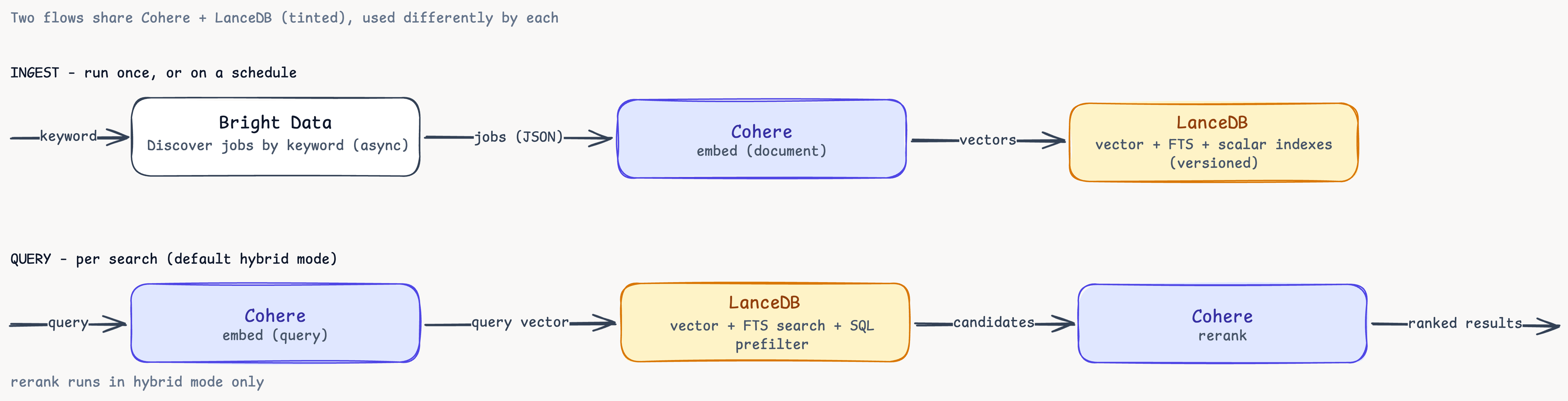
The two flows side by side. Ingest embeds documents and stores them. Query embeds the search text, runs vector + full-text search with a SQL prefilter, then reranks. Cohere and LanceDB appear in both flows but do different work in each, which is why rerank never touches the ingest path.
3 scripts run the pipeline: scrape.py, index.py, search.py. 6 more helpers: lib.py (shared search backend), compare.py (mode comparison), eval.py (precision@3), stats.py (dataset summary), versions.py (snapshot browser), and app.py (Streamlit UI).
Scrape LinkedIn with Bright Data
LinkedIn is a major source for job data, but it’s hard to scrape reliably: rate limits, dynamic markup, and HTML that changes without notice. The Web Scraper API returns clean structured JSON from pre-built endpoints, so you don’t maintain parsers.
Choose the right endpoint
Bright Data exposes several LinkedIn scrapers:
- People profiles → individual member profiles
- Company information → company pages
- Job listings → Collect by URL → specific job URLs you already have
- Job listings → Discover by keyword ← we want this
- Job listings → Discover by URL → jobs from a search-results URL
- LinkedIn posts and People search → other entity types
Discover by keyword is the right fit because we want bulk job discovery from a search query. A single API call returns up to 1,000 structured job postings per keyword, including title, company, location, seniority level, employment type, salary range where listed, and the full job description.
Each scraper has its own dataset_id. To find one, open Bright Data’s Scrapers Library, search for the site (here, linkedin.com), and open it. Pick the Job listings → Discover by keyword endpoint, and its dataset_id (gd_lpfll7v5hcqtkxl6l) and a ready-to-run request appear in the Code examples panel. A valid token is all scrape.py needs to call it.
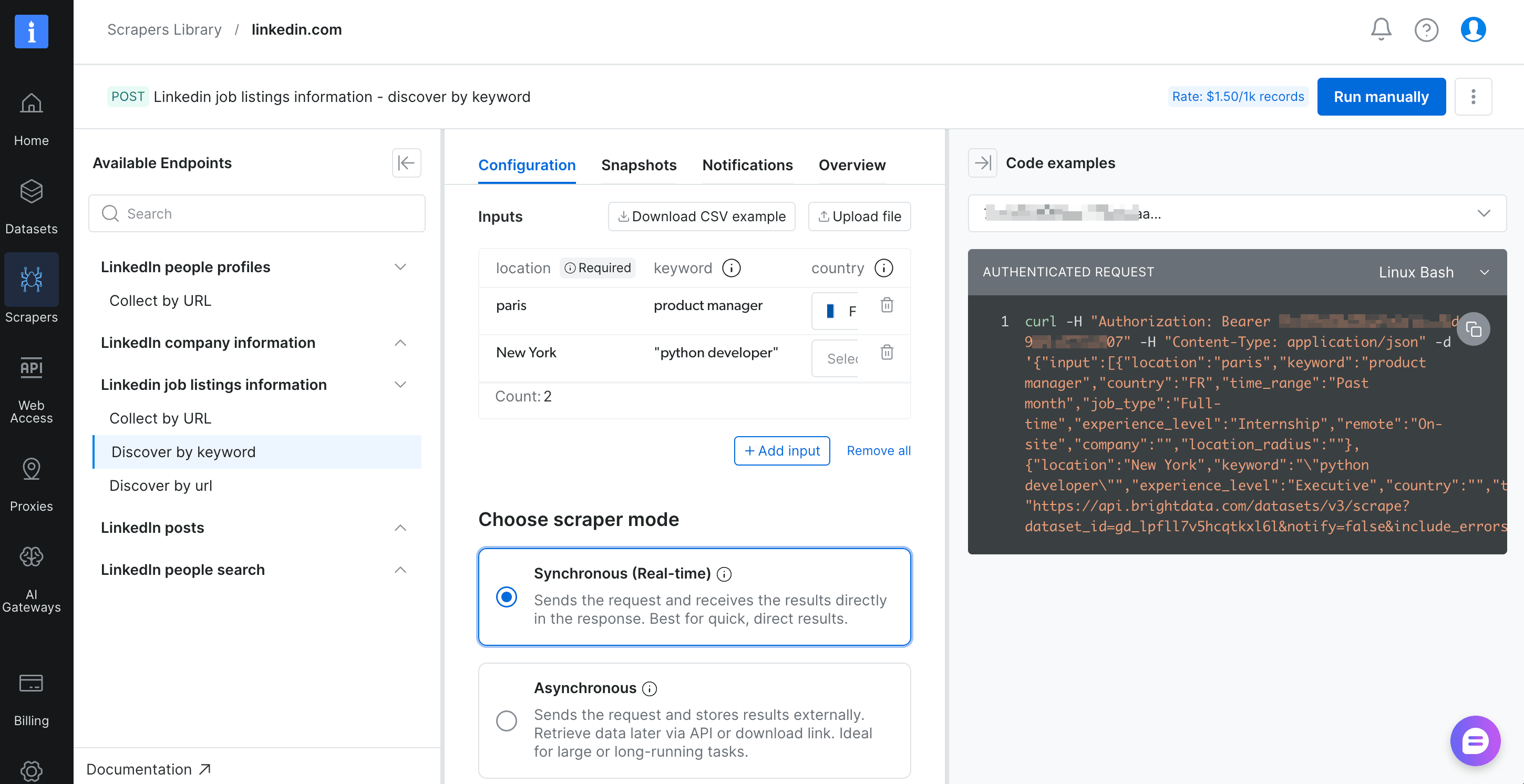
The Discover by keyword scraper page. The Code examples panel on the right is where you’ll find the dataset_id.
Sync vs async
Bright Data offers 2 delivery modes:
- Synchronous (
POST /datasets/v3/scrape) returns the data inline, best for tiny batches. - Asynchronous (
POST /datasets/v3/trigger) returns a snapshot ID. You poll for completion and download the result, best for anything bigger.
In our runs, response time averaged ~6 seconds per input. For 2 keywords with limit_per_input=100 (200 jobs total), a sync call has to hold the connection open for the whole batch, which risks timing out. Async is the safe default.
Control cost with per-input limits
The query parameter limit_per_input=N caps how many results each input search returns, which is exactly the knob you want for predictable spend:
2 keywords × 100 jobs × $0.0015 = $0.30 per runRaise it for bigger runs, up to 1,000 jobs per keyword.
The code
The scraper triggers a snapshot, polls until ready, and downloads the JSON. The core is below (a production version would add retry/backoff and richer error handling):
# scrape.py
import json, time, sys
from pathlib import Path
import requests
from lib import require_env

BD_TOKEN = require_env("BRIGHTDATA_API_TOKEN")
DATASET_ID = "gd_lpfll7v5hcqtkxl6l"  # LinkedIn jobs - discover by keyword
LIMIT_PER_INPUT = 100

SEARCHES = [
    {"location": "San Francisco", "keyword": "machine learning engineer",
     "country": "US", "time_range": "Past month", "job_type": "Full-time",
     "experience_level": "", "remote": "", "company": "", "location_radius": ""},
    {"location": "New York", "keyword": "python developer",
     "country": "US", "time_range": "Past month", "job_type": "Full-time",
     "experience_level": "", "remote": "", "company": "", "location_radius": ""},
]

API = "https://api.brightdata.com/datasets/v3"
HEADERS = {"Authorization": f"Bearer {BD_TOKEN}", "Content-Type": "application/json"}

def trigger_snapshot() -> str:
    r = requests.post(f"{API}/trigger", headers=HEADERS, json={"input": SEARCHES},
        params={"dataset_id": DATASET_ID, "type": "discover_new",
                "discover_by": "keyword", "include_errors": "true",
                "limit_per_input": str(LIMIT_PER_INPUT)})
    r.raise_for_status()
    return r.json()["snapshot_id"]

def wait_until_ready(snapshot_id: str) -> None:
    while True:
        status = requests.get(f"{API}/progress/{snapshot_id}", headers=HEADERS).json()["status"]
        if status == "ready": return
        if status == "failed": raise RuntimeError("snapshot failed")
        time.sleep(10)

def download(snapshot_id: str) -> list[dict]:
    return requests.get(f"{API}/snapshot/{snapshot_id}",
                        headers=HEADERS, params={"format": "json"}).json()
Running it:
$ python scrape.py
→ scraping 2 keyword searches, max 100 jobs each
  estimated max cost: $0.30 (at $0.0015/record × 200 max records)
  triggered snapshot: sd_mojicp6g39xwbwqn2
  status: ready
✓ saved 204 jobs → data/raw_jobs.json
  actual cost: $0.31
What you get back
Each job in the JSON has 25+ fields. Here are the ones that matter:
{
  "job_posting_id": "<id>",
  "job_title": "Associate Machine Learning Engineer",
  "company_name": "ExampleCo",
  "job_location": "San Francisco, CA",
  "job_seniority_level": "Entry level",
  "job_employment_type": "Full-time",
  "job_industries": "Software Development",
  "job_summary": "About ExampleCo. ExampleCo is the career network for the AI economy...",
  "base_salary": {
    "min_amount": 115000,
    "max_amount": 144000,
    "currency": "$",
    "payment_period": "yr"
  },
  "job_posted_date": "2026-04-25T03:41:21.072Z",
  "url": "https://www.linkedin.com/jobs/view/<id>"
}
The structured base_salary field is what makes salary-filter queries possible in the next step.
Index with Cohere and LanceDB
We have 204 raw job records, 4 of them error rows we filter on load. Now we make the remaining 200 semantically searchable.
Why Cohere
We picked Cohere over the alternatives (OpenAI’s embedding models, Voyage AI, or local sentence-transformers):
- Asymmetric encoding. Cohere lets you tag the input as
search_documentwhen indexing orsearch_querywhen searching. The model encodes each side differently, which works better than treating both the same. - Declarative embedding. LanceDB’s registry supports Cohere natively (as it does OpenAI and sentence-transformers), so embedding happens on insert and query with no manual
embed()calls. - The Rerank API. It’s a separate model that takes a query plus a candidate list and re-orders the candidates by actual relevance. It’s the second stage that can sharpen a hybrid pipeline’s ranking, and we add that stage with one
.rerank()call.
The LanceDB embedding registry
Embeddings in LanceDB go through its embedding registry. You declare your schema once, and embeddings happen automatically on every insert and every query, each with the right input_type.
# index.py
import lancedb
from lancedb.embeddings import get_registry
from lancedb.pydantic import LanceModel, Vector

cohere = get_registry().get("cohere").create(
    name="embed-english-v3.0",
    api_key=COHERE_API_KEY,
)

class Job(LanceModel):
    text: str = cohere.SourceField()              # ← what to embed
    vector: Vector(cohere.ndims()) = cohere.VectorField()  # ← stored embedding
    job_id: str
    title: str
    company: str
    location: str
    country_code: str
    seniority: str
    employment_type: str
    job_function: str
    industry: str
    posted_date: str
    apply_url: str
    search_keyword: str
    salary_min_annual: float
    salary_max_annual: float
    salary_currency: str
    salary_display: str
    description_snippet: str
Everything after vector is a plain stored column, used for filtering and display.
The salary normalization trick
Most jobs have salaries quoted per year, but a few are per hour. To make salary_min_annual >= 200000 work consistently, we normalize on ingest:
HOURS_PER_YEAR = 2080

def _normalize_salary(base):
    if not base:
        return 0.0, 0.0, "", ""
    lo = float(base.get("min_amount") or 0)
    hi = float(base.get("max_amount") or 0)
    if (base.get("payment_period") or "").lower() == "hr":
        lo *= HOURS_PER_YEAR
        hi *= HOURS_PER_YEAR
    currency = base.get("currency") or ""
    display = f"{currency}{int(lo):,}–{currency}{int(hi):,}/yr" if (lo and hi) else ""
    return lo, hi, currency, display
We store both the raw numeric values (for filters) and a human-readable display string (for the UI).
Incremental updates with upserts
The first time index.py runs it creates the table. Every subsequent run is an upsert keyed on job_id:
result = (
    table.merge_insert("job_id")
         .when_matched_update_all()       # refresh existing job postings
         .when_not_matched_insert_all()   # add newly-discovered ones
         .execute(rows)
)
print(f"inserted={result.num_inserted_rows}, updated={result.num_updated_rows}")
New job postings from a fresh Bright Data scrape are inserted, and re-posted jobs (same job_id) have their salaries, descriptions, and timestamps refreshed. To prune stale postings entirely, chain .when_not_matched_by_source_delete().
The whole upsert is a single atomic transaction. Because Lance stores data columnarly with copy-on-write, re-ingesting is an incremental write rather than a full-table rebuild.
Scalar indexes for fast SQL filters
When search.py, where "salary_min_annual >= 200000" runs, LanceDB applies the filter before the vector scan (prefilter=True). At 200 rows that’s instant either way. At 200,000 rows the filter would walk the entire column unless we tell LanceDB how to index it:
table.create_scalar_index("salary_min_annual", index_type="BTREE",  replace=True)
table.create_scalar_index("seniority",         index_type="BITMAP", replace=True)
table.create_scalar_index("search_keyword",    index_type="BITMAP", replace=True)
table.create_scalar_index("employment_type",   index_type="BITMAP", replace=True)
2 index types cover what we need:
- BTREE for sortable, higher-cardinality columns.
salary_min_annualbenefits because we want range queries (>=,BETWEEN). - BITMAP for low-cardinality enums.
seniorityhas ~6 distinct values,employment_typeis almost allFull-time, andsearch_keywordis one of our 2 scrape inputs. Each distinct value gets its own bitmap. An=filter becomes a single bitwise AND.
Both run with replace=True, so re-running index.py rebuilds them idempotently. After the call, table.list_indices() reports all 5 (the 4 scalar + the FTS index):
text_idx               type=FTS      columns=['text']
salary_min_annual_idx  type=BTree    columns=['salary_min_annual']
seniority_idx          type=Bitmap   columns=['seniority']
search_keyword_idx     type=Bitmap   columns=['search_keyword']
employment_type_idx    type=Bitmap   columns=['employment_type']
Inspect the indexed data
After running python index.py, our companion script stats.py summarizes what’s in the database:
$ python stats.py

📊 LanceDB · table 'jobs'  ·  200 rows

by source keyword
  machine learning engineer  ████████████████████ 100
  python developer           ████████████████████ 100

by seniority
  Mid-Senior level  ████████████████████ 99
  Entry level       ████████████ 62
  Not Applicable    ████ 20
  Internship        ██ 14
  Associate          4
  Director           1

salary coverage: 43/200 jobs (22%)
  min  $   65,000
  med  $  150,000
  max  $1,000,000

  highest-paying jobs:
    • Quantitative Developer (Python)                  Fintal Partners       $400,000–$1,000,000/yr
    • Machine Learning Engineer                        Mercor                $130,000–$500,000/yr
    • Data Scientist                                   Triumph               $200,000–$400,000/yr
    • Senior Python Developer (Middle Office Tech)     Quantitative Systems  $200,000–$400,000/yr
    • ML Engineer (Infra & Distributed training)       techire ai            $250,000–$400,000/yr

top hiring companies (top 10)
  Turing          ████████████████████ 7
  Handshake       █████████████████ 6
  OpenAI          █████████████████ 6
  Meta            █████████████████ 6
  Jack & Jill     ██████████████ 5
  DataAnnotation  ██████████████ 5
  Catalyst Labs   ███████████ 4
  Notion          ███████████ 4
  LangChain       ███████████ 4
  Uber            ████████ 3
Run hybrid search with reranking
LanceDB supports 3 search modes, and our lib.py exposes all 3 behind a single function:
# lib.py
from lancedb.rerankers import CohereReranker

reranker = CohereReranker(model_name="rerank-v3.5")  # pinned; Cohere's newer model is rerank-v4.0

def search(query: str, mode: str = "hybrid", limit: int = 10, where: str | None = None):
    table = _table()
    if mode == "vector":
        q = table.search(query, query_type="vector")
    elif mode == "keyword":
        q = table.search(query, query_type="fts")
    elif mode == "hybrid":
        q = table.search(query, query_type="hybrid").rerank(reranker=reranker)
    if where:
        q = q.where(where, prefilter=True)
    return q.limit(limit).to_pandas()
Three pieces of search() are worth explaining:
query_type="hybrid"combines vector similarity and BM25 scores from the full-text index we built at index time (LanceDB’s native FTS). The union of candidates is then reranked..rerank(reranker)sends the candidate list to Cohere’s Rerank API and returns its ordering. We passmodel_name="rerank-v3.5"explicitly because the LanceDB default is older.prefilter=Trueapplies the SQLWHEREclause before the vector scan, not after. This is faster (smaller search space) and more accurate (you don’t lose results to truncation).
A real query
Here are the top 2 results for a query that doesn’t share many literal words with any job title in the dataset:
$ python search.py "deep learning model training with GPUs"

  ▸ Training: ML Framework Engineer  ·  score 0.275
    OpenAI — San Francisco, CA
    Entry level · Full-time · 2026-04-22
    "About The Team Training Runtime designs the core distributed
     machine-learning training runtime that powers everything from early
     research experiments to frontier-scale model runs..."

  ▸ Machine Learning Engineer  ·  score 0.138
    Skild AI — San Mateo, CA
    Entry level · Full-time · 2026-04-15
    "Company Overview At Skild AI, we are building the world's first
     general purpose robotic intelligence that is robust and adapts to
     unseen scenarios without failing. We believe massive scale through
     data-driven machine learning..."
Neither job’s title contains “GPUs,” but both descriptions are about distributed ML training, which is what the query is asking about. Pure keyword search would likely miss both.
Each mode returns a different kind of score. Vector mode returns cosine distance (lower = closer), hybrid+rerank returns Cohere’s relevance score (0 to 1, higher = better), and keyword mode returns raw BM25 (unbounded, higher = more keyword overlap). The numbers aren’t comparable across modes, only within a single mode.
Combine semantics with hard constraints
Semantic similarity and SQL filters combine in one query in LanceDB:
$ python search.py "fintech python role with equity" \
    --where "salary_min_annual >= 250000"

  ▸ Quantitative Developer (Python)  ·  score 0.374
    Fintal Partners — New York, United States
    Mid-Senior level · Full-time · $400,000–$1,000,000/yr · 2026-04-22

  ▸ Senior Software Engineer (Python)  ·  score 0.272
    Fintal Partners — New York, NY
    Mid-Senior level · Full-time · $250,000–$400,000/yr · 2026-04-23
The vector half matches the descriptive part (“fintech python with equity”). The SQL filter enforces the numeric constraint (>= $250k). Both results are Fintal Partners roles in the right pay band.
The same hybrid + filter pattern runs in the Streamlit UI, on a later scrape (the live listings differ from the CLI run above):
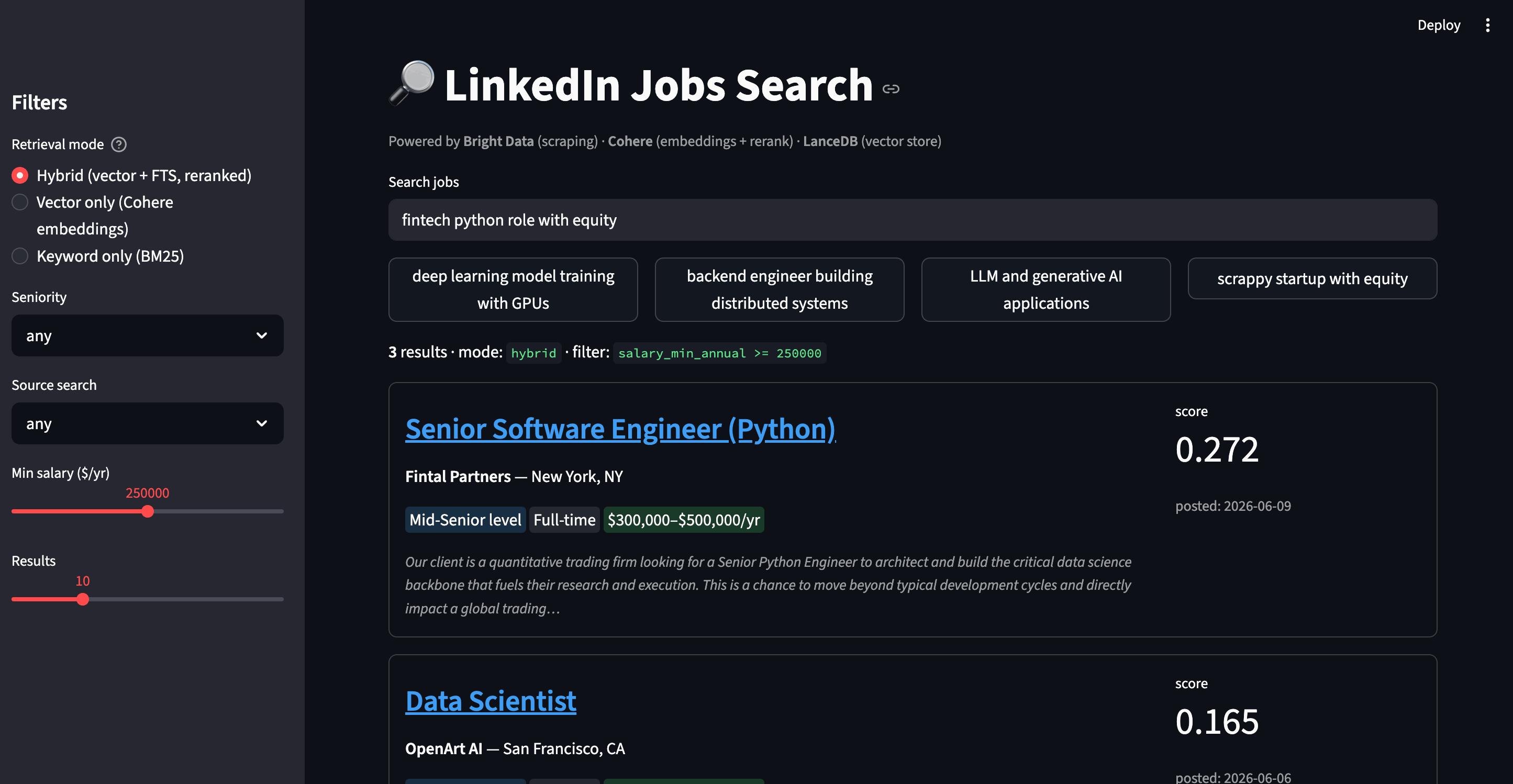
A hybrid query with the salary slider set, served from app.py. The slider produces the salary_min_annual >= 250000 prefilter shown in the green-on-black filter banner.
Where keyword, vector, and hybrid disagree
compare.py runs the same query through all 3 modes and prints a side-by-side report:
$ python compare.py "engineer working on LLMs and prompt engineering" --top 3

══════════════════════════════════════════════════════════════════════════
  query: engineer working on LLMs and prompt engineering
══════════════════════════════════════════════════════════════════════════

  ── keyword (BM25) ───────────────────────────────────────────────────────
  1. AI/ML Engineer                                          — Careerswift
  2. AI/ML Engineer                                          — Careerswift
  3. Applied AI Engineer                                     — Serval

  ── vector (Cohere) ──────────────────────────────────────────────────────
  1. Senior Software Engineer (Prompt Engineer Python/GenAI)        — Genpact
  2. 15+ Years exp/ Need f2f/ AI/ML Engineer or Python AI Engi...   — Jobs via Dice
  3. ML Engineer (Infra & Distributed training)                     — techire ai

  ── hybrid + rerank ──────────────────────────────────────────────────────
  1. Applied AI Engineer                                     — Serval
  2. Senior Software Engineer (Prompt Engineer Python/GenAI) — Genpact
  3. AI/ML Engineer                                          — Careerswift

  overlap: keyword∩vector=0/3 · hybrid∩vector=1/3 · hybrid∩keyword=2/3
In the overlap row, keyword and vector found 0 of the same jobs in the top 3. They’re searching different conceptual spaces.
- Keyword (BM25) finds postings where the literal tokens “LLMs” and “prompt” appear most frequently. It returns generic AI/ML titles.
- Vector (Cohere) finds the Senior Software Engineer (Prompt Engineer Python/GenAI) posting at #1, even though the user query said “prompt engineering” (gerund) and the title says “Prompt Engineer” (noun). It also returns an LLM-focused listing from Jobs via Dice that is a strong semantic match but lexically distant from the query.
- Hybrid + rerank takes the union, dedupes, and runs it through Cohere Rerank. The Serval Applied AI Engineer role ($200k to $325k) moves to #1. Its description is dense with prompt-engineering and LLM-agent work, but neither its title nor its top BM25-weighted terms would have ranked the role this high.
For this specific query, vector and hybrid both did better than keyword. Raw token overlap ranked the Genpact and Serval results below where their semantic relevance put them. But a single query is an anecdote, not evidence. Whether that pattern holds in general is a question only a real eval can answer.
Measure quality with precision@3
To measure this properly, eval.py scores 10 hand-written queries against all 3 modes and computes precision@3, the fraction of the top-3 results that match a transparent ground-truth predicate.
The ground truth for each query is a Python predicate, not a magic number, so a reader can decide whether they’d grade results the same way.
For “machine learning engineer at OpenAI”, a result counts as relevant only if its company field contains “OpenAI.” For “quantitative developer at trading firm”, the rule is broader. A result counts if the title contains “Quant” or “Trading”, or the company is a known trading firm (Fintal Partners, DRW, Hudson River Trading, Tower Research, Mondrian Alpha). These predicates are tuned to the sample dataset, so your scores will shift on fresh jobs. Re-tune them to your own data. The gap between the modes carries over even when the exact percentages don’t.
Running it:
$ python eval.py

precision@3 per query (hits/3)
────────────────────────────────────────────────────────────────────────
  query                                          keyword    vector     hybrid
────────────────────────────────────────────────────────────────────────
  machine learning engineer at OpenAI            1.00 (3/3)  1.00 (3/3)  1.00 (3/3)
  founding engineer at AI startup with equity    0.33 (1/3)  0.67 (2/3)  0.67 (2/3)
  prompt engineer working with LLMs              0.00 (0/3)  0.67 (2/3)  0.33 (1/3)
  quantitative developer at trading firm         0.67 (2/3)  1.00 (3/3)  1.00 (3/3)
  computer vision and robotics engineer          1.00 (3/3)  0.67 (2/3)  1.00 (3/3)
  data scientist role                            0.67 (2/3)  1.00 (3/3)  1.00 (3/3)
  distributed training infrastructure for ML     0.33 (1/3)  0.67 (2/3)  0.67 (2/3)
  backend engineer at AI company                 0.33 (1/3)  0.33 (1/3)  0.33 (1/3)
  python developer at fintech                    0.00 (0/3)  0.67 (2/3)  0.33 (1/3)
  high-paying machine learning role with equity  0.00 (0/3)  0.33 (1/3)  0.33 (1/3)
────────────────────────────────────────────────────────────────────────
  AVERAGE (10 queries)                           0.433       0.700       0.667
The same numbers as a chart:
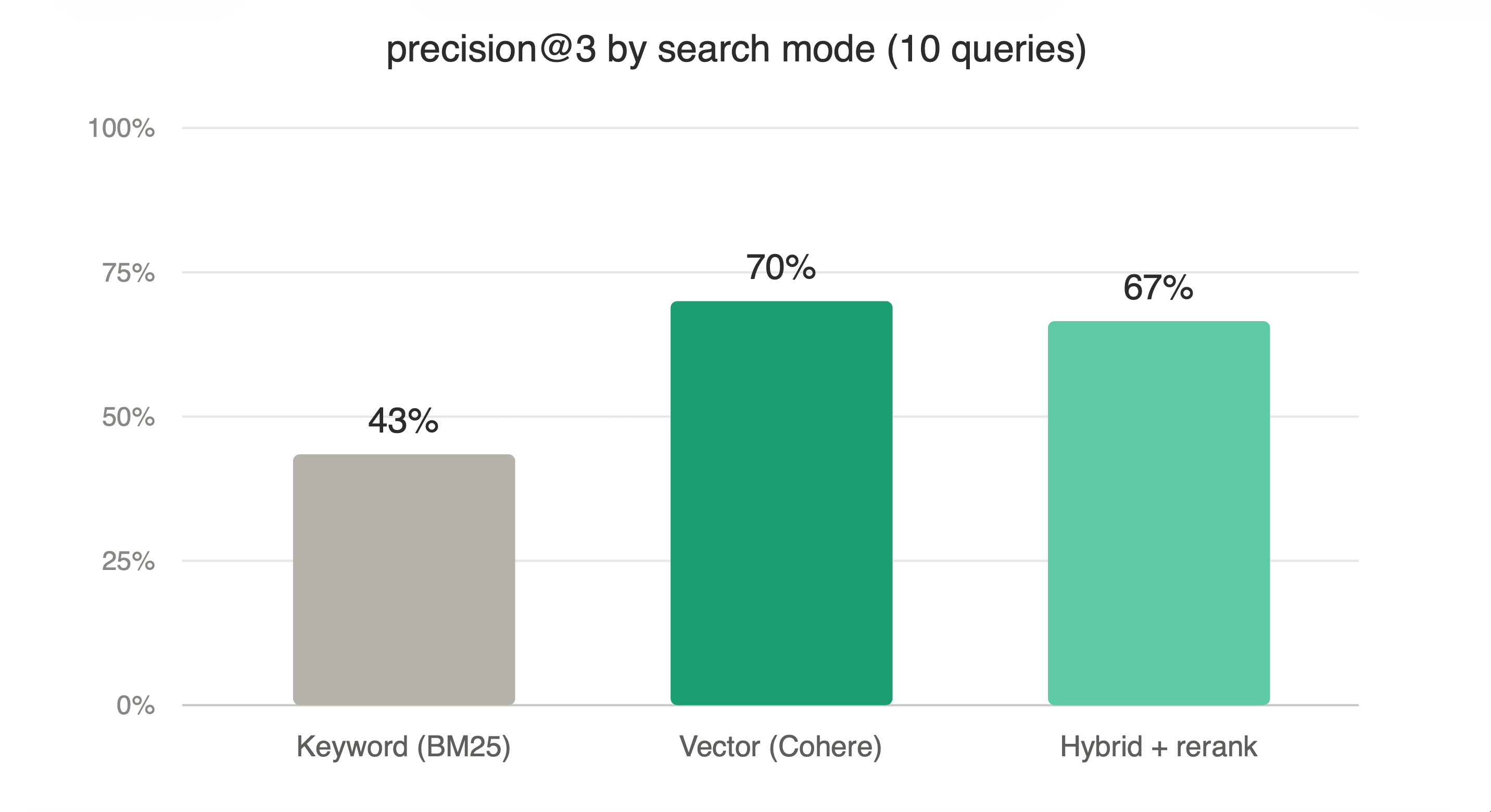
Precision@3 averaged over the 10 eval queries. Vector scores far above keyword, and hybrid is within a few points of vector.
What the numbers say
From the table:
- Vector search scored well above keyword search at 70% vs 43% average precision@3. All 3 queries where keyword scored 0 (“prompt engineer,” “python developer at fintech,” “high-paying ML with equity”) had at least 1 relevant hit under vector.
- Hybrid + rerank didn’t beat vector at this scale. The 67% vs 70% gap is within noise: the reranker adds a Cohere call per query, and the FTS half feeds it lexical near-misses that it then has to filter back out.
- No mode is strictly dominated. “Computer vision and robotics” is the one query where keyword (1.00) scores above vector (0.67), because the relevant companies all contain literal robotics terms in their descriptions.
When to enable hybrid + rerank
It depends on a few factors:
- Candidate pool size. At a few hundred rows, vector alone is usually enough. Hybrid’s 2-stage retrieval needs a bigger pool (10k+) before the rerank step is worth its cost.
- Query type. Queries with both semantic intent and distinctive keywords (a brand name, a specific technology) benefit from hybrid. Pure-semantic queries usually don’t.
- Reranker quality. Cohere’s rerank-v3.5 performed well in our eval. If you swap in a different reranker, re-run
eval.pybefore trusting it, since a weaker reranker can reorder good vector results downward on a small candidate pool.
Run eval.py on your own data to decide. Adding a query is a string plus a ground-truth predicate.
Note: the hybrid eval runs fine on a free Cohere key. The trial rate limit makes it back off and finish in ~90s instead of ~15.
Add a web UI with Streamlit
Streamlit turns the same search backend into a clickable web app. The search-and-render core is below:
# app.py
import streamlit as st
from lib import search

mode = st.sidebar.radio("Mode", ["hybrid", "vector", "keyword"])
seniority = st.sidebar.selectbox("Seniority", ["any", "Entry level", "Associate", "Mid-Senior level", "Director", "Internship", "Not Applicable"])
min_salary = st.sidebar.slider("Min salary ($/yr)", 0, 500_000, 0, step=10_000)

query = st.text_input("Search jobs", placeholder="e.g. remote ML engineer...")

if query:
    where_clauses = []
    if seniority != "any":
        where_clauses.append(f"seniority = '{seniority}'")
    if min_salary > 0:
        where_clauses.append(f"salary_min_annual >= {min_salary}")
    where = " AND ".join(where_clauses) or None

    df = search(query, mode=mode, where=where, limit=10)
    for _, row in df.iterrows():
        with st.container(border=True):
            st.markdown(f"### [{row['title']}]({row['apply_url']})")
            st.markdown(f"**{row['company']}** — {row['location']}")
            st.caption(row["description_snippet"] + "…")
Run it:
streamlit run app.pyYou get a full search page at localhost:8501 with a search box, mode toggle, sidebar filters for seniority, source keyword, and salary, plus result cards with badges, scores, and snippet previews.
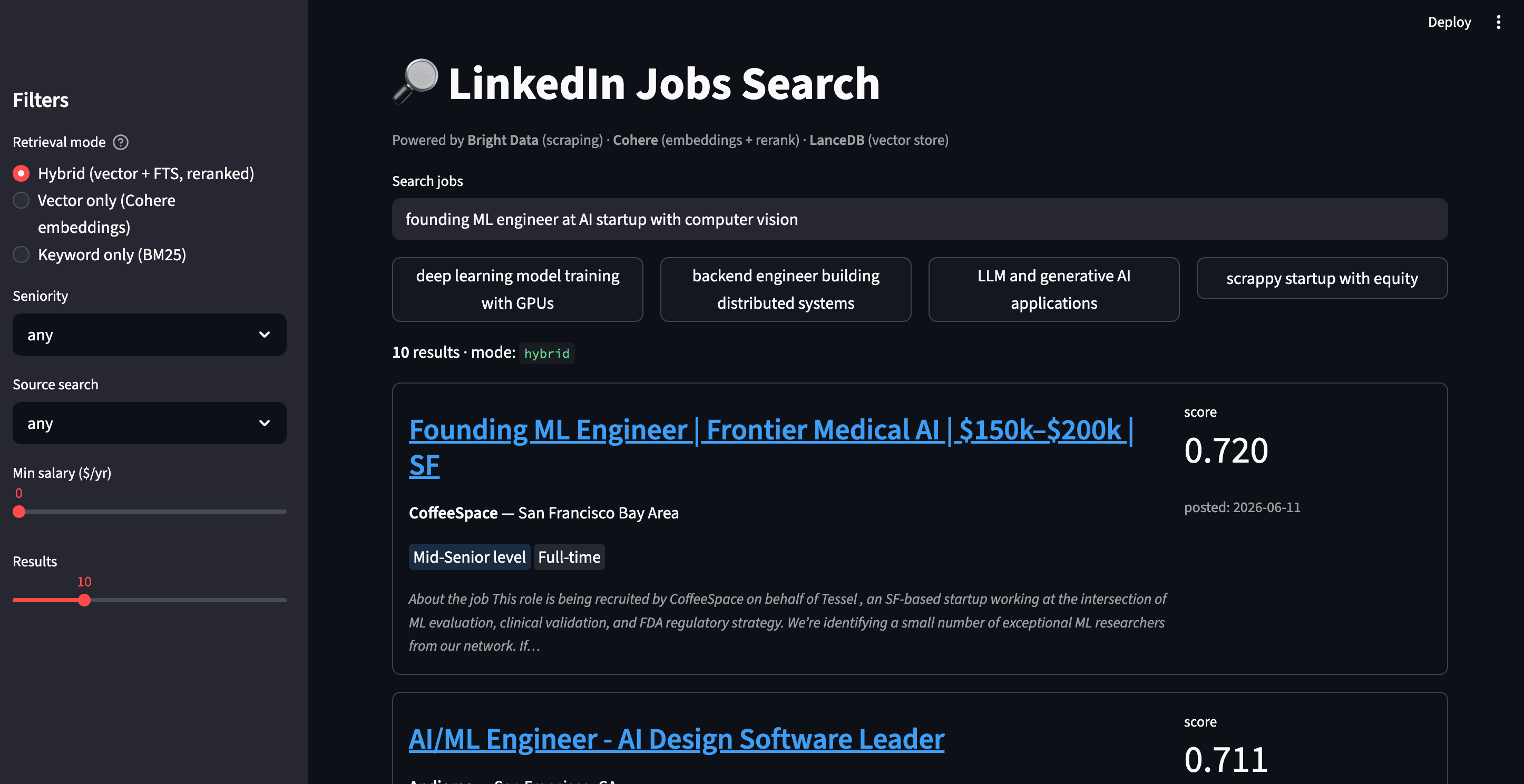
The Streamlit app running a hybrid search. The score badge on each card is Cohere’s relevance score, and the snippet below the badges shows why each result made it into the top 3.
Free time-travel with LanceDB
That covers search and the UI. LanceDB has one more feature worth showing. Every write to LanceDB creates a new version automatically, with no extra cost or infrastructure. It’s how the underlying Lance columnar format works. To make a version easy to find later, index.py tags it after each ingest:
table.tags.create(f"ingest-{datetime.now():%Y-%m-%d-%H%M}", table.version)Our companion versions.py script then lets you browse and open historical snapshots. After running python index.py once you’ll see 1 tag. After a second ingest (say, re-scraping a week later) you’ll see 2:
$ python versions.py

📊 table 'jobs'  ·  current version: 13  ·  200 rows

🏷  tags (2):
  • ingest-2026-05-20-0905           → version 7
  • ingest-2026-05-20-0906           → version 13  ← current

  travel back with: `python versions.py --tag <name>`

$ python versions.py --tag ingest-2026-05-20-0905

📌 snapshot 'ingest-2026-05-20-0905'  ·  version 7  ·  200 rows
  • Associate Machine Learning Engineer  — Handshake
  • Machine Learning Engineer            — RZR
  • Machine Learning Engineer            — ChatGPT Jobs
Time-travel is one table.checkout(tag_or_version) call. For a job-search product it answers questions like “what roles were posted last quarter?” or “is the salary distribution shifting over time?” without a separate time-series database. That’s one reason we picked LanceDB here.
Cost and scale
For the demo (200 jobs, ~5 example queries):
| Item | Cost |
|---|---|
| Bright Data scrape (204 records @ $0.0015/record) | $0.31 |
| Cohere embeddings (~228k tokens total @ $0.10/1M) | ~$0.02 |
| Cohere rerank (~$0.002/query, Rerank v3.5 at $2 / 1k searches) | ~$0.01 for 5 queries |
| LanceDB | free |
The end-to-end demo costs ~$0.34 in total. These prices are from a 2026 run, so check the providers’ current rates.
Scale up
The local demo handles 200 jobs. A few levers cover the path from here to a production-scale dataset:
- More jobs. Change
LIMIT_PER_INPUT(max 1,000 per keyword) or add more keyword searches. 10,000 jobs costs ~$15 in Bright Data credits. - More keywords / locations. Add entries to the
SEARCHESlist inscrape.py. - Scheduled refresh. The
merge_insertupsert we built means rerunning the pipeline refreshes what’s changed. Bright Data supports scheduled collection and delivery from the dashboard. Pair that with the upsert and you have a self-updating dataset. - Vector index. Past ~10k rows, swap brute-force search for an HNSW or IVF_PQ index via
table.create_index(vector_column_name="vector"). It builds on CPU by default. For a GPU build, passaccelerator="cuda"(or"mps"on Apple Silicon) with PyTorch>2.0. Automatic GPU indexing is currently a LanceDB Enterprise feature. - Production vector store. LanceDB OSS scales to millions of vectors on a single node. Past hundreds of millions of vectors or terabytes of data, LanceDB Cloud and Enterprise add distributed indexing and query execution (their docs target ~10 to 50B rows / ~10 to 30 TB).
Before any of those scaling moves, though, the demo itself has sharp edges.
8 bugs and gotchas we hit
In case it saves you the hours they cost us:
list_tables()doesn’t return a list. In LanceDB 0.30 it returns aListTablesResponseobject that looks iterable in the REPL butif TABLE in db.list_tables()silently fails. Usetry: db.open_table(TABLE)and catch the exception instead, or.tableson the response.table.checkout(tag)returnsNoneand mutates the table handle in place. It looks like a bug, but isn’t. Dot = db.open_table(...); t.checkout(tag); use(t), nott = db.open_table(...).checkout(tag).- The default
CohereReranker()uses an old model (rerank-english-v3.0in the versions we tested). Pass a model explicitly, eitherrerank-v3.5(what we pin here) orrerank-v4.0-profor higher quality. The default doesn’t warn you. - Use
/trigger+ polling, not/scrape, for real batches. Sync (/scrape) is built for small pulls. Holding the connection open forlimit_per_input=100× 2 keywords (~200 jobs) can hit a timeout, so use/trigger+ polling for anything above ~50 records. - A few scraped records are error rows. Out of 204 jobs, 4 had an
errorfield set instead of ajob_title(for example,"Crawl aborted on job cancel"). They look superficially like normal records, so filter them inindex.pyormerge_insertwill fail on an emptyjob_id. - Salaries come in 2 periods (
yrandhr) but the schema field is the same. Without normalizing to annual (multiply hourly by 2080), a filter likesalary_min_annual >= 200000silently misses high-paying hourly contracts and includes implausibly low salaried roles. argparsehelp strings with raw%break on Python 3.14. Writing--where "salary > 200000 AND location LIKE '%SF%'"in your help text raisesValueError: badly formed help stringbecause argparse tries to format it. Escape as%%or rephrase the example.- Streamlit renders text between
$signs as LaTeX math. A salary like$150k,$200kshown withst.markdownorst.captionbecomes garbled math. Escape every$in your display strings (the repo’sapp.pydoes it with a one-linereplace), or the salary badges render as gibberish.
What you can build next
The pattern, Bright Data ⟶ embeddings ⟶ vector DB ⟶ hybrid search, generalizes to almost any domain:
| Domain | Bright Data product | What you’d query |
|---|---|---|
| Agentic web access | The Bright Data MCP (free tier currently 5,000 requests/mo) | “give an AI agent live search + scrape tools, then ground its answers against a LanceDB-backed cache of past results” |
| Whole-site corpora | Crawl API | “index an entire docs site or knowledge base for hybrid retrieval” |
| E-commerce | Web Scraper API (Amazon products) | “comfortable running shoes under $100 with 4+ stars” |
| Real estate | Web Scraper API (Zillow / Redfin) | “quiet family home near good schools, 3+ beds” |
| News intelligence | SERP API + Web Unlocker | “AI safety articles from this week, ranked by relevance to alignment” |
| Sales prospecting | LinkedIn company info | “Series A startups in healthcare AI based in Europe” |
| Restaurants | Yelp dataset | “cozy Italian place with outdoor seating” |
Some natural extensions of this exact project:
- Multi-modal search. Switch to Cohere
embed-v4.0(natively multimodal) and embed company logos alongside job descriptions. - LLM-extracted filters. Let the user type “remote ML jobs paying $200k+” and have an LLM extract
remote=true, salary_min_annual >= 200000automatically. - Saved searches with email alerts. Re-run a query against the most recent scrape and notify on new matches.
- Resume matching. Embed a resume and search jobs by similarity to the candidate. Bright Data’s LinkedIn job-hunting AI assistant is a fuller example.
- A self-maintaining scraper. Give an agent access to Bright Data’s MCP and it can inspect the page, write the scraper, and attempt a fix when the layout changes, instead of you patching
scrape.pyby hand. Bright Data’s Scraper Studio packages this as a managed product, turning a plain-English prompt into a self-healing scraper.
Next steps
Keyword search missed the right roles, and vector search found them even when the titles never matched the query. In the eval, vector scored 70% precision@3 against keyword’s 43%, with hybrid adding no lift at this scale.
The complete project on GitHub is 9 small files. To use it on your own data, run python eval.py first, because the best mode depends on the data, not on which one is most complex. Then decide a refresh cadence, where merge_insert upserts only what changed and versions.py snapshots each ingest. And before any of it ships, plan a key-rotation routine, because both BD and Cohere keys go in .env.
The same pattern works for anything Bright Data can scrape, not just jobs. From there, you have a semantic search engine you can reuse for any dataset you scrape.
FAQ
Can I use this for sites other than LinkedIn?
Yes. Bright Data’s Web Scrapers Library covers hundreds of sites (Amazon, Zillow, Yelp, and more), each with its own dataset_id. Swap the DATASET_ID in scrape.py and the to_row() mapping in index.py for the new JSON shape. The search and indexing logic is data-agnostic and carries over.
Do I need a paid Cohere account for this?
No, a trial key runs the whole demo. Cohere’s trial Rerank endpoint is currently capped at 10 calls/min, so eval.py hits a 429 and backs off automatically (~90s instead of ~15s). Scraping, indexing, and ad-hoc search stay well under the limits. Upgrade only if you iterate on the eval often.
Why LanceDB, not Pinecone, Weaviate, or pgvector?
LanceDB is an embedded library with no server, no separate database, and no managed-service bill. It supports hybrid search and Cohere reranking natively, and every write is a version snapshot. For a single-machine pipeline with no ops, that’s the least overhead. The others are capable but add more infrastructure.
How often should I re-run the scraper?
Once a day suits an active job board. Bright Data can run scheduled collection from the dashboard, and the merge_insert upsert dedupes on the LanceDB side, so re-runs are cheap. Postings older than ~30 days are usually closed, so old snapshots become historical, and versions.py keeps them queryable.


Technical Writer
 5 years experience
Satyam Tripathi helps SaaS and data startups turn complex tech into actionable content, boosting developer adoption and user understanding.