
Getting an Amazon product data pipeline to work on your laptop is one thing. Keeping it running in production, with proxies, CAPTCHAs, layout changes, and IP blocks, is another. Even if you solve the scraping itself, you still need scheduling, retries, error handling, and a way to actually see what you collected.
We’ll build all of that here. We’ll use Bright Data’s Web Scraping API and Mage AI to wire together a pipeline that collects Amazon products and reviews, runs Gemini sentiment analysis, and pushes everything to PostgreSQL and a Streamlit dashboard. The full pipeline runs with Docker and a single API key (plus an optional Gemini key for AI analysis)
TL;DR: Amazon product intelligence without building scraping infrastructure.
- What you get: A pipeline that discovers products by keyword, analyzes reviews with Gemini AI, and serves a live Streamlit dashboard
- What it costs: Pay-as-you-go, billed per record (pricing page), 5–8 minutes end to end
- How it works: Bright Data handles proxies, CAPTCHAs, and parsing; Mage AI handles scheduling, retries, and branching
- How to start:
docker compose up– all code on GitHub repo
What we’re building: a Bright Data + Mage AI integration pipeline
Bright Data’s Web Scraping API handles the scraping layer. You send a keyword or a product URL, you get back structured JSON (titles, prices, ratings, reviews, seller info), already parsed. No proxy infrastructure to manage, no HTML to parse. When Amazon changes their site, Bright Data typically updates their parsers. Your code stays the same.
If you haven’t used Mage AI before, it’s a free, open-source data pipeline tool, like Airflow but without the boilerplate. You write Python in a notebook-style editor where each block is a reusable unit with its own test and output preview. What matters here: Mage AI supports branching pipelines, basically a DAG (directed acyclic graph) with parallel paths. It also has built-in retry logic per block and pipeline variables you can change from the UI, no code edits needed.
The pipeline has 6 blocks across two parallel branches:
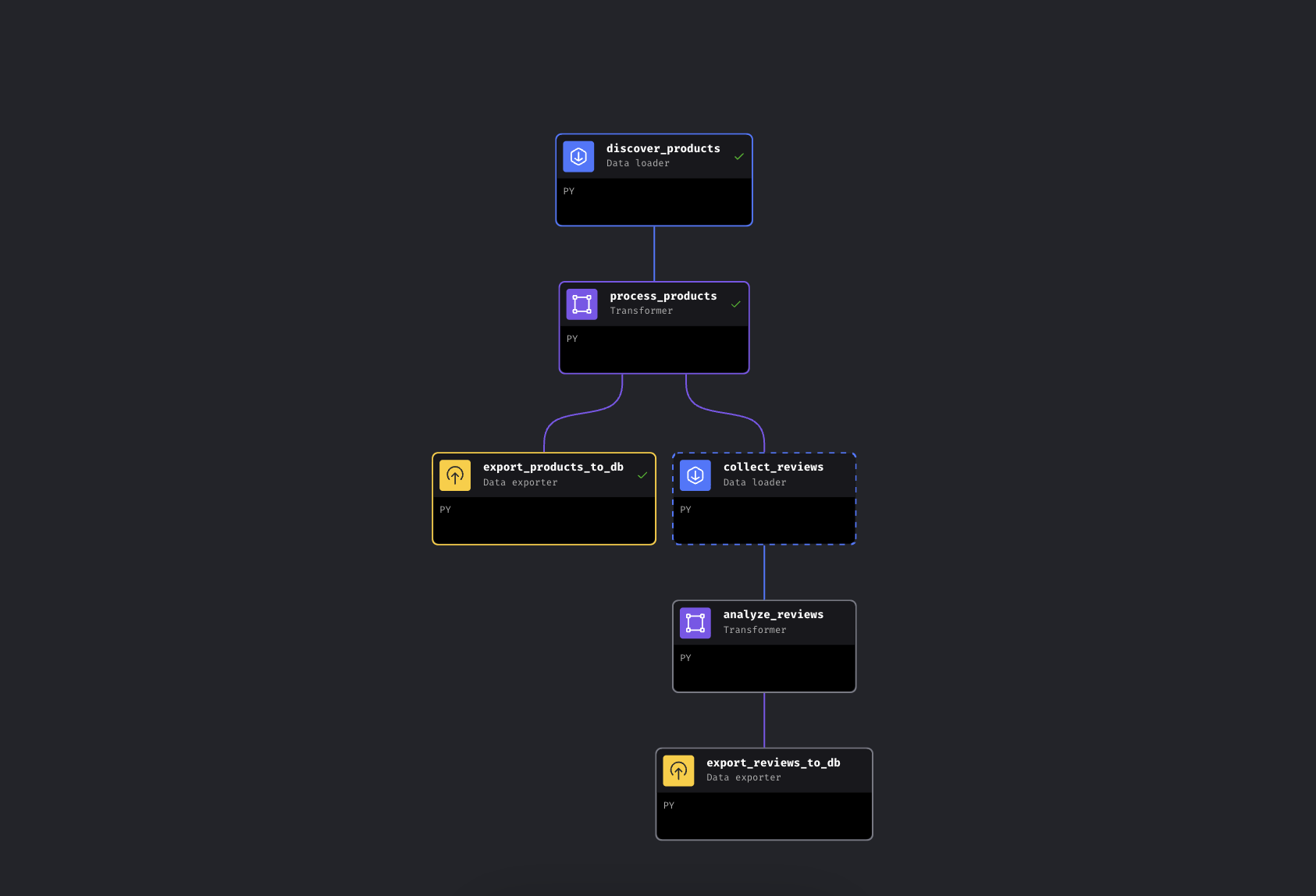
The branching pipeline in Mage AI. Left branch exports products immediately, right branch collects and analyzes reviews
The pipeline discovers products by keyword via Bright Data, enriches them with price tiers and ratings, and then branches. One path exports products to PostgreSQL immediately, while the other collects reviews for the top products, runs them through Gemini for sentiment analysis, and exports those too.
We’re using Mage AI here because the pipeline branches (it’s a DAG, not a linear script – if review collection fails, your product data is already safe), but the Bright Data API calls are just HTTP requests. They work the same way in Airflow, Prefect, Dagster, or a plain Python script.
Quick start
Clone the repo, add your API keys, and run it. Everything runs in Docker, so you don’t need Python installed locally.
Prerequisites
You’ll need:
- Docker and Docker Compose (get Docker)
- A Bright Data account with API token
- A Google Gemini API key (free tier available with limits; see the Gemini section below)
- Basic familiarity with Python and Docker. No scraping experience needed; that’s the point
Step 1: clone and configure
Clone the repo and create your config file:
git clone https://github.com/luminati-io/bright-data-with-mage-ai.git
cd bright-data-with-mage-ai
cp .env.example .env
Now add your API keys to .env:
BRIGHT_DATA_API_TOKEN=your_api_token_here
GEMINI_API_KEY=your_gemini_api_key_here
Getting your Bright Data API token: Sign up at Bright Data (free tier, no credit card required), then go to Account Settings and create an API key. The pipeline uses two Web Scraping API scrapers (one for product discovery, one for reviews), billed per record, pay as you go. See the pricing page for current rates.
Getting your Gemini API key: Go to Google AI Studio, sign in, click Create API key. Free tier, no credit card required. The pipeline works without it too; it falls back to rating-based sentiment.
Step 2: start the services
docker compose up -dIf you want to double-check your keys are loaded:
docker compose exec mage python -c "import os; t=os.getenv('BRIGHT_DATA_API_TOKEN',''); assert t and t!='your_api_token_here', 'Token not set'; print('OK')"This spins up three containers:
| Service | URL | Purpose |
|---|---|---|
| Mage AI | http://localhost:6789 |
Pipeline editor and scheduler |
| Streamlit Dashboard | http://localhost:8501 |
Live data visualization + chat |
| PostgreSQL | localhost:5432 |
Data storage |
First run pulls images and installs dependencies, roughly 3-5 minutes depending on your connection. Restarts with docker compose stop/start take a few seconds; docker compose down/up reinstalls pip packages and takes about a minute.
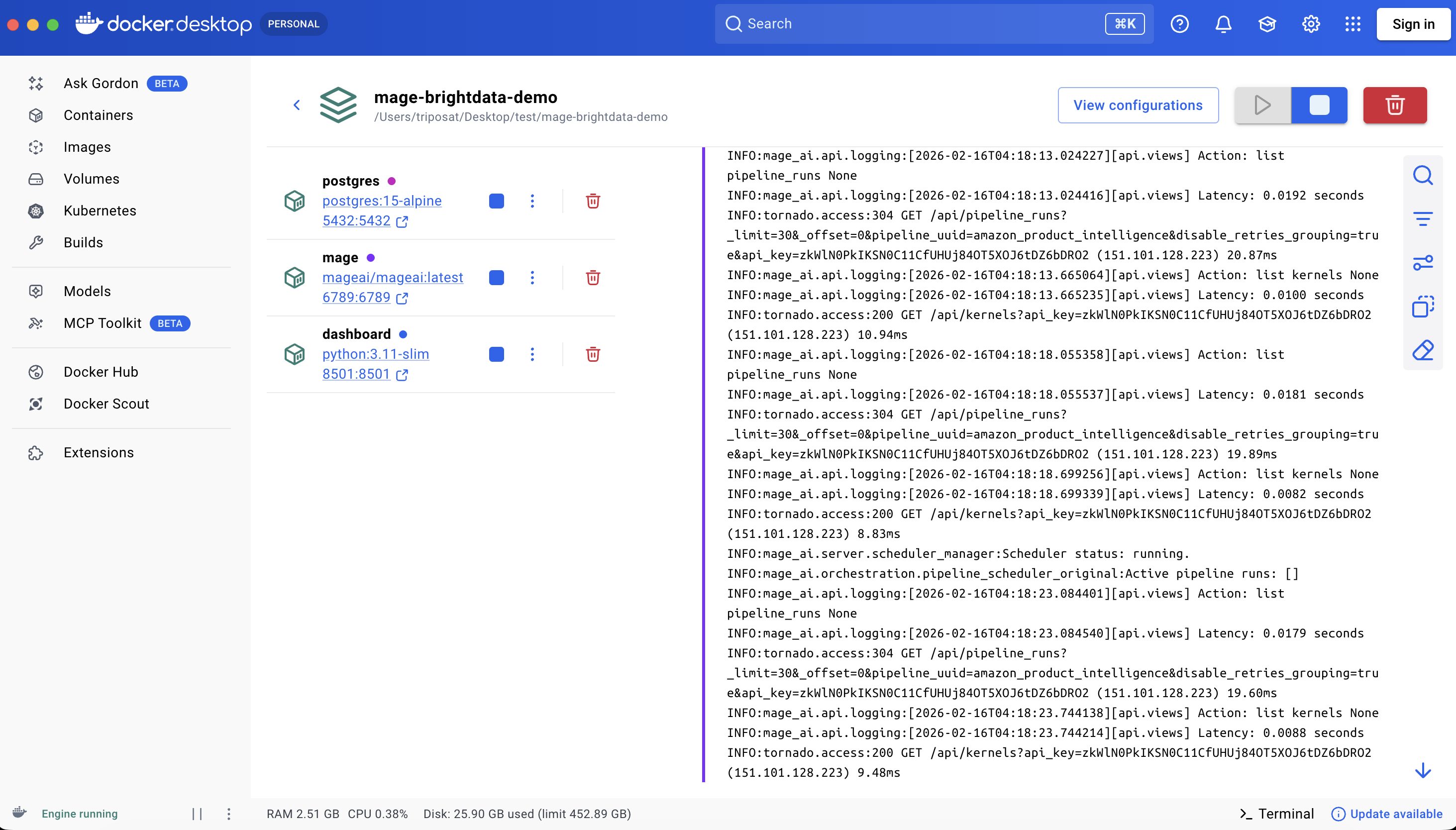
All three services running
Step 3: run the pipeline
Open http://localhost:6789, go to Pipelines, click amazon_product_intelligence, then click Triggers in the left sidebar and hit Run@once.
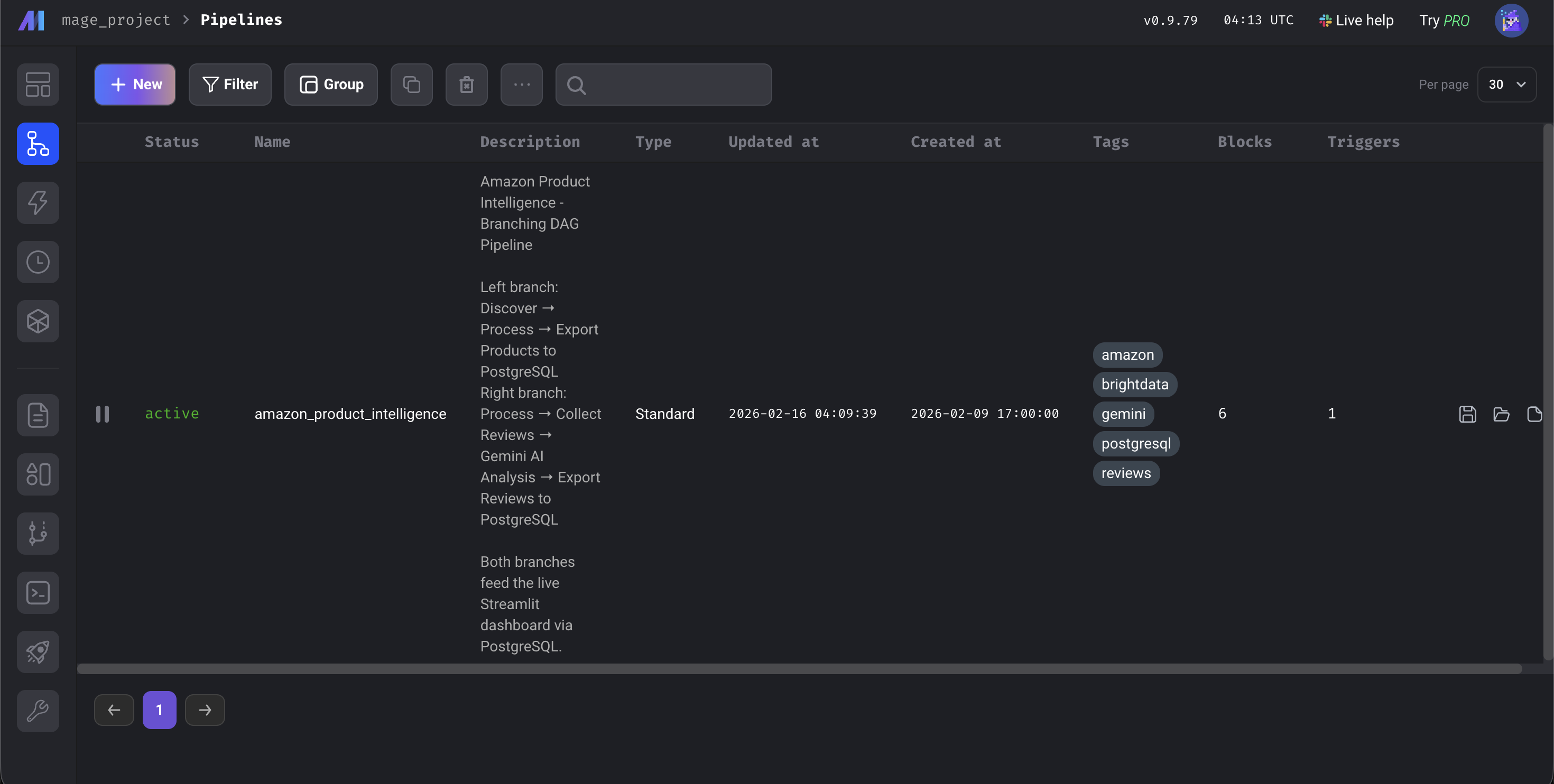
The Mage AI dashboard
The pipeline takes about 5-8 minutes end to end. Most of that time is the Bright Data APIs collecting data from Amazon; the enrichment and database exports take seconds, and the Gemini analysis depends on batch size and rate limits. When all 6 blocks turn green, open http://localhost:8501 to see the dashboard.
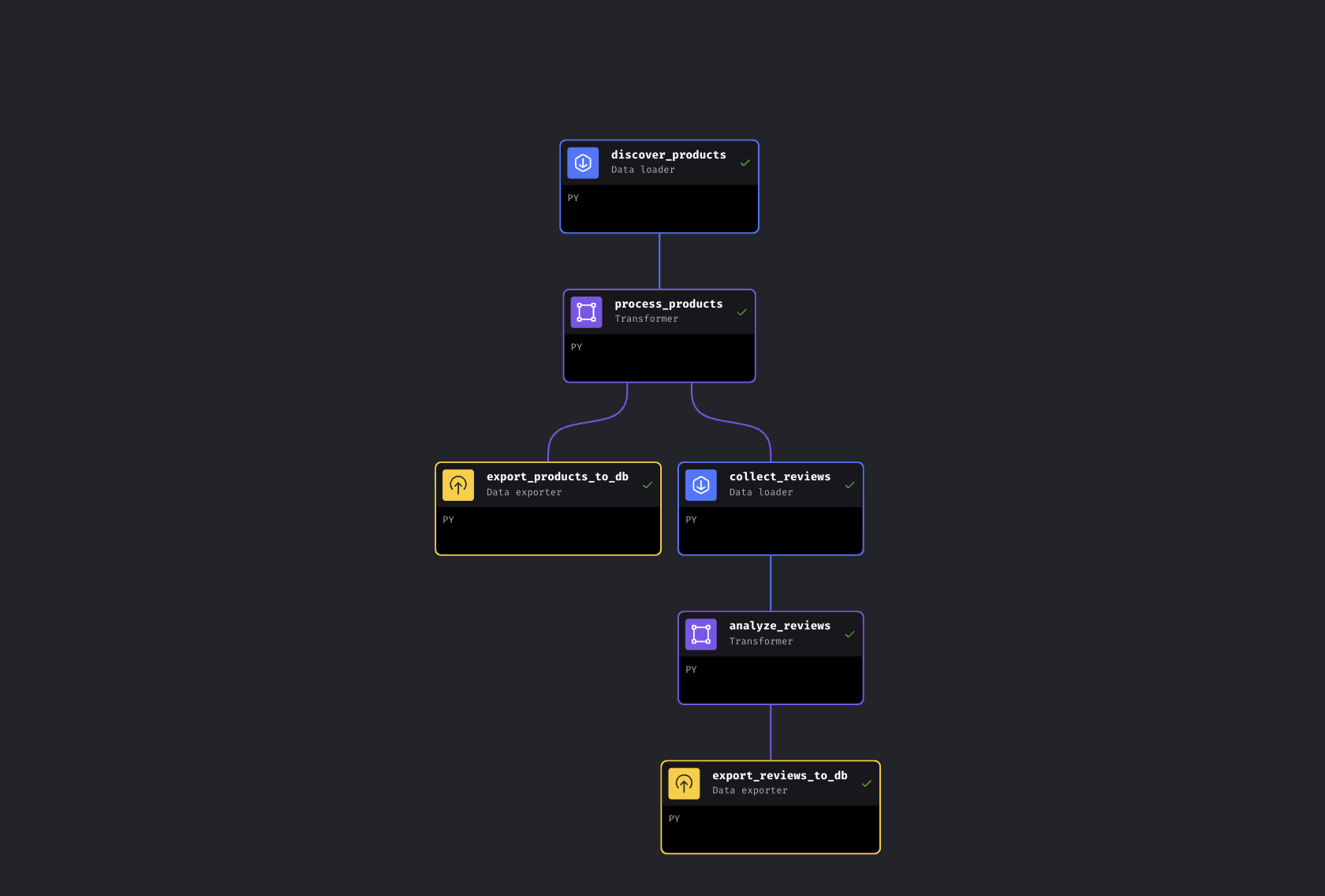
All 6 blocks green. Pipeline complete
How the Mage AI data pipeline works
Let’s walk through the code. We’ll focus on the Bright Data integrations and the Gemini analysis.
Connecting Bright Data’s Web Scraping API to Mage AI
We send keywords to the Amazon Products API and get back structured data. Bright Data calls this a “Discovery” scraper – it finds products by keyword or category. The reviews block later uses a separate Reviews scraper, which takes product URLs as input. The API uses an async pattern: trigger the collection, get a snapshot ID, poll until results are ready.
DATASET_ID = "gd_l7q7dkf244hwjntr0"  # Amazon Products (check repo for current IDs)
API_BASE = "https://api.brightdata.com/datasets/v3"

# Trigger the collection (uses /scrape – auto-switches to async if >1 min; for production, consider /trigger)
response = requests.post(
    f"{API_BASE}/scrape",
    headers={"Authorization": f"Bearer {api_token}",
             "Content-Type": "application/json"},
    params={"dataset_id": DATASET_ID,
            "type": "discover_new",
            "discover_by": "keyword",
            "limit_per_input": kwargs.get('limit_per_keyword', 5)},
    json={"input": [{"keyword": kw} for kw in keywords]}
)
snapshot_id = response.json()["snapshot_id"]

# Poll until results are ready
data = requests.get(
    f"{API_BASE}/snapshot/{snapshot_id}",
    headers={"Authorization": f"Bearer {api_token}"},
    params={"format": "json"}
).json()
Here’s what Bright Data sends back:
{
  "title": "BESIGN LS03 Aluminum Laptop Stand",
  "asin": "B07YFY5MM8",          // Amazon's unique product ID
  "url": "https://www.amazon.com/dp/B07YFY5MM8",
  "initial_price": 19.99,
  "final_price": 16.99,
  "currency": "USD",
  "rating": 4.8,
  "reviews_count": 22776,
  "seller_name": "BESIGN",
  "categories": ["Office Products", "Office & School Supplies"],
  "image_url": "https://m.media-amazon.com/images/I/..."
}
The kwargs.get('limit_per_keyword', 5) pulls from Mage AI pipeline variables, so you can adjust it from the UI.
Adding a second API call: Amazon reviews collection
The review collector takes the processed products from the upstream block and sorts them by review count. It picks the top N and feeds their Amazon URLs into a second Bright Data API:
REVIEWS_DATASET_ID = "gd_le8e811kzy4ggddlq"  # Amazon Reviews

# Top products from upstream (passed automatically by Mage AI)
top_products = data.sort_values('reviews_count', ascending=False).head(top_n)
product_urls = top_products['url'].dropna().tolist()

# Feed URLs into the Reviews API (same /scrape pattern)
response = requests.post(
    f"{API_BASE}/scrape",
    headers={"Authorization": f"Bearer {api_token}",
             "Content-Type": "application/json"},
    params={"dataset_id": REVIEWS_DATASET_ID},
    json={"input": [{"url": url} for url in product_urls]}
)
# Same async poll pattern as products...
Both API blocks have retry configuration in the demo’s metadata.yaml: if a call fails, the pipeline retries 3 times with a 30-second delay. Each block in this demo also has a @test function that runs after execution. If it fails, downstream blocks don’t run, so bad data doesn’t end up in your database.
Adding AI analysis: Gemini sentiment pipeline block
Instead of keyword matching (which would flag “not cheap, great quality!” as negative because of the word “cheap”), we use Gemini to understand context. The block processes reviews in batches with a 3-model rotation to stay within free tier limits:
GEMINI_MODELS = ["gemini-2.5-flash-lite", "gemini-2.5-flash", "gemini-2.5-pro"]  # check repo for current models

prompt = f"""Analyze these reviews. For EACH, return JSON with:
- "sentiment": "Positive", "Neutral", or "Negative"
- "issues": specific product issues mentioned
- "themes": 1-3 topic tags
- "summary": one-sentence summary
Return ONLY JSON.\n\n{reviews_text}"""

for model in models:
    try:
        response = client.models.generate_content(model=model, contents=prompt)
        return json.loads(response.text.strip())
    except Exception as e:
        if '429' in str(e):
            continue  # Rate limited -- rotate to next model
The rotation starts with flash-lite (cheapest and fastest), falls back to flash, then pro. If all three are exhausted, the review gets rating-based sentiment instead. Free-tier quotas change periodically, but the three-model rotation handles most rate limits automatically. Gemini returns sentiment, specific issues (like “wobbles on uneven surfaces” or “hinge loosens over time”), and 1-3 theme tags per review. Each review also comes with a one-sentence summary.
The remaining blocks (a transformer for price tiers and discount calculations, and two database exporters with upsert logic) are straightforward. They’re in the GitHub repo if you want to dig in.
Pipeline output: results and Streamlit dashboard
Here’s what the pipeline produced in one run with the default keywords: “laptop stand” and “wireless earbuds”. Your results will vary depending on Amazon’s current listings.
In this run: 10 products discovered, 20 reviews analyzed by Gemini. The earbuds reviews surfaced complaints that don’t show up in the 4.3-star average – themes like “sound quality”, “battery life”, and “connectivity” with specific issues attached.
What the pipeline adds to your raw data:
| Field | Example | Added by |
|---|---|---|
best_price |
$16.99 | Transformer (calculated) |
discount_percent |
15.0% | Transformer (calculated) |
price_tier |
Budget (<$25) | Transformer (enriched) |
rating_category |
Excellent (4.5-5) | Transformer (enriched) |
sentiment |
Negative | Gemini AI |
issues |
[“Bluetooth drops connection frequently”] | Gemini AI |
themes |
[“connectivity”, “battery life”] | Gemini AI |
ai_summary |
“Battery lasts only 2 hours despite claims of 8” | Gemini AI |
Here’s what that looks like in practice – all 10 products with enriched fields visible:
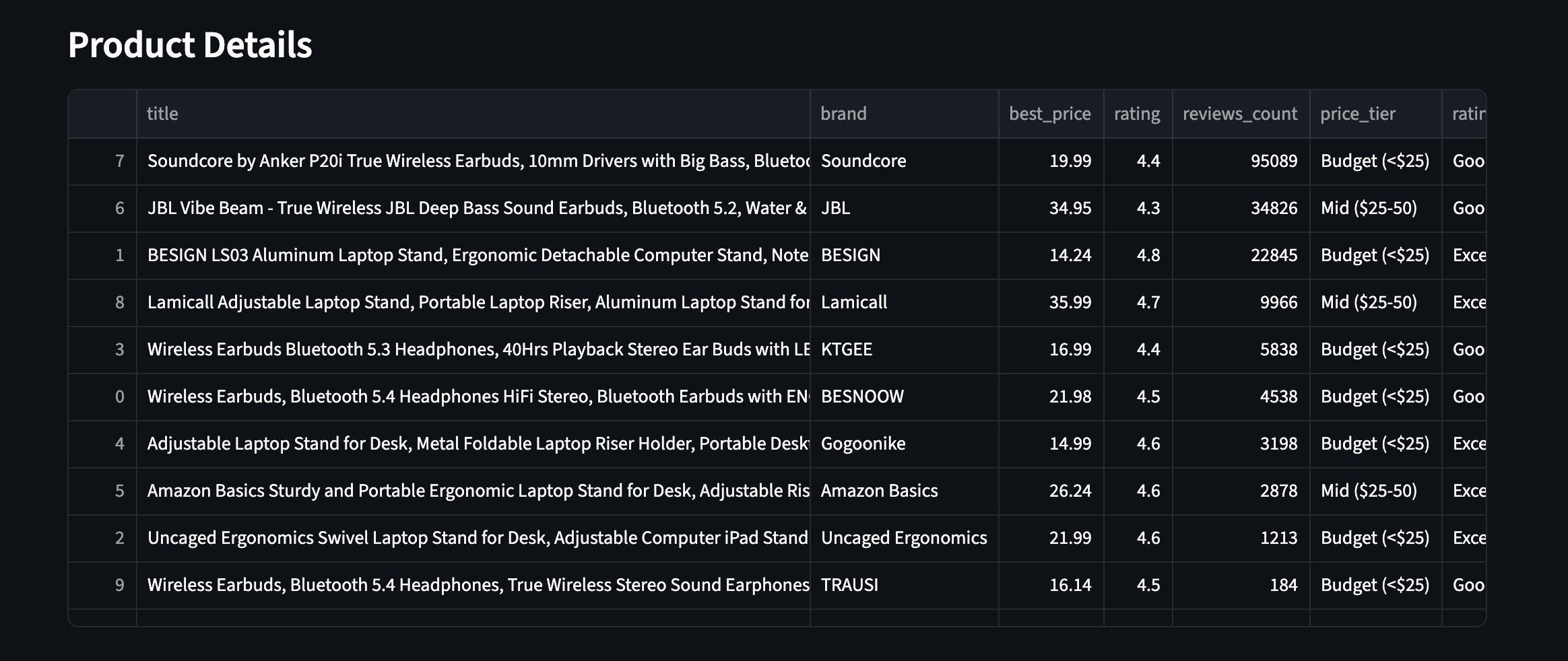
All 10 products with enriched fields. Price tiers, ratings, and review counts from two different product categories
The dashboard
Open http://localhost:8501 for the Streamlit dashboard. Click Refresh Data in the sidebar to pull the latest results from PostgreSQL.
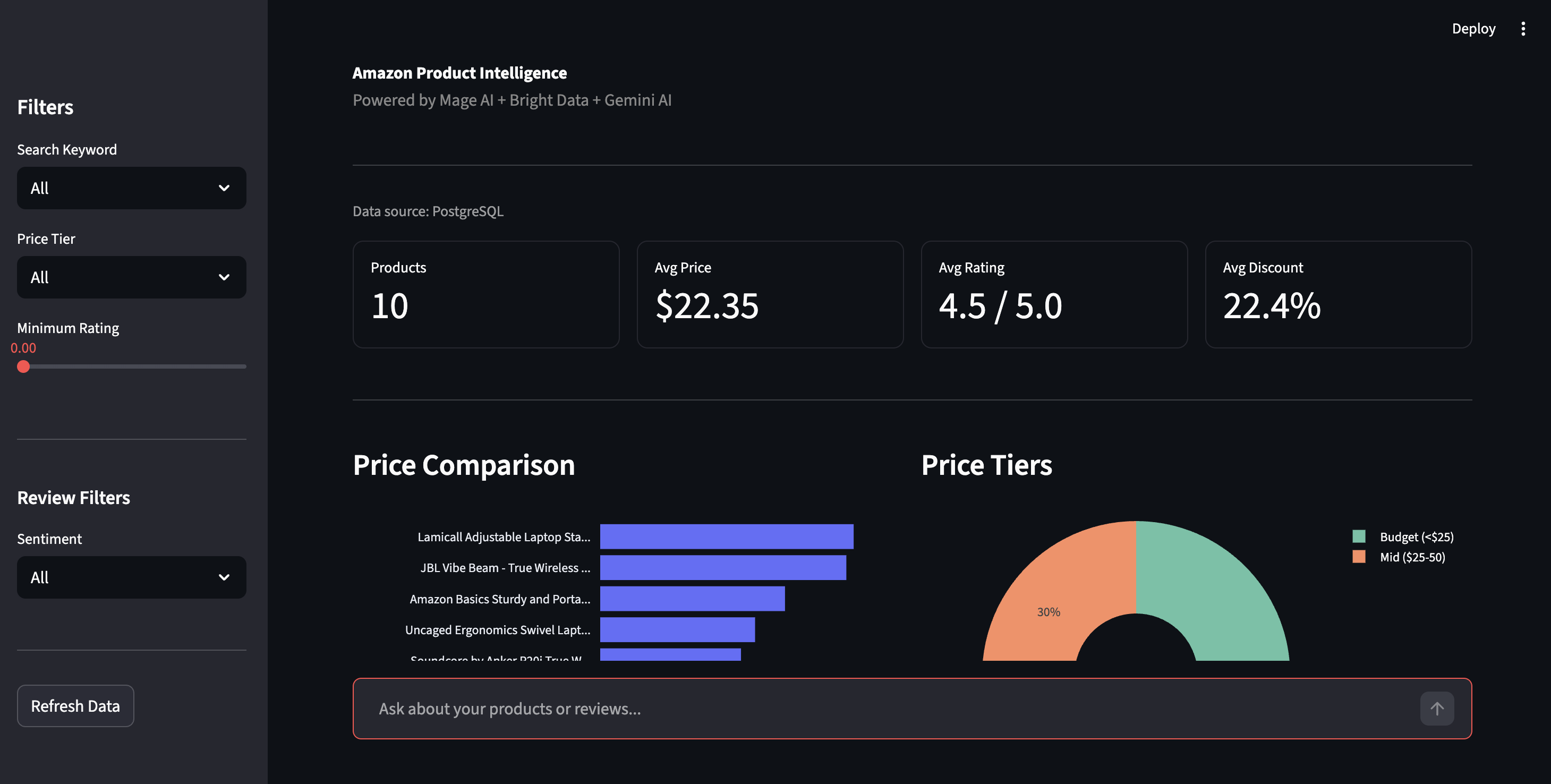
Product intelligence dashboard — price comparison, price tiers, and filtering controls
The sidebar lets you filter by price tier, rating, or sentiment. The sentiment view shows the Positive/Negative breakdown across all reviews, with the specific issues Gemini pulled out: “Bluetooth drops connection”, “hinge loosens over time”, the kind of detail star ratings bury.
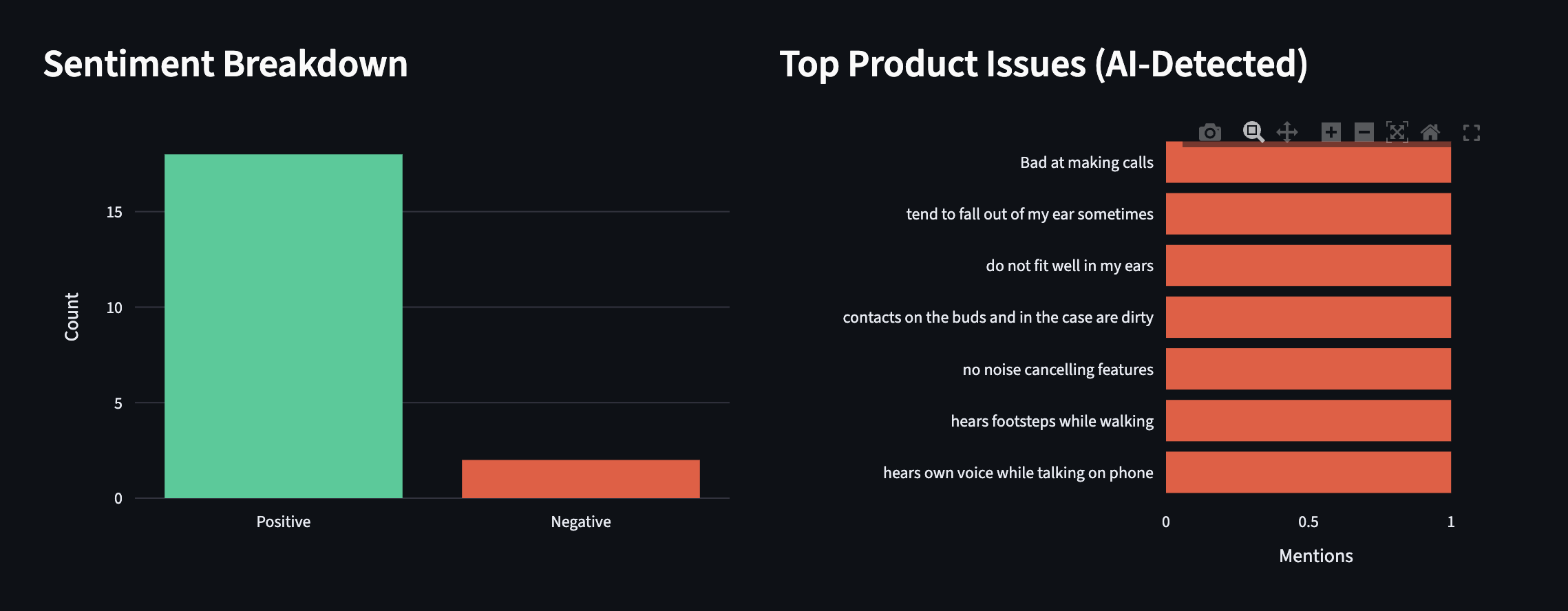
Sentiment breakdown and AI-detected product issues. Real complaints extracted by Gemini, not keyword matching
The dashboard also has a Chat with Your Data feature. Ask questions in plain English and Gemini answers using your actual scraped data as context. Here’s an example from a separate run with more products:
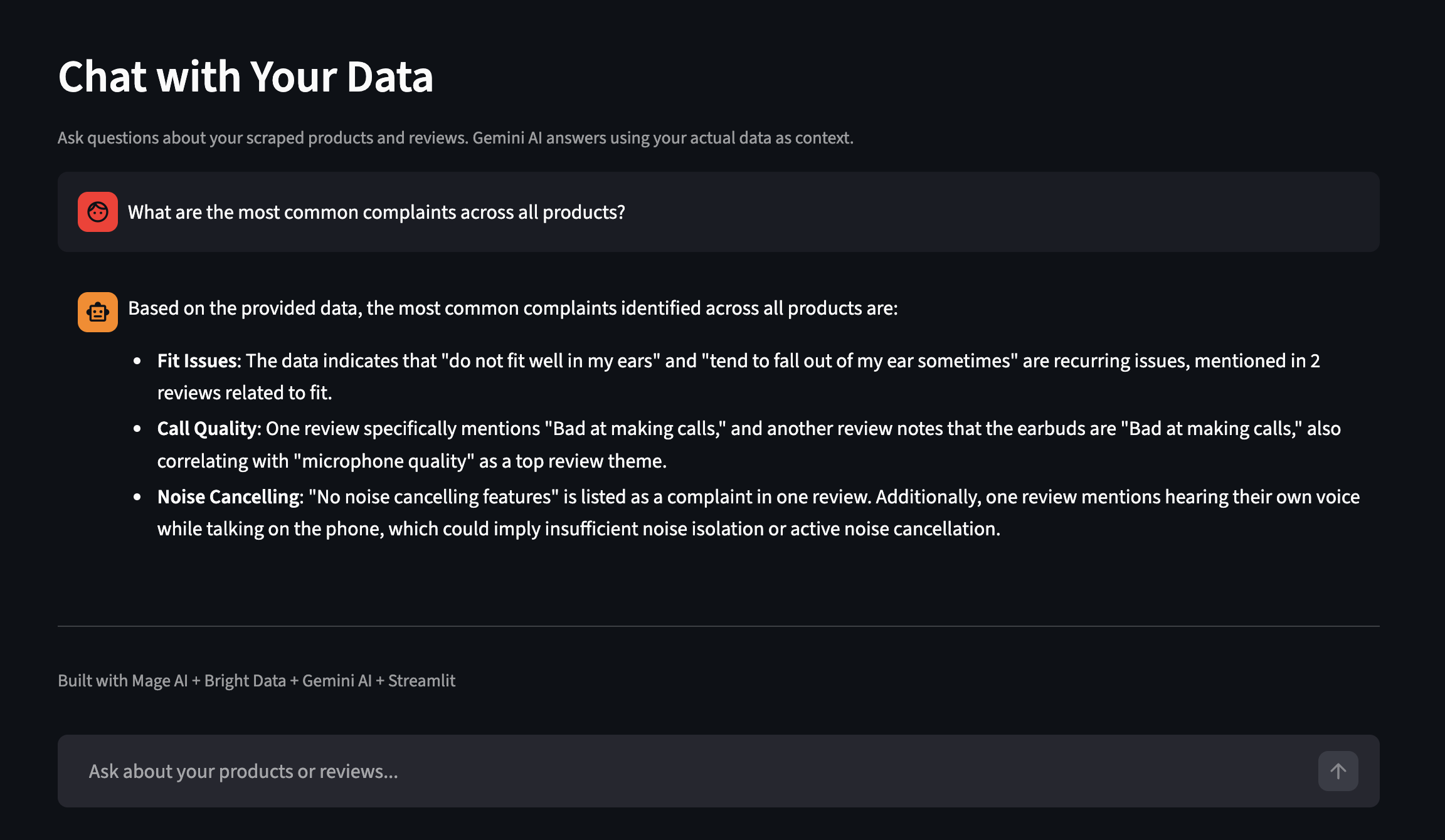
Ask questions about your scraped data in plain English
Scaling the pipeline
The demo runs with two keywords and 10 products.
Pipeline variables
All configurable from the Mage AI UI or metadata.yaml:
| Variable | What it controls | Default |
|---|---|---|
keywords |
Amazon search terms | ["laptop stand", "wireless earbuds"] |
limit_per_keyword |
Products per keyword from Bright Data | 5 |
top_n_products |
How many top products get reviews collected | 2 |
reviews_per_product |
Max reviews per product | 10 |
sort_by |
How to rank products for review selection | reviews_count |
Change keywords to ["phone case", "USB-C hub"] and you’ve got a different dataset entirely. No code changes.
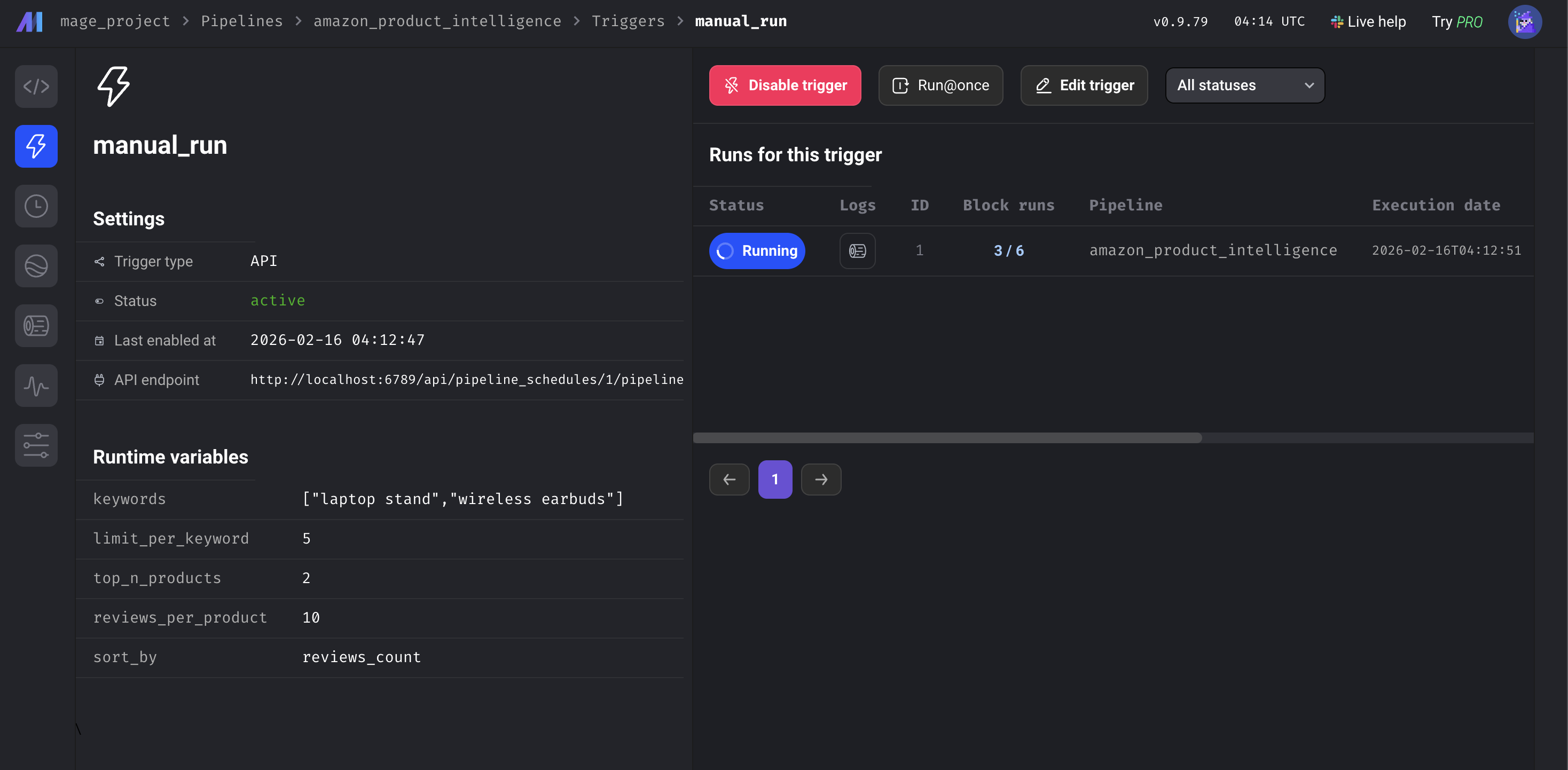
Pipeline variables in the Mage AI UI
Scheduling
To run this on a schedule, go to Triggers in the Mage AI sidebar, click + New trigger, select Schedule, and pick a frequency (once, hourly, daily, weekly, monthly, or custom cron).
Each run upserts by ASIN – it replaces data for the same products while preserving results from other keywords. A timestamped CSV backup is also saved for historical comparison.
Once you have a few runs of data, you can query PostgreSQL directly to surface complaints that star ratings miss:
-- Find products with high negative sentiment
SELECT asin, product_name,
    AVG(CASE WHEN sentiment = 'Negative' THEN 1 ELSE 0 END) as negative_rate
FROM amazon_reviews
GROUP BY asin, product_name
HAVING AVG(CASE WHEN sentiment = 'Negative' THEN 1 ELSE 0 END) > 0.2;
To monitor your own products instead of search keywords, remove the type, discover_by, and limit_per_input parameters and pass your product URLs directly as [{"url": "https://www.amazon.com/dp/YOUR_ASIN"}].
If you need dashboards and alerts without building them yourself, Bright Insights does this without extra setup for retail data.
Scaling up. This demo runs in Docker on a single machine, but Mage AI supports a Kubernetes executor for production, and Bright Data’s APIs handle concurrency on their end (with rate limits for batch requests). Scaling up is about adding Mage AI capacity, not changing your data collection code.
Integrating other Bright Data scrapers
The same pipeline pattern works with any of Bright Data’s ready-made scrapers for 100+ websites. For example, see the Google Maps Scraper, LinkedIn Scraper, and Crunchbase Scraper repos. To switch from Amazon to another platform, swap the DATASET_ID in the data loader blocks and adjust the input parameters to match the new scraper’s schema.
To find the right ID and input fields, browse the Scraper Library in your dashboard or call the /datasets/list endpoint – the API Request Builder in the dashboard shows you exactly what each scraper expects. The Gemini analysis and pipeline structure carry over as-is; the enrichment and export blocks may need column name adjustments if the new scraper’s response fields differ from Amazon’s.
Troubleshooting
If something goes wrong during setup or execution, here are the most common fixes:
- Port 6789 or 8501 already in use. Another service is occupying the port. Either stop that service or edit
docker-compose.ymlto remap the ports (e.g., change6789:6789to6790:6789). - Bright Data API returns 401 Unauthorized. Your API token is missing or malformed. Go to Account Settings, copy the full token, and make sure there are no trailing spaces in your
.envfile. The token is a long hex string (64 characters). If what you copied is short or has dashes like a UUID, you may have copied the wrong field. - Gemini returns 429 (rate limit) on every model. The free tier has per-minute limits that change periodically. The pipeline handles this by rotating through three models, but if all three are exhausted, reviews fall back to rating-based sentiment. To avoid this: reduce
reviews_per_productin pipeline variables, add atime.sleep(60)between batches in the Gemini block, or enable billing on your Google AI project for higher quotas. Check Google’s rate limits page for current quotas. - A pipeline block shows red (failed). Go to the Logs page for your pipeline (accessible from the left sidebar) to see the error. You can filter by block name and log level. Common causes: expired API token, network timeout on the Bright Data API (increase
max_wait_secondsin the block), or a Gemini response that isn’t valid JSON (the block’s@testfunction catches this). - Docker Compose is slow or fails on Apple Silicon. The Mage AI image is multi-arch and works on ARM, but the initial pull can take longer. If the build fails with a memory error, increase Docker Desktop’s memory allocation to at least 4 GB in Settings → Resources.
Next steps
You’ve got a working pipeline that collects Amazon product data, runs AI-powered review analysis, and stores everything in PostgreSQL – no proxies, no parsers, no cron jobs you’re afraid to touch.
If you followed along, make it yours. Swap the keywords list in metadata.yaml for a different product category – no code changes needed. For deeper customization, point it at specific ASINs or switch to a different Bright Data scraper entirely.
New here? Start with Bright Data’s free tier (no credit card required), clone the demo repo, and run docker compose up.
FAQ
Common questions about this setup:
How do I scrape Amazon product data with Python?
You can build your own scraper with requests and BeautifulSoup (which breaks when Amazon changes layouts), or use Bright Data’s Amazon scraper which returns structured JSON from a single API call. For a standalone Python example, see the Amazon Scraper repo. For a deep dive, see Bright Data’s complete Amazon scraping guide
How much does scraping Amazon with Bright Data cost?
The Web Scraping API uses pay-as-you-go pricing, billed per 1,000 records collected. Gemini’s free tier covers the AI analysis. New accounts get a free tier. See the pricing page for current rates.
Can I scrape Walmart, eBay, or other eCommerce sites with this pipeline?
Swap the DATASET_ID in the data loader blocks and adjust input parameters to match the new scraper’s schema. The Gemini analysis and pipeline structure carry over; the enrichment and export blocks may need column name tweaks.
What happens when Amazon changes their page layout?
Nothing on your end. Bright Data maintains the parsers, so when Amazon updates their HTML, your API calls and response format typically stay the same.
Do I need Gemini, or can I use a different LLM?
The pipeline works without Gemini; it falls back to rating-based sentiment. To swap in a different LLM (OpenAI, Claude, Llama), modify the analyze_reviews function in the Gemini block. The prompt format stays the same; you just change the API call.


Technical Writer
 5 years experience
Satyam Tripathi helps SaaS and data startups turn complex tech into actionable content, boosting developer adoption and user understanding.