In this article, you will learn:
- What Bright Data skills are.
- Why they are useful and how they support AI coding agents and assistants.
- Which specific skills they offer for web search, scraping, and more.
- How to install them in your AI agent setup via
skills, the Bright Data CLI, or manually. - How to get the most out of them with practical prompt examples.
Let’s dive in!
What Are Bright Data Skills?
The Bright Data skills allow your AI coding agent to gain knowledge of Bright Data’s products and services.
These skills follow the Agent Skills standard specification defined by Anthropic and are supported across 40+ AI coding solutions. Essentially, skills are structured folders containing instructions, scripts, and resources that agents can discover and use to perform tasks more accurately and efficiently.
In detail, as shown in the official GitHub repository, the Bright Data skills have this folder structure:
skills/
├── scrape/
│   ├── SKILL.md              # Instructions + metadata loaded by the agent
│   └── scripts/
│       └── search.sh         # Executable script that the agent can run
│
├── # other skills...
│
├── bright-data-mcp/
│   ├── SKILL.md
│   └── references/           # MCP tool reference docs
└── bright-data-best-practices/
    ├── SKILL.md              # API selection guide + auth patterns + code examples
    └── references/
        ├── web-unlocker.md   # Full Web Unlocker API reference
        ├── serp-api.md       # Full SERP API reference
        ├── scrapers.md       # Full Web Scraping APIs reference
        └── browser-api.md    # Browser API reference
As you can tell, skills equip your agent with best practices, parameter knowledge, and executable shell scripts to connect to Bright Data’s solutions.
At a high level, the Bright Data skills enable your coding agent to access web data via web scraping, retrieve data feeds from popular domains, perform searches, interact with web pages, and more.
The Need for Web Access in Coding Agents
No matter how powerful the LLM behind your AI coding agent is, it still faces a fundamental limitation shared by all language models: outdated knowledge. An LLM can only generate responses based on the data it was trained on, which represents a fixed snapshot in time.
Given how quickly the tech landscape evolves, this becomes a significant issue. It is common for LLMs to suggest outdated coding practices, rely on deprecated methods, or miss newly released features altogether.
To overcome that limitation, extend your AI coding agent with real-time web access. This is exactly what Bright Data skills provide. Once integrated, your agent can:
- Identify the right API for search, scraping, or structured data extraction.
- Authenticate and structure requests correctly when connecting to Bright Data APIs.
- Handle pagination, errors, and edge cases effectively.
- Execute real shell scripts to perform actions such as web search and scraping.
Thanks to them, the agent becomes able to autonomously:
- Discover up-to-date information from the right online sources, such as documentation pages, Stack Overflow, and forums.
- Retrieve real web data to enrich your scripts (e.g., when populating databases or mocking responses).
- Suggest relevant links for further reading or to support your
README.mdfiles. - Handle many other real-world use cases.
What makes Bright Data special is that its products are built on a robust network infrastructure supported by over 400 residential proxy IPs. This enables unlimited scalability while achieving 99.99% uptime and a 99.95% success rate.
Remember that Bright Data skills are part of the open Agent Skills ecosystem and are supported across 40+ AI coding assistants.
Bright Data Skills: Complete List
Explore all Bright Data skills in the following table:
| Skill | Description | Bright Data Product |
|---|---|---|
search |
Search Google and get structured JSON results with titles, links, and descriptions. Supports pagination using the Bright Data SERP API. | SERP API |
scrape |
Scrape any webpage as clean markdown with automatic bot detection bypass, CAPTCHA solving, and JavaScript rendering using the Web Unlocker API. | Web Unlocker API |
data-feeds |
Extract structured data from 40+ websites including Amazon, LinkedIn, Instagram, TikTok, YouTube, eBay, and Walmart with automatic polling. | Web Scraping APIs |
bright-data-mcp |
Orchestrate the 60+ Bright Data MCP tools for search, scraping, structured extraction, and browser automation. | Bright Data MCP |
scraper-builder |
Guide agents to build production-ready scrapers, covering site analysis, API selection, selector extraction, pagination, and complete implementation. | Web Scraper API/Python SDK |
bright-data-best-practices |
Built-in reference for Web Unlocker, SERP API, Scraper API, and Browser API. Claude consults it automatically when generating Bright Data code. | , |
python-sdk-best-practices |
Guide for the brightdata-sdk Python package, including async/sync clients, scrapers, SERP, datasets, Browser API, error handling, and common coding patterns. |
Python SDK |
brightdata-cli |
Instructions for using the Bright Data CLI to scrape, search, extract data, manage proxies, and monitor account usage directly from the terminal. | Bright Data CLI |
competitive-intel |
Provides real-time competitive intelligence with competitor snapshots, pricing comparisons, review mining, hiring signals, content, SEO insights, and market mapping. | Bright Data CLI |
design-mirror |
Replicates design system patterns, tokens, and components to help build consistent, high-quality user interfaces. | Web Unlocker API |
brd-browser-debug |
Debug Bright Data Scraping Browser sessions with failure triage, per-session bandwidth tracking, CAPTCHA reporting, and pattern detection via Browser Sessions API. | Browser API |
Important: To learn more about each skill, check out the official repository. Consider also supporting the project and staying updated by leaving a star!
How to Add Bright Data Skills to Coding Agents and Assistants
Each coding agent may load skills differently, but there are ways to simplify the installation process. The three main approaches to adding the Bright Data skills are:
- Via the Vercel
skillstool (recommended):skillsis a CLI developed by Vercel to install and manage skills. It provides a guided setup and supports 40+ AI agent frameworks. - Through the Bright Data CLI: Includes dedicated commands to simplify skill installation and configuration in supported AI coding tools.
- Via manual configuration: Copy the Bright Data skill folders into the correct directory required by your AI coding agent.
The first two approaches are guided and automated, making them easier to use but offering less control. The manual approach requires more effort but gives you full control over the setup.
In the following sections, you will see how to use each method in Claude Code! (Note: The same instructions will also work for any other AI coding agents supporting skills.)
Common Prerequisites
No matter which approach you choose to add Bright Data skills to your AI coding agent, there are a few common steps to follow. Let’s go through them!
Requirements
To make Bright Data skills work in your chosen AI agent, you must have:
- A Unix-based operating system capable of running
.shscripts (Linux, macOS, or WSL). - A Bright Data account with the required zones and an API key set up. (You will be guided through this in the next step.)
- Access to one of the 40+ AI agents that support Agent Skills.
- The
jqpackage installed locally.
To install jq (a tool for processing JSON, similar to sed) on Debian-based systems, run:
sudo apt-get install curl jqOr, equivalently, on macOS:
brew install curl jqSet Up Your Bright Data Account
The Shell scripts used by Bright Data skills require these two environment variables:
BRIGHTDATA_API_KEY: Used to authenticate HTTP requests to the Bright Data API infrastructure.BRIGHTDATA_UNLOCKER_ZONE: Utilized to connect to your Bright Data Web Unlocker API zone, which enables web scraping capabilities (as well as web search, since it can also act as a SERP API).
In simple terms, to get started, you need a Bright Data account, a Web Unlocker API zone, and an API key. This section will guide you through setting them all up.
For a quick setup, refer to the “Create Your First Unlocker API” guide from the docs. Alternatively, follow the instructions below.
If you do not have a Bright Data account, create one. Otherwise, just log in. Reach the control panel, navigate to the “Proxies & Scraping” page, and check the “My Zones” table:
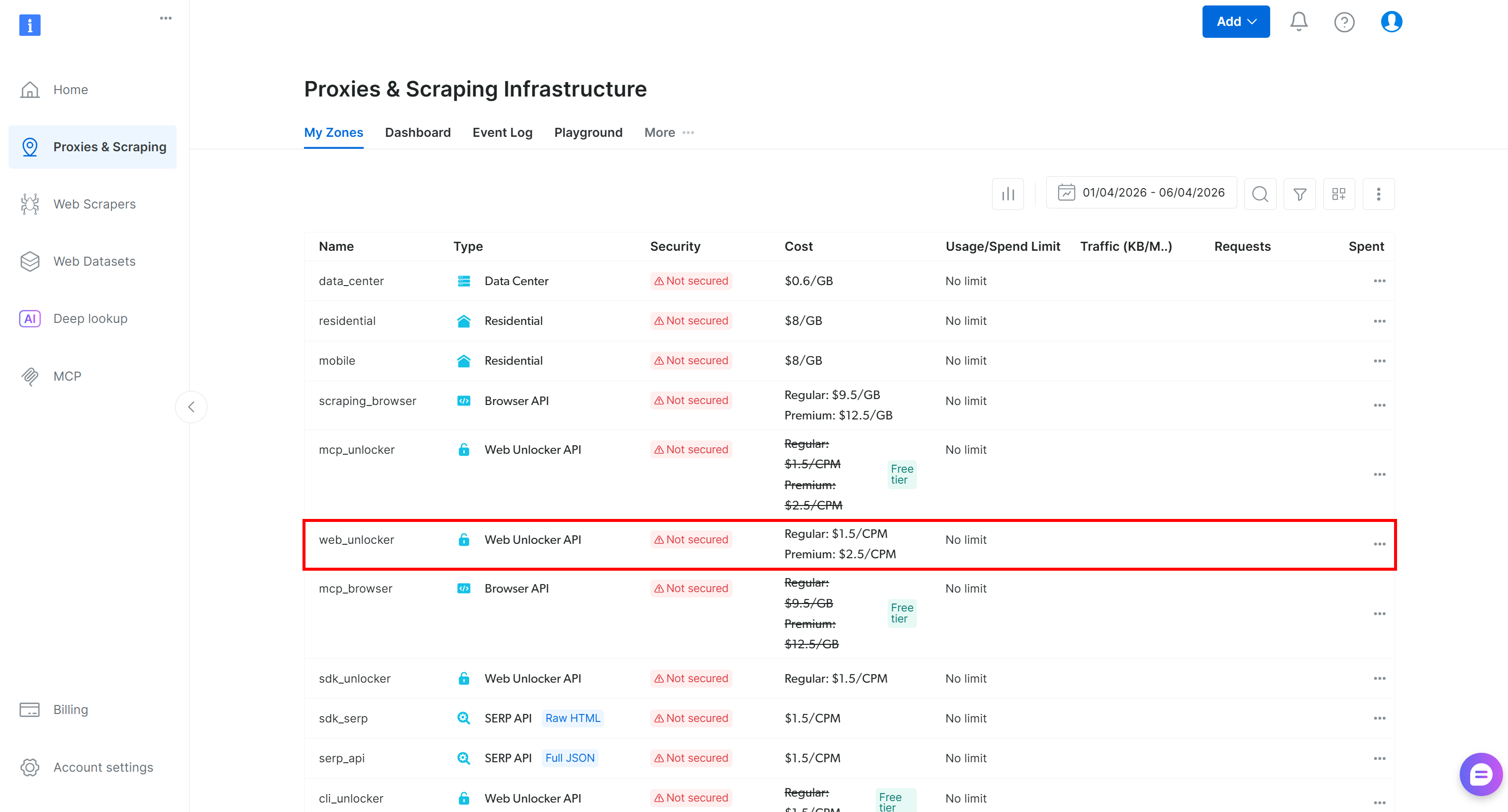
If a Web Unlocker API zone (for example, web_unlocker, in this case) already exists, you are ready to proceed to the API key creation.
If it does not exist, create one. Scroll to the “Unblocker API” section, click the “Create zone” button:
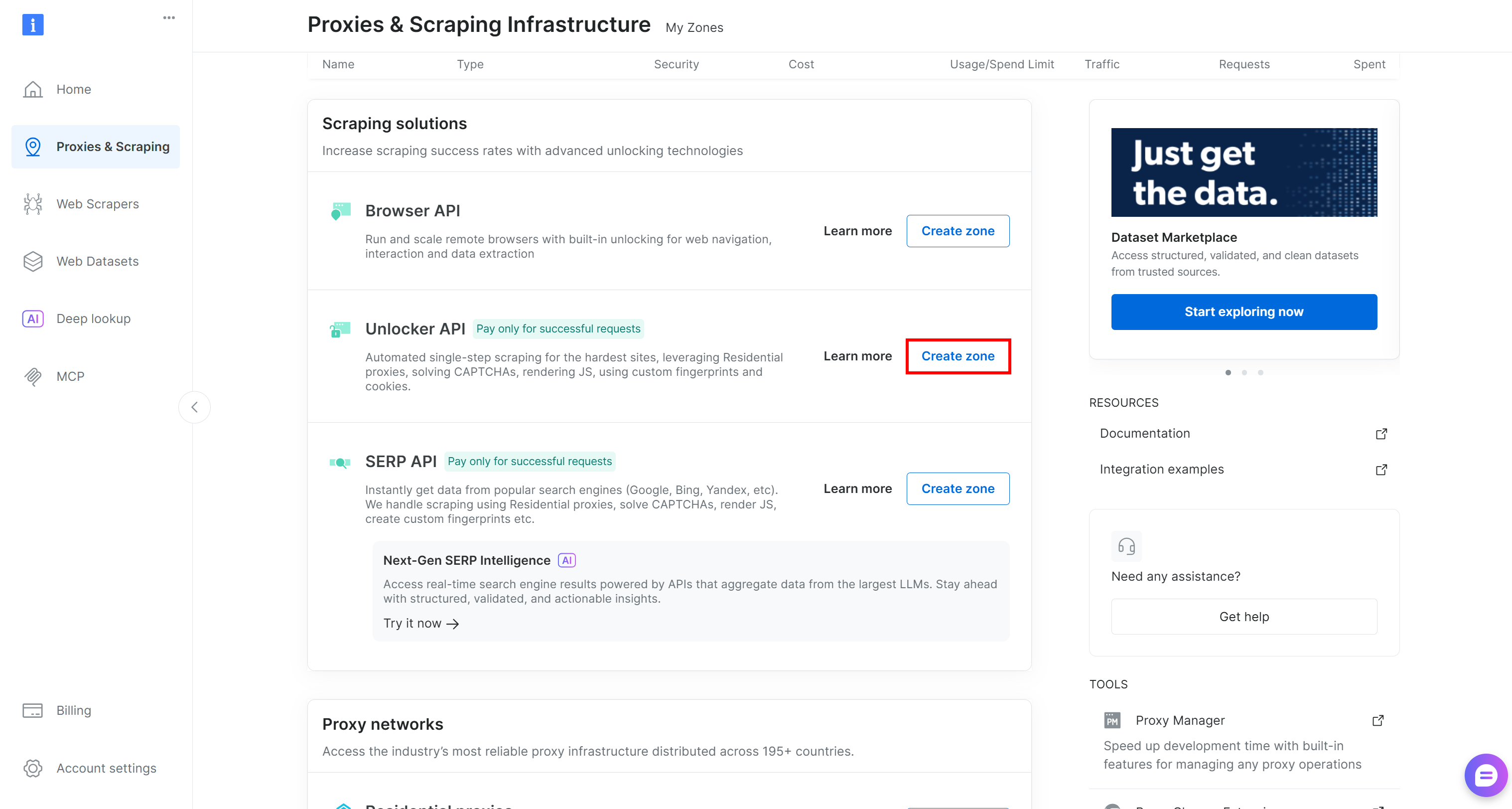
Choose a clear name for your zone and complete the wizard until the zone becomes active.
Finally, generate your Bright Data API key by following the official guide.
Once you have both the zone name and the API key, define the required environment variables in your Unix-based system:
export BRIGHTDATA_API_KEY="<YOUR_BRIGHT_DATA_API_KEY>"
export BRIGHTDATA_UNLOCKER_ZONE="<YOUR_BRIGHT_DATA_WEB_UNLOCKER_API_ZONE_NAME>"
Replace the placeholders with the values you just retrieved or configured, and you are good to go!
Approach #1: Via the Vercel skills Tool
The recommended approach to add Bright Data skills to your AI coding agents (among the 40+ supported) is via the Vercel skills package. See how to take advantage of it!
Prerequisites
To follow this section, make sure you have:
Step #1: Install the Skills
Move to your project’s directory. Launch the command below to start the wizard for adding the Bright Data skills to your local AI coding agent:
npx skills add brightdata/skillsThis runs the skills npm package, installing it if necessary, and retrieves the specified skills from the Agent Skills Directory.
Note: brightdata/skills is the name of the Bright Data skills on the Agent Skills Directory.
You will be asked to select the specific skills you want to install:
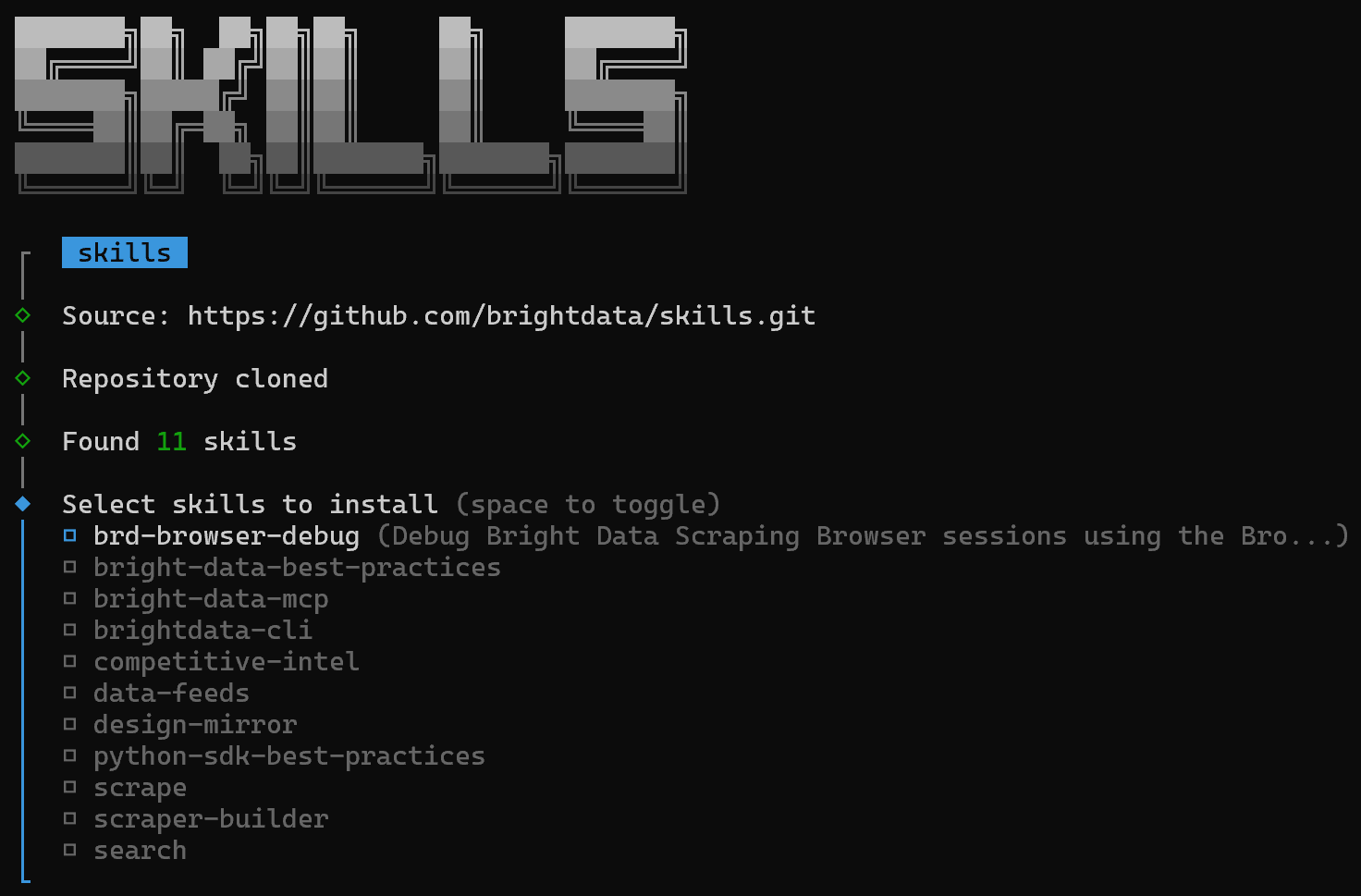
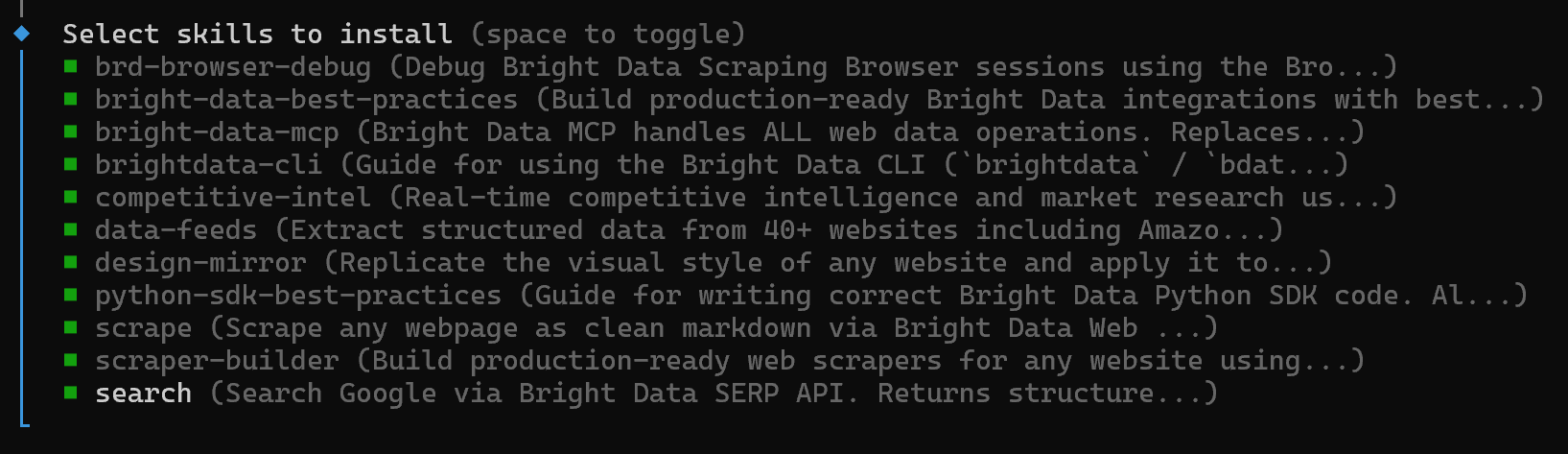
Press the space bar to toggle all skills one by one, then press Enter:
Next, you will be prompted to select the AI agents where you want to install the skills:
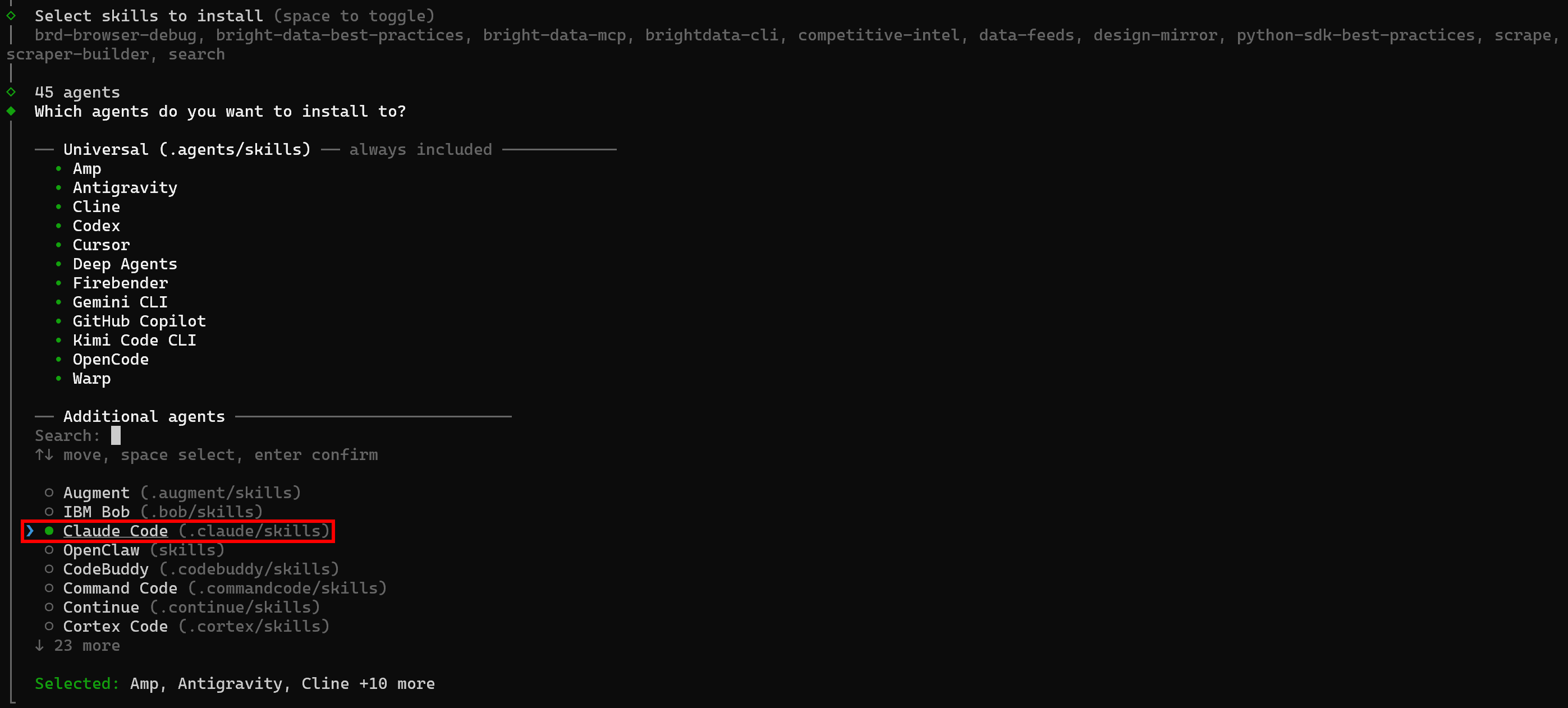
By default, agents like Amp, Antigravity, Cline, Codex, and others are selected. Since you want to install on Claude Code, toggle it with the space bar and press Enter.
Note: Keep in mind that you can install the skills directly in Claude Code using:
npx skills list -a claude-codeskills will ask whether to install the skills locally in your project or globally:

Select the option that fits your use case.
For the installation method, the recommended approach is via symlink:

This option adds the skills to a general folder and links them to your projects, keeping the original folder as the single source of truth.
Finally, you will see the “Installation Summary” and “Security Risk Assessment” sections. Review them and type “Yes” to continue. You should then receive the following confirmation:

Congratulations! The Bright Data skills have now been added to the selected AI coding agents and assistants.
Step #2: Verify the Skills Installation
To check that the skills were successfully added to your Claude Code local setup, run:
npx skills list -a claude-codeYou should see a list like this:
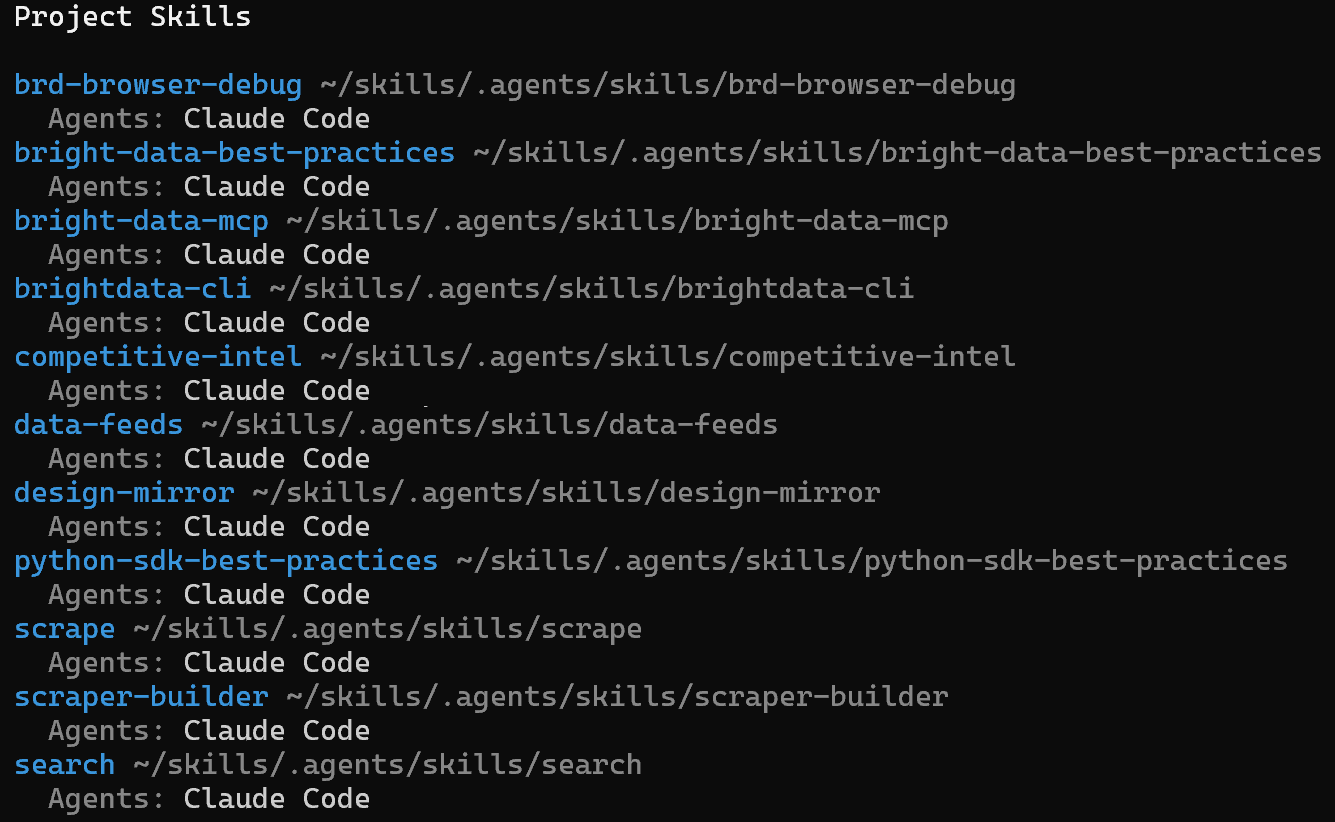
Notice how this contains all the Bright Data skills selected previously.
Alternatively, open Claude Code and type the command:
/skillsThe result will again show the list of Bright Data skills you selected before:
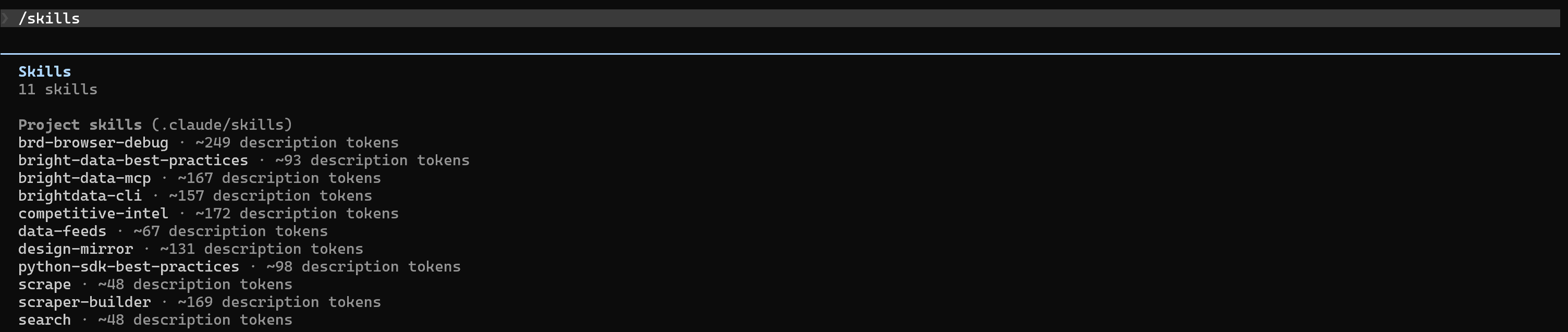
Amazing! The Bright Data skills are now available in Claude Code (or your preferred AI coding agent).
Next Steps: Update the Skills
The Bright Data skills are likely to receive updates in the future. To check for updates, run:
npx skills checkIf updates are available (namely, the Bright Data skills repository has changed since you last cloned it via npx skills add brightdata/skills), retrieve the updates with:
npx skills updateCool! Your Bright Data skills will now be up-to-date with the latest version.
Approach #2: Through Bright Data CLI
The Bright Data CLI is an all-in-one terminal tool that offers streamlined access to the full Bright Data surface. Among its many commands, it also includes one for skills installation. Learn how to use it!
Prerequisites
Before continuing, ensure you meet the requirement below:
- Bright Data CLI installed locally and connected to your account.
Install the Skills
To select and install skills interactively via the Bright Data CLI, execute:
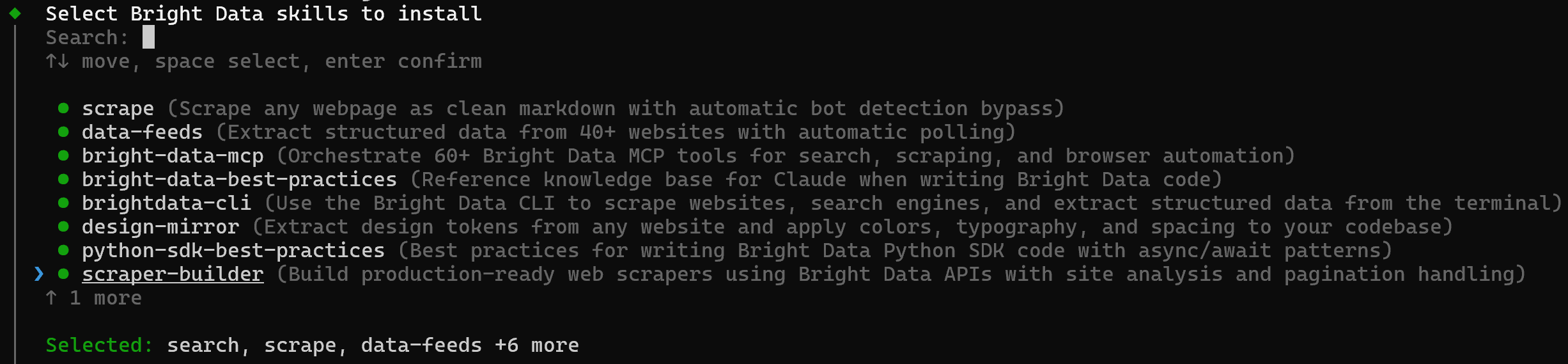
brightdata skill addThis launches an interactive picker where you can choose which skills to install:
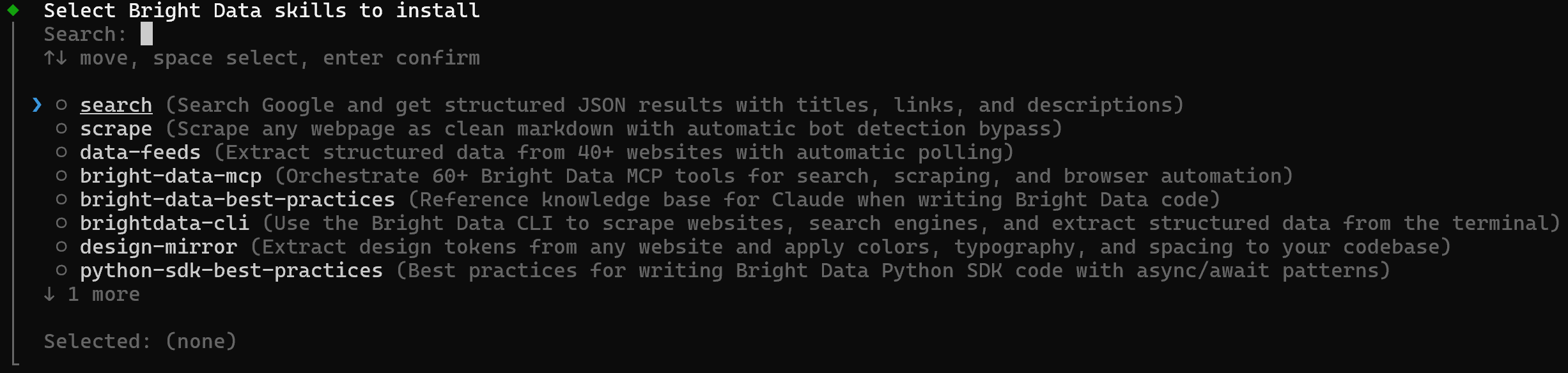
Select all skills by toggling them with the space bar:
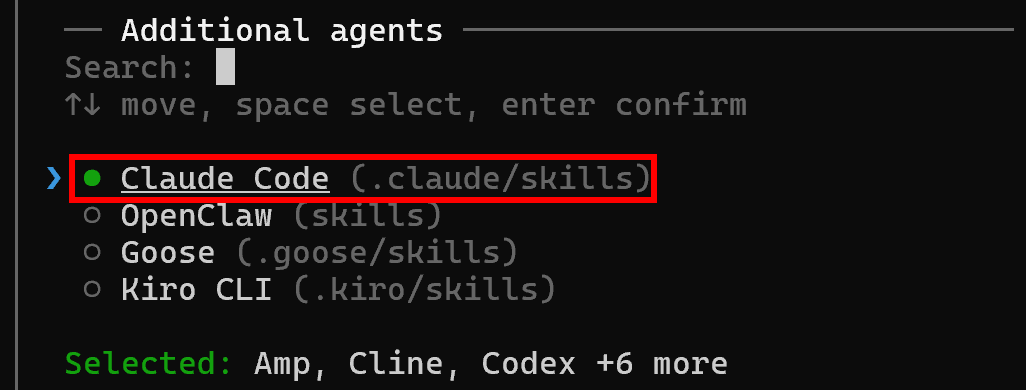
Next, choose the AI agents where you want to install the skills. In this case, select Claude Code:
One by one, the toggled skills will then be retrieved and installed in the selected coding agent:
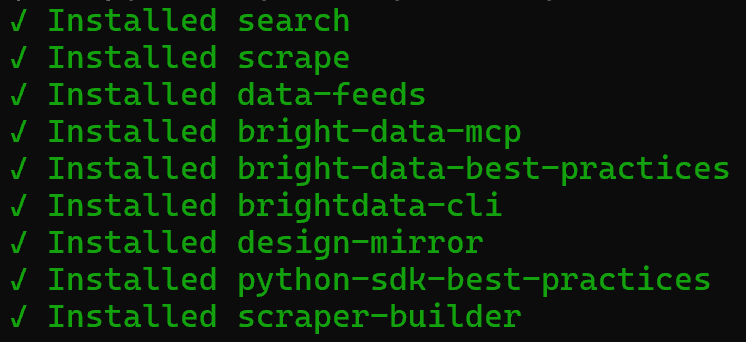
Fantastic! Your local Claude Code setup now includes the Bright Data skills.
Approach #3: Via manual configuration
Skills are simply folders. So, for configuration, you can manually copy and paste them into the required directory of your AI coding agent.
Start by cloning the GitHub repository for the Bright Data skills:
git clone https://github.com/brightdata/skillsThe skills/ folder will now contain:
skills/
├── .claude-plugin/
├── skills/
│   ├── bright-data-best-practices/
│   ├── bright-data-mcp/
│   ├── brightdata-cli/
│   ├── data-feeds/
│   ├── design-mirror/
│   ├── python-sdk-best-practices/
│   ├── scrape/
│   ├── scraper-builder/
│   └── search/
├── .gitignore
├── LICENSE
└── README.md
Next, copy the skill folders (such as bright-data-best-practices/, bright-data-mcp/, etc.) from skills/skills/ into the required directory for your AI agent configuration.
For example, to copy them to a Claude Code project, run:
cp -r skills/skills/* <PATH_TO_YOUR_PROJECT>/.claude/skills/If you are using a different AI coding agent, refer to its official documentation to find the correct folder where the Bright Data skills should be placed. Mission complete!
Bright Data Skills in Action
It is time to observe the capabilities your AI coding agent gains through integration with the Bright Data skills. Out of the many supported use cases, we will focus on the main ones and present real prompts you could run in your projects.
Web Search
The AI agent can now search the web in real time and retrieve structured results thanks to the search skills.
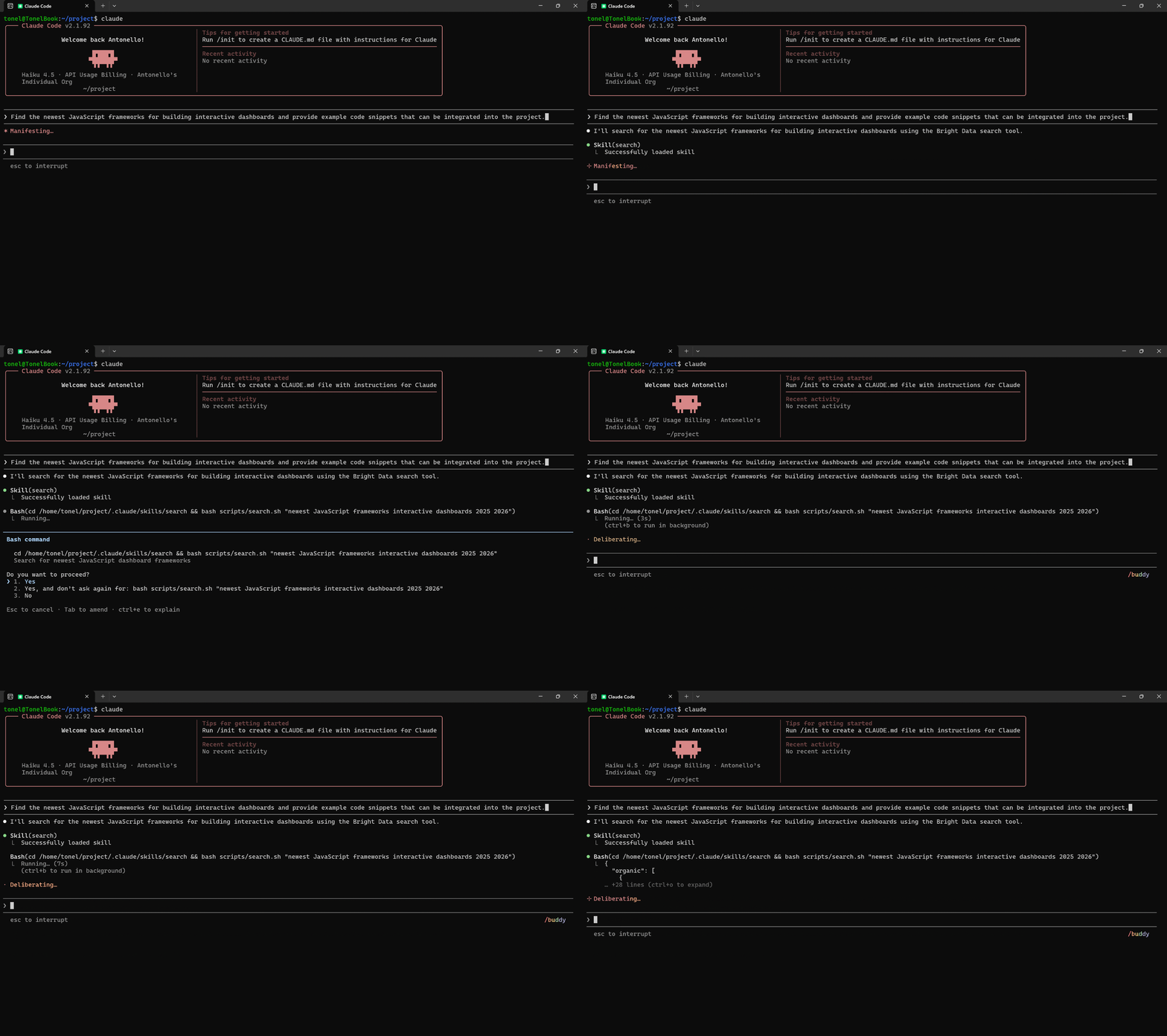
Sample prompts:
"Find the latest Python tutorials on data visualization with Matplotlib and use them to improve the charts in the data-analysis.ipynb notebook"."Search for recent articles on best practices for API authentication in Python and summarize the key steps to the current authentication layer"."Find the newest JavaScript frameworks for building interactive dashboards and provide example code snippets that can be integrated into the project".
Web Scraping
Your coding assistant can now scrape any webpage and get clean Markdown content via the scrape skill.
Sample prompts:
"Scrape the product listings from this e-commerce page 'https://www.gucci.com/us/en/ca/women/handbags-c-women-handbags' and generate an SQL query to populate the 'products' table with the extracted data"."Scrape recent posts from this official Python forum page 'https://python-forum.io/forum-44.html' and summarize the key discussions".
Web Data Feeds
The AI agent can fetch structured JSON data from 40+ domains using the data-feeds skill. This is ideal for populating databases, defining mock responses, or supporting data analysis pipelines.
Sample prompts:
"Fetch data from this Amazon product page 'https://www.amazon.com/Apple-Bluetooth-Headphones-Personalized-Effortless/dp/B0DGHMNQ5Z/' and use it to mock the response of the /api/v1/products/B0DGHMNQ5Z endpoint"."Pull video statistics and comments from this YouTube video '<YOUTUBE_VIDEO_URL>' and use them to calculate engagement metrics and perform sentiment analysis".
Design Mirror
The AI agent can replicate design system patterns, tokens, and UI components from source material to maintain consistent UI quality through the design-mirror skill.
Sample prompts:
"Mirror the color palette, typography, and button styles from this website '<WEBSITE_URL>' into a reusable CSS/React component library".Extract design tokens from the given Figma project '<PUBLIC_FIGMA_PROJECT_URL>' and generate a JSON configuration for reuse in my web app".
Web Scraper Building
The AI agent can generate production-ready scrapers using the scraper-builder skill.
Sample prompts:
"Build a scraper for this e-commerce site '<WEBSITE_URL>' that extracts product names, prices, and stock availability from all products"."Generate a script to scrape all articles from this blog '<BLOG_URL>' and extract title, author, content, and date".
Advanced Use Case
The AI agent can combine multiple skills (e.g., search + scrape) to take care of complex, multi-step prompts.
Sample prompts:
"Search for recent articles on AI model security, scrape their abstracts, and propose best practices to improve the current project"."Collect product listings from Amazon and eBay, merge the data, and highlight price differences for competitive analysis"."Find trending Python packages on GitHub, retrieve their README files, and summarize the usage patterns".
Conclusion
In this blog post, you learned what the Bright Data skills bring to the table, why they matter, and how to install them. Thanks to what you have seen here, you now know how to extend your AI coding agents and assistants with tools for enterprise-ready web data access. These will help them overcome the limitations of static LLM knowledge.
The Bright Data skills enable you to connect your agents to the full range of Bright Data products and services for AI-powered use cases. Leave a star on the official repository to receive notifications when a new update is released!
Create a Bright Data account for free today and start integration with our AI-ready web data access solutions!
FAQ
Which coding agents and assistants are supported by Bright Data skills?
Bright Data skills can be used with any AI agent technology that supports the Agent Skills standard by Anthropic. These include Amp, Kimi Code CLI, Replit, Universal, Antigravity, Augment, IBM Bob, Claude Code, OpenClaw, Cline, Warp, CodeBuddy, Codex, Command Code, Continue, Cortex Code, Crush, Cursor, Deep Agents, Droid, Firebender, Gemini CLI, GitHub Copilot, Goose, Junie, iFlow CLI, Kilo Code, Kiro CLI, Kode, MCPJam, Mistral Vibe, Mux, OpenCode, OpenHands, Pi, Qoder, Qwen Code, Roo Code, Trae, Trae CN, Windsurf, Zencoder, Neovate, Pochi, and AdaL.
Can I combine skills with MCP in the same agent?
Sure! An AI agent can connect to the Bright Data MCP server while also being extended with Bright Data skills. See how to configure this setup in Claude Desktop to use both capabilities together. Keep in mind that Bright Data skills include a specific bright-data-mcp skill for orchestrating Bright Data MCP tools to achieve better results with them.
Is it possible to utilize Bright Data skills outside of AI coding agents?
Yes! Some skills (such as scrape, search, and data-feeds) come with dedicated shell scripts that you can call directly. Clone the GitHub repository, navigate into the cloned folder (cd skills/), and ensure all prerequisites are met. Then test the scripts in your terminal.
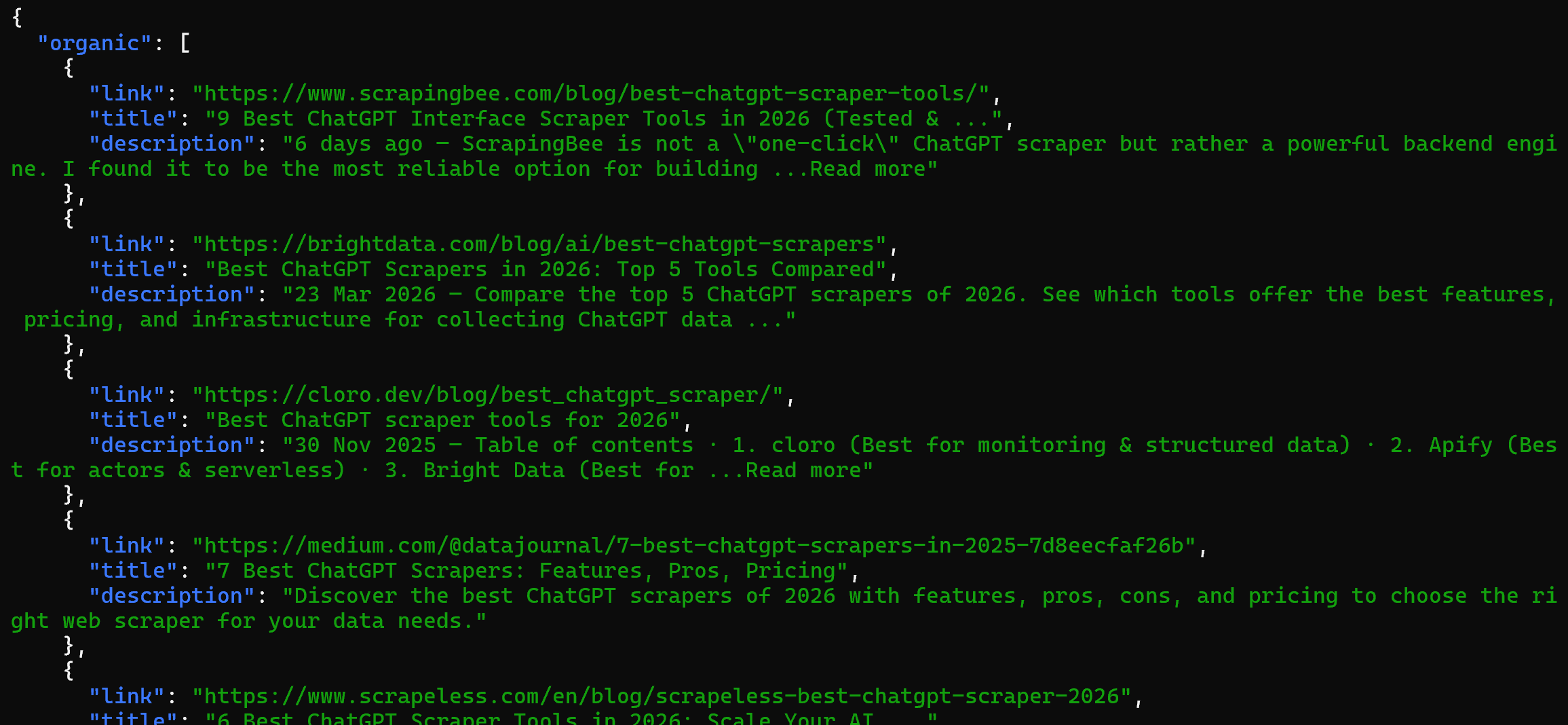
For example, you can run the search skill directly with:
bash skills/search/scripts/search.sh "best chatgpt scrapers"The result will be structured SERP data scraped from Google via the SERP API:
Explore additional examples in the official documentation.



Technical Writer
 5.5 years experience
Antonello Zanini is a technical writer, editor, and software engineer with 5M+ views. Expert in technical content strategy, web development, and project management.