Web scrapers fail in three ways: HTML is empty because JavaScript renders the page, CSS selectors stop matching after a frontend update, and requests get blocked by anti-bot products like Cloudflare. Scrapling is an open-source Python library that handles all three. This guide shows each part on live websites, and where a managed proxy service becomes necessary at production scale.
TL;DR
Scrapling combines three fetcher classes (HTTP, Chromium, stealth Firefox), an adaptive parser that re-finds elements after class renames, and a Scrapy-style spider in one Python library for production scraping.
- Pick the cheapest fetcher that works; escalate to StealthyFetcher for bot-protected sites.
- Adaptive selectors recover from markup changes if you fingerprint a known-good page first.
- For production, wrap parse logic in a Spider with checkpointing and an empty-result alarm.
- When local stealth runs out (IP reputation, enterprise anti-bot products), switch to residential proxies or a managed unblocking endpoint.
Why Scrapling, when requests + BS4 already exists?
The combination of requests and BeautifulSoup still works for static pages with stable markup. The trouble starts as soon as you deploy a scraper that has to keep working.
Selectors stop matching when a frontend team renames or restructures elements. Pages render server-side this quarter and client-side next quarter. A site you’ve scraped for a year suddenly adds Cloudflare Bot Management, and every request returns a challenge page.
None of these are unusual problems, but each one needs its own fix. Combining those fixes into a requests script tends to produce a fragile collection of try/except blocks and selector fallbacks. (For low-volume jobs where selectors keep changing, an LLM extraction pass over the rendered HTML is now a viable alternative. Scrapling is worth the setup cost when per-page cost matters and you’re rendering at scale.)
Scrapling consolidates the common fixes into one library:
- Three fetchers, one API. A fast HTTP client with TLS-fingerprint impersonation (Fetcher), a Playwright-driven browser (DynamicFetcher), and a stealth browser based on Camoufox, a patched Firefox build that masks common automation signals (StealthyFetcher). All of them return the same parser object, so changing fetchers doesn’t mean rewriting your selector code.
- Selectors that survive markup changes. Save the structural fingerprint of an element on first run, and on subsequent runs Scrapling can locate the same element even if classes, IDs, or positions have changed.
- A built-in Spider framework. Concurrent requests, per-domain throttling, pause and resume, robots.txt compliance, and JSON/JSONL export, all built in.
- Proxy rotation built in. A ProxyRotator helper integrates with all session types, with per-request overrides.
The three fetchers map to three difficulty levels, so the decision of which to use is usually obvious once you check the target:
| If the page is… | Use this fetcher | Per-request cost (time, memory) |
|---|---|---|
| Static HTML, no anti-bot | Fetcher | milliseconds, no browser |
| JavaScript-rendered, no anti-bot | DynamicFetcher | seconds, Chromium memory |
| Behind Cloudflare or similar anti-bot | StealthyFetcher | seconds, Camoufox memory |
Scrapling’s parser is roughly the same speed as Parsel and lxml, and faster than BeautifulSoup for large documents. For a 5,000-element document, the official benchmarks put it at around 2 ms versus over 1.5 seconds for bs4 + lxml. Unlikely to matter at small scale, but it adds up once you’re parsing millions of pages a month.
Before choosing any scraping library, do a quick check: does the target expose an official API, an RSS or Atom feed, a sitemap, a JSON-LD embed, or a public data dump? When those exist, an API call is usually faster and cheaper than scraping. Scraping is the right answer when there’s no API, when the API is paywalled or rate-limited beyond what the use case can afford, or when the data you need isn’t exposed by the API.
Scrapling isn’t the right tool for everything:
- At distributed-cluster scale, Scrapy clusters and framework-specific distributed runners scale better.
- For curl-equivalent scrapes that requests and a 5-line BeautifulSoup selector already handle, use those.
- When you need a managed scraper without writing code, a no-code platform is a better fit.
The strongest fit is the production scraper that has to keep working week after week: enough complexity that maintenance matters, but not so much that you need a cluster.
Scrapling is BSD-3 licensed; this guide is verified against v0.4.7 (April 2026). API names used in the guide are stable; check the changelog for newer releases if your defaults differ. Type hints cover the public API, which matters if you’re piping responses through a typed pipeline.
Install Scrapling
The fetcher dependencies are an explicit opt-in, so you’re not installing Playwright and Camoufox on a machine that only needs the parser. Install with the fetcher extras and the browser binaries:
# pip
pip install "scrapling[fetchers]"
# or with uv (faster, lockfile-aware)
uv pip install "scrapling[fetchers]"

scrapling install
The first command installs the library plus HTTP and browser fetchers. The second downloads the browser binaries (Camoufox for StealthyFetcher, Chromium for DynamicFetcher) along with the system dependencies they need. On Windows, run the terminal as administrator the first time so the binaries can install system-wide.
To verify everything installed cleanly:
from scrapling.fetchers import Fetcher

page = Fetcher.get('https://httpbin.org/headers')
print(page.status, page.json()['headers']['User-Agent'])
A working install prints 200 and a Chrome-style User-Agent string. If the User-Agent looks like python-requests/x.x instead, you’re running the parser-only build; reinstall with the [fetchers] extra so pip also installs curl_cffi (the library that provides Fetcher‘s TLS impersonation).
Two more extras are useful to know:
- scrapling[shell] adds an interactive IPython shell (scrapling shell), a curl-to-Scrapling converter, and a scrapling extract CLI to fetch content from the terminal in one line. For example, scrapling extract get https://example.com out.md writes the page (or a CSS-selector subset of it) as Markdown.
- scrapling[all] installs everything, including the MCP (Model Context Protocol) server for AI-agent integrations; see the project’s documentation.
scrapling[fetchers] covers every example below.
Your first scrape: extract quotes from a static page
The standard sandbox is quotes.toscrape.com, which renders ten quotes per page in plain server-rendered HTML. There’s no JavaScript, no anti-bot, and no rate limit, so it’s a good first test for the Fetcher path:
from scrapling.fetchers import Fetcher

page = Fetcher.get('https://quotes.toscrape.com/', stealthy_headers=True)

for quote in page.css('.quote'):
    text = quote.css('.text::text').get()
    author = quote.css('.author::text').get()
    tags = quote.css('.tag::text').getall()
    print(f"{author}: {text[:60]}... [{', '.join(tags)}]")
Fetcher.get() returns a Response object that also acts as the parser handle. Setting stealthy_headers=True makes Scrapling send realistic browser headers, including User-Agent, Accept, Accept-Language, and sec-ch-ua, rather than a default python-requests header set. Unnecessary on a sandbox, but production sites often filter on header consistency.
page.css(‘.quote’) returns a Selectors container of all matching elements. The ::text pseudo-element is a Scrapy/Parsel convention that extracts the text node directly rather than the surrounding tag.
The output looks like this:
Albert Einstein: "The world as we have created it is a process of our t... [change, deep-thoughts, thinking, world]
J.K. Rowling: "It is our choices, Harry, that show what we truly are,... [abilities, choices]
Albert Einstein: "There are only two ways to live your life. One is as t... [inspirational, life, live, miracle, miracles]
...
If you’ve used Scrapy before, the API is intentionally familiar. If you’ve used BeautifulSoup, Scrapling has find_all and find_by_text too:
quotes = page.find_all('div', class_='quote')
einstein = page.find_by_text('Einstein', partial=True)
Scrape a real target: the Hacker News front page
Sandbox sites are only for practice. The same code structure works on real targets, with two changes: selectors come from inspecting the actual markup, and the data needs more cleanup. Hacker News is a useful first real target (stable HTML, no anti-bot) and its layout has an unusual structure worth knowing about: each story is a \ row, with the metadata (points, user, age) on the immediately following sibling row. The scraper:
from scrapling.fetchers import Fetcher

page = Fetcher.get('https://news.ycombinator.com/', stealthy_headers=True)

stories = []
for athing in page.css('tr.athing'):
    title = athing.css('.titleline a::text').get()
    href = athing.css('.titleline a::attr(href)').get()
    rank = athing.css('.rank::text').get()

    # Metadata lives on the next sibling row
    subline = athing.next.css('.subline')
    points_text = subline.css('.score::text').get() or '0 points'
    user = subline.css('.hnuser::text').get()
    age = subline.css('.age a::text').get()

    stories.append({
        'rank': int(rank.rstrip('.')) if rank else None,
        'title': title,
        'url': href,
        'points': int(points_text.split()[0]),
        'user': user,
        'age': age,
        'id': athing.attrib.get('id'),
    })

print(f"scraped {len(stories)} stories")
for s in stories[:3]:
    print(f"  {s['rank']}. [{s['points']:>4}] {s['title'][:55]}  by {s['user']}")
The snippet uses three patterns that the sandbox examples don’t show:
- athing.next navigates to the next sibling element, useful when structurally related rows share data (a common pattern in older table-based markup).
- .attrib.get(‘id’) reads a raw HTML attribute when there’s no convenient ::attr() shortcut.
- The or ‘0 points’ default value covers job postings, which appear on the Hacker News front page without a score.
Real targets almost always have these small irregularities (missing fields, mixed item types, occasional malformed rows). Adjust selectors and add small default values; the structure of the code stays the same.
Write scrapers without selectors using find_similar
Sometimes you don’t even need to write the row selector. Start from visible text, move up to the right container, and let Scrapling find every structurally similar element:
sample = page.find_by_text("1.")                          # the rank label on story #1
row = sample.find_ancestor(lambda e: e.tag == "tr")       # walk up to the story row
peers = row.find_similar()                                # find every similar row
print(f"Found {len(peers) + 1} story rows without writing a CSS selector for the row")
On the live front page, this prints 30 (every story row, located by structural similarity to the one we started from). find_similar takes an optional similarity_threshold (default 0.2; lower values mean a stricter structural match) and an ignore_attributes list (defaults to href and src) so URL differences don’t stop the match. For sites where markup changes faster than you can maintain selectors, combining find_by_text with find_similar holds up better than chasing class names.
Extract tables: country data from Wikipedia
Tables are another common form of real-world data: financial figures, sports stats, reference lists. Wikipedia provides its data tables under a single table.wikitable class, which is consistent across the encyclopedia, so the same selector pattern works almost everywhere. The country-population scrape:
from scrapling.fetchers import Fetcher

URL = 'https://en.wikipedia.org/wiki/List_of_countries_by_population_(United_Nations)'
page = Fetcher.get(URL, stealthy_headers=True)

table = page.css('table.wikitable')[0]
countries = []
for row in table.css('tbody tr'):
    cells = row.css('td')
    if len(cells) < 3:                          # skip header and grouping rows
        continue
    name = cells[0].css('a::attr(title)').get()
    pop_text = cells[1].text.strip()
    if not name or not pop_text:
        continue
    countries.append({
        'country': name,
        'population': int(pop_text.replace(',', '')),
    })

print(f"scraped {len(countries)} country rows")
top = sorted(countries, key=lambda c: c['population'], reverse=True)[:3]
for c in top:
    print(f"  {c['country']:<20} {c['population']:>15,}")
Two patterns matter here. cells[0].css(‘a::attr(title)’).get() extracts the country name from the link’s title attribute, which is cleaner than .text because it skips the flag-icon clutter in the same cell. The if len(cells) < 3 guard skips the irregular header and grouping rows that show up in almost any third-party HTML table.
Selectors that survive site changes
A site renames a class from .product-card to .product-tile. Your scraper starts returning empty results. You don’t notice until a later step in your pipeline reports missing data.
Scrapling’s answer is one config option plus two flags. Each does one thing:
| What you write | When you write it | What it does |
|---|---|---|
| selector_config={‘adaptive’: True} on the fetcher call | Always (first AND later runs) | Turns the feature on. Without it, Scrapling silently ignores the other two flags. |
| auto_save=True on .css() | First run | Records the matched element’s structural fingerprint (tag, attributes, position, surrounding text) to a small local SQLite file. |
| adaptive=True on .css() | Later runs | If the selector returns nothing, uses the saved fingerprint to find the element again. |
The lifecycle, end to end:
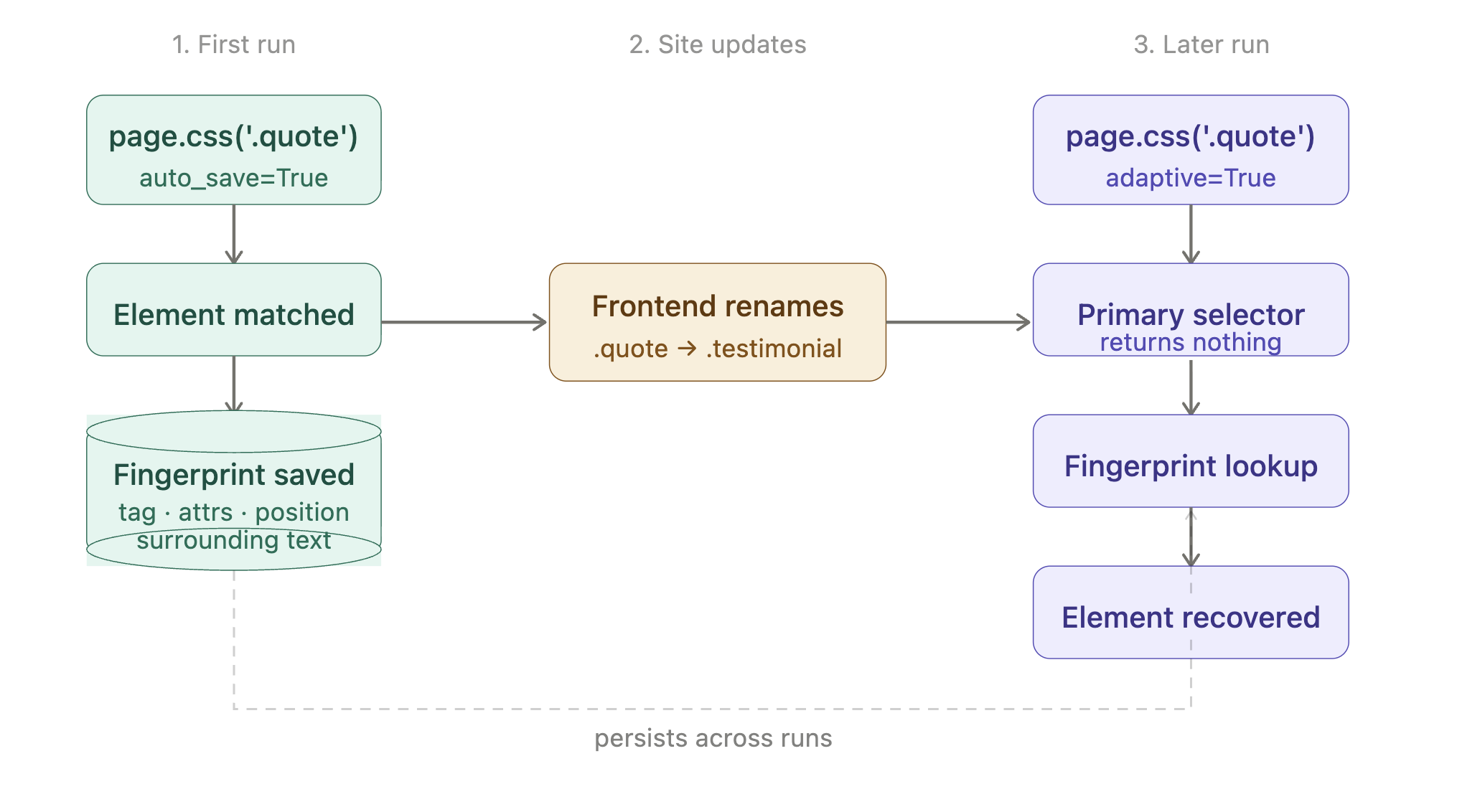
In code, that’s:
from scrapling.fetchers import Fetcher

# First run: enable adaptive on the fetcher, save fingerprints with auto_save
page = Fetcher.get(
    'https://quotes.toscrape.com/',
    selector_config={'adaptive': True},
)
quotes = page.css('.quote', auto_save=True)
print(f"Found {len(quotes)} quotes on first run")

# Later run: same selector, plus adaptive=True for the fallback path.
# If the site renamed `.quote`, the fingerprint recovers the elements.
page = Fetcher.get(
    'https://quotes.toscrape.com/',
    selector_config={'adaptive': True},
)
quotes = page.css('.quote', adaptive=True)
print(f"Found {len(quotes)} quotes (recovered via fingerprint if needed)")
The fingerprint database is stored next to your script, so the same script reuses the saved fingerprints across runs. The pattern works the same way on every fetcher: pass selector_config once on the fetch call, then use auto_save and adaptive on the .css() calls.
Treat the fingerprint file like a migration artifact: commit it for reproducible CI runs, mount it as a volume in Docker, and never run auto_save=True against a page you haven’t verified. A CAPTCHA wall scraped with auto_save poisons the fingerprint, so later runs recover the wrong element. Delete the file to reset.
Limitation: adaptive matching only works when the content of the element stays roughly stable and only the markup changes. If the site replaces the entire section with a different feature, no algorithm can recover it. Keep alerts on empty result sets so you notice when a site has changed in a way the fingerprint can’t handle.
Scrape JavaScript-rendered pages
Many sites send an almost-empty HTML skeleton and then render the actual content client-side. The standard test page for this is quotes.toscrape.com/js, which serves the same quotes as the static version but injects them via JavaScript. If you point Fetcher at it, the result is predictable:
from scrapling.fetchers import Fetcher

page = Fetcher.get('https://quotes.toscrape.com/js/')
print(page.css('.quote::text').getall())
# []
Empty. The text is stored inside a var data = […] JavaScript variable that the browser executes on page load, and a basic HTTP client never runs that script. The fix is to use DynamicFetcher, which controls a real Chromium instance internally:
from scrapling.fetchers import DynamicFetcher

page = DynamicFetcher.fetch(
    'https://quotes.toscrape.com/js/',
    headless=True,
    network_idle=True,
)

for quote in page.css('.quote'):
    print(quote.css('.text::text').get())
Two flags in that snippet matter. headless=True is what you want on a server. network_idle=True waits until network activity has stopped before the parser reads the page, which catches most JavaScript-rendered pages. On hydration-heavy SPAs (Next.js, Remix, SvelteKit) the network can idle while React is still hydrating; for those, pass wait_selector=”…” with a known-stable element instead, or in addition.
Once the browser has the page, the rest of the API is identical to the static Fetcher example.
Each browser session is roughly 1 GB resident (the production scaling section has the breakdown). For a few hundred pages a day a 2 GB worker handles it; past tens of thousands per day, reuse browsers across requests with DynamicSession, or move the work to a managed scraping browser running outside your own servers.
Bypass anti-bot defenses with StealthyFetcher
Modern anti-bot products like Cloudflare Turnstile, DataDome, and HUMAN Bot Defender (formerly PerimeterX) check dozens of signals to determine whether a request comes from a real browser. The list includes TLS-handshake fingerprints (JA3 and JA4 are the common formats), HTTP/2 frame ordering, navigator properties (navigator.webdriver, plugin lists, language headers), canvas and WebGL hashes, and timing patterns. Once those static checks pass, a behavioral layer often takes over (mouse-movement entropy, scroll cadence, dwell time). A vanilla Playwright or Selenium session exposes several of these by default, which is why “I added Playwright and now I’m still being blocked” is a common question on scraping forums.
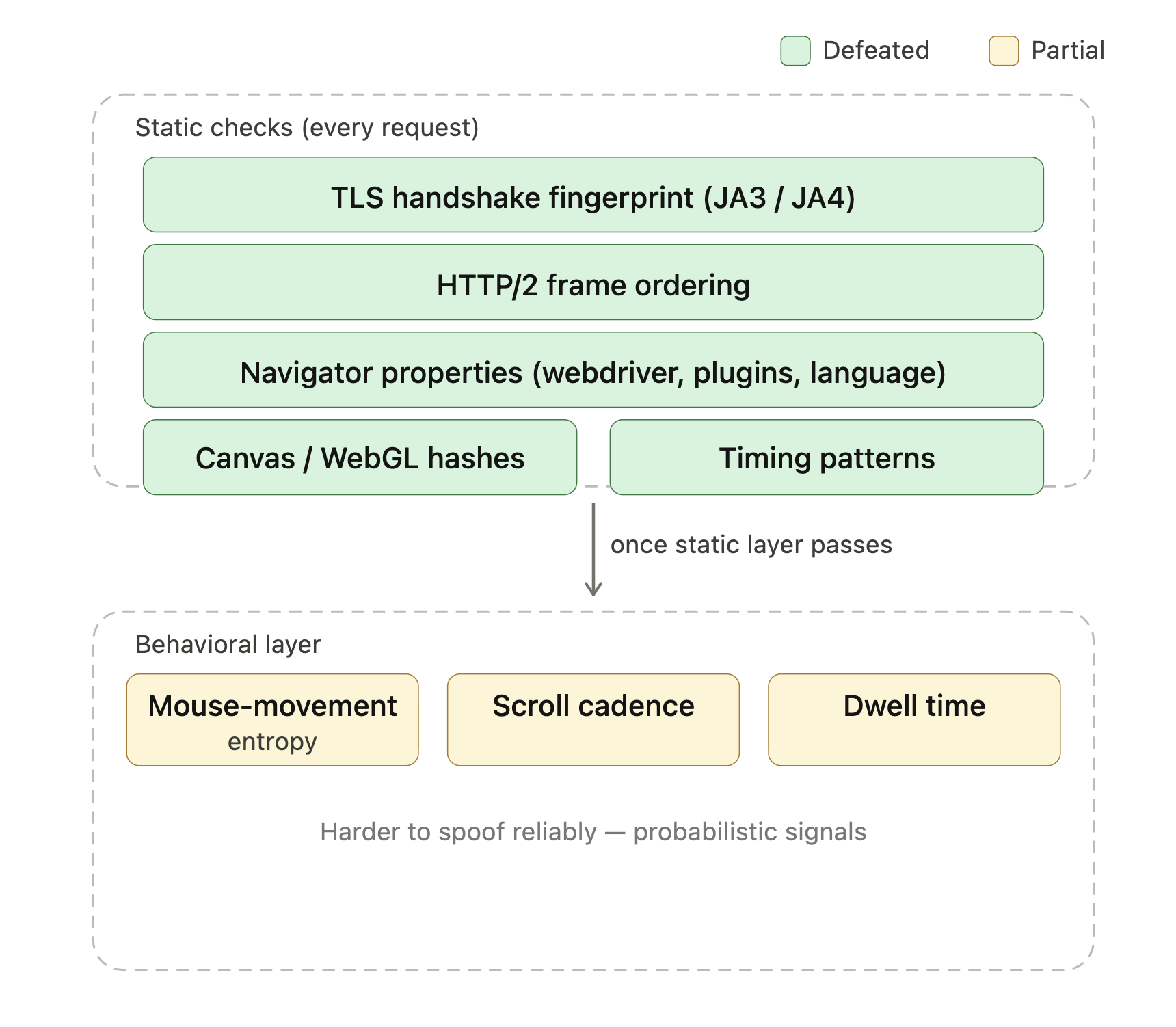
Green layers are what StealthyFetcher‘s Camoufox base handles on its own; yellow is where behavioral scoring kicks in and managed unblocking earns its cost.
StealthyFetcher uses Camoufox, a patched Firefox build that masks common automation signals, to defeat the headless-browser and Playwright fingerprints these systems check for. For Cloudflare’s lighter Bot Management tiers, that’s often enough on its own. Enterprise-tier deployments combining Turnstile with behavioral scoring still block local stealth setups; that’s where managed unblocking becomes the practical answer (covered in the production scaling section). For sites that explicitly run Turnstile challenges, Scrapling has a solve_cloudflare flag that passes the challenge automatically:
from scrapling.fetchers import StealthyFetcher

page = StealthyFetcher.fetch(
    'https://nopecha.com/demo/cloudflare',
    headless=True,
    solve_cloudflare=True,
    network_idle=True,
)

links = page.css('#padded_content a::attr(href)').getall()
print(f"Found {len(links)} links past the challenge")
The page in that example is a public Cloudflare demo running a real Turnstile challenge.
A few real limits are worth remembering:
- The solve_cloudflare path works for managed Turnstile challenges. It doesn’t promise to handle every CAPTCHA category. Image-grid challenges (older reCAPTCHA, hCaptcha image puzzles) need either a third-party solver service (2Captcha, CapSolver) wired into a page action, or a managed unblocking endpoint that handles the challenge layer end-to-end.
- Stealth bypass techniques change frequently. Plan for periodic verification on your real targets, not a one-time setup.
- Outcomes also depend on IP reputation. A datacenter IP already flagged on a target won’t succeed, no matter how good the browser fingerprint is.
For sites that don’t use Cloudflare, get the stealth benefits without the challenge solver:
page = StealthyFetcher.fetch('https://example.com', headless=True)The default fingerprinting protections apply, and solve_cloudflare does nothing if there’s no challenge to solve.
One pattern to know about: the hidden block
Anti-bot systems sometimes return a 200 OK with a disguised block page (a CAPTCHA wall, an empty results page, or a “verifying you are human” interstitial) instead of an explicit 403 or 503. An empty-results check (shown in the production-ready script) catches the obvious cases. For hidden blocks where the structure is intact and only the data is wrong, you’ll want a content-level check: comparing response length to a baseline, looking for tell-tale strings (“captcha”, “are you human”, “access denied” in the body), or sampling a known-stable item’s expected fields. None are perfect; together they catch most silent blocks before bad data flows downstream.
The Spider framework exposes an is_blocked hook for this: override it (also async def) and Scrapling auto-retries blocked responses up to max_blocked_retries (default 3):
class MySpider(Spider):
    max_blocked_retries = 5

    async def is_blocked(self, response: Response) -> bool:
        body = (response.body or b'').lower()
        return b'are you human' in body or b'captcha' in body
Blocked-retry counts appear in result.stats.blocked_requests_count after the crawl. Use this counter as your production-alert metric.
Scrape pages behind a login with FetcherSession
Real targets often require login. The pattern with FetcherSession is the standard CSRF + cookie flow you’d write with requests + Session, just with Scrapling’s parser handling the response. The Quotes-to-Scrape sandbox includes a working login at /login, which makes it a simple test case:
from scrapling.fetchers import FetcherSession

with FetcherSession(impersonate='chrome') as session:
    # 1. GET the login page to grab the CSRF token
    login_page = session.get('https://quotes.toscrape.com/login')
    csrf = login_page.css('input[name="csrf_token"]::attr(value)').get()

    # 2. POST credentials. Cookies persist on the session automatically.
    session.post(
        'https://quotes.toscrape.com/login',
        data={'csrf_token': csrf, 'username': 'demo', 'password': 'demo'},
    )

    # 3. Fetch a page that's gated behind the login.
    page = session.get('https://quotes.toscrape.com/')
    if page.css('a[href="/logout"]').get():
        print("Logged in OK")
    # Logged-in pages on this sandbox show extra Goodreads links per quote
    print("first goodreads link:", page.css('a[href*="goodreads"]::attr(href)').get())
Three things matter here:
- Use a session, not individual Fetcher.get() calls. FetcherSession persists cookies (and any Set-Cookie the server returns) between requests; individual Fetcher.get() calls don’t share state.
- Read the CSRF token from the login form. Most modern frameworks include one and reject POST requests without it. The field name varies by framework: Django uses csrfmiddlewaretoken, Rails uses authenticity_token, and many SPAs send the token in a header instead, so inspect the form before assuming a name.
- Verify the login succeeded before proceeding. Check for a logout link, a username in the navbar, or the absence of a login form. If login fails without an error and you scrape the public page, you get data that looks correct but is actually wrong.
For sites with 2FA, OAuth, or login flows that issue long-lived tokens, the simplest approach is to log in once manually (or via the site’s API), capture the resulting cookies or token, and reuse them. FetcherSession accepts a cookies={…} dict at construction so you can populate a session from saved cookies.
Concurrent fetches with AsyncFetcher
When you have a list of URLs and need them all, the synchronous Fetcher serializes them. AsyncFetcher exposes the same API as a coroutine, so you can issue all requests concurrently with asyncio.gather and let multiple network round-trips run in parallel (the same pattern as asynchronous scraping with AIOHTTP, with a parser already attached):
import asyncio
from scrapling.fetchers import AsyncFetcher

URLS = [f'https://quotes.toscrape.com/page/{i}/' for i in range(1, 11)]

async def fetch_all():
    tasks = [AsyncFetcher.get(u, stealthy_headers=True) for u in URLS]
    pages = await asyncio.gather(*tasks)
    return [q.css('.text::text').get()
            for p in pages for q in p.css('.quote')]

quotes = asyncio.run(fetch_all())
print(f"scraped {len(quotes)} quotes")
On the same 10 quote pages, this drops a sequential 9-second fetch to roughly 1 second on a typical home connection. FetcherSession itself works under async with too, so you can reuse cookies and headers across async calls the same way as in sync code. For full crawls with throttling, dedup, and resume, the Spider framework is usually the better choice. AsyncFetcher matters when you have a known list of URLs and just want them in parallel.
One trap: bare asyncio.gather(\*tasks) re-raises the first exception immediately, but the other tasks keep running in the background; you lose access to their results without stopping the work. For production lists where you want partial success, pass return_exceptions=True and filter the results, or use asyncio.TaskGroup (3.11+), which cancels siblings on first failure and gives you explicit per-task error handling.
Build a multi-page crawler with the Spider framework
A real scraping job is rarely one page. You follow pagination, follow product links, dedupe URLs, limit request rates, write everything to disk, and resume gracefully if anything fails. Scrapling provides a Spider framework for this, with a Spider/parse/yield shape that will be familiar to Scrapy users. Spiders that don’t lean on Scrapy’s middlewares, pipelines, or signals port mostly mechanically; the rest need rewrites against Scrapling’s hooks and async parse signature.
A simple crawler over books.toscrape.com, which has a fifty-page paginated catalog of around a thousand books:
from scrapling.spiders import Spider, Response


class BooksSpider(Spider):
    name = "books"
    start_urls = ["https://books.toscrape.com/"]
    concurrent_requests = 8
    download_delay = 0.5  # seconds between requests per domain

    async def parse(self, response: Response):
        for book in response.css('article.product_pod'):
            yield {
                "title": book.css('h3 a::attr(title)').get(),
                "price": book.css('.price_color::text').get(),
                "rating": book.css('p.star-rating::attr(class)').get(),
                "url": response.urljoin(book.css('h3 a::attr(href)').get()),
            }

        next_page = response.css('li.next a::attr(href)').get()
        if next_page:
            yield response.follow(next_page, callback=self.parse)


if __name__ == "__main__":
    result = BooksSpider().start()
    print(f"Scraped {len(result.items)} books")
    result.items.to_jsonl("books.jsonl")
A few things this snippet does that you’d otherwise build by hand. concurrent_requests runs eight requests simultaneously, which on books.toscrape.com cuts a full crawl from minutes to seconds. download_delay enforces a per-domain gap so you don’t overload a single host. response.follow() resolves relative URLs against the current page, which removes one of the most common pagination bugs (forgetting to join a relative next link). The async parse signature lets you do per-page I/O (fetching detail pages, calling external APIs) without blocking the crawl loop.
Two parser methods are worth knowing. .re_first(pattern) on a .css() result returns the first regex match, useful for pulling numeric values out of formatted text:
# turns '£51.77' into 51.77 in one expression
price = float(book.css('.price_color::text').re_first(r'[\d.]+'))
And the Selectors container that .css() returns has a .filter() method that takes a predicate, so you can narrow the data Scrapling already has without writing a second loop:
expensive = response.css('article.product_pod').filter(
    lambda b: float(b.css('.price_color::text').re_first(r'[\d.]+')) >= 50
)
yield {'count_over_50': len(expensive)}
Useful when the site doesn’t expose a URL filter parameter for the field you want to filter by.
The export at the end writes one JSON object per line, which is what most downstream pipelines expect. You can also use .to_json() for a single JSON array, or write your own pipeline by overriding the process_item hook.
For pipelines that need items as they’re scraped instead of waiting for the whole crawl to finish, the Spider exposes .stream() as an async generator:
import asyncio

async def main():
    async for item in BooksSpider().stream():
        await write_to_kafka(item)  # or any other downstream sink

asyncio.run(main())
For longer crawls, the pause-and-resume mechanism is worth setting up from the beginning:
result = BooksSpider(crawldir="./crawl_data").start()Pass a crawldir and Scrapling checkpoints visited URLs and pending requests to disk. Press Ctrl+C and the crawl shuts down gracefully. Run it again with the same crawldir and it resumes from where it stopped. For a fifty-page crawl this is unnecessary, but for long-running production crawls (catalog refreshes, market research, price monitoring) it’s the difference between losing a day’s progress and losing nothing.
If your target requires the more resource-intensive fetchers, the spider can route requests through different sessions per URL:
from scrapling.spiders import Spider, Request, Response
from scrapling.fetchers import FetcherSession, AsyncStealthySession


class HybridSpider(Spider):
    name = "hybrid"
    start_urls = ["https://example.com/catalog"]

    def configure_sessions(self, manager):
        manager.add("fast", FetcherSession(impersonate="chrome"))
        manager.add("stealth", AsyncStealthySession(headless=True), lazy=True)

    async def parse(self, response: Response):
        for link in response.css('a::attr(href)').getall():
            if "/protected/" in link:
                yield Request(link, sid="stealth", callback=self.parse_protected)
            else:
                yield Request(link, sid="fast", callback=self.parse)

    async def parse_protected(self, response: Response):
        yield {"url": response.url, "title": response.css('h1::text').get()}
Visualized as a routing diagram:
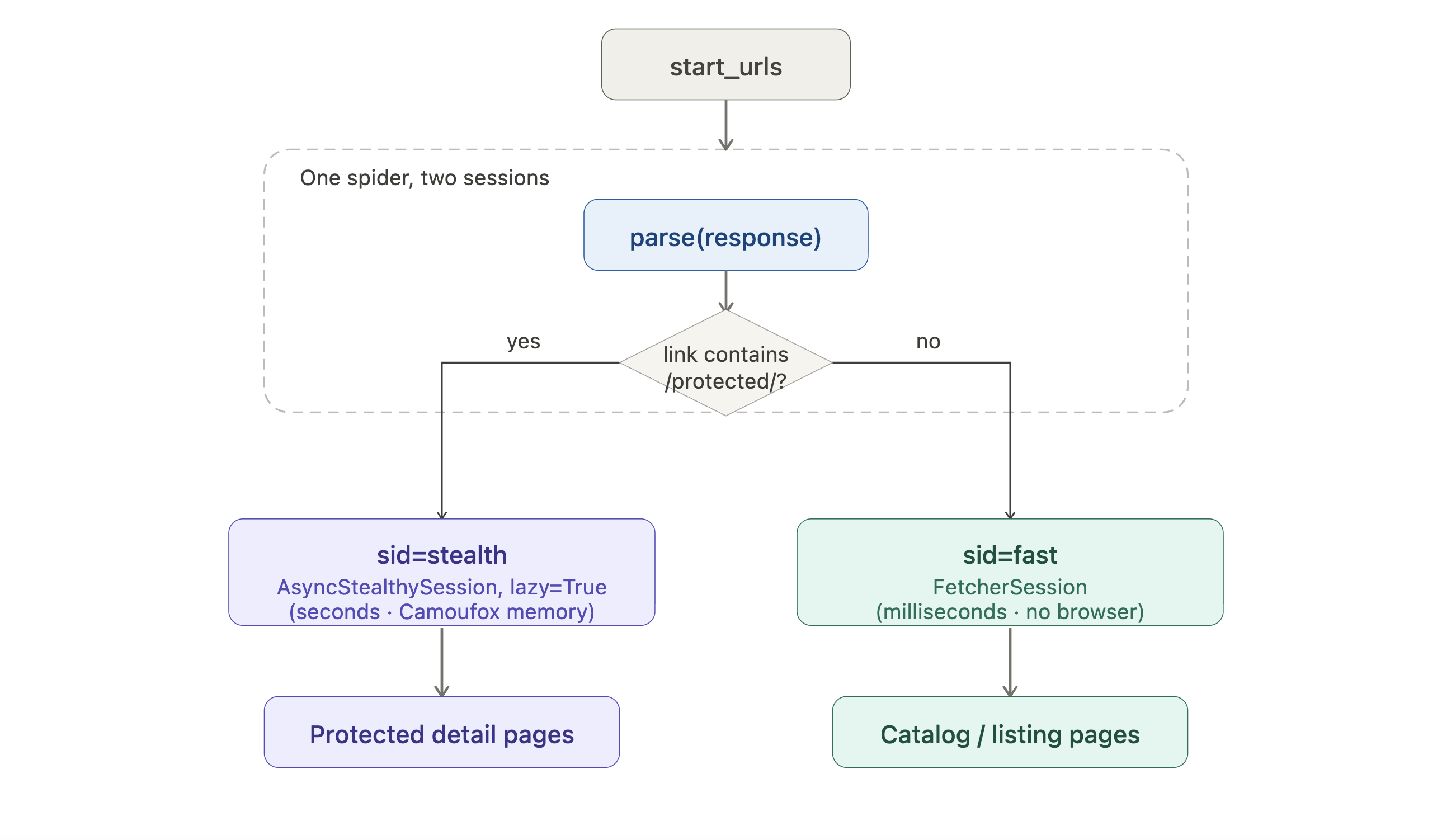
Listing pages take the cheap HTTP path; only protected detail pages pay the browser cost. lazy=True defers the browser startup until the first stealth request actually fires, so a crawl that ends up only hitting listings never opens Camoufox.
A few details in that example aren’t obvious from the code. AsyncStealthySession and AsyncDynamicSession are long-lived browser sessions. Reuse them across many requests, instead of StealthyFetcher.fetch() or DynamicFetcher.fetch() which start a new browser on every call.
configure_sessions receives a manager (the Spider’s session registry); manager.add(name, session) registers a session under a name you can later route to with Request(url, sid=name). The lazy=True flag on the stealth session delays opening the browser until you make the first stealth request, so a crawl that only requests public pages never incurs the browser startup overhead.
The fast session uses the cheap HTTP fetcher for the listing pages, and only the protected detail pages require a real browser. That kind of routing is hard to add later to a general-purpose crawler.
Pagination on real sites
Real targets rarely have a simple .next link the way books.toscrape.com does. Three patterns handle most cases you’ll see:
- Numbered pagination (for example, ?page=1, 2, 3…) is the easiest. Generate the URLs in start_urls directly, or yield Request objects from parse in a loop.
- Infinite scroll usually relies on a JSON XHR endpoint. Open DevTools → Network, scroll the page, and look for the request that returns the next batch of items. Then call that endpoint with Fetcher (much cheaper than rendering each scroll in a browser).
- “Load more” buttons need a real click inside the browser. DynamicFetcher and StealthyFetcher accept a page_action callable that receives the underlying Playwright page; click the button there, wait for the new content, then let the parser read the page when the function returns:
from scrapling.fetchers import DynamicFetcher

def click_load_more(page):
    # `page` is the underlying Playwright sync Page.
    for _ in range(5):
        page.click("button.load-more")
        page.wait_for_load_state("networkidle")
    return page

result = DynamicFetcher.fetch(
    "https://example.com/products",
    page_action=click_load_more,
    headless=True,
)
items = result.css(".product")
Adapt the selector and the click count to the target. The async session classes (AsyncDynamicSession, AsyncStealthySession) take an async equivalent of the same callable.
Scale Scrapling for production: proxies and unblocking
The architecture changes once you’re scraping a real production target at volume. Three constraints usually appear together:
- IP reputation. A single residential or datacenter IP that sends a thousand requests an hour to the same site does not resemble a real user. Most production targets rate-limit, then throttle, then block. The solution is a pool of IPs, ideally residential (real consumer connections) or ISP (carrier-assigned datacenter IPs that look residential to anti-bot scoring), that rotate per request or per session.
- Geographic targeting. Some sites serve different content (or different prices) by country, state, or city. Reproducing those views needs proxies in those locations.
- CDN-grade anti-bot. Beyond Cloudflare’s basic Turnstile, Akamai Bot Manager (and DataDome or HUMAN in strict mode) often blocks local stealth setups. At that point, a managed unblocking endpoint that maintains its own browser pool and challenge solvers usually works better than a custom solution.
Retries, timeouts, and transient errors
Network errors are unavoidable at scale: connection resets, occasional 503s under load, 429s when you’re being rate-limited. FetcherSession accepts retries=, retry_delay=, and timeout= at construction (defaults on v0.4.7: 3, 1 second, 30 seconds; confirm with help(FetcherSession) on your installed version). The browser fetchers (StealthyFetcher, DynamicFetcher) accept the same parameters per-fetch on each .fetch() call instead.
For per-target rate limits where the server sends a Retry-After header on a 429, read that header in your parse method and re-yield the Request with a delay. The default retry doesn’t respect Retry-After, so relying on it gets you the same 429 again.
Browser memory: concrete sizing numbers
Running a real browser is the cost of using DynamicFetcher and StealthyFetcher. On a typical content page (~200 KB HTML, no media-heavy SPA), a single Camoufox or Chromium session uses around 700-900 MB of RAM in headless mode on Linux x86_64. The size barely changes between fetches in the same session, so plan for about 1 GB per concurrent browser session when sizing containers: a 4 GB worker comfortably runs 3-4 concurrent sessions, an 8 GB worker handles 6-8. Heavier targets (image-rich pages, dense SPAs, sites that load dozens of analytics scripts) push the per-session cost up to 1.2-1.5 GB. Reuse your sessions instead of one-shot .fetch() calls so you don’t incur browser startup delay on every request.
Two browser-fetcher flags matter at production volume. block_ads=True enables Scrapling’s built-in blocklist (around 3,500 ad and tracker domains) and reduces fetch time on ad-heavy sites by skipping irrelevant network requests. dns_over_https=True routes DNS queries through Cloudflare’s DoH (DNS over HTTPS) endpoint and helps prevent DNS leaks when you’re routing traffic through a residential proxy. Both apply to DynamicFetcher and StealthyFetcher (HTTP fetcher requests don’t load page resources, so they don’t need either flag).
Self-managed proxy rotation
Scrapling has a ProxyRotator helper that handles the basic rotation case directly:
from scrapling.fetchers import FetcherSession
from scrapling.engines.toolbelt.proxy_rotation import ProxyRotator

rotator = ProxyRotator([
    "http://user:[email protected]:8000",
    "http://user:[email protected]:8000",
    "http://user:[email protected]:8000",
])

with FetcherSession(proxy_rotator=rotator) as session:
    for url in target_urls:
        page = session.get(url)
        process(page)
For a small project with a handful of static proxies, that’s all you need. For anything larger, you usually want a single endpoint that gives you a fresh IP per request (or a sticky session per user), and that’s where paying for a commercial provider makes sense.
Bright Data’s residential proxy network integrates with Scrapling using the same proxy URL pattern: it’s a single HTTP proxy endpoint with username and password authentication, and the username contains the routing parameters the network needs, including country and sticky session ID. The values come from the zone’s Access parameters page in the Bright Data dashboard.
To run the example below: sign up at brightdata.com (free trial, no card required to start), create a residential proxy zone in the dashboard, and copy your id, zone, and password into the proxy URL. Residential proxies require a one-time KYC verification before zone activation. Here is a typical setup for rotating per request:
from scrapling.fetchers import FetcherSession

# Replace <id>, <zone>, and <password> with the values from your dashboard.
PROXY = "http://brd-customer-<id>-zone-<zone>:<password>@brd.superproxy.io:33335"

with FetcherSession(impersonate="chrome", verify=False) as session:
    page = session.get(
        "https://quotes.toscrape.com/",
        proxy=PROXY,
        stealthy_headers=True,
    )
Two notes on this setup:
- Pass proxy= per request, not on the FetcherSession constructor. Per-request proxy= behaves consistently across fetcher types and is the easiest path to override per call. This applies to any provider, not just Bright Data.
- Set verify=False on the session. The Bright Data residential network terminates the proxy hop with a self-signed certificate chain (standard for residential proxy services). Verification is only disabled for the local hop to the proxy; the target connection is still end-to-end TLS via the proxy’s CONNECT method. The cleaner pattern for production is to install Bright Data’s CA certificate in your trust store and remove verify=False entirely; avoid copy-pasting it into code paths that don’t go through the residential proxy.
For sticky sessions (same IP across multiple requests to keep a cart or login state), the username contains a session ID, for example brd-customer-\
The same Scrapling integration works with Bright Data’s other proxy types (ISP proxies for higher-volume residential-quality IPs, mobile proxies for mobile-only views) with only the zone name in the URL changing.
For the most difficult targets, the Web Unlocker pattern is worth knowing about. Instead of running your own stealth browser and updating fingerprints whenever a vendor ships a new detection check, you point the fetcher at a single endpoint; rendering, fingerprinting, IP rotation, and challenge solving happen remotely. Bright Data’s Web Unlocker is built around this pattern, with country-level targeting and per-domain unblocking logic maintained by the vendor. Your parsing code stays the same; only the fetch line moves.
The same trade-off applies to JavaScript-heavy targets. Running Camoufox or Chromium locally works for moderate volume. Once you’re managing many browser containers, a managed Bright Data Scraping Browser takes the unblocking and fingerprint maintenance off your team. The Scraping Browser is a remote browser you connect to over a WebSocket using the same protocol Playwright uses internally, so it slots into the same code path as a local Chromium browser.
Two practical notes apply when choosing between these:
- If your problem is “I need a different IP per request to avoid rate limits”, residential proxies plus the local Fetcher or StealthyFetcher is usually enough. You’re paying for IPs, not for the work of bypassing blocks.
- If your problem is “I’m getting CAPTCHA challenges I can’t solve, and the site changes its protection every few weeks”, a managed unblocking endpoint usually saves enough engineering time to justify the higher per-request cost.
A complete production-ready Scrapling script
A basic BooksSpider runs cleanly on a sandbox. Five additions make it production-ready, marked with numbered comments below:
import logging
from datetime import datetime, timezone

from scrapling.spiders import Spider, Response

logging.basicConfig(
    level=logging.INFO,
    format="%(asctime)s %(levelname)s %(message)s",
)
log = logging.getLogger("books")


class BooksSpider(Spider):
    name = "books_production"
    start_urls = ["https://books.toscrape.com/"]
    concurrent_requests = 8
    download_delay = 0.5
    robots_txt_obey = True              # 1. respect robots.txt and Crawl-delay

    async def parse(self, response: Response):
        if response.status != 200:                                              # 2. handle non-200 responses explicitly
            log.warning("Non-200 status %s on %s", response.status, response.url)
            return

        books_on_page = response.css('article.product_pod')
        if not books_on_page:                                                   # 3. detect outdated selectors early
            log.error("No books found on %s; selector may be outdated", response.url)
            return

        for book in books_on_page:
            yield {
                "scraped_at": datetime.now(timezone.utc).isoformat(),           # 4. timestamp every row
                "title": book.css('h3 a::attr(title)').get(),
                "price": book.css('.price_color::text').get(),
                "rating": book.css('p.star-rating::attr(class)').get(),
                "url": response.urljoin(book.css('h3 a::attr(href)').get()),
            }

        next_page = response.css('li.next a::attr(href)').get()
        if next_page:
            yield response.follow(next_page, callback=self.parse)


if __name__ == "__main__":
    spider = BooksSpider(crawldir="./crawl_data")                               # 5. checkpoint for pause/resume
    result = spider.start()
    log.info("Scraped %d items", len(result.items))
    result.items.to_jsonl("books.jsonl")
What each addition gives you:
- robots_txt_obey respects robots.txt and Crawl-delay directives automatically.
- The status check makes the spider record server-side failures explicitly instead of treating them as “no items found.”
- The empty-result check catches an outdated selector the next morning rather than three weeks later when a downstream report shows no data.
- The timestamp records when each row was scraped, so re-runs across days don’t blur into each other.
- crawldir means a Ctrl+C, a kernel panic, or a lost network connection won’t destroy crawl progress.
To switch the same script to residential proxies, the only change is the fetcher session. To switch to a Web Unlocker endpoint, change the proxy URL to the unlocking service. The parsing logic and the spider behavior stay identical.
Run it on a schedule
Wrap the script in cron, a systemd timer, or an orchestrator like Airflow or Prefect. Use a per-run crawldir (for example, ./crawl_data/$(date +%Y%m%d)) so resume state from a previous run doesn’t carry into a new one, and send the output to durable storage rather than leaving it on the worker machine’s disk. Common sinks: Parquet on S3 or GCS read by polars or DuckDB for ad-hoc analysis, or a Postgres table when you need relational lookups.
For destinations beyond JSONL files, override the Spider’s on_start, on_scraped_item, and on_close hooks (all three are async def). Open a database connection or message-queue producer once in on_start. Write each item from on_scraped_item as it’s yielded (return the item to forward it, return None to drop it). Clean up in on_close.
import asyncpg
from scrapling.spiders import Spider, Response


class BooksToPostgres(Spider):
    name = "books_to_pg"
    start_urls = ["https://books.toscrape.com/"]

    async def on_start(self, resuming: bool = False) -> None:
        self.db = await asyncpg.connect(DSN)

    async def parse(self, response: Response):
        for book in response.css('article.product_pod'):
            yield {
                "title": book.css('h3 a::attr(title)').get(),
                "price": book.css('.price_color::text').get(),
            }

    async def on_scraped_item(self, item):
        await self.db.execute(
            "INSERT INTO books (title, price) VALUES ($1, $2)",
            item["title"], item["price"],
        )
        return item                                # forward downstream too

    async def on_close(self) -> None:
        await self.db.close()
When scraping breaks: a debugging checklist
Production scrapers fail in ways unit tests don’t detect. A few quick checks handle most of it.
Open the browser in visible mode. Pass headless=False to StealthyFetcher.fetch() or DynamicFetcher.fetch() and watch the page render. CAPTCHA challenges, redirect chains, geo-IP redirects, and anti-bot detection pages often only become obvious when you can see what’s happening. Run it locally; for headless servers, save a screenshot via page_action instead.
Save the response HTML to disk. When a selector returns nothing, save the raw response and open it in a browser:
page = Fetcher.get('https://example.com')
with open('debug.html', 'wb') as f:
    f.write(page.body)
Then compare what the parser received against what you expected. Most often, what you scraped turns out to be a CAPTCHA wall, a different-language redirect, or an empty-results page that looks identical to the success case at first glance. The HTML shows the truth even when the status code is misleading.
Use the interactive shell. Install scrapling[shell] and run scrapling shell. It loads an IPython session with Scrapling pre-imported plus two useful helpers: uncurl(…) parses a curl command (from DevTools’ Copy as cURL) into a Scrapling Request object so you can inspect exactly what’s being sent, and curl2fetcher(…) parses-and-executes it, returning a parsed Response. Right-click any XHR call in DevTools, copy as cURL, paste it inside the shell, and you have a working Scrapling fetch.
Reverse-engineer a selector from an element you already have. If you found an element through find_by_text, navigation, or anywhere else, the .generate_css_selector and .generate_xpath_selector properties (note: properties, not methods) give you a reusable selector for it:
einstein = page.find_by_text("Albert Einstein")
print(einstein.generate_css_selector)
# body > div > div:nth-of-type(2) > div > div > span:nth-of-type(2) > small
The output isn’t human-readable, but it’s reusable and survives content changes that don’t move the element.
A note on what to check first. When a scraper that worked yesterday breaks today, work from the quickest check to the slowest: empty-result check (“selector returned nothing”), saved HTML (“did the page even render?”), then headless=False (“is the site challenging the browser?”).
Iterate on parse() without sending another request to the target. Set development_mode = True and development_cache_dir = “./_dev” on your Spider class:
class MySpider(Spider):
    name = "iter"
    start_urls = ["https://target.example.com/"]
    development_mode = True
    development_cache_dir = "./_dev"
    async def parse(self, response):
        ...
The first run hits the network and caches every response to disk; later runs replay from the cache (about 50 ms versus 1.2 seconds on the sandbox sites, roughly a 24x speed-up). While you’re adjusting selectors and cleaning data, you no longer have to wait for the network on every test run. Set development_mode back to False before deploying.
Next steps
Pick a real target you’ve been wanting to scrape and start with the lightest fetcher that works for it. Fetcher handles static HTML; use DynamicFetcher when content is JavaScript-rendered, StealthyFetcher when the site sits behind Cloudflare or a comparable anti-bot vendor.
For anything you plan to keep running, set these defaults from the start:
- Wrap the parse logic in a Spider with crawldir, robots_txt_obey=True, and an empty-result check on every page.
- Turn on selector_config={‘adaptive’: True} and auto_save=True on the first run so the structural fingerprint is on disk before the site changes its markup.
- Set download_delay to at least 0.5,1 s on shared infrastructure, and read the Retry-After header in your parse method for any 429 responses.
When local stealth stops being enough (IP reputation, scaling concurrency, CDN-grade anti-bot), switch to a residential proxy or a managed unblocking endpoint by adding a single proxy= argument on each fetch call. Any provider that exposes an HTTP proxy with basic authentication works the same way.
For the full reference, see the official documentation.
FAQ
Can I use Scrapling in a commercial product?
Yes. Scrapling is BSD-3-Clause, so you can ship it inside commercial products, SaaS backends, or internal tooling without royalties or a paid tier. You only pay for optional third-party services you choose, like a residential proxy or a CAPTCHA solver. No feature in Scrapling itself is gated by license.
How does Scrapling compare to Playwright or Selenium?
Scrapling is purpose-built for scraping; Playwright and Selenium are general browser-automation tools. Scrapling wraps a stealth-patched Camoufox build (driven via Playwright), retries, session reuse, and adaptive selectors, so you write less glue code and avoid the Chromium-CDP fingerprints vanilla Playwright exposes.
Does Scrapling solve CAPTCHAs?
Partially. StealthyFetcher passes managed Cloudflare Turnstile challenges when solve_cloudflare=True. Other categories (image-grid hCaptcha, audio CAPTCHAs, custom enterprise) need a third-party solver (2Captcha, CapSolver) or a managed unblocking endpoint that handles the challenge layer end-to-end.
Can Scrapling work with Scrapy?
Yes. Scrapling’s parser uses the same pseudo-element syntax (::text, ::attr(href)) as Parsel, so a Scrapling Selector works inside a Scrapy callback with most selectors unchanged. The Spider/parse/yield shape carries over; spiders without heavy middlewares or pipelines port mostly mechanically.
Do I need a proxy service to use Scrapling?
No, Scrapling works without a proxy on small jobs. At production volume, use Scrapling’s built-in ProxyRotator with a static list when you want full control, or a managed residential, ISP, or mobile endpoint when you need per-request fresh IPs or country-level targeting.
Can Scrapling run inside Docker?
Yes. The project provides an official Docker image with all browser dependencies pre-installed. For StealthyFetcher and DynamicFetcher, the official image saves about an hour of getting Camoufox and Chromium working in a custom container. For the basic Fetcher, any standard Python image works.


Technical Writer
 5 years experience
Satyam Tripathi helps SaaS and data startups turn complex tech into actionable content, boosting developer adoption and user understanding.