
This article covers how to run large-scale web scraping workloads using PySpark and Bright Data. If you need to scrape hundreds of thousands of product pages, monitor pricing across hundreds of sites, or build training datasets from millions of pages, single-machine scripts won’t get you there.
The patterns here show you how to distribute scraping work across clusters while keeping the pipeline reliable as request volume grows.
By the end, you’ll know how to:
- Treat large URL lists as distributed datasets using PySpark
- Run scraping workloads efficiently at the partition level
- Design workers that can handle retries and failures without restarting the whole job
- Handle proxy routing and network reliability as request volume scales
When Web Scraping Becomes a Distributed Problem
Most scraping projects start the same way: a developer writes a script, reads a list of URLs, sends requests, and saves the results.
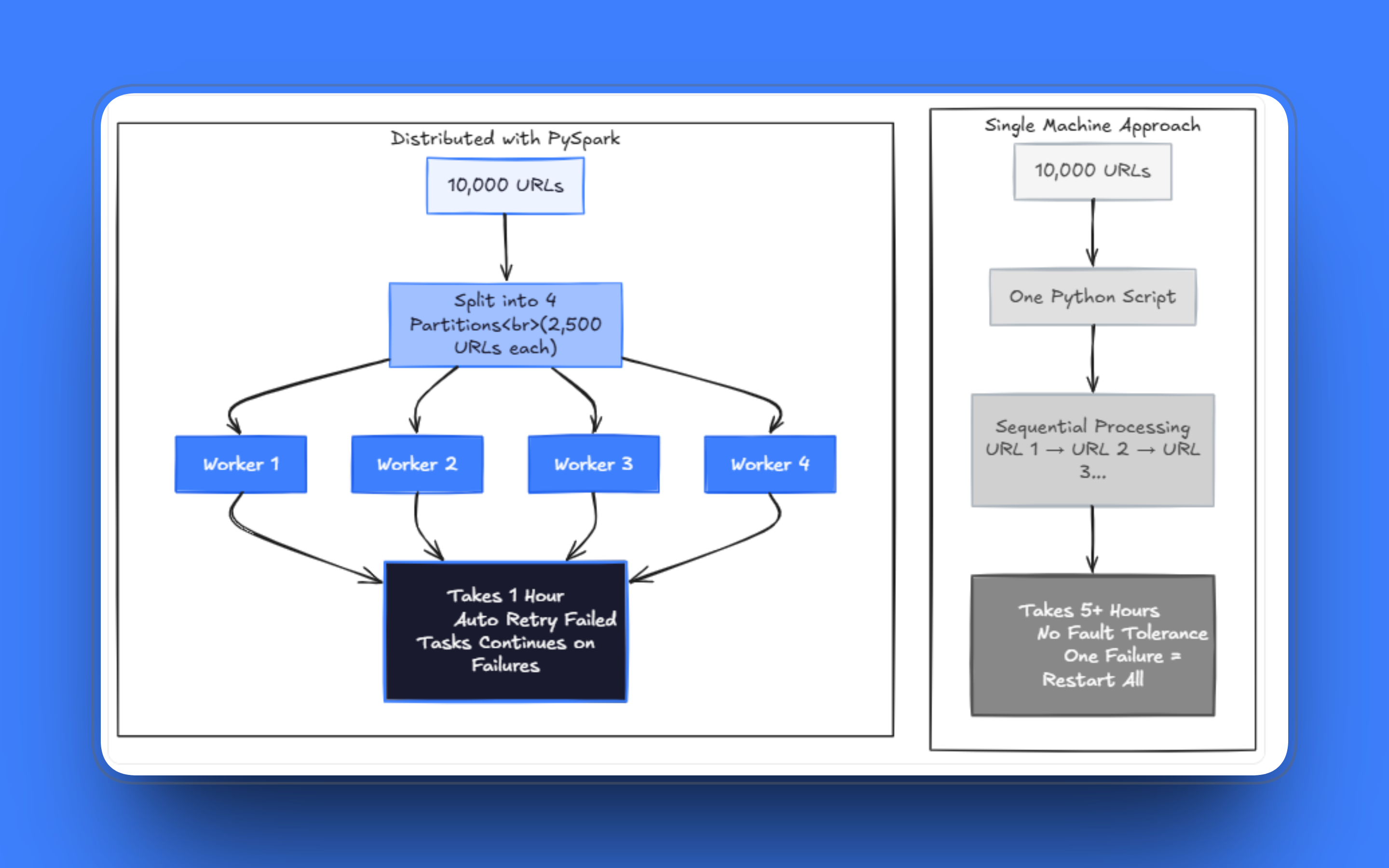
The cracks show up once the workload scales. Jobs that used to take minutes start taking hours. A few failed requests can stall a run after processing thousands of pages, and managing retries within the same script while also handling fetching and parsing quickly turns into a mess. I’ve seen teams maintain these single-file scrapers for months, patching one edge case after another, when the real issue is that the architecture no longer fits the problem.
Scraping hundreds of thousands of pages on one machine takes an impractical amount of time, even with threading. At scale, you need to run across multiple workers, and the system has to stay running even when some fraction of requests fail. The way forward is to stop thinking of the URL list as an ordered queue and start treating it as a dataset you can distribute.
Why PySpark Is a Good Fit Here
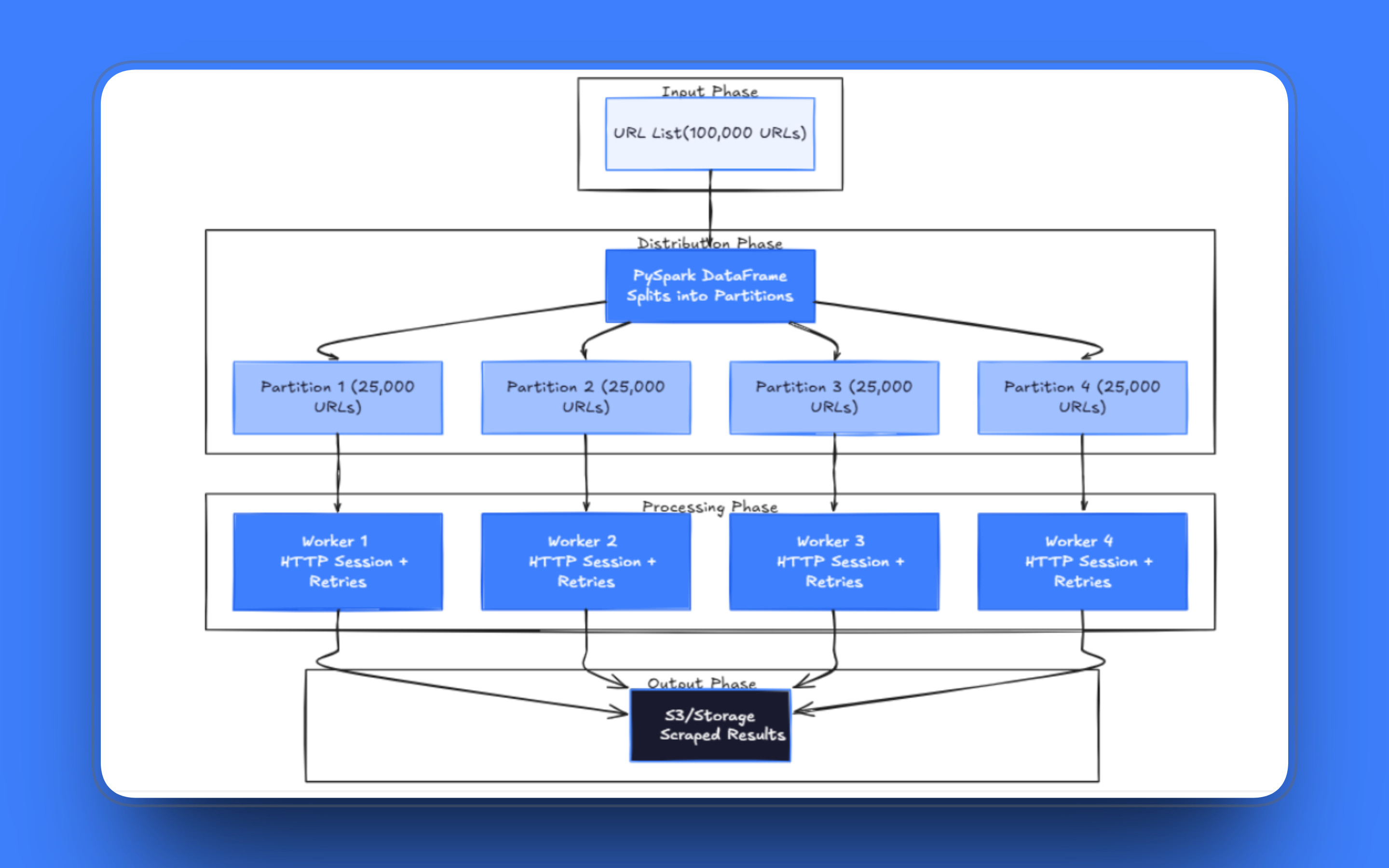
PySpark is built around the idea of splitting datasets into partitions and processing them in parallel across a cluster of machines. The model maps directly onto web scraping: each URL is a unit of work, partitions group URLs into batches, and executors process those batches independently.
Rather than managing a queue with Celery or a home-built multiprocessing setup, Spark provides fault tolerance and scheduling without you having to build them. If a task fails, Spark reschedules it. If a node drops, the work is reassigned. You still need to write sensible retry logic inside your tasks, but the orchestration layer is handled for you.
Pattern 1: URLs as a Distributed Dataset
The foundation of any distributed scraping pipeline is how you load the URL list. With PySpark, URLs go into a DataFrame Spark distributes it across workers automatically. Each partition holds a slice of the data, and Spark assigns those partitions to available executors.
A basic setup looks like the following:
   from pyspark.sql import SparkSession

    spark = SparkSession.builder.appName("distributed_scraper").getOrCreate()

    urls = [
        ("https://example.com/page1",),
        ("https://example.com/page2",),
        ("https://example.com/page3",)
    ]

    df = spark.createDataFrame(urls, ["url"])
In production, you’d load the URL list from a file, a database table, or object storage rather than hardcoding it. Schema matters too once you start adding metadata like crawl priority or last-fetched timestamps.
Partition count is the first tuning decision you’ll face. Too few partitions and workers sit idle waiting for slow requests; too many, and Spark spends a disproportionate amount of time on scheduling overhead rather than actual fetching.
A reasonable starting point for a scraping workload is 2 to 4 partitions per executor core; then adjust based on the task logs. If executors finish partitions in under a second or consistently take more than 10 minutes, the partition size needs to be adjusted.
Pattern 2: Run Requests at the Partition Level
The natural first attempt is to apply a row-level transformation to each URL in the DataFrame. This approach works, but it’s the wrong fit for web scraping. Each request triggers a separate function call, which means a new connection for each URL unless you’re careful. The overhead compounds quickly over millions of rows.
The correct approach is mapPartitions(). Instead of processing one row at a time, it hands your function an entire partition as an iterator. You create an HTTP session once and reuse it for every request in the partition. Connection pooling over a long-running session is significantly faster than establishing a new TCP connection for each URL, particularly with servers that support HTTP keep-alive.
   from pyspark.sql import SparkSession
    import requests

    spark = SparkSession.builder.appName("distributed_scraper").getOrCreate()

    urls = [
        ("https://example.com/page1",),
        ("https://example.com/page2",),
        ("https://example.com/page3",)
    ]

    df = spark.createDataFrame(urls, ["url"])

    def scrape_partition(rows):
        session = requests.Session()
        for row in rows:
            url = row["url"]
            try:
                response = session.get(url, timeout=30)
                yield {
                    "url": url,
                    "status_code": response.status_code,
                    "html": response.text
                }
            except Exception:
                yield {
                    "url": url,
                    "status_code": None,
                    "html": None
                }

    results = df.rdd.mapPartitions(scrape_partition)
Failed requests yield a record with null fields rather than raising an exception. The approach is intentional. Letting an exception propagate kills the entire partition task, losing all the work done before the failure. Returning a null record keeps the partition running and gives you a clean way to identify and retry failed URLs afterward.
One thing worth doing early is to define an explicit output schema using StructType rather than letting Spark infer it from the RDD. Schema inference requires a full scan of the data, which is expensive, and can occasionally produce unexpected results when the response content is unexpectedly empty.
Pattern 3: Designing Workers That Can Handle Long Runs
A job scraping a million pages will run for hours. During long runs, you’ll see connection resets, DNS timeouts, 429s from rate-limited servers, and servers occasionally dropping connections mid-response. None of these are bugs in your code; they’re just what happens when you make HTTP requests at scale.
The partition function is the right place to handle all of these issues. Retry logic, backoff delays, timeout settings, and failure recording should all live there. Keeping everything in a single partition function keeps the rest of the Spark pipeline clean and lets you test worker behavior independently.
    import requests
    import time

    def scrape_partition(rows):
        session = requests.Session()
        for row in rows:
            url = row["url"]
            attempts = 0
            success = False

            while attempts < 3 and not success:
                try:
                    response = session.get(url, timeout=30)
                    yield {
                        "url": url,
                        "status_code": response.status_code,
                        "html": response.text
                    }
                    success = True
                except Exception as e:
                    attempts += 1
                    time.sleep(2 ** attempts)  # exponential backoff

            if not success:
                yield {
                    "url": url,
                    "status_code": None,
                    "html": None
                }
A few things to note here. The retry delay uses exponential backoff rather than a fixed sleep. A flat 2-second delay is fine for occasional network blips, but it slows workers down considerably when hitting a server that is consistently throttled. Also, log the exception type before yielding the null record; the difference between a connection timeout and a 403 Forbidden tells you very different things about what’s happening upstream.
Monitoring Jobs in Production
When a job processes millions of URLs over several hours, you need visibility into what’s happening while it runs. At a minimum, track these metrics from each partition:
    def scrape_partition(rows):
        session = requests.Session()
        partition_stats = {
            "urls_attempted": 0,
            "urls_succeeded": 0,
            "urls_failed": 0,
            "status_codes": {}
        }

        for row in rows:
            partition_stats["urls_attempted"] += 1
            url = row["url"]
            attempts = 0
            success = False

            while attempts < 3 and not success:
                try:
                    response = session.get(url, timeout=30)
                    partition_stats["urls_succeeded"] += 1
                    code = response.status_code
                    partition_stats["status_codes"][code] = \
                        partition_stats["status_codes"].get(code, 0) + 1

                    yield {
                        "url": url,
                        "status_code": response.status_code,
                        "html": response.text
                    }
                    success = True
                except Exception as e:
                    attempts += 1
                    time.sleep(2 ** attempts)

            if not success:
                partition_stats["urls_failed"] += 1
                yield {
                    "url": url,
                    "status_code": None,
                    "html": None
                }

        # Log stats when partition completes
        print(f"Partition stats: {partition_stats}")
Watch the Spark UI for task completion rates while the job runs. If tasks finish at very different speeds, your partitions are unbalanced. If you see steady 403s or 429s in the logs, your proxy rotation needs adjustment, or you need to add request delays. The goal is to catch problems while the job is still running, not discovering them six hours later when it fails.
Writing Results from Workers (The Production Pattern)
For jobs running longer than an hour, there’s a failure mode retry logic that can’t protect against: the driver process dying mid-run. Spark reschedules individual tasks if they fail, but when a driver goes down, the entire job is lost.
The fix is to write results to persistent storage as each partition finishes, instead of sending everything back to the driver and keeping results in memory until the job completes. Use foreachPartition(), which processes each partition and lets you write output directly from the worker with no data flowing back through the driver:
    from pyspark.sql import SparkSession
    from pyspark.sql.types import StructType, StructField, StringType, IntegerType
    import requests, time, uuid

    spark = SparkSession.builder.appName("distributed_scraper").getOrCreate()
    spark.sparkContext.setCheckpointDir("s3://your-bucket/checkpoints/")

    schema = StructType([
        StructField("url", StringType(), True),
        StructField("status_code", IntegerType(), True),
        StructField("html", StringType(), True)
    ])

    def scrape_and_write(rows):
        session = requests.Session()
        results = []

        for row in rows:
            url = row["url"]
            attempts = 0
            success = False

            while attempts < 3 and not success:
                try:
                    response = session.get(url, timeout=30)
                    results.append((url, response.status_code, response.text))
                    success = True
                except Exception as e:
                    attempts += 1
                    time.sleep(2 ** attempts)

            if not success:
                results.append((url, None, None))

        # Write this partition's results directly from the worker
        partition_id = str(uuid.uuid4())
        spark.createDataFrame(results, schema).write.mode("append").parquet(
            f"s3://your-bucket/scrape-results/batch={partition_id}"
        )

    df.rdd.foreachPartition(scrape_and_write)
Each worker writes its own output file independently. If the driver dies halfway through, the completed partitions are already on storage, and only the in-progress ones need to be rerun. For jobs with downstream Spark transformations on the scraped data, rdd.checkpoint() is a lighter alternative: it materializes the RDD to the checkpoint directory before the transformation runs, preventing Spark from replaying the entire scraping step if a later stage fails.
Pattern 4: Routing Requests Through a Proxy Network
Running multiple workers in parallel increases throughput, but the target server will see a flood of requests coming from your cluster’s IP range. Most sites have rate limiting or blocking configured for exactly this pattern of concentrated traffic from a single IP range. Routing requests through a residential proxy network distributes traffic across multiple IP addresses, which helps keep workers running without triggering blocks.
You configure the proxy once per session inside the partition function, and every request the session makes routes through the network automatically:
    import requests

    BRIGHTDATA_PROXY = (
        "http://brd-customer-<customer_id>-zone-<zone_name>:"
        "<zone_password>@brd.superproxy.io:33335"
    )

    def scrape_partition(rows):
        session = requests.Session()
        session.proxies = {
            "http": BRIGHTDATA_PROXY,
            "https": BRIGHTDATA_PROXY
        }

        for row in rows:
            url = row["url"]
            try:
                response = session.get(url, timeout=30)
                yield {
                    "url": url,
                    "status_code": response.status_code,
                    "html": response.text
                }
            except Exception as e:
                yield {
                    "url": url,
                    "status_code": None,
                    "html": None
                }
Depending on your Bright Data zone configuration, requests may raise SSL verification errors because traffic passes through their intermediate certificate layer. A quick workaround is to pass verify=False and move on, but this approach disables certificate validation entirely, meaning your workers can no longer detect a compromised connection between the proxy and the target.
The right fix is to download Bright Data’s CA certificate and pass it via verify='/path/to/brightdata-ca.crt', which keeps full validation intact. Also worth noting: the proxy URL in the example should be sourced from an environment variable or a secrets manager in production. In a distributed environment, those credentials are serialized and shipped to every worker node, so a leak exposes more than it would on a single machine.
For targets serving JavaScript-rendered content, routing through a standard proxy won’t be enough. Bright Data’s Scraping Browser handles JavaScript execution, CAPTCHA solving, and browser fingerprinting, and it integrates with Playwright and Puppeteer. The partition function structure stays the same; you’re just swapping the request session for a Playwright browser instance pointed at the Scraping Browser endpoint.
Troubleshooting Common Issues
A few problems show up consistently in production. If partition tasks repeatedly time out, check the partition size first. Partitions with 10,000+ URLs will exceed Spark’s default timeout when requests are slow. Either repartition into smaller batches or increase spark.task.maxFailures and spark.network.timeout.
Getting 429 errors despite using proxies means multiple workers are hitting the same domain simultaneously. Add random jitter between requests:
    import random
    import time

    def scrape_partition(rows):
        session = requests.Session()
        for row in rows:
            time.sleep(random.uniform(1, 3))
            # ... rest of scraping logic
Memory errors on executors usually mean you’re accumulating full HTML before writing. Write results more frequently, or parse and discard the HTML inside the partition function if you only need extracted fields.
Partitions finishing at very different speeds indicate an unbalanced distribution. Repartition with a higher count to spread slow domains across workers.
Wrapping Up
These patterns give you a foundation that holds up at scale: distribute the URL list, run requests at the partition level, build workers that survive long runs, and route traffic through a proxy network that stays unblocked as volume grows.
Production jobs will need explicit schemas, checkpointing, and proper secrets handling, but the structural decisions are the same regardless of size. For the network and infrastructure side, Bright Data covers most of what you’d otherwise need to build and maintain yourself.



Technical Writer
Amitesh Anand is a developer advocate and technical writer sharing content on AI, software, and devtools, with 10k followers and 400k+ views.