
Scraping Etsy means you collect listing, shop and review data from Etsy’s public pages. Etsy reported more than 100M items and 5.6M active sellers in the 2025 annual report. Etsy runs DataDome. A direct request returns a 403 and a block page. The 2 fixes that usually come first are a Chrome User-Agent and TLS impersonation. Both still get a 403. This guide shows what changes the 403, what robots.txt blocks, and which extraction problems corrupt an Etsy dataset without raising an error.
TL;DR
- Etsy runs DataDome behind Fastly. DataDome puts a risk score in its own response header. You can grade a request before writing a crawler.
- Etsy refused all 9 transports that we tried. A headed browser loaded the first page in 2.2 seconds. Etsy refused the second request.
- robots.txt disallows keyword search and sold history and declares no sitemap. Listing and shop pages stayed open there. But Etsy’s terms are stricter.
- Currency and price follow the exit IP. Our dataset sample had 19 currencies. An unfiltered average of that column was 227x too high.
What Etsy returns to an automated request
Read the refusal first. Don’t retry the request. A plain request tells you which vendor runs at the edge and how that vendor graded you. Any listing URL works. This one belongs to a seller, so it may already be gone:
curl -sD - -o /dev/null https://www.etsy.com/listing/753913297/smoky-quartz-ring-rose-gold-ring-womenThe server returns a 403 with these headers:
HTTP/2 403
server: DataDome
x-datadome: protected
x-datadome-riskscore: 0.9230727100377928
accept-ch: Sec-CH-UA,Sec-CH-UA-Mobile,Sec-CH-UA-Platform,Sec-CH-UA-Arch,Sec-CH-UA-Full-Version-List,Sec-CH-UA-Model,Sec-CH-Device-Memory
set-cookie: datadome=ovuDEZ4S0taK1jDAOvZ9W3Uq2qUujN_iPPE3uXp7~r3msKXSvMFPp4j30em5IvR0...
via: 1.1 varnish
x-served-by: cache-del-vibw2260027-DEL
That block contains 3 facts. Etsy uses DataDome, not the Akamai Bot Manager that older guides still report, so plan against DataDome’s detection layers. Fastly runs in front of Etsy, and the Via and X-Served-By headers show that hop. X-DataDome-riskscore is DataDome’s score for how bot-like the request looked, on a scale where 1.0 is the worst. Etsy can switch vendors, so re-run the command before you plan against these 3 facts.
That header gives you a number to measure against. In our testing, the score was deterministic. All 6 interleaved samples of the same request returned 0.9230727100377928. The score tracks the request signature, the calling IP, and the datadome cookie once you start returning one, not a running count of requests. So your own numbers may differ, and on a different address the ranking between client configurations can differ too.
The body, 776 bytes in our runs, is a DataDome block page that loads ct.captcha-delivery.com/c.js. That block page contains a challenge script, not listing data, so a parser reading it returns empty fields rather than an error. The embedded config contained 't':'fe', DataDome’s device check, so that fetch got a challenge that a real browser can answer rather than a permanent ban. The 't' field shows the current grade and takes other values as that grade changes, so read your own value rather than assuming 'fe'.
We sent every request from 1 minimal 3-header client and varied only the path. Every content path we tried returned the same 403 and the same 0.482 score, while /robots.txt and a URL that resolves to nothing went to Apache unprotected:
path                                       HTTP server     riskscore
/                                          403  DataDome   0.482
/listing/753913297/smoky-quartz-ring...    403  DataDome   0.482
/shop/AnemoneJewelry                       403  DataDome   0.482
/legal/terms/                              403  DataDome   0.482
/robots.txt                                200  Apache     -
/nonexistent-path-xyz                      404  Apache     -
So on the paths DataDome protects, it grades the caller rather than the URL.
A request with a Googlebot User-Agent skipped DataDome and reached a rate limiter instead. Apache answered 429 Too Many Requests with a nicki_ reference string. At least 1 declared search-engine agent reaches a rate limiter of its own, separate from DataDome.
Why header and TLS fingerprints aren’t enough
The risk score lets you test the usual advice about headers, where a lower number means less bot-like. We held the IP and the URL constant, varied only the request headers on a requests client, and recorded the score DataDome returned:
headers sent                                         score    HTTP
requests, library default headers                    0.977    403
+ Chrome User-Agent only                             0.923    403
full 12-header Chrome set                            0.503    403
User-Agent + accept + sec-fetch-site (3 headers)     0.482    403
That table contains 2 results. Adding a Chrome User-Agent barely moved the grade, because everything else in the request still came from requests. And the 3-header set scored better than the full 12-header set, so on this target consistency mattered more than header count.
These 3 headers scored 0.482, so copy the accept value exactly:
User-Agent:      Mozilla/5.0 (Macintosh; Intel Mac OS X 10_15_7) AppleWebKit/537.36
                 (KHTML, like Gecko) Chrome/140.0.0.0 Safari/537.36
accept:          text/html,application/xhtml+xml,application/xml;q=0.9,image/avif,
                 image/webp,image/apng,*/*;q=0.8,application/signed-exchange;v=b3;q=0.7
sec-fetch-site:  none
We removed 1 header at a time from the full set and recorded each change, where a plus sign means the score got worse:
run                              score     change
full set (baseline)              0.503
minus accept                     0.845     +0.342
minus user-agent                 0.784     +0.281
minus sec-fetch-site             0.669     +0.166
minus every sec-ch-ua* header    0.503      0.000
DataDome advertises 7 client hints in its own Accept-CH response header. Our full set had 3 of them, but dropping every sec-ch-ua header changed nothing. The accept header moved the score more than the User-Agent did.
TLS impersonation is the usual next step, so we tested it on its own. Each run sent the same 3 headers, and only the TLS and HTTP/2 fingerprint changed. The JA4 values below come from curl_cffi rather than from Etsy, so they change whenever that library updates a profile:
transport                             JA4                      riskscore  HTTP
python requests (OpenSSL, HTTP/1.1)   t13d1712h1_ab0a1bf427ad  0.482      403
curl_cffi impersonate=chrome110       t13d1516h2_8daaf6152771  0.663      403
curl_cffi impersonate=chrome116       t13d1516h2_8daaf6152771  0.663      403
curl_cffi impersonate=chrome124       t13d1516h2_8daaf6152771  0.503      403
curl_cffi impersonate=chrome131       t13d1516h2_8daaf6152771  0.503      403
curl_cffi impersonate=chrome133a      t13d1516h2_8daaf6152771  0.503      403
curl_cffi impersonate=firefox133      t13d1716h2_5b57614c22b0  0.503      403
curl_cffi impersonate=safari17_0      t13d2014h2_a09f3c656075  0.663      403
curl_cffi impersonate=safari17_2_ios  t13d2014h2_a09f3c656075  0.663      403
That table contains 3 different fingerprints, one each for Chrome, Firefox and Safari. Plain requests on HTTP/1.1 still scored better than all 3. That column prints only the first 2 parts of a JA4. The third part encodes the extension list and differs between the Chrome profiles that share a prefix here.
The transport moved the score by 0.181 between the best and worst run, but no run returned a page. No fingerprint we tested was enough on its own.
So TLS fingerprints aren’t worth the effort on this target. We read the HTTP/2 frames back from each profile, including the pseudo-header order that differs per engine:
profile      SETTINGS                       | window   | pri | pseudo-header order
chrome131    1:65536;2:0;4:6291456;6:262144 | 15663105 | 0   | m,a,s,p
firefox133   1:65536;2:0;4:131072;5:16384   | 12517377 | 0   | m,p,a,s
safari17_0   2:0;4:4194304;3:100            | 10485760 | 0   | m,s,p,a
Those 3 handshakes are correct copies, and Etsy refused all 3. So DataDome decides on something other than the handshake.
What actually runs the check
In a headed browser, DataDome’s challenge renders as a slider, and 2 of its 4 reasons are the calling IP and the use of developer tools:
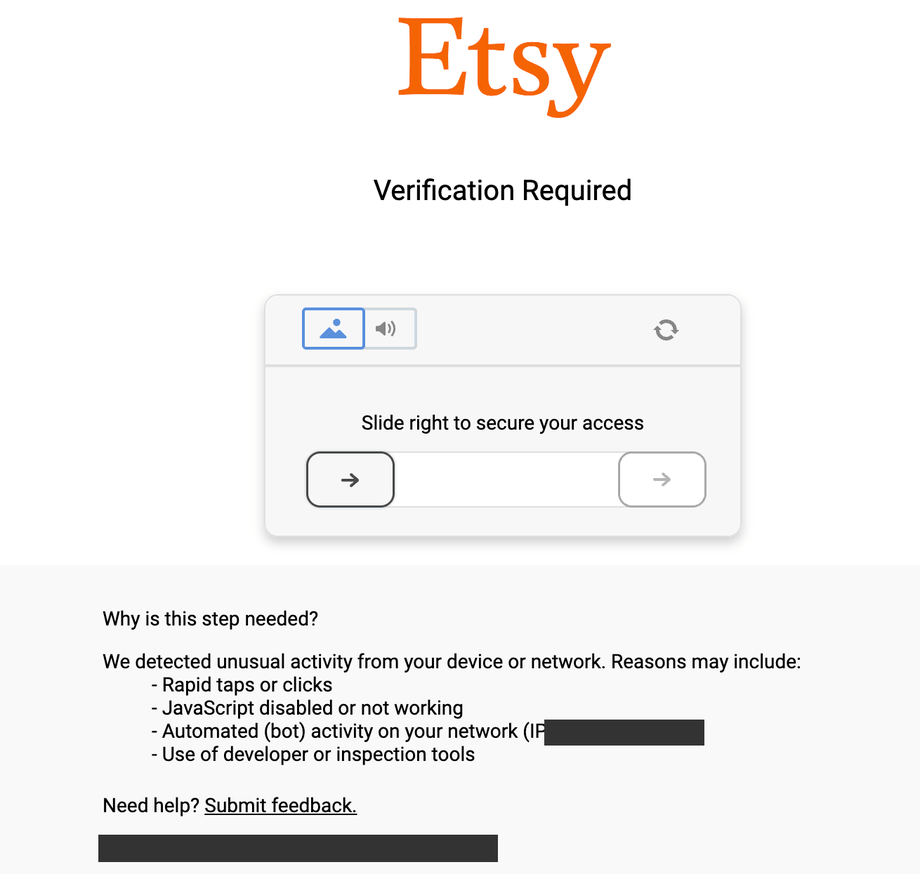
That c.js loader is 14 KB, builds an iframe URL, and fetches a second page. That second page contained a 596 KB inline script the day we pulled it, and its module names show what you would have to reimplement:
detection-js/dist/vm-obf.js     the detection engine, VM-obfuscated
detection-js/dist/captcha.js    challenge coordination
./picasso                       canvas-based device-class fingerprinting
./mouseMaths                    pointer-movement analysis
./slidercaptcha  ./hash  ./helpers  ./bean
The detection module is stored as bytecode for an interpreter bundled in the same file. That’s why a text search of the bundle finds no webdriver, no cdc_, no headless and no _phantom. A bytecode bundle hides those strings whether the probes run or not, so the search result tells you nothing.
The build we pulled reported itself as 1.34.0, timed its own execution, and sent that duration as a signal. That build also logged a console warning asking you to close DevTools before continuing. Expect a different version and a different module list by the time you look, since this engine follows DataDome’s release cycle rather than Etsy’s. The architecture behind those names changes far more slowly.
The check request has 16 fields and encodes the browser environment into userEnv, ddCaptchaEnv and plv3.
So there are 2 practical conclusions. Reproducing that output from requests means reimplementing an obfuscated VM against a version string that increments. And DataDome collects canvas output and pointer movement, which exist only after a real browser engine has rendered the page. DataDome-specific unblocking runs that browser engine as a service and is built to return the rendered page rather than the block.
That second conclusion is testable, so we ran a plain Playwright Chromium with no stealth patches and no proxy. Each mode ran 3 times from the same address that every transport above was refused on:
headless=True (default)        403  403  403     1,530 B    0.5s
headless=True --headless=new   403  403  403     1,530 B    0.4s
headless=False (headed)        200  200  200   532,049 B    2.2s   Product JSON-LD present
Both windows ran from 1 machine with no proxy, so the headed window shows prices in the local currency:
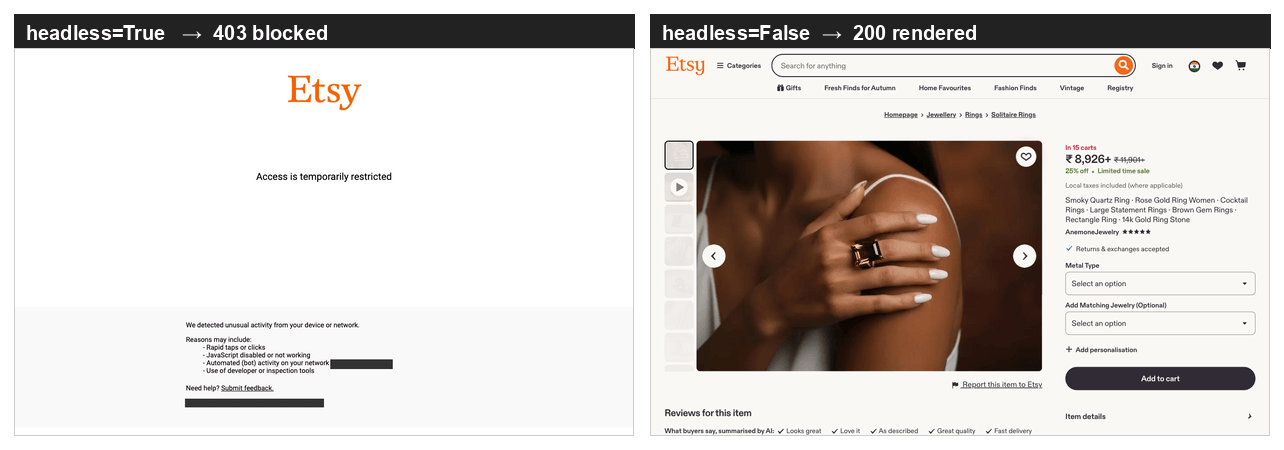
Headless Chromium includes HeadlessChrome in its own User-Agent, so those rows differ in more than the window. For checking a page by hand, or pulling a few pages, a headed browser is the simplest answer. Unblocking infrastructure is built for the requests after the first one, and for a single fetch a headed run is roughly 10 times faster than routing through it.
Why one browser isn’t a crawler
We loaded 12 listings one at a time in a single browser page, 2 seconds apart, and got 1 success and 11 refusals:
#1   200   444,123 B
#2   403     1,527 B
#3-12 403   ~1,530 B each
Discarding the browsing context between navigations restored the 200, so the refusals came from session state rather than from the address. Later in the same testing period, that fix stopped working. Etsy then refused every request from that address, regardless of how new the context was.
The risk score didn’t move while the success rate went from every request to none. The 3-header run still measured 0.4822 to 4 decimal places, hours and several hundred requests after the first reading.
The X-DataDome-riskscore header grades 1 request at a time, so it’s useful for testing 1 change, but not for monitoring a crawl. A pipeline that watches it will report success while collecting nothing.
Collecting more than a few pages needs 2 things, a new browsing context and an address that DataDome hasn’t already refused. Discarding the context between navigations is cheap, so start there, but that fix lasts only until DataDome refuses the address. Residential proxies give you a pool of addresses to rotate through.
Web Unlocker runs both, and the script further down stays within the free allowance. Browser API handles both inside a hosted browser that your Playwright code drives.
What robots.txt and the Etsy terms don’t allow
Before building anything, read Etsy’s robots.txt yourself, because the file disallows keyword search and Etsy rewrites it without notice. When we read it, that file was 1,818 lines long and declared only 3 user-agent groups, *, AdsBot-Google-Mobile and Spinn3r:
User-agent: *
Disallow: /search?*q=
Disallow: /search/?*q=
Disallow: */shop/*/sold*
Disallow: */listing/*/favoriters*
Disallow: /api/
Allow:    /search/shops
The wildcard group disallows keyword search results in every locale variant. That group covers every crawler that the other 2 groups don’t name. Sold-listing history and favoriters counts are disallowed too, and they’re among the clearest demand signals Etsy publishes. Listing pages and shop pages have no Disallow rule, so both stay open.
The file declares no Sitemap: directive, and /sitemaps.xml answers 403 with an empty body. Those 2 absences matter as much as the Disallow rules above. Both are 1-line checks worth repeating, because Etsy can add either one back without notice. While they stay missing, you have to discover listings from the pages Etsy leaves open.
Etsy named no AI crawler anywhere in the file when we read it, and published no llms.txt or ai.txt. That absence is the most likely thing in this section to have changed since we checked.
DataDome refuses those crawlers at the edge regardless. GPTBot and ClaudeBot both got a 403, and both scored 0.9814 in our test, higher than the 0.923 that the same address scored with a Chrome User-Agent. Nonsense User-Agent strings with the same headers got the same score, so DataDome grades the absence of a known browser rather than the crawler name.
The Etsy Terms of Use, last updated August 26, 2025, state that you agree “not to crawl, scrape, or spider any page of the Services” without express permission.
Check whether your collection layer enforces robots.txt for you, and at what point it decides. The residential unblocking endpoint decides per request. On an account without completed KYC, a request for the disallowed search path returns the rule and the KYC form:
Residential Failed (bad_endpoint): Requested site is not available for immediate
residential (no KYC) access mode in accordance with robots.txt. To get full
residential access for targeting this site, fill in the KYC form:
https://brightdata.com/cp/kyc
The same account fetched /shop/AnemoneJewelry with no error, and the response was 983,937 bytes. The endpoint reads the same robots.txt you did, then serves the allowed paths and routes the disallowed paths to a compliance review instead of to a proxy. Decide whether your use case needs the disallowed paths before you start building.
If you build the fetch layer yourself, you make that decision in code, and you own and maintain robots.txt handling per target.
What the official Etsy API returns, and what it omits
The API is the authorized path, so check what it does before you reject it. The choice between an official API and scraping is general, and on Etsy it depends on the fields the specification omits. We pulled the OpenAPI specification directly and counted 76 paths, of which 31 GET operations need only an application key and no seller OAuth. Those totals move whenever Etsy adds or removes an endpoint, so recount from that file rather than from this paragraph.
Common claims about the v3 API are wrong on 3 points. findAllListingsActive wasn’t removed, and it accepts keywords, min_price, max_price, taxonomy_id, shop_location, currency and buyer_country, with a maximum limit of 100 per call. getReviewsByListing and getReviewsByShop return review text with an app key alone. getShop returns transaction_sold_count, review_count, review_average, num_favorers and listing_active_count for any shop.
The specification carries 1 demand field and omits the rest. getListing needs only an application key and returns views, a cumulative view count refreshed once a day, on the ShopListingWithAssociations schema. Searching the whole document returns no field for search volume, impressions, conversion rate or per-listing sales. The ShopListing schema had 50 properties when we counted, including num_favorers, quantity and price, and none of them was a sales count. Recheck the count against the spec, but no sales field has appeared yet.
Per-listing transactions do have an endpoint, getShopReceiptTransactionsByListing, but it needs the transactions_r OAuth scope, which only a shop owner can grant for their own shop. For any shop you don’t operate, Etsy publishes lifetime sales at shop level as a current total with no history, and nothing per listing.
That gap explains the third-party tool market around Etsy. Some products sell per-listing sales estimates or keyword search volume for shops they don’t operate. Nothing in the specification we read returns those numbers for a shop you don’t own, so that data must come from outside this API.
Etsy enforces rate limits per application key, per second and per day. The x-limit-per-second and x-limit-per-day response headers report both, and Etsy returns a 429 with a retry-after when you exceed either.
The rate limits page labels its figures “Example Value” rather than defaults. The older “10,000 per day, 10 per second” pair was gone from that page when we read it. Read your own limits from the Developer Portal.
Scrape Etsy listing and shop pages with Python
Etsy listing pages embed schema.org JSON-LD, so the extraction step needs no CSS selectors and doesn’t break when Etsy restyles the markup around it. The fetch step needs infrastructure, and you have 2 ways to do it. An unblocked API runs anywhere and needs an account. A local browser needs no account and suits a few pages.
The script below needs 1 library and 2 environment variables:
python3 -m venv .venv && source .venv/bin/activate
pip install requests
export BRIGHTDATA_API_KEY="your-api-token"
export BRIGHTDATA_ZONE="web_unlocker"
The token comes from the Bright Data control panel. Every request with that token spends your account balance, so keep it in an environment variable rather than in a committed script.
You create the second value under Web Access → Add API → Web Unlocker API. The request payload calls it a zone, but the control panel labeled it an API when we set this up, so searching the panel for “zone” found nothing. BRIGHTDATA_ZONE has to match the name you type there, since the script defaults to web_unlocker. The form warns that the name is permanent:
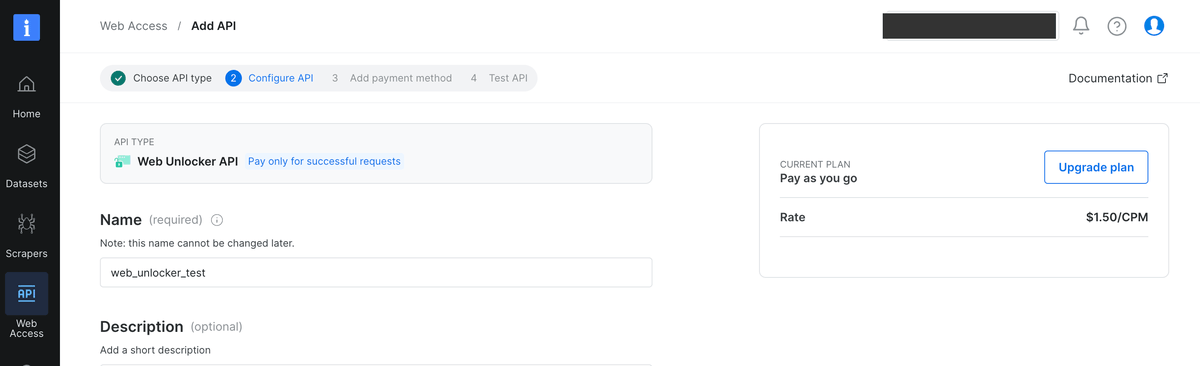
The zone in that capture is named web_unlocker_test, so the script’s default would miss it. Either set BRIGHTDATA_ZONE to the name you typed, or use web_unlocker and leave the default alone. The Web Unlocker quickstart documents both, and we started on the free allowance without a card when we set this up. The Web Unlocker pricing page lists the current free allowance and the pay-as-you-go rate past it, quoted per 1K successful requests. The panel writes that rate as a CPM.
This script sends the request through the Web Unlocker endpoint and parses the result:
import json
import os
import re
import requests

API_KEY = os.environ.get("BRIGHTDATA_API_KEY")
ZONE = os.environ.get("BRIGHTDATA_ZONE", "web_unlocker")
ENDPOINT = "https://api.brightdata.com/request"

LD_JSON = re.compile(
    r'<script[^>]*type\s*=\s*[\'"]application/ld\+json[\'"][^>]*>(.*?)</script\s*>',
    re.S | re.I,
)


def fetch_html(url, country="us"):
    """Return the rendered HTML for an Etsy URL, or raise on failure."""
    # Checked here rather than at import, so the browser path below runs
    # without an account.
    if not API_KEY:
        raise SystemExit("BRIGHTDATA_API_KEY is not set, see the exports above")
    response = requests.post(
        ENDPOINT,
        headers={"Authorization": f"Bearer {API_KEY}"},
        json={"zone": ZONE, "url": url, "format": "raw", "country": country},
        timeout=90,
    )
    response.raise_for_status()
    body = response.text
    # A quota error arrives as HTTP 200 with a short text body, and a block page
    # arrives as HTTP 200 of valid HTML. Neither contains ld+json, which is the
    # content this actually wants, so test for that rather than for either error.
    if not LD_JSON.search(body):
        raise RuntimeError(f"no ld+json in response, most likely blocked: {body[:200]!r}")
    return body


def product_jsonld(html):
    """Pick the Product block by @type. Every listing we opened had four."""
    for block in LD_JSON.findall(html):
        try:
            parsed = json.loads(block.strip())
        except json.JSONDecodeError:
            continue
        for node in parsed if isinstance(parsed, list) else [parsed]:
            if node.get("@type") == "Product":
                return node
    return None


def parse_listing(node):
    """Flatten a Product node, keeping the offer's range rather than its lowest price."""
    offer = node.get("offers", {})
    # schema.org allows a list of offers and a single priceSpecification object,
    # and Etsy serves both, so normalize before indexing into them.
    if isinstance(offer, list):
        offer = offer[0] if offer else {}
    specs = offer.get("priceSpecification", [])
    if isinstance(specs, dict):
        specs = [specs]
    base = next((s for s in specs if "priceType" not in s), {})
    was = next(
        (s for s in specs if "Strikethrough" in str(s.get("priceType", ""))), {}
    )
    # Not every listing carries a priceSpecification. Without this fallback a
    # single-variant listing records a null price and raises nothing.
    # A range arrives three ways: nested in priceSpecification, as AggregateOffer's
    # own lowPrice and highPrice, or not at all. Try them in that order.
    low = base.get("minPrice") or offer.get("lowPrice") or offer.get("price")
    high = base.get("maxPrice") or offer.get("highPrice") or offer.get("price")
    # availability is the only field that marks a dead listing, and JSON-LD lets it
    # arrive as a bare term, an array, or an @id object. Normalize before comparing.
    avail = offer.get("availability") or ""
    if isinstance(avail, list):
        avail = avail[0] if avail else ""
    if isinstance(avail, dict):
        avail = avail.get("@id", "")
    rating = node.get("aggregateRating", {})
    return {
        "sku": node.get("sku"),
        "title": node.get("name"),
        # Etsy serves a dead listing as a full HTTP 200 page that still
        # carries a price, so availability is the only field that says so.
        "availability": str(avail).rsplit("/", 1)[-1],
        "currency": offer.get("priceCurrency"),
        "price_min": low,
        # high can be a bundle maximum rather than the item's, where a listing
        # has an add-on axis. Count the axes before trusting it as a maximum.
        "price_max": high,
        "list_price": was.get("price"),
        # True only where the variations differ in price. Same-price variants
        # read false, so this is a price-spread test, not a variation test.
        "has_variations": None if low is None else low != high,
        "rating": rating.get("ratingValue"),
        "review_count": rating.get("reviewCount"),
        "shop": node.get("brand", {}).get("name"),
    }


if __name__ == "__main__":
    url = (
        "https://www.etsy.com/listing/753913297/"
        "smoky-quartz-ring-rose-gold-ring-women"
    )
    node = product_jsonld(fetch_html(url, country="us"))
    if node is None:
        raise SystemExit("no Product block on page: blocked, or the layout changed")
    print(json.dumps(parse_listing(node), indent=2))
We ran the script against a live listing, and it returned a flat record. The price range comes from 1 listing with many separately priced variations:
{
  "sku": "753913297",
  "title": "Smoky Quartz Ring · Rose Gold Ring Women · Cocktail Rings · ...",
  "availability": "InStock",
  "currency": "USD",
  "price_min": "89.25",
  "price_max": "5613.75",
  "list_price": "119.00",
  "has_variations": true,
  "rating": "4.5",
  "review_count": 99,
  "shop": "AnemoneJewelry"
}
Across 3 runs against the same listing, fetches took 23 to 27 seconds and returned between 540 KB and 750 KB. Those figures are the cost of the unblocking step. Budget for latency in that range rather than for the sub-second timing of a block.
If you only need a few pages and would rather not open an account, a local browser reaches the same result in about the same amount of code. That browser runs from an address DataDome hasn’t already refused. It needs a display, so on a server run it headed under a virtual display such as Xvfb rather than in headless mode. Install Playwright and Chromium once:
python3 -m venv .venv && source .venv/bin/activate   # skip if already active
pip install playwright requests
playwright install chromium
Then swap the fetch, keeping the same 2 parsing functions. Put this above the __main__ block, with the other functions:
from playwright.sync_api import sync_playwright


def fetch_html_browser(url):
    """Fetch one page with a visible browser, since headless returns a 403."""
    with sync_playwright() as p:
        browser = p.chromium.launch(headless=False)
        context = browser.new_context(locale="en-US")
        page = context.new_page()
        page.goto(url, wait_until="domcontentloaded", timeout=45000)
        html = page.content()
        browser.close()
        # Same rule as the guard above: test for the content you want. A block
        # page is valid HTML, so only the missing ld+json shows it.
        if not LD_JSON.search(html):
            raise RuntimeError("no ld+json on page, most likely a block page")
        return html
Change 1 line inside the __main__ block, and nothing else:
node = product_jsonld(fetch_html_browser(url)) # was: fetch_html(url, country="us")Our run returned 535,247 bytes and parsed cleanly through the same 2 functions. The page was also priced in INR, because a browser on your machine exits from your own address, and the browser path takes no country argument. Without that argument you can’t set the exit country, so this path fits a few pages rather than a dataset.
The code above parses the page rather than sending it to a model. Etsy publishes the fields as structured data, so reading them is deterministic and effectively free. On the listing we measured, selecting the Product block and flattening it takes a median of 0.3 milliseconds.
Handing the same page to a language model instead means 179,599 tokens of raw HTML, most of a 200K-token context window for 1 product. Stripping markup first cuts that to 5,352 tokens, a 97% reduction. That ratio matters more than the choice of model.
But a parser that stops matching returns an empty field rather than an error, while a model would at least produce something wrong and visible. So take the deterministic path on a site that publishes schema.org. Use the time you save to check that the parser still returns the fields you expect.
Shop pages have 4 of these blocks as well, under different types, and one of them shows where listing URLs come from. /shop/{shop_name} returns an Organization node describing the shop and an ItemList node whose itemListElement holds full listing URLs. shop_itemlist selects the ItemList by @type, so the same function with Organization in its place returns the shop’s own fields. On the shop we tested, numberOfItems read 1,842 while a single page returned 36 URLs, and ?page=2 returned 36 more with no overlap.
The enumerator takes a shop name as its input, so you need a source for shop names, and 3 sources work without touching the disallowed search path. You can use shops you already track, the findAllListingsActive endpoint above, or a prepared dataset. That endpoint takes keywords with an application key alone, and it includes a shop_id on every listing it returns.
We fetched pages across the range and past the declared end:
page  2    36 items
page 25    36 items
page 51    36 items
page 52     6 items      51 x 36 + 6 = 1,842
page 53    no ItemList block
page 60    no ItemList block
The total matches the 1,842 the shop declares. Past the end, Etsy keeps answering with a full page of roughly 420 KB and no ItemList.
Etsy gives no error and no empty array to terminate on, so a loop that waits for either will keep paging forever against pages that look fine. Terminate on the missing block instead, and let the declared count check your work. The usual patterns for paginated collection assume one of those 2 signals, so they don’t apply here.
Both functions belong in the same file as the earlier functions, since they use LD_JSON and fetch_html. Comment out the entry point you aren’t running, since the enumerator takes 20 minutes:
def shop_itemlist(html):
    """Pick the ItemList block. The first block on a shop page is a video."""
    for block in LD_JSON.findall(html):
        try:
            parsed = json.loads(block.strip())
        except json.JSONDecodeError:
            continue
        for node in parsed if isinstance(parsed, list) else [parsed]:
            if node.get("@type") == "ItemList":
                return node
    return None


def enumerate_shop(shop_name, country="us"):
    """Page a shop until the ItemList stops appearing, and hand back the declared
    count so the caller can check it."""
    base = f"https://www.etsy.com/shop/{shop_name}"
    urls, declared, page = [], None, 1
    while True:
        suffix = "" if page == 1 else f"?page={page}"
        try:
            node = shop_itemlist(fetch_html(base + suffix, country=country))
            if node is None:
                break
            declared = node.get("numberOfItems", declared)
            urls += [item["item"]["url"] for item in node["itemListElement"]]
        except (RuntimeError, requests.RequestException, KeyError, TypeError,
            AttributeError) as err:
            print(f"stopped at page {page}: {err}", flush=True)
            break
        print(f"page {page}: {len(urls)} of {declared}", flush=True)
        # Breaking on the declared count here would make the comparison below
        # vacuous, so page until the ItemList block stops appearing.
        page += 1
    return urls, declared


if __name__ == "__main__":
    urls, declared = enumerate_shop("AnemoneJewelry")
    print(len(urls), "collected,", declared, "declared")
The enumerator makes 53 fetches against the pages measured above, returns 1,842 URLs, and checks the total against the count the shop declares. Compare those 2 numbers on every run, because a short read returns fewer URLs and raises nothing.
The try has to cover the parse as well as the fetch. A 53-request loop is long enough to receive the rate-limit response, and a single malformed itemListElement does the same damage as a failed request. Without the guard, either one raises at page 30 and discards every URL collected so far. Catching both leaves you with a short read instead of a lost run, and the count comparison shows it. Handling failed requests in Python follows a standard pattern, and the only Etsy-specific part is putting the parse inside the guard.
At the latency measured above, 53 fetches is 20 to 24 minutes and 53 requests out of the free monthly allowance, for 1 shop. Run the enumerator on a small shop first and watch the page count increase before you use it on a shop with 1,842 listings. Set a usage limit on the zone as well, so a run that goes wrong stops at a cap instead of at your balance.
We ran the same discovery through the Etsy shop endpoint of the Web Scraper API as a batch job. We ran the job on the shop rather than on listing URLs, and limited it to 50 records for the comparison. It returned 50 listings in 168.9 seconds, or roughly 3.4 seconds per record, with no duplicates and no locale-prefixed URLs in that run.
Collecting that whole shop takes 53 enumeration fetches plus 1,842 listing fetches, or 1,895 requests and roughly 13 hours single-threaded. Check those 1,895 against the current free allowance before you start. Past that allowance, the same work is billed at the pay-as-you-go rate per 1K successful requests.
Pin country here as well. We fetched the same shop without it and got /de/listing/ URLs and German titles. Those URLs would enter a dataset as different keys for items already stored under their /listing/ form.
Extraction problems that silently corrupt an Etsy dataset
Each problem here returns HTTP 200 and raises no exception. Of the 5, 4 write a plausible but wrong row and the fifth writes an empty row. Instead, you find a bad number months later. Data quality metrics catch that kind of failure after the data is stored, and not writing the bad row is cheaper.
A listing page has 4 JSON-LD blocks, not 1. Etsy included Product, VideoObject, BreadcrumbList and FAQPage in 4 separate script tags on every listing we opened, all with the application/ld+json type. The page source shows them on 4 consecutive lines:

Code that calls find() and takes the first match works on listing pages and silently returns the video block on shop pages. Select on @type rather than on position. Nothing else about the mechanics of parsing JSON in Python changes.
A shop page has 4 blocks of its own, in a different order:

On the shop we tested, the first block is a video and the ItemList you want is last, so taking the first match fails. The script above selects on @type instead.
On a listing with variations, offers.price is the lowest price in the range, not the whole range. On the listing we tested, offers.price read 89.25 while the priceSpecification entry nested inside offers declared minPrice 89.25 and maxPrice 5613.75. A parser that reads offers.price records the cheapest variation and drops the range. Storing maxPrice instead isn’t the fix either, because on this listing maxPrice is the price of a bundle rather than of the item alone.
We collected the same URL with variations turned on and got 61 separate records, 1 per variant, priced from 89.25 to 1,871.25. A single listing row in your table represents 61 buyable SKUs across a 21x price range.
A second dropdown on the page multiplies that range:
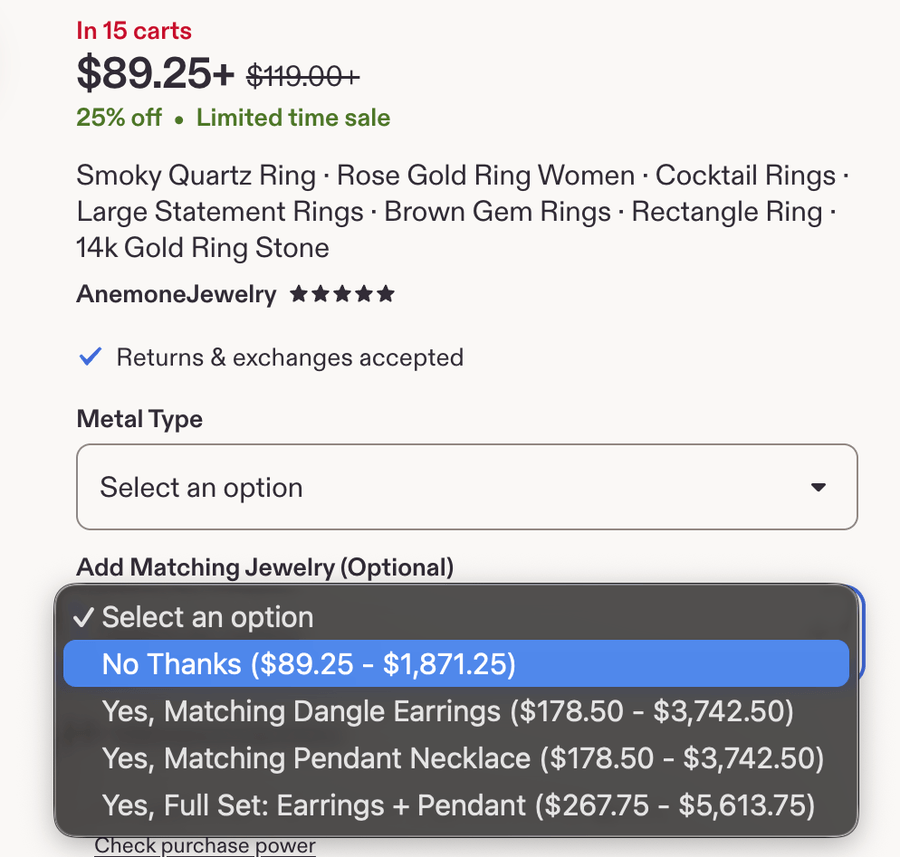
Those 2 maximums measure different things, and this listing has 2 variation axes. Metal Type runs from 14k Gold Filled at 89.25 to the 3 solid-gold options at 1,871.25. Add Matching Jewelry (Optional) then multiplies that range. No Thanks runs 89.25 to 1,871.25, either single matching piece runs 178.50 to 3,742.50, and Full Set: Earrings + Pendant runs 267.75 to 5,613.75.
The declared maxPrice is the solid-gold ring plus both matching pieces, 3 items at 1 price. The variation extract returned the ring by itself and matched the No Thanks row to the cent.
So whenever a listing has an add-on axis, maxPrice is the maximum for a bundle rather than for the item. A price series built on it quietly tracks bundles. Count the variation axes before you store a range as the product’s own. They aren’t in the JSON-LD, so read them from the rendered page or pull the variation extract.
The same priceSpecification array also contains a second entry tagged StrikethroughPrice, so the sale price and the list price appear side by side, distinguished only by a schema.org URL. That entry has its own minPrice and maxPrice. The list_price the script records is the lowest price in the list-price range, just as offers.price is the lowest in the current range.
Locale follows the exit IP, and it changes more than the currency symbol. We fetched 1 listing 3 times in the same hour, changing only the exit country:
country   currency   price    variation range      title
us        USD        89.25    89.25 - 5613.75      Smoky Quartz Ring, Rose Gold Ring Women
de        EUR        95.71    95.71 - 5058.76      Rauchquarzring, Damenring aus Roségold
gb        GBP        82.77    82.77 - 4338.22      Smoky Quartz Ring, Rose Gold Ring Women
The same listing renders differently from each exit country:
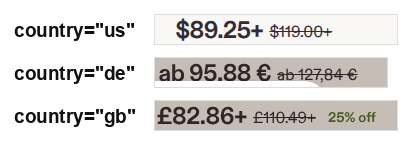
Those captures come from a later fetch than the 3 rows, and only the dollar figure stayed the same. The German page also writes its lowest price as ab, or “from,” and the + marks the same thing on the other 2 pages.
The 3 fetches returned the same SKU, rating and review count, at 3 different prices in 3 currencies. The ratio between the lowest and highest price differs across the 3 rows, 62.9x on the US row against 52.9x and 52.4x, so more than the exchange rate moved between those fetches. The German exit also returned a machine-translated title, while the 2 English locales kept the original.
A rotating pool that ignores geography produces a price series mixing 3 currencies and a text corpus mixing languages, and nothing in the pipeline reports a problem. Pin the exit country per collection run and store the currency alongside every price.
The same problem appears in prepared data. The 1,000-record sample we downloaded had 19 currencies, with 109 rows in a currency other than USD, 14 of them priced in Vietnamese dong. That sample refreshes, so your copy will differ from these totals. Run the same comparison on your own copy.
Averaging the price column without reading the currency column inflates the mean:
mean(final_price), all rows          31,238.84   n=991
mean(final_price), currency = USD       137.57   n=882
                                        ~227x
median(final_price), all rows            26.00
In that column, 14 rows out of 991 contribute 87% of the total, but 109 rows are non-USD and all of them need handling. The query runs, the column is a clean float, and the answer is wrong by 2 orders of magnitude. The median barely moves, because the non-USD rows are a small share of the column. A mean and median that disagree this much only tell you that a heavy tail is present. Grouping by the currency column separates mixed units from ordinary skew.
A March 2026 arXiv paper on marketplace listings, cited again further down, restricted its sample to listings priced in USD before running any analysis. That solves the problem after collection rather than during it. Filtering that way also changes the population the average describes, since it drops listings in other currencies instead of converting them.
This problem is hardest to see on the agent path. We fetched this listing through an MCP server whose schema accepts only a URL, and got the Czech storefront priced in CZK. The country-pinned REST call reports the same listing at 89.25 USD.
The cause is the tool’s interface, not the fetch. With no country or locale parameter to set, you take whatever exit the server is using. Check that behavior on any such server before you connect it to an agent, because the exit decides the currency of every answer downstream.
So collect Etsy data into your own store on a pinned locale, and have the agent read that store rather than fetch live per question. An agent that silently answers in a different currency each time is worse than an agent that can’t answer.
A dead listing is a full page with a price on it. Etsy doesn’t return a 404 for an expired or sold-out listing. We pulled a 2007 listing and got HTTP 200, 465,563 bytes, a complete Product block, and price 13.00 USD.
The page renders in full, and shows both the sold-out banner and the price:
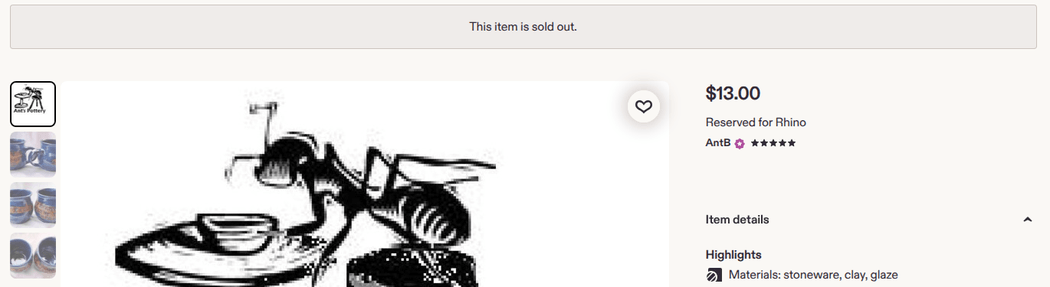
offers.availability is the only field that contradicts the price, and it reads schema.org/OutOfStock. A parser that skips it records a dead item at full price, so the script above reads that field.
That field is less reliable in prepared data than on the page. In that same copy, 74 of 1,000 rows were sold-out listings, availability was empty on all 74, and 65 still showed a numeric price. The sign there is a show_sold_out_detail parameter on the stored URL. Keeping only the rows whose availability reads InStock would discard 798 live rows, because the field is absent on most of them too.
A 2xx response doesn’t mean you have data. This problem is in the collection layer rather than the payload, and we saw it with the script above during testing. The unblocking endpoint explains itself in the body. When the account reached a request-rate limit, it answered 200 with a 111-byte plain-text body reading Your system is sending too many of this type of request. The status line stays a success, so raise_for_status() passes, the parser finds no Product block, and a loop writes empty rows without a single exception.
The Web Scraper API handles the same case by design. Its synchronous collect endpoint returns records within 1 minute, and longer jobs continue asynchronously. The same endpoint answers 202 with a snapshot_id and a retry-after when a job runs past that minute, so you can collect the result once it’s ready, as the API reference documents. Both responses are success statuses, so branch on the status code before indexing into a record list.
The guard in fetch_html is 2 lines and tests for a page containing ld+json rather than for either error. Running the enumerator against a live shop found a third case, a 200 with an empty body, and the same guard caught it without any change. So test the response for the content you want rather than against the errors you’ve already seen, since vendor error text isn’t a stable interface. Write the equivalent for whatever fetch layer you use, because a success status doesn’t guarantee the payload.
One worked example proves that a problem exists, not that it’s common. We checked the price-range and strikethrough problems against 100 listings from both discovery paths. Variations are present on 98 of 100, and initial_price differs from final_price on the same 98. Neither problem is an edge case you can defer. Those 100 came through the 2 discovery paths above rather than a random sample across Etsy’s categories. So read 98 as a minimum for jewelry listings rather than a rate for the site.
The same check shows that the listing used above is unusual in one respect. That listing has 99 reviews, while the median is 1 in that crawl and 0 in the published dataset sample.
When to buy a managed dataset instead of maintaining a scraper
You can build the scraper, and the code above is most of it. The decision is which failures you want to handle yourself.
We ran the same listing through the Web Scraper API again, this time collecting by URL rather than discovering from a shop. It returned 58 fields against the 14 in the raw Product block, and the extra fields handle most of the problems above:
raw JSON-LD (geo=us)          Web Scraper API
-----------------------------------------------------
price 89.25 (range minimum)   final_price 89.25
119.00 (StrikethroughPrice)   initial_price 119
not present                   discount_percentage 25
not present                   listing_has_variations true
not present                   reviews_count_shop 15129
not present                   is_star_seller false
4 embedded reviews            6 top_reviews
14 fields                     58 fields
You configure that extractor per input URL, and set all_variations to true for the price-range problem:
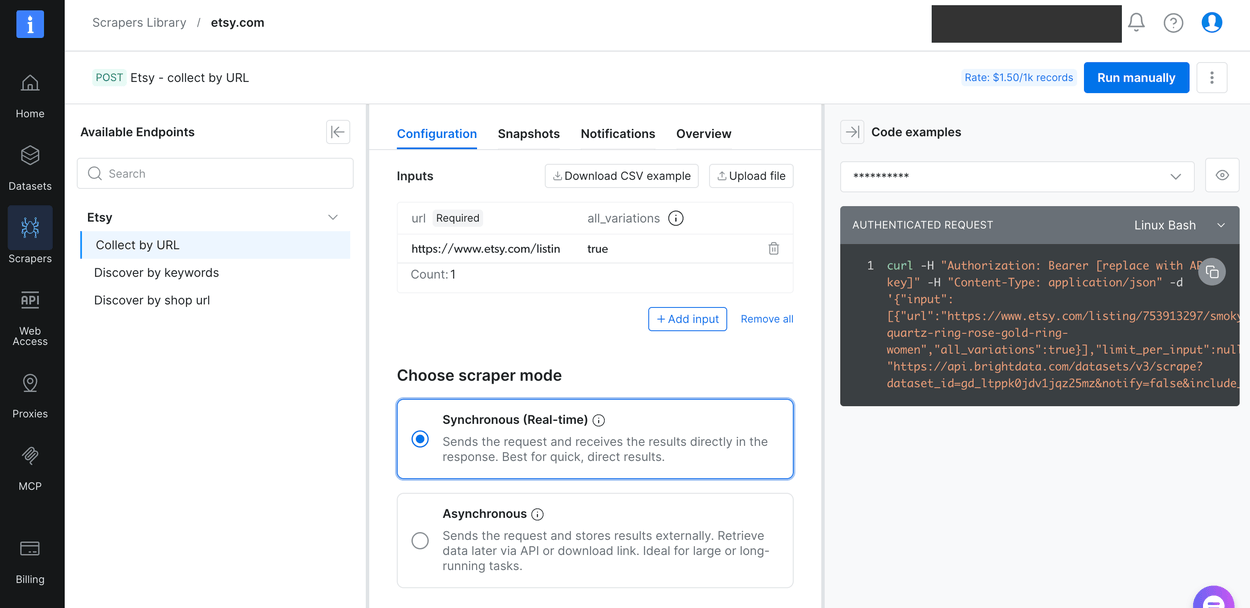
The 6 fields we diffed across both paths agreed exactly, and they were currency, charged price, list price, rating, item review count and shipping origin. Run that check before you trust either path.
The time comparison reverses, and the mode decides by how much. Through the synchronous endpoint, the structured extraction took about 50 seconds for a single record, against 27 seconds for the raw fetch. It renders and normalizes rather than returning bytes. The 50 seconds leaves about 10 seconds inside the 1-minute timeout above. The endpoint is built for 1 URL and an answer now.
We ran the same scraper as a batch job instead and got the 50 records above at 3.4 seconds each. Each record costs roughly 1/8 of the 27 seconds a raw fetch takes. In batch mode the 202 is the expected response, not an error to handle.
For a recurring crawl, the structured path removes selector maintenance, locale pinning and price-range handling from your team, for the fields it returns. For 1 listing, it’s slower whichever mode you pick. The diff above shows the price handling resolved, and the 50-record run showed no locale-prefixed URLs. Selector maintenance is the one part no single run can test. The structured path is billed the same way as Web Unlocker, with the current free allowance and per-1K record rate on the Web Scraper API pricing page.
The same sample contains 2 kinds of record rather than 1, so plan for both on the buy side. Of the 1,000 rows, 128 have the full field set, and the other 872 leave 12 of its fields empty, including description, product_category and store_country.
The split tracks listing age, with the full record on items listed from late 2025 onward. A bulk extract spanning years therefore mixes both kinds in 1 file. That ratio should shift toward the full record as the corpus ages. Check field coverage against your own required columns before you decide the order size, not after.
Review volume needs the same check before you order. In the copy we pulled, 753 of 1,000 listings had no reviews, so the median is zero. The top 10% of listings have 98% of all reviews. The mean of 52.5 per listing describes the file as a whole and no listing you will open.
The review skew looks like the currency case, but it’s a different failure with a different fix. The currency case above is a unit error, and the mean is wrong. Review volume is skew, and there the mean is right for a total. A random sample of 1,000 listings should return about 52,500 reviews, so use the mean when you plan a bulk corpus. At a pilot-sized sample, that concentration makes the estimate unreliable.
Coverage is a different question. With 753 of the 1,000 at zero, only about 25% of the rows you buy have any reviews.
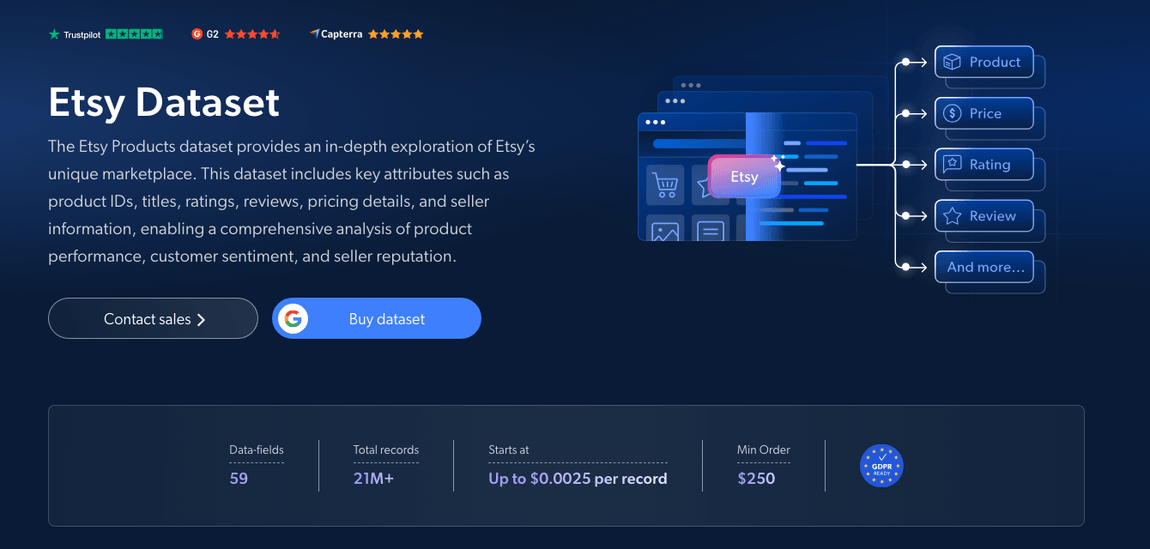
If the data you need is historical rather than live, a prepared dataset skips the crawl. The Etsy dataset page lists the current field count, record total, per-record price and minimum order, and those 4 numbers are the buy-side arithmetic.
The per-record figure on that page is the one-time rate, and refresh schedules from bi-annual through daily come as subscriptions that discount it. How recent the data is matters too. The page describes pre-collected records as days to months old, while collection on demand lets you set that limit before checkout. You select the refresh schedule and the volume level on the dataset page itself.
Those figures change without notice, so read them from the page before you budget, and treat the 2 pricing pages the same way. The dataset page shows a sample of the records under the summary row, blurred until you request access:
One outside reference point is worth more than a vendor claim here. That same paper, Mecha-nudges for Machines, documents where its data came from in Appendix B. The authors state that the raw data “was obtained from the company Bright Data, which provides structured datasets of Etsy product listings”. Their extract “was collected on November 12, 2025 and delivered the same day”. They describe 2 snapshots, of 5M and 1.06M listings. That appendix is checkable, and a vendor case study isn’t.
The rule here is narrow. Build the scraper when you need a few thousand listings you can enumerate by URL, and you can accept pinning 1 locale. Buy the collection layer when the list of URLs is the hard part, or when the crawl has to keep running. Buy it too when the dataset feeds pricing work, because the price-range and strikethrough fields arrive already separated. The currency column still needs filtering on either path.
On the shop measured above, building costs 1,895 requests and roughly 13 hours single-threaded for 1,842 listings. The buy side is a minimum order of prepared records. Those 2 numbers aren’t directly comparable, because the build cost is per shop and the buy cost is a minimum you spread across shops.
Final thoughts
Etsy blocks ordinary fetching while publishing schema.org JSON-LD on those same public pages, so extraction is a short job and access is most of the work. The transport doesn’t decide access, because a headed browser loaded a page that 9 tuned HTTP clients couldn’t load, and Etsy refused that same browser on its second request. So the engineering problem is how to keep collecting, not how to look like a browser. Whichever path you take, the data failures cost more than the access failures, because a mixed-currency column or a dead listing at full price parses cleanly and you find it months later. Pull 1 listing through both a raw fetch and a structured extractor, diff the fields, and let the result decide build versus buy before you write the crawler.
Frequently asked questions
Is there an API for Etsy?
Yes. The Etsy Open API v3 listed 76 paths when we counted, of which 31 GET operations need only an application key. It returns listings, shops, reviews and taxonomy. For shops you don’t operate, it omits per-listing sales, keyword search volume, conversion rate and history, which many data projects need.
Is the Etsy API free?
The API itself has no published price, but access depends on approval and on rate limits set per application key. Etsy decides who gets higher limits, and may attach extra terms or charges. The practical cost is the rate limit rather than a fee.
Why is my Etsy scraper getting blocked?
Etsy runs DataDome, which returns a 403 with a short block page and an X-DataDome-riskscore header grading your request, where 1.0 is worst. The score follows your calling IP and request signature. In our tests, header edits lowered the score and Chrome TLS impersonation raised it, and neither returned a page.
Does Etsy allow web scraping?
Not without express permission from Etsy. The terms are the stricter document. robots.txt disallows keyword search, sold history and favoriters in every locale variant, and leaves listing and shop pages open. Etsy rewrites that file without notice, so read the live copy before you build.
Can you scrape Etsy with Python?
Yes. Listing pages embed schema.org JSON-LD, so extraction needs no CSS selectors. Pick the application/ld+json block whose @type is Product, then flatten the offer object. The fetch is the hard half, and collecting at volume needs new browsing contexts and rotating addresses.
How do I get Etsy sales data?
Sales are public only at shop level. The getShop endpoint returns transaction_sold_count, a lifetime figure for the whole shop. Nothing splits that per listing for a shop you don’t operate, so a tool’s per-listing numbers come from elsewhere. Treat those as estimates and check them against shop totals.
Does Etsy have a sitemap for crawling?
None at our last check. The robots.txt file declares zero Sitemap: directives, and /sitemaps.xml returns a 403 with an empty body. With no sitemap, you have to discover URLs from shop pages, the API findAllListingsActive endpoint, or a prepared dataset. None of those 3 touches the disallowed search path.
Does Etsy block AI crawlers like GPTBot?
Not by name when we checked. The robots.txt file declares only 3 user-agent groups, none of them an AI crawler, and Etsy publishes no llms.txt or ai.txt. DataDome still refused GPTBot and ClaudeBot, both scoring a worse 0.9814 than the 0.923 a Chrome User-Agent scored. Nonsense strings scored the same.


Technical Writer
 5 years experience
Satyam Tripathi helps SaaS and data startups turn complex tech into actionable content, boosting developer adoption and user understanding.