Your sales team just spent hours dialing “verified” contacts, only to hit disconnected lines, bounced emails, and prospects who moved on months ago. This is the reality of B2B data decay: the gradual degradation of contact accuracy that affects every database.
In this guide, you’ll learn what B2B data is, why it decays, where it comes from, and how to choose the right sourcing approach for your organization.
What is B2B data?
B2B data refers to business information about companies and their employees, which lets sales and marketing teams identify, reach, and engage the right prospects.
Modern B2B data includes five core types: firmographics (company size, industry, revenue), technographics (software and technology they use), behavioral intent signals (signs they’re researching solutions), chronographic data (key events like funding rounds), and contact information (emails, phone numbers, job titles).
The challenge: contact data decays at a rate of 22.5% annually (approximately 2.1% per month). Static contact lists become outdated within months as professionals change jobs, emails bounce, and phone numbers disconnect.
This is why modern GTM (go-to-market) teams have shifted from one-time list purchases to real-time data feeds. Automated enrichment keeps your CRM current by updating records as prospects change roles or companies, ensuring your outreach stays accurate and your sender reputation stays protected.
The five types of B2B data
Understanding the different types of B2B data helps you determine which information matters most for your specific business objectives.
1. Identity data (contact information)
Identity data includes the basic contact details needed to reach prospects:
- Full names and job titles
- Email addresses (work and personal)
- Phone numbers (direct dials and mobile)
- LinkedIn profile URLs
- Company affiliations and reporting structure
Key insight: Contact details change frequently (30-40% annually in high-growth sectors like technology, healthcare, and professional services), but LinkedIn profile URLs provide a stable identifier that persists across job changes. Data teams use profile URLs as the primary key to track individual prospects throughout their careers, letting you maintain continuity even when emails and phone numbers change.
2. Firmographic data (company characteristics)
Firmographic data describes the core attributes of organizations:
- Company size (employee count, annual revenue)
- Industry and sub-industry classifications
- Geographic locations and headquarters
- Founding date and company age
- Ownership structure (public, private, subsidiary)
- Growth indicators (hiring velocity, recent funding)
Practical application: Firmographics let you segment markets and identify companies matching your ideal customer profile (ICP). For example, if you sell enterprise software, you might filter for companies with hundreds of employees and substantial annual revenue in technology or financial services.
Rather than relying on lagging revenue estimates (often over a year outdated), leading teams prioritize real-time signals like funding announcements and hiring surges. These indicators identify companies in active growth phases with budget available.
3. Technographic data (technology stack)
Technographic data reveals what software and infrastructure a company uses:
- CRM systems (Salesforce, HubSpot, Microsoft Dynamics)
- Marketing automation platforms (Marketo, Pardot, ActiveCampaign)
- eCommerce platforms (Shopify, Magento, WooCommerce)
- Cloud infrastructure (AWS, Azure, Google Cloud)
- Estimated tech budget and contract renewal dates
Strategic value: Technographics enable precise targeting by revealing technology gaps and replacement opportunities.
For example, if you sell sales enablement software, knowing a company uses Salesforce but lacks email sequencing tools gives you a clear entry point. Similarly, predicting renewal windows helps you time outreach when contracts are up for review.
4. Intent data (behavioral signals)
Intent data captures signals indicating active solution research – both first-party data (direct interactions with your website) and third-party data (research activity across the broader web):
- Website visits and content consumption patterns
- Product review site activity (G2, Capterra, TrustRadius)
- Search behavior and keyword research
- Social signals (engagement with competitors or industry discussions)
- Job postings for roles that typically use solutions like yours
Practical application: Intent data prioritizes high-signal accounts showing active buying interest.
For example, when a company visits your pricing page three times in one week, reads competitor comparisons, and posts a job for a “Sales Operations Manager”, they’re demonstrating strong buying intent. These multi-touch signals indicate an active evaluation – response rates for high-intent accounts can be significantly higher than cold outreach.
5. Chronographic data (time-based events)
Chronographic data tracks significant events that create buying opportunities:
- Funding rounds and acquisitions (new budget allocation)
- Executive leadership changes (tech stack reviews)
- Product launches or major announcements
- Office openings or relocations
- Mergers and restructuring
Timing advantage: These events create narrow windows when companies are actively evaluating solutions.
For example, a company that just raised Series B funding likely has fresh capital earmarked for growth initiatives. Similarly, a new VP of Sales typically reviews the tech stack within their first few months. Research shows that timing engagement around these triggers can improve response rates significantly.
Understanding B2B data decay
B2B contact databases degrade rapidly. With AI-driven automation becoming standard, outdated data doesn’t just waste time – it creates financial losses and reputational damage at scale.
The reality of data degradation
Research shows that approximately 22.5% of contact records become completely invalid annually (2.1% monthly decay rate). However, when measuring partial changes, the impact is far broader:
Fields that change within 12 months:
- Job titles and roles. 65.8% of contacts change (including promotions and internal moves).
- Phone numbers. 42.9% change or become inactive.
- Email addresses. 37.3% decay from job changes.
For a database of 10,000 contacts, this translates to 2,250 invalid records and 6,580 records with outdated information within one year.
Why data decays
Several factors drive this constant erosion:
- Professional mobility. In high-growth sectors (technology, healthcare, professional services), 30-40% of professionals change jobs annually. Even in stable industries, mobility rates of 25-30% mean roughly 1 in 4 contacts change employers each year.
- Company changes. Mergers, acquisitions, and restructuring shift reporting structures overnight. When companies merge, 30-50% of leadership positions are typically consolidated within 12 months.
- Buying committee turnover. Modern B2B sales involve an average of 11 stakeholders per deal. Given current mobility rates, at least one key committee member often leaves mid-sales-cycle, stalling deals.
- AI multiplication effect. AI-powered sales agents require fresh data to function. Feeding them 6-12 month-old information doesn’t just result in wrong emails – it produces embarrassing personalization errors. When an agent references someone’s old job title or mentions a company they left months ago, the outreach feels obviously automated and damages credibility.
The cost of outdated data
Research estimates data quality issues translate to millions in annual losses per mid-market organization through wasted marketing spend, missed opportunities, and operational inefficiencies.
Direct impact:
- Sales productivity loss. Sales reps spend over a quarter of their time pursuing leads with incorrect information, representing tens of thousands in wasted salary per rep annually.
- Email deliverability damage. Bounce rates above 2% trigger penalties with Gmail and Outlook, dramatically reducing inbox placement to half or less. Above 5% you risk blacklisting – complete delivery failure requiring several months to recover.
- Wasted marketing spend. When a significant portion of your database is invalid, every campaign wastes a comparable amount of its budget. For organizations spending substantially on outbound marketing, this represents hundreds of thousands in pure waste.
Where does B2B data come from?
B2B data originates from publicly available sources and vendor-maintained databases, each with different collection methods, refresh speeds, and pricing models.
The main sources
Most B2B data is collected from publicly accessible sources:
- LinkedIn. The primary source for professional identities and employment history (1.1B+ members, 67M+ company pages globally).
- Crunchbase. Standard source for venture-backed companies and funding rounds (2M+ companies).
- Indeed/Glassdoor. Key source for tracking hiring velocity. Vendors monitor 7 million+ active job postings to identify expanding companies.
- Google Maps. The primary source for local business information (200M+ businesses and places globally).
- Public records. Government filings including SEC reports and business licenses provide verified legal information.
Key point: All major B2B data vendors collect from these same public sources. The differentiators are refresh frequency and verification methods.
Traditional databases vs. direct datasets
The core difference isn’t the data source – it’s the speed and frequency of the refresh cycle.
Traditional vendor model:
Vendors like ZoomInfo or Apollo collect data from public sources and combine it with “community” data (email signatures from CRM integrations). However, they typically update their central databases on systemic quarterly cycles (90-120 days). Because B2B data decays at 2.1% monthly, approximately 3–6% of the contacts you buy will likely be invalid on the day of delivery due to the age of the record.
Direct dataset alternative:
Direct datasets (like Bright Data’s B2B Datasets) use automated infrastructure to pull structured data on high-frequency schedules:
- Daily refreshes. For high-volatility data like job postings, funding alerts, and leadership changes.
- Weekly/Monthly refreshes. For stable data like company firmographics or headquarters locations.
This approach delivers data within 24–48 hours of a public update, reducing data decay by up to 80% compared to quarterly updates.
Pricing comparison (2026 Pricing)
| Feature | Traditional Vendors | Direct Datasets (Bright Data) |
|---|---|---|
| Base Cost | $15K–$30K+ (Annual Contract) | $250 per 100,000 records |
| Pricing Model | Per-seat / Credit-based | Pay-per-record / No seat limits |
| Data Freshness | 90–120 Day Refresh | Daily/Weekly Refresh |
| Ownership | Data “Leasing” (often expires) | Perpetual Ownership |
The trade-off: Direct datasets provide fresher data at a 60–80% lower cost, but they deliver raw files (JSON, CSV, Parquet) rather than a built-in sales engagement platform. This makes them ideal for teams using existing tools like Salesforce, HubSpot, Outreach, or those building custom AI SDR agents.
Custom scraping and AI integration
For specific needs, like tracking competitor pricing or monitoring niche job boards, you require custom web scraping infrastructure.
- Web Scraper APIs. B2B-focused scrapers handle CAPTCHA solving and proxy rotation automatically, starting at $0.75 per 1,000 successful records.
- AI Agent Efficiency. Processing raw web pages for AI is expensive. MCP (Model Context Protocol) servers solve this by delivering clean, structured data directly to LLMs, making your AI agents faster and cheaper.
- Deep Lookup. For specific gaps, Deep Lookup uses natural language queries to match records; you only pay for successfully matched results.
Three strategies for B2B data sourcing
The strategic question isn’t just where to find B2B data – it’s how to access it reliably without maintaining broken scrapers, managing outdated records, or overpaying for unused features.
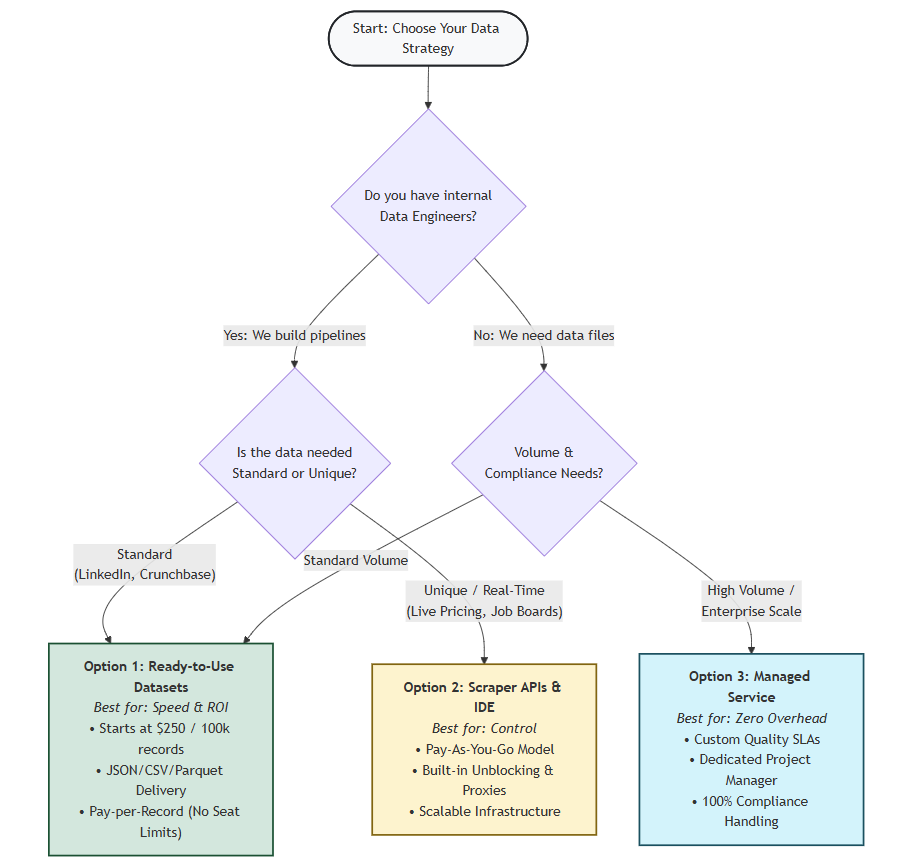
Option 1: Purchase ready-to-use datasets
Best for: Organizations needing immediate, high-volume access to pre-structured contact and company data.
Pre-built datasets provide regularly refreshed snapshots of data from major platforms like LinkedIn, Crunchbase, and G2. Instead of scraping data yourself, you download structured files containing the exact fields you need – filtered by industry, location, or company size.
- Key benefits. Access Billions of records across 120+ domains; delivered directly to Snowflake, S3, or Google Cloud; pre-cleaned formats (JSON, CSV, Parquet) reduce preprocessing time by 80-90%.
- When to choose this. You need data within 24-48 hours; you have an annual budget of $5K-$25K; your team prefers raw data pipelines over software interfaces.
- Pricing. Starts at $250 per 100,000 records.
Option 2: Build custom collection
Best for: Engineering-heavy teams building proprietary tools or requiring unique data combinations.
Modern infrastructure handles the technical complexity – CAPTCHA solving, proxy rotation, and rate limiting – so your engineers focus on data logic rather than scraping mechanics.
- Tools available. Web Scraper IDE (run scrapers as serverless functions); Scraping Browser (automated unblocking for dynamic sites); and access to the world’s largest Residential Proxy Network (400M+ ethically sourced IPs).
- When to choose this. You’re building proprietary AI products; you need real-time updates; you have 1-2 data engineers.
- Cost estimate. $30K-$60K first-year TCO (including infrastructure and engineering time).
Option 3: Managed data services
Best for: Enterprise organizations needing AI-ready data pipelines at scale without technical overhead.
You specify the data and format; Bright Data’s Managed Data Acquisition handles the collection, cleaning, and delivery.
- Key benefits. Zero technical overhead; guaranteed quality with 95-99% accuracy SLAs; 99.99% network uptime; dedicated account management.
- When to choose this. You need 10M+ records on an ongoing basis; you have no internal data engineering team; time-to-market is your primary driver.
- Pricing. One-time setup begins at $500 per standard scraper (scaling for complex enterprise pipelines); monthly service starts at $1,500/month.
How modern teams use B2B data
B2B data has moved out of the sales silo and become core infrastructure for the entire organization.
Sales teams use B2B data to build highly targeted lists matching their ICP precisely – combining verified direct dials, firmographic filters, technographic data, and intent signals to identify accounts in a buying window. Connect rates improve 3-5x (from 1-2% to 5-10%) and sales cycles reduce 20-30%.
Marketing teams combine technographic data with intent signals to craft campaigns that speak directly to prospect needs – addressing specific pain points like legacy system limitations. CAC typically drops 30-50% and CTR improves 2-4x over generic targeting.
Operations teams use automated enrichment to eliminate manual data entry – instantly filling in job titles, company size, and technology stack with full data lineage when leads enter the CRM. Research time drops from significant minutes per lead to near-instant.
Strategy teams track hiring surges, technology shifts, and geographic expansions of competitors using B2B data signals – identifying underserved niches and spotting emerging competitors early based on observed trends rather than lagging market research.
Implementing data quality practices
Maintaining accurate B2B data requires moving from periodic cleanup to continuous validation – automated systems that prevent decay from affecting your CRM.
Three key practices:
- Filter at the source. Don’t collect every lead. Apply strict filters during collection (e.g., “Must have raised Series B in last 6 months” or “Must use Salesforce Enterprise”). If your CRM has 50,000 contacts but only 10,000 match your ICP, you’re paying to maintain 40,000 irrelevant records.
- Schedule regular refreshes. Set refresh schedules based on account value. High-value accounts (>$100K potential) need weekly to monthly refreshes. Standard prospecting requires monthly to quarterly refreshes (30-90 days). With 2.1% monthly decay, a 90-day-old list accumulates roughly 6% invalid contacts.
- Use a layered approach. Check existing CRM data first (zero cost). Query datasets for batch enrichment at low cost (under $0.01 per field). Reserve real-time enrichment ($0.05-$0.25 per contact) for high-value accounts only. This reduces total costs by 80-90% versus enriching every contact in real-time.
Quality targets: Maintain email bounce rates below 1% (2% triggers Gmail/Outlook penalties), phone connect rates above 20% for mobile, and duplicate rates below 2%.
Choosing the right B2B data provider
Selecting the right B2B data provider affects sales productivity, data quality, and budget for years. Look beyond record counts and focus on operational factors:
1. Data accuracy and freshness
Verification standards. Does the provider use real-time verification? Target: email bounce rates below 1%, phone connect rates above 15%.
Ask specifically:
- What is your measured bounce rate across all customers?
- How do you verify phone numbers?
- How often are contacts re-verified?
Refresh frequency. Is the database refreshed every 30-90 days? Any cycle over 120 days creates significant quality risks. Calculate the decay: A database refreshed every 120 days has approximately 8% invalid contacts at delivery (4 months × 2.1% monthly). Monthly refreshes keep decay below 2%.
Infrastructure reliability. For custom scraping, look for documented uptime guarantees (99.9%+ SLA) and published success rates (95%+ for scraping success, CAPTCHA solving, and proxy uptime).
2. Legal compliance and data provenance
Can the provider document where their data comes from? Ask for compliance documentation (GDPR, CCPA) and confirm they offer privacy controls like Do Not Call filtering. Most established vendors handle this – your legal team can review specifics during contract negotiations.
Ask for: Data lineage documentation, collection timestamps, and source references.
3. AI integration and technical capabilities
Data must be ready for immediate use in your AI tools, CRM, and data warehouse:
CRM compatibility. Does it sync with your CRM (Salesforce, HubSpot, Pipedrive) to enrich records and prevent duplicates? Look for native integrations, API access, webhook support, and bulk import/export.
Standard formats. Does data arrive in standard formats (JSON, CSV, Parquet) with consistent schemas and documented data dictionaries?
Real-time updates. Can the provider update records in real-time when needed? Real-time APIs let you enrich contacts at form submission, verify emails before campaigns, and validate phones before dialing.
4. Clear pricing and contract terms
Pay for results: Do you only pay for records that meet your quality standards? Some providers charge for searches, previews, or failed matches. Best practice: Only pay for successfully delivered, quality-validated records.
No hidden fees. Watch out for per-seat licensing, API request fees, export fees, overage penalties, setup fees, and training costs.
Data ownership. Do you retain access to exported records if you cancel? Once you’ve purchased data, you should own it perpetually.
Contract flexibility. Can you cancel monthly, or are you locked into annual contracts? Can you scale up/down based on seasonal needs?
Key takeaways
If you only remember 5 things from this guide:
- Contact data becomes unreliable within months as professionals change jobs at 25-40% annually. Validate regularly (every 30-90 days) and use stable identifiers like LinkedIn profile URLs to maintain continuity.
- Traditional vendors update quarterly (every 90-120 days), meaning data is 30-90 days old at delivery with 3-6% already decayed. Direct datasets with daily/weekly/monthly updates reduce decay by 60-80%.
- Pricing models differ dramatically (2026 rates) – traditional contracts cost tens of thousands annually with per-seat limits, while direct datasets cost significantly less with no seat restrictions. For equivalent coverage, direct datasets typically cost substantially less.
- Use a layered approach – check existing CRM data first (zero cost), use datasets for batch enrichment (minimal cost per field), and reserve real-time enrichment for high-value accounts only.
- Validate before committing – request sample data matching your ICP, test actual bounce rates on a small campaign, and measure phone connect rates before signing contracts.
See the difference quality data makes
Download a free sample of our B2B dataset to compare against your current provider. Filter by your ideal customer profile, test the data quality, and measure actual bounce rates. No credit card required.
Ready to get started? View Pricing | Talk to Sales
Frequently asked questions
How often should I update my B2B database?
Refresh contact data every 30-90 days depending on account value. High-priority accounts need weekly updates, standard prospecting requires monthly refreshes. With data decaying at 2.1% monthly, a 90-day-old list accumulates 6% invalid contacts – enough to trigger bounce penalties with Gmail and Outlook above 2%.
How do I feed B2B data into my AI agents?
AI agents require real-time data access. Modern approaches include natural language tools like Deep Lookup ($0.05-$0.25 per contact) for on-demand queries, regularly refreshed databases via SQL (weekly/monthly updates), or MCP servers for direct web extraction. Choose based on your agent’s autonomy level and budget constraints.
Should I build or buy my B2B data solution?
Use a 70/20/10 framework: allocate 70% to ready-to-use datasets (under $0.01 per record) for broad coverage, 20% to real-time enrichment ($0.05-$0.25 per contact) for active leads, and 10% to custom scraping for proprietary signals. This balances low-cost bulk data with fresh enrichment and competitive advantages.
How do I measure ROI on data quality improvements?
Track three metrics: agent success rate (60%+ task completion vs 20-30% with poor data, saving $30K+ per SDR), domain reputation (maintain <1% bounce rates; >2% triggers penalties), and time savings (15-20 minutes to 2 seconds per lead, representing $75K+ annual savings for teams processing 500+ leads monthly).


Technical Writer
 5 years experience
Satyam Tripathi helps SaaS and data startups turn complex tech into actionable content, boosting developer adoption and user understanding.