Proxy types describe where a proxy’s IP addresses come from. The four main types are datacenter, ISP, residential, and mobile, and each one looks different to the sites you collect data from.
Most proxies change the network a site sees, but not the details your client sends. In testing, a Python script still looked like a script, not a browser, after its requests went through a proxy. Reliable setups combine the right proxy type with a client the site accepts.
This guide shows what a site sees from each proxy type and how to choose one.
TL;DR
- A site sees the IP’s owner, not the provider’s label, such as “residential”. An ASN lookup shows whether a hosting company, an ISP, or a carrier owns the IP.
- Some sites check more than the IP. Bright Data’s Web Unlocker API handles those checks. It returned the job site Indeed’s results in both test runs.
- Start with the cheapest type a site accepts. Nike’s catalog loaded through datacenter IPs in 20 of 20 requests.
- Check how a residential network is sourced. Ask for documents on device consent, customer verification, and independent security audits. Bright Data publishes all three.
What a site sees from each proxy IP type
A website sees the proxy’s exit IP, the network that owns and routes it, and the connection that arrives from it. It identifies the network by its ASN, the number registered to the company that routes the IP range. The provider’s label, such as “residential” or “datacenter”, never reaches the site. This table compares the 4 types:
| Proxy type | IP owner in an ASN lookup | How long you keep an IP | Billed by | Best for |
|---|---|---|---|---|
| Datacenter | Hosting or cloud company | Per connection (rotating) or for the rental (dedicated) | IP or GB | Sites without bot management, high volume |
| ISP (static residential) | Telecom or ISP | For the rental (dedicated) or per connection (shared rotating) | IP or GB | Long sessions on stricter sites |
| Residential | Home broadband or mobile carrier | Per connection, or a sticky session | GB | Sites with bot management, city-level content |
| Mobile | Mobile carrier | Per connection, or a sticky session | GB or IP | Carrier-specific content, app traffic |
The ASN is one of the cheapest checks for an anti-bot system, because it costs one database lookup. So a site can identify your proxy type on the first request.
You’ll also see proxies grouped in other ways. Forward and reverse proxies differ by direction, and transparent, anonymous, and elite proxies differ by the headers they add. On HTTP requests, Bright Data’s residential, ISP, and datacenter proxies added no headers that tell the site a proxy is in use.
A request carries more than its IP address. Most proxies tunnel HTTPS traffic, which means your client’s encrypted session runs through the proxy unchanged. The site sees your client’s TLS fingerprint, which is the pattern of its encrypted handshake, plus its HTTP headers and timing. You control those signals.
Anti-bot vendors also use those signals to block traffic. A client that impersonates a browser can handle that kind of block, and so can Bright Data’s Web Unlocker API and Browser API.
For a tunneled request, the proxy sets the network-level signals and your client sets the client-side signals:

Your proxy type and geotargeting set everything in the proxy exit box.
If a site blocks your IP or its network, change the proxy type. If it blocks your client’s fingerprint, change the client.
Datacenter proxies
Datacenter proxies use IPs that hosting providers own and route, so an ASN lookup shows a hosting company. They usually take the shortest network path and have the lowest list prices of the proxy types. They fit sites that don’t run bot management, such as public data portals and documentation sites. Some large retail pages accept them too, and Nike’s catalog page for men’s shoes loaded in full through datacenter IPs in 20 of 20 requests.
To see if a site uses bot management, which detects bots among its visitors, read the server header and cookies on its first response. A bot cookie, such as Cloudflare’s __cf_bm, confirms bot management, while a vendor name in the header, such as AkamaiGHost, only suggests it. Some vendors set their cookies later, from JavaScript. Sites with bot management can still accept datacenter IPs, so a test request gives the clearest answer.
In Chrome DevTools, open Network, select the page request, and read its Headers:
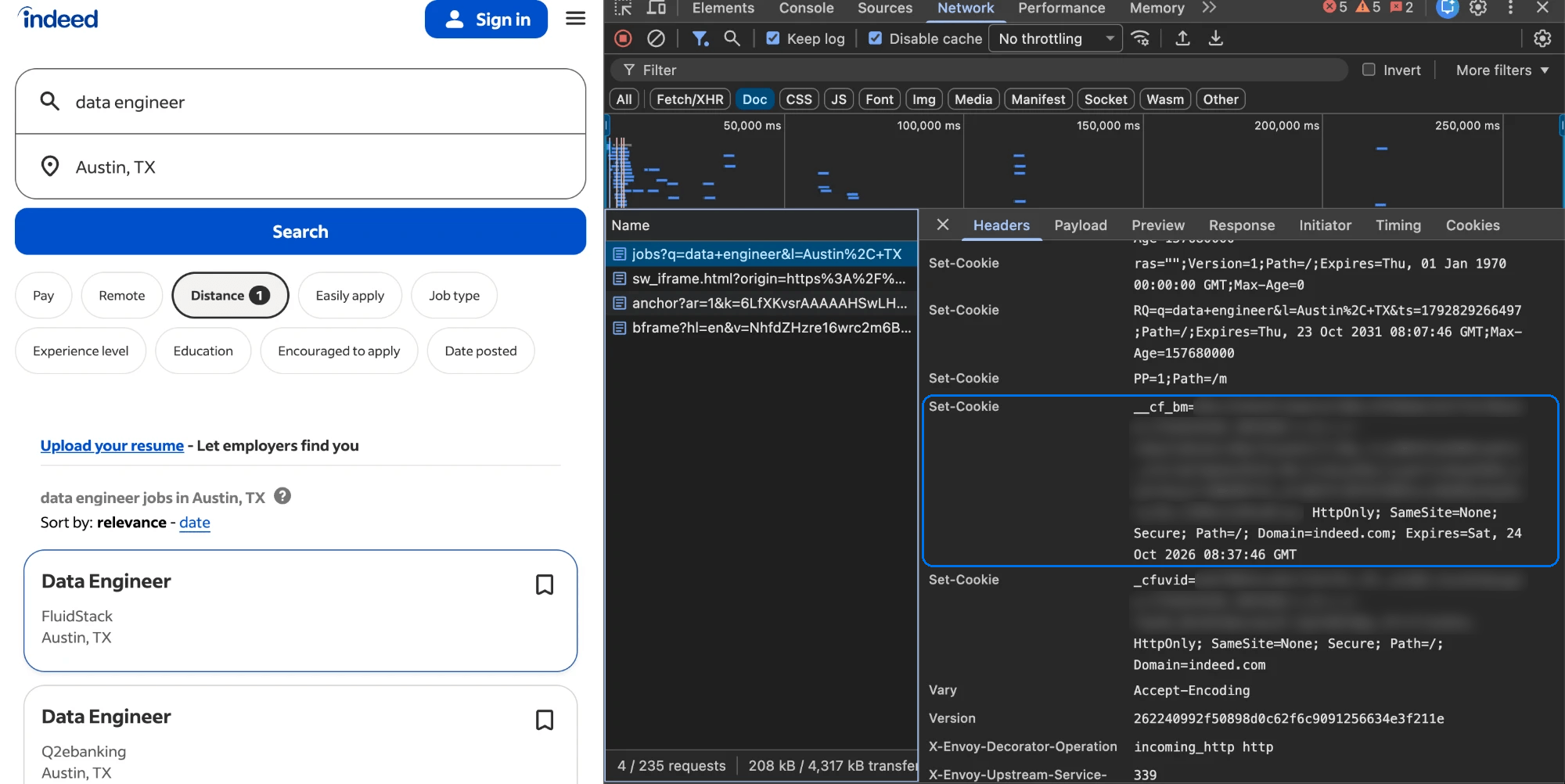
Indeed’s search page set Cloudflare’s __cf_bm cookie on its first response.
Bright Data offers datacenter proxies as shared or dedicated IPs. A shared pool costs less and suits most public pages. Dedicated IPs carry only your traffic during the rental, which helps on sites that track each IP’s reputation. The Create proxy page lists these choices under IP Type:
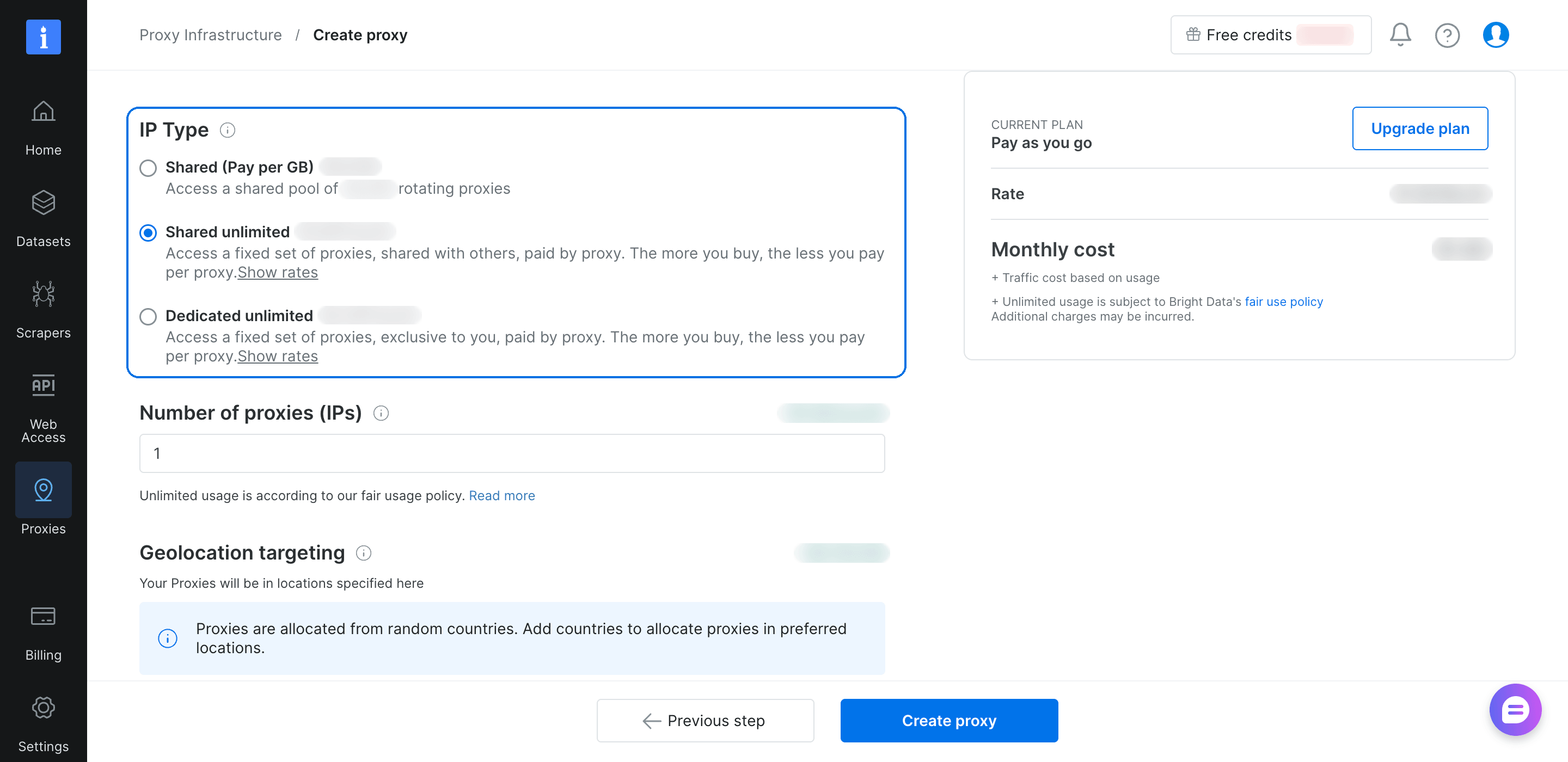
Shared IPs bill per GB or per IP, and dedicated IPs bill per IP. Current rates are on the proxy pricing page.
If a site responds with 403 errors or challenge pages, fix the client first with browser headers and a browser’s TLS fingerprint. If blocks continue, test ISP or residential IPs, because many sites accept home addresses more often than data center ranges.
On Bright Data, each proxy type runs as its own zone (a proxy configuration in your account), and all zones share one host and port. Switching types changes the zone name and password in your proxy URL, not your code.
ISP proxies (static residential proxies)
ISP proxies use IP ranges that are registered to internet service providers and telecoms but hosted on data center servers. They combine an ISP’s ASN with server speed. On a dedicated plan, the address also stays the same for the whole rental.
A /24 subnet is a range of 256 neighboring addresses, and some anti-bot teams block whole subnets. When you buy a dedicated IP pool, count the distinct /24 subnets as well as the IPs.
ISP proxies work best when each address behaves like one steady client:
- Assign one ISP IP to one long-running job or session.
- Watch each site’s block rate to find how many requests per IP it accepts, and stay below that number.
- Prefer dedicated IPs for cart and shipping price checks, and use only dedicated IPs for partner systems that allowlist your IP.
Bright Data’s ISP proxies offer shared and dedicated static IPs. Use them for sites that expect consumer ISP addresses. Compared with residential proxies, ISP proxies are usually faster and dedicated ISP IPs stay fixed, while residential IPs rotate across many home connections and locations. Our ISP vs residential proxies comparison covers that choice in more detail.
Residential proxies
Residential proxies route your requests through devices on home broadband and mobile connections. On Bright Data’s network, the owners of those devices have opted in.
Geotargeting matters when prices, ads, or search results differ by country or city. The results below come from an independent IP database and Bright Data’s geolocation data:
- Rotation. The US pool returned 39 different IPs on 39 requests, all on consumer broadband or mobile-carrier networks.
- City targeting. All 19 exit IPs in a Chicago sample were in the city or its nearby suburbs.
- ASN targeting. All 20 exit IPs targeted to Comcast’s ASN came from Comcast, spread across several states.
- Carrier targeting. All 20 exit IPs targeted to T-Mobile’s ASN were different T-Mobile IPs, and the database classified every one as mobile.
The Chicago exit IPs came from fixed broadband, mobile-carrier networks, and one Starlink satellite link. When a job needs only fixed broadband addresses, ASN targeting limits the pool to the networks you choose.
Many retail sites read a store or ZIP code cookie as well as the IP. For price monitoring and ad verification, use city targeting and set that cookie to the same location. Then confirm the location the site itself shows, such as the store, currency, or delivery area. If you automate a browser, set its timezone and language to match the exit IP’s location.
For multi-step flows, a sticky session keeps every request on one device’s IP. The residential FAQ explains session duration and how to keep a session active with small periodic requests.
Bright Data’s residential proxies bill per GB and support country, state, city, ZIP code, and ASN targeting.
Mobile proxies
Mobile proxies route traffic through devices on 4G and 5G mobile networks. Many carriers use carrier-grade NAT (CGNAT), which shares one public IPv4 address among many subscribers. Blocking a shared IP affects all of its subscribers, so sites often allow more traffic from a mobile IP before they block it.
Use mobile IPs when the results depend on the carrier, such as mobile-only ads and prices, mobile app APIs, and carrier-specific content. To get mobile IPs from a specific carrier, target the carrier’s ASN on Bright Data’s residential network. In testing, every IP targeted to T-Mobile’s ASN was a T-Mobile IP that an independent IP database classified as mobile. ASN targeting also works with the residential network’s rotation, sticky sessions, and per-GB billing.
Rotating, sticky, and static sessions
The session type sets how long you keep one exit IP. Session type and proxy type are separate choices. The right session type keeps a multi-step job working. There are 3 session types:
- Rotating. A new IP for each new connection. Use it for stateless page fetches, where each request is independent.
- Sticky. The same IP for a session ID you choose, until you change the ID or the session expires. Use it for search, pagination, cart and checkout flows, and all the requests that one page load makes.
- Static. The same IP for as long as you rent it. Use it for long-running jobs that must keep one IP, and for partner systems that allowlist your IP.
Rotation happens per connection, not per request. An HTTP client that reuses connections, such as a requests.Session in Python, keeps the tunnel open and sends every request through the same exit IP. In testing, 3 new connections on a rotating ISP proxy each got a different IP, but one requests.Session sent all its requests from one IP. If you need a new IP for each request, open a new connection for each one.
On Bright Data, the proxy username sets the session ID and targeting, so one zone can run many sessions and target many countries at once. Add the session ID to the username in your zone’s Access details:
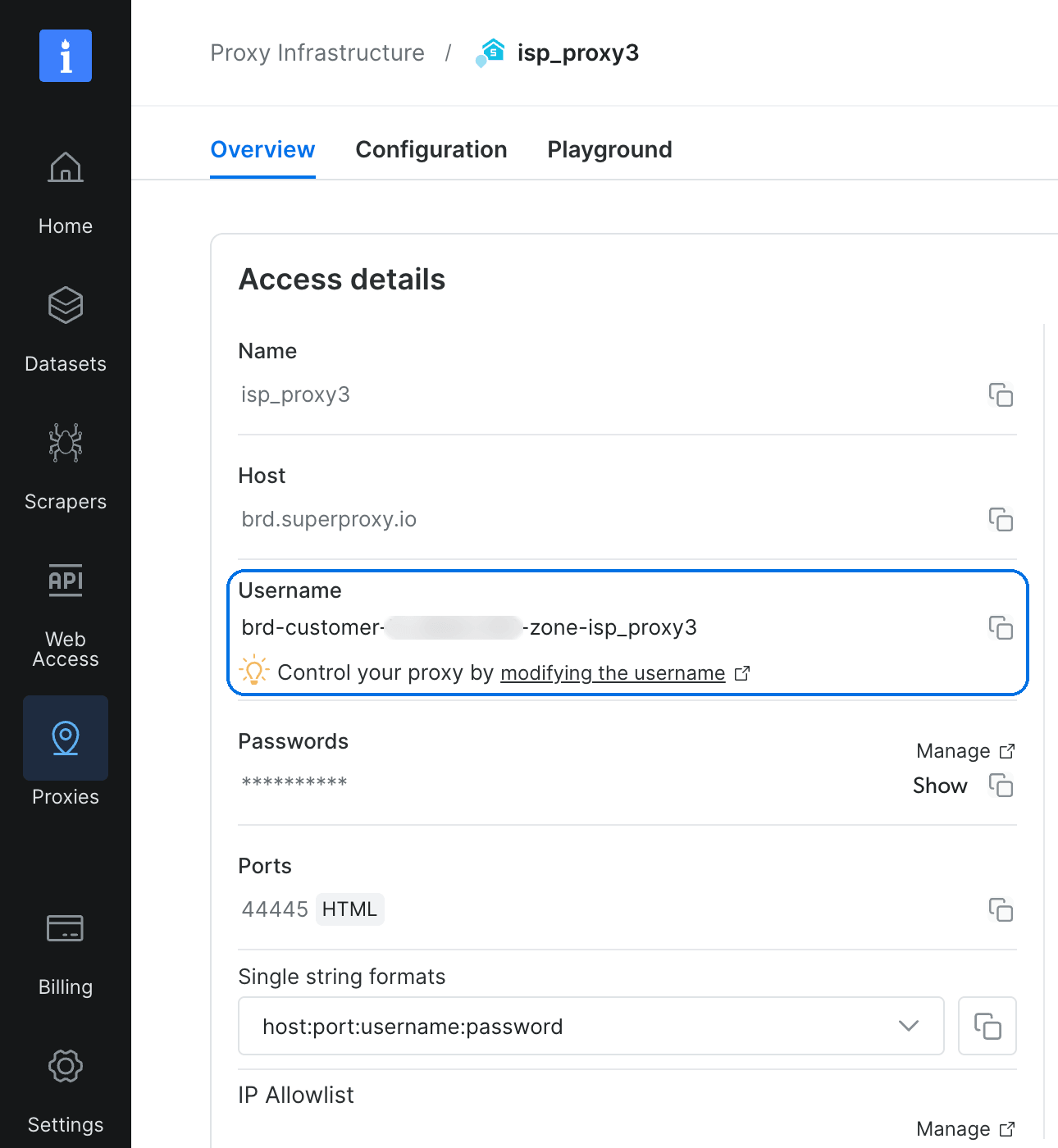
Every connection that uses session-job1 gets the same exit IP while the session lasts:
curl --proxy brd.superproxy.io:44445 \
  --proxy-user "brd-customer-<CUSTOMER_ID>-zone-<ZONE>-country-us-session-job1:<PASSWORD>" \
  "https://geo.brdtest.com/welcome.txt"
Use a different session ID for each parallel job, so the jobs don’t share an exit IP.
HTTP, SOCKS5, and IPv6 proxy options
The proxy protocol sets how your client connects to the proxy, and it doesn’t change the proxy type. HTTP proxies tunnel HTTPS traffic with the CONNECT method. SOCKS5 proxies relay any TCP connection, which helps tools that don’t use HTTP. The SOCKS vs HTTP proxies guide compares the two in more depth.
Bright Data zones accept SOCKS5 with the same credentials as HTTP, and the SOCKS5 setup page has the connection details.
IPv6 gives you more addresses to use on sites that accept it. Many sites block IPv6 by prefix, the shared first part of an address. Each home network usually gets its own /64 block. A site that blocks by /64 treats every address inside one /64 as one client.
Bright Data offers IPv6 on its residential network, where exit IPs come from separate home and mobile connections with their own prefixes. By default, the network switches to IPv4 when a site has no IPv6 address.
How to choose a proxy type for your workload
Production teams choose a proxy type per site, and often per page type, because a site can protect its search and product pages differently.
Pick a starting type for each workload
Find your workload in the first column:
| Workload | Start with | Session type | When to change |
|---|---|---|---|
| Public pages without bot management | Datacenter | Rotating | If you get 403s or challenge pages, fix the client, then test ISP or residential |
| Product catalogs behind bot management | Datacenter first, then residential | Sticky, reusing site cookies | If blocks continue after you fix the client, use Web Unlocker API |
| Prices or ads by city | Residential with city targeting | Sticky | If the site shows a different location, set its store or ZIP code cookie to match |
| Search results, such as Google by city | SERP API | Handled by the API | Not needed, since the API returns parsed results |
| Multi-step flows, such as filters and checkout | Dedicated ISP | Sticky or static | If you need many locations, test residential with a session ID |
| AI agents that interact with pages | Browser API | One session per task | If the agent only reads pages, use Bright Data’s Model Context Protocol (MCP) server |
Most rows start with the cheapest type that can work, and search engines are the exception. In testing, a basic HTTP client got no results from Google’s search pages.
Test one layer at a time
Before you pay for a more expensive proxy type, find which layer blocks the page. Start with browser-like headers, because a default User-Agent such as python-requests can cause a block by itself. Each step below then changes one layer on the same URL:
- Proxy error or site block. Use a tool such as
curl -vto read the proxy’s response to theCONNECTrequest, which opens the tunnel. Bright Data’s proxy explains its own responses in the standard Proxy-Status header (RFC 9209). A block from the target site arrives after a successfulCONNECT, inside the tunnel. - TLS client. Keep the proxy type and switch to a client that impersonates a browser’s TLS and HTTP/2 fingerprint, such as curl_cffi in Python. This change adds no proxy cost. The
impersonateargument sets the browser to copy:
from curl_cffi import requests

PROXY_URL = "http://USER:PASS@HOST:PORT"
r = requests.get("https://example.com", impersonate="chrome",
                 proxies={"http": PROXY_URL, "https": PROXY_URL})
With this setting, curl_cffi sent a Chrome-style TLS fingerprint over HTTP/2, and plain requests sent a Python-style one.
- Proxy type. Send the same request through datacenter, then ISP, then residential IPs. If one type returns the data, use that type for the site.
- JavaScript and behavior. A client that impersonates a browser can still get a challenge page or a page without data, a sign of JavaScript checks or behavioral analysis. When the page loads its data from a JSON API, the DevTools Fetch/XHR filter shows that request. Calling the API directly often costs less than running a browser. Otherwise, use a real browser, such as Browser API, or a managed API such as Web Unlocker API.
Judge each step by the content, not the status code. Blocks can appear as 403 or 429 errors, 307 redirects, empty responses, pages titled “Security Check”, or connections that hang until they time out. Check each response for a field you expect, such as a price or a job title. A 200 response without that field can mean a soft block or data that loads later with JavaScript.
Two sites show how much the right setup can differ. Nike’s catalog page loaded through datacenter IPs with a standard HTTP client, even at 20 parallel requests. Indeed kept showing its “Security Check” page after both the TLS client and the proxy type changed. It needed a real browser or a managed API.
Run these checks at the concurrency you plan to use, because a site can block more as request volume grows. Re-test cheaper options regularly, because sites change their bot management over time.
Compare cost per successful request
Each usable result carries the cost of the failed attempts before it. Divide total spend by the requests that returned the data you need.
A challenge page costs bandwidth and returns no data. A retry loop on a cheap IP can cost more than one residential request that succeeds. Web Unlocker API bills only successful requests, so your cost follows the data you get.
Our guide to web scraping without getting blocked covers more ways to avoid blocks, such as headers, request timing, and rendering.
How to check your proxy’s exit IP and TLS fingerprint
Before you scale a job, run one test request through your proxy and read the response. This script prints the exit IP, its city, the network and ASN that own it, and the TLS fingerprint that reached the server:
"""Print what a site sees from a proxy: exit IP, network owner, and TLS fingerprint."""
import os
import sys

import requests

PROXY_URL = os.environ["PROXY_URL"]  # http://USER:PASS@HOST:PORT
ROUNDS = int(sys.argv[1]) if len(sys.argv) > 1 else 3
proxies = {"http": PROXY_URL, "https": PROXY_URL}

for _ in range(ROUNDS):
    # One request through the proxy returns the exit IP and the TLS fingerprint
    seen = requests.get("https://tls.peet.ws/api/all", proxies=proxies,
                        timeout=60).json()
    # Remove the port, and the brackets around an IPv6 address
    ip = seen["ip"].rsplit(":", 1)[0].strip("[]")
    # Look up who owns that IP, without the proxy
    owner = requests.get(f"https://ipinfo.io/{ip}/json", timeout=30).json()
    print(f"{ip:<16} {owner.get('city', '?'):<14} "
          f"{owner.get('org', '?')[:32]:<32} {seen['tls']['ja4']}")
Save it as proxy_check.py. Run it once with an empty PROXY_URL to record your own fingerprint, which depends on your Python and OpenSSL versions. Then run it through your proxy:
pip install requests
PROXY_URL= python proxy_check.py 1
export PROXY_URL="http://brd-customer-<CUSTOMER_ID>-zone-<ZONE>-country-us:<PASSWORD>@brd.superproxy.io:44445"
python proxy_check.py 3
export PROXY_URL="http://brd-customer-<CUSTOMER_ID>-zone-<ZONE>-country-us-session-job1:<PASSWORD>@brd.superproxy.io:44445"
python proxy_check.py 3
On a rotating ISP zone, each round got a different IP. With -session-job1 added to the username, all 3 rounds used the same IP. The output below replaces the real IPs and network names with reserved example values:
203.0.113.24     Denver         AS64500 Example ISP A            t13d1812h1_85036bcba153_b26ce05bbdd6
198.51.100.7     New York City  AS64501 Example ISP B            t13d1812h1_85036bcba153_b26ce05bbdd6
198.51.100.19    New York City  AS64501 Example ISP B            t13d1812h1_85036bcba153_b26ce05bbdd6

192.0.2.55       Mesa           AS64502 Example ISP C            t13d1812h1_85036bcba153_b26ce05bbdd6
192.0.2.55       Mesa           AS64502 Example ISP C            t13d1812h1_85036bcba153_b26ce05bbdd6
192.0.2.55       Mesa           AS64502 Example ISP C            t13d1812h1_85036bcba153_b26ce05bbdd6
The last column, the TLS fingerprint in JA4 format, matters most. The script produced that same value with no proxy at all, because a tunneled proxy doesn’t change it. A real Chrome browser on Browser API sent t13d1517h2_8daaf6152771_cb7bf5808d99, which a site can match to a browser. If a site checks fingerprints, use a client that impersonates a browser, or send the request to Web Unlocker API.
How to keep your proxy bill predictable
The proxy type also sets how you pay. Per-IP plans suit steady crawls that move a lot of data through few addresses, and they make ISP and datacenter costs more predictable. Per-GB plans suit jobs with changing volume, and residential costs then follow the data you transfer.
Compression has a large effect on a per-GB bill, and your zone’s bandwidth statistics show that effect. On a per-GB datacenter zone, Nike’s catalog page used 1.2 MB per request without compression and 183 KB with gzip, about 85% less. Check that your client requests gzip, then estimate the plan size as the number of pages times the compressed page size, plus retries. At 183 KB, 100K pages total about 18 GB before retries.
Connection reuse also reduces the data that small requests use. Every new HTTPS connection starts with a TLS handshake, which can be larger than a small response. Send small API calls over a keep-alive connection or a sticky session when you don’t need a new IP for each call. In a browser, block images, fonts, and media you don’t need, because they’re usually larger than the HTML.
Move very large pages to a product billed per request, such as Web Unlocker API. For per-IP and per-GB plans, the proxy pricing page lists the current rates.
When to hand IP selection to a managed API
A managed API handles the proxy layer for you. Bright Data’s Web Unlocker API manages the IPs, headers, cookies, CAPTCHAs, and retries for each request, and you pay only for successful requests.
In both test runs, Web Unlocker API returned Indeed’s job results page. The same search in the API playground produced this response:
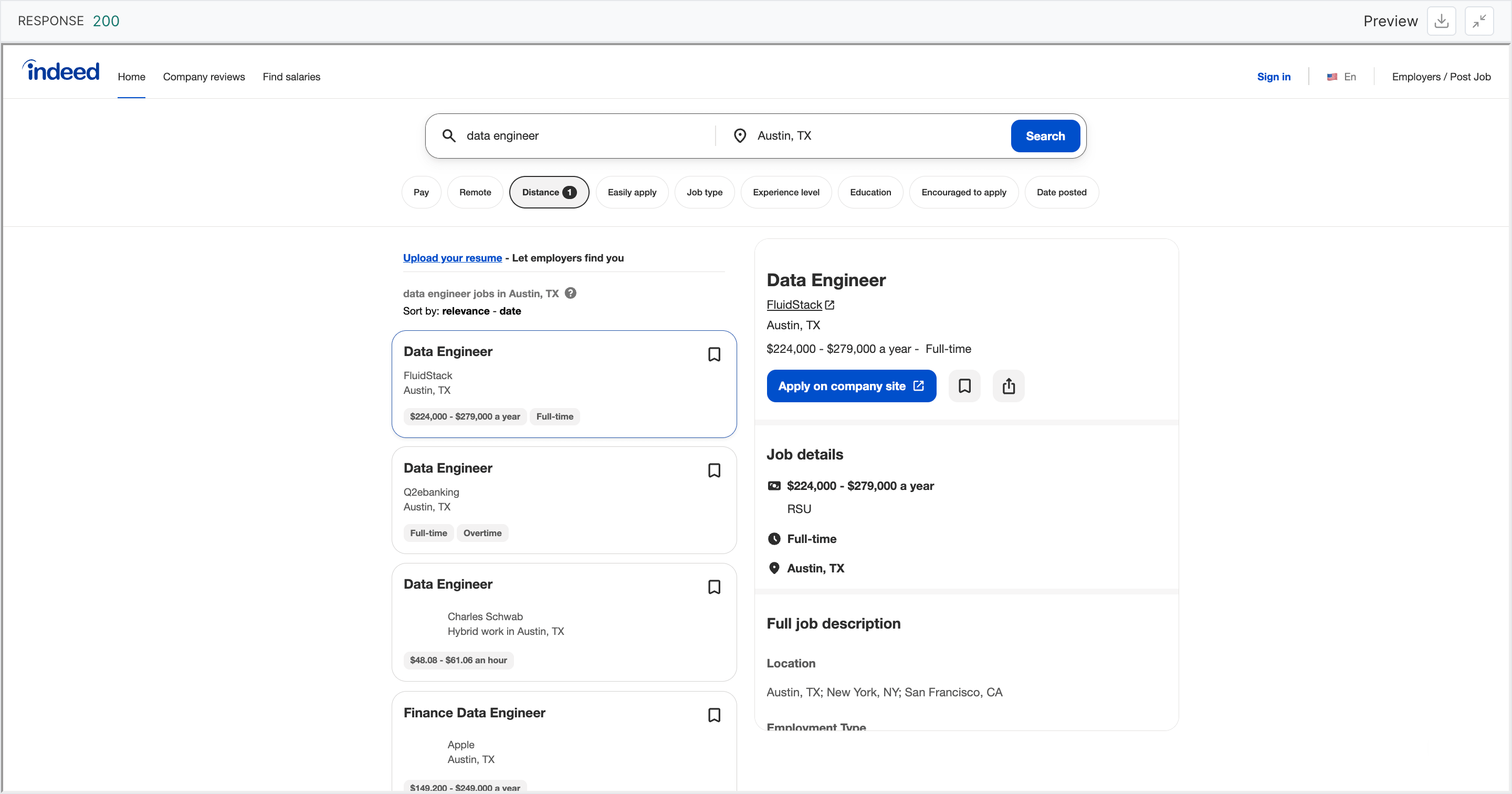
Bright Data’s other managed products also handle the IP and the fingerprint:
- Browser API. A real Chrome browser that you control through Playwright, Puppeteer, or Selenium, with the proxy and fingerprint handled for each session.
- MCP server. Web search and page scraping for AI agents. In testing, its page requests carried a Chrome TLS fingerprint, like a real browser.
- Web Scraper API. Pre-built scrapers that return structured data from popular sites, such as Amazon and Google Maps.
Your request volume also affects the choice. For small or occasional jobs, an API billed per request often costs less than the engineering time it takes to configure proxies for each site. At high volume, proxies matched to each site usually give the lowest cost per successful request, and one Bright Data account covers both options. Use the managed products when a site changes its bot management more often than you want to update your client.
How to check a residential proxy provider’s sourcing
Two takedowns in 2026 gave proxy buyers a reason to ask about sourcing. Google’s threat intelligence group disrupted 2 large residential proxy networks and worked with the FBI and Lumen on the second. Google reported that threat actors used the first network, and that many proxy brands resold the second under their own names.
If your proxies come from a network like that, your requests can share exit IPs with fraud and attack traffic. The network can also stop working without notice during a takedown. Ask a residential provider 4 questions, and expect a public document for each answer:
- Does the provider run its own peer network, and how do device owners opt in and opt out? Bright Data operates its own peer network of opted-in devices. Its sourcing standards require a clear consent screen in partner apps, a benefit for opting in, and an opt-out at any time.
- Does the provider verify its own customers? Bright Data’s residential network access policy requires a KYC (know-your-customer) review before residential access.
- Which uses does the network support, and which types of abuse does it block? Bright Data’s acceptable use policy defines the supported uses and prohibits abuse, such as creating fake accounts or collecting data that requires a login.
- Which independent security audits can you read? Bright Data’s security documentation lists its current certifications and audit reports, such as ISO/IEC 27001 and SOC 2.
Send the same 4 questions to every provider you compare.
Final thoughts
The proxy type you choose sets the network a site sees. When a block comes from your client’s fingerprint, fix the client or send the request to Web Unlocker API. Use the cheapest type each site accepts, enable compression, judge the choice by cost per successful request, and re-test as sites change. Before you buy residential IPs, ask how the provider gets consent and verifies customers, questions that Bright Data’s public documents answer. Run proxy_check.py against your current proxy, then test Bright Data’s proxy types on your hardest target site.
FAQ
What are the proxy types?
By IP source, the main proxy types are datacenter, ISP, residential, and mobile. Datacenter IPs belong to hosting companies, and ISP IPs are ISP-registered but hosted in data centers. Residential and mobile IPs come from home broadband and mobile networks. Proxies are also grouped by protocol and session type.
What type of proxy should I use?
Use the cheapest type a site accepts, and judge it by cost per successful request. Datacenter proxies suit sites without bot management, and ISP proxies suit long sessions. Residential proxies suit sites with bot management and city-level data. For carrier-specific content, target a carrier’s ASN on residential IPs.
Which is better, an ISP or a residential proxy?
Each type fits different jobs. ISP proxies use ISP-registered IPs on data center servers, so they’re fast, and a dedicated ISP IP stays fixed. Residential proxies route traffic through real home and mobile devices, and the IP rotates by default. Pick ISP for long sessions and residential for rotation across locations.
Can residential proxies be detected?
Residential IPs usually pass an ASN check, because the lookup shows a consumer network. Detection mostly comes from other signals, such as the TLS fingerprint, headers, and behavior. Use residential IPs with a client that impersonates a browser, or use Bright Data’s Web Unlocker API.
Are residential proxies illegal?
No, the proxy alone is not illegal. The legal questions are whether device owners consented, what data you collect, and how you collect it. Choose a provider that verifies device consent and its own customers, and check the privacy laws and site terms that apply to your data.


Technical Writer
 5 years experience
Satyam Tripathi helps SaaS and data startups turn complex tech into actionable content, boosting developer adoption and user understanding.