Amazon Bedrock Knowledge Bases is a managed service for Retrieval Augmented Generation (RAG). Point it at a data source, and it chunks, embeds, and indexes your documents, then answers queries with citations. Its connectors include Amazon S3, SharePoint, and a native Web Crawler for public pages.
That crawler covers the cooperative web. Many product catalogs, marketplaces, and news sites render with JavaScript, sit behind bot protection, or serve different content by country. The crawler returns a shell, a block, or the wrong country’s content. This guide feeds those pages into a knowledge base through Bright Data and S3.
TL;DR
- Web Unlocker returns a public page as Markdown in one request, unless the page needs interaction. Write each page to S3 as
.mdplus a.metadata.jsonsidecar. - Hash the content before writing, so a refresh re-embeds the pages you rewrote instead of the whole corpus.
- Measure retrieval against a golden set before scaling, because your chunking is set on the data source and the non-filterable metadata keys are set on an S3 Vectors index. You cannot change either afterward.
- Route per query. Fall back to a live lookup when the top score is below a relevance floor.
Why the native Web Crawler leaves a gap
The Web Crawler data source is a first-party connector, and for your own static pages it’s a good fit. Today its constraints leave public web data at scale to Bright Data.
- It supports static websites. The documentation says so directly, and the crawler doesn’t retrieve pages that render client-side. Many catalogs, dashboards, and listing pages render this way, so the crawler sees an empty shell where the data should be.
- It’s built for the cooperative web. The crawler respects
robots.txtper RFC 9309, and treats the site as disallowed when it finds none. It identifies itself asbedrockbot, and it stops at bot protection by design. - It caps at 25,000 pages per sync, and it supports one vector store. If you exceed that limit, the sync fails and ingests nothing. That store is currently Amazon OpenSearch Serverless, so S3 Vectors isn’t an option with the crawler.
- It returns pages, not clean records. The crawler ingests HTML. Navigation, cookie banners, and boilerplate arrive with the content, and there is no structured extraction step. Your chunks carry the noise into the embeddings.
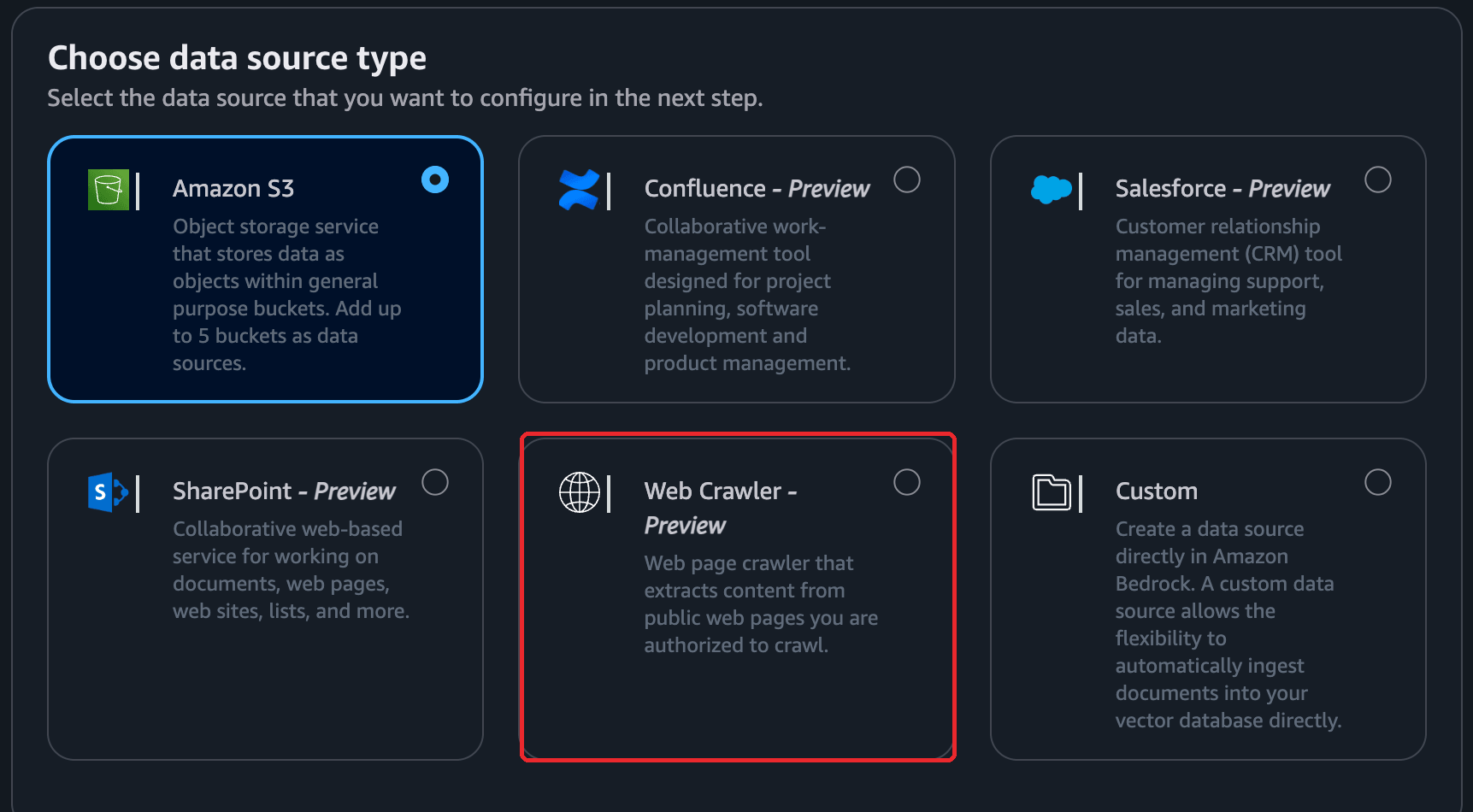
The console labels the Web Crawler as Preview on the screen where you choose it:
None of this makes the crawler the wrong choice for the static, cooperative pages it was built for. In Bright Data’s Data for AI 2026 report, 90% of AI organizations said access restrictions are limiting their initiatives. Cloudflare reclassified AI crawlers in July 2026. It said it would block mixed-use crawlers by default from September 15, 2026, on ad-supported pages for new customers, new sites, and unchanged free accounts. Keeping access working takes continuous effort, and Bright Data does it for you.
The architecture
The pipeline turns a list of public URLs into a searchable, cited knowledge base, and keeps it current. Bright Data owns the access and the Markdown conversion. S3 is the handoff. Bedrock owns the indexing and retrieval.
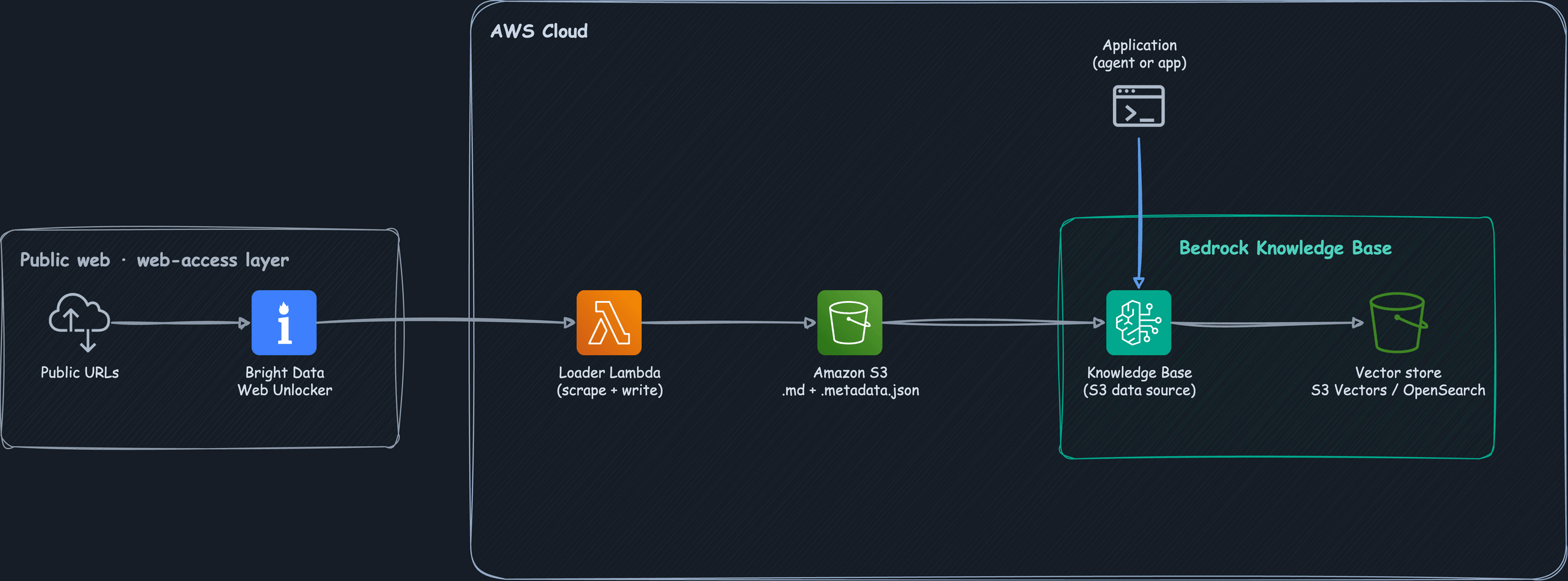
The diagram shows the core path:
- The loader calls Bright Data’s Web Unlocker for bot protection, geo-routing, and JavaScript rendering, and gets back the page as Markdown.
- The loader then writes each page to Amazon S3 as a
<slug>.mddocument plus a<slug>.md.metadata.jsonsidecar. - The knowledge base syncs the S3 data source with
StartIngestionJob, and later runs are incremental. - Bedrock chunks each document, embeds it with Titan Text Embeddings V2, and writes the vectors to a store such as Amazon S3 Vectors or OpenSearch Serverless.
- An application calls
Retrievefor raw chunks orRetrieveAndGeneratefor a grounded, cited answer.
Three pieces of the production wrapper sit outside that core path, and the diagram doesn’t show them. An Amazon EventBridge schedule fires the loader as often as you choose, AWS Secrets Manager holds the Bright Data token, and the knowledge base assumes a least-privilege IAM role. The diagram draws the loader as a Lambda, which is where it runs once you schedule it. Below, you run the loader from your own machine, so you can watch each stage first.
Writing to S3 is a choice rather than a default, because you can also send documents directly through a custom data source and the IngestKnowledgeBaseDocuments API. The bucket is the better option for a scraped corpus. The objects stay replayable, the sidecars let you inspect the metadata contract, and a failed run leaves the previous corpus untouched. Bright Data’s Crawl API also delivers into the same bucket natively.
Prerequisites
- An AWS account with access to Amazon Bedrock in a supported Region, and Amazon Titan Text Embeddings V2 (
amazon.titan-embed-text-v2:0) enabled there. Plus a generation model in the same Region, if you want written answers from Step 5 rather than raw chunks. - An IAM principal that can create S3 buckets, Bedrock knowledge bases and data sources, a vector store, and the IAM service role the knowledge base assumes. The companion repository lists the exact policy statements.
- A Bright Data account with an API token and a Web Unlocker zone. Every request references the zone by name. A free tier covers the first 5,000 credits each month, which is enough to work through every step below. Check the current allowance and rate on Web Unlocker pricing, then set a spend limit on the zone.
- Python 3.10 or later with
boto3andrequests. - Working knowledge of Amazon S3 and IAM.
The embedding model sets your vector dimension, and your vector store’s index has to match it. If you create the store by hand and the two disagree, ingestion fails at write time. Titan Text Embeddings V2 supports 256, 512, or 1024 dimensions.
Check your embedding quota before you build anything, because it can be zero and nothing in the create flow warns you. A new account can have an on-demand quota of 0 requests per minute for the embedding model. That quota lets you create the knowledge base and the data source normally, then fails every ingestion job. Confirm it in one call, and request an increase in Service Quotas if it reads zero:
aws service-quotas list-service-quotas --service-code bedrock --region YOUR_REGION \
  --query "Quotas[?contains(QuotaName,'Titan Text Embeddings V2')].[QuotaName,Value]" --output text
Run it against the Region you actually intend to use, because AWS sets the quota per Region, and the difference can be all or nothing. In one account, on the same day, Titan Text Embeddings V2 had an applied on-demand quota of 0 requests per minute and 0 tokens per minute in US East (N. Virginia):
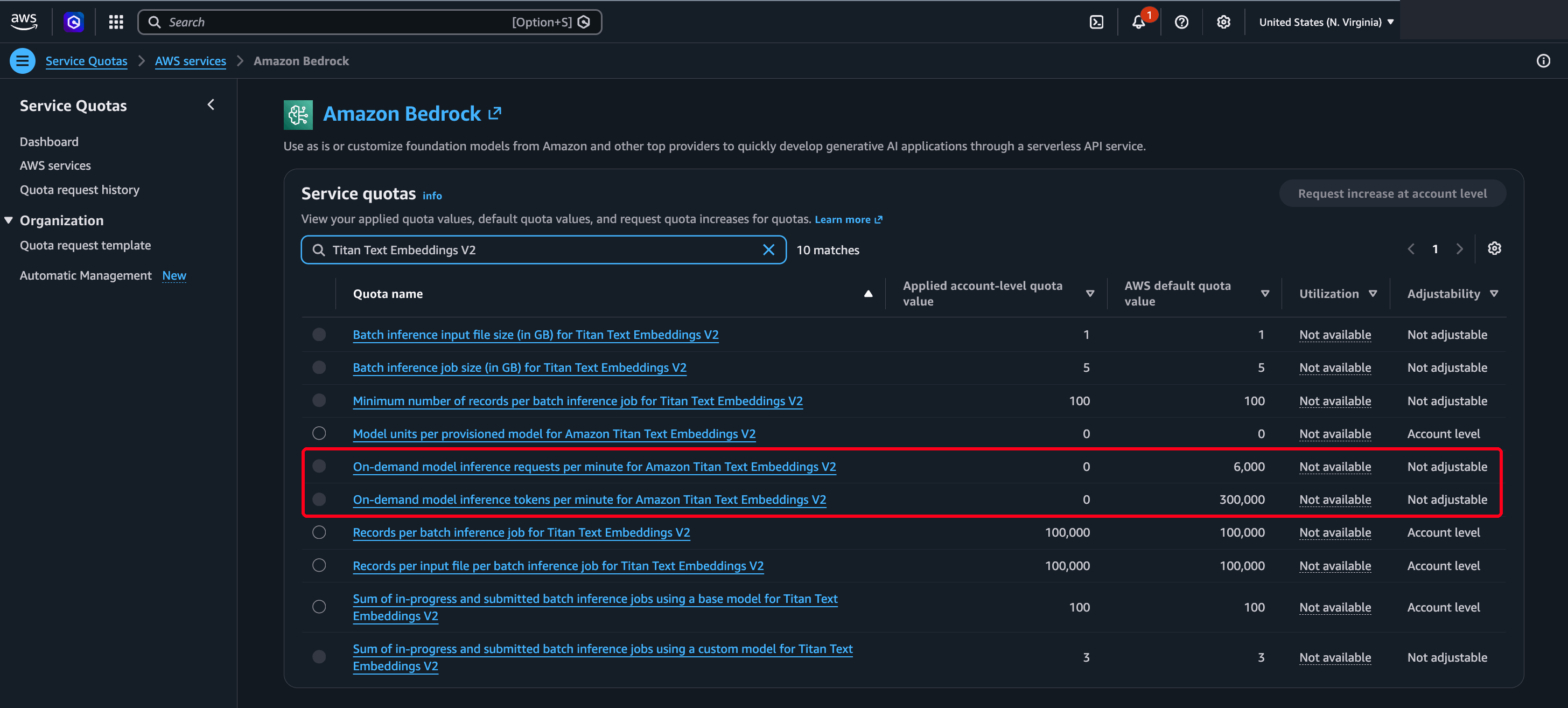
In US East (Ohio) the same model had 60 requests per minute and 300,000 tokens per minute:
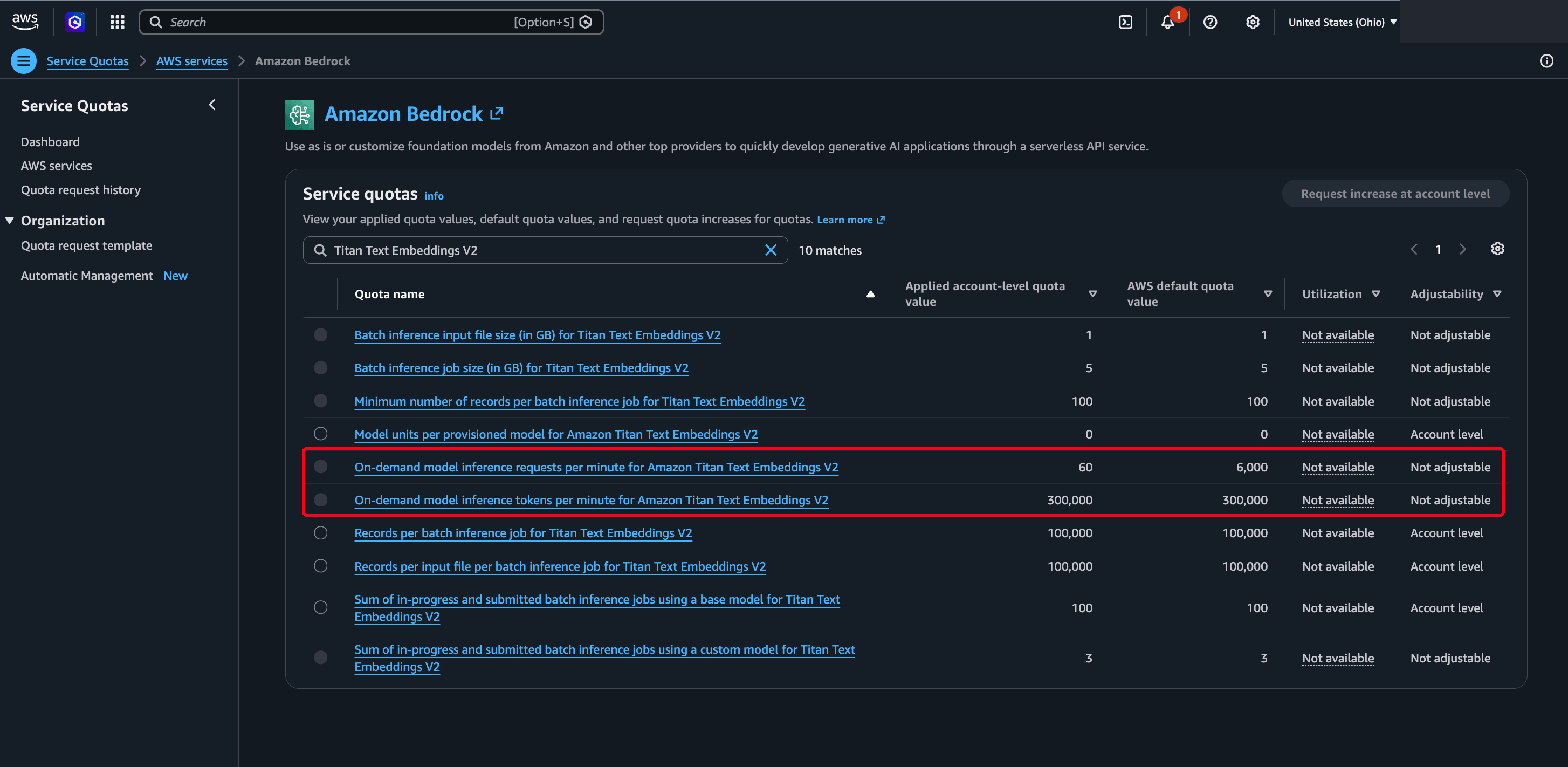
Compare the applied value with the AWS default in the Service Quotas console. A quota of 60 against a default of 6,000 means the Region that works is still running at a hundredth of the standard request rate. The token quota next to it sits at the full default, so requests per minute is the limit that matters. At roughly 300 tokens a chunk, 60 requests a minute is about 18,000 tokens a minute against a 300,000 ceiling. That’s enough for a small corpus. It’s a bottleneck for a large one.
Two error messages in this pipeline name the wrong cause.
AccessDeniedExceptiononCreateKnowledgeBase, naming your user and the action. This usually means a malformedroleArnrather than a permissions problem, so check the ARN string before you audit IAM.not able to call specified bedrock embedding modelduring ingestion. This looks like a permissions error, and a zero embedding quota produces it as well. Invoke the embedding model directly as yourself, and if that throttles too, you have a quota problem.
Both are setup problems rather than pipeline problems, and neither returns once the account is right.
Step 1 – Scrape the pages with Bright Data
Bright Data’s Web Unlocker takes a single URL and returns the page. Bot checks and proxy routing happen on its side, and it renders JavaScript when you enable that option. Set data_format to markdown, and instead of raw HTML you get the page as Markdown, which is the form you want for RAG.
You create the Web Unlocker zone once in the Bright Data control panel, and every request references it by name. The zone also carries the geolocation setting. For a site that serves different content by country, Web Unlocker fetches from the country you configure there, not from wherever your loader happens to run. The code below needs two things from the zone’s Overview tab: the zone name (web_unlocker here) and the API token.
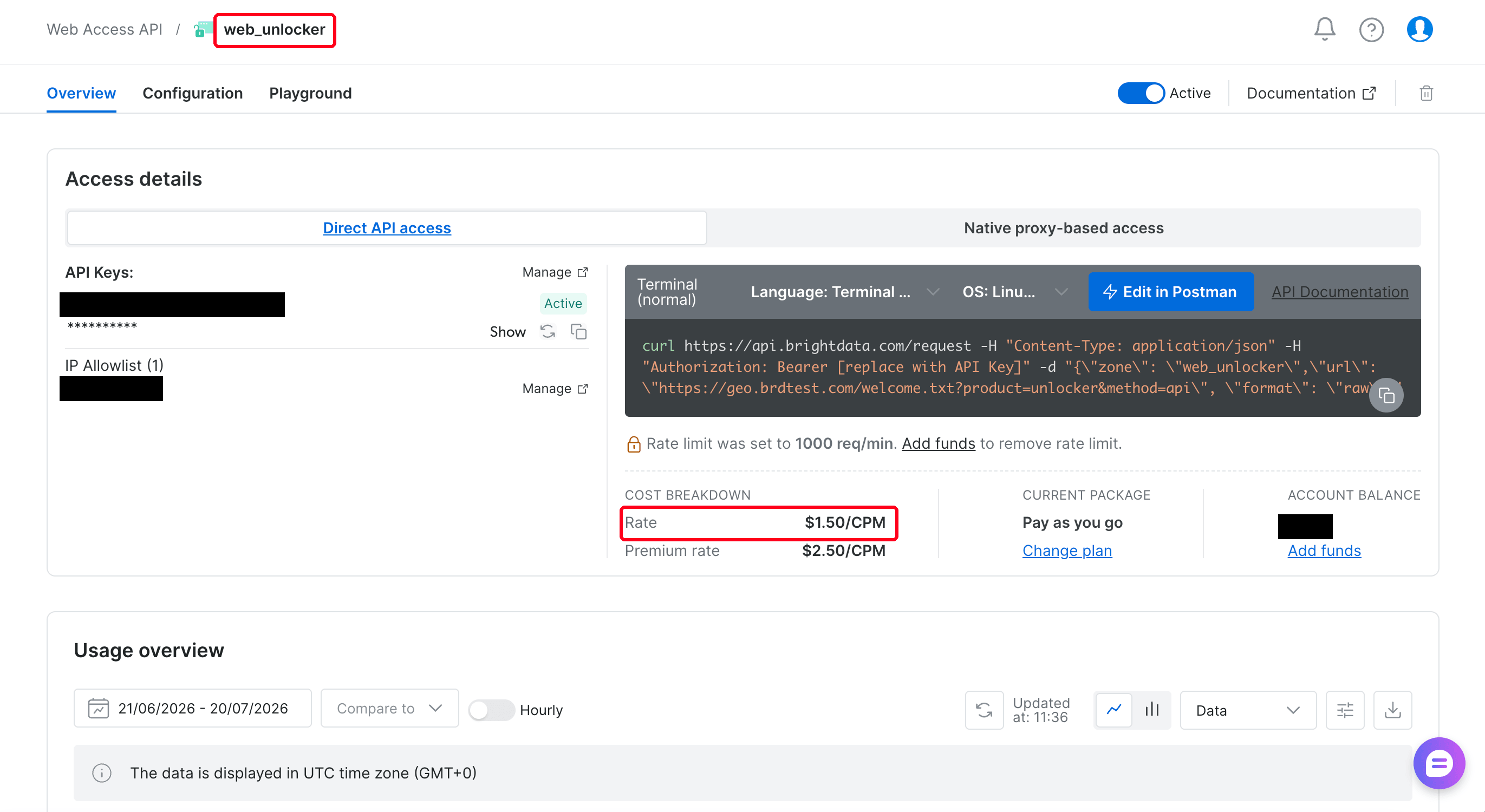
In Python that call is one POST carrying the zone, the target URL, and the output format you want:
import requests

BRIGHTDATA_TOKEN = "..."   # from your Bright Data account
UNLOCKER_ZONE = "web_unlocker"

def scrape_markdown(url: str) -> str:
    """Fetch a public URL as Markdown via Bright Data Web Unlocker."""
    resp = requests.post(
        "https://api.brightdata.com/request",
        headers={"Authorization": f"Bearer {BRIGHTDATA_TOKEN}"},
        json={
            "zone": UNLOCKER_ZONE,
            "url": url,
            "format": "raw",            # return the response body directly
            "data_format": "markdown",  # convert the page to Markdown
            # add "render": "true" when content exists only after client-side JS
        },
        timeout=120,
    )
    resp.raise_for_status()
    return resp.text
There is no browser session to manage, no CAPTCHA step, and no HTML parsing.
One failure here doesn’t look like a failure. Three things return an empty 200 rather than an error: a wrong zone name, a revoked token, or an IP allowlist that no longer matches your current address. So raise_for_status accepts it, and your loader stores the page as a blank document. Check the length of the response, not just the status code. For a scheduled pipeline, skip the allowlist and let the token be the credential.
A headless browser would also render JavaScript for you, and that part stays the same. The rest isn’t a setting you configure once. It’s an ever-changing flow: finding an exit IP that works for this target, customizing headers, and rotating fingerprints when detection shifts. The pricing puts that risk on Bright Data, since it doesn’t bill failed requests.
Once you have the page, it still needs structuring, parsing, and cleaning, since HTML is messy. The markdown format moves that work to Bright Data’s side.
Turn on rendering only when the page needs it
Web Unlocker doesn’t start a browser on every request. It uses the fast path for a page it can fetch without executing JavaScript. For content that exists only after client-side rendering, set render to "true".
The practice page quotes.toscrape.com/js injects its content with JavaScript. A plain GET yielded 96 characters of indexable text and none of the quotes, the fast path returned a 191-character shell, and only the rendered request returned all 1,583 characters. On that page the rendered request finished in 7.7 seconds, against 17.1 seconds on the fast path. That’s a sample of one on each path, so treat rendering as a correctness switch rather than a latency penalty, and measure your own targets.
The repository’s 8_render_check.py runs this three-way check against any URL, so it’s the first thing to try when a scrape looks suspiciously thin. It needs a Bright Data token and nothing else. You can point it at your own URLs and see what each path returns before you create a single AWS resource. If the content is still absent with rendering on, the page likely needs interaction, which the Browser API covers and Web Unlocker doesn’t. The script exits non-zero on that page when you pass --probe:

The pages scraped below are server-rendered, so the default run leaves render off.
Scrape a list, not one page
Web Unlocker is one request per URL, so a small thread pool keeps throughput high without a heavy framework:
from concurrent.futures import ThreadPoolExecutor

def scrape_many(urls: list[str], workers: int = 8) -> dict[str, str]:
    """Scrape a batch of URLs. Return {url: markdown} for the ones that succeed."""
    out: dict[str, str] = {}
    with ThreadPoolExecutor(max_workers=workers) as pool:
        for url, md in zip(urls, pool.map(_safe_scrape, urls)):
            if md:
                out[url] = md
    return out

def _safe_scrape(url: str) -> str | None:
    try:
        return scrape_markdown(url)
    except requests.RequestException:
        return None   # a page that fails is skipped, not fatal
A failed page returns None and leaves the batch instead of stopping the run. The loader in the repository is stricter than this snippet. It retries twice with a 1-second then 2-second backoff. It also treats an empty or HTML body as a failure, not as content. That means a page that failed to fetch keeps its previous version in the corpus, and nothing in a later answer marks it stale. Treat fetch failures as a signal you act on rather than a line in a log.
Web Unlocker fetched 6 documentation pages. Each request took between 24.6 and 36.7 seconds, with a median of 30.6 seconds. Every numbered step here was run live against that one 6-page corpus in a single day. Those pages are cooperative, so the timings measure the pipeline itself rather than a target’s defenses. Unblocking a page isn’t a static fetch, which explains the time, and concurrency makes that workable. The same 6 pages took 43.1 seconds of wall time at 6 workers, against the roughly 3 minutes a serial run would take.
Keep the worker count low anyway, since the pool targets one site. Bright Data capped the zone above at 1,000 requests per minute until you add funds. At a 30-second median, that is far more headroom than a handful of workers will use. Check your zone’s ceiling, and confirm the latency on your own targets before scaling the list.
Prefer the site’s own Markdown twin
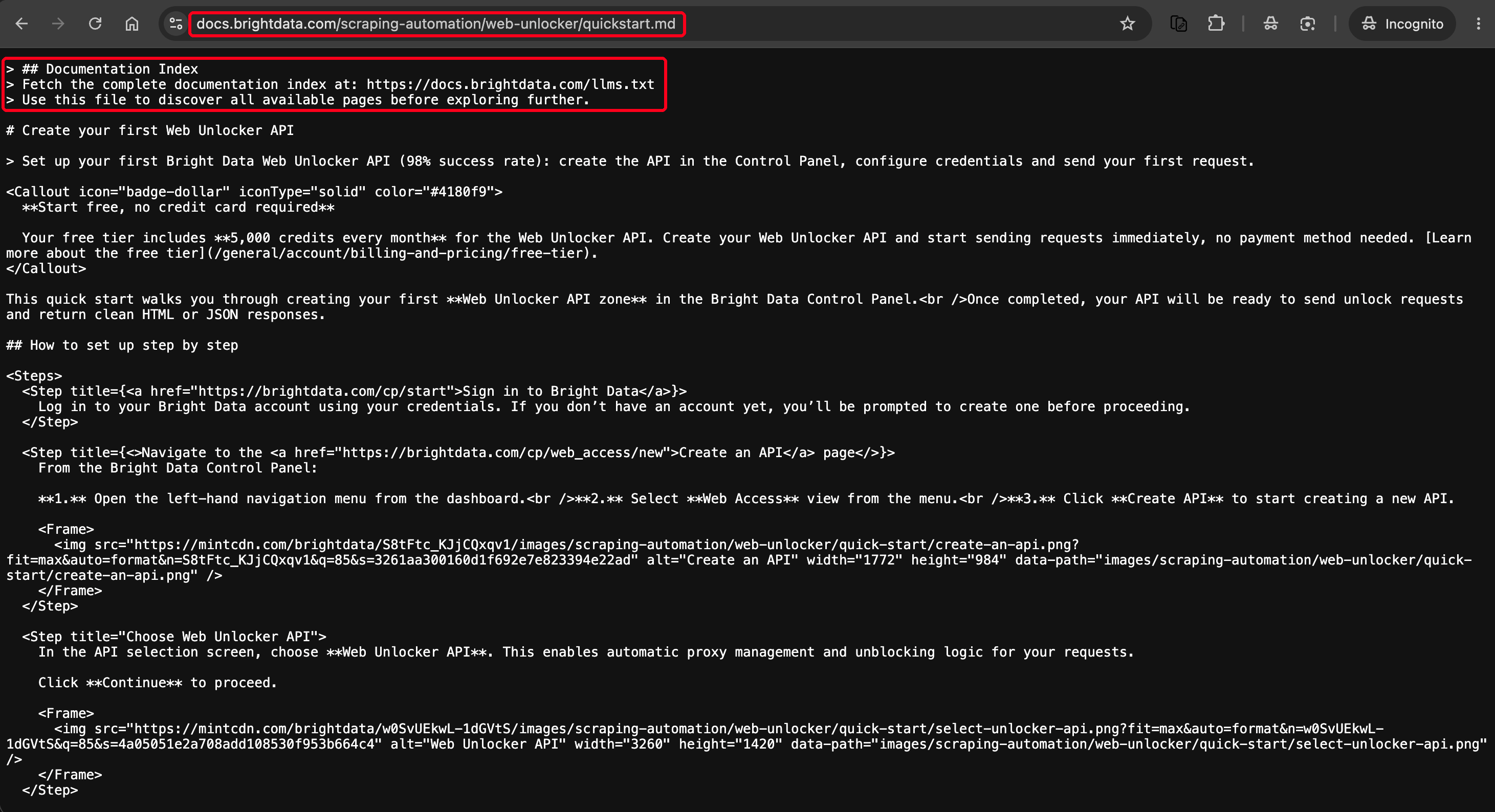
Before you scrape a site at all, check whether it already publishes what you’re about to reconstruct. Many documentation platforms serve an LLM-ready Markdown twin of every page, usually as <page-url>.md, and list the twins in a /llms.txt index. Bright Data’s own documentation publishes twins and indexes them at docs.brightdata.com/llms.txt, so all 6 pages above had a twin. Those twins are free, and a single GET returns them instead of a 30.6-second scrape. They carry none of the navigation the scrape picks up.
They aren’t plain prose. The twin below still carries the platform’s own component tags and full image URLs, so you trade site chrome for markup that line-based stripping won’t catch:
Outside developer-documentation platforms, a Markdown twin is rare, and Web Unlocker does the work there. That makes the fetch a two-step decision:
def fetch_page(url: str) -> str:
    """Prefer the site's own Markdown twin. Scrape only when there isn't one."""
    return native_markdown(url) or scrape_markdown(url)
native_markdown is the repository’s src/web_kb/clean.py helper, a GET of <page-url>.md that returns None when the page has no twin. It doesn’t remove the component markup, and the chrome stripping in Step 2 doesn’t either. A twin-heavy corpus needs a tag-aware pass of its own.
When you do have to scrape, Web Unlocker returns the page rather than deciding which parts of it are the main content. Across 6 pages of a live documentation site, the Markdown still carried site chrome: the logo strip, a “Skip to main content” link, the search box, the full sidebar navigation tree, and a “Was this page helpful” footer. That chrome was roughly 43% of the characters. Step 2 covers stripping what repeats.
Step 2 – Write clean documents and metadata to S3
Bedrock reads every supported file under the prefix you give it. Each one becomes a document of up to 50 MB, with an optional sidecar next to it for metadata. You write both.
Strip the chrome first
A navigation block is close to identical on every page of a site, so a 50-page corpus embeds that same block 50 times. You pay to embed it, you pay to store it, and at query time those 50 near-identical chunks compete with the content someone requested. The deduplication later in this step can’t catch it, because the pages aren’t duplicates. Only their chrome repeats.
You don’t need site-specific rules to remove it, because most chrome is text that repeats. Count how often each line appears across the batch and drop the ones that appear on most of the pages:
from collections import Counter

KEEP = {"", "-" * 3, "`" * 3}          # blanks, bare rules, and bare fences are never chrome

def strip_repeated(pages: dict[str, str], threshold: float = 0.6) -> dict[str, str]:
    """Drop lines that repeat on most pages of the batch. Those are the chrome."""
    counts = Counter()
    for markdown in pages.values():
        for line in {ln.strip() for ln in markdown.splitlines()}:
            if line not in KEEP and len(line) >= 2:   # >= 2 so the ⌘K hint counts
                counts[line] += 1

    cutoff = max(2, int(len(pages) * threshold))
    boilerplate = {line for line, n in counts.items() if n >= cutoff}
    return {url: "\n".join(ln for ln in md.splitlines() if ln.strip() not in boilerplate)
            for url, md in pages.items()}
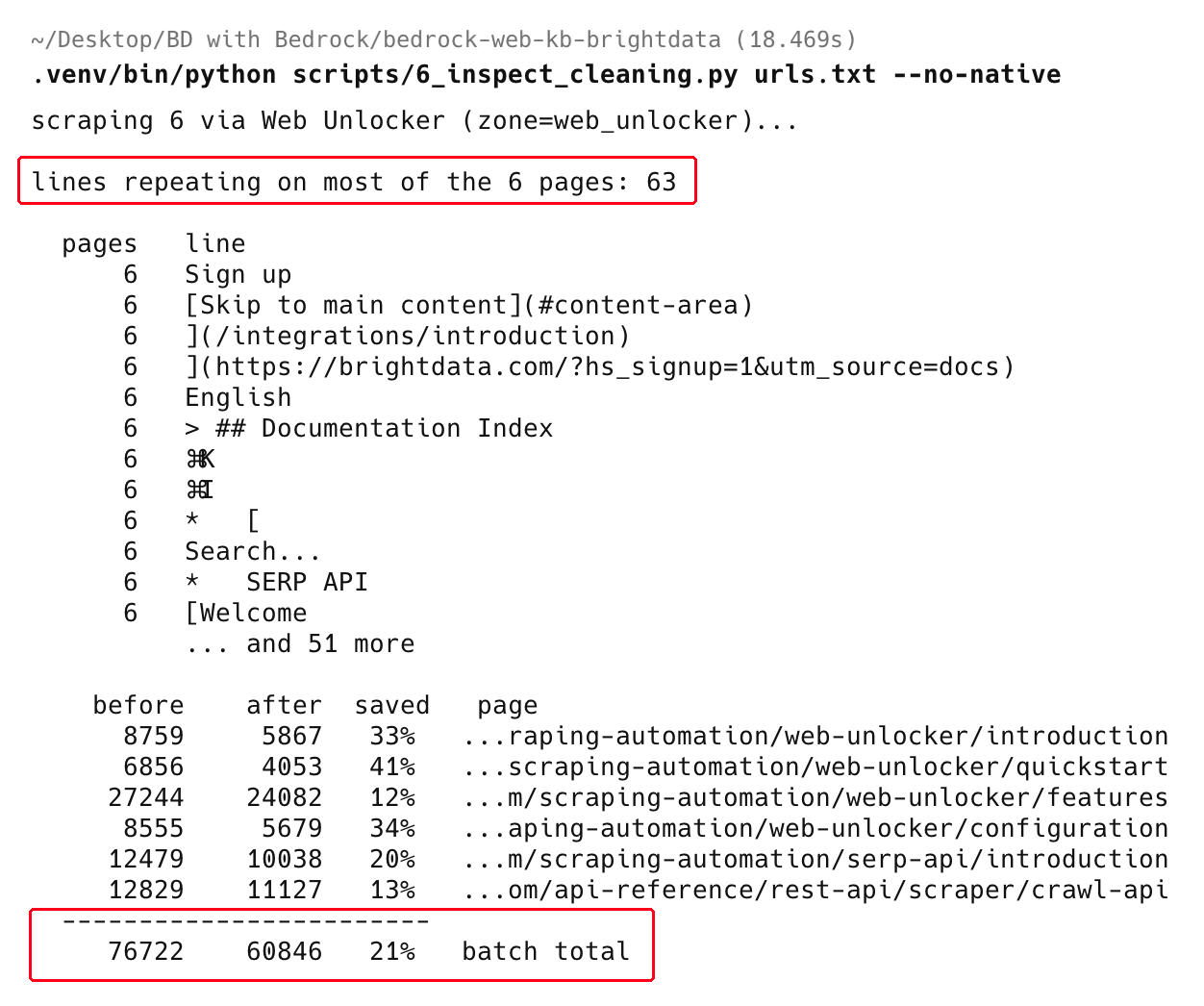
On the 6-page sample this took the batch from 76,722 to 60,846 characters, a 21% cut. That’s roughly half the chrome Step 1 measured. The rule only fires on lines that are identical across pages, but some sites word their navigation a little differently on each page. Lines that repeated across most of the batch went from 63 to 0. Each of those lines could have become a duplicate chunk. All 6 pages showed the search box, the ⌘K shortcut hint, the language switcher, and every sidebar navigation link.
The savings are uneven, because chrome is a fixed cost per page. In this run it removed 41% of the shortest page and 12% of the longest. A corpus of many short pages would otherwise pay the most to embed navigation.
The technique is a heuristic, not a parser, so audit it before you trust it on a new site. On a code-heavy corpus, add the language-tagged fences to KEEP as well, since KEEP protects only the bare ones, and dropping a shared opening fence orphans its closing fence.
The repository’s 6_inspect_cleaning.py lists every line it would drop, and --verify scores what survived against a page’s own Markdown twin. On this corpus the stripping lost no page-unique content. By that comparison, the only line missing from each page was the same llms.txt boilerplate. For raw HTML rather than Markdown, use a dedicated extractor such as Trafilatura.
All 6 of these pages publish a Markdown twin, so the default run uses them every time. The scrape and chrome figures above come from forcing the Web Unlocker path with --no-native.
Write the document and its sidecar
Bedrock pairs a document with its metadata by filename alone. For a document quickstart-3f9a2c1b04.md, the metadata file is quickstart-3f9a2c1b04.md.metadata.json. Inside, each attribute has a typed value and an includeForEmbedding flag. That flag controls whether Bedrock adds the value to the embedded text. The loader writes the sidecar, then the document, stamped with the content hash that lets the next run skip both:
import boto3, json, hashlib, re
from datetime import datetime, timezone

REGION = "us-east-2"                    # a Region with non-zero embedding quota
s3 = boto3.client("s3", region_name=REGION)
BUCKET = "web-kb-corpus-111122223333"   # your bucket
PREFIX = "docs"

def slugify(url: str) -> str:
    """Stable, safe object key derived from the URL."""
    digest = hashlib.sha1(url.encode()).hexdigest()[:10]
    tail = url.rstrip("/").split("/")[-1][:40] or "page"
    safe = "".join(c if c.isalnum() or c in "-_" else "-" for c in tail)
    return f"{safe}-{digest}"

def content_hash(markdown: str) -> str:
    """Hash the meaningful text. Normalizing whitespace stops different
    line breaks from looking like a content change."""
    return hashlib.sha256(re.sub(r"\s+", " ", markdown).strip().encode()).hexdigest()

def stored_hash(key: str) -> str | None:
    """The hash saved on the object last run, or None if the object is not there.

    Only a missing object counts as absent. Catching every ClientError would report
    AccessDenied or throttling as a new page, rewrite it, and re-embed the corpus."""
    try:
        return s3.head_object(Bucket=BUCKET, Key=key)["Metadata"].get("content-hash")
    except s3.exceptions.ClientError as exc:
        if exc.response["Error"]["Code"] in ("404", "NoSuchKey", "NotFound"):
            return None
        raise

def put_document(url: str, markdown: str, title: str, section: str,
                 raw: str | None = None) -> str:
    key = f"{PREFIX}/{slugify(url)}.md"
    chash = content_hash(raw or markdown)   # hash the RAW scrape, not the stripped body

    if stored_hash(key) == chash:
        return "unchanged"          # leave the object alone, so the next sync skips it

    metadata = {
        "metadataAttributes": {
            "source_url":  {"value": {"type": "STRING", "stringValue": url},
                            "includeForEmbedding": False},
            "title":       {"value": {"type": "STRING", "stringValue": title},
                            "includeForEmbedding": True},
            "section":     {"value": {"type": "STRING", "stringValue": section},
                            "includeForEmbedding": True},
            "scraped_date":{"value": {"type": "NUMBER",
                                      "numberValue": int(datetime.now(timezone.utc).strftime("%Y%m%d"))},
                            "includeForEmbedding": False},
        }
    }
    # Sidecar first. The document carries the hash the next run compares against, so it is
    # the commit point. The reverse order can leave a new document beside a stale sidecar
    # that never self-heals, because the hash already matches.
    s3.put_object(Bucket=BUCKET, Key=f"{key}.metadata.json",
                  Body=json.dumps(metadata).encode("utf-8"),
                  ContentType="application/json")
    s3.put_object(Bucket=BUCKET, Key=key, Body=markdown.encode("utf-8"),
                  ContentType="text/markdown", Metadata={"content-hash": chash})
    return "written"
Write only when the content hash changes
The hash gate at the top of put_document keeps a refresh cheap. On an incremental sync, Bedrock uses the data source’s own change tracking to decide what to re-embed. The AWS documentation doesn’t currently state which signal Bedrock reads for S3. A loader that rewrites every object on every run updates that signal whether or not the content changed. The safe assumption is that a sync meant to touch three pages re-embeds the entire corpus, and you pay for all of it. Comparing the content hash before writing means you leave an unchanged page alone, and it costs nothing downstream.
Cloudflare’s data suggests that over half of AI crawler traffic goes to re-fetching pages that didn’t change. This gate doesn’t solve that, because you fetch the page either way, and it saves only the embedding. The re-sync schedule in Step 4 controls the fetch itself.
Hash the raw scrape rather than the chrome-stripped body. That stripping earlier in this step is batch-relative, so an unchanged page in a different batch would otherwise hash differently and re-embed for nothing. The snippet takes a separate raw argument for exactly that reason, so pass the unstripped text when you call it.
The repository’s loader keeps the hashes it has seen in a run, so it also drops exact duplicates, where two URLs return byte-identical text. In practice that covers ?utm_source= and ?print=1 aliases. A syndicated copy or a paginated variant differs by a few bytes and escapes that check.
Catching those needs near-duplicate detection, and the repository ships it as MinHash behind an opt-in --near-dup flag on the loader. It defaults to a 0.85 similarity threshold. On this corpus distinct pages scored at most 0.02, and a page against its own Markdown twin scored 0.75, so the default keeps both. The pure-Python implementation suits corpora up to a few thousand pages. At the latency measured earlier, that is more than a single batch run will usually cover.
Choose what the metadata carries
The sidecar holds the two things a scraped corpus loses on the way into a vector store. source_url gives every retrieved chunk a citation back to the page it came from, so an answer can show its source. section and scraped_date become filter keys at query time. You can limit a search to one part of the corpus, or to content that changed after a cutoff date.
The sidecar also carries the page title. Setting includeForEmbedding to True on title and section adds them to the embedded text, so a query naming either has more to match against. Setting it to False on source_url keeps a long URL out of the vectors, where it would add more noise than signal.
Bedrock supports STRING, NUMBER, BOOLEAN, and STRING_LIST metadata types. Storing scraped_date as a NUMBER in YYYYMMDD form lets you filter with greaterThan and lessThan later. You don’t rewrite an unchanged page, so it keeps its earlier date. This makes scraped_date a content-age filter, not a signal that a page still refreshes. That signal needs a separate last-seen stamp, and the repository writes one on every successful fetch.
Run the loader on your URL list, and the bucket then holds one document and one sidecar per page. Confirm the pairs in the console before you point a knowledge base at the prefix:
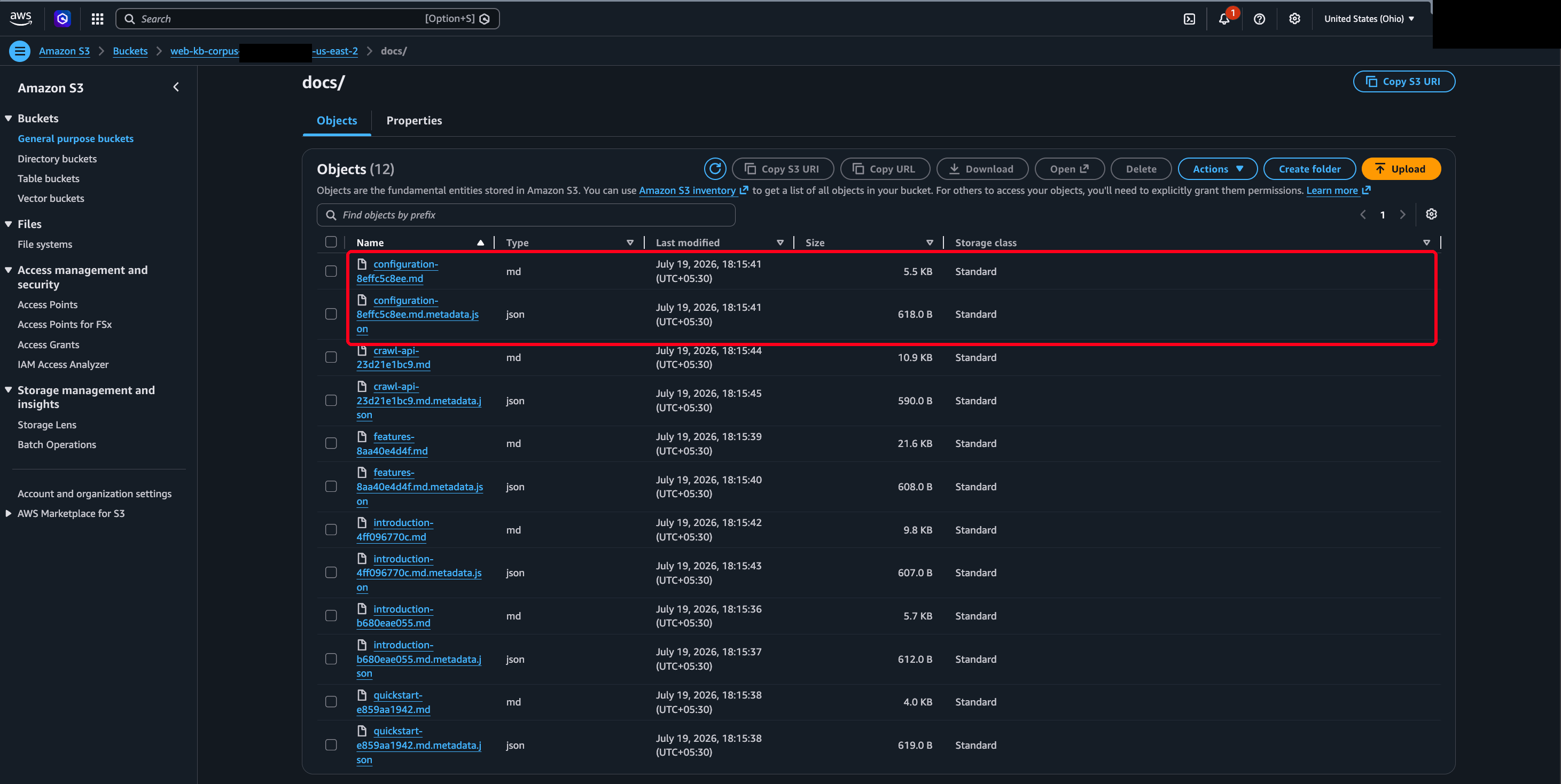
Step 3 – Create the knowledge base
You create the knowledge base once. After that the pipeline writes files and triggers syncs. The console is the clearest path for that setup, and the create-knowledge-base flow covers each screen.
Choose managed or customer-managed
AWS’s documentation recommends the fully managed knowledge base by default. Depending on your Region, the console offers it too. Managed knowledge bases run their own data store, parsing, and reranking. They also add agentic retrieval and include native connectors such as Google Drive.
This build takes the customer-managed path. Choosing your own vector store gives you the S3 Vectors pricing below, and it leaves the index in your account. A managed knowledge base can ingest the documents this pipeline writes to S3, through the same S3 data source. The crawler gap stays the same on either path.
Set the choices you cannot change later
Four choices shape retrieval. Three of the four lock once the knowledge base and its data source exist.
- Data source. Choose Amazon S3 and point it at your bucket and the
docs/prefix. Bedrock then reads the documents and their sidecars from there on every sync. A knowledge base takes up to 5 buckets as data sources. - Embedding model. Amazon Titan Text Embeddings V2 (
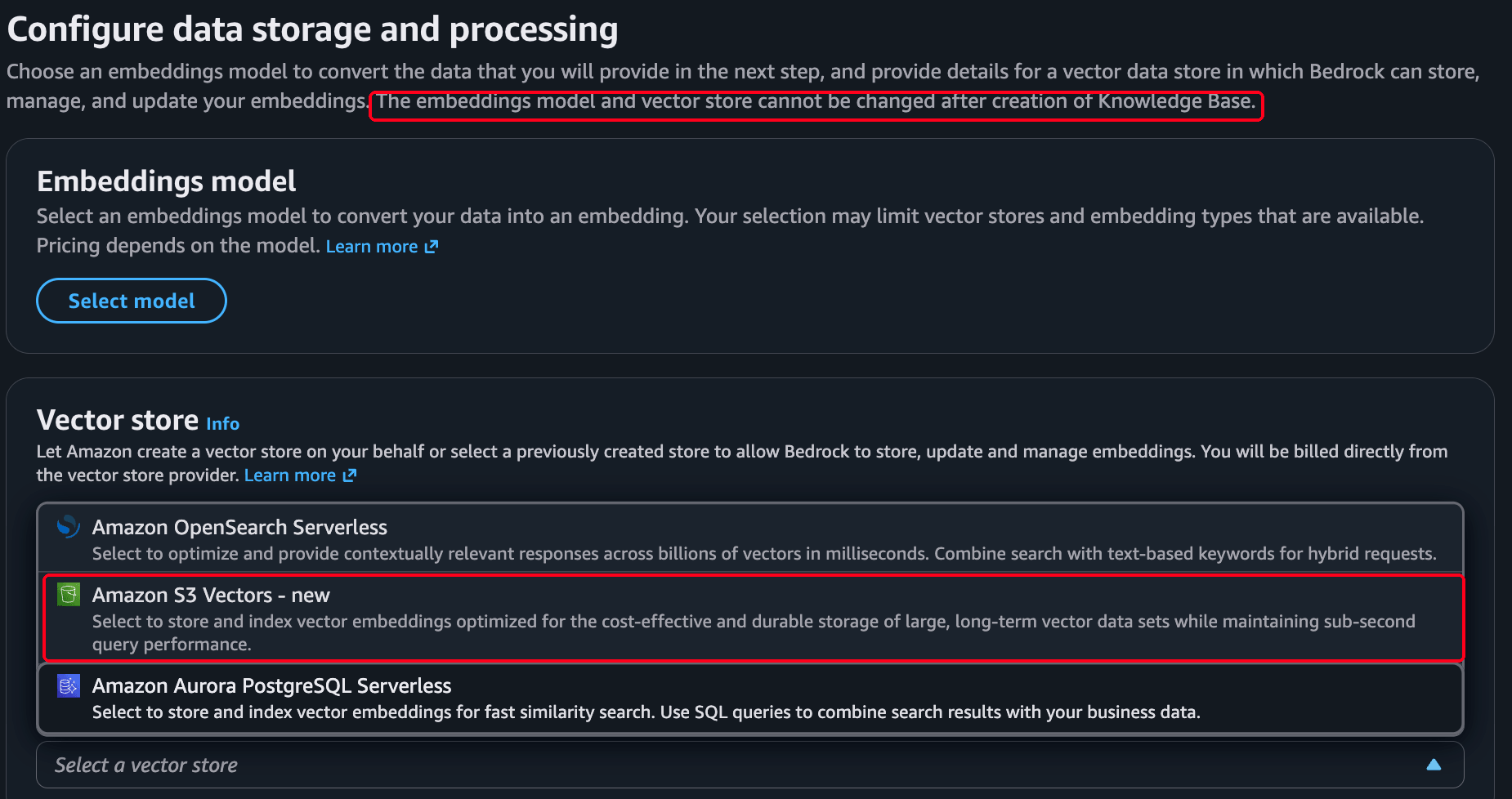
amazon.titan-embed-text-v2:0) is the default for text, and it’s the model behind every retrieval number below. At 1024 dimensions you get better retrieval quality, and at 256 you get lower storage cost. The supported embedding models include Amazon Nova Multimodal Embeddings, worth considering when a corpus mixes text with images. Choose once, because you cannot change the embedding model on an existing knowledge base. - Vector store. Amazon S3 Vectors reached general availability in December 2025. It stores and queries vectors on a pay-as-you-go basis with no cluster to run, and you cannot swap it after the knowledge base exists. Create its bucket and index before you open the wizard. Then point the wizard at that existing store, instead of letting Amazon create one for you. The next section explains why. AWS says S3 Vectors reduces the cost of uploading, storing, and querying vectors by up to 90% compared to unnamed alternative solutions. Amazon OpenSearch Serverless remains the option when you need its query features or higher throughput, though this build ran on S3 Vectors only. For a corpus you refresh on a schedule rather than serve at high query volume, that trade is usually worth it. The console also offers Amazon Aurora PostgreSQL Serverless. Confirm the current status and pricing against the S3 Vectors documentation when you build.
- Chunking. Scraped articles have sentence and paragraph structure, so default chunking of roughly 300 tokens on sentence boundaries is a reasonable starting point. If you scrape long reference pages, hierarchical chunking retrieves precise child chunks and returns their broader parents for context, though Bedrock recommends against it on an S3 Vectors store. Bedrock also offers other strategies. Fixed-size splitting uses a token count you set. Semantic chunking groups by meaning rather than length. A no-chunking option treats each document as a single chunk. You cannot change the chunking strategy after you create the data source.
The wizard warns you about this for the embedding model and the vector store, on the screen where you set them:
Name the non-filterable metadata keys
If you choose S3 Vectors, mark the chunk text and Bedrock’s own metadata non-filterable when you create the index. Otherwise Bedrock fails to ingest most of your corpus. S3 Vectors allows at most 2048 bytes of filterable metadata per vector, and Bedrock uses part of that for the chunk text and its own bookkeeping. Anything except a very short chunk exceeds the budget. After that overhead, the S3 Vectors knowledge base documentation puts the practical allowance for your attributes at 1 KB and 35 keys per vector. Keep sidecars small.
On the first run, 5 of 6 documents failed with Filterable metadata must have at most 2048 bytes, and the only one that survived had a 499-byte chunk. Naming both of Bedrock’s own keys when you create the index fixes it, and you cannot change that choice afterward:
aws s3vectors create-vector-bucket --vector-bucket-name YOUR_VECTOR_BUCKET --region YOUR_REGION

aws s3vectors create-index --vector-bucket-name YOUR_VECTOR_BUCKET --region YOUR_REGION \
  --index-name web-kb-index --data-type float32 --dimension 1024 --distance-metric cosine \
  --metadata-configuration '{"nonFilterableMetadataKeys":["AMAZON_BEDROCK_TEXT","AMAZON_BEDROCK_METADATA"]}'
The name people get wrong is AMAZON_BEDROCK_TEXT. AMAZON_BEDROCK_TEXT_CHUNK is the OpenSearch field name, and naming that one instead leaves the failure exactly as it was. The companion repository’s 2_create_kb.py creates the index this way for you. It also refuses to continue against an existing index that lacks those keys. The alternative is discovering the problem during a sync that reports success.
The wizard repeats the warning for the parsing and chunking strategies one screen later.
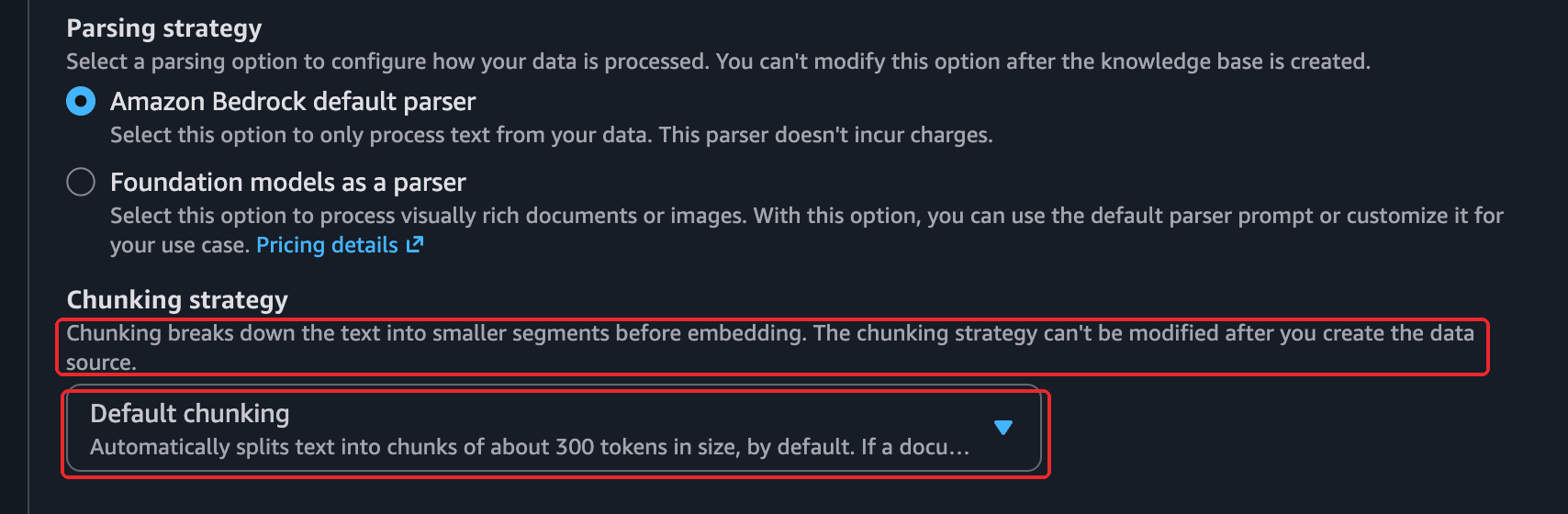
That same screen carries an optional transformation function. Contextual retrieval prepends a model-written note about each chunk’s place in the document before embedding. Anthropic measured a 35% drop in top-20 retrieval failures. Bedrock runs that function at ingestion, at the cost of a model call per chunk. This build leaves it off, so the retrieval numbers below come from default chunking alone.
If you prefer to create the knowledge base in code, that same 2_create_kb.py calls the bedrock-agent client’s create_knowledge_base and create_data_source. It sets the S3 configuration and the IAM service role for you. The repository also ships Terraform for the whole AWS side. It’s the shorter path if you would rather not click through any of this, and it sets the non-filterable metadata keys above, so you can’t forget them.
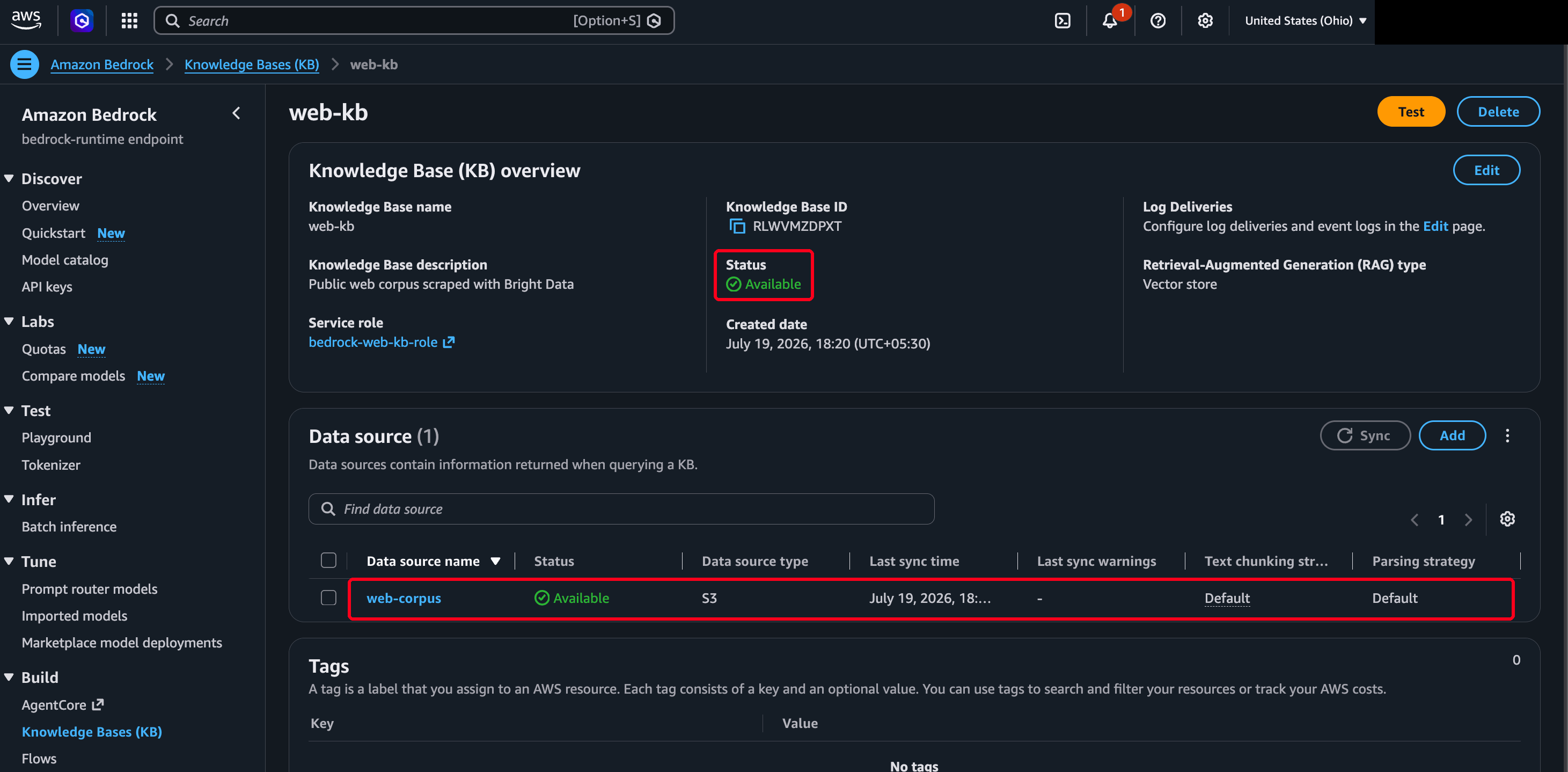
When the create flow finishes, the knowledge base detail page shows what you built:
Step 4 – Ingest and keep the data fresh
Creating the knowledge base doesn’t read your data. Ingestion does. A sync, called an ingestion job, reads the bucket, chunks and embeds the documents, and writes the vectors. You start one after the first load and again after every refresh:
bedrock_agent = boto3.client("bedrock-agent", region_name=REGION)

def sync(knowledge_base_id: str, data_source_id: str) -> str:
    job = bedrock_agent.start_ingestion_job(
        knowledgeBaseId=knowledge_base_id,
        dataSourceId=data_source_id,
    )
    return job["ingestionJob"]["ingestionJobId"]
After the first full sync, later syncs are incremental. Bedrock ingests new and modified files and removes vectors for any that left the bucket, so a refresh re-embeds only the pages your loader rewrote. That behavior makes the hash gate in Step 2 essential, since an object you rewrite with identical bytes may still count as modified. The slugify key is deterministic, so a re-scrape of the same URL overwrites the same object rather than creating a duplicate.
That handles new and changed pages, but nothing removes the ones you retire. The loader only ever writes, so dropping a URL from your list doesn’t delete its object. That stale content stays in the corpus, where it can appear in any later answer. Retiring a page is a separate reconcile step that lists the bucket, finds objects whose URL is gone, and deletes them so the next sync clears their vectors. The companion repository ships that as 7_reconcile.py, a dry-run-by-default script. It diffs against the full URL list, so it never mistakes a page that merely failed to scrape for one you removed.
Match the re-sync schedule to the fastest-changing content in your corpus. Social posts can be stale within hours, news within days, pricing and financial pages within weeks, while reference documentation can stay current for months. Those are starting points, not measurements. A knowledge base of news pages might re-sync daily, and one built from product documentation weekly. An Amazon EventBridge schedule can trigger the scrape-and-sync at whatever interval you pick, so the refresh runs without a human starting it.
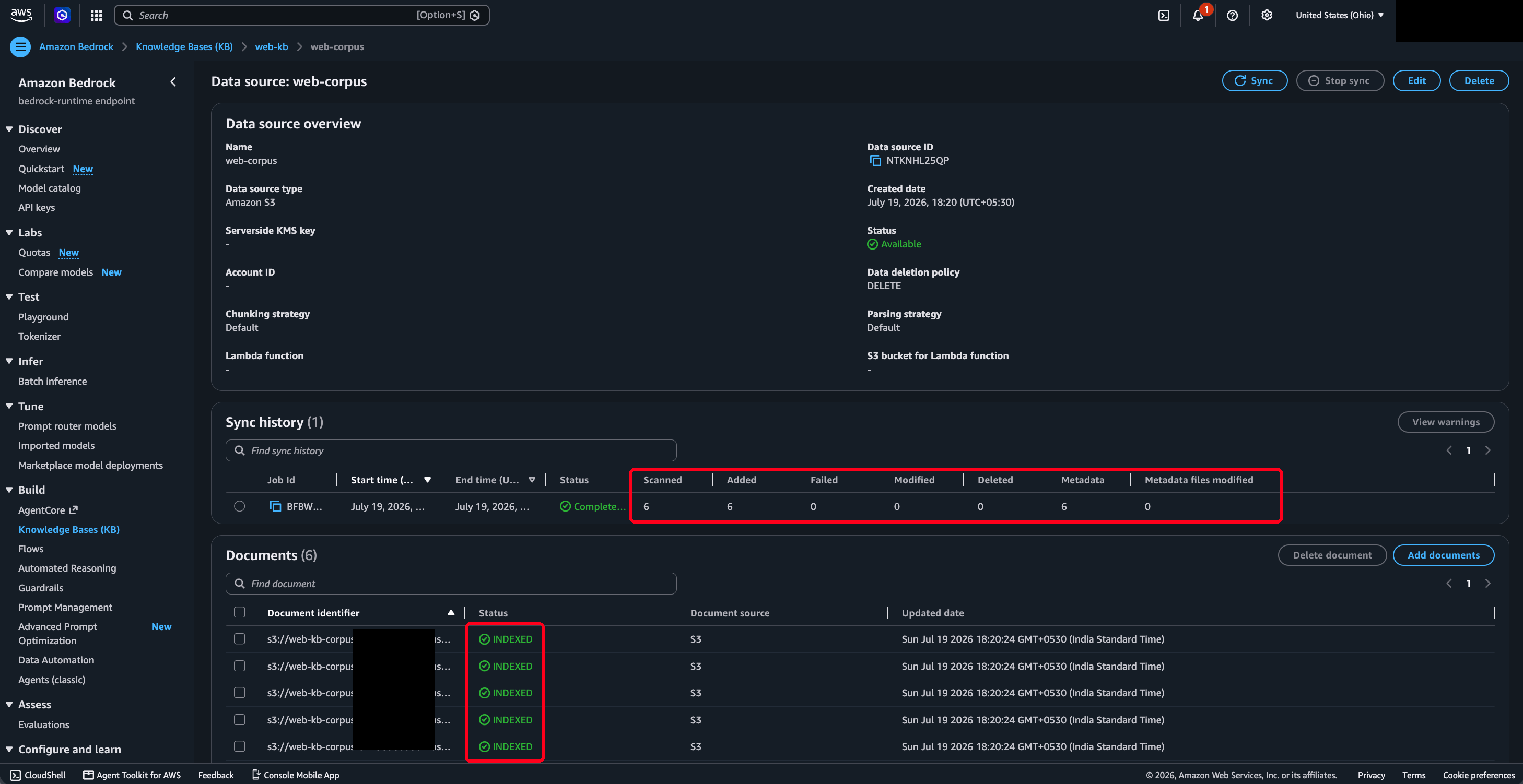
Read the statistics, not the status. An ingestion job reports COMPLETE even when most of its documents failed. A run that indexed 1 page out of 6 still looks like a success from the status field alone. The repository’s 3_sync.py prints those counts and exits non-zero on failures:
{"status": "COMPLETE",
 "statistics": {"numberOfDocumentsScanned": 6, "numberOfNewDocumentsIndexed": 6,
                "numberOfModifiedDocumentsIndexed": 0, "numberOfDocumentsDeleted": 0,
                "numberOfDocumentsFailed": 0}}
That’s a measured result from the 6-page corpus, and it took two attempts to get there. The first run reported COMPLETE with numberOfDocumentsFailed: 5, all of them hitting the S3 Vectors metadata limit described in Step 3. When documents fail, failureReasons on the job carries the actual error and is the first thing to read. A zero embedding quota appears here too, and looks like a permissions problem. Ingestion of 6 pages took roughly 25 seconds. Time and chunk counts scale with your corpus and how you chunk it, so measure them on your own data.
The data source page lists each job in its sync history with the per-document statistics:
Step 5 – Query the knowledge base
Bedrock offers a retrieval call and a generate call. The one you choose depends on whether you want the raw evidence or a written answer. Both are on the bedrock-agent-runtime client.
Retrieve returns the source chunks and nothing else. It’s the right choice when your own model or application does the writing and you only need grounded context and citations:
runtime = boto3.client("bedrock-agent-runtime", region_name=REGION)

def retrieve(kb_id: str, query: str, section: str | None = None,
             num_results: int = 5) -> list[dict]:
    config = {"vectorSearchConfiguration": {"numberOfResults": num_results}}
    if section:
        config["vectorSearchConfiguration"]["filter"] = {
            "equals": {"key": "section", "value": section}
        }
    resp = runtime.retrieve(
        knowledgeBaseId=kb_id,
        retrievalQuery={"text": query},
        retrievalConfiguration=config,
    )
    return resp["retrievalResults"]
Each result carries the chunk text, a relevance score, the location of the source object, and the metadata you wrote in Step 2. On this corpus a correct top result scored 0.67, a number you use to set the relevance floor later. That metadata makes the optional filter work, limiting the search to one section or to a date range:
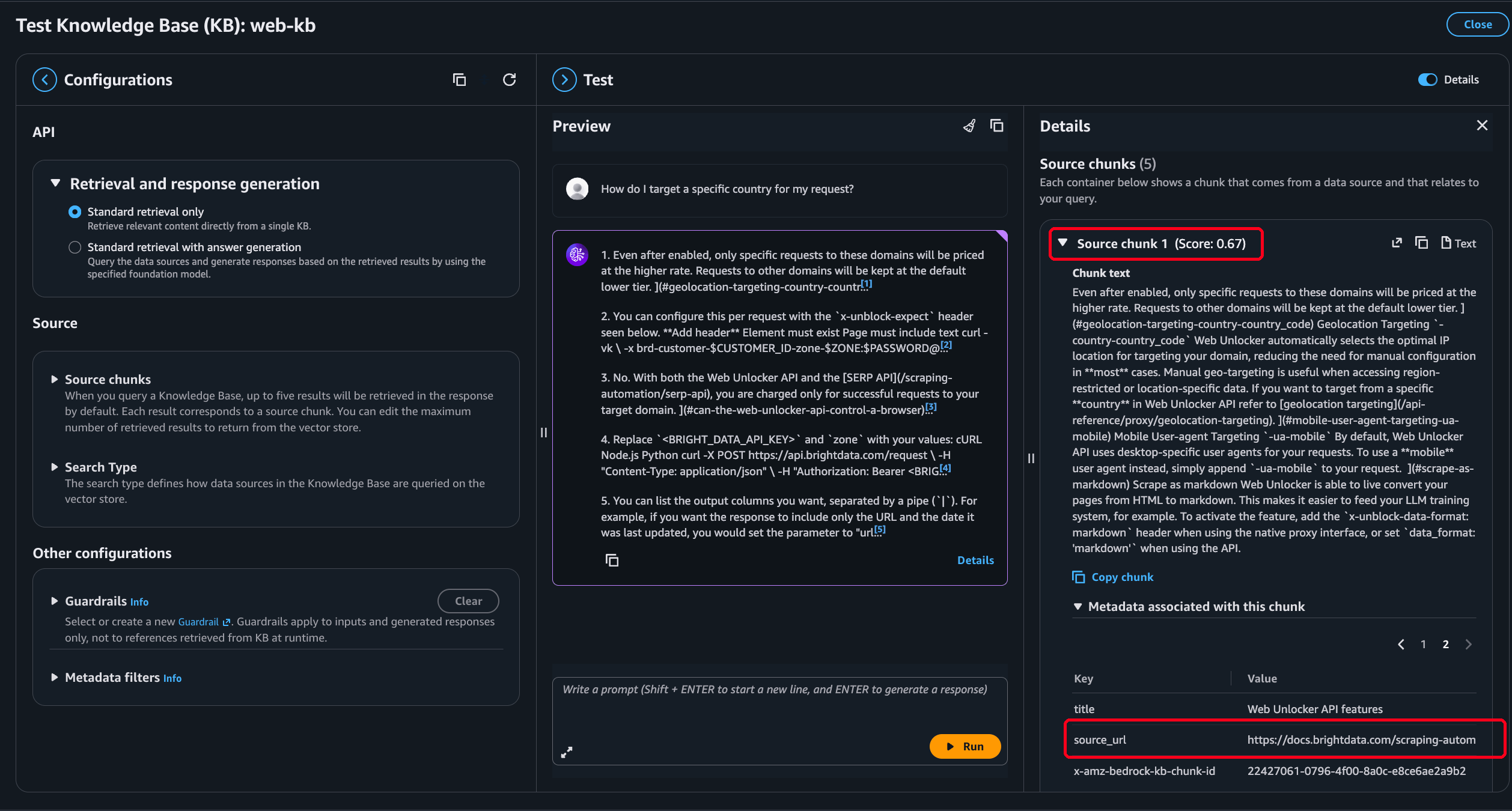
The native crawler ingests HTML with no sidecar step, so those attributes have nowhere to come from.
RetrieveAndGenerate does what Retrieve does, then writes the answer. It grounds that answer in the retrieved chunks and returns citations with it:
def answer(kb_id: str, query: str, model_arn: str) -> dict:
    resp = runtime.retrieve_and_generate(
        input={"text": query},
        retrieveAndGenerateConfiguration={
            "type": "KNOWLEDGE_BASE",
            "knowledgeBaseConfiguration": {
                "knowledgeBaseId": kb_id,
                "modelArn": model_arn,
            },
        },
    )
    return resp   # resp["output"]["text"] plus resp["citations"]
The response holds the generated text and a citations array that maps spans of the answer to the chunks they came from. Because you set source_url in the sidecar, each citation resolves to the page you scraped. An answer about a product’s pricing then cites the pricing page Bright Data fetched.
If you build a fully managed knowledge base, use managedSearchConfiguration in place of vectorSearchConfiguration, since managed knowledge bases run hybrid search with reranking on by default. The companion repository’s retrieve() marks where to swap it.
Step 6 – Measure whether retrieval works
Nothing in the pipeline so far tells you whether the knowledge base returns the right page for the questions your users ask. Fixing a wrong chunk size means recreating the data source, so find that out on 20 pages rather than 20,000.
The tool for that is a golden set, a list of questions, each with the pages that should answer it. This pipeline’s set holds 6 questions, and it’s in the repository as eval/golden.json, alongside eval/golden-v1-mislabeled.json, the first version whose bad label this section explains:
[
  {"question": "How do I get the page back as markdown instead of HTML?",
   "expect": ["https://docs.brightdata.com/scraping-automation/web-unlocker/features"]},
  {"question": "How do I target a specific country for my request?",
   "expect": ["https://docs.brightdata.com/scraping-automation/web-unlocker/features",
              "https://docs.brightdata.com/scraping-automation/web-unlocker/configuration"]}
]
You then run every question through Retrieve and record where the expected page appears in the results:
def evaluate(kb_id: str, golden: list[dict], k: int = 5):
    ranks = []
    for item in golden:
        chunks = retrieve(kb_id, item["question"], num_results=k)
        got = [c.get("metadata", {}).get("source_url", "") for c in chunks]
        # 1-based rank of the first expected page, or None if it never appeared
        ranks.append(next((i + 1 for i, u in enumerate(got) if u in item["expect"]), None))

    hit_rate = sum(r is not None for r in ranks) / len(ranks)
    mrr = sum(1 / r if r else 0 for r in ranks) / len(ranks)
    missed = [g["question"] for g, r in zip(golden, ranks) if r is None]
    return hit_rate, mrr, missed
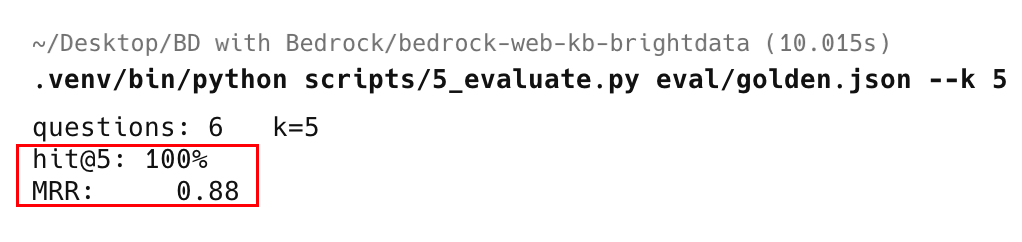
The hit rate is the share of questions where the expected page appeared at all. It tells you whether the corpus can ground an answer in the first place. Mean reciprocal rank averages 1 divided by the rank of that page. It drops when the right page appears but sits at rank 5, and a hit rate alone hides that.
The list of misses is the part you act on. A miss usually means one of four things. The page never reached the corpus, so check the loader output for a failed fetch. The chunks are too large, so surrounding text dilutes the relevant passage. The chunks are too small, so the passage lost the context that made it match. Or your golden set is wrong.
The first evaluation run scored 83% hit@5, with one miss on “How do I target a specific country for my request?” The golden set expected the configuration page. Reading the chunk retrieval returned instead settled the question. The passage from the features page contained the country-targeting documentation verbatim. Retrieval had been right and the label had been wrong. Correcting it gave 100% hit@5 with an MRR of 0.88, and 83% hit@3 with an MRR of 0.83. Those are 6 questions against 6 pages, so read them as one measured data point rather than a benchmark.
Always read what retrieval returned on a miss before you change anything about the pipeline. Only the retrieved text tells you whether retrieval or the label is wrong. A pipeline problem sends you to the loader, a chunking problem sends you back to the data source, and a mislabeled question just needs a better golden set.
Run this before you scale the corpus, and keep running it. Once you have a hit rate you’re happy with, treat it as a release gate. The companion repository’s evaluation script takes a --min-hit-rate flag for exactly that. A scheduled refresh that quietly degrades retrieval then fails loudly instead of shipping worse answers.
Bedrock also ships managed evaluation that scores retrieval and generation with a judge model. Use it to study quality, and keep the golden set as the release gate. The set is deterministic, costs only the retrieval calls, and runs in seconds at this size.
When to go beyond the knowledge base
A knowledge base is a snapshot of pages you chose. You embed them once and query them many times. That snapshot makes each query cheap, and it also puts two kinds of questions outside its reach. Questions about facts that change faster than your sync schedule get stale answers. Questions about pages that were never in the corpus have nothing to match against.
Route per query instead of choosing once between a persistent knowledge base and live retrieval. Ask the knowledge base first, and when it can’t ground the question, fall back to a live Bright Data lookup:
def route_answer(kb_id: str, query: str, min_score: float = 0.4):
    chunks = retrieve(kb_id, query, num_results=5)
    top = max((c.get("score", 0.0) for c in chunks), default=0.0)

    if chunks and top >= min_score:
        return "knowledge_base", chunks

    # nothing in the corpus covers this, so search and fetch it live
    return "live_web", live_context(query)      # Bright Data SERP + Web Unlocker
live_context is the repository’s search-then-fetch helper in src/web_kb/live_tool.py, and it needs a Bright Data SERP zone alongside the Web Unlocker zone from Step 1. You create the SERP zone the same way and call it through the same api.brightdata.com/request endpoint. It returns the result page as JSON, so the fallback can pick URLs to fetch.
The relevance floor is the routing signal. Bedrock returns a score with every chunk, and when the best one falls below the floor, the corpus probably doesn’t cover the question. Answering from the corpus anyway is the failure mode to avoid, because the result is a confident answer citing a page that doesn’t support it.
The 0.4 above is a starting point, not a measured value. It sits below the 0.67 that a correct top result scored in Step 5. Tune it against the golden set from Step 6, alongside a few questions you know the corpus doesn’t cover. 5_evaluate.py prints the band it saw, the lowest score on a hit and the highest on a miss. The floor belongs between them. Keep those extra questions in a separate file, since a question with no expected page counts as a miss against the release gate.
Managed knowledge bases make a version of this decision internally, called agentic retrieval. Keeping that decision in your own code means you can inspect the signal, the floor, and the fallback, and the live path can reach outside AWS. Connect it as a Bedrock agent action group, as a tool in a framework like Strands Agents, or as Bright Data’s MCP server.
That server gives any MCP-compatible agent the same live search, unlocking, and crawling. In an AgentCore Gateway it sits alongside a tool that calls Retrieve. The routing rule doesn’t change, only where the fallback runs.
A knowledge base is the right choice when you query the same pages repeatedly, when you need citations, filters, and access control, and when the corpus changes more slowly than you query it. Live retrieval wins when a fact moves faster than your sync, when the question space is open-ended, or when you would embed far more than you will ever retrieve. The clearest sign the balance is wrong is syncing so often that you re-embed most pages before anyone queries them. Then you’re paying to maintain an index instead of using it.
Prompt caching changed one part of that rule. With a corpus small and stable enough to fit in a model’s context window, you can skip retrieval entirely. This pipeline is worth building once the corpus outgrows the cache, or when answers must cite exact pages, filters must limit queries, or pages refresh on different schedules. Without any of those, caching the whole corpus is simpler.
Whole-site coverage with the Crawl API and native S3 delivery
The pipeline so far takes a known list of URLs. When the corpus grows, you may not know every URL in advance, and you would rather not run the fetch loop yourself. Bright Data’s Crawl API handles both. It discovers and crawls the internal pages of a site from a seed URL, returning each page as Markdown. It can also deliver the output straight to your S3 bucket.
This path was assembled from the documentation rather than run. The call sequence and field names below follow Bright Data’s API reference, so check them against the Crawl API documentation before you depend on this path.
This snippet continues from the earlier steps: it reuses BRIGHTDATA_TOKEN from Step 1 and REGION from Step 2. Crawl jobs are asynchronous, and delivery is its own call rather than an option on the trigger. You trigger a crawl and receive a snapshot ID, poll until that snapshot is ready, then hand it to the delivery endpoint with an s3 target. The delivery call writes the output into your bucket with no download step in your code:
import requests, time

BD = "https://api.brightdata.com"
HEADERS = {"Authorization": f"Bearer {BRIGHTDATA_TOKEN}"}
CRAWL_DATASET_ID = "..."   # the Crawl API dataset ID from your Bright Data control panel
AWS_KEY, AWS_SECRET = "...", "..."   # delivery credentials. Prefer an IAM role ARN with an external ID

def _call(method: str, path: str, **kw):
    resp = requests.request(method, f"{BD}{path}", headers=HEADERS, timeout=60, **kw)
    resp.raise_for_status()
    return resp.json()

def crawl_to_s3(seed_url: str, bucket: str, directory: str) -> str:
    # 1. Trigger. The body is a bare array of input objects, not a wrapper object.
    snapshot = _call("POST", "/datasets/v3/trigger",
                     params={"dataset_id": CRAWL_DATASET_ID,
                             "custom_output_fields": "markdown|url|page_title"},
                     json=[{"url": seed_url}])["snapshot_id"]

    # 2. Poll. Delivery only accepts a snapshot already in `ready` status.
    while (state := _call("GET", f"/datasets/v3/progress/{snapshot}")["status"]) != "ready":
        if state == "failed":
            raise RuntimeError(f"crawl {snapshot} failed")
        time.sleep(15)

    # 3. Deliver. Returns a delivery job ID, which you poll at
    #    GET /datasets/v3/delivery/{id} until its status is "done".
    return _call("POST", f"/datasets/v3/deliver/{snapshot}",
                 json={"type": "s3",
                       "bucket": bucket,
                       "directory": directory,
                       "region": REGION,
                       "credentials": {"aws-access-key": AWS_KEY,
                                       "aws-secret-key": AWS_SECRET},
                       "filename": {"template": "crawl", "extension": "json"}})["id"]
Bright Data delivers records as JSON, NDJSON, or CSV rather than one Markdown file per page, so there is a normalization step between delivery and ingestion. An S3-triggered Lambda function handles it, firing when delivery writes the output to a landing prefix. The function splits each record into a <slug>.md document and its .metadata.json sidecar under the knowledge base’s source prefix. That is exactly the shape you wrote by hand in Step 2. Bedrock’s S3 data source then ingests those on the next sync.
The example above passes a key pair. Prefer an IAM role ARN with an external ID, so no long-lived key sits in the request.
The trade between the two paths is control against scale. Web Unlocker with your own loader gives you exact control over every filename and metadata field. That is ideal for a curated list. The Crawl API with S3 delivery and a normalization Lambda gives you wide coverage and no fetch loop of your own. That is ideal when the corpus is a whole site section you want to keep in sync.
Cost considerations
Treat the figures below as a template for your own numbers rather than a quote, and price your own corpus against Bright Data pricing and Amazon S3 pricing before you commit.
| Component | How it’s priced | What drives it |
|---|---|---|
| Bright Data Web Unlocker | $1.50 per 1,000 successful requests on pay-as-you-go, with a premium rate of $2.50. Failures aren’t billed | 1 request per page scraped |
| Bright Data Crawl API | $1.50 per 1,000 records on pay-as-you-go | Pages discovered and crawled per job |
| Bedrock embeddings (Titan V2) | Per input token | Total tokens across all chunks at ingestion, plus each query |
| Vector store | S3 Vectors pay-as-you-go, or OpenSearch Serverless per OCU-hour | Corpus size and query volume |
| Amazon S3 | Storage and requests, a few cents at this scale | 1 .md plus 1 sidecar per page |
| RetrieveAndGenerate | Per token on the generation model | Answer volume and model choice |
Here is what one refresh of the 6-page corpus costs, on the Web Unlocker path at the standard rate.
- Scraping. 6 Web Unlocker requests, $0.009 at $1.50 per 1,000.
- Embedding. 60,846 cleaned characters, roughly 15,000 tokens at 4 characters each, about three hundredths of a cent at $0.00002 per 1,000.
- Vector storage. Around 50 default-sized chunks, well under a megabyte, too small to matter at $0.06 per GB-month.
A weekly refresh of this pilot costs about 4 cents a month, nearly all of it Web Unlocker requests. The hash gate keeps embedding at zero when nothing changed. If you scale linearly, 500 pages you refresh weekly cost about $3.25 a month in scraping and under a cent in storage.
Generation tokens per query and the vector store you chose are the two costs that can grow past those figures. A classic Amazon OpenSearch Serverless collection has a baseline cost even when idle. That is roughly $175 a month at the reduced dev-test minimum, and about double at the standard 2-OCU floor. AWS also offers a collection type that scales to zero, priced on the OpenSearch Service pricing page. Against the classic collections, S3 Vectors changes the arithmetic for scheduled refreshes at moderate query volume.
Limitations and production hardening
This pipeline is a reference architecture, not a production-ready product.
- Freshness is a schedule you own. A knowledge base is a snapshot from its last sync, and between syncs it goes stale at the rate its source data decays. Raise an alert when a sync fails, because a skipped run leaves stale data in place.
- A failed scrape hides behind good data. When you can’t fetch a page, its previous version keeps serving as current. The loader in the repository names failed URLs and exits non-zero so a scheduled run reports them. Spotting a page that quietly stopped refreshing is a separate question.
scraped_datecan’t answer it, since a page can fetch cleanly for months without changing. The repository stamps a last-seen date on every successful fetch and reports the URLs it hasn’t seen since a cutoff date. - You cannot change chunking or embedding later. Test both on a sample of your pages before the first full sync. Fixing the model means recreating the knowledge base, and fixing the chunking means recreating the data source.
- Retrieved content is only as good as the page. Bright Data returns what the page served and converts it to Markdown. It doesn’t verify that the page is correct. For anything you will act on, keep a human in the loop, and use the
source_urlcitation to make verification a click rather than a guess. - The token in the snippets is a placeholder. Anything scheduled should read it from AWS Secrets Manager. It should never reach a repository.
- The figures are measured, but not from your corpus. Reproduce them on your own accounts and data before you rely on any specific number.
Final thoughts
Amazon Bedrock Knowledge Bases handles chunking, embedding, and cited retrieval, and its native connectors cover the data you already hold and the static pages you own. The public web that changes, renders client-side, and defends itself sits outside that reach, and it often holds the data that makes a knowledge base worth building. Bright Data closes that gap, and the two meet in S3.
To extend the pipeline, add EventBridge scheduling for automatic refresh, use Bright Data’s Crawl API for whole-site coverage, or enable Bedrock reranking once you settle chunking.
Bright Data’s Web Unlocker includes a free tier to get you started, the Crawl API covers whole-site crawls, and you set up Amazon Bedrock Knowledge Bases from the Amazon Bedrock console. The full runnable project, with the loader, the knowledge base setup script, and the IAM policies, is in the companion repository.
Frequently asked questions
Can Amazon Bedrock Knowledge Bases crawl the web on its own?
It has a native Web Crawler in preview, a good fit for static pages you own. Today it handles static sites only, disallows a site with no robots.txt, caps at 25,000 pages per sync, and needs OpenSearch Serverless. For JavaScript or bot-protected pages, use Bright Data to render and unblock the content, then ingest from S3.
Why store the data in S3 instead of retrieving from the web at query time?
A persistent knowledge base embeds each page once and serves many queries from a low-latency vector search, with citations, metadata filtering, and access control. Live retrieval through Bright Data fits fast-changing or one-time lookups. Many production systems use both, and route per query by the score.
What format should scraped pages be in for Bedrock?
Markdown. Bright Data’s Web Unlocker returns the page as Markdown when you set data_format to markdown, and Bedrock ingests it as a supported document type. The conversion drops the HTML markup but not the site navigation, so strip the repeating chrome before you write to S3.
How do citations work in the answers?
You write a source_url attribute into each document’s .metadata.json sidecar. Bedrock carries that metadata into retrieval, so Retrieve returns it on every chunk and RetrieveAndGenerate includes a citation array that resolves each span of the answer back to the page it came from.
Why does my ingestion job say COMPLETE when nothing was indexed?
Because status isn’t a success signal. A job can report COMPLETE when most of its documents failed, and on this pipeline it reported COMPLETE with 5 of 6 failed. Read statistics for the per-document counts and failureReasons for the error, which here was the S3 Vectors filterable-metadata limit.
How do I keep the knowledge base current?
Re-scrape on a schedule, write only the objects whose content hash changed, and start an ingestion job. That hash gate stops Bedrock from re-embedding an unchanged page. Match the schedule to how fast your sources decay, from daily for news to weekly or slower for documentation.
How many questions does a golden set need?
Fewer than people expect, and the questions have to be real. Questions you take from what users actually ask beat invented ones, because the point is to find what your corpus can’t ground rather than to produce a number. Add one every time someone reports a bad answer, and the set becomes a regression suite.
How much does this cost to run?
The main costs are Bright Data requests, which scale with pages times refresh frequency, plus the vector store, and per-token embedding and generation. S3 Vectors is pay-as-you-go and suits a scheduled refresh, while a classic OpenSearch Serverless collection costs even when idle. The 6-page pilot here cost about 4 cents a month to refresh weekly.


Technical Writer
 5 years experience
Satyam Tripathi helps SaaS and data startups turn complex tech into actionable content, boosting developer adoption and user understanding.