A web scraper breaks when a site changes its markup or starts blocking you. The brightdata-scrape Kiro Power writes one from a plain-language prompt and runs it against Bright Data MCP, which handles the unblocking and parsing. This guide applies one repeatable Power pattern across 4 use cases, taking 2 all the way to a live API run, including one that checks whether ChatGPT names your brand.
TL;DR
By the end you’ll have one Power pattern you can point at 4 use cases, each driven by one plain-language prompt, with 2 taken all the way to a live API run:
- Retail price tracker , follows one product across Amazon and Walmart.
- Brand-visibility monitor , sees which AI assistants mention your brand.
- LinkedIn lead-gen pipeline , watches a prospect list for job changes.
- Crunchbase intel dashboard , pulls dozens of live fields per company.
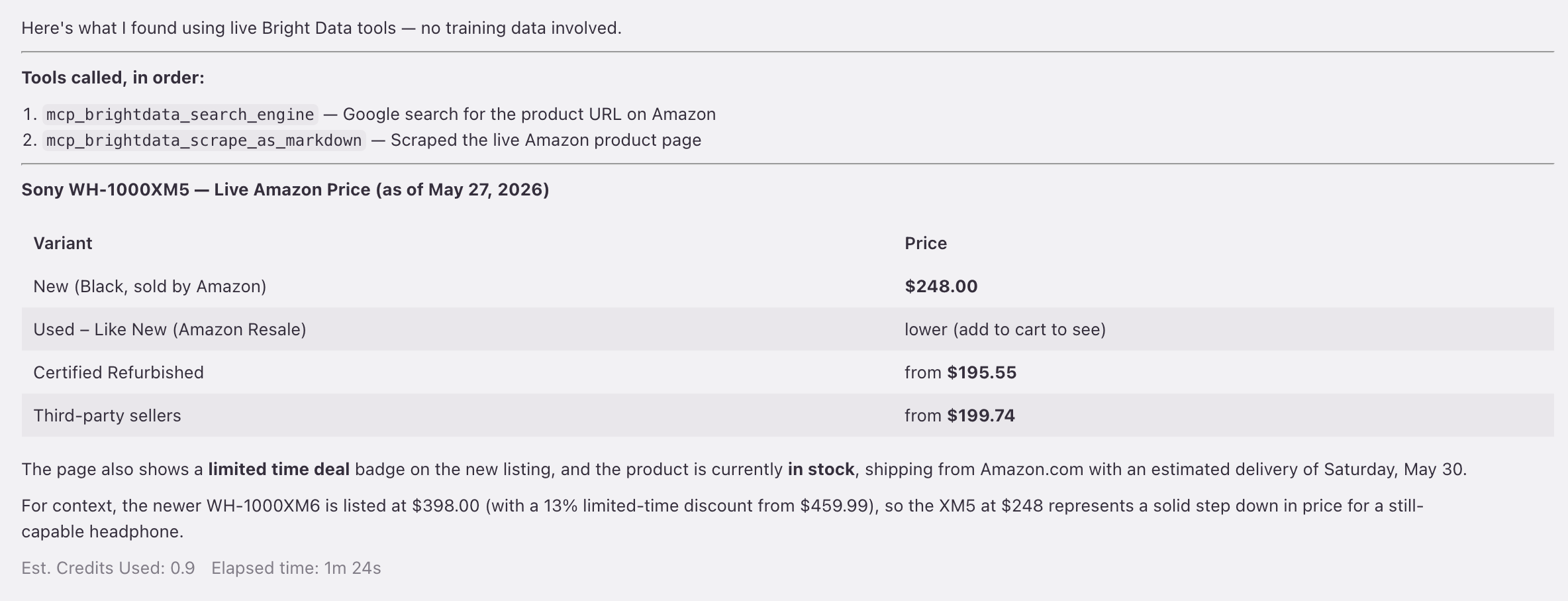
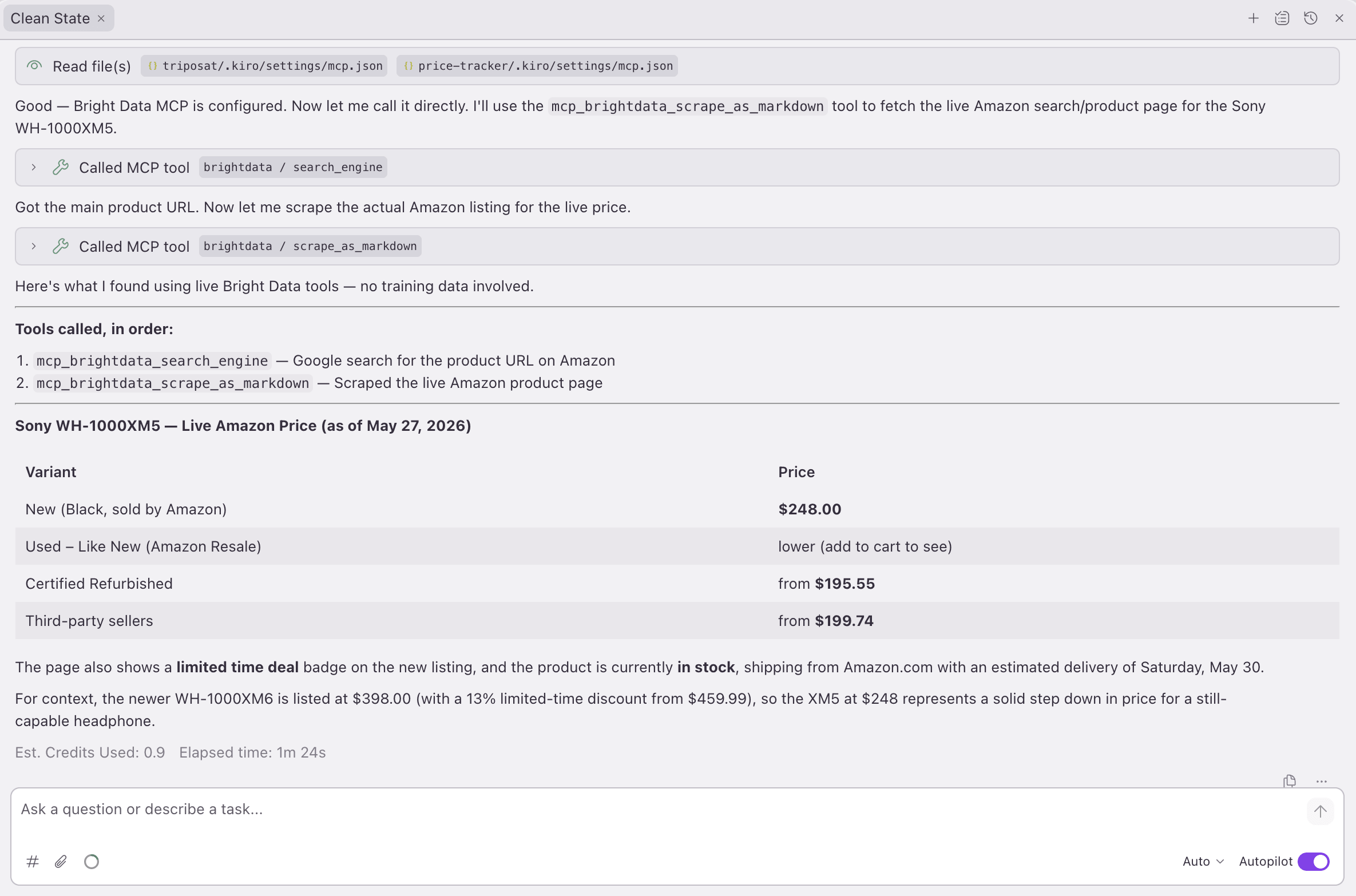
The Kiro agent makes 2 live tool calls , search_engine, then scrape_as_markdown , and returns a real Amazon price of $248.
What is a Kiro Power?
Kiro is the AI IDE built by AWS. A Power is Kiro’s own extension format: a folder that has a manifest, an MCP server config, steering files, and code templates. Kiro loads a Power into context only when your prompt activates it. Browse the official catalog at kiro.dev/powers. Bright Data publishes brightdata-scrape separately on GitHub, so you can import it directly.
Powers differ from Claude Skills in one important way: each Power comes with an MCP (Model Context Protocol) server configuration already set up. So the agent gets new tools to call, not only instructions. For brightdata-scrape, that server is Bright Data MCP.
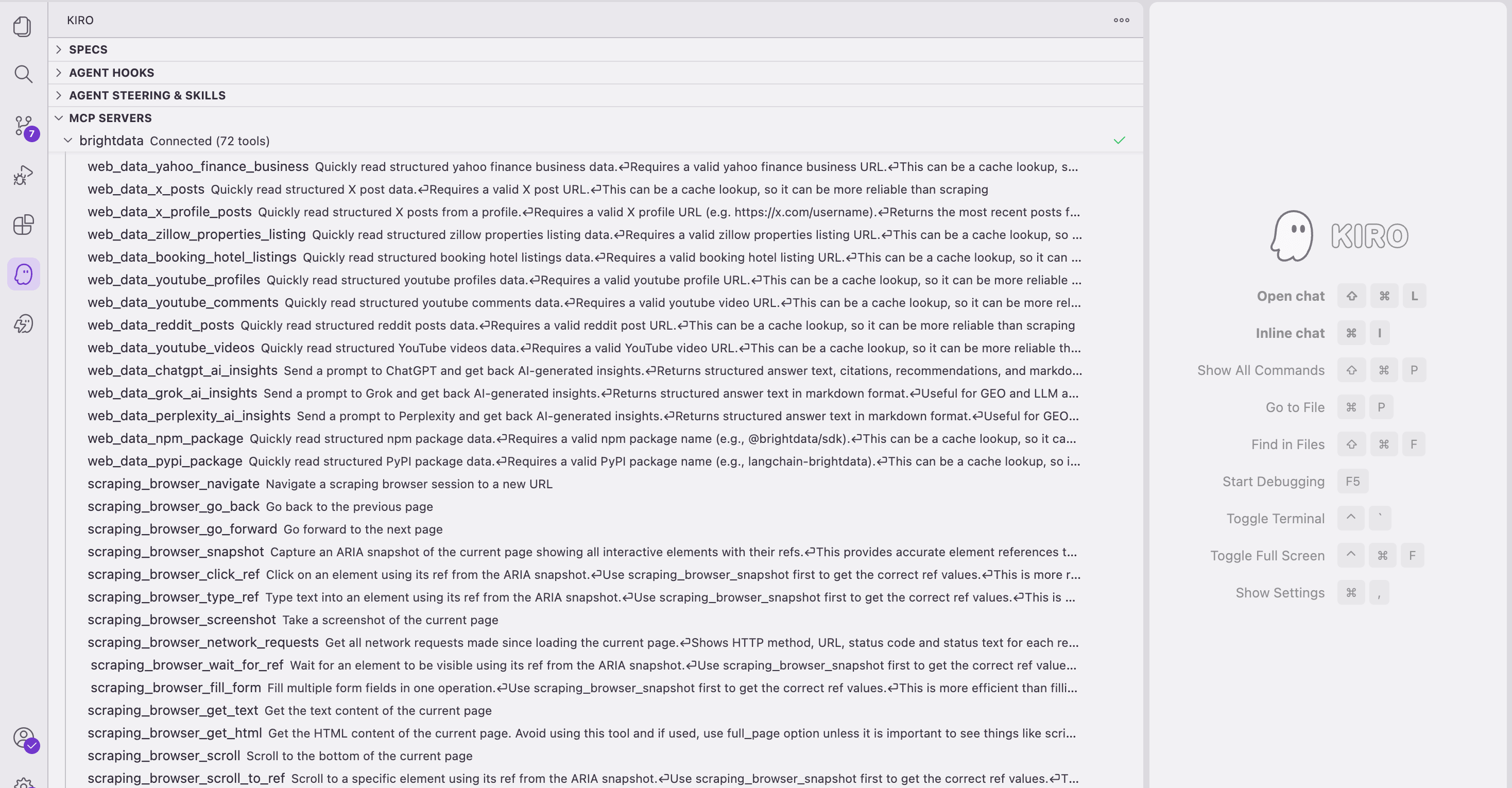
That endpoint gives you Web Unlocker, SERP API, Browser API, and Bright Data’s pre-built dataset catalog. Bright Data’s MCP lets the agent use any of them in a single tool call. Those tools (search_engine, scrape_as_markdown, the 50 web_data_* Pro tools, scraping_browser_*, and discover) replace what used to be 3 separate integrations , a proxy, a SERP API, and a browser farm , with one set of credentials and one retry pattern.
Install the brightdata-scrape Kiro Power
There are 5 steps to set up the project and confirm the connection:
- Get a Bright Data API token. Under Users and API keys → API keys, add a key with User permission, set an expiration, and copy the value. No credit card is needed for the free tier.
- Install Kiro, then create and open the project. Download and install Kiro. The Power needs a project to work in, and this guide uses Next.js, so create one and open the
price-trackerfolder in Kiro:
npx create-next-app@latest price-tracker \
–typescript, app, tailwind, src-dir, use-npm
cd price-tracker
You don’t need to install anything else now. Kiro adds any packages the generated scraper needs later, in Phase 3.
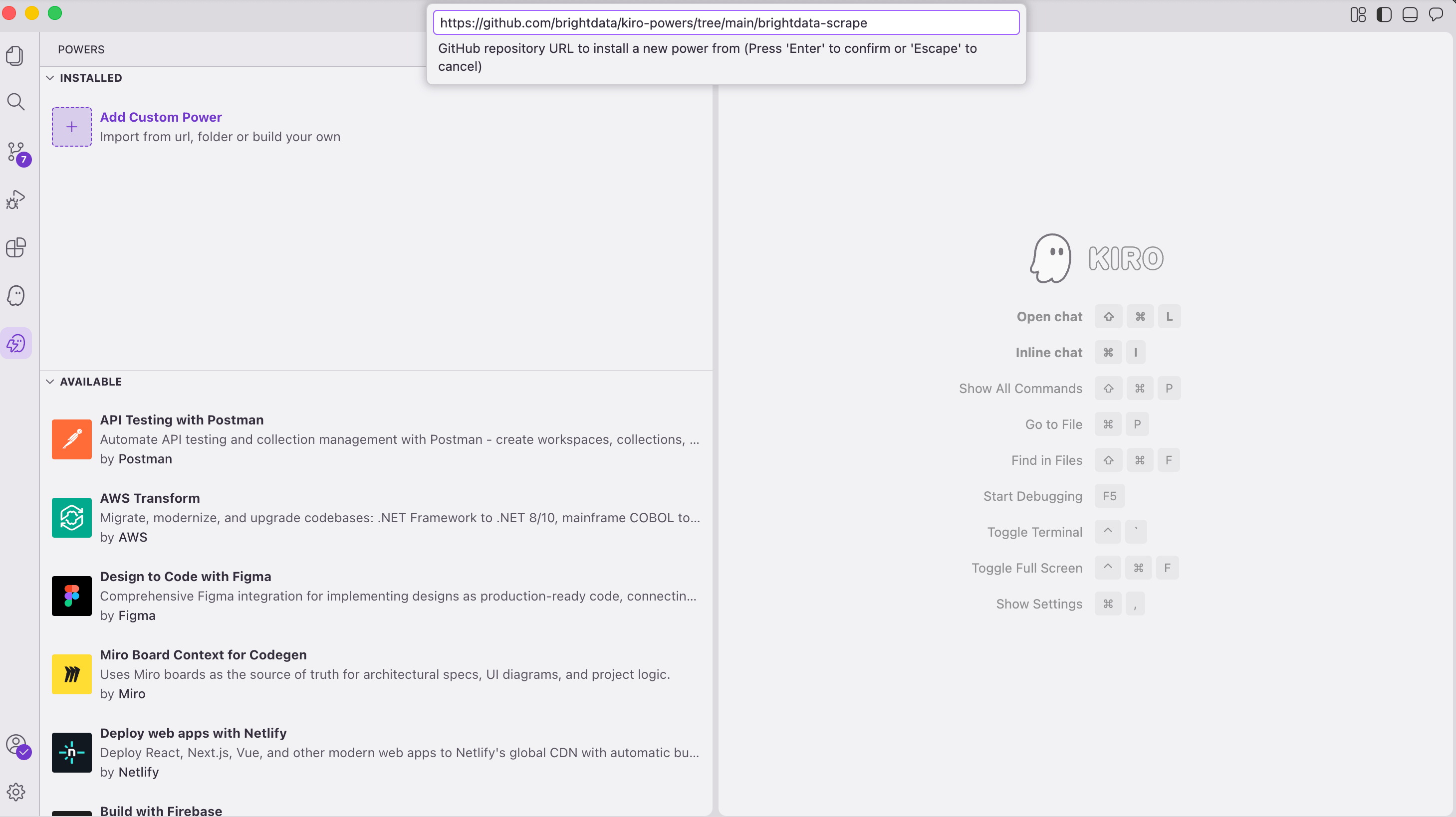
- Install the Power. Open the Powers panel in Kiro (the icon in the left activity bar). Click Add Custom Power, then Import power from GitHub, then paste this URL:
https://github.com/brightdata/kiro-powers/tree/main/brightdata-scrape
- Give Kiro the token. Installing the Power adds a
brightdataserver to your project’s.kiro/settings/mcp.jsonwith the URLhttps://mcp.brightdata.com/mcp?token=${BRIGHTDATA_API_KEY}. Open that file, replace${BRIGHTDATA_API_KEY}with the literal token you copied in Step 1, and save. Then add.kiro/settings/mcp.jsonto.gitignoreso the token never gets committed.
> Why the literal token, not the ${…} placeholder? Kiro doesn’t currently expand ${VAR} in mcp.json (a known open issue), so the placeholder gives you Connection Failed / HTTP 404 instead of a connection.
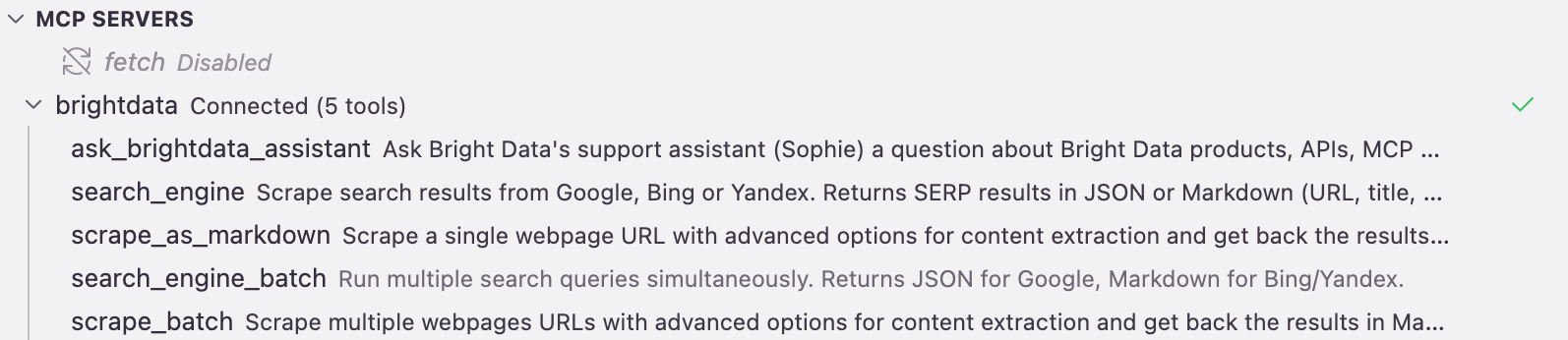
- Confirm the connection. Reopen the MCP Servers panel. After a few seconds,
brightdatashows Connected withsearch_engineandscrape_as_markdownamong its tools, which is the signal you need.
Now create .env.local in the project root and put the same token in it. You paste the token twice on purpose: the copy in .kiro/settings/mcp.json (Step 4) connects Kiro to Bright Data while you build, and this copy is read by the generated app when it runs.
BRIGHTDATA_API_KEY=...          # the token you generated above
BRIGHTDATA_UNLOCKER_ZONE=...    # placeholder is fine for the retail build; set before a Web Unlocker use case
On a brand-new account, or before you run a Web Unlocker use case, set your zone name first. See Set your Web Unlocker zone under Scale all 4 use cases to production below.
Across all 4 use cases, only the prompt changes; the 4-phase workflow stays the same.
Kiro’s 4-phase workflow (one pattern for all 4)
The Power runs the same 4 phases for every prompt. Each phase waits for your approval before it continues:
- Detect & plan. The Power checks the workspace manifest (
package.json,pyproject.toml,Cargo.toml,go.mod, etc.) and the dependencies inside it. It then chooses how to integrate: if it finds a web framework, it generates an API route; if it finds an agent SDK, it generates an agent tool; and if the project is a library, it generates a module. It asks you what to scrape and how many items.
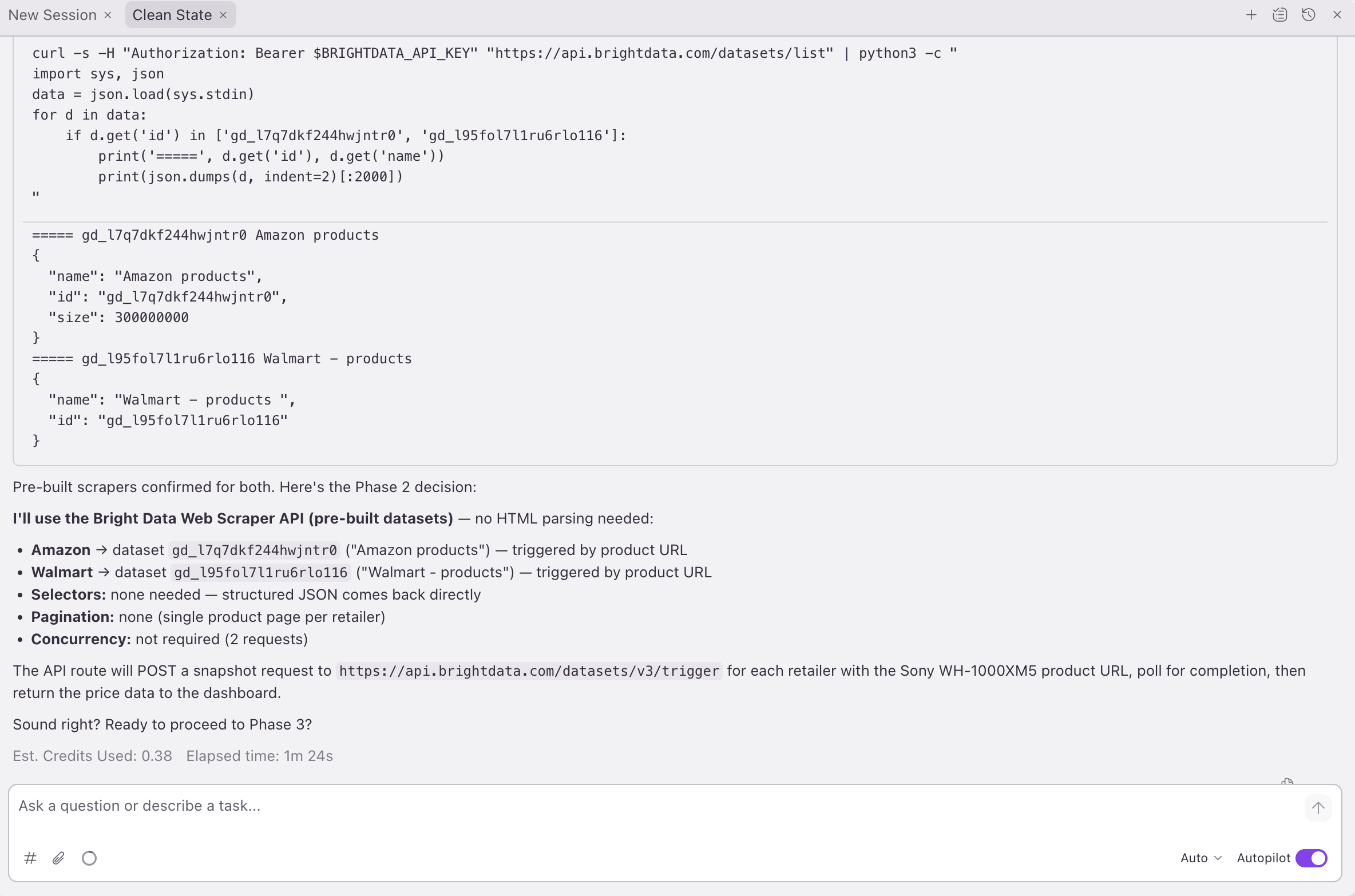
- Scraping playbook. The Power checks Bright Data’s tool ladder and, for each target site, picks the best path that your tier allows: a Web Data Pro tool (one of 50
web_data_*tools across 30+ platforms, typed fields, requires&pro=1) → a dataset trigger (the same data, polled, no&pro=1needed) → Web Unlocker (proxy + parsing for long-tail sites) → Browser API (login/click flows) → SERP API (search results).
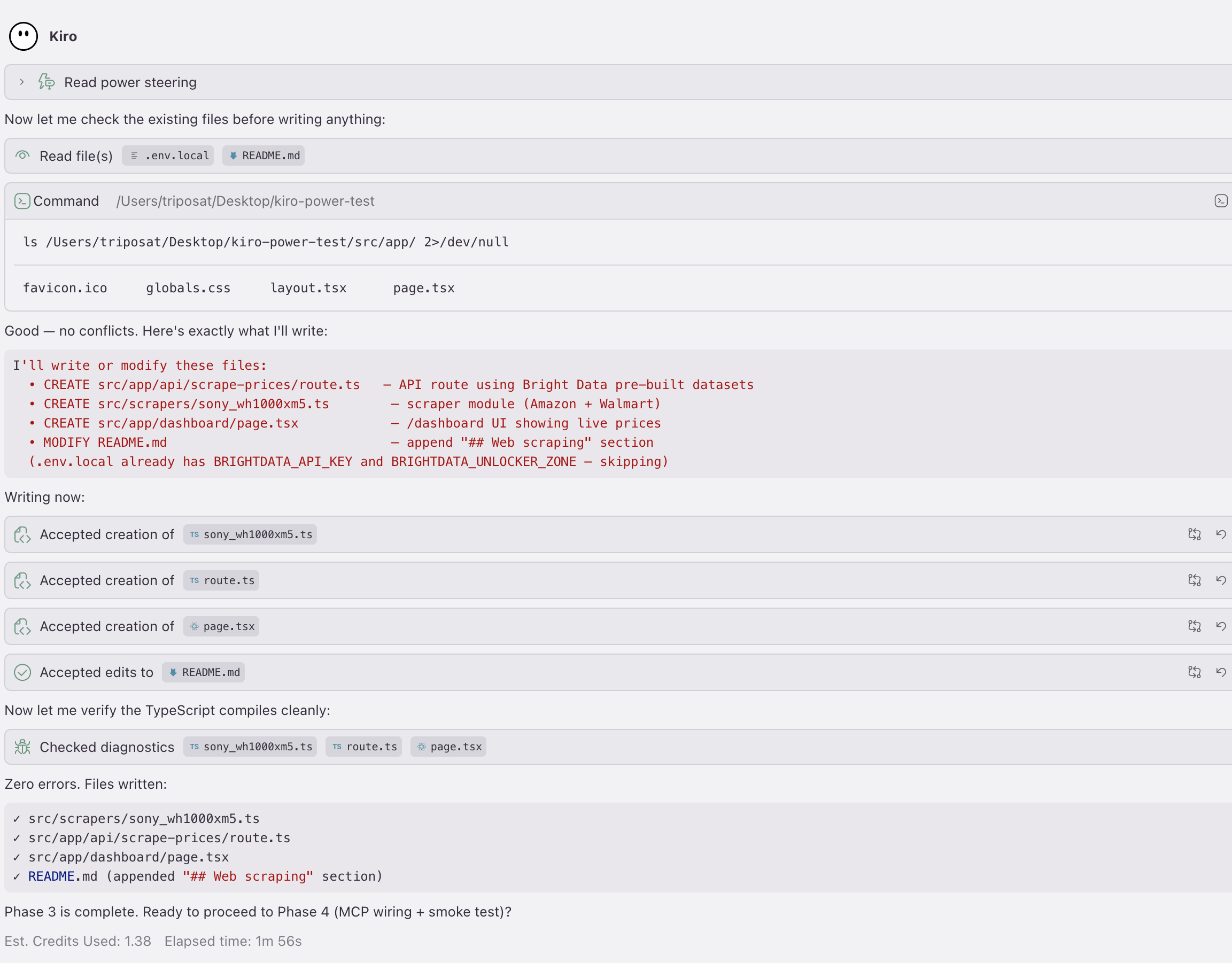
- Integrate. The Power generates the files. The retail run below produced 4: a scraper module, an API route, a dashboard page, and a new
## Web scrapingsection inREADME.md. (.env.localalready had the API token, so Phase 3 skipped it. That is the file-safety rule: it does not overwrite a file that already exists.)
- MCP & verify. The Power merges Bright Data’s MCP server into
.kiro/settings/mcp.jsonand runs a smoke test against the target URL. Two production safeguards run in this phase: the diff-before-overwrite, and the FAIL → ITERATE recovery. Use case 1’s Phase 4 shows the recovery in full.
What ran live, and what’s shown
Everything here is verified against the live API, not a mockup. The exact prices, tools, and timings come from specific captured runs. Because the scrapers read live data, your own results will reflect current prices, pages, and model answers, not these captured ones.
- Use cases 1 and 4 ran in full against the live API: retail (with zero Pro spend) and Crunchbase (on the Pro tier). Every retail screenshot below is from that run, and Use case 4’s full code is in its section.
- Use cases 2 and 3 are shown, not rebuilt: the prompt, the tools Phase 2 would pick, and field shapes whose names we verified live against each tool. They reuse Use case 4’s
callMcpToolclient, so there’s no near-identical code to re-paste. - Use cases 2, 3, and 4 run on Pro mode (
&pro=1), which Scale to production covers below.
Use case 1: multi-retailer price tracking
Here is the prompt for Kiro:
Prompt to Kiro: “Add a price-comparison agent that scrapes Sony WH-1000XM5 prices from Amazon and Walmart.”
Phase 2’s pick: On the captured zero-Pro run, the Power picked the dataset-trigger path (same data, polled). With &pro=1 it would instead pick the Pro tools web_data_amazon_product and web_data_walmart_product.
Extending to more retailers: the same pattern adds web_data_ebay_product, web_data_homedepot_products, and web_data_bestbuy_products by re-prompting Kiro with a wider retailer list. Some retailers (Best Buy, Target) typically need Premium domains enabled on the zone; Amazon and Walmart did not in the captured run.
The architecture Kiro generated
The dashboard fetches the API on mount. The API calls Bright Data’s dataset triggers in parallel and returns the structured records.
       Browser opens /
                │
                ▼ (auto-fetch on mount)
        GET /api/scrape-prices
                │
                ▼
    src/scrapers/price-tracker.ts
        fetchAllPrices()
                │
                ▼ (Promise.allSettled, parallel)
   ┌────────────────────────────────────┐
   │  Bright Data Datasets API          │
   │  gd_l7q7dkf244hwjntr0 → Amazon     │
   │  gd_l95fol7l1ru6rlo116 → Walmart   │
   └────────────────────────────────────┘
One read path: dashboard → API route → scraper module → 2 Bright Data dataset triggers. With &pro=1, the scraper module becomes direct web_data_ MCP calls, and the client-side polling loop moves into the MCP server.*
The scraper module
src/scrapers/price-tracker.ts holds the dataset IDs, a triggerAndPoll helper, and a normalise step that flattens Bright Data’s response into a consistent PriceResult shape. Here is the core of the file, and the full file is about 85 lines:
// src/scrapers/price-tracker.ts (excerpt)
const BASE = "https://api.brightdata.com/datasets/v3";
const DATASETS = { Amazon: "gd_l7q7dkf244hwjntr0", Walmart: "gd_l95fol7l1ru6rlo116" } as const;

async function triggerAndPoll(datasetId: string, url: string) {
  // 1. POST trigger with the target URL
  const trigger = await fetch(`${BASE}/trigger?dataset_id=${datasetId}&include_errors=true`, {
    method: "POST",
    headers: { Authorization: `Bearer ${process.env.BRIGHTDATA_API_KEY}`,
               "Content-Type": "application/json" },
    body: JSON.stringify([{ url }]),
  });
  const { snapshot_id } = await trigger.json();
  if (!snapshot_id) throw new Error("no snapshot_id returned from trigger");

  // 2. Poll the snapshot endpoint (in-progress = HTTP 202; ~120 s cap)
  for (let i = 0; i < 24; i++) {
    await new Promise((r) => setTimeout(r, 5000));
    const res = await fetch(`${BASE}/snapshot/${snapshot_id}?format=json`,
      { headers: { Authorization: `Bearer ${process.env.BRIGHTDATA_API_KEY}` } });
    if (res.status === 202) continue;
    return await res.json();
  }
  throw new Error("snapshot timed out after 120s");
}

// triggers both retailers in parallel; Promise.allSettled isolates errors per retailer,
// so one bad snapshot doesn't fail the other. The full file maps each settled result
// into a PriceResult (rejected ones carry an `error` field).
export async function fetchAllPrices() {
  return Promise.allSettled(
    Object.entries(DATASETS).map(([retailer, id]) =>
      triggerAndPoll(id, PRODUCT_URLS[retailer]).then((r) => normalise(r[0], retailer, PRODUCT_URLS[retailer]))),
  );
}
Kiro’s chat is a live MCP client, not a memory lookup
While building, Kiro’s chat panel talks to the same brightdata server your code calls. Asked for the Sony price, the chat didn’t answer from the model’s memory. It made live search_engine and scrape_as_markdown calls and returned a table ($195.55 refurb to $248 new, plus an XM6 comparison at $398):
The chat is how you explore while building. The dashboard below is what your end users see.
The dashboard
The home route (/) that Kiro generated renders the JSON that the API returns as 2 colored cards (Amazon orange and Walmart blue) plus a green “Best price” banner picking the cheaper of the 2:
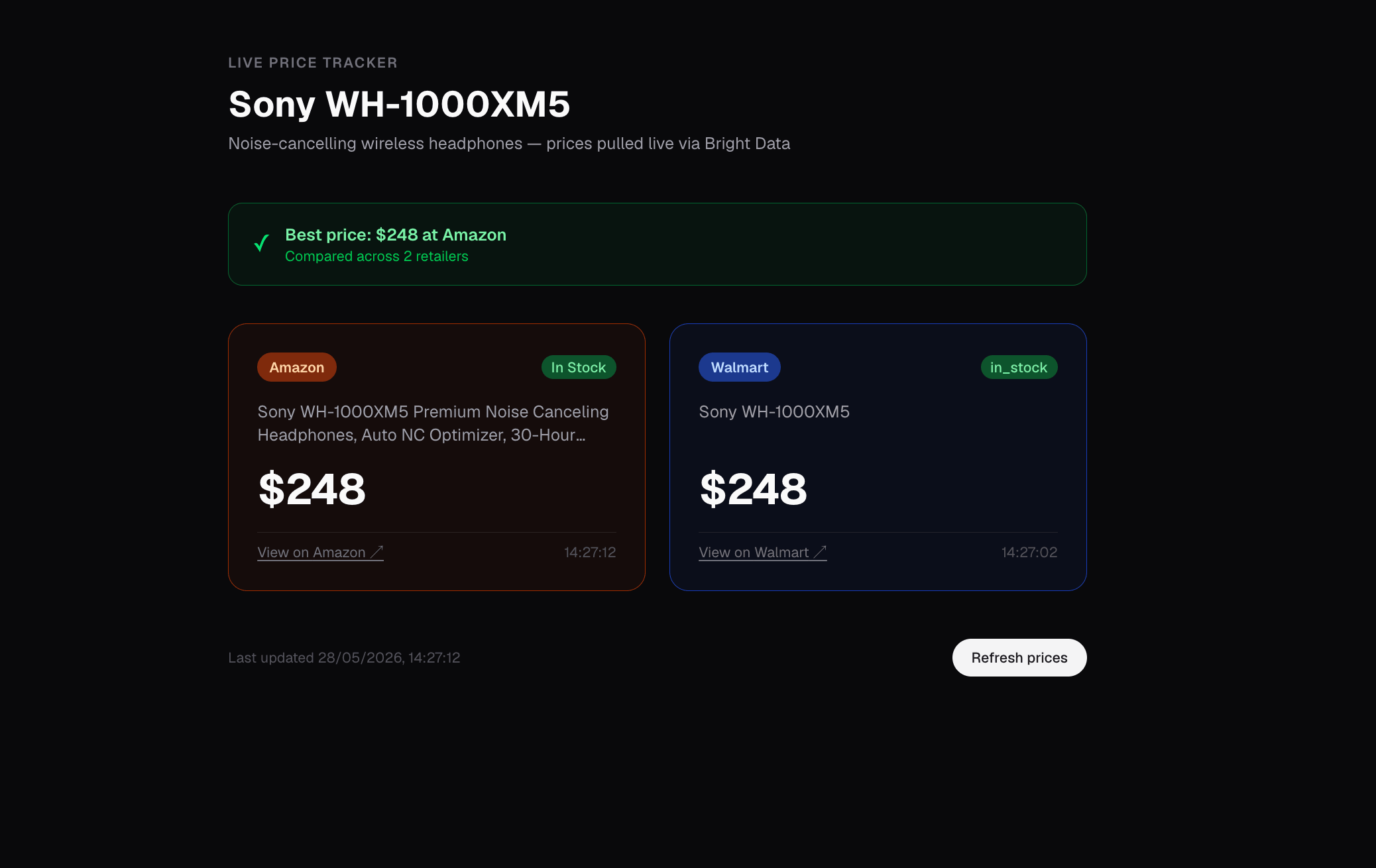
The home route (/) view. Sony WH-1000XM5 at $248 on both Amazon and Walmart with product titles, stock state, and per-retailer timestamps read directly from each source. Walmart’s raw in_stock and Amazon’s In Stock are passed through as-is, so you see exactly what each source returns. Normalize to your own schema when you build alerting on it.
If you inspect the raw pages yourself, Amazon’s obvious price selector (span.a-price-whole) usually returns empty, and the real one is .a-price .a-offscreen. Walmart doesn’t put the price in the rendered HTML at all; it sits inside a JSON blob in <script id="NEXT_DATA">. The dataset triggers above skip both problems because Bright Data parses the pages server-side and returns typed fields.
Phase 4: self-healing when the URL drifts
Phase 4 is the recovery routine the Power runs automatically when a smoke test fails. In the captured run, Amazon returned clean data ($248, In Stock), but Walmart returned every field set to null. Kiro didn’t declare success. Instead, it read the raw record’s error key ("dead page (404)"), called search_engine to find the current Walmart URL, re-triggered the dataset, and switched to scrape_as_markdown when polling stalled (returned $248, matching Amazon). Then it patched the generated scraper:
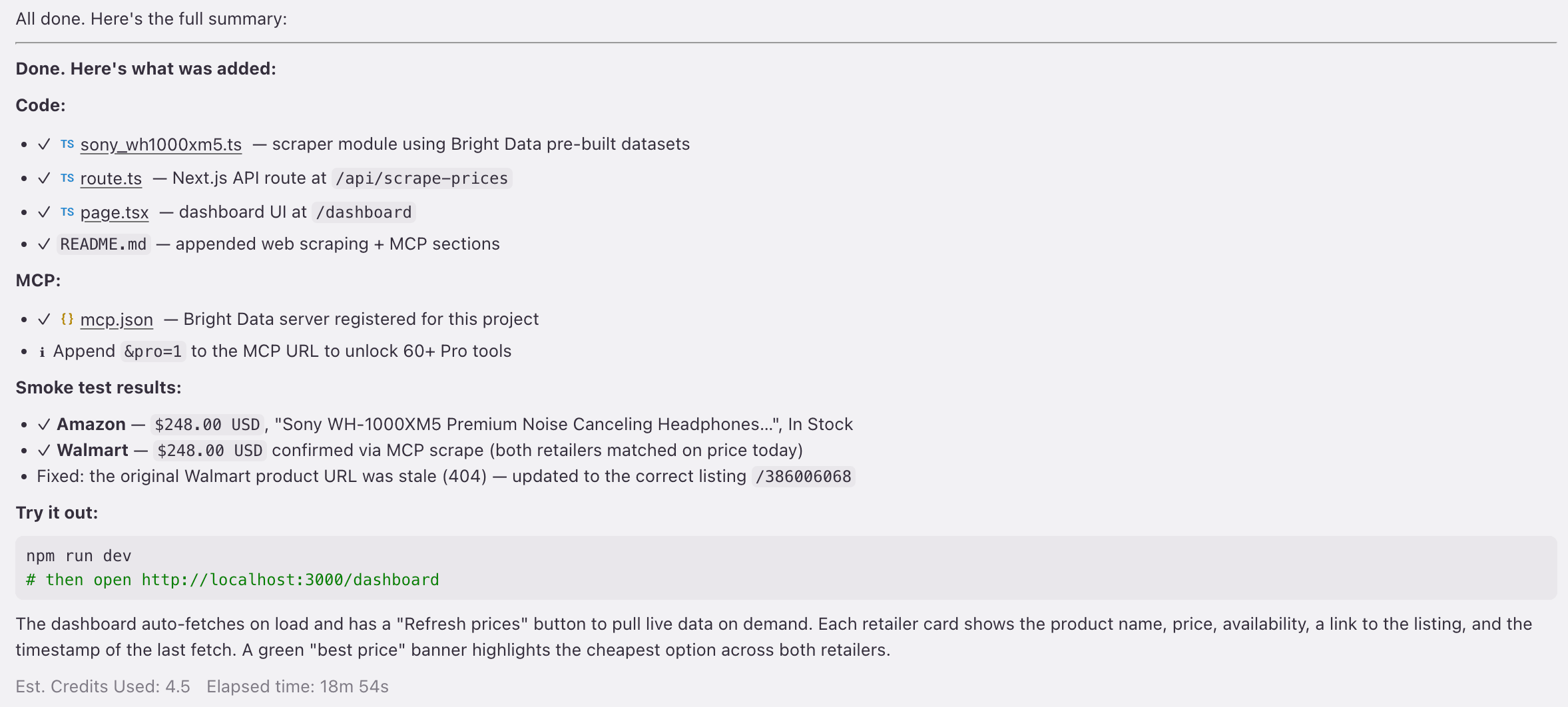
Phase 4 detects the dead Walmart URL, finds the live one, and patches the scraper on its own. The 18m 54s includes the re-polled dataset job, and the 4.5 credits are a one-time build-phase cost, not a runtime cost.
The recovery loop catches failures that throw an error or return null fields (dead 404s, redesigned pages, snapshot errors). But it does not catch a URL that still resolves but points at the wrong product. For example, a walmart.com/ip/... ID that silently changed from Sony headphones to a PS5 listing returns valid data for the wrong product. To catch this case, you need search-driven URLs instead of hardcoded IDs (covered in the scaling-to-production section below).
Captured cost across phases 2,4 (each visible in screenshots above): 0.38 → 1.38 → 4.5 credits (a running total). These are Kiro IDE build-time credits, the agent’s usage while it writes the code, separate from Bright Data billing. So this captured run cost 4.5 credits in total, but most of that was the one-time Phase 4 self-heal. A clean build with no recovery is about 2 credits (estimated, since we didn’t capture a no-self-heal run).
Production safeguards: self-healing, no silent overwrites, CI-validated templates
In Use case 1, Phase 4 caught a dead Walmart URL and refused to declare success. That behavior isn’t improvised each run. It comes from the production rules built into the Power’s steering files. Here is the full set of those rules:
- File-safety (Phase 3). The Power won’t overwrite an existing scraper (it suggests
_2.ts), appends toREADME.md/.env.exampleinstead of replacing, and shows a CREATE/MODIFY list before writing. - MCP-config merge (Phase 4). The Power detects an existing
brightdataentry in.kiro/settings/mcp.json, shows a diff if the URL differs, and asks before replacing, so there are no silent overwrites. - Smoke-test FAIL → ITERATE. After connecting MCP, the Power runs the scraper against your target. On empty, null, or error, the steering says, word for word, “return to Phase 2… Do not declare success.”
- CI-tested templates (49 tests pass).
validate_power.pyandtest_validate_power.pycheck frontmatter, MCP config, steering, and template presence. They do not test generated code against a live site; that’s the Phase 4 smoke test’s job, per project. - Auto-zone-provisioning. The MCP server calls
/zone/get_active_zonesand creates missing zones on first run, so a new account doesn’t hand-create a Web Unlocker zone first.
Use case 2: GEO brand-visibility monitor
The visibility problem. Buyers increasingly form their shortlist on LLM answer pages (ChatGPT, Grok, Perplexity) before they talk to sales, so being outside the top 3 means many buyers may never see you. The problem is that traditional brand-monitoring tools (PR, social listening, SEO) weren’t built to watch LLM answers, so you can’t reliably see where you rank.
Prompt to Kiro: “Add a brand-visibility monitor that scrapes how ChatGPT, Grok, and Perplexity answer my 5 priority buyer queries, and alerts me when my brand stops being mentioned.”
The GEO tools and what they return
Pro tools for this use case: Phase 2 would pick the geo group: web_data_chatgpt_ai_insights, web_data_grok_ai_insights, and web_data_perplexity_ai_insights. Each tool is its engine (there’s no engine selector), takes a single prompt argument, and returns the rendered LLM answer as markdown. With one tool per engine, you cover the 3 major answer pages your buyers use today, not just ChatGPT’s.
Phase 3 generates a src/scrapers/brand_visibility.ts module that calls each web_data_* tool with a single { prompt } and collects its answer_text_markdown. ChatGPT and Perplexity return inline and run together under Promise.all. Grok usually runs past the MCP poll window and returns asynchronously, so it stays on a separate non-blocking path; treat it as eventually-consistent, not a blocking call.
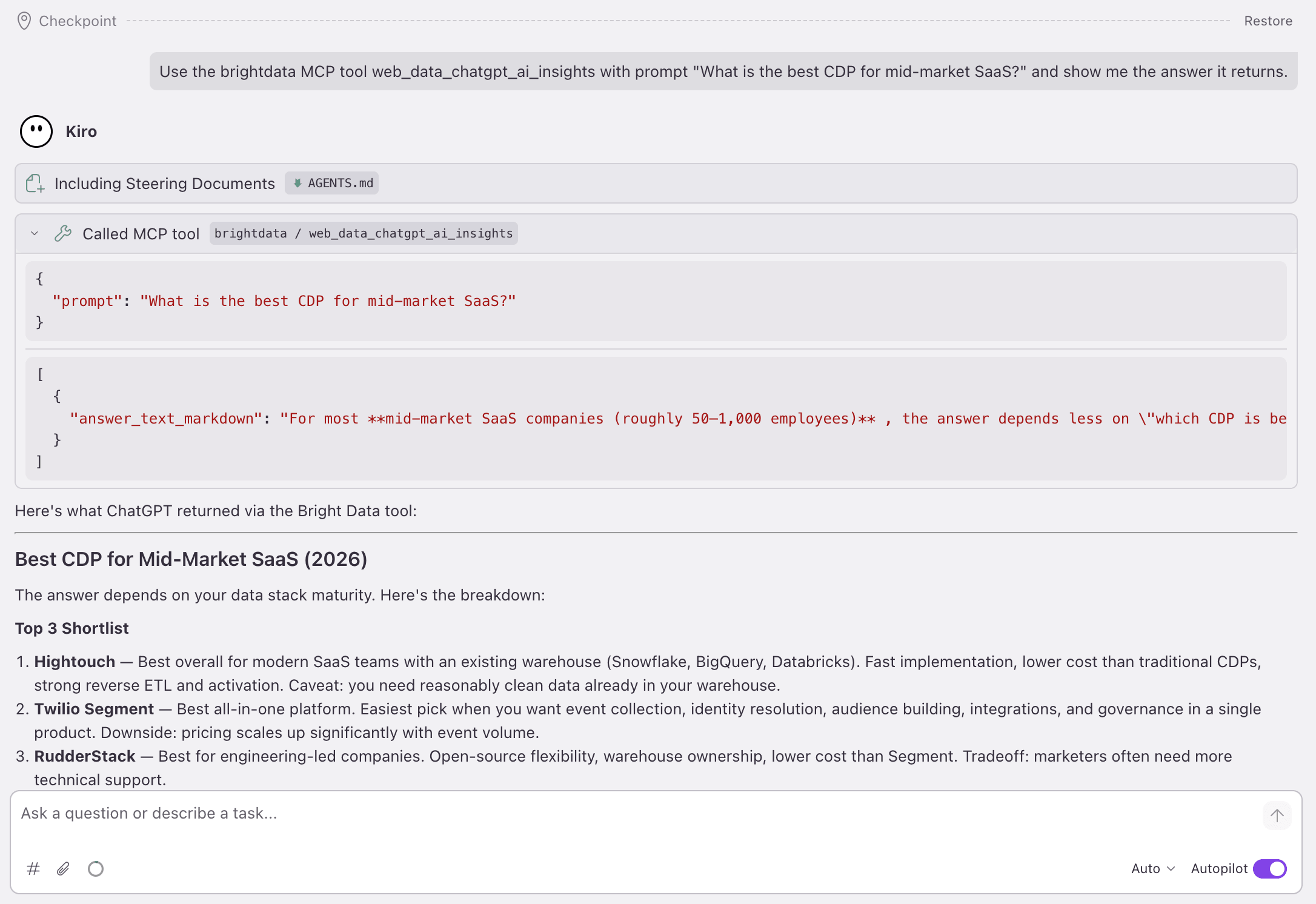
Here is the live response shape, captured directly from both web_data_chatgpt_ai_insights and web_data_perplexity_ai_insights with the prompt “What is the best CDP for mid-market SaaS?”, and both returned the same single-field shape (Grok’s async call ran past a 9-minute poll):
{
  "answer_text_markdown": "For most **mid-market SaaS companies (roughly 50,1,000 employees)**, the answer depends less on \"which CDP is best\" than on your data-stack maturity. My ranking: 1) [Hightouch](https://hightouch.com?utm_source=chatgpt.com) , warehouse-native; 2) [Twilio Segment](https://segment.com?utm_source=chatgpt.com) , all-in-one; 3) [RudderStack](https://www.rudderstack.com?utm_source=chatgpt.com) , engineering-led..."
}
The tool returns the model’s answer as a single answer_text_markdown string, not a pre-parsed brand ranking. The brand-extraction step is yours. A naive first approach is a single includes() check against the markdown, but it misses casing, name variants, and your brand appearing inside another word. For any real use, pass the markdown to a cheap LLM call and ask for the ranked list.
The alert loop and who installs it
The alert loop works like this: it stores 1 answer_text_markdown row per engine per day, then it extracts whether (and where) your brand appears, then it alerts you when your brand disappears from an answer it used to be in, and finally it renders a 3-engine grid of today’s answers with brand-presence flags.
One caveat before you wire up alerts: LLM answers are non-deterministic, so the same prompt can rank brands differently from one run to the next. A single daily fetch is one sample, not a stable signal, so a brand dropping out for one day is often noise, not a real change. Sample each prompt a few times, or smooth over several days, before you treat a drop as real.
Who installs this: This is for B2B SaaS marketing and DevRel teams, brand-monitoring agencies adding LLM coverage, and AI/ML researchers tracking model-output drift. Usage works out to 5 prompts across 3 engines polled daily, which is about 450 calls/month, or roughly $0.68/month at pay-as-you-go rates.
Use case 3: LinkedIn lead-gen pipeline
The B2B problem is that you have to track 50 sales prospects (or candidates, or partner-program contacts) for job changes, company moves, or promotions. The usual solution is LinkedIn Sales Navigator plus a manual review workflow. The structured-data option is 1 MCP call per prospect, polled daily.
Prompt to Kiro: “Watch these 50 LinkedIn prospects for job changes, company moves, or promotions. Notify my CRM when anything changes.”
The LinkedIn tools and what they return
Pro tools for this use case. Phase 2 would pick the LinkedIn cluster inside the social group: web_data_linkedin_person_profile, web_data_linkedin_company_profile, web_data_linkedin_job_listings, and web_data_linkedin_people_search.
Here is what Phase 3 generates (field names verified live against the tool):
// src/scrapers/linkedin_prospects.ts (excerpt)
import { callMcpTool } from "@/lib/mcp-client"; // Kiro generates this MCP-client call in Phase 3 , not an installable package

interface ProspectSnapshot {
  url: string;
  current_company_name: string;  // current_company is a nested object; *_name is the string
  position: string;              // job-title field , there is no "current_title"
  location: string;
  followers: number;
}

type Change = { field: string; from: string; to: string };

export const snapshotProspect = (url: string) =>
  callMcpTool("web_data_linkedin_person_profile", { url }) as Promise<ProspectSnapshot>;

// Diff today vs. yesterday; emit a Change for any field that moved.
export function diffProspect(prev: ProspectSnapshot, now: ProspectSnapshot): Change[] {
  return (["current_company_name", "position"] as const)
    .filter((f) => prev[f] !== now[f])
    .map((f) => ({ field: f, from: prev[f], to: now[f] }));
}
The complete record returns 30+ typed fields, including current_company (object), experience[], education[], about, followers, connections, city, country_code, and more.
The CRM notify loop and who installs it
The CRM notify loop works like this: it stores yesterday’s snapshot per prospect, then it runs today’s fetch and diff once per day from a background worker, and then it POSTs changes to your CRM’s webhook (Salesforce, HubSpot, Attio, not Bright Data’s MCP).
Who installs this: This is for B2B sales, recruiting, RevOps, and partner-program managers. Usage works out to 50 prospects polled daily, which is about 1,500 calls/month, or roughly $2.25/month at PAYG.
Use case 4: competitive-intelligence dashboard
The corp-dev and strategy problem is this: teams have to track a watch-list of competitors and acquisition targets for funding rounds, headcount changes, and momentum shifts. The common baseline is a manual Crunchbase-refresh-and-spreadsheet workflow. The structured-data option is 1 MCP call per company, polled weekly.
Prompt to Kiro: “Track these 30 competitors on Crunchbase. Alert me when any raises a round, crosses an employee-count band, or jumps in growth ranking.”
The Crunchbase tool and what it returns
Pro tool picked in Phase 2: The Power picks web_data_crunchbase_company (the business group). Verified live, it returns 93 typed fields per company, including funds_raised, num_funding_rounds, acquisitions, exits, num_employees, cb_rank, growth_score, heat_score, founders, built_with_tech, ipo_status, and region.
Here is what Phase 3 generates:
// src/scrapers/competitor_intel.ts
import { callMcpTool } from "@/lib/mcp-client"; // Kiro generates this MCP-client call in Phase 3 , not an installable package

interface CompanySnapshot {
  name: string;
  num_employees: string;      // band, e.g. "5001-10000"
  cb_rank: number;            // Crunchbase rank (lower = more prominent)
  growth_score: number;       // 0-100
  heat_score: number;         // 0-100 momentum signal
  funds_raised: unknown[];    // array of funding/investment events
  ipo_status: string;         // "private" | "public" | ...
  region: string;
  url: string;
}

type Alert =
  | { kind: "headcount_band"; from: string; to: string }
  | { kind: "new_funding_event"; count: number }
  | { kind: "growth_surge"; from: number; to: number };

// the MCP row arrives untyped, so you map just the fields you track into a typed CompanySnapshot
export async function snapshotCompany(url: string): Promise<CompanySnapshot> {
  const row = await callMcpTool<Record<string, unknown>>("web_data_crunchbase_company", { url });
  return {
    name: String(row.name ?? ""),
    num_employees: String(row.num_employees ?? ""),
    cb_rank: Number(row.cb_rank ?? 0),
    growth_score: Number(row.growth_score ?? 0),
    heat_score: Number(row.heat_score ?? 0),
    funds_raised: Array.isArray(row.funds_raised) ? row.funds_raised : [],
    ipo_status: String(row.ipo_status ?? ""),
    region: String(row.region ?? ""),
    url,
  };
}

export function detectMoves(
  prev: CompanySnapshot, now: CompanySnapshot,
): Alert[] {
  const alerts: Alert[] = [];
  if (now.num_employees !== prev.num_employees) {
    alerts.push({ kind: "headcount_band", from: prev.num_employees, to: now.num_employees });
  }
  if (now.funds_raised.length !== prev.funds_raised.length) {
    alerts.push({ kind: "new_funding_event", count: now.funds_raised.length - prev.funds_raised.length });
  }
  if (now.growth_score - prev.growth_score >= 5) {
    alerts.push({ kind: "growth_surge", from: prev.growth_score, to: now.growth_score });
  }
  return alerts;
}
Live sample. A real call to web_data_crunchbase_company for Stripe returned num_employees: "5001-10000", cb_rank: 300, growth_score: 98, heat_score: 60, ipo_status: "private", region: "California", plus a populated funds_raised array of investment events.
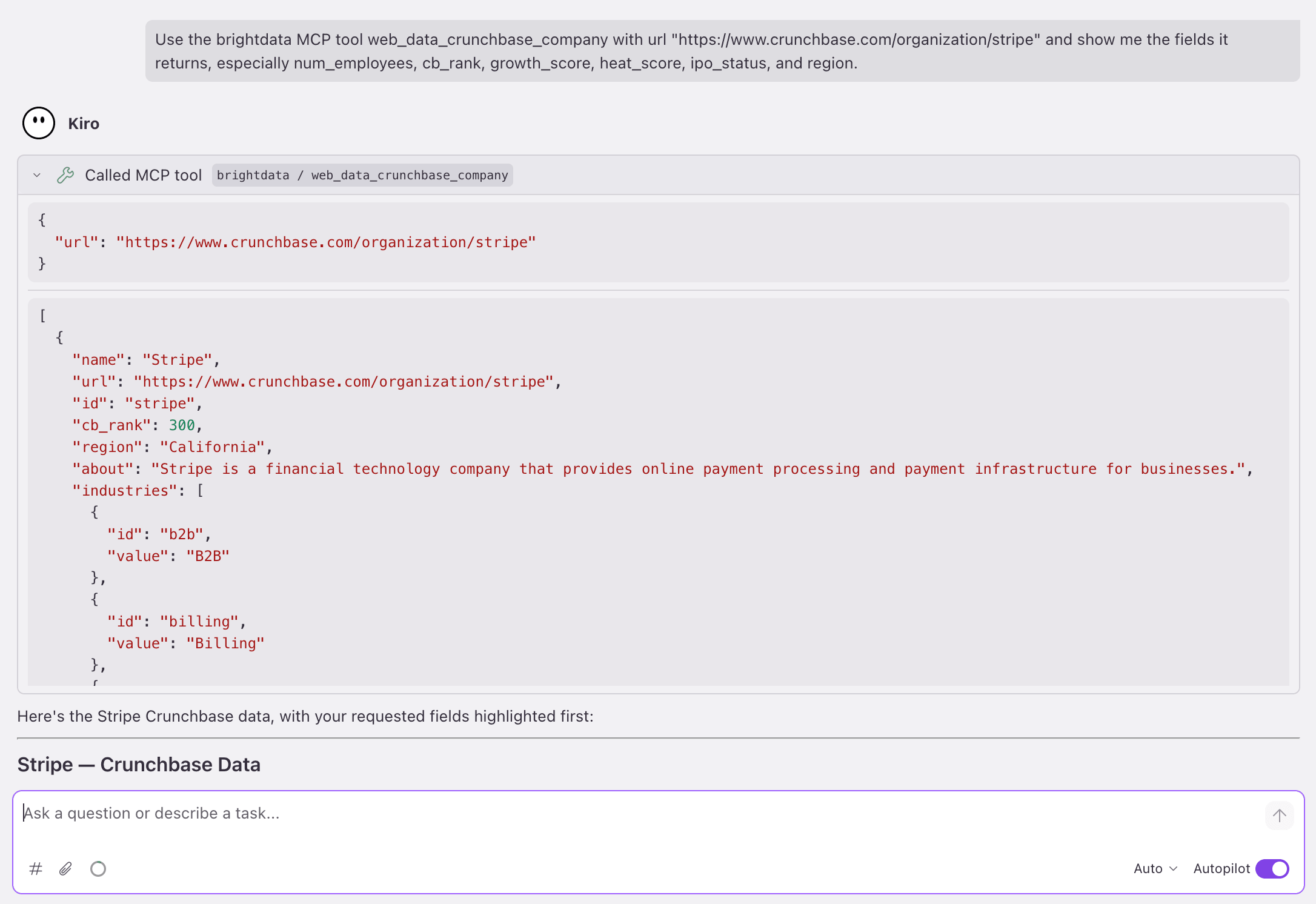
The Power generated the 4 files (the scraper above, the client below, an API route, a dashboard page), and the generated code compiled with zero TypeScript errors. With BRIGHTDATA_API_KEY set, running it against the live MCP (~58 s for the live scrape) returned the Stripe record above and rendered this:
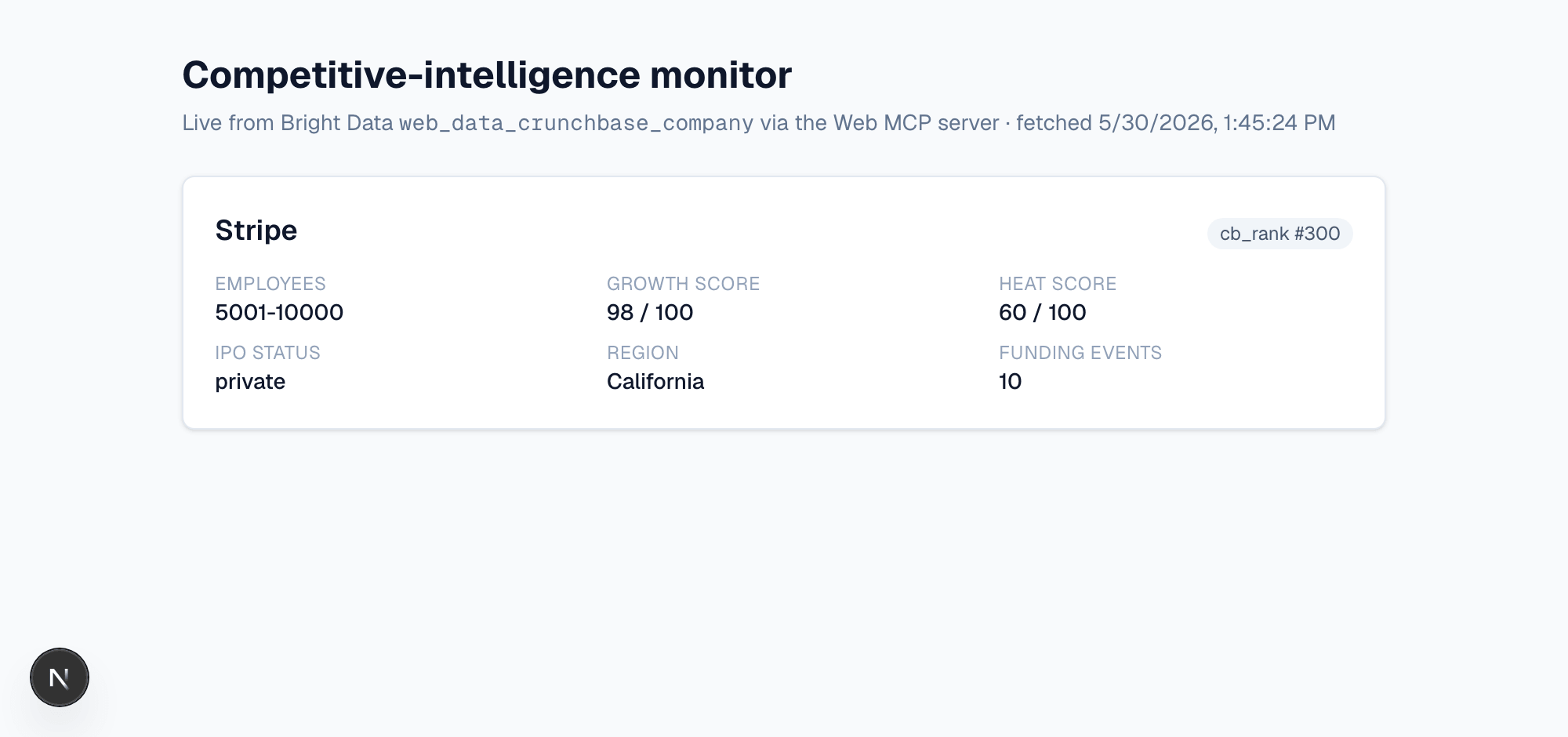
The home route (/), rendered live from the same web_data_crunchbase_company call that returned the Stripe record above.
To run it yourself, clone the example repo: git clone https://github.com/triposat/crunchbase-intel-demo && cd crunchbase-intel-demo && npm install && cp .env.example .env.local, paste a Pro-enabled token, and run npm run dev. (&pro=1 is already in the repo’s mcp-client.ts; you just need an account with Pro mode enabled.)
The shared MCP client
The callMcpTool the scraper imports is a thin MCP client the Power generates in Phase 3 , the same one the GEO and LinkedIn modules are written to reuse. Here it is in full:
// src/lib/mcp-client.ts , the client callMcpTool resolves to
const MCP_URL = `https://mcp.brightdata.com/mcp?token=${process.env.BRIGHTDATA_API_KEY}&pro=1`;

async function post(body: unknown, sessionId?: string) {
  const headers: Record<string, string> = {
    "Content-Type": "application/json",
    Accept: "application/json, text/event-stream",
  };
  if (sessionId) headers["mcp-session-id"] = sessionId;
  return fetch(MCP_URL, { method: "POST", headers, body: JSON.stringify(body) });
}

// the server replies as SSE: one JSON object per `data:` line
function parseSse(text: string) {
  if (!text.includes("data:")) {
    try { return [JSON.parse(text)]; }
    catch { throw new Error(`MCP returned a non-JSON response: ${text.slice(0, 120)}`); }
  }
  return text.split("\n").filter((l) => l.startsWith("data:"))
    .map((l) => { try { return JSON.parse(l.slice(5).trim()); } catch { return null; } })
    .filter(Boolean);
}

export async function callMcpTool<T = unknown>(name: string, args: Record<string, unknown>): Promise<T> {
  // 1. initialize , the session id comes back as a response header
  const init = await post({ jsonrpc: "2.0", id: 1, method: "initialize",
    params: { protocolVersion: "2024-11-05", capabilities: {}, clientInfo: { name: "intel", version: "1.0" } } });
  if (!init.ok) throw new Error(`MCP connection failed: HTTP ${init.status} ${init.statusText}. Check BRIGHTDATA_API_KEY.`);
  const sessionId = init.headers.get("mcp-session-id") ?? undefined;
  await init.text();

  // 2. confirm initialized, then 3. call the tool
  await post({ jsonrpc: "2.0", method: "notifications/initialized", params: {} }, sessionId);
  const res = await post({ jsonrpc: "2.0", id: 2, method: "tools/call", params: { name, arguments: args } }, sessionId);
  if (!res.ok) throw new Error(`MCP tool call failed: HTTP ${res.status} ${res.statusText}.`);

  const reply = parseSse(await res.text()).find((m: { id?: number }) => m?.id === 2);
  if (reply?.error) throw new Error(`MCP error: ${reply.error.message}`);
  const text = reply?.result?.content?.find((c: { type: string }) => c.type === "text")?.text;
  const payload = text ? JSON.parse(text) : reply?.result;
  return (Array.isArray(payload) ? payload[0] : payload) as T;
}
Put that file in src/lib/, and the Crunchbase scraper above is ready to run.
The watch loop and who installs it
The watch loop works like this: it stores last week’s snapshot per company, then it diffs this week’s snapshot against last week’s, and then it posts any funding event, headcount-band crossing, or growth-score surge to your strategy Slack channel. Usage works out to 30 companies polled weekly, which is about 120 calls/month, or roughly $0.18/month at PAYG.
Who installs this: This is for corporate development, competitive intelligence, strategy, VC/PE deal teams, and sales reps building account intel. These teams need depth of data rather than retail volume, because they want 93 structured fields per company that they’d otherwise gather manually.
Scale all 4 use cases to production
The generated scrapers compile with zero TypeScript errors and run against the live API (the retail and Crunchbase runs above), with the safeguards above. These changes take them to production scale, adding the background jobs, snapshot tables, and volume settings that real workloads need:
- Switch to Pro tools. Append
&pro=1to the MCP URL in.kiro/settings/mcp.jsonso it readshttps://mcp.brightdata.com/mcp?token=<your-token>&pro=1, and restart the server. (Note the leading&, becausetoken=already opens the query string.) Phase 2 picksweb_data_*tools instead of dataset triggers. Polling typically drops to seconds, and parsing becomes a typed-field read. The flag goes in 2 places:.kiro/settings/mcp.json, so Kiro’s agent sees the Pro tools, and the generated app’ssrc/lib/mcp-client.ts, so the running app calls them. - Set your Web Unlocker zone. The Web Unlocker path reads
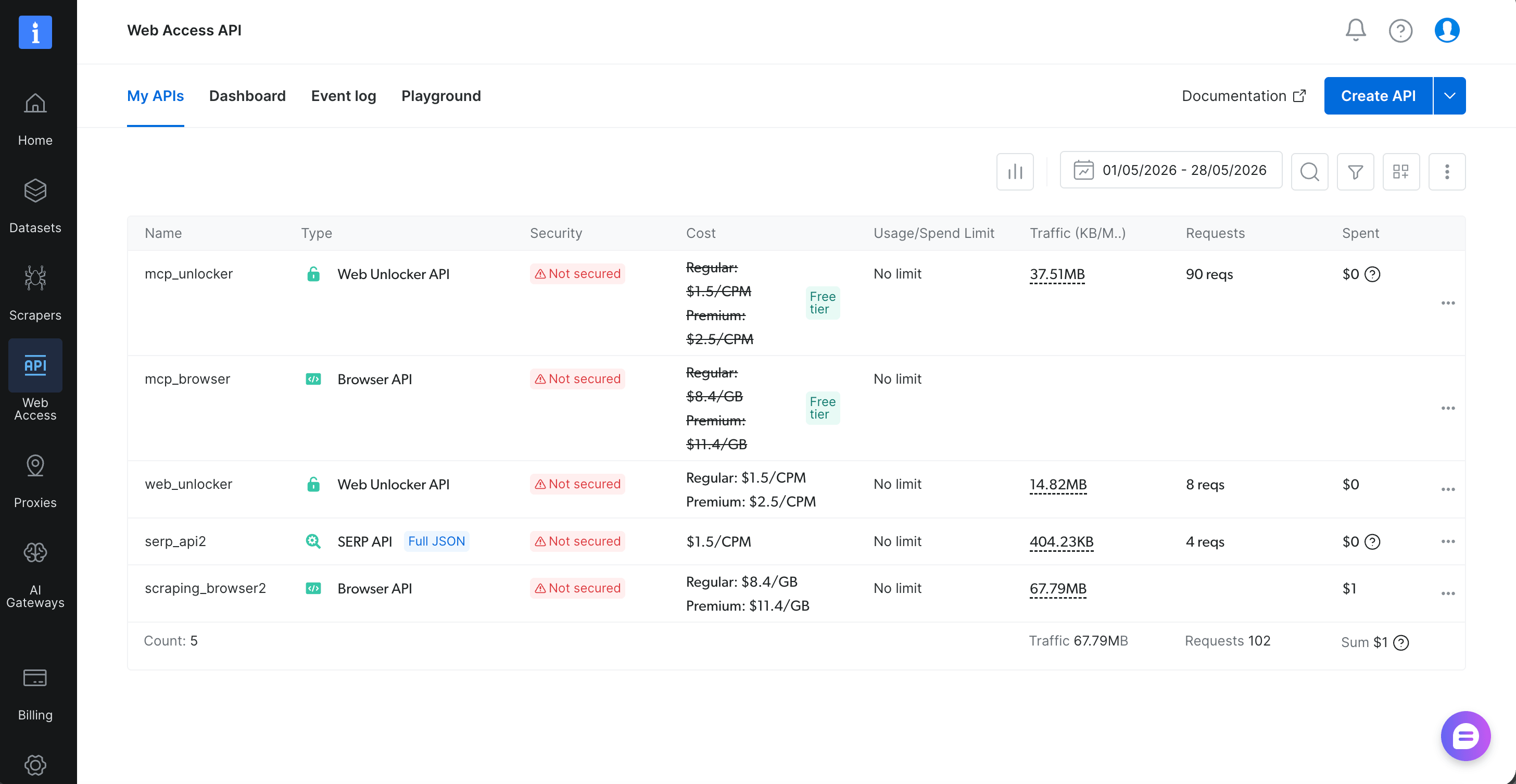
BRIGHTDATA_UNLOCKER_ZONE, and your zone has an account-specific name (web_unlocker,mcp_unlocker,web_unlocker1, etc.). Find the exact name in your Web Access dashboard and set it in.env.local. A mismatch returns HTTP 400 withzone not found. On a brand-new account the table may be empty until the MCP server auto-provisions a zone on its first call. If 2 zones appear, pick the one marked Free tier. - Move polling off the request path. In our runs, a single-record
web_data_*trigger returned in roughly 10,90 s and multi-record in several minutes. Latency varies, and LLM-answer tools like Grok can run well past the poll window. The MCP server keeps polling for several minutes before timing out (thePOLLING_TIMEOUTenv var sets the ceiling). For production, run triggers from a background worker (Vercel Cron, Inngest, Trigger.dev) and write to a snapshot table. The dashboard reads from the table, not the live scrape. (The direct Dataset API outside MCP supports webhook delivery if you need push instead of poll, set with thenotifyandendpointparameters. See Bright Data’s trigger-a-collection docs.) - Batch + scope.
scrape_batchandsearch_engine_batchrun multiple URLs per call, cutting per-URL token overhead. Appending&groups=ecommerce,social,geo,businessto the MCP URL loads only the tool groups your use case needs, shrinking the tool-list handshake the agent has to read. The 11 groups areecommerce,social,finance,business,research,app_stores,travel,geo,code,browser, andadvanced_scraping. - Cross-stack templates. The Power includes 22 production templates: web-framework routes for TS (Next, Express, Fastify, Hono, Koa) and Python (FastAPI, Flask, Django), agent-SDK tools (Anthropic, OpenAI, LangChain, Vercel AI SDK, Mastra), and generic modules (TS fetch + Cheerio, Python stdlib + BeautifulSoup, and a universal
curl.sh). Kiro detects 7 languages by manifest and picks the match, but first-class codegen is TS and Python only. Go, Rust, Ruby, Java, and PHP are detected and routed to thecurl.shfallback. - Search-driven URLs, not hardcoded. Hardcoded URLs can break on listing-ID rotation, where a stale ID still resolves but points at the wrong product (the PS5-vs-headphones failure from Use case 1 that the recovery loop can’t catch). The built-in fix is to trigger datasets in discovery mode instead of by URL. Swap the dataset-trigger body from
[{ url }]to a discovery query (discover_by=keyword,category_url, orbest_sellers_url), so Bright Data finds the current product. See Bright Data’s trigger-a-collection docs for the discover request shape. - Login flows + steering. Browser API handles auth-walled sites with an ARIA-snapshot interface (Playwright-MCP-style refs) designed for agent use. Add
.kiro/steering/<your-domain>.mdto your workspace to override the Power’s built-in steering without forking. Use official APIs when the source publishes them.
With &pro=1 set, reopening the MCP panel shows the full tool catalog:
Next steps
One Power drives all 4 use cases from a single MCP endpoint, so you spend your time on integration and alerting logic instead of scraper plumbing.
Build the retail tracker yourself. Paste https://github.com/brightdata/kiro-powers/tree/main/brightdata-scrape into Kiro’s Add Custom Power → Import power from GitHub, then run the Use case 1 prompt. In our run this took 20,30 minutes, used zero Pro spend, and confirmed both the install and the 4-phase workflow. In a hurry? Clone the finished app instead: git clone https://github.com/triposat/retail-price-tracker && cd retail-price-tracker && npm install && cp .env.example .env.local, add a free Bright Data token, and run npm run dev.
Then scale by re-prompting, not rewriting. Add &pro=1 in .kiro/settings/mcp.json and run any of the 3 Pro-tier prompts above (GEO, LinkedIn, or Crunchbase intel) at pay-as-you-go rates. No new code, just a new prompt against the same Power.
Further reading: the Bright Data MCP page for the full tool list, and Bright Data’s Kiro chat workflow article for the same tools used interactively.
Frequently asked questions
What’s free, and what’s paid?
Free: you get 5 base tools in the Bright Data MCP (search_engine, search_engine_batch, scrape_as_markdown, scrape_batch, and discover), with 5,000 requests/month at no cost (per Bright Data’s MCP README). Paid: the Pro web_data* tools cost money, and so does the dataset-trigger path the retail build uses, which calls Bright Data’s Datasets API directly. That path bills on its own, with a ~1,000-record free trial first and then ~$1.50/1,000 records, so scraping a couple of products per run usually costs you a fraction of a cent.
What do the Pro tools cost?
The Pro web_data_* tools cost $1.00,$1.50 per 1,000 results depending on your plan (Bright Data’s pricing page):
| Plan | Price per 1,000 results |
|---|---|
| Pay-As-You-Go | $1.50 |
| Starter | $1.30 |
| Professional | $1.10 |
| Business | $1.00 |
For single-entity Pro calls , 1 LLM-answer fetch, 1 LinkedIn profile, or 1 Crunchbase company per call , the monthly estimates assume 1 call = 1 billed result, which matches Bright Data’s usage-based billing for single-record web_data_* tools. For bulk-search tools like web_data_amazon_product_search, the per-result count scales with the items returned. Use the limit parameter while prototyping and verify current rates against your account before you budget.
Browser API bills separately at $5,8/GB bandwidth. If you add an AI-agent layer, then Anthropic, OpenAI, or Google pricing also applies, per LLM call.
Does this work with GPT or Gemini?
Yes, the brightdata-scrape Power works with OpenAI (GPT) and Google (Gemini), not just Anthropic. When you prompt Kiro for an agent layer (“add an /api/agent route that uses these scrapers as tools”), it picks the matching tool template (Anthropic SDK, OpenAI SDK, LangChain, Mastra, or Vercel AI SDK) based on your project’s deps. Swap anthropic(...) for openai(...) or google(...) in the generated route, then adjust the provider’s client setup and model ID to match.
Can it scrape sites that require login?
The brightdata-scrape Power can scrape login-walled sites, but not from the dataset-trigger default. Switch to the Browser API for stateful sessions, and add your own credential storage. The Power’s Phase 2 ladder escalates to the Browser API for login and click flows.
Can I run all 4 use cases in one project?
Yes. Each use case is a self-contained module (its own src/scrapers/ file, API route, and view) that reuses the same MCP server, so all 4 can coexist in one Next.js project. This guide doesn’t combine them into one app (the 2 live builds, retail and Crunchbase, are separate demo repos, and GEO and LinkedIn are shown as prompts), but nothing stops you from doing so.
Can I use this from Claude Code or Cursor?
For Claude Code or Cursor, use Bright Data’s Claude Skills instead of the brightdata-scrape Kiro Power. Bright Data ships scraping Skills at github.com/brightdata/skills (such as scraper-builder and scrape) that run in Claude Code, Cursor, or any agent host that supports Skills. They cover much the same scraping jobs on the same Bright Data infrastructure, but they’re packaged as Skills plus the bdata CLI rather than this Power’s MCP-and-Next.js codegen, so the install and the generated code differ.


Technical Writer
 5 years experience
Satyam Tripathi helps SaaS and data startups turn complex tech into actionable content, boosting developer adoption and user understanding.