In this guide, you will learn:
- What Third-Party Risk Management (TPRM) is and why manual screening fails
- How to build an autonomous AI agent that investigates vendors for adverse media
- How to integrate Bright Data’s SERP API and Web Unlocker for reliable and up-to-date data collection
- How to use OpenHands SDK for agentic script generation and OpenAI for risk analysis
- How to enhance the agent with Browser API for complex scenarios like court registries
Let’s get started!
The Problem with Manual Vendor Screening
Enterprise compliance teams face an impossible task: monitoring hundreds of third-party vendors for risk signals across the entire web. Traditional approaches involve:
- Manual Google searches for each vendor name combined with keywords like “lawsuit,” “bankruptcy,” or “fraud”
- Hitting paywalls and CAPTCHAs when trying to access news articles and court records
- Inconsistent documentation with no standardized process for recording findings
- No ongoing monitoring, vendor screening happens once during onboarding, then never again
This approach fails for three critical reasons:
- Scale: A single analyst can thoroughly investigate maybe 5-10 vendors per day
- Access: Protected sources like court registries and premium news sites block automated access
- Continuity: Point-in-time assessments miss risks that emerge after onboarding
The Solution: An Autonomous TPRM Agent
A TPRM agent automates the entire vendor investigation workflow using three specialized layers:
- Discovery (SERP API): The agent searches Google for red flags like lawsuits, regulatory actions, and financial distress
- Access (Web Unlocker): When relevant results are behind paywalls or CAPTCHAs, the agent bypasses these barriers to extract full content
- Action (OpenAI + OpenHands SDK): The agent analyzes the content for risk severity using OpenAI, then uses OpenHands SDK to generate Python monitoring scripts that check for new adverse media daily
This system transforms hours of manual research into minutes of automated analysis.
Prerequisites
Before you begin, make sure you have:
- Python 3.12 or higher (required for OpenHands SDK)
- A Bright Data account with API access (free tier available)
- An OpenAI API key for risk analysis
- An OpenHands Cloud account or your own LLM API key for agentic script generation
- Basic familiarity with Python and REST APIs
Project Architecture
The TPRM agent follows a three-stage pipeline:
┌─────────────────┐     ┌─────────────────┐     ┌─────────────────┐
│   DISCOVERY     │────▶│     ACCESS      │────▶│     ACTION      │
│   (SERP API)    │     │ (Web Unlocker)  │     │ (OpenAI + SDK)  │
└─────────────────┘     └─────────────────┘     └─────────────────┘
        │                       │                       │
   Search Google          Bypass paywalls         Analyze risks
   for red flags          and CAPTCHAs           Generate scripts
Create the following project structure:
tprm-agent/
├── src/
│   ├── __init__.py
│   ├── config.py         # Configuration
│   ├── discovery.py      # SERP API integration
│   ├── access.py         # Web Unlocker integration
│   ├── actions.py        # OpenAI + OpenHands SDK
│   ├── agent.py          # Main orchestration
│   └── browser.py        # Browser API (enhancement)
├── api/
│   └── main.py           # FastAPI endpoints
├── scripts/
│   └── generated/        # Auto-generated monitoring scripts
├── .env
├── requirements.txt
└── README.md
Environment Setup
Create a virtual environment and install the required dependencies:
python -m venv venv
source venv/bin/activate  # Windows: venv\Scripts\activate

pip install requests fastapi uvicorn python-dotenv pydantic openai beautifulsoup4 playwright openhands-sdk openhands-tools
Create a .env file to store your API credentials:
# Bright Data API Token (for SERP API)
BRIGHT_DATA_API_TOKEN=your_api_token

# Bright Data SERP Zone
BRIGHT_DATA_SERP_ZONE=your_serp_zone_name

# Bright Data Web Unlocker credentials
BRIGHT_DATA_CUSTOMER_ID=your_customer_id
BRIGHT_DATA_UNLOCKER_ZONE=your_unlocker_zone_name
BRIGHT_DATA_UNLOCKER_PASSWORD=your_zone_password

# OpenAI (for risk analysis)
OPENAI_API_KEY=your_openai_api_key

# OpenHands (for agentic script generation)
# Use OpenHands Cloud: openhands/claude-sonnet-4-5-20260929
# Or bring your own: anthropic/claude-sonnet-4-5-20260929
LLM_API_KEY=your_llm_api_key
LLM_MODEL=openhands/claude-sonnet-4-5-20260929
Bright Data Configuration
Step 1: Create Your Bright Data Account
Sign up at Bright Data and navigate to the dashboard.
Step 2: Configure SERP API Zone
- Go to Proxies & Scraping Infrastructure
- Click Add and select SERP API
- Name your zone (e.g.,
tprm_serp) - Copy your zone name and note your API token from Settings > API tokens
The SERP API returns structured search results from Google without getting blocked. Add brd_json=1 to your search URL for parsed JSON output.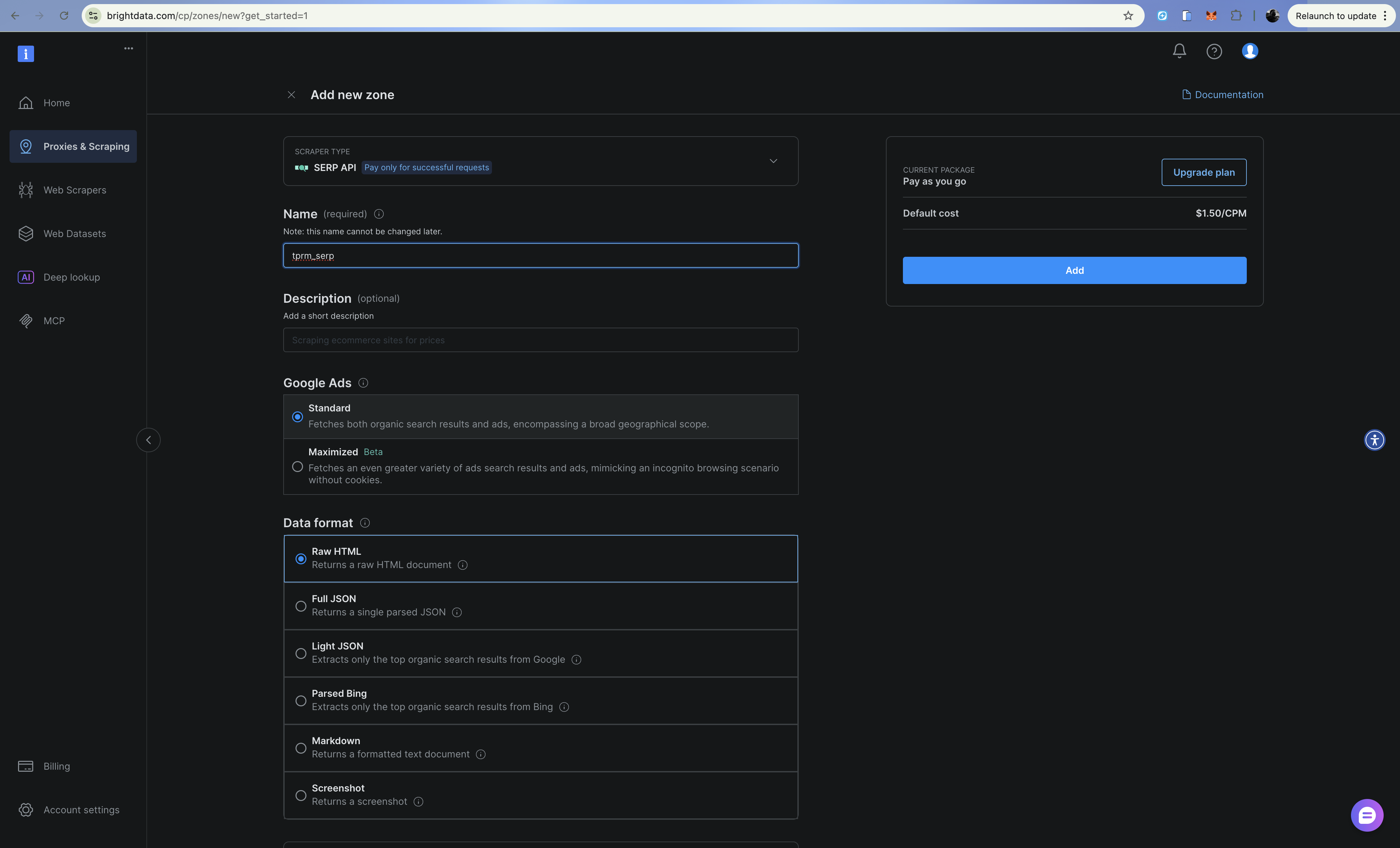
Step 3: Configure Web Unlocker Zone
- Click Add and select Web Unlocker
- Name your zone (e.g.,
tprm_unlocker) - Copy your zone credentials (username format:
brd-customer-CUSTOMER_ID-zone-ZONE_NAME)
Web Unlocker handles CAPTCHAs, fingerprinting, and IP rotation automatically through a proxy endpoint.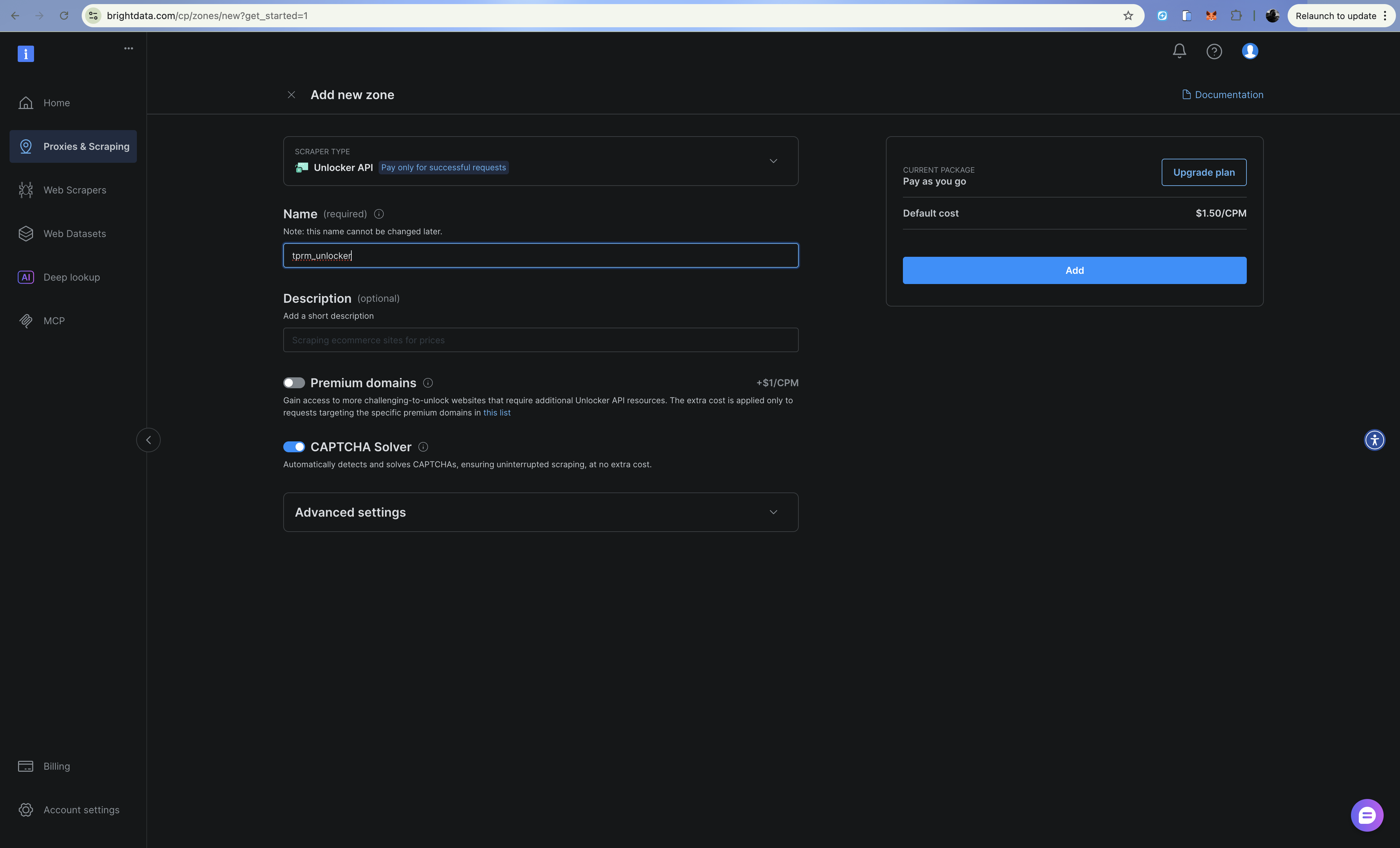
Building the Discovery Layer (SERP API)
The discovery layer searches Google for adverse media about vendors using the SERP API. Create src/discovery.py:
import requests
from typing import Optional
from dataclasses import dataclass
from urllib.parse import quote_plus
from config import settings


@dataclass
class SearchResult:
    title: str
    url: str
    snippet: str
    source: str


class DiscoveryClient:
    """Search for adverse media using Bright Data SERP API (Direct API)."""

    RISK_CATEGORIES = {
        "litigation": ["lawsuit", "litigation", "sued", "court case", "legal action"],
        "financial": ["bankruptcy", "insolvency", "debt", "financial trouble", "default"],
        "fraud": ["fraud", "scam", "investigation", "indictment", "scandal"],
        "regulatory": ["violation", "fine", "penalty", "sanctions", "compliance"],
        "operational": ["recall", "safety issue", "supply chain", "disruption"],
    }

    def __init__(self):
        self.api_url = "https://api.brightdata.com/request"
        self.headers = {
            "Content-Type": "application/json",
            "Authorization": f"Bearer {settings.BRIGHT_DATA_API_TOKEN}",
        }

    def _build_queries(self, vendor_name: str, categories: Optional[list] = None) -> list[str]:
        """Build search queries for each risk category."""
        categories = categories or list(self.RISK_CATEGORIES.keys())
        queries = []

        for category in categories:
            keywords = self.RISK_CATEGORIES.get(category, [])
            keyword_str = " OR ".join(keywords)
            query = f'"{vendor_name}" ({keyword_str})'
            queries.append(query)

        return queries

    def search(self, query: str) -> list[SearchResult]:
        """Execute a single search query using Bright Data SERP API."""
        try:
            # Build Google search URL with brd_json=1 for parsed JSON
            encoded_query = quote_plus(query)
            google_url = f"https://www.google.com/search?q={encoded_query}&hl=en&gl=us&brd_json=1"

            payload = {
                "zone": settings.BRIGHT_DATA_SERP_ZONE,
                "url": google_url,
                "format": "raw",
            }

            response = requests.post(
                self.api_url,
                headers=self.headers,
                json=payload,
                timeout=30,
            )
            response.raise_for_status()
            data = response.json()

            results = []
            organic = data.get("organic", [])

            for item in organic:
                results.append(
                    SearchResult(
                        title=item.get("title", ""),
                        url=item.get("link", ""),
                        snippet=item.get("description", ""),
                        source=item.get("displayed_link", ""),
                    )
                )
            return results

        except Exception as e:
            print(f"Search error: {e}")
            return []

    def discover_adverse_media(
        self,
        vendor_name: str,
        categories: Optional[list] = None,
    ) -> dict[str, list[SearchResult]]:
        """Search for adverse media across all risk categories."""
        queries = self._build_queries(vendor_name, categories)
        category_names = categories or list(self.RISK_CATEGORIES.keys())

        categorized_results = {}
        for category, query in zip(category_names, queries):
            print(f"  Searching: {category}...")
            results = self.search(query)
            categorized_results[category] = results

        return categorized_results

    def filter_relevant_results(
        self, results: dict[str, list[SearchResult]], vendor_name: str
    ) -> dict[str, list[SearchResult]]:
        """Filter out irrelevant results."""
        filtered = {}
        vendor_lower = vendor_name.lower()

        for category, items in results.items():
            relevant = []
            for item in items:
                if (
                    vendor_lower in item.title.lower()
                    or vendor_lower in item.snippet.lower()
                ):
                    relevant.append(item)
            filtered[category] = relevant

        return filtered
The SERP API returns structured JSON with organic results, making it easy to parse titles, URLs, and snippets for each search result.
Building the Access Layer (Web Unlocker)
When the discovery layer finds relevant URLs, the access layer retrieves the full content using Web Unlocker API. Create src/access.py:
import requests
from bs4 import BeautifulSoup
from dataclasses import dataclass
from typing import Optional
from config import settings


@dataclass
class ExtractedContent:
    url: str
    title: str
    text: str
    publish_date: Optional[str]
    author: Optional[str]
    success: bool
    error: Optional[str] = None


class AccessClient:
    """Access protected content using Bright Data Web Unlocker (API-based)."""

    def __init__(self):
        self.api_url = "https://api.brightdata.com/request"
        self.headers = {
            "Content-Type": "application/json",
            "Authorization": f"Bearer {settings.BRIGHT_DATA_API_TOKEN}",
        }

    def fetch_url(self, url: str) -> ExtractedContent:
        """Fetch and extract content from a URL using Web Unlocker API."""
        try:
            payload = {
                "zone": settings.BRIGHT_DATA_UNLOCKER_ZONE,
                "url": url,
                "format": "raw",
            }

            response = requests.post(
                self.api_url,
                headers=self.headers,
                json=payload,
                timeout=60,
            )
            response.raise_for_status()

            # Web Unlocker API returns the HTML directly
            html_content = response.text
            content = self._extract_content(html_content, url)
            return content

        except requests.Timeout:
            return ExtractedContent(
                url=url,
                title="",
                text="",
                publish_date=None,
                author=None,
                success=False,
                error="Request timed out",
            )
        except Exception as e:
            return ExtractedContent(
                url=url,
                title="",
                text="",
                publish_date=None,
                author=None,
                success=False,
                error=str(e),
            )

    def _extract_content(self, html: str, url: str) -> ExtractedContent:
        """Extract article content from HTML."""
        soup = BeautifulSoup(html, "html.parser")

        # Remove unwanted elements
        for element in soup(["script", "style", "nav", "footer", "header", "aside"]):
            element.decompose()

        # Extract title
        title = ""
        if soup.title:
            title = soup.title.string or ""
        elif soup.find("h1"):
            title = soup.find("h1").get_text(strip=True)

        # Extract main content
        article = soup.find("article") or soup.find("main") or soup.find("body")
        text = article.get_text(separator="\n", strip=True) if article else ""

        # Limit text length
        text = text[:10000] if len(text) > 10000 else text

        # Try to extract publish date
        publish_date = None
        date_meta = soup.find("meta", {"property": "article:published_time"})
        if date_meta:
            publish_date = date_meta.get("content")

        # Try to extract author
        author = None
        author_meta = soup.find("meta", {"name": "author"})
        if author_meta:
            author = author_meta.get("content")

        return ExtractedContent(
            url=url,
            title=title,
            text=text,
            publish_date=publish_date,
            author=author,
            success=True,
        )

    def fetch_multiple(self, urls: list[str]) -> list[ExtractedContent]:
        """Fetch multiple URLs sequentially."""
        results = []
        for url in urls:
            print(f"  Fetching: {url[:60]}...")
            content = self.fetch_url(url)
            if not content.success:
                print(f"  Error: {content.error}")
            results.append(content)
        return results
Web Unlocker automatically handles CAPTCHAs, browser fingerprinting, and IP rotation. It simply route your requests through the proxy and takes care of the rest.
Building the Action Layer (OpenAI + OpenHands SDK)
The action layer uses OpenAI to analyze risk severity and OpenHands SDK to generate monitoring scripts that uses Bright Data Web Unlocker API. OpenHands SDK provides agentic capabilities: the agent can reason, edit files, and execute commands to create production-ready scripts.
Create src/actions.py:
import os
import json
from datetime import datetime, UTC
from dataclasses import dataclass, asdict
from openai import OpenAI
from pydantic import SecretStr
from openhands.sdk import LLM, Agent, Conversation, Tool
from openhands.tools.terminal import TerminalTool
from openhands.tools.file_editor import FileEditorTool
from config import settings


@dataclass
class RiskAssessment:
    vendor_name: str
    category: str
    severity: str
    summary: str
    key_findings: list[str]
    sources: list[str]
    recommended_actions: list[str]
    assessed_at: str


@dataclass
class MonitoringScript:
    vendor_name: str
    script_path: str
    urls_monitored: list[str]
    check_frequency: str
    created_at: str


class ActionsClient:
    """Analyze risks using OpenAI and generate monitoring scripts using OpenHands SDK."""

    def __init__(self):
        # OpenAI for risk analysis
        self.openai_client = OpenAI(api_key=settings.OPENAI_API_KEY)

        # OpenHands for agentic script generation
        self.llm = LLM(
            model=settings.LLM_MODEL,
            api_key=SecretStr(settings.LLM_API_KEY),
        )

        self.workspace = os.path.join(os.getcwd(), "scripts", "generated")
        os.makedirs(self.workspace, exist_ok=True)

    def analyze_risk(
        self,
        vendor_name: str,
        category: str,
        content: list[dict],
    ) -> RiskAssessment:
        """Analyze extracted content for risk severity using OpenAI."""
        content_summary = "\n\n".join(
            [f"Source: {c['url']}\nTitle: {c['title']}\nContent: {c['text'][:2000]}" for c in content]
        )

        prompt = f"""Analyze the following content about "{vendor_name}" for third-party risk assessment.

Category: {category}

Content:
{content_summary}

Provide a JSON response with:
{{
    "severity": "low|medium|high|critical",
    "summary": "2-3 sentence summary of findings",
    "key_findings": ["finding 1", "finding 2", ...],
    "recommended_actions": ["action 1", "action 2", ...]
}}

Consider:
- Severity should be based on potential business impact
- Critical = immediate action required (active fraud, bankruptcy filing)
- High = significant risk requiring investigation
- Medium = notable concern worth monitoring
- Low = minor issue or historical matter
"""

        response = self.openai_client.chat.completions.create(
            model="gpt-4o-mini",
            messages=[{"role": "user", "content": prompt}],
            response_format={"type": "json_object"},
        )

        response_text = response.choices[0].message.content
        try:
            result = json.loads(response_text)
        except (json.JSONDecodeError, ValueError):
            result = {
                "severity": "medium",
                "summary": "Unable to parse risk assessment",
                "key_findings": [],
                "recommended_actions": ["Manual review required"],
            }

        return RiskAssessment(
            vendor_name=vendor_name,
            category=category,
            severity=result.get("severity", "medium"),
            summary=result.get("summary", ""),
            key_findings=result.get("key_findings", []),
            sources=[c["url"] for c in content],
            recommended_actions=result.get("recommended_actions", []),
            assessed_at=datetime.now(UTC).isoformat(),
        )

    def generate_monitoring_script(
        self,
        vendor_name: str,
        urls: list[str],
        check_keywords: list[str],
    ) -> MonitoringScript:
        """Generate a Python monitoring script using OpenHands SDK agent."""
        script_name = f"monitor_{vendor_name.lower().replace(' ', '_')}.py"
        script_path = os.path.join(self.workspace, script_name)

        prompt = f"""Create a Python monitoring script at {script_path} that:

1. Checks these URLs daily for new content: {urls[:5]}
2. Looks for these keywords: {check_keywords}
3. Sends an alert (print to console) if new relevant content is found
4. Logs all checks to a JSON file named 'monitoring_log.json'

The script MUST use Bright Data Web Unlocker API to bypass paywalls and CAPTCHAs:
- API endpoint: https://api.brightdata.com/request
- Use environment variable BRIGHT_DATA_API_TOKEN for the Bearer token
- Use environment variable BRIGHT_DATA_UNLOCKER_ZONE for the zone name
- Make POST requests with JSON payload: {{"zone": "zone_name", "url": "target_url", "format": "raw"}}
- Add header: "Authorization": "Bearer <token>"
- Add header: "Content-Type": "application/json"

The script should:
- Load Bright Data credentials from environment variables using python-dotenv
- Use the Bright Data Web Unlocker API for all HTTP requests (NOT plain requests.get)
- Handle errors gracefully with try/except
- Include a main() function that can be run directly
- Support being scheduled via cron
- Store content hashes to detect changes

Write the complete script to {script_path}.
"""

        # Create OpenHands agent with terminal and file editor tools
        agent = Agent(
            llm=self.llm,
            tools=[
                Tool(name=TerminalTool.name),
                Tool(name=FileEditorTool.name),
            ],
        )

        # Run the agent to generate the script
        conversation = Conversation(agent=agent, workspace=self.workspace)
        conversation.send_message(prompt)
        conversation.run()

        return MonitoringScript(
            vendor_name=vendor_name,
            script_path=script_path,
            urls_monitored=urls[:5],
            check_frequency="daily",
            created_at=datetime.now(UTC).isoformat(),
        )

    def export_assessment(self, assessment: RiskAssessment, output_path: str) -> None:
        """Export risk assessment to JSON file."""
        with open(output_path, "w") as f:
            json.dump(asdict(assessment), f, indent=2)
The key advantage of using OpenHands SDK over simple prompt-based code generation is that the agent can iterate on its work, testing the script, fixing errors, and refining until it works correctly.
Agent Orchestration
Now let’s wire everything together. Create src/agent.py:
from dataclasses import dataclass
from datetime import datetime, UTC
from typing import Optional

from discovery import DiscoveryClient, SearchResult
from access import AccessClient, ExtractedContent
from actions import ActionsClient, RiskAssessment, MonitoringScript


@dataclass
class InvestigationResult:
    vendor_name: str
    started_at: str
    completed_at: str
    total_sources_found: int
    total_sources_accessed: int
    risk_assessments: list[RiskAssessment]
    monitoring_scripts: list[MonitoringScript]
    errors: list[str]


class TPRMAgent:
    """Autonomous agent for Third-Party Risk Management investigations."""

    def __init__(self):
        self.discovery = DiscoveryClient()
        self.access = AccessClient()
        self.actions = ActionsClient()

    def investigate(
        self,
        vendor_name: str,
        categories: Optional[list[str]] = None,
        generate_monitors: bool = True,
    ) -> InvestigationResult:
        """Run a complete vendor investigation."""
        started_at = datetime.now(UTC).isoformat()
        errors = []
        risk_assessments = []
        monitoring_scripts = []

        # Stage 1: Discovery (SERP API)
        print(f"[Discovery] Searching for adverse media about {vendor_name}...")
        try:
            raw_results = self.discovery.discover_adverse_media(vendor_name, categories)
            filtered_results = self.discovery.filter_relevant_results(raw_results, vendor_name)
        except Exception as e:
            errors.append(f"Discovery failed: {str(e)}")
            return InvestigationResult(
                vendor_name=vendor_name,
                started_at=started_at,
                completed_at=datetime.now(UTC).isoformat(),
                total_sources_found=0,
                total_sources_accessed=0,
                risk_assessments=[],
                monitoring_scripts=[],
                errors=errors,
            )

        total_sources = sum(len(results) for results in filtered_results.values())
        print(f"[Discovery] Found {total_sources} relevant sources")

        # Stage 2: Access (Web Unlocker)
        print(f"[Access] Extracting content from sources...")
        all_urls = []
        url_to_category = {}
        for category, results in filtered_results.items():
            for result in results:
                all_urls.append(result.url)
                url_to_category[result.url] = category

        try:
            extracted_content = self.access.fetch_multiple(all_urls)
            successful_extractions = [c for c in extracted_content if c.success]
        except Exception as e:
            error_msg = f"Access failed: {str(e)}"
            print(f"[Access] {error_msg}")
            errors.append(error_msg)
            successful_extractions = []

        print(f"[Access] Successfully extracted {len(successful_extractions)} sources")

        # Stage 3: Action - Analyze risks (OpenAI)
        print(f"[Action] Analyzing risks...")
        category_content = {}
        for content in successful_extractions:
            category = url_to_category.get(content.url, "unknown")
            if category not in category_content:
                category_content[category] = []
            category_content[category].append({
                "url": content.url,
                "title": content.title,
                "text": content.text,
            })

        for category, content_list in category_content.items():
            if not content_list:
                continue
            try:
                assessment = self.actions.analyze_risk(vendor_name, category, content_list)
                risk_assessments.append(assessment)
            except Exception as e:
                errors.append(f"Risk analysis failed for {category}: {str(e)}")

        # Stage 3: Action - Generate monitoring scripts
        if generate_monitors and successful_extractions:
            print(f"[Action] Generating monitoring scripts...")
            try:
                urls_to_monitor = [c.url for c in successful_extractions[:10]]
                keywords = [vendor_name, "lawsuit", "bankruptcy", "fraud"]
                script = self.actions.generate_monitoring_script(
                    vendor_name, urls_to_monitor, keywords
                )
                monitoring_scripts.append(script)
            except Exception as e:
                errors.append(f"Script generation failed: {str(e)}")

        completed_at = datetime.now(UTC).isoformat()
        print(f"[Complete] Investigation finished")

        return InvestigationResult(
            vendor_name=vendor_name,
            started_at=started_at,
            completed_at=completed_at,
            total_sources_found=total_sources,
            total_sources_accessed=len(successful_extractions),
            risk_assessments=risk_assessments,
            monitoring_scripts=monitoring_scripts,
            errors=errors,
        )


def main():
    """Example usage."""
    agent = TPRMAgent()
    result = agent.investigate("Acme Corp")

    print(f"\n{'='*50}")
    print(f"Investigation Complete: {result.vendor_name}")
    print(f"Sources Found: {result.total_sources_found}")
    print(f"Sources Accessed: {result.total_sources_accessed}")
    print(f"Risk Assessments: {len(result.risk_assessments)}")
    print(f"Monitoring Scripts: {len(result.monitoring_scripts)}")

    for assessment in result.risk_assessments:
        print(f"\n[{assessment.category.upper()}] Severity: {assessment.severity}")
        print(f"Summary: {assessment.summary}")


if __name__ == "__main__":
    main()
The agent orchestrates all three layers, handling errors gracefully and producing a comprehensive investigation result.
Configuration
Create src/config.py to set up all the secrets and keys we will be needing for the application to run successfully:
import os
from dotenv import load_dotenv

load_dotenv()


class Settings:
    # SERP API
    BRIGHT_DATA_API_TOKEN: str = os.getenv("BRIGHT_DATA_API_TOKEN", "")
    BRIGHT_DATA_SERP_ZONE: str = os.getenv("BRIGHT_DATA_SERP_ZONE", "")

    # Web Unlocker
    BRIGHT_DATA_CUSTOMER_ID: str = os.getenv("BRIGHT_DATA_CUSTOMER_ID", "")
    BRIGHT_DATA_UNLOCKER_ZONE: str = os.getenv("BRIGHT_DATA_UNLOCKER_ZONE", "")
    BRIGHT_DATA_UNLOCKER_PASSWORD: str = os.getenv("BRIGHT_DATA_UNLOCKER_PASSWORD", "")

    # OpenAI (for risk analysis)
    OPENAI_API_KEY: str = os.getenv("OPENAI_API_KEY", "")

    # OpenHands (for agentic script generation)
    LLM_API_KEY: str = os.getenv("LLM_API_KEY", "")
    LLM_MODEL: str = os.getenv("LLM_MODEL", "openhands/claude-sonnet-4-5-20260929")


settings = Settings()
Building the API Layer
Using FastAPI, you will create api/main.py to expose the agent via REST endpoints:
from fastapi import FastAPI, HTTPException, BackgroundTasks
from pydantic import BaseModel
from typing import Optional
import uuid
import sys
sys.path.insert(0, 'src')

from agent import TPRMAgent, InvestigationResult

app = FastAPI(
    title="TPRM Agent API",
    description="Autonomous Third-Party Risk Management Agent",
    version="1.0.0",
)

investigations: dict[str, InvestigationResult] = {}
agent = TPRMAgent()


class InvestigationRequest(BaseModel):
    vendor_name: str
    categories: Optional[list[str]] = None
    generate_monitors: bool = True


class InvestigationResponse(BaseModel):
    investigation_id: str
    status: str
    message: str


@app.post("/investigate", response_model=InvestigationResponse)
def start_investigation(
    request: InvestigationRequest,
    background_tasks: BackgroundTasks,
):
    """Start a new vendor investigation."""
    investigation_id = str(uuid.uuid4())

    def run_investigation():
        result = agent.investigate(
            vendor_name=request.vendor_name,
            categories=request.categories,
            generate_monitors=request.generate_monitors,
        )
        investigations[investigation_id] = result

    background_tasks.add_task(run_investigation)

    return InvestigationResponse(
        investigation_id=investigation_id,
        status="started",
        message=f"Investigation started for {request.vendor_name}",
    )


@app.get("/investigate/{investigation_id}")
def get_investigation(investigation_id: str):
    """Get investigation results."""
    if investigation_id not in investigations:
        raise HTTPException(status_code=404, detail="Investigation not found or still in progress")

    return investigations[investigation_id]


@app.get("/reports/{vendor_name}")
def get_reports(vendor_name: str):
    """Get all reports for a vendor."""
    vendor_reports = [
        result
        for result in investigations.values()
        if result.vendor_name.lower() == vendor_name.lower()
    ]

    if not vendor_reports:
        raise HTTPException(status_code=404, detail="No reports found for this vendor")

    return vendor_reports


@app.get("/health")
def health_check():
    """Health check endpoint."""
    return {"status": "healthy"}
Run the API locally:
python -m uvicorn api.main:app --reloadVisit http://localhost:8000/docs to explore the interactive API documentation.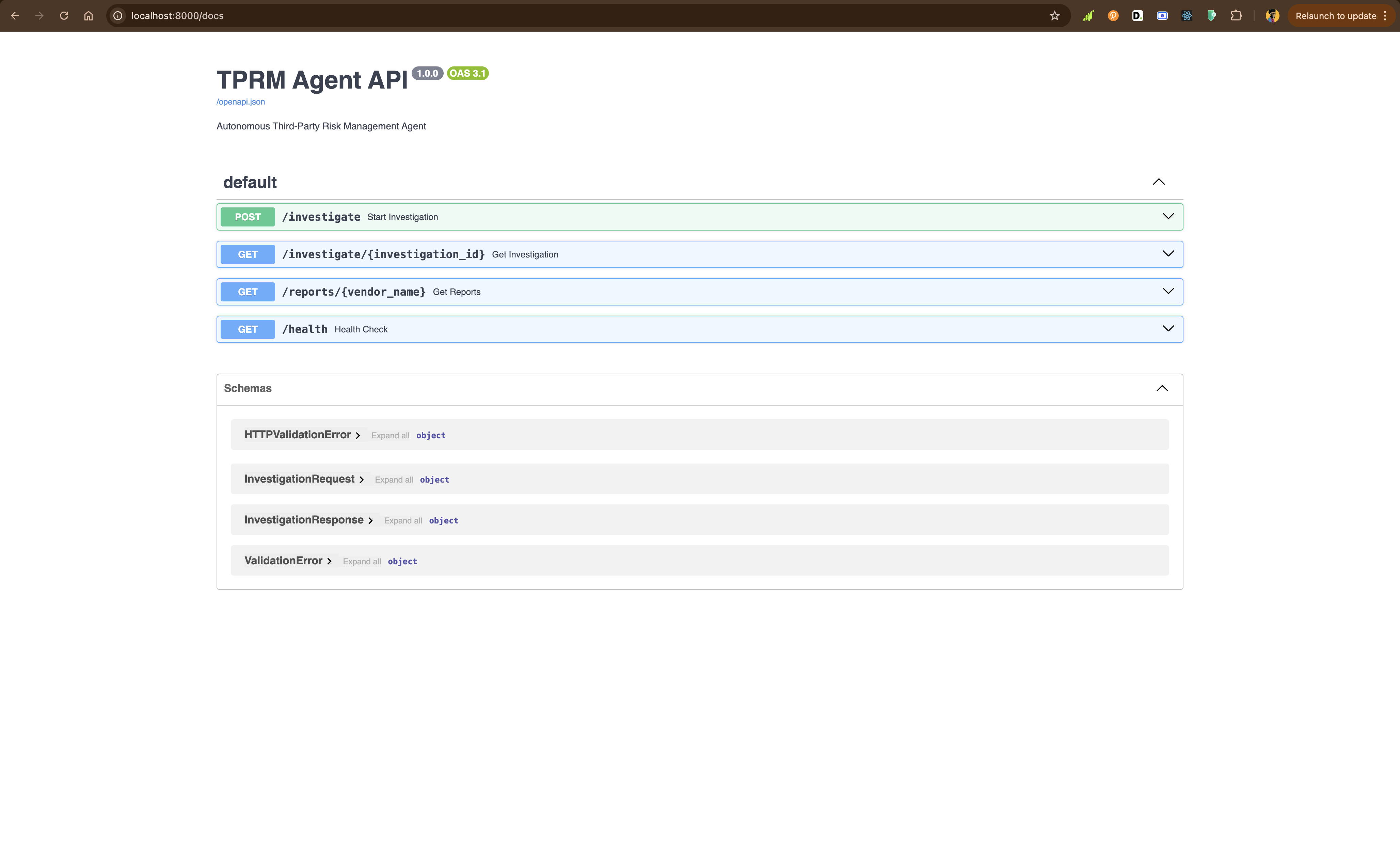
Enhancing with Browser API (Scraping Browser)
For complex scenarios like court registries that require form submissions or JavaScript-heavy sites, you can enhance the agent with Bright Data’s Browser API (Scraping Browser). You can set this up in similar way like Web Unlocker API and SERP API.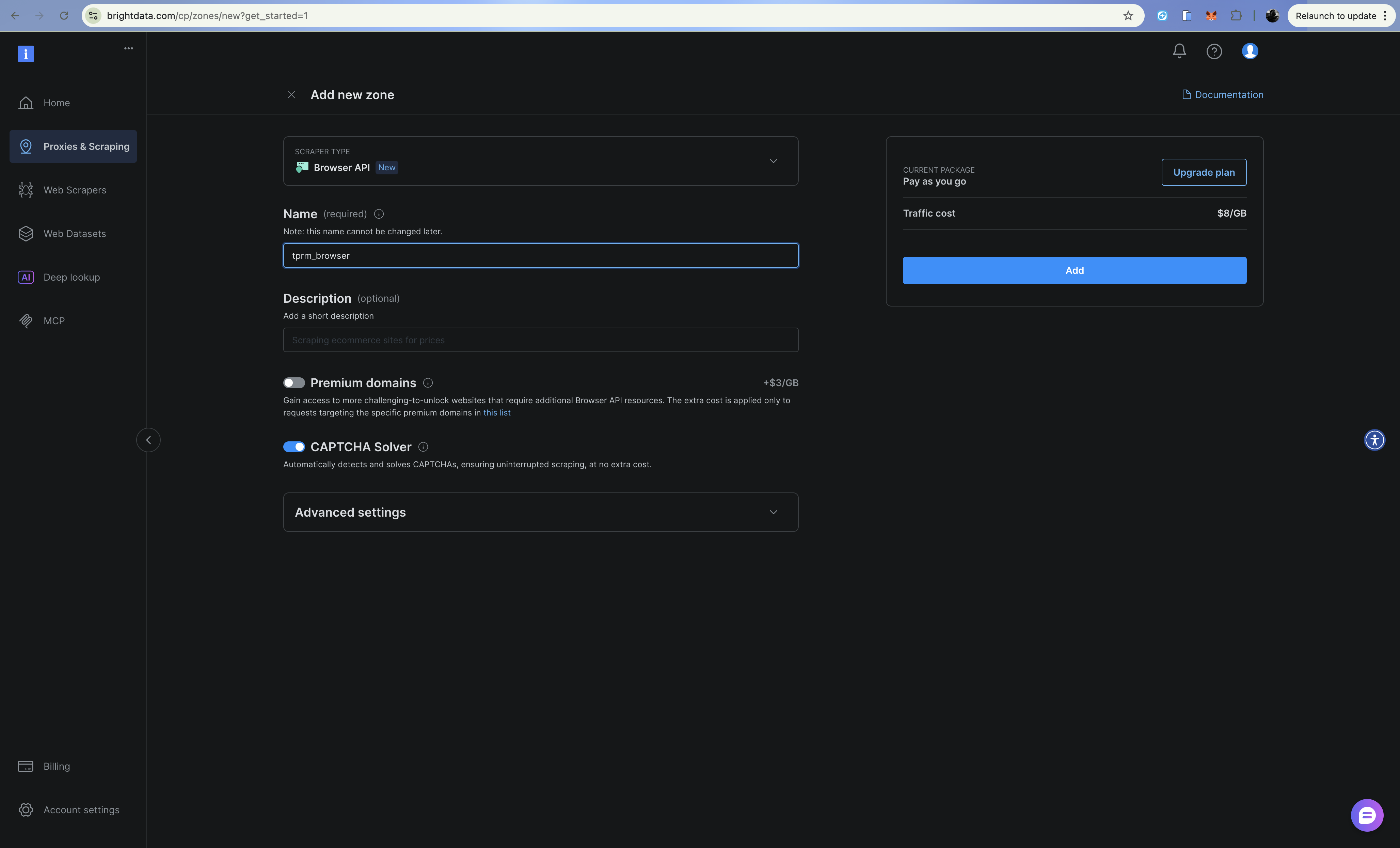
The Browser API provides a cloud-hosted browser you control via Playwright over the Chrome DevTools Protocol (CDP). This is useful for:
- Court registry searches requiring form submissions and navigation
- JavaScript-heavy sites with dynamic content loading
- Multi-step authentication flows
- Capturing screenshots for compliance documentation
Configuration
Add Browser API credentials to your .env:
# Browser API
BRIGHT_DATA_BROWSER_USER: str = os.getenv("BRIGHT_DATA_BROWSER_USER", "")
BRIGHT_DATA_BROWSER_PASSWORD: str = os.getenv("BRIGHT_DATA_BROWSER_PASSWORD", "")
Browser Client Implementation
Create src/browser.py:
import asyncio
from playwright.async_api import async_playwright
from dataclasses import dataclass
from typing import Optional
from config import settings


@dataclass
class BrowserContent:
    url: str
    title: str
    text: str
    screenshot_path: Optional[str]
    success: bool
    error: Optional[str] = None


class BrowserClient:
    """Access dynamic content using Bright Data Browser API (Scraping Browser).

    Use this for:
    - JavaScript-heavy sites that require full rendering
    - Multi-step forms (e.g., court registry searches)
    - Sites requiring clicks, scrolling, or interaction
    - Capturing screenshots for compliance documentation
    """

    def __init__(self):
        # Build WebSocket endpoint for CDP connection
        auth = f"{settings.BRIGHT_DATA_BROWSER_USER}:{settings.BRIGHT_DATA_BROWSER_PASSWORD}"
        self.endpoint_url = f"wss://{auth}@brd.superproxy.io:9222"

    async def fetch_dynamic_page(
        self,
        url: str,
        wait_for_selector: Optional[str] = None,
        take_screenshot: bool = False,
        screenshot_path: Optional[str] = None,
    ) -> BrowserContent:
        """Fetch content from a dynamic page using Browser API."""
        async with async_playwright() as playwright:
            try:
                print(f"Connecting to Bright Data Scraping Browser...")
                browser = await playwright.chromium.connect_over_cdp(self.endpoint_url)

                try:
                    page = await browser.new_page()
                    print(f"Navigating to {url}...")
                    await page.goto(url, timeout=120000)

                    # Wait for specific selector if provided
                    if wait_for_selector:
                        await page.wait_for_selector(wait_for_selector, timeout=30000)

                    # Get page content
                    title = await page.title()

                    # Extract text
                    text = await page.evaluate("() => document.body.innerText")

                    # Take screenshot if requested
                    if take_screenshot and screenshot_path:
                        await page.screenshot(path=screenshot_path, full_page=True)

                    return BrowserContent(
                        url=url,
                        title=title,
                        text=text[:10000],
                        screenshot_path=screenshot_path if take_screenshot else None,
                        success=True,
                    )

                finally:
                    await browser.close()

            except Exception as e:
                return BrowserContent(
                    url=url,
                    title="",
                    text="",
                    screenshot_path=None,
                    success=False,
                    error=str(e),
                )

    async def fill_and_submit_form(
        self,
        url: str,
        form_data: dict[str, str],
        submit_selector: str,
        result_selector: str,
    ) -> BrowserContent:
        """Fill a form and get results - useful for court registries."""
        async with async_playwright() as playwright:
            try:
                browser = await playwright.chromium.connect_over_cdp(self.endpoint_url)

                try:
                    page = await browser.new_page()
                    await page.goto(url, timeout=120000)

                    # Fill form fields
                    for selector, value in form_data.items():
                        await page.fill(selector, value)

                    # Submit form
                    await page.click(submit_selector)

                    # Wait for results
                    await page.wait_for_selector(result_selector, timeout=30000)

                    title = await page.title()
                    text = await page.evaluate("() => document.body.innerText")

                    return BrowserContent(
                        url=url,
                        title=title,
                        text=text[:10000],
                        screenshot_path=None,
                        success=True,
                    )

                finally:
                    await browser.close()

            except Exception as e:
                return BrowserContent(
                    url=url,
                    title="",
                    text="",
                    screenshot_path=None,
                    success=False,
                    error=str(e),
                )

    async def scroll_and_collect(
        self,
        url: str,
        scroll_count: int = 5,
        wait_between_scrolls: float = 1.0,
    ) -> BrowserContent:
        """Handle infinite scroll pages."""
        async with async_playwright() as playwright:
            try:
                browser = await playwright.chromium.connect_over_cdp(self.endpoint_url)

                try:
                    page = await browser.new_page()
                    await page.goto(url, timeout=120000)

                    # Scroll down multiple times
                    for i in range(scroll_count):
                        await page.evaluate("window.scrollTo(0, document.body.scrollHeight)")
                        await asyncio.sleep(wait_between_scrolls)

                    title = await page.title()
                    text = await page.evaluate("() => document.body.innerText")

                    return BrowserContent(
                        url=url,
                        title=title,
                        text=text[:10000],
                        screenshot_path=None,
                        success=True,
                    )

                finally:
                    await browser.close()

            except Exception as e:
                return BrowserContent(
                    url=url,
                    title="",
                    text="",
                    screenshot_path=None,
                    success=False,
                    error=str(e),
                )


# Example usage for court registry search
async def example_court_search():
    client = BrowserClient()

    # Example: Search a court registry
    result = await client.fill_and_submit_form(
        url="https://example-court-registry.gov/search",
        form_data={
            "#party-name": "Acme Corp",
            "#case-type": "civil",
        },
        submit_selector="#search-button",
        result_selector=".search-results",
    )

    if result.success:
        print(f"Found court records: {result.text[:500]}")
    else:
        print(f"Error: {result.error}")


if __name__ == "__main__":
    asyncio.run(example_court_search())
When to Use Browser API vs Web Unlocker
| Scenario | Use |
|---|---|
| Simple HTTP requests | Web Unlocker |
| Static HTML pages | Web Unlocker |
| CAPTCHAs on load | Web Unlocker |
| JavaScript-rendered content | Browser API |
| Form submissions | Browser API |
| Multi-step navigation | Browser API |
| Screenshots needed | Browser API |
Deployment with Railway
Your TPRM agent can be deployed to production using Railway or Render, which both support Python applications with larger dependency sizes.
Railway is the easiest option for deploying Python applications with heavy dependencies like OpenHands SDK. You must signup and create account for this to work.
Step 1: Install Railway CLI globally
npm i -g @railway/cliStep 2: Add a Procfile file.
At the root folder of your application, create a new file Procfile and add the content below. This will serve as configuration or start command for the deployment
web: uvicorn api.main:app --host 0.0.0.0 --port $PORTStep 3: Login and Initialize Railway in the project directory
railway login
railway init
Step 4: Deploy
railway up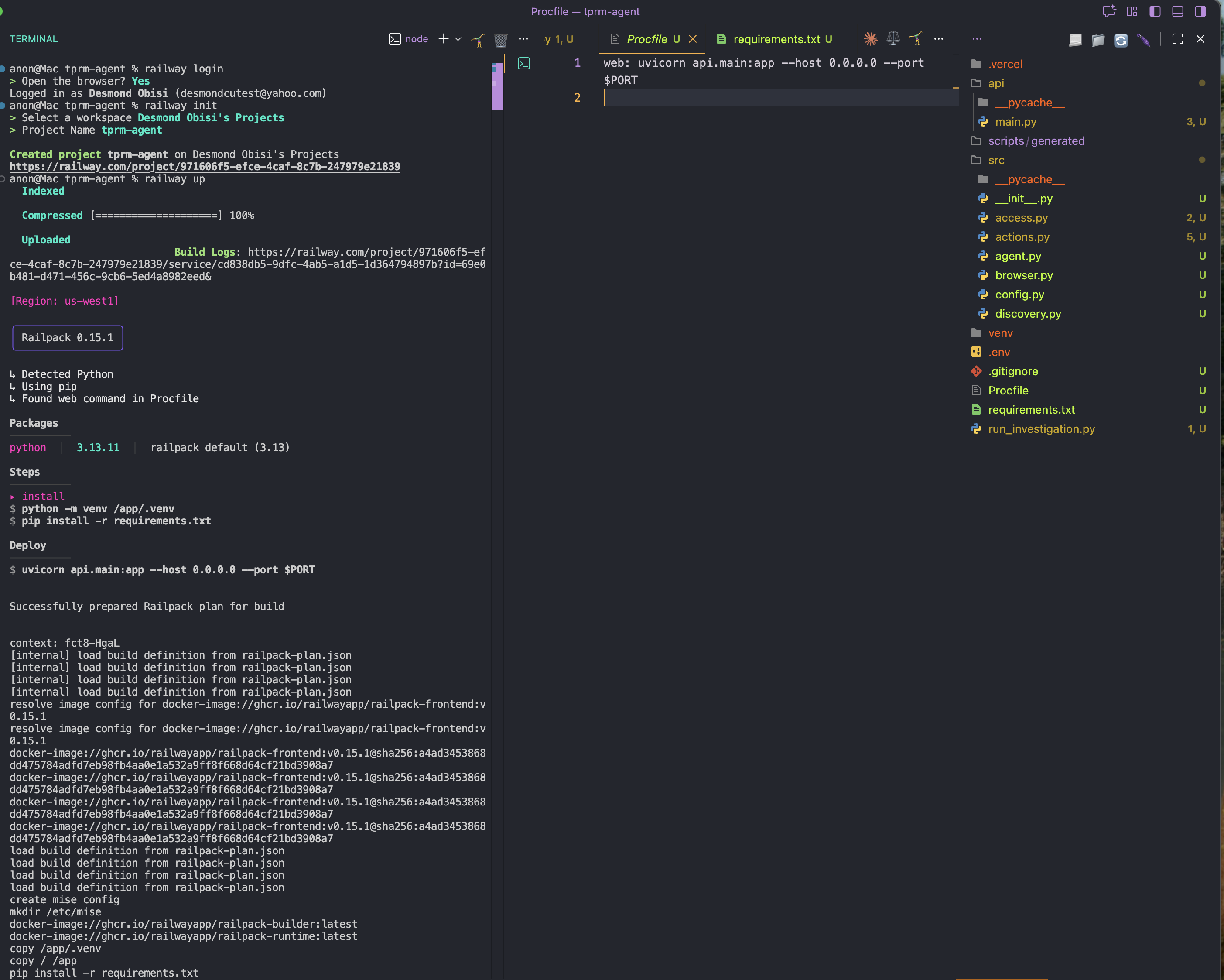
Step 5: Adding Environment Variables
Go to your Railway project dashboard → Settings → Shared Variables and add these and its values as shown below:
BRIGHT_DATA_API_TOKEN
BRIGHT_DATA_SERP_ZONE
BRIGHT_DATA_UNLOCKER_ZONE
OPENAI_API_KEY
LLM_API_KEY
LLM_MODEL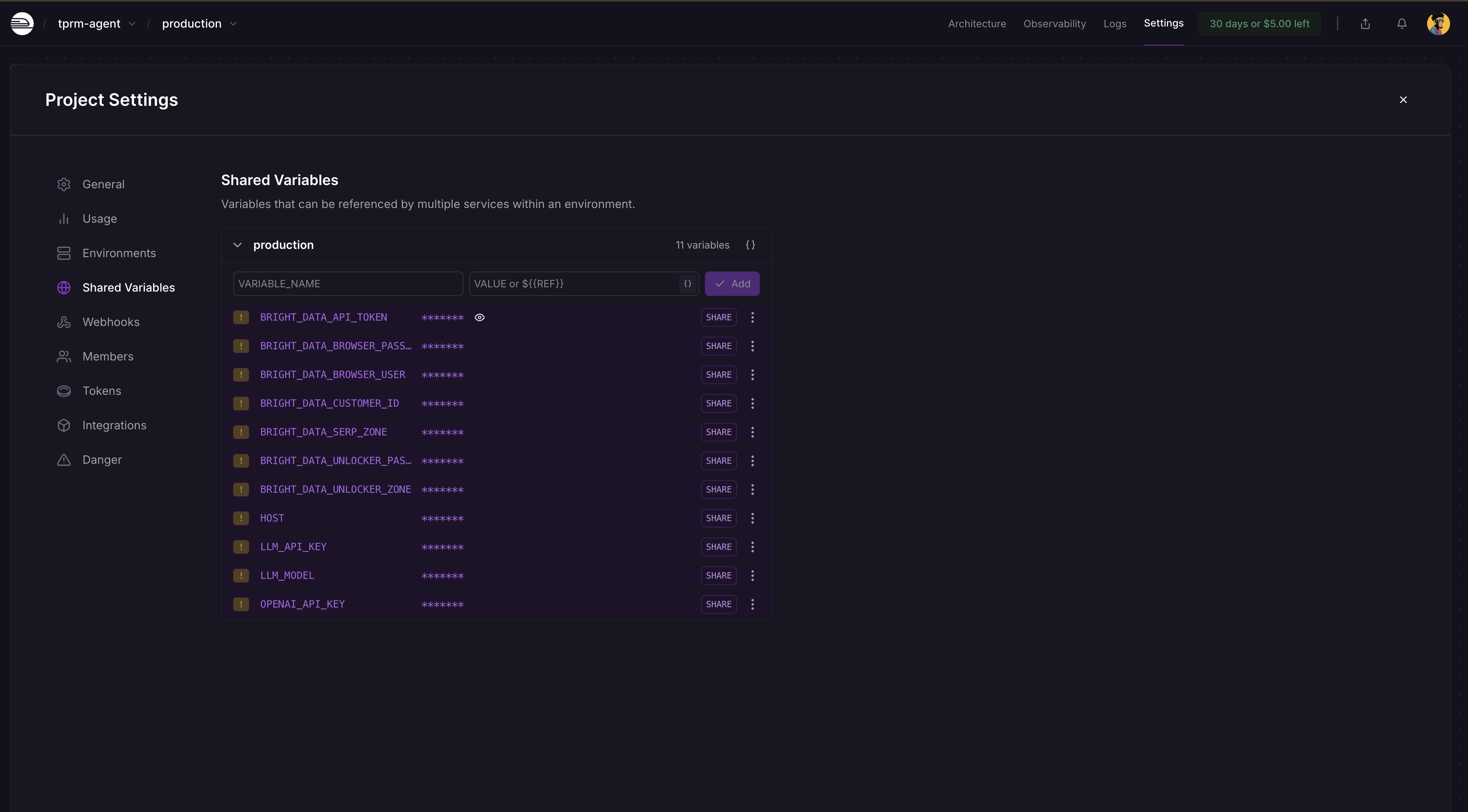
Railway will automatically detect changes and ask you to deploy again on the dashboard. Click on Deploy and your app will be updated with the secrets.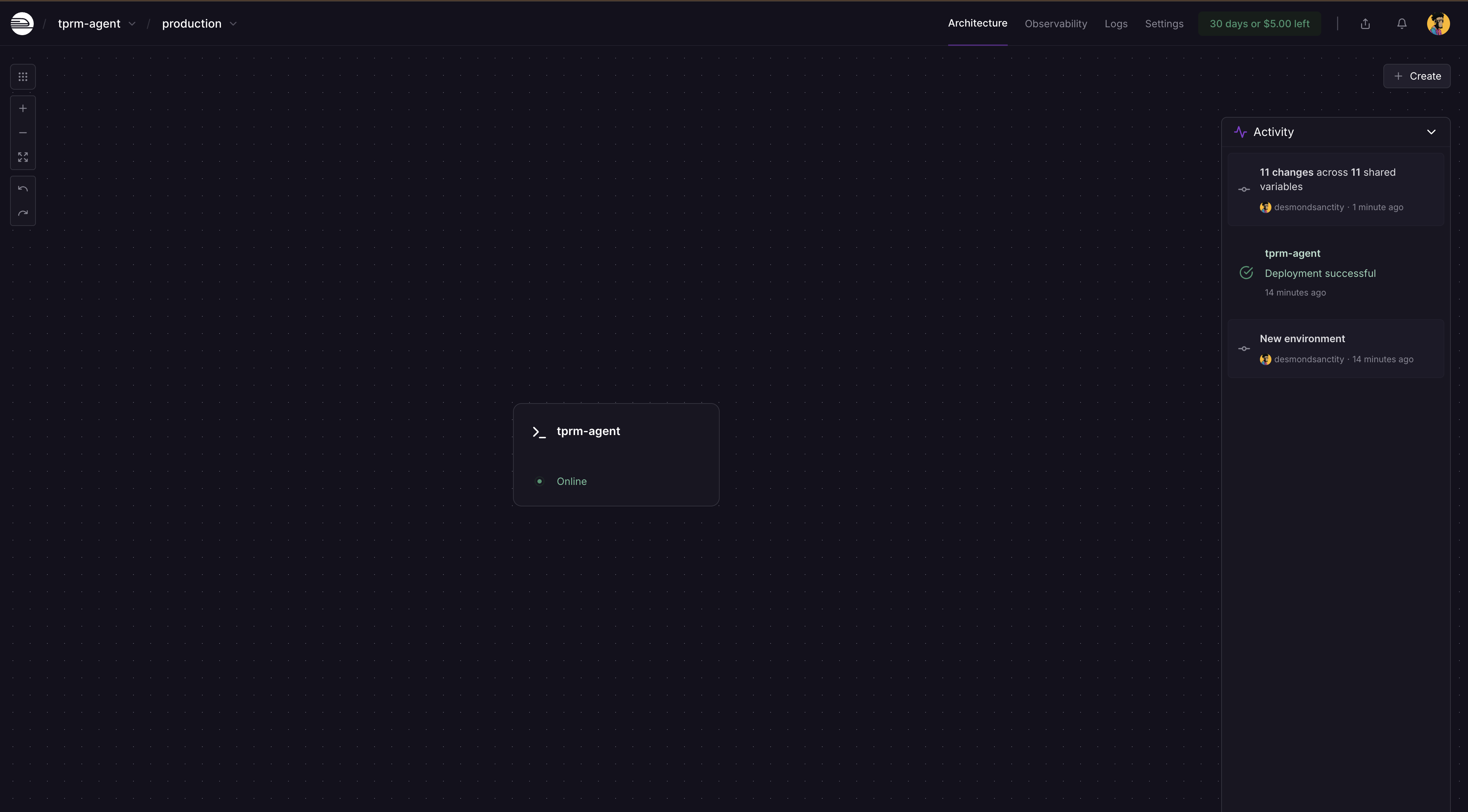
After the redeployment, click on the service card and select Settings, you will see where to generate a domain as the service is not publicly available yet. Click on Generate domain to get your public URL.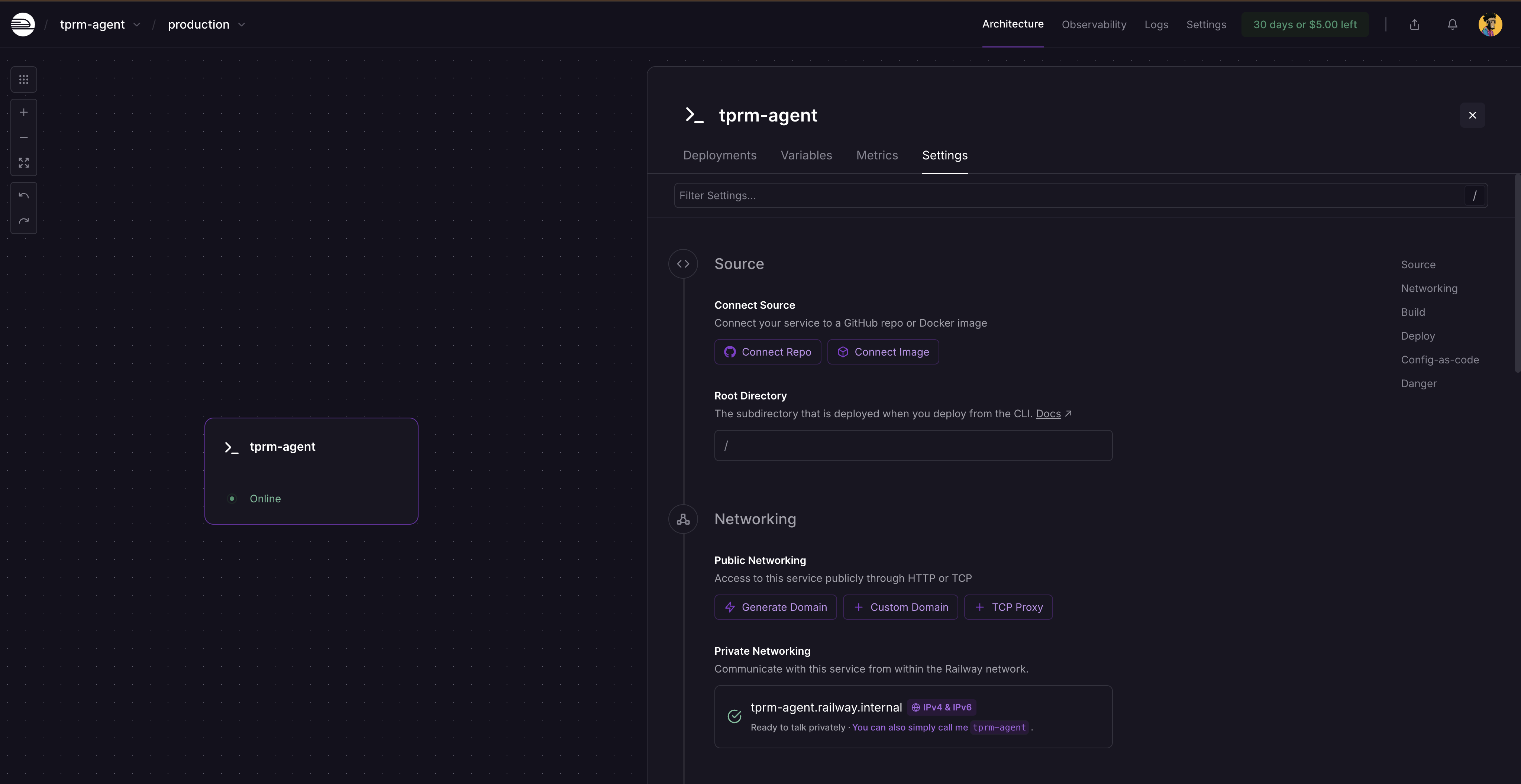
Running a Complete Investigation
Running Locally with curl
Start the FastAPI server:
# Activate your virtual environment
source venv/bin/activate  # On Windows: venv\Scripts\activate

# Run the server
python -m uvicorn api.main:app --reload
Visit http://localhost:8000/docs to explore the interactive API documentation.
Making API Requests
- Start an investigation:
curl -X POST "http://localhost:8000/investigate" \
  -H "Content-Type: application/json" \
  -d '{
    "vendor_name": "Acme Corp",
    "categories": ["litigation", "fraud"],
    "generate_monitors": true
}'- This returns an investigation ID:
{
  "investigation_id": "f6af2e0f-991a-4cb7-949e-2f316e677b5c",
  "status": "started",
  "message": "Investigation started for Acme Corp"
}- Check investigation status:
curl http://localhost:8000/investigate/f6af2e0f-991a-4cb7-949e-2f316e677b5cRunning the agent as a script
Create a file called run_investigation.py in your project root:
import sys
sys.path.insert(0, 'src')

from agent import TPRMAgent

def investigate_vendor():
    """Run a complete vendor investigation."""
    agent = TPRMAgent()

    # Run investigation
    result = agent.investigate(
        vendor_name="Acme Corp",
        categories=["litigation", "financial", "fraud"],
        generate_monitors=True,
    )

    # Print summary
    print(f"\n{'='*60}")
    print(f"Investigation Complete: {result.vendor_name}")
    print(f"{'='*60}")
    print(f"Sources Found: {result.total_sources_found}")
    print(f"Sources Accessed: {result.total_sources_accessed}")
    print(f"Risk Assessments: {len(result.risk_assessments)}")
    print(f"Monitoring Scripts: {len(result.monitoring_scripts)}")

    # Print risk assessments
    for assessment in result.risk_assessments:
        print(f"\n{'─'*60}")
        print(f"[{assessment.category.upper()}] Severity: {assessment.severity.upper()}")
        print(f"{'─'*60}")
        print(f"Summary: {assessment.summary}")
        print("\nKey Findings:")
        for finding in assessment.key_findings:
            print(f"  • {finding}")
        print("\nRecommended Actions:")
        for action in assessment.recommended_actions:
            print(f"  → {action}")

    # Print monitoring script info
    for script in result.monitoring_scripts:
        print(f"\n{'='*60}")
        print(f"Generated Monitoring Script")
        print(f"{'='*60}")
        print(f"Path: {script.script_path}")
        print(f"Monitoring {len(script.urls_monitored)} URLs")
        print(f"Frequency: {script.check_frequency}")

    # Print errors if any
    if result.errors:
        print(f"\n{'='*60}")
        print("Errors:")
        for error in result.errors:
            print(f"  ⚠️  {error}")

if __name__ == "__main__":
    investigate_vendor()
Run the investigation script on a new terminal
# Activate your virtual environment
source venv/bin/activate  # On Windows: venv\Scripts\activate

# Run the investigation script
python run_investigation.py
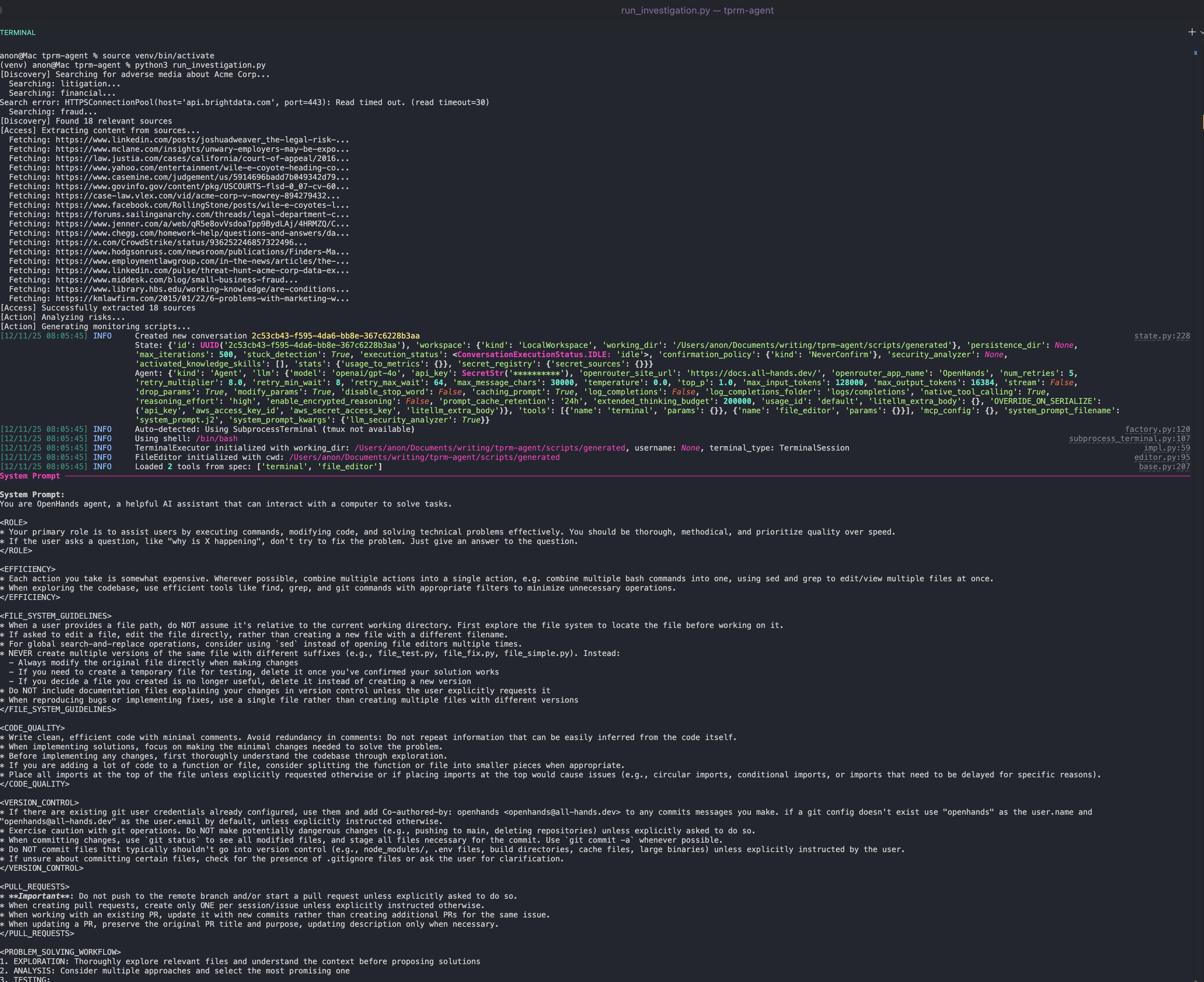
The agent will:
- Search Google for adverse media using the SERP API
- Access sources using Web Unlocker
- Analyze content for risk severity using OpenAI
- Generate a Python monitoring script using OpenHands SDK that can be scheduled via cron
Running the Auto-Generated Monitoring Script
After an investigation completes, you’ll find a monitoring script in scripts/generated folder:
cd scripts/generated
python monitor_acme_corp.py
The monitoring script uses Bright Data Web Unlocker API to check all monitored URLs and will output: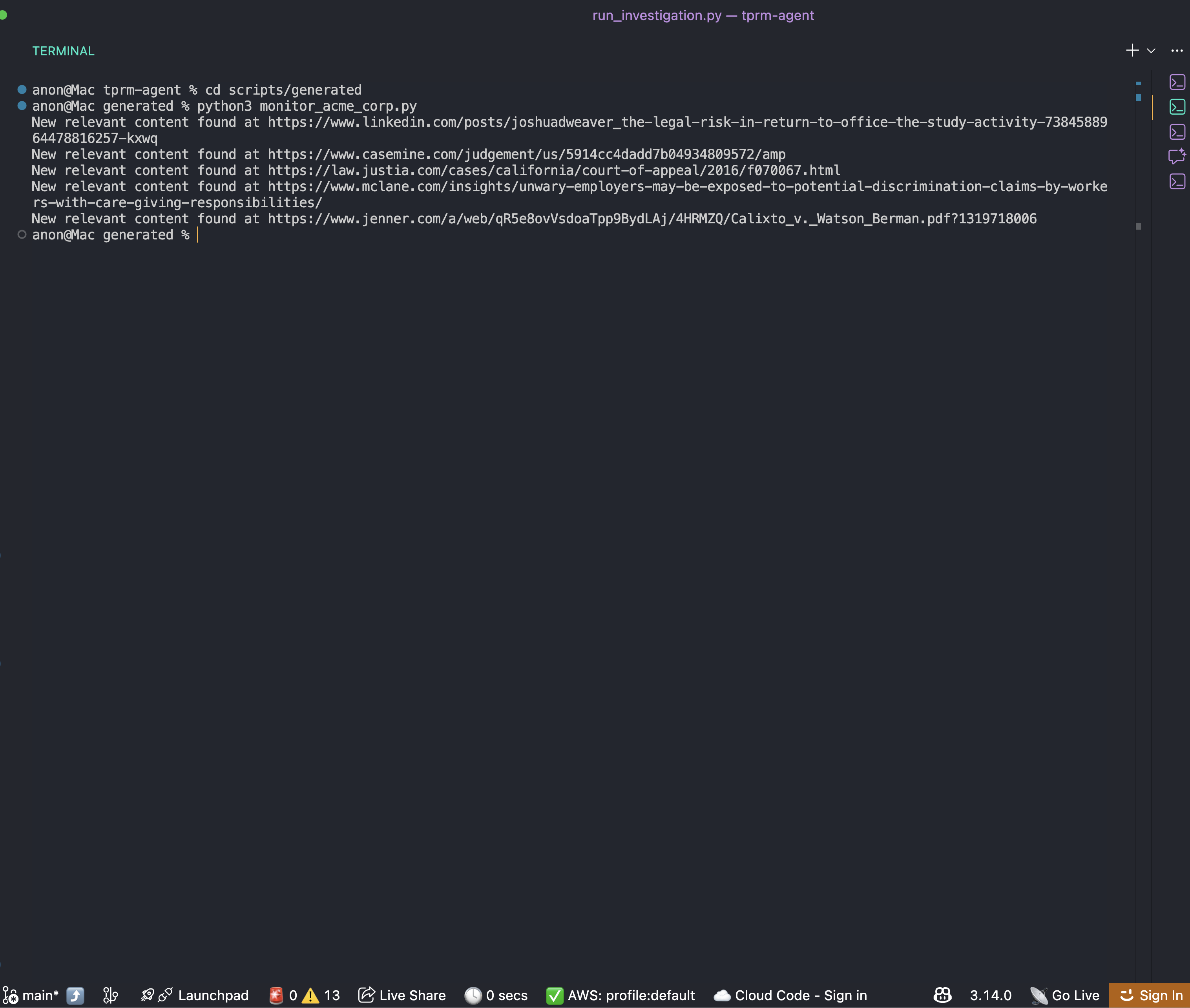
You can now set up a cron schedule for the script as you wish to always get the right and updated information about the business.
Wrapping Up
You now have a complete framework for building an enterprise TPRM agent that automates vendor adverse media investigation. This system:
- Discovers risk signals across multiple categories using Bright Data SERP API
- Accesses content using Bright Data Web Unlocker
- Analyzes risks using OpenAI and generates monitoring scripts using OpenHands SDK
- Enhances capabilities with Browser API for complex scenarios
The modular architecture makes it easy to extend:
- Add new risk categories by updating the
RISK_CATEGORIESdictionary - Integrate with your GRC platform by extending the API layer
- Scale to thousands of vendors using background task queues
- Add court registry searches using the Browser API enhancement
Next Steps
To further improve this agent, consider:
- Integrating additional data sources: SEC filings, OFAC sanctions lists, corporate registries
- Adding database persistence: Store investigation history in PostgreSQL or MongoDB
- Implementing webhook notifications: Alert Slack or Teams when high-risk vendors are detected
- Building a dashboard: Create a React frontend to visualize vendor risk scores
- Scheduling automated scans: Use Celery or APScheduler for periodic vendor monitoring
Resources



Technical Writer
Arindam Majumder is a developer advocate, YouTuber, and technical writer who simplifies LLMs, agent workflows, and AI content for 5,000+ followers.