In this blog post, you will see:
- Why AI agents need MCP and/or CLI integrations.
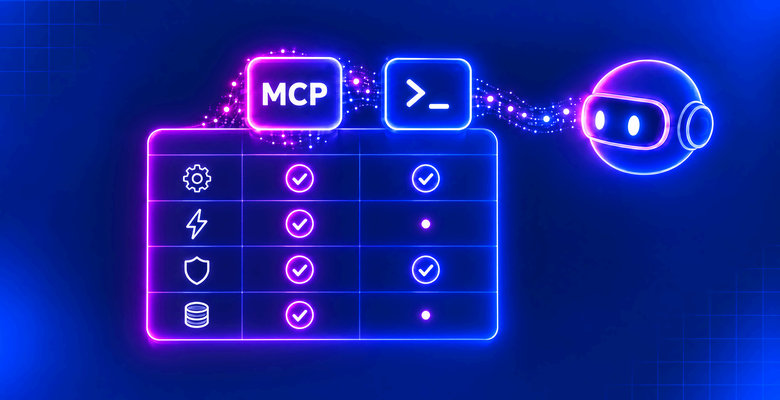
- A summary table comparing MCP vs CLI.
- What MCP is, how it works, and its benefits and drawbacks.
- What CLI is, how to use it in AI systems, and its pros and cons.
- How MCP and CLI compare in terms of token usage, setup, authentication, and execution model.
- A real-world scenario comparing MCP and CLI to highlight practical differences.
- When to prefer MCP over CLI and vice versa.
- Whether MCP and CLI can be used together in the same AI environment.
Let’s dive in!
Why AI Agents Need MCP and CLI Access in the First Place
AI applications, especially agents, are now expected to take actions rather than just generate content. This shift has led to two dominant execution patterns:
- MCP tools
- CLI-based execution loops
Both approaches give agents the ability to interact with external systems, but they operate at different abstraction layers.
As you will soon learn, choosing one over the other directly affects cost, reliability, and more. Note that this is not a “which is better” debate, but rather a question of which approach better fits your goals and system design.
TL;DR: CLI vs MCP Summary Comparison Table
| Aspect | MCP (Model Context Protocol) | CLI (Command Line Interface) |
|---|---|---|
| Execution model | Structured tool invocation through JSON-RPC with schema-defined inputs and outputs | AI agent executes local CLI commands and parses their stdout/stderr |
| Output | Structured JSON responses with well-defined schemas | Plain-text output (stdout/stderr) |
| Token usage | Higher initial token overhead due to tool discovery via schema loading | No initial overhead, but token usage grows linearly over command iterations |
| Speed | Often faster for repeated tool interactions thanks to structured calls and fewer correction cycles | Can be slower due to iterative command execution and correction cycles |
| Reliability | High determinism through structured schemas, typed arguments, and validated responses | Depends on the CLI output format and the agent’s ability to interpret errors and recover |
| Scalability | Strong for enterprise-scale tool ecosystems with many services and APIs | Excellent for local/system-level scaling via shell composition and scripting |
| Setup & integration | Requires server setup (remote or local) + potential tool discovery | Simple installation of CLI binaries + AI agent configuration for CLI command execution |
| Authentication | Typically handled through OAuth, API keys, or other web authentication mechanisms | Usually managed directly by the CLI (e.g., login commands, config files, or environment variables) |
| Authorization | Usually via fine-grained, tool-level permissions | Generally limited |
| Developer experience | Structured, governed, cross-framework compatible | Fast, flexible, highly familiar to LLMs and developers |
| Error handling | Schema-driven validation reduces runtime ambiguity | Explicit failures via stderr, requiring the agent to diagnose and retry |
MCP in Agents and AI Applications
Let’s start this MCP vs CLI article by diving into the world of the Model Context Protocol.
What Is MCP?
MCP, short for Model Context Protocol, is an open-source standard developed by Anthropic. It specifies a standardized communication layer that allows AI applications to interact with external services through a unified interface.
Built on top of JSON-RPC, MCP enables agents to discover and execute tools in a structured, schema-validated way. This approach ensures consistent and governed interactions with external systems.
Bright Data’s Approach to MCP
Bright Data has embraced MCP through its Web MCP service.
This MCP server is available as a remote service via Streamable HTTP, with SSE for legacy architectures. You can also install it as a local server through the @brightdata/mcp NPM package, an open-source project with 2.5k+ GitHub stars and thousands of weekly downloads.
Bright Data’s Web MCP exposes 70+ tools built on top of its underlying API infrastructure, making it easier for AI systems to interact with it. These tools cover web search, content discovery, structured web data extraction, and browser automation.
Web MCP is available in two tiers:
- Rapid mode: A free plan offering up to 5,000 monthly requests, covering essential tools for web search, content discovery, and scraping workflows.
- Pro mode: A paid tier that unlocks the full set of 70+ tools, including structured data streams from platforms like Amazon, LinkedIn, Crunchbase, Yahoo Finance, Zillow, YouTube, Google Maps, and 40+ others, along with advanced browser automation capabilities.
Key tools include:
| Tool | Description | Underlying Bright Data Product |
|---|---|---|
search_engine |
Performs web searches (on Google, Bing, Yandex, and other search engine) and returns SERP results in JSON | SERP API |
web_fetch |
Retrieves webpage content and converts it into clean Markdown format, while bypassing anti-bots | Unlocker API |
discover |
Finds and ranks relevant web pages using AI-powered relevance scoring | Discover API |
scraping_browser_navigate |
Launches a browser session and navigates to a target page | Browser API |
scraping_browser_click_ref |
Click an element on a given page | Browser API |
scraping_browser_screenshot |
Captures a screenshot of the current page, including an option for full-page screenshots | Browser API |
Explore the documentation to discover all the Web MCP tools.
How MCP Works
To better understand how MCP works in practice, it helps to walk through a concrete example. Imagine an AI agent connected to the Bright Data Web MCP and prompted with:
Search online for the Amazon Best Sellers page and scrape it in Markdown. Return the main info from the top five best-selling products.To get the task done, the AI agent will likely go through these steps:
- MCP connection establishment: The agent first connects to the Web MCP server through a persistent session (HTTP or local STDIO).
- Tool discovery: The agent retrieves the list of available MCP tools and loads their schemas into its context.
- Intent interpretation and planning: The model interprets the request as an e-commerce extraction task and determines that it needs web search/discovery and content extraction.
- Search and discovery: The agent uses the
search_engineordiscovertool to locate the Amazon Best Sellers page, leveraging either search engine results or AI-powered relevance ranking. - Context filtering: The agent analyzes the returned results and selects the page that most likely corresponds to the Amazon Best Sellers page.
- Content extraction: The agent calls the
web_fetchtool to retrieve the page content as Markdown, a data format optimized for LLM processing. - Structured parsing and reasoning: The model extracts the relevant information (e.g., product name, price, rating, number of reviews, availability, etc.) from the Markdown content.
- Response generation: The agent synthesizes the extracted data into a concise summary containing the key information for the top five best-selling Amazon products.
When MCP Works Best
The main strengths of MCP are:
- Tool discovery: Agents can query available tools and receive structured JSON schemas for safe, predictable execution.
- Persistent connections: A single long-lived session supports multiple tool calls, reducing overhead and improving overall efficiency.
- Composability across servers: Agents can run tools from multiple MCP servers, even in parallel, to complete a specific task.
- Framework interoperability: Most AI agent frameworks and applications can act as MCP clients, natively supporting both MCP server connections.
Beyond the protocol mechanics, MCP also excels in enterprise-grade environments thanks to:
- Structured API environments: Strict schemas remove ambiguity, enabling models to work with clearly defined inputs instead of relying on inference or guesswork.
- Centralized security and compliance: Most AI applications include strong authentication (such as OAuth 2.0), permission scoping, and audit logging to ensure controlled, traceable access to MCP servers.
- High scalability: Via the Streamable HTTP transport, you can connect to the vendor’s MCP server, typically hosted in the cloud. These MCP servers can support many connections, with the actual limits depending on the vendor’s infrastructure and your subscription plan.
When MCP Breaks Down
MCP is powerful but can become inefficient in fast or resource-constrained environments due to its inherent overhead and rigid structure. Major downsides include:
- Context and token overhead: MCP loads full tool schemas into the context window, increasing token usage and making even simple requests more expensive. Note that some AI solutions reduce that overhead by supporting lazy tool loading and on-demand discovery via tool search, instead of loading all schemas upfront.
- Slower inner-loop iteration: In rapid coding or agent loops, large schemas and persistent context can slow feedback cycles and reduce responsiveness.
- Workflow composition limitations: Unlike traditional CLI pipelines, MCP lacks native chaining or piping, forcing AI models to manually orchestrate multi-step workflows.
- Scalability constraints in dense toolsets: As more tools are added, discovery and selection overhead can grow, increasing cognitive load on the model. The solution is to customize your MCP server so it exposes only the tools you actually need, similar to the tool grouping feature available in Bright Data Web MCP.
CLI in AI Agents
It is time to continue this MCP vs CLI article by exploring how AI agents can interact with CLI tools.
What CLI Execution Means in the Context of AI
Unlike MCP, the CLI (Command Line Interface) is nothing new. Quite the opposite, it has been a fundamental part of the IT world since its early days. The goal of the CLI is to allow developers and system administrators to automate tasks, manage systems, and interact with the underlying system. What is new is that AI agents can now interact directly with the CLI.
In a typical workflow, the LLM generates one or more shell commands based on the user’s request. The agent executes those commands as subprocesses, captures their standard output (stdout) and error output (stderr), and feeds the results back to the model.
The model can also chain multiple commands together. Plus, it can recover from errors by further interacting with the CLI itself. For example, the model can invoke the same command with the --help or -h flag to understand the correct syntax, adjust its strategy, and try again. This iterative loop enables AI agents to solve complex tasks using the same CLI tools we use every day.
Bright Data’s Approach to CLI
The Bright Data CLI brings Bright Data’s web data solutions to the command line through a simple, developer-friendly set of terminal commands.
Some of the most relevant Bright Data CLI commands include:
| Command | Description | Bright Data Product |
|---|---|---|
brightdata scrape |
Scrapes any webpage while bypassing CAPTCHAs and other anti-bot protections | Web Unlocker API |
brightdata search |
Searches Google, Bing, Yandex, and other search engines, returning structured JSON results | SERP API |
brightdata discover |
Uses AI to discover and rank relevant web pages based on search intent, with optional full-page content | Discover API |
brightdata pipelines |
Extracts structured data from 40+ major platforms, including Amazon, LinkedIn, TikTok, and more | Web Scraping API |
brightdata browser |
Controls a real browser to navigate pages, click elements, type text, capture screenshots, and more | Browser API |
brightdata scraper create |
Generates a new scraper from a natural-language prompt using AI | Scraper Studio |
brightdata scraper run |
Executes a previously configured scraper against a target URL | Scraper Studio |
brightdata scraper heal |
Uses AI to detect and repair broken scrapers, requiring human approval before applying changes | Scraper Studio (self-healing feature) |
brightdata scraper approve |
Accepts or rejects AI-generated scraper fixes | Scraper Studio (self-healing feature) |
For the complete list of supported commands, refer to the official Bright Data GitHub repository.
Note: The Bright Data CLI includes a free tier with up to 5,000 requests per month, renewed every month.
How AI Agents Execute CLI Commands
To better understand how CLI execution works in practice, consider a real-world scenario. Assume that the Bright Data CLI (brightdata or bdata) is already installed on the system and your CLI AI agent is authorized to execute terminal commands.
Issue the following request:
The Bright Data CLI (bdata) for web search and scraping is already installed and configured on the underlying system. Use it to search the web for the Amazon Best Sellers page and then scrape the page in Markdown. From the extracted data, return the key information for the top five best-selling Amazon products.To complete the task, the AI agent should follow these steps:
- Task interpretation and planning: The model interprets the request as an e-commerce data extraction workflow and identifies the need to locate, retrieve, and parse the Amazon Best Sellers page.
- CLI capability discovery: The agent can run a help command (e.g.,
bdata --help) to understand available CLI commands and expected parameters. This is optional, as the model can already have knowledge of the Bright Data CLI and go straight to using it. - Search and discovery execution: The agent uses
bdata searchorbdata discoverto locate the correct Amazon Best Sellers URL via SERP results or relevance-ranked discovery. - Target selection: From the returned results, the agent selects the most relevant URL corresponding to the Amazon Best Sellers page.
- Content extraction: The agent executes
bdata scrapeon the selected URL to retrieve the page content in clean, structured Markdown optimized for LLM processing. - Structured parsing and reasoning: The model extracts key fields such as product name, price, rating, review count, and availability, organizing them into a structured format.
- Response generation: The CLI AI agent synthesizes the extracted data into a concise summary of the top five best-selling Amazon products.
Main Benefits of CLI for AI Agents
The CLI is an effective interface for AI agents because of the following advantages:
- Minimal context overhead: CLI tools do not require loading tool schemas or protocol metadata, resulting in lower token consumption and more efficient reasoning.
- Strong prior knowledge: Modern LLMs have been extensively trained on shell commands. Thus, even when encountering unfamiliar tools, they can often infer the correct syntax and usage patterns.
- Composable workflows: Shell primitives such as pipes (
|), redirection (>), and utilities likegrep,find,jq, andxargsenable agents to build multi-step workflows with minimal effort. - Rapid feedback loops: Commands execute quickly, allowing agents to iteratively run, inspect, debug, and refine their approach without the overhead of managing a protocol session.
- Universal compatibility: Nearly all compilers, package managers, version control systems, and operating systems expose a CLI, giving AI agents immediate access to a vast software ecosystem without requiring dedicated integrations.
When CLI-Based Execution Breaks Down
CLI-based execution loops in AI agents are effective because they are simple and provide direct access to system-level tools. At the same time, they come with important limitations:
- No standardized tool schemas or calling interface: Unlike MCP, CLI commands are unstructured, meaning the model must infer syntax, arguments, and behavior without formal validation or schema support.
- Fragmented provider support: While many infrastructure tools expose MCP interfaces, not all third-party APIs or cloud services provide official CLI tooling.
- Weak permission granularity: CLI execution operates at the process or system level, making it harder to enforce fine-grained, per-tool permissions compared to structured protocol-based access.
- Limited portability in cloud-native agents: Many AI platforms run in the cloud, where CLI access is unavailable. Similarly, they could be running in sandboxed environments where direct CLI access is restricted. This limits CLI execution to local or self-managed systems.
MCP vs CLI: Deep Comparison
To better understand the MCP vs CLI argument in AI agents and applications, let’s compare them across relevant criteria.
Token Usage
From a token-efficiency perspective, MCP and CLI behave very differently.
In most MCP implementations, the client relies on upfront tool schema injection to make tools discoverable. In practice, this means loading multiple structured definitions into the model context before execution begins.
With typical MCP servers exposing from 5 to 80 tools, and each schema costing roughly 50-250 tokens, the initial overhead ranges from ~250 tokens in small setups to 20,000+ tokens in larger enterprise toolkits.
This cost is reintroduced across sessions or when toolsets refresh, meaning part of the context window is permanently occupied before any reasoning starts.
Instead, CLI-based AI execution loops can be lighter in terms of token usage, unless many iterations are required. Each step generally requires only ~100-300 tokens, covering the command generation, execution feedback, and output interpretation. There is no schema preloading, so the model starts with near-zero tool context overhead.
In other words, MCP concentrates cost upfront in a single structured load. Instead, CLI distributes cost across iterative steps. This makes MCP more predictable but heavier at initialization, whereas CLI is more incremental during execution. As toolsets grow, MCP overhead increases linearly with the number of tools, whereas CLI scales with the number of executed commands.
Setup and Authentication
MCP requires an explicit server connection before any tools can be used. For remote servers (Streamable HTTP / SSE), you usually need to set up an authenticated MCP endpoint on the vendor platform. For local MCP servers (STDIO), you must install and configure the server on your machine before.
Once the server is available, the AI system must be explicitly connected to it using a supported integration method. This involves updating a configuration file, launching a specific CLI command, or configuring the server through a visual wizard.
Authentication is handled at connection time using API keys, OAuth, or similar credential-based systems. After connection, many AI tools provide fine-grained, tool-level permissions. These allow you to define which tools the agent can call directly and which require your confirmation before execution.
In CLI-based execution, the underlying environment must already have the required binaries installed. Also, the agent needs permissions to run CLI commands. Setup usually involves installing the CLI via a single command (e.g., npm install, pip install, or cURL-retrieved installers), followed by authentication through a setup wizard or token-based login (API key, OAuth, or similar).
Once configured, the agent can directly execute CLI commands without schema negotiation, tool discovery, or structured permission layers.
Execution Model
MCP and CLI differ fundamentally in how AI agents execute actions and process results.
MCP follows a tool-selection model where the agent chooses from predefined tools. These are invoked via JSON-RPC using JSON inputs, and they produce structured JSON outputs. This mechanism makes execution more predictable, as every call is validated against a schema and returns structured results that are easy to parse and chain.
In contrast, CLI usage in AI operates through a probabilistic command-generation and correction loop. The agent generates shell commands, executes them, and interprets unstructured stdout/stderr outputs. While less structured, this approach is more flexible thanks to the CLI’s ability to chain commands.
Case Study: Bright Data Web MCP vs CLI Claude Code
To benchmark the impact of MCP vs CLI, let’s compare both approaches using the same workflow. Specifically, we will observe how Claude Code behaves when connected first to the Bright Data Web MCP, and then to the Bright Data CLI, to complete an identical task.
The shared goal is to enable Claude Code to discover the Amazon Best Sellers Electronics page, scrape its content, and return a summary of the top four products:

Look at how this works in practice!
Prerequisites
To replicate this section, make sure you have:
- Claude Code installed and configured locally.
- Bright Data Web MCP configured in Claude Code.
- Bright Data CLI installed locally.
For more guidance on Web MCP and CLI setup in Claude Code, refer to the official documentation guides:
Web MCP Scenario
Assume Claude Code is connected to the remote version of the Streamable HTTP Web MCP server in Rapid mode. Task the agent with:
Search online for the Amazon Best Sellers electronics page and scrape it in Markdown. Return the main info from the top 4 best-selling products.Execute the prompt:
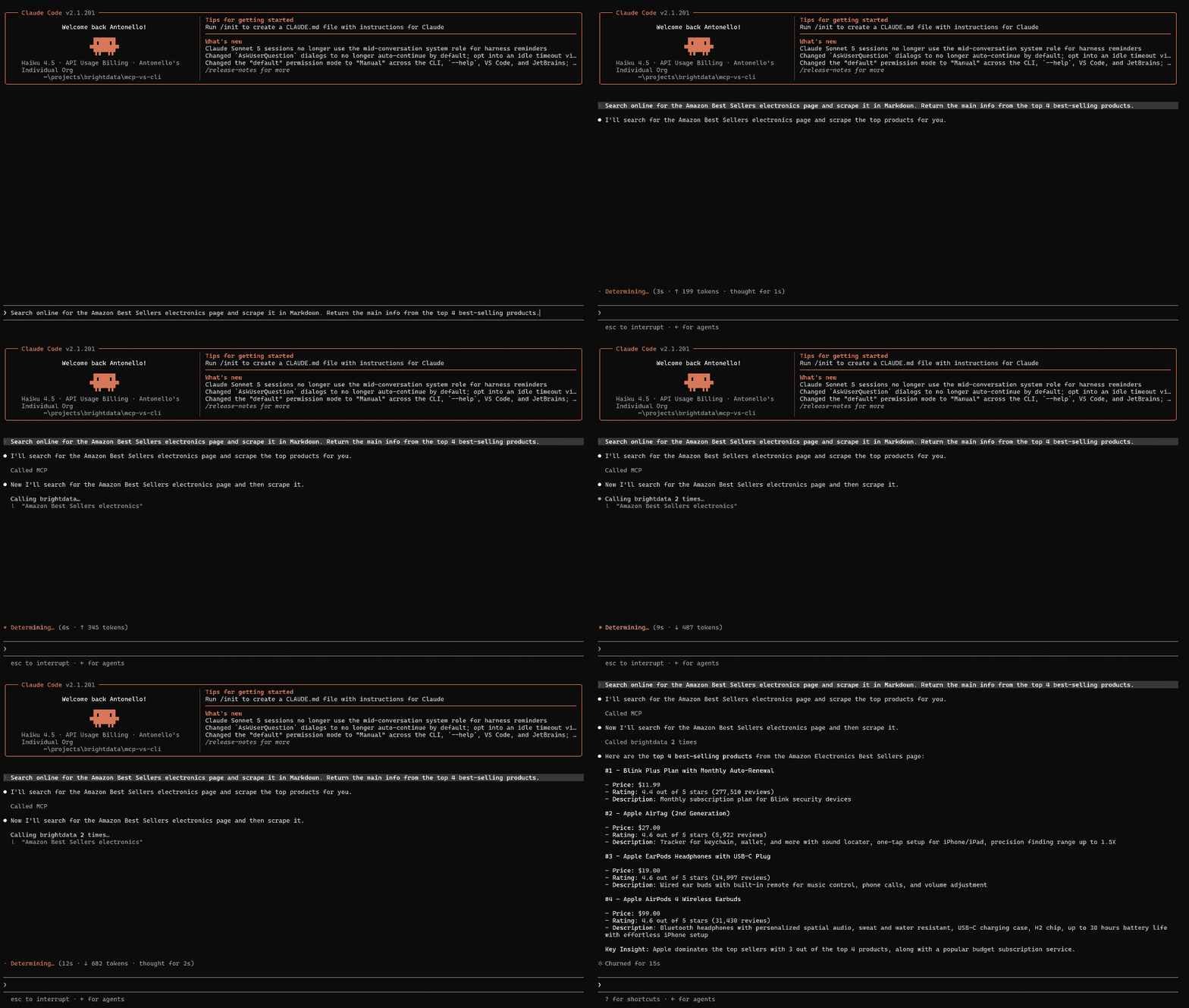
To complete the task, Claude Code performs the following steps:
- Called the
search_enginetool with a query for “Amazon Best Sellers electronics”. - From the returned Google SERP results (in JSON), identified the most relevant Amazon Best Sellers Electronics page URL.
- Called the
web_fetchtool on the selected URL. - Processed the returned Markdown to extract and summarize the top 4 best-selling products.
CLI Scenario
Consider that the Bright Data CLI is installed locally and Claude Code is allowed to execute terminal commands. Then ask the agent:
The Bright Data CLI (bdata) for web search and scraping is already installed and configured on the underlying system. Use the --help command if you are unsure how to use it. Then, employ it to search the web for the Amazon Best Sellers electronics page and scrape the page in Markdown format. From the retrieved data, return the key information for the top 4 best-selling Amazon products.Launch the prompt:
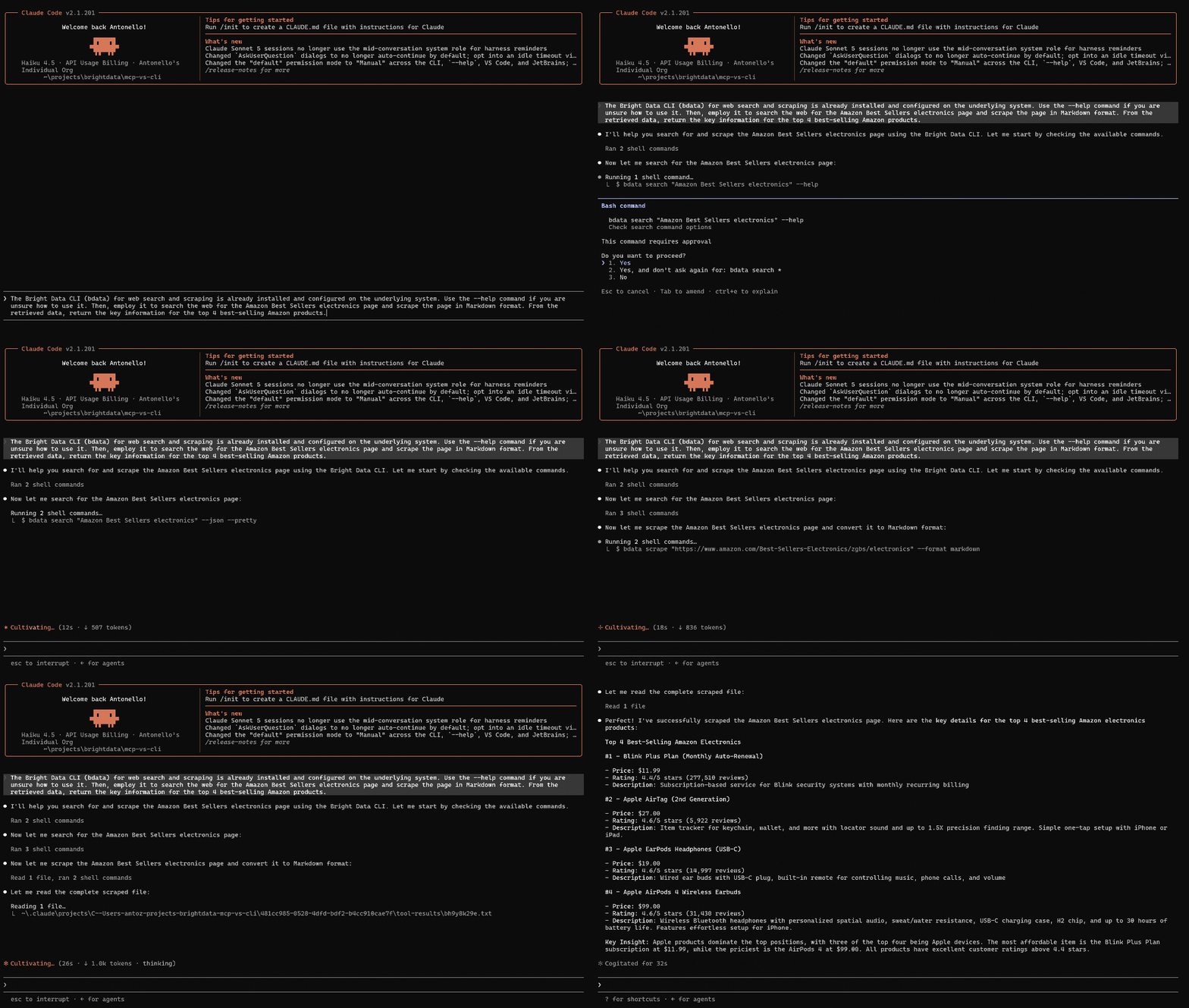
This is what Claude Code did:
- Called
bdata --helpto get information about available commands. - Called
bdata search "Amazon Best Sellers electronics" --helpto understand how to use thesearchcommand for the desired query. - Called
bdata search "Amazon Best Sellers electronics" --json --prettyto retrieve the target SERP in structured, readable JSON format. - Extracted the target page URL from the search results.
- Called
bdata scrape "https://www.amazon.com/Best-Sellers-Electronics/zgbs/electronics" --helpto understand how to use thescrapecommand on the target page. - Called
bdata scrape "https://www.amazon.com/Best-Sellers-Electronics/zgbs/electronics" --format markdownto retrieve the page content in Markdown format. - Extracted product information from the retrieved Markdown data and presented it to the user.
Output Analysis
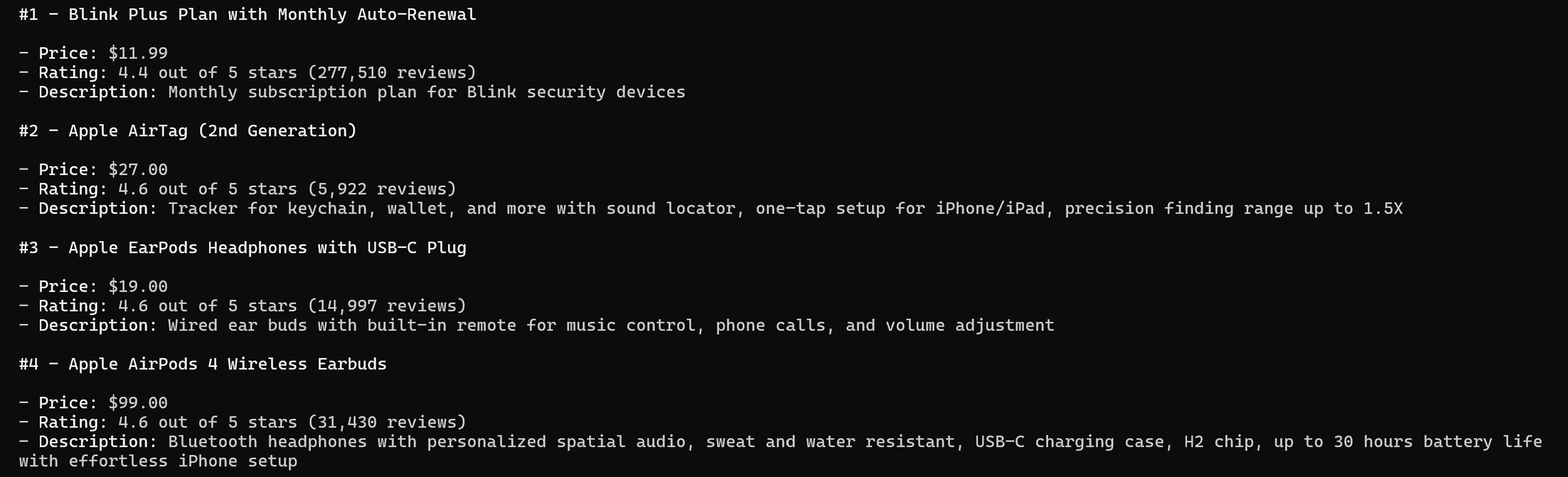
In both cases (Web MCP or CLI), the produced result correctly matches the information for the top four products on the Amazon Best Sellers Electronics page:
Final Comment
Regardless of the setup you choose, keep in mind that both Bright Data MCP and the CLI are built on top of Bright Data’s enterprise-grade infrastructure. This is built on a global network of 400M+ residential IPs across 195+ countries, with 99.99% uptime, a 99.95% success rate, and support for unlimited scalability and concurrency.
Now, compare MCP vs CLI execution in our real-world benchmark:
| MCP usage | CLI usage | |
|---|---|---|
| Total cost | $0.0927 | $0.0958 |
| Total duration | 15s | 32s |
| Total context used | 49.3k tokens | 65.6k tokens |
| Messages | 21.8k tokens | 38.6k tokens |
| MCP tool context | 368 tokens | 0 tokens |
Although MCP introduces upfront schema overhead, the CLI required additional back-and-forth to understand command usage. Because of that, the CLI scenario generated extra context through help calls and command outputs.
This does not mean that MCP is strictly better than the CLI. The CLI remains inherently more flexible and direct in many scenarios, especially for low-level system interaction and scripting workflows.
When to Use MCP vs CLI
Neither MCP nor CLI is universally better for providing tools to AI agents. After all, they solve different problems and operate at different levels of abstraction. The right choice depends on your use case, architecture, and requirements.
When MCP Is the Better Choice
MCP is particularly well-suited for:
- Enterprise SaaS integrations: Connect agents to services like CRMs, databases, cloud platforms, or internal APIs through a standardized interface.
- Secure, permission-controlled, scalable environments: Fine-grained tool permissions, OAuth 2.0 support, audit logs, and scalable remote servers make MCP perfect for enterprise deployments and production AI applications.
- Cross-framework compatibility: The same MCP server can be reused across different AI applications and agent frameworks without modification.
- Predictable, schema-driven execution: Explicit tool definitions reduce ambiguity and improve reliability when interacting with structured APIs.
When CLI Is the Better Choice
CLI excels in:
- Local development and coding agents: Ideal for compiling code, running tests, managing Git repositories, installing dependencies, and debugging applications.
- High-frequency execution loops: Minimal context overhead makes CLI highly efficient for workflows involving dozens or hundreds of sequential commands.
- Command composition and automation: Native support for pipes, redirection, shell scripting, and tools like
grep,jq,awk, andsedenables complex workflows with simple commands. - Existing command-line ecosystems: Many developer tools already provide mature CLIs, allowing agents to use them immediately without requiring an MCP implementation.
Can MCP and CLI Work Together?
Absolutely! MCP is not a replacement for the CLI, and the CLI is far from obsolete. Instead, they complement each other by addressing different layers of an AI agent’s architecture.
The CLI is best suited for local execution, particularly for developer workflows. It gives agents direct access to operating system utilities, programming tools, and shell pipelines with minimal overhead.
On the other hand, MCP provides a standardized and governed way to interact with external services, enterprise APIs, databases, and SaaS platforms through structured tool interfaces.
In practice, many AI systems benefit from combining both approaches:
- CLI: Compile code, run tests, interact with the underlying operating system, invoke third-party tools through their CLIs, automate shell workflows, and preprocess data (e.g., filtering JSON with
jqor searching logs withgrep). - MCP: Securely access enterprise systems, retrieve business data, and interact with third-party platforms.
The CLI + MCP combination enables faster development cycles, giving you the best of both worlds.
Even when working with the same provider, combining both MCP and CLI often makes sense. Take Bright Data as an example. Through the official Bright Data skills, models can learn when to use both the Bright Data Web MCP and the Bright Data CLI, leveraging the strengths of each.
This allows agents to combine the flexibility and speed of CLI execution with the structured, secure integrations provided by MCP. This setup opens the door to production-ready workflows for web search, website discovery, web scraping, structured data extraction, and browser automation.
Conclusion
In this blog post, you learned how MCP and CLI approaches give AI agents access to external tools. These integrations enable AI models to go beyond simple content generation and complete more complex, action-based workflows.
MCP is standardized and ideal for connecting to third-party services, but it introduces additional context and schema overhead. CLI is more flexible and widely familiar to LLMs, but it is less deterministic and produces unstructured outputs.
As is often the case, there is no single winner, and the best approach is usually to combine both depending on the use case.
Remember that Bright Data supports both approaches:
- Bright Data Web MCP: 70+ tools that equip AI agents with the ability to search, scrape, and extract structured web data, as well as interact with web pages.
- Bright Data CLI: A terminal-based interface that lets agents execute web search, scraping, and structured extraction workflows directly from the command line.
Test both for free with 5,000 monthly requests by creating a Bright Data account!
FAQ
Is MCP a replacement for CLI?
No, MCP is not a replacement for CLI. CLI remains essential for local execution and developer workflows, while MCP focuses on structured, secure access to external systems and APIs. They operate at different abstraction layers and can be used together.
MCP vs CLI vs Skills: What is the difference?
CLI executes system commands, MCP provides structured tool-based integrations via standardized protocols, and Skills add reusable, prebuilt instruction sets and scripts that teach agents how to use APIs correctly. Together, they form complementary layers of agent tooling.
When does CLI shine in AI interactions?
CLI excels in fast local execution, debugging, testing, codebase operations, and shell-based automation. It is ideal for high-frequency loops and environments where low overhead and direct system access are critical.
When does MCP shine in AI integrations?
MCP shines in secure, structured, and scalable integrations with external systems like SaaS platforms, databases, and enterprise APIs. It is best for governed workflows requiring authentication, consistency, and cross-framework compatibility.
How does Bright Data support MCP, CLI, and Skills?
Bright Data supports all three via:
- Bright Data Web MCP: Provides structured, secure access to 70+ web data tools.
- Bright Data CLI: Enables fast terminal-based access to scraping, search, and browser automation through simple commands.
- Bright Data Skills: Offers reusable agent instructions and scripts that teach best practices for using Bright Data.



Technical Writer
 5.5 years experience
Antonello Zanini is a technical writer, editor, and software engineer with 5M+ views. Expert in technical content strategy, web development, and project management.