In this guide, we’ll go over the usage and architecture of a Universal LLM scraper for LLM mentions tracking. This project will combine the following scrapers into a single unified interface:
By the time you’re finished with this guide, you’ll be able to perform the following.
- Trigger scrapers using the Bright Data Web Scraping API.
- Poll readiness and download scraper results.
- Use Bright Data’s output format for effortless normalization.
- Compare prompts across multiple LLMs simultaneously for research and validation.
Want to jump right into the project? Check it out on GitHub.
Why Build a Universal LLM Scraper?
Research behavior has shifted. Users now ask AI chatbots questions and trust the generated answers, rarely looping back to continue searching. This changes SEO and market intelligence operations drastically: if your brand isn’t mentioned in chatbot outputs, potential customers may never discover you.
Companies now need to appear not only in search results but in model outputs. Bright Data’s pre-built LLM scrapers provide normalized output from the most popular models on the market. By unifying these APIs into a single interface, teams can compare recommendation results across all major LLMs.
Consider the prompt: Who are the best residential proxy providers?
Manually querying each LLM and reading results can take an hour or more. With unified results, you forward the prompt to multiple LLMs simultaneously and use regex to immediately determine whether your company appears in the responses.
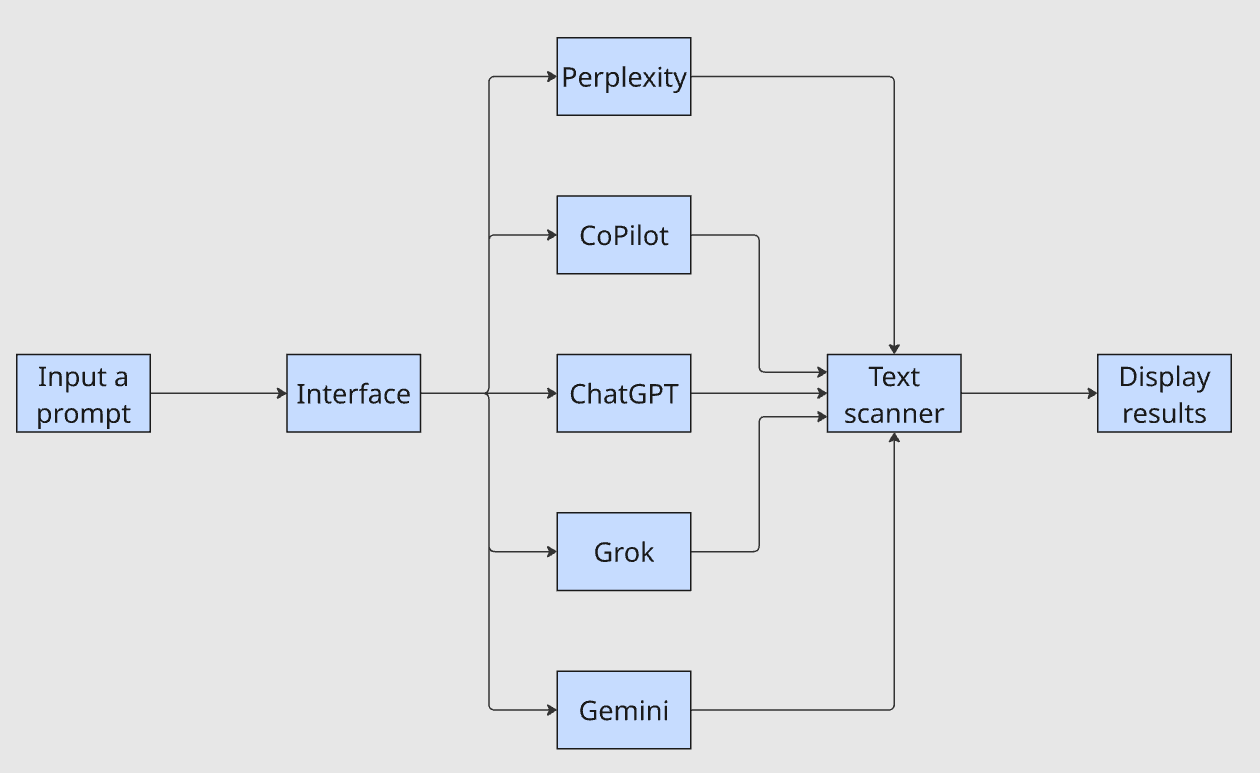
The interface takes a single prompt, forwards it to each LLM, pipes the outputs through a text scanner, and displays results. The question Does my company appear in the results? now takes minutes instead of an hour.
Building the Actual Software
Now, we need to build the actual software. We’ll create our basic project skeleton. Then, we’ll fill in the code as we go along. This section does not contain the full codebase. This is a conceptual breakdown, not a line by line walkthrough.
Getting Started
We can begin by creating a new project folder.
mkdir universal-llm-scraper
cd universal-llm-scraper
Next, we create a virtual environment to prevent dependency conflicts.
python -m venv .venvNext, you need to activate the virtual environment. The first can activate on Linux or macOS. If you’re on Windows, use the second command.
Linux/macOS
source .venv/bin/activateWindows
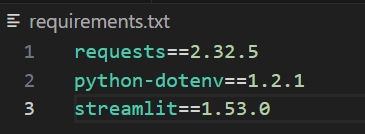
.\.venv\Scripts\Activate.ps1Finally, create a file called requirements.txt and add the dependencies you see below. You can adjust the version numbers. However, these ones worked well when building, so we pinned them for reproducible behavior.
requests==2.32.5
python-dotenv==1.2.1
streamlit==1.53.0
When you’re finished, the file will look like the image below.
To install these dependencies, simply run the pip command below.
pip install -r requirements.txtAI Models as Objects
Next, we need to understand that all of our AI models function as objects. Each one has the following attributes.
name: A human readable label for the model.dataset_id: This is a unique identifier for the scraper.url: The actual URL that we use to access the AI model.
In the class below, we create this same model object. This class needs no methods or logic. If you’re familiar with computer science, it’s similar to an old fashioned struct.
class AIModel:
    def __init__(self, name: str, dataset_id: str, url: str):
        self.name = name
        self.dataset_id = dataset_id
        self.url = url
Writing a Model Retriever
Next, we need to write a model retriever. This class does more heavy lifting. The model retriever provides a unifying orchestration layer between Bright Data and the rest of our code. It uses your Bright Data API key to authenticate with the API. We also have a variety of methods: get_model_response(), trigger_prompt_collection(), collect_snapshot() and write_model_output(). As we continue, we’ll fill in these methods.
class AIModelRetriever:
    def __init__(self, api_token: str):
        self.api_token = api_token

    def get_model_response(self, model: AIModel, prompt: str):
        pass

    def trigger_prompt_collection(self, model: AIModel, prompt: str, country: str = ""):
        pass

    def collect_snapshot(self, model: AIModel, snapshot_id: str):
        pass

    def write_model_output(self, model: AIModel, llm_response: dict):
        pass
get_model_response()
This method will be used primarily for orchestration. It uses trigger_prompt_collection() to initiate a scraper and return its snapshot_id. Then, collect_snapshot() is used to poll the API and return the response when it’s ready. Finally, we write the response to a file using write_model_output().
def get_model_response(self, model: AIModel, prompt: str):
        snapshot_id = self.trigger_prompt_collection(model, prompt)
        if not snapshot_id:
            raise RuntimeError(f"{model.name}: failed to trigger snapshot. Please wait and try again.")
        llm_response = self.collect_snapshot(model, snapshot_id)
        if not llm_response:
            raise RuntimeError(f"Failed to collect snapshot {snapshot_id} for {model.name}. Please wait and try again")
        self.write_model_output(model, llm_response)
trigger_prompt_collection()
To trigger a collection, we pass our API token into the HTTP headers. We then attempt a POST request to the API. We allow up to three retries because failures in HTTP can sometimes be unpredictable and the retries account for this. If the response is good, we return the snapshot_id. If errors occur, we continue trying until we run out of retries. If we exceed the retries, we exit the function.
def trigger_prompt_collection(self, model: AIModel, prompt: str, country: str = ""):
headers = {
"Authorization": f"Bearer {self.api_token}",
"Content-Type": "application/json",
}
data = json.dumps(
{"input":
[
{
"url": model.url,
"prompt": prompt,
"country":country,
}
],
})
tries = 3
while tries > 0:
response = None
try:
response = requests.post(
f"https://api.brightdata.com/datasets/v3/scrape?dataset_id={model.dataset_id}¬ify=false&include_errors=true",
headers=headers,
data=data,
timeout=POST_TIMEOUT
)
response.raise_for_status()
payload = response.json()
snapshot_id = payload["snapshot_id"]
return snapshot_id
except (ValueError, KeyError, TypeError, requests.RequestException) as e:
print(f"failed to trigger {model.name} snapshot: {e}")
tries -= 1
if response is not None and response.status_code >= 400:
print(f"Status: {response.status_code}")
print(response.text)
print("retries exceeded")
returncollect_snapshot()
Once we’ve got our snapshot_id, we check each minute to see if it’s ready. The API returns status code 202 if the collection is currently in progress. When the snapshot is ready, it returns a 200. When we receive any other status code, we throw an error and enter the retry logic. If the retries are exceeded, we exit the method.
def collect_snapshot(self, model: AIModel, snapshot_id: str):
        url = f"https://api.brightdata.com/datasets/v3/snapshot/{snapshot_id}"

        ready = False
        llm_response = None

        print(f"Waiting for {model.name} snapshot {snapshot_id}")
        max_errors = 3

        while not ready and max_errors > 0:
            headers = {"Authorization": f"Bearer {self.api_token}"}

            try:
                response = requests.get(url, headers=headers, timeout=GET_TIMEOUT)
            except requests.RequestException as e:
                max_errors -= 1
                print(f"{model.name}: polling error ({e})")
                continue

            if response.status_code == 200:
                print(f"{model.name} snapshot {snapshot_id} is ready!")
                ready = True
                llm_response = response.json()
                return llm_response
            elif response.status_code == 202:
                sleep(60)
            else:
                max_errors-=1
                print("Error talking to the server")
        print(f"Max errors exceeded, snapshot {snapshot_id} could not be collected")
        return
write_model_output()
This one is very simple. We just use it to store our model outputs. os.makedirs(OUTPUT_FOLDER, exist_ok=True) is used to ensure that we’ve got an outputs folder. Then, we write the file to the outputs folder and we use model.name to name the file.
def write_model_output(self, model: AIModel, llm_response: dict):
        os.makedirs(OUTPUT_FOLDER, exist_ok=True)
        path = os.path.join(OUTPUT_FOLDER, f"{model.name}-output.json")

        with open(path, "w", encoding="utf-8") as file:
            json.dump(llm_response, file, indent=4, ensure_ascii=False)
            print(f"Finished generating report from {model.name} → {path}")
Writing a Main File
Now, we’ll write a main file. We can use this to run the backend processes without loading the UI. run_one() lets us run the process on a single model. Inside main(), we use ThreadPoolExecutor() to run this function on multiple threads simultaneously. Rather than performing one collection at a time, we can perform one collection per thread to drastically speed up our results.
import os
from concurrent.futures import ThreadPoolExecutor, as_completed
from dotenv import load_dotenv

from ai_models import chatgpt, perplexity, gemini, grok, copilot, AIModelRetriever

MAX_WORKERS = 5


def run_one(model, retriever, prompt):
    retriever.get_model_response(model, prompt)
    return model.name


def main():
    load_dotenv()
    api_token = os.environ["BRIGHTDATA_API_TOKEN"]
    prompt = "Why is the sky blue?"

    models = [chatgpt, perplexity, gemini, grok, copilot]
    retriever = AIModelRetriever(api_token=api_token)

    failures = 0
    with ThreadPoolExecutor(max_workers=min(MAX_WORKERS, len(models))) as pool:
        futures = {pool.submit(run_one, m, retriever, prompt): m for m in models}

        for fut in as_completed(futures):
            model = futures[fut]
            try:
                name = fut.result()
                print(f"{name}: done")
            except Exception as e:
                failures += 1
                print(f"{model.name}: failed ({e})")

    if failures == len(models):
        raise SystemExit(1)


if __name__ == "__main__":
    main()
You can run the main file using the command below.
python main.pyThe Streamlit UI
The Streamlit UI is very similar to our main file in concept. We still use multiple threads to run each collection. Our write_output() and sanitize_filename() functions are used just for cleaner filenames. Rather than printing to the terminal, we create variables with streamlit to launch and display the app within your local browser.
Writing the UI
import os
import json
import re
from concurrent.futures import ThreadPoolExecutor, as_completed
from pathlib import Path

import streamlit as st
from dotenv import load_dotenv

from ai_models import chatgpt, perplexity, gemini, grok, copilot, AIModelRetriever


OUTPUT_DIR = Path("output")
MAX_WORKERS = 5


def sanitize_filename(name: str) -> str:
    return re.sub(r"[^A-Za-z0-9._-]+", "_", name).strip("_")


def write_output(model_name: str, payload: dict) -> Path:
    OUTPUT_DIR.mkdir(parents=True, exist_ok=True)
    path = OUTPUT_DIR / f"{sanitize_filename(model_name)}-output.json"
    path.write_text(json.dumps(payload, indent=4, ensure_ascii=False), encoding="utf-8")
    return path


def main():
    st.set_page_config(page_title="Universal LLM Scraper", layout="wide")
    st.title("Universal LLM Scraper")

    load_dotenv()
    api_token = os.getenv("BRIGHTDATA_API_TOKEN")
    if not api_token:
        st.error("Missing BRIGHTDATA_API_TOKEN. Add it to a .env file in the project root.")
        st.stop()

    models = [chatgpt, perplexity, gemini, grok, copilot]
    model_names = [m.name for m in models]
    model_by_name = {m.name: m for m in models}

    with st.sidebar:
        st.header("Run settings")
        prompt = st.text_area("Prompt", value="Who are the best residential proxy providers?", height=120)
        target_phrase = st.text_input("Target phrase to track", value="Bright Data")
        selected = st.multiselect("Models", options=model_names, default=model_names)
        country = st.text_input("Country (optional)", value="")
        save_to_disk = st.checkbox("Save results to output/", value=True)
        redact_terms = st.text_area("Brand terms to hide (one per line)", value="")
        redact_mode = st.selectbox("Hide mode", ["Mask", "Remove"], index=0)

        run_clicked = st.button("Run scrapes", type="primary", use_container_width=True)

    if "results" not in st.session_state:
        st.session_state.results = {}  # model_name -> payload
    if "errors" not in st.session_state:
        st.session_state.errors = {}   # model_name -> error str
    if "paths" not in st.session_state:
        st.session_state.paths = {}    # model_name -> saved path

    def apply_redaction(text: str) -> str:
        terms = [t.strip() for t in redact_terms.splitlines() if t.strip()]
        if not terms:
            return text
        pattern = re.compile(r"(" + "|".join(map(re.escape, terms)) + r")", flags=re.IGNORECASE)
        if redact_mode == "Mask":
            return pattern.sub("███", text)
        return pattern.sub("", text)

    def extract_answer_text(payload: dict) -> str | None:
        if not isinstance(payload, dict):
            return None

        if isinstance(payload.get("answer_text"), str):
            return payload["answer_text"]

        if "data" in payload and isinstance(payload["data"], list) and payload["data"]:
            first = payload["data"][0]
            if isinstance(first, dict) and isinstance(first.get("answer_text"), str):
                return first["answer_text"]

        return None

    def mentions_target(payload: dict) -> bool:
        if not target_phrase:
            return False

        answer = extract_answer_text(payload)
        if isinstance(answer, str):
            return target_phrase.lower() in answer.lower()

        # Fallback: if we can't find answer_text, just search the serialized payload
        try:
            blob = json.dumps(payload, ensure_ascii=False)
            return target_phrase.lower() in blob.lower()
        except Exception:
            return False


    # Layout: status + results
    status_col, results_col = st.columns([1, 2], gap="large")

    with status_col:
        st.subheader("Status")
        if run_clicked:
            st.session_state.results = {}
            st.session_state.errors = {}
            st.session_state.paths = {}

            if not selected:
                st.warning("Select at least one model.")
                st.stop()

            retriever = AIModelRetriever(api_token=api_token)

            status_boxes = {name: st.empty() for name in selected}
            progress = st.progress(0)
            done = 0
            total = len(selected)

            def run_one(model_name: str):
                model = model_by_name[model_name]
                payload = retriever.run(model, prompt, country=country)
                return model_name, payload

            with ThreadPoolExecutor(max_workers=min(MAX_WORKERS, total)) as pool:
                futures = [pool.submit(run_one, name) for name in selected]

                for fut in as_completed(futures):
                    try:
                        model_name, payload = fut.result()
                        st.session_state.results[model_name] = payload
                        status_boxes[model_name].success(f"{model_name}: done")
                        if save_to_disk:
                            path = write_output(model_name, payload)
                            st.session_state.paths[model_name] = str(path)
                    except Exception as e:
                        err = str(e)
                        st.session_state.errors[f"job-{done+1}"] = err
                        st.error(err)

                    done += 1
                    progress.progress(done / total)

            st.success("Run complete.")

        # Show saved files (if any)
        if st.session_state.paths:
            st.caption("Saved files")
            for k, v in st.session_state.paths.items():
                st.write(f"- {k}: {v}")

        if st.session_state.errors:
            st.caption("Errors")
            for k, v in st.session_state.errors.items():
                st.write(f"- {k}: {v}")

    with results_col:
        st.subheader("Results")

        if not st.session_state.results:
            st.info("Click 'Run scrapes' to collect results.")
            st.stop()

        tabs = st.tabs(list(st.session_state.results.keys()))
        for tab, model_name in zip(tabs, st.session_state.results.keys()):
            payload = st.session_state.results[model_name]

            with tab:
                answer_text = extract_answer_text(payload)
                mentioned = mentions_target(payload)

                st.markdown(f"**Target phrase mentioned:** {'✅' if mentioned else '❌'}")

                if answer_text and isinstance(answer_text, str):
                    st.markdown("### Answer")
                    st.text_area(
                        label="",
                        value=apply_redaction(answer_text),
                        height=260
                    )
                else:
                    st.markdown("### Raw JSON")
                    st.json(payload)


if __name__ == "__main__":
    main()
Yes, app.py is longer than our main file. However there are only a few key differences from main.py.
- State management: Using Streamlit, we store our results errors and file paths in
st.session_state. This allows us to retrieve and display them within the UI. - Orchestration: Rather than hardcoding our prompts and model collections, they are collected and triggered from within the UI.
- Text inspection: We inspect our answer text see if it holds the target phrase. If the target phrase is present, we display a ✅. If it’s not, we display ❌ instead.
Using the UI
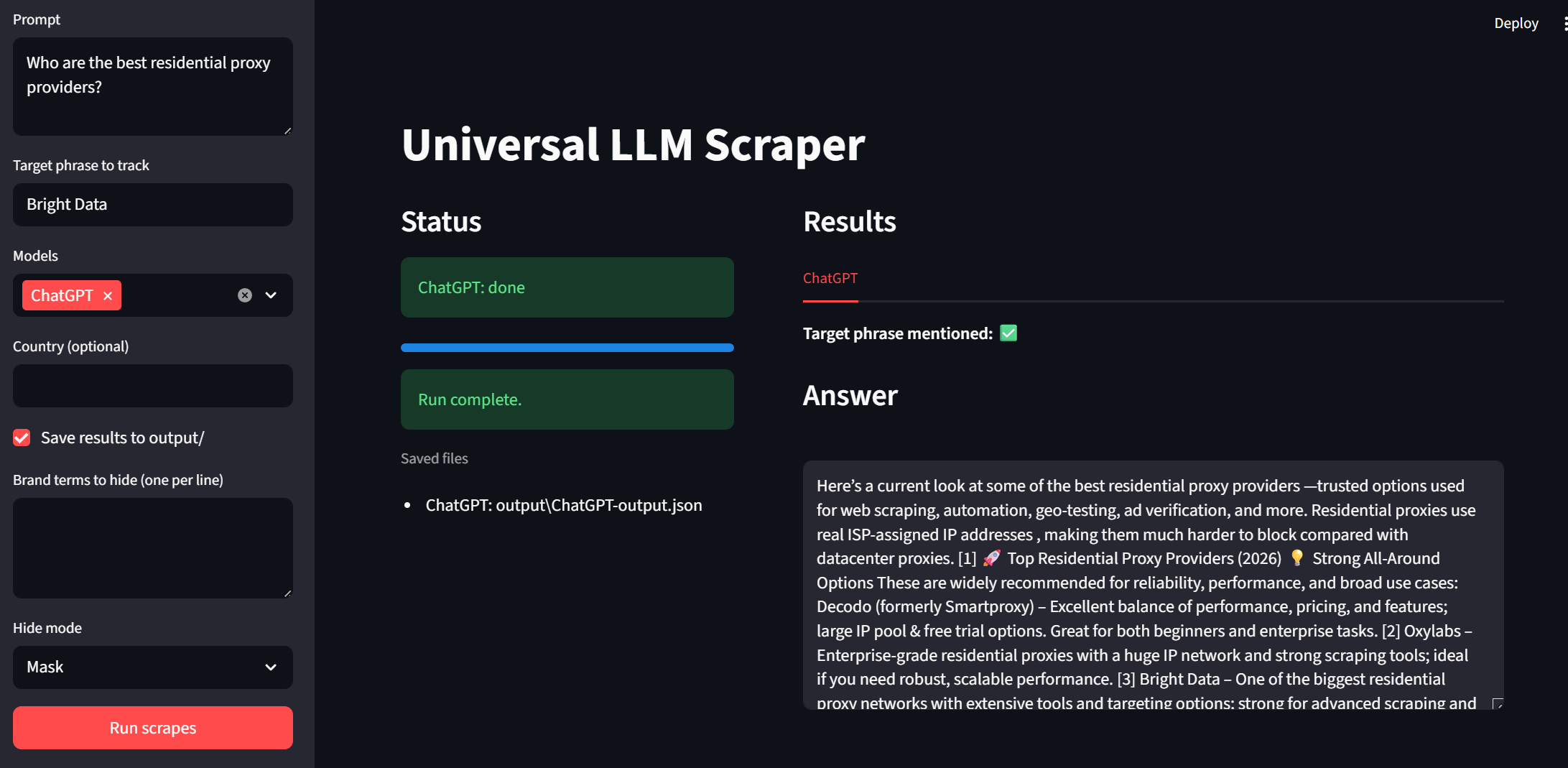
Now, it’s time to test out our UI. You can run the app with the snippet below.
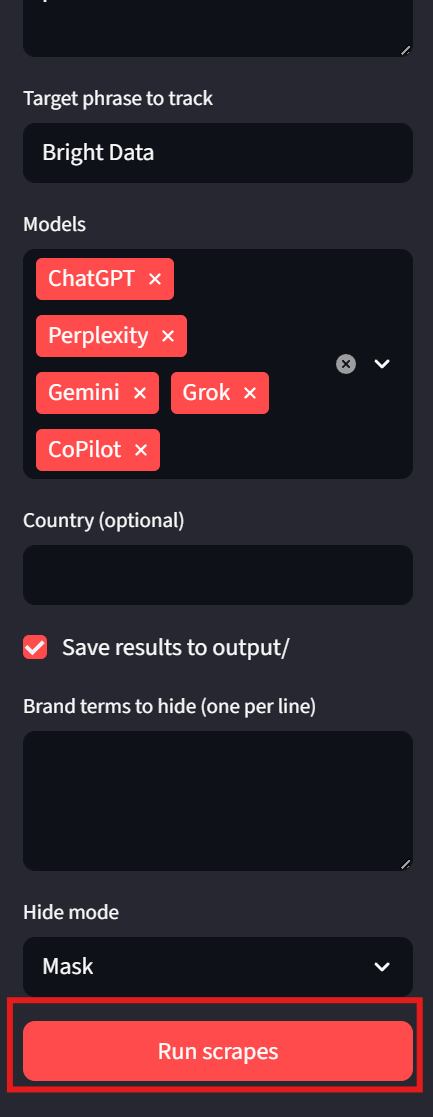
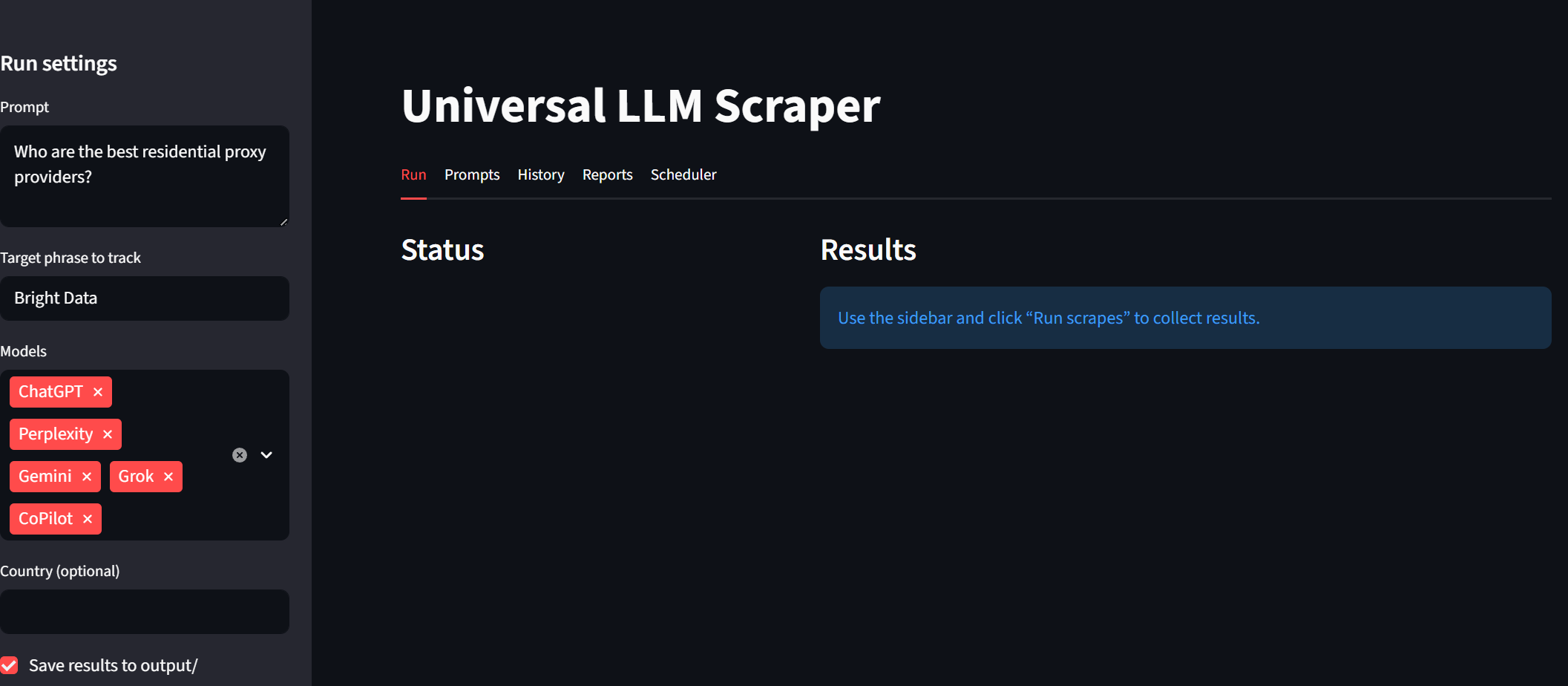
streamlit run app.pyTake a look at the sidebar. We can input prompts and target phrases. Models are now selectable using a dropdown. “Country” and “Save output” are optional tweaks on the user end. To run the program, simply click on the “Run scrapes” button at the bottom.
The Results
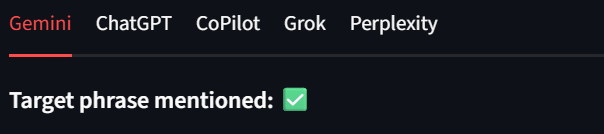
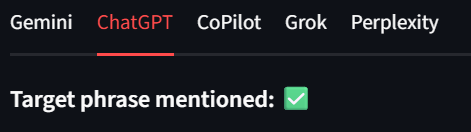
Each model shows up as its own tab within the results. This way, we can quickly review the results. In the images below, Bright Data received a green checkmark for each model output. Example:
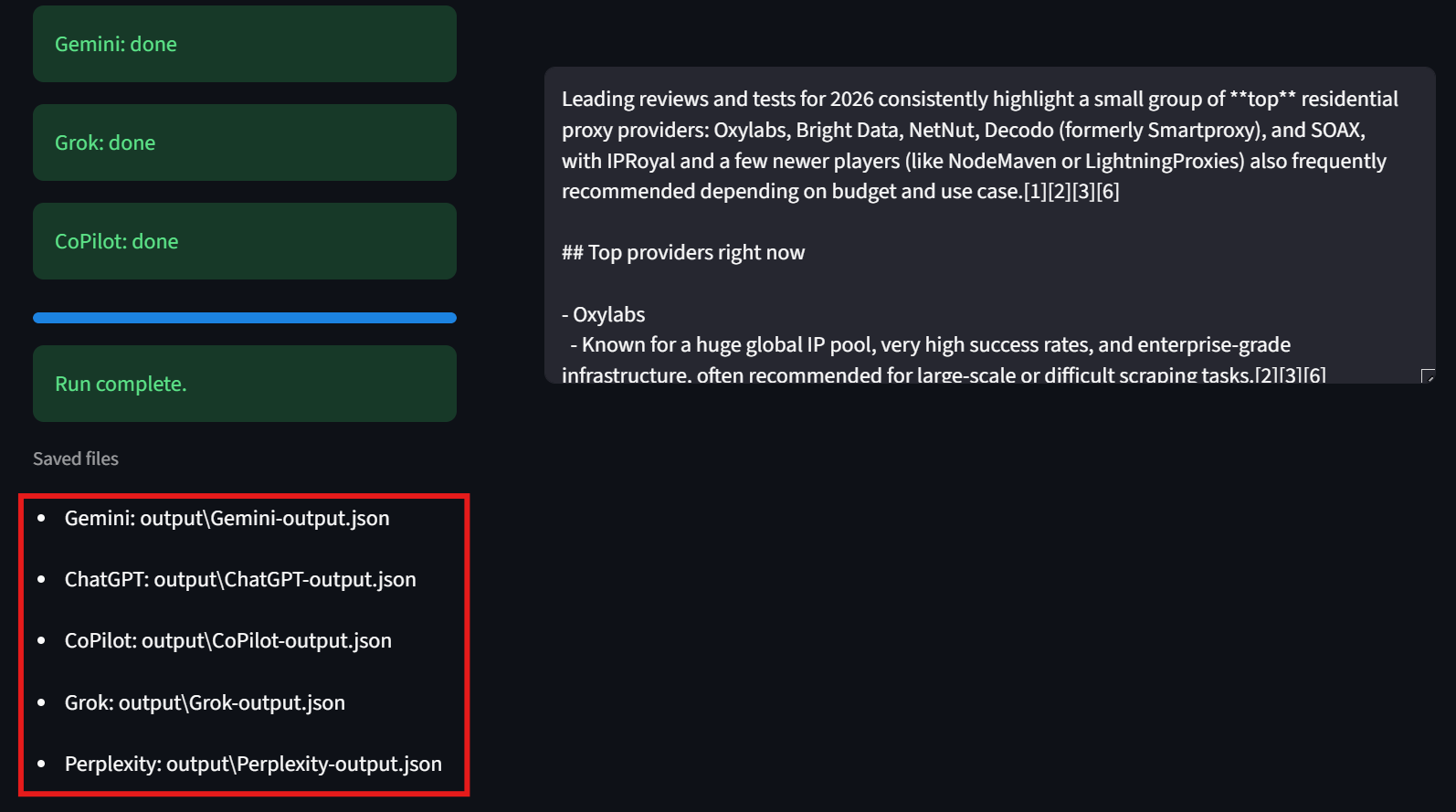
Users should also notice the bottom left corner of the interface. Here, the UI displays the path to each of the results files. This makes it easy for people to inspect the raw results.
Taking it to the next level
First, we need a Supabase account. You can head over to supabase.com and follow the instructions. Supabase offers a variety of pricing plans to support your needs. For this project, their free tier will do just fine. However, as your database grows, you may need to upgrade.
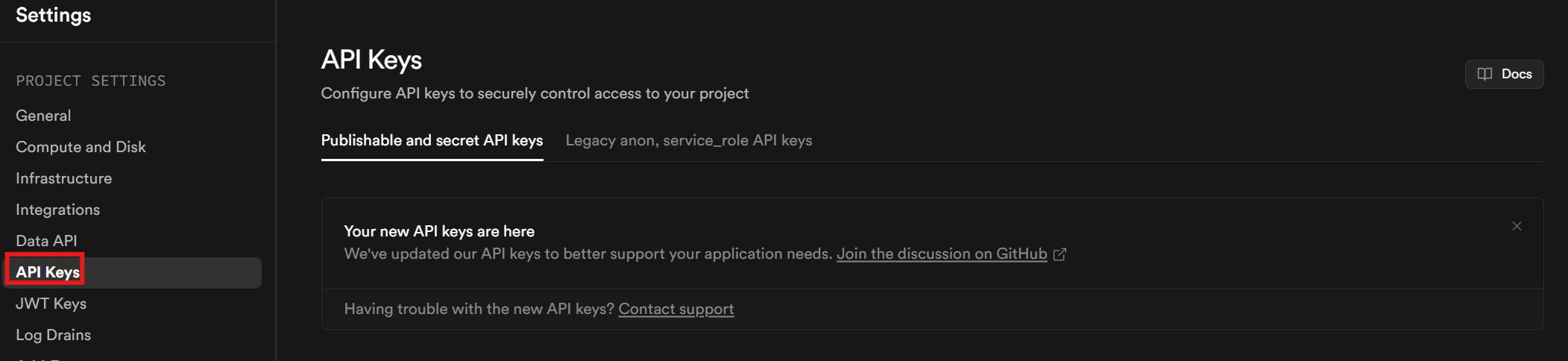
You’ll need an API key. Once you’ve finished setting up your account and project, click on Project Settings in the sidebar. Go to the API keys tab to retrieve your API key.
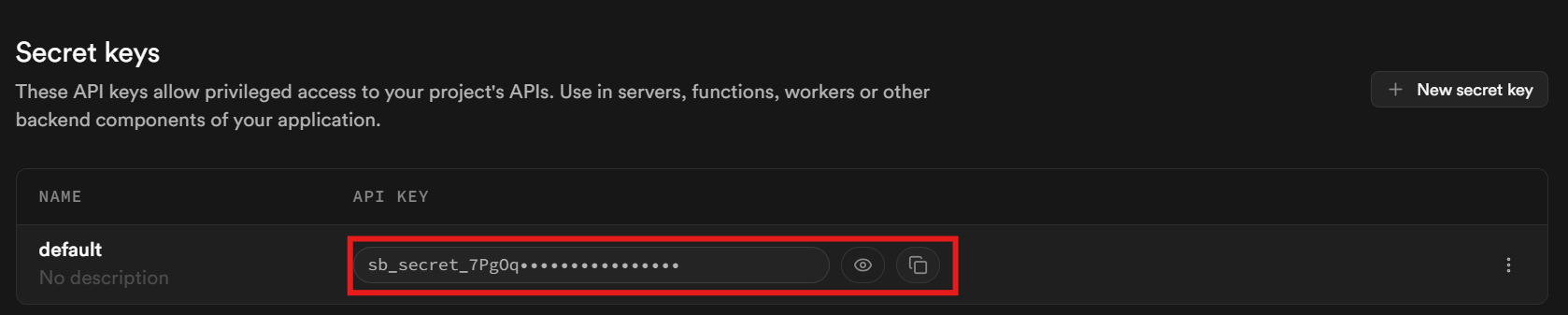
Scroll down to the bottom of the page. Your key is located in the section labeled “Secret keys.”
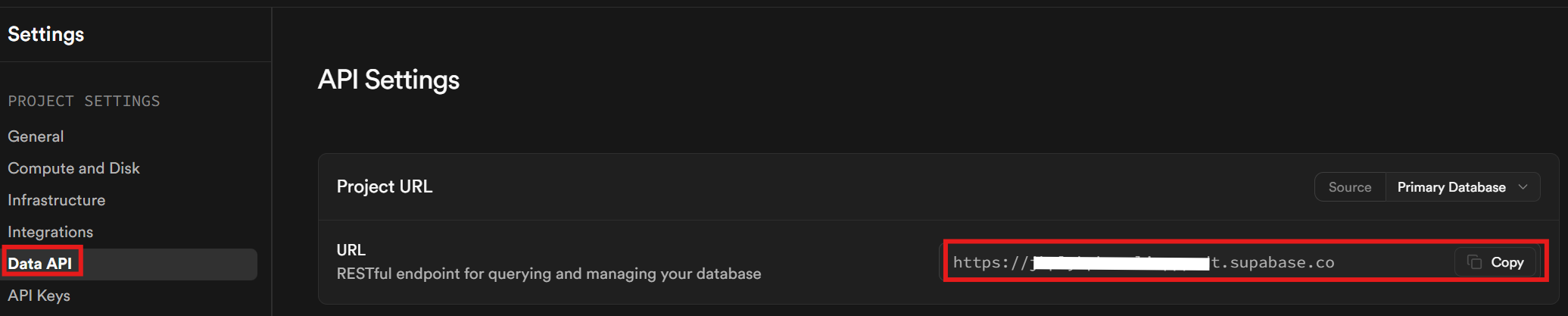
Finally, in the Data API tab, retrieve your Supabase URL. This is the URL you use for talking to your database.
Once we’ve got our keys, we need to update our environment file and our requirements file. Your new environment file should now look like this.
BRIGHTDATA_API_TOKEN=<your-bright-data-api-key>
SUPABASE_URL=<your-supabase-project-url>
SUPABASE_API_TOKEN=<your-supabase-api-key>
Our requirements file now looks like this.
requests==2.32.5
python-dotenv==1.2.1
streamlit==1.53.0
supabase==2.27.2
Creating the tables
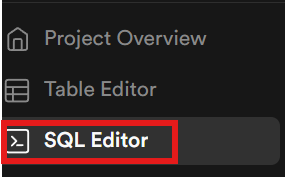
Now, we need to create our tables within the database. Using the sidebar, open the SQL editor.
LLM runs
Paste the following SQL code into a script and run it. This creates a table called llm_runs. Each time we run a collection, we’ll deposit the results here.
create table public.llm_runs (
  id bigint generated by default as identity primary key,
  created_at_ts bigint not null, -- unix seconds
  model_name text not null,
  prompt text not null,
  country text null,
  target_phrase text null,
  mentioned boolean not null default false,
  payload jsonb not null
);

create index if not exists llm_runs_created_at_ts_idx
  on public.llm_runs (created_at_ts);

create index if not exists llm_runs_model_idx
  on public.llm_runs (model_name);

create index if not exists llm_runs_target_idx
  on public.llm_runs (target_phrase);
Prompts
We also need a the ability to save prompts. The code below creates a prompts table.
create table public.prompts (
  id bigint generated by default as identity primary key,
  created_at_ts bigint not null,
  prompt text not null,
  is_active boolean not null default true
);

create index if not exists prompts_created_at_ts_idx
  on public.prompts (created_at_ts desc);

create index if not exists prompts_active_idx
  on public.prompts (is_active);
Schedules
Finally, we need a table to hold scheduled jobs.
create table public.schedules (
  id bigint generated by default as identity primary key,

  name text not null,
  is_enabled boolean not null default true,

  next_run_ts bigint not null,
  last_run_ts bigint null,

  models jsonb not null default '[]'::jsonb,

  country text null,
  target_phrase text null,
  only_active_prompts boolean not null default true,

  locked_until_ts bigint null,
  lock_owner text null,

  repeat_every_seconds bigint not null default 86400
);

create index if not exists schedules_due_idx
  on public.schedules (is_enabled, next_run_ts);

create index if not exists schedules_lock_idx
  on public.schedules (locked_until_ts);
Updated architecture
The final codebase is now large enough that it no longer fits inside a tutorial. Rather than dumping every file here, we’ll go over some of the core points behind the database connection, the headless runner and the Streamlit UI.
Database interactions
We’ve got a variety of database helpers but everything is primarily based around reading and creating within the database. The code below allows us to connect to the entire database.
def get_db() -> Client:
    url = os.getenv("SUPABASE_URL")
    key = os.getenv("SUPABASE_API_TOKEN")  # keep consistent with your .env
    if not url or not key:
        raise RuntimeError("Missing SUPABASE_URL or SUPABASE_API_TOKEN in environment.")
    return create_client(url, key)
To actually interact with the database, we call additional methods on top of get_db(). In the next snippet, get_db() retrieves the database. We then use db.table("llm_runs").insert(row).execute() to insert new rows into our llm_runs table. The prompts and scheduling helpers follow this same basic logic.
def save_run(
    *,
    model_name: str,
    prompt: str,
    country: str,
    target_phrase: str,
    mentioned: bool,
    payload: dict,
) -> dict:


    db = get_db()

    row = {
        "created_at_ts": int(time.time()),
        "model_name": model_name,
        "prompt": prompt,
        "country": country or None,
        "target_phrase": target_phrase or None,
        "mentioned": bool(mentioned),
        "payload": payload,  # JSONB
    }

    res = db.table("llm_runs").insert(row).execute()
    if not getattr(res, "data", None):
        row["payload"] = {"ERROR": "FAILED RUN"}
        res = db.table("llm_runs").insert(row).execute()

        raise RuntimeError(f"Insert failed: {res}")
    return res.data[0]
Headless runner
After creating the Streamlit UI, we renamed main.py to headless_runner.py as the project expanded in scope. There is no longer one main program but rather, two scripts that run simultaneously.
persist_run() checks for an empty payload from the API. If the payload is empty, we return False and print a message to the terminal about the failed insert. If the payload contains information, we use save_run() to insert the results into the database.
def persist_run(*, model_name: str, prompt: str, payload, target_phrase: str, country: str = "") -> bool:
    if payload is None:
        print(f"{model_name}: skipping DB insert (payload is None).")
        return False

    # If you want to treat empty list/dict as "don't save", keep this:
    if payload == {} or payload == []:
        print(f"{model_name}: skipping DB insert (empty payload). type={type(payload).__name__}")
        return False

    try:
        json.dumps(payload, ensure_ascii=False)
    except TypeError as e:
        print(f"{model_name}: payload not JSON-serializable ({e}). Stringifying.")
        payload = {"raw": json.dumps(payload, default=str, ensure_ascii=False)}

    mentioned = mentions_target(payload if isinstance(payload, dict) else {"data": payload}, target_phrase)

    try:
        save_run(
            model_name=model_name,
            prompt=prompt,
            country=country,
            target_phrase=target_phrase,
            mentioned=mentioned,
            payload=payload,
        )
    except Exception as db_err:
        print(f"{model_name}: DB insert failed: {db_err}")

    return mentioned
Before moving on, there’s one other major piece of our headless runner you need to look at. We have a variety of optional environment variables you can use as configuration tweaks. Our real program runtime gets held within a simple while loop. Inside the runtime loop, we continually check for new jobs in the schedule. Whenever a scheduled job is due, it calls run_schedule_once() to initiate the run.
# tune these without DB changes
tick_every_seconds = int(os.getenv("SCHED_TICK_SECONDS", "15"))      # how often to wake up
lock_seconds = int(os.getenv("SCHED_LOCK_SECONDS", "1800"))         # lock duration while a job runs
drain_all_due = os.getenv("SCHED_DRAIN_ALL_DUE", "1") == "1"         # run all due jobs each tick
save_to_disk = os.getenv("SCHED_SAVE_TO_DISK", "0") == "1"

while True:
    now_ts = int(time.time())

    ran_any = False

    # claim & run either one schedule, or drain all due schedules
    while True:
        try:
            due = claim_due_schedule(now_ts=now_ts, lock_owner=lock_owner, lock_seconds=lock_seconds)
        except Exception as e:
            print(f"Failed to claim due schedule: {e}")
            due = None

        if not due:
            break

        ran_any = True
        try:
            run_schedule_once(
                schedule_row=due,
                retriever=retriever,
                available_models=available_models,
                model_by_name=model_by_name,
                save_to_disk=save_to_disk,
            )
        except Exception as e:
            # If something explodes mid-run, we do NOT advance the schedule.
            # The lock will expire, and the schedule will be picked up later.
            print(f"Schedule run crashed: {e}")

            if not drain_all_due:
                break

            # update time for next claim
            now_ts = int(time.time())

        if not ran_any:
            # optional: quieter logs
            print(f"[{int(time.time())}] No due schedules.")

        time.sleep(tick_every_seconds)
To start the headless runner, simply open a new terminal and run python headless_runner.py.
The Streamlit application
Our Streamlit application has grown massively. You can still invoke it using streamlit run app.py It now has five separate tabs. The original “Run Scrapes” page still shows up immediately on our dashboard.
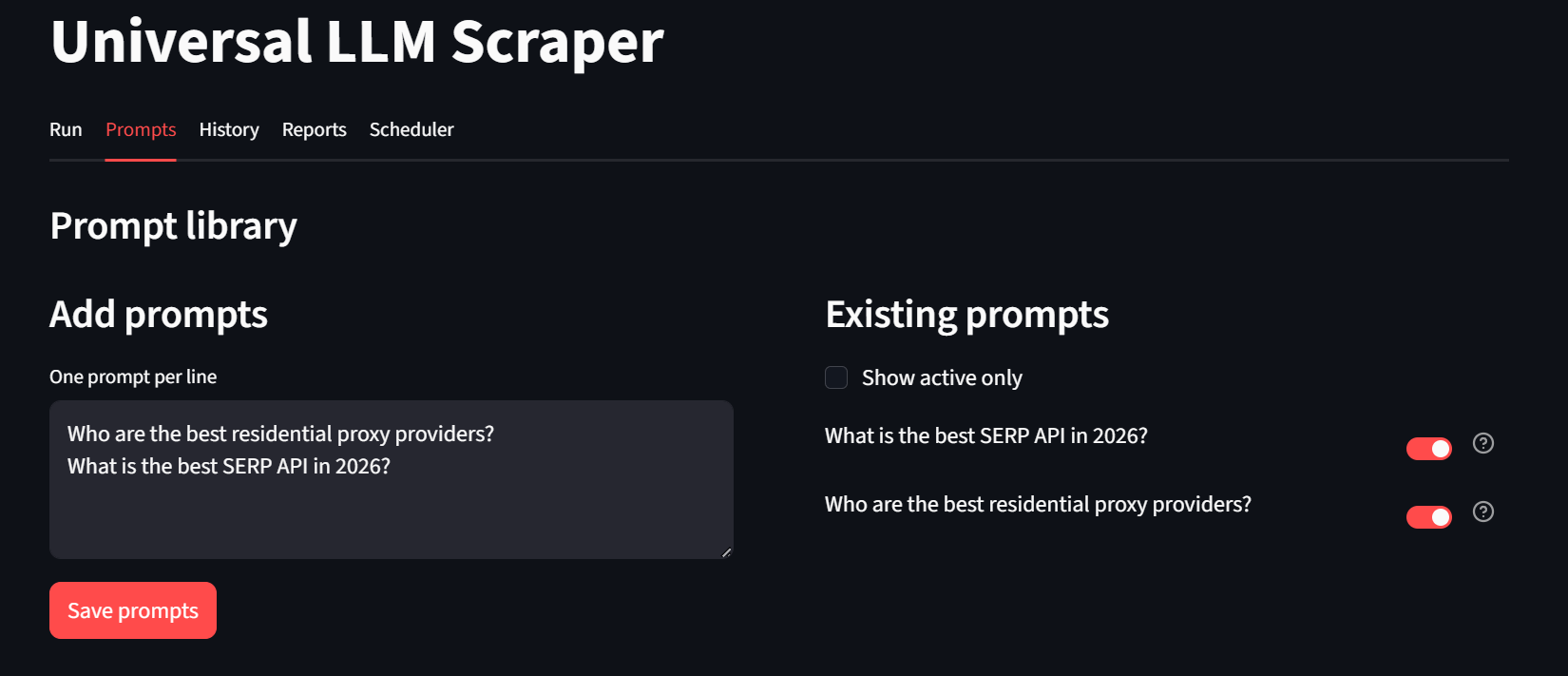
On our “Prompts” tab, users can create new prompts and optionally save them for later usage. At the bottom of this page, users can configure and perform bulk runs.
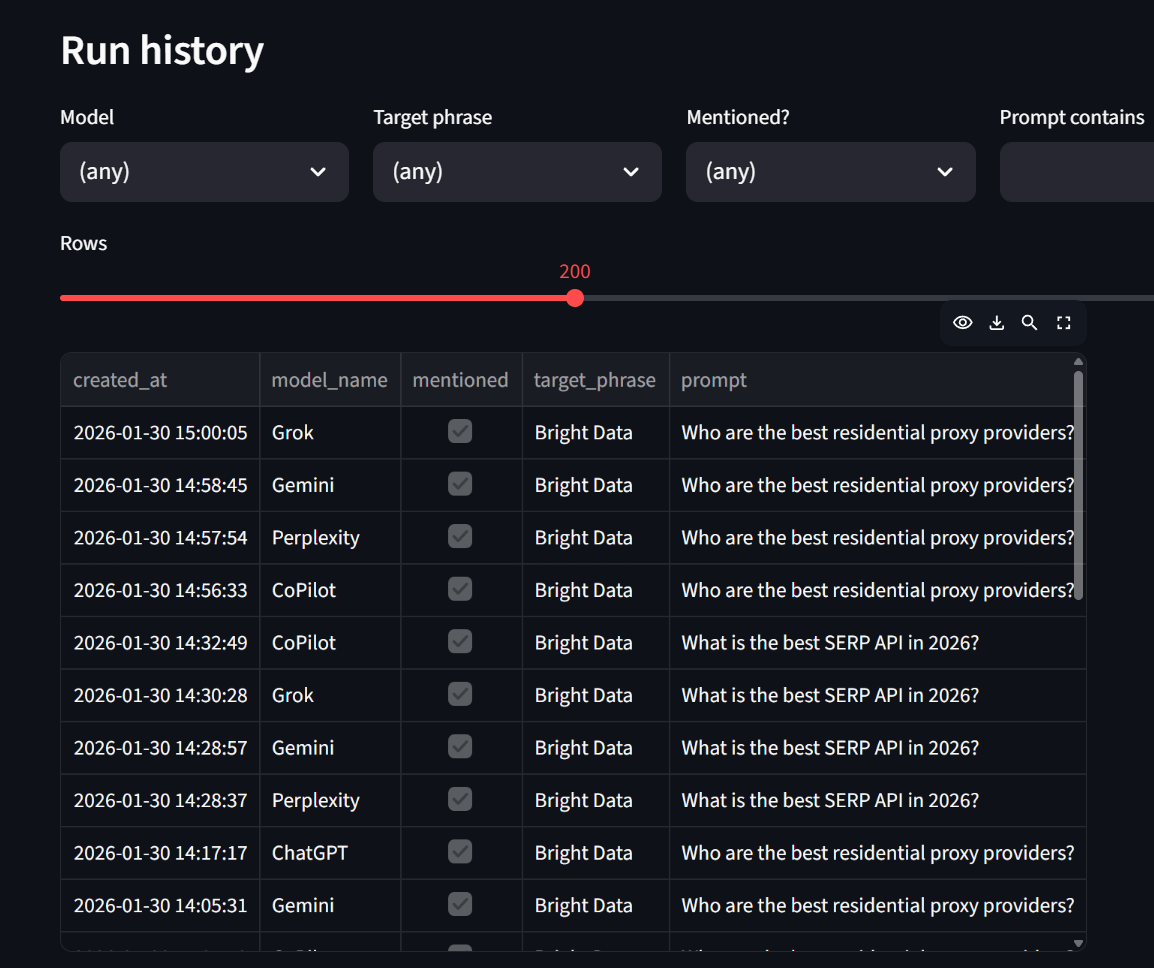
Using the “History” tab, users can inspect detailed run history. At the bottom of this page, users also get the option to inspect raw JSON payloads if they desire.
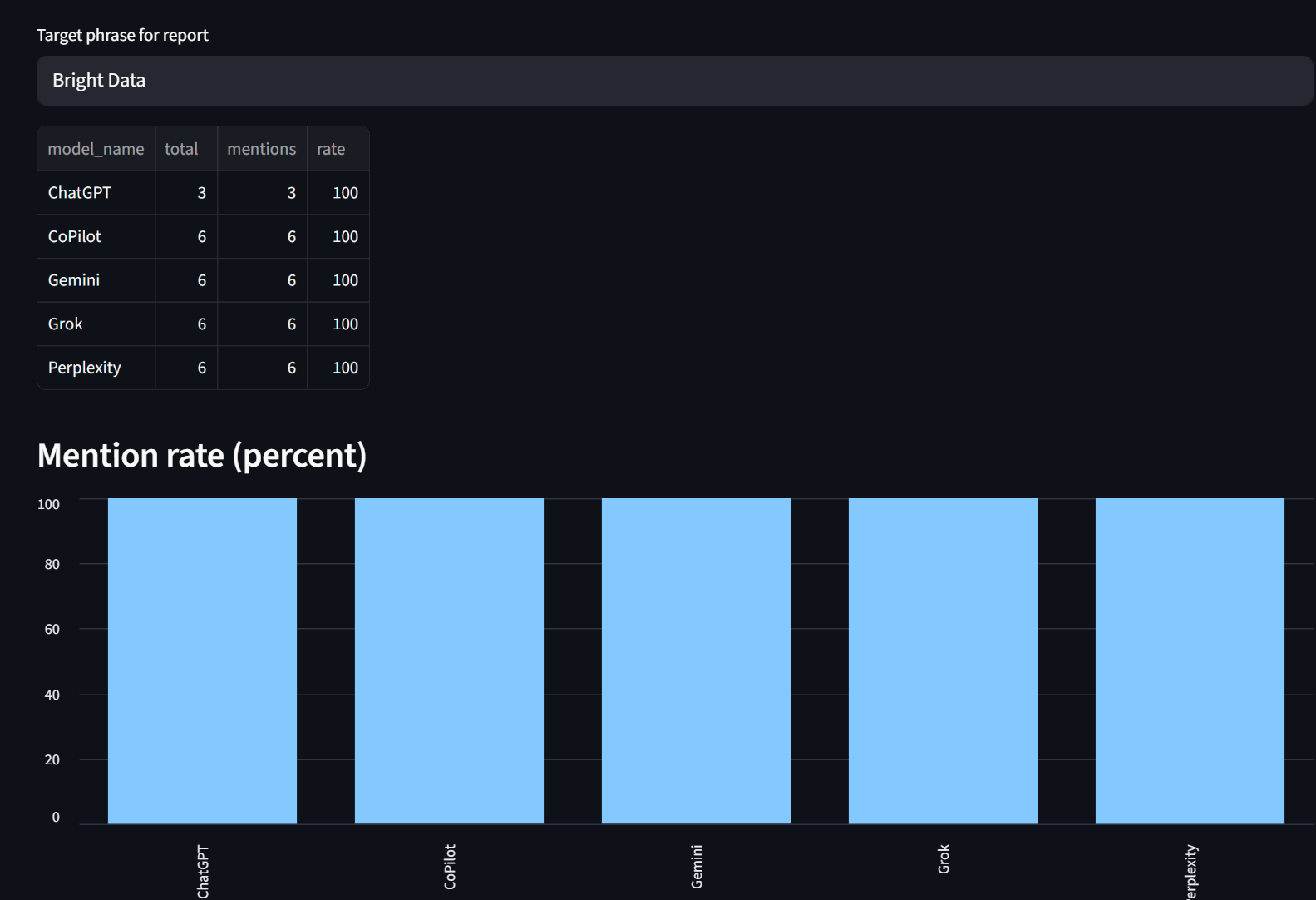
Our reports tab lets you look at mention rates broken down by model. As you can see, Bright Data was mentioned 100% of the time by each model here.
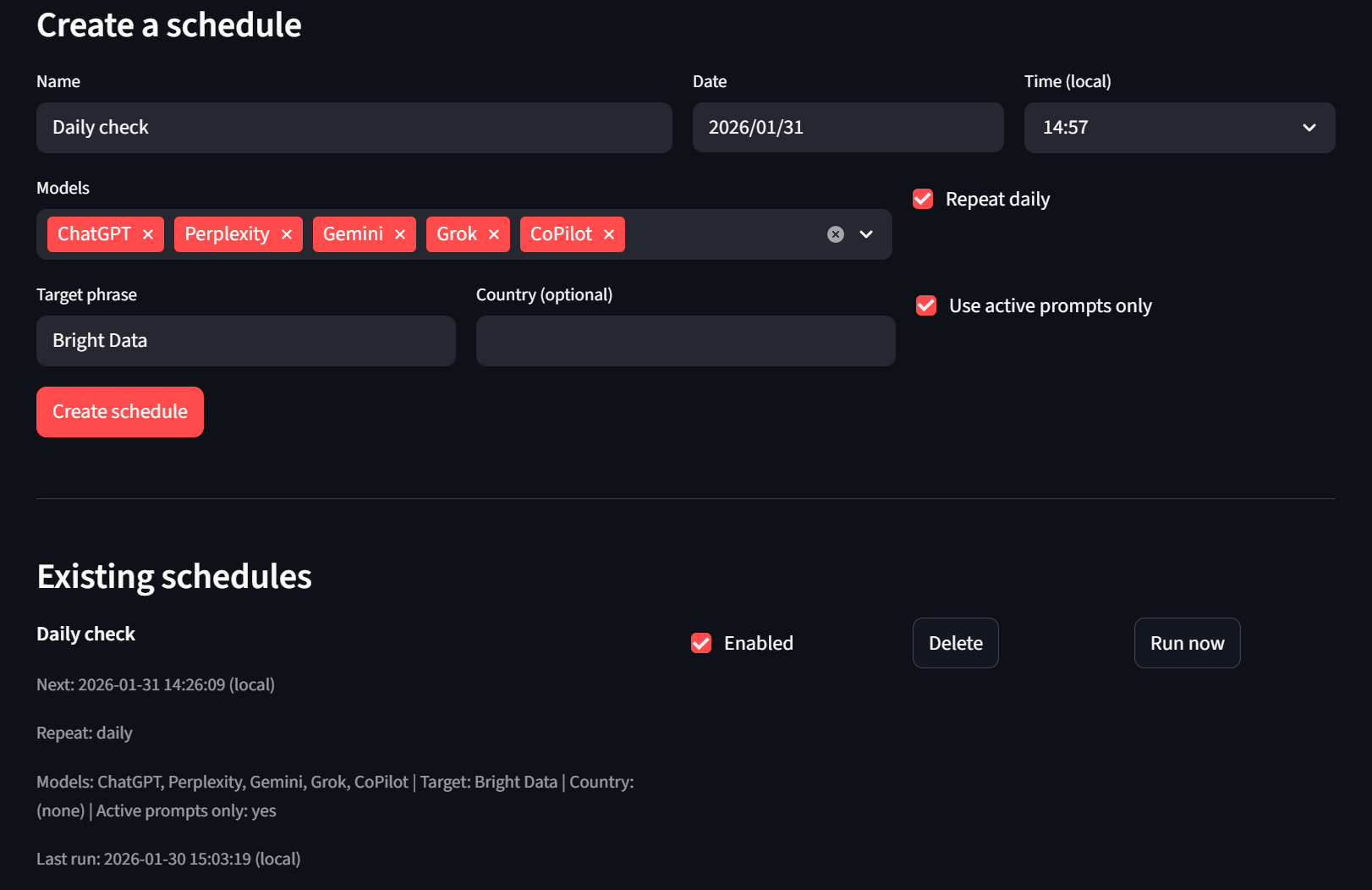
Finally, we have our Scheduler tab. Users can create and delete schedules. If they don’t want to wait, they can also use the “Run now” button and the headless runner will pick it up on the next tick.
Conclusion
If you built the prototype at the beginning of this article, you already understand the concepts required for moving tools like this into the next stage.
The architecture demonstrated in this guide can support:
- Persistent memory and historical tracking: Store results over time to detect trends in how AI models mention your brand, track ranking changes, and identify emerging competitors.
- Hundreds of prompts monitored daily: Automate scheduled collections across thousands of keyword variations, product categories, and competitor comparisons.
- Automated reporting and analysis: Generate reports showing brand mention rates, sentiment analysis, citation frequency, and competitive positioning across all major LLMs.
- Alerting systems: Trigger notifications when your brand drops from recommendations or when competitors gain visibility.
- Multi-region monitoring: Track how AI responses vary by geography to inform localized marketing strategies.
For enterprise teams managing brand reputation at scale, the ability to answer “Is my company being recommended by AI?” across every major model, for every relevant query, every single day, is no longer optional. It’s essential infrastructure.
Bright Data’s Web Scraper APIs provide the normalized, reliable data feeds that make this level of monitoring possible. Whether you’re tracking ChatGPT, Perplexity, Gemini, Grok, or Microsoft Copilot, the unified schema removes friction from integration and lets your team focus on insights rather than data wrangling.
Ready to build your own AI visibility monitoring system? Start for free and see how Bright Data can power your next-generation SEO strategy.


Technical Writer
 6 years experience
Jacob Nulty is a Detroit-based software developer and technical writer exploring AI and human philosophy, with experience in Python, Rust, and blockchain.