
An ETL pipeline extracts data from a source, transforms it into a consistent format, and loads it into a destination such as a data warehouse. It’s a type of data pipeline that gives analysts and AI applications one shared dataset.
When the source is a website, extraction can fail silently. A page can return HTTP 200, the success code, and still show a bot check instead of the product.
This guide builds a Python pipeline that catches these failures, with the Bright Data Web Unlocker API for extraction. It also shows when buying records costs less than maintaining parsers.
TL;DR
- HTTP 200 doesn’t prove extraction worked. Check each page for the item and price. The Bright Data Web Unlocker API passes the site’s status code, and none of 72 requests through it returned HTTP 200 without the product.
- The country belongs in the primary key. Steam priced one game in 6 currencies across 8 countries.
- Detect changes by comparing fields between runs. Retail pages gave no reliable last-modified time. Walmart’s 6,501 sitemap files shared one date.
- Store the raw page before you parse it. After a parser fix, re-parsing stored Target pages recovered the missing price without a new request.
How an ETL pipeline works
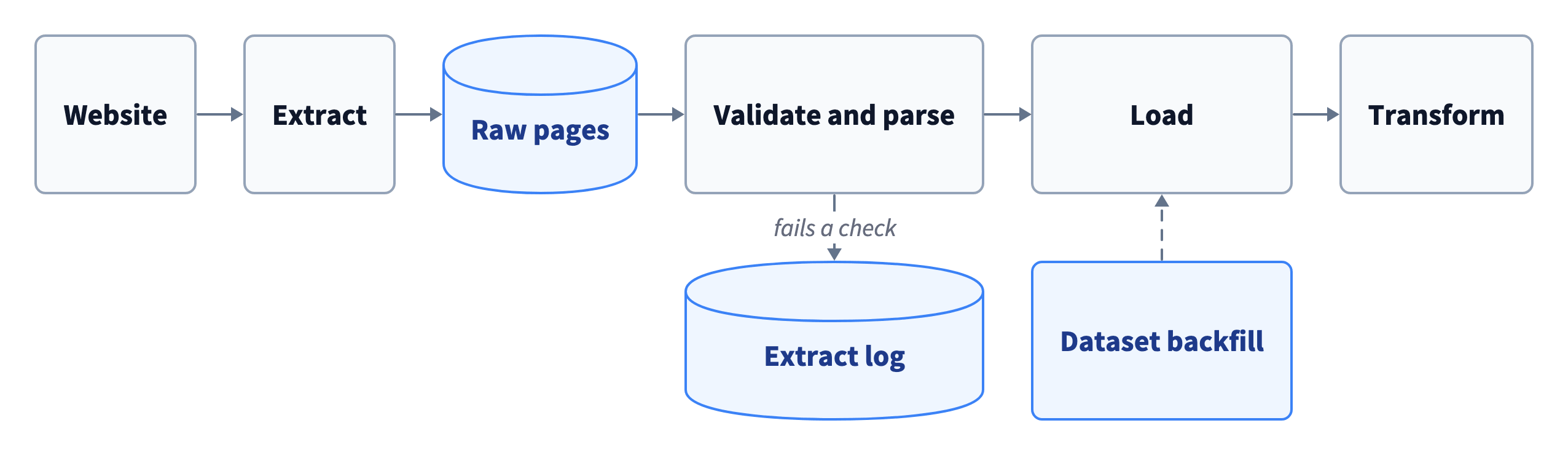
An ETL pipeline runs on a schedule or when new data arrives, and each run moves data through 3 steps. A web source adds 3 parts around those steps, shown in blue:
- Raw pages are copies of each fetched page, kept before parsing.
- An extract log records every fetch attempt, with a reason for each rejected page.
- A dataset backfill loads records collected before your first run.
The parse step runs before the load. The last Transform box is the SQL work you run in the warehouse after the load, such as dbt models:
Extract reads data from the source system. For a database, extraction is often a query on a watermark column such as updated_at. For a website, extraction is an HTTP request, a browser session, or a scraping API call, sent from a location you choose. Each response then needs a check that it contains the data.
Transform turns raw input into typed, consistent records. That work includes parsing, type casting, deduplication, currency and unit normalization, joins, and business rules. For web data, parsing is often the largest part, because sites structure their pages differently.
Load writes the records to the destination. The destination can be Snowflake, BigQuery, Databricks, Postgres, or an Apache Iceberg table in object storage.
For web data, a safe default is an upsert keyed on the item, the country, and the capture date. A rerun on the same day then replaces rows instead of duplicating them.
ETL vs ELT: where the transform runs
ETL transforms data before it reaches the warehouse. ELT loads raw data first and transforms it inside the warehouse with SQL, often as version-controlled models in dbt or SQLMesh.
Web sources fit a third pattern better. This pattern is sometimes called EtLT or ETLT, with a small transform (t) before the load and the main transform (T) after it:
| ETL | ELT | EtLT, for web sources | |
|---|---|---|---|
| Where the transform runs | Before the load, in pipeline code | After the load, in the warehouse | A parse step before the load, SQL models after it |
| What reaches the warehouse | Clean records only | Raw records, then SQL models built on them | Typed records, while raw pages stay in object storage |
| How you reprocess | Reload from a staging area, or extract again | Run the SQL again on raw tables | Parse the stored pages again |
| Good fit | Strict schemas, sensitive fields removed before the load | Databases and SaaS APIs whose raw tables can land as they are | HTML, JSON-LD, and other semi-structured pages |
The third pattern suits web sources for 2 reasons. First, product pages are large. The Amazon product page in these tests was between 1.7 and 3.2 MB of HTML per fetch. Raw pages that size are better kept in object storage than in warehouse tables.
At its default level, Python’s gzip module compressed the test pages by a factor of 4.4 to 8.9. At 1M Amazon product pages a day, the compressed HTML is about 450 GB instead of 2.4 TB uncompressed.
Second, a website doesn’t serve its past versions. A database keeps its data, so you can extract it again. A change data capture (CDC) tool can also read recent changes from the database’s transaction log.
Store the raw page first. In a medallion architecture, this is the bronze layer, which holds data exactly as it arrived. Then parse it into typed rows and load those rows. After a parser fix, you can re-parse the stored pages without fetching them again.
What changes when the source is a website
A database source often fails with a clear error, such as a dropped connection or a failed query. A web source differs in 4 ways, and each one needs its own check or design choice in the pipeline.
An HTTP 200 response can contain no data
A client that imitates a browser more closely can get more HTTP 200 responses without getting more data. The table shows 9 Sony WH-1000XM5 product pages on 8 retail sites, fetched from a home internet connection in India by 3 clients:
- The
requestslibrary with default settings, which sends apython-requestsUser-Agent. - The
requestslibrary with the User-Agent and Accept headers of Chrome. - curl_cffi with
impersonate="chrome", which sends Chrome headers and copies the TLS and HTTP/2 fingerprint of Chrome.
A response counted as a product page when its title contained the product name and its body was larger than 50 KB. Every page gave the same result in each of at least 3 randomized rounds:
| Page | requests, default | requests, Chrome headers | curl_cffi, Chrome impersonation |
|---|---|---|---|
| Amazon.com | Product page | Product page | HTTP 200, interstitial |
| Amazon.de | Product page | Product page | Product page |
| Walmart | HTTP 200, “Robot or human?” | Product page | HTTP 200, “Robot or human?” |
| Target | Product page | Product page | Product page |
| Target, refurbished listing | Product page | Product page | Product page |
| Best Buy | HTTP 403 | Timed out after 30 seconds | HTTP 200, country picker |
| Sony | HTTP 403 | HTTP 403 | Product page |
| Newegg | HTTP 403 | HTTP 403 | HTTP 200, “Are you a human?” |
| eBay | HTTP 403 | HTTP 403 | HTTP 403 |
| Product pages | 4 of 9 | 5 of 9 | 4 of 9 |
For the Walmart product URL, the default client stored this page with HTTP 200:
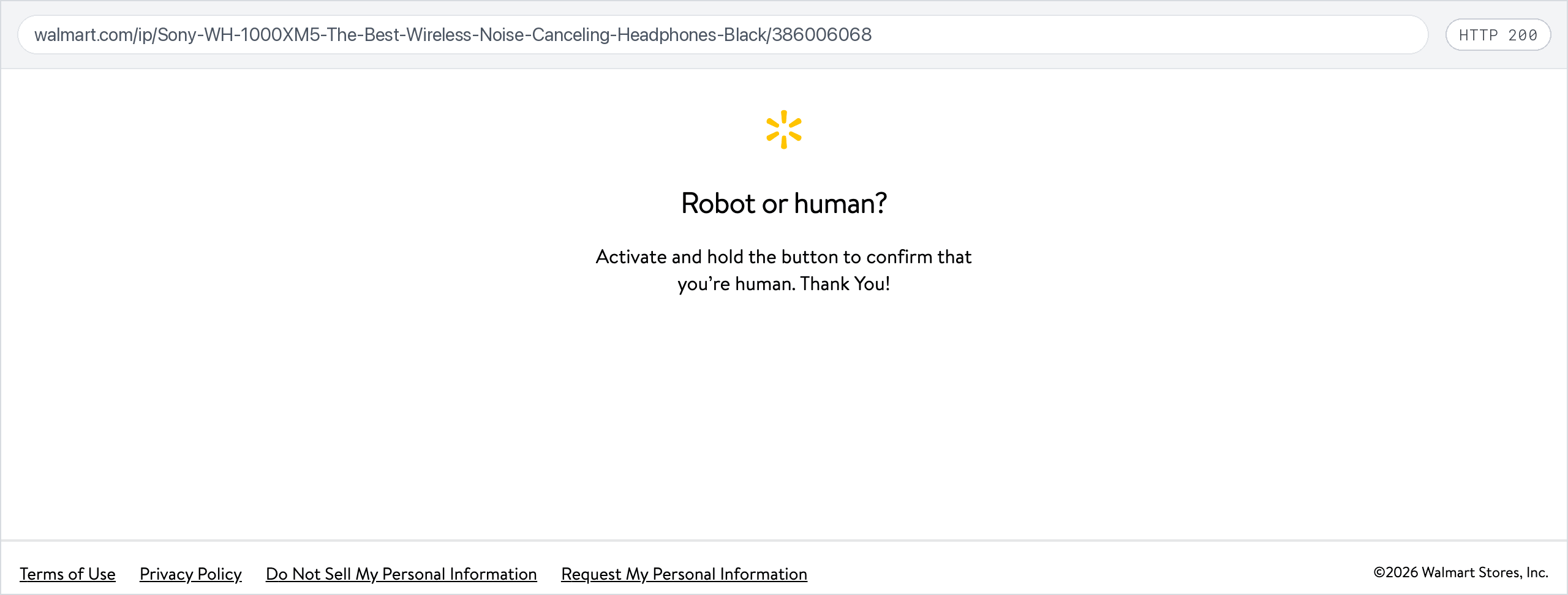
On 3 of the 4 sites where the default client got HTTP 403, the curl_cffi client got HTTP 200. Only the Sony page contained the product data.
Results depend on where requests come from and how many you send. The Best Buy country picker, for example, appeared because the requests came from India. Repeat this check from the host that will run your pipeline, at the volume it will run.
A job that alerts on status codes would rate the curl_cffi client as the most successful, with HTTP 200 on 8 of 9 pages. The same job would also load 4 pages without product data, compared with 1 for the default client. Scrapy’s built-in stats count responses by status code, so a success rate based on them counts these pages as successes. Validate the content as well as the status code:
- The page contains the name of the item you requested.
- The price parses as a number, and the currency is a 3-letter ISO 4217 code.
The Bright Data Web Unlocker API reports the site’s own HTTP status code in the x-brd-status-code response header. On the same 9 pages, over 8 rounds, none of 72 requests through it returned HTTP 200 without the product. Through the Web Unlocker API, eBay served the product page, though it returned HTTP 403 to all 3 clients. Sony and Newegg, which blocked the default client, served it too.
For a removed product page, the header reports 404, so the pipeline can reject it based on the site’s own status. Read the status from that header, and retry on 429 or 5xx.
The same URL returns different data by country
Many sites set the price, the currency, and the page content by the visitor’s location. To test this, Steam’s page for Elden Ring was requested from 8 countries. The Web Unlocker API fetched the HTML pages, with its country parameter set to each one, and Steam’s own endpoint returned the JSON prices. Repeat requests returned the same prices:
| Country | HTML page, exit IP in that country | JSON endpoint, by country code |
|---|---|---|
| Türkiye | $39.99 USD | USD 3999 |
| United Kingdom | £49.99 | GBP 4999 |
| Germany | 59,99€ | EUR 5999 |
| Brazil | R$ 274,50 | BRL 27450 |
| India | ₹ 3,599 | INR 359900 |
| Japan | ¥ 9,020 | JPY 902000 |
| United States | Steam age gate, no price | USD 5999 |
| Argentina | Steam age gate in Spanish, no price | USD 4799 |
The table shows 4 cases that the transform step has to handle:
- Currency doesn’t identify the market. In the JSON column, Steam priced the game in US dollars in Türkiye, the US, and Argentina, at $39.99, $59.99, and $47.99.
- An age gate is an HTTP 200 page with the correct title. Both age-gate pages had the “ELDEN RING” title, and only the body asked for a birth date. A check for the English wording misses the Argentine page, because that page was in Spanish.
- Display prices need per-locale parsing. “274,50” uses a comma as the decimal separator, and “3,599” uses it as a thousands separator. Parse with the page’s locale, and fail instead of guessing. The Babel library’s
parse_decimalwithstrict=Trueread both correctly with the right locale, and raised an error for “274,50” underen_US. - Each source needs its own unit conversion. The JSON endpoint reported ¥9,020 as 902000, in hundredths of a yen, while the ISO 4217 standard gives the yen no minor unit. If a loader reads 902000 as whole yen, the price is 100 times too high. Convert each source’s prices to ISO 4217 minor units before you store them.
Steam’s JSON endpoint is undocumented, so treat it like a scraped HTML page that can change without notice. Store the country, the currency, and the capture time on every row, and make the country part of the primary key.
Many retail pages need a custom parser
Structured data describes a page’s content in a standard format, so a parser doesn’t depend on the page layout. On product pages, it’s usually schema.org Product data in JSON-LD, with a dot as the decimal separator and a separate currency field.
Structured data still needs validation. Steam’s schema.org price microdata used the same local formats as its display prices.
Best Buy, Sony, and eBay were the only 3 of the 8 retail sites that published a Product price in JSON-LD. The other 5 kept it in server-rendered HTML or in JSON embedded in the page. Amazon included the price in its embedded JSON in some versions of the same page and not in others. Walmart’s embedded JSON had 2 prices for one product, $288 and $298.
Before you write any parser, decide which price you store, such as the list, sale, buy-box, or member price, and which item condition it’s for.
Count how many of your sites publish structured data. Each site without it usually needs a parser that you write and then repair after front-end changes. The Bright Data Web Scraper API returns structured records from pre-built scrapers, so there’s no parser for you to maintain.
Change detection compares the extracted fields
A database pipeline extracts incrementally from a watermark, such as a modification timestamp or a log position. On the 8 retail sites, none of the web equivalents worked:
- HTTP validators. None of the 8 sites sent a
Last-Modifiedheader, and only Target and Sony sent anETag. Conditional requests sent directly to either site with its ownETagstill got a full HTTP 200 instead of 304 Not Modified. - Byte comparison. In one repeat fetch per site, a few seconds after the first, no site returned identical bytes.
- Sitemaps. A Target product sitemap file and its index had no
lastmod. Walmart’s sitemaps hadlastmod, but all 6,501 files in its index showed the same date. In one file, 49,999 of 50,000 URLs had that date too.
On these sites, plan a full extraction on each run, and compare the fields you extract, such as price, currency, and availability.
Keep the change history as type 2 slowly changing dimension rows in dbt snapshots or dlt’s scd2 merge. Each version of an item gets its own row, with valid-from and valid-to times taken from the capture time. Set an end date on an item’s current row only after several consecutive runs show it as gone. A removed item can return a 404, a redirect to search, or an “unavailable” page.
Some platforms do provide a change time. Shopify stores return an updated_at on each product in /products.json, and the WordPress REST API returns modified_gmt on each post. Check for such a field first, and test that it updates only when the fields you need change.
To reduce fetch volume, diff the sitemap URL list between runs to find new and removed products. A listing page, such as a category page, also returns many prices in one request. Revisit each item at a rate that matches how often it changes.
Build a web ETL pipeline in Python
This pipeline extracts product pages through the Web Unlocker API and stores each raw page. The pipeline then rejects pages without a usable product record and upserts the rest into DuckDB. DuckDB runs in-process, so the example needs no database server. The same table design works in Postgres, and in Snowflake or BigQuery the upsert becomes a MERGE.
You need Python 3.11 or later and a Bright Data account. The Web Unlocker API reference covers the request options, and the Web Unlocker pricing page lists the current rates. The code was tested with Python 3.11 to 3.15, requests 2.34, and DuckDB 2.0. All 4 code files are also in a GitHub repository.
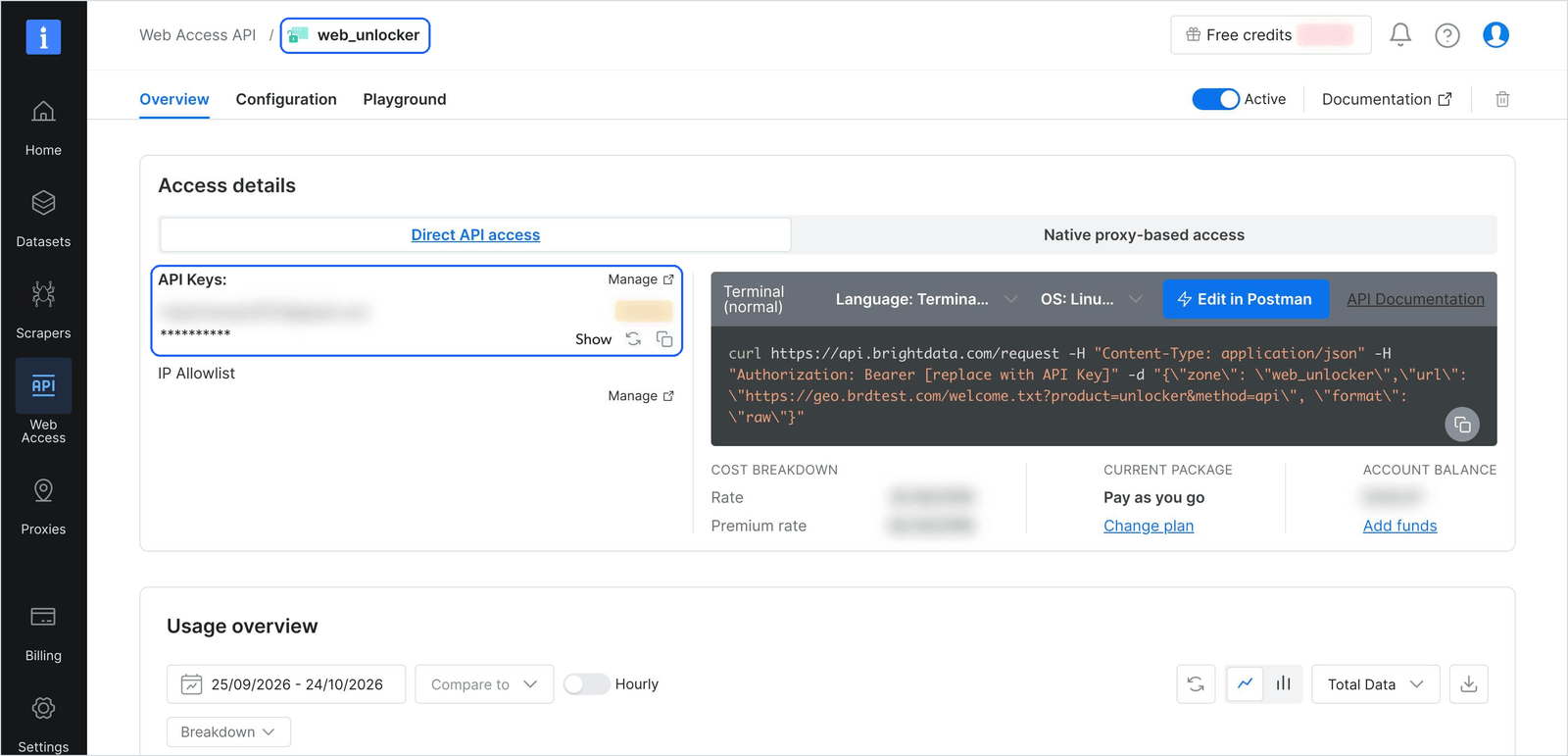
Configure access in 3 steps:
- Sign up and open Web Access in the control panel.
- Create a Web Unlocker zone, which holds the settings your requests use.
- Copy the zone name and your API key from the zone’s Overview page. The breadcrumb shows the zone name, and API Keys shows the key:
Install the 2 dependencies and set your credentials:
python -m pip install requests duckdb
export BRIGHTDATA_API_KEY="your-api-key"
export BRIGHTDATA_ZONE="web_unlocker"  # Your Web Unlocker zone name
Each function matches a box in the diagram, and run() calls them in order:
| Function | Diagram box | What it does |
|---|---|---|
extract() |
Extract | Fetches the page through the Web Unlocker API, and reads the site’s own status code |
land_raw() |
Raw pages | Stores the page, gzipped, before parsing |
transform() |
Validate and parse | Parses the JSON-LD Product data, and gives every rejected page a reason |
load() |
Load | Writes the prices and extract_log tables |
To track another item later, set SOURCES to its product URLs. Set EXPECTED_MODEL to its model number in capital letters and digits only, such as 1000XM5. Save the pipeline as web_price_etl.py:
"""Extract product pages, keep the raw HTML, validate, transform, and upsert."""

import datetime as dt
import gzip
import hashlib
import json
import os
import re
import time
from collections import deque
from decimal import ROUND_HALF_UP, Decimal, InvalidOperation
from pathlib import Path

import duckdb
import requests

API_URL = "https://api.brightdata.com/request"
API_KEY = os.environ["BRIGHTDATA_API_KEY"]
ZONE = os.environ.get("BRIGHTDATA_ZONE", "web_unlocker")
RAW_DIR = Path("raw")
EXPECTED_MODEL = "1000XM5"  # Every page must name the item we asked for

# ISO 4217 currencies whose minor unit is not 2 (SIX list). Other codes use 2.
MINOR_UNITS = {
    "BIF": 0, "CLP": 0, "DJF": 0, "GNF": 0, "ISK": 0, "JPY": 0, "KMF": 0,
    "KRW": 0, "PYG": 0, "RWF": 0, "UGX": 0, "UYI": 0, "VND": 0, "VUV": 0,
    "XAF": 0, "XOF": 0, "XPF": 0, "BHD": 3, "IQD": 3, "JOD": 3, "KWD": 3,
    "LYD": 3, "OMR": 3, "TND": 3, "CLF": 4, "UYW": 4,
}  # fmt: skip

SOURCES = {
    "bestbuy": "https://www.bestbuy.com/site/sony-wh-1000xm5-wireless-noise-canceling-over-the-ear-headphones-black/6505727.p?skuId=6505727",
    "sony": "https://electronics.sony.com/audio/headphones/headband/p/wh1000xm5-b",
    "ebay": "https://www.ebay.com/itm/318849109603",
    "target": "https://www.target.com/p/sony-wh-1000xm5-bluetooth-wireless-noise-canceling-headphones-black/-/A-86314264",
}


def extract(url: str, country: str, attempts: int = 4):
    """Return (target_status, raw_bytes, text). 0: no response, below 0: bad request."""
    status, raw, text = 0, b"", ""
    for attempt in range(attempts):
        try:
            resp = requests.post(
                API_URL,
                json={"zone": ZONE, "url": url, "format": "raw", "country": country},
                headers={"Authorization": f"Bearer {API_KEY}"},
                timeout=180,
            )
        except requests.RequestException:  # Timeout or connection error
            resp = None
        if resp is not None and resp.status_code in (401, 407):
            resp.raise_for_status()  # A bad API key or zone: retrying will not help
        if resp is not None and resp.status_code in (400, 403):
            return -resp.status_code, b"", ""  # A request error for this URL: log it
        if resp is not None and resp.status_code == 200:
            # Read the target site's own status from the header.
            header = resp.headers.get("x-brd-status-code")
            status = int(header) if header else None
            raw, text = resp.content, resp.text
            if status is not None and status != 429 and status < 500 and raw:
                return status, raw, text
        if attempt < attempts - 1:  # 429, 5xx, timeout, or empty body: back off
            time.sleep(5 * 2**attempt)
    return status, raw, text


def land_raw(raw: bytes, source: str, captured_at: dt.datetime) -> str:
    """Store the response bytes, gzipped. A website does not serve past versions."""
    digest = hashlib.sha256(raw).hexdigest()
    day = captured_at.strftime("%Y-%m-%d")
    path = RAW_DIR / f"source={source}" / f"dt={day}" / f"{digest}.html.gz"
    path.parent.mkdir(parents=True, exist_ok=True)
    path.write_bytes(gzip.compress(raw))
    return str(path)


def is_type(node: dict, name: str) -> bool:
    kinds = node.get("@type")
    kinds = kinds if isinstance(kinds, list) else [kinds]
    return any(isinstance(k, str) and k.rsplit("/", 1)[-1] == name for k in kinds)


def product_from_jsonld(html: str) -> dict | None:
    """Return the first schema.org Product in document order, if the page has one."""
    pattern = r"<script[^>]*application/ld\+json[^>]*>(.*?)</script>"
    for block in re.findall(pattern, html, re.S | re.I):
        try:
            queue = deque([json.loads(block)])
        except json.JSONDecodeError:
            continue
        while queue:  # Breadth-first, so the main Product wins over nested ones
            node = queue.popleft()
            if isinstance(node, list):
                queue.extend(node)
            elif isinstance(node, dict):
                if is_type(node, "Product"):
                    return node
                queue.extend(v for v in node.values() if isinstance(v, (dict, list)))
    return None


def transform(source, url, country, status, html, captured_at, raw_path):
    """Return (row, None) for a valid record or (None, reason) for a rejected one."""
    if status is None:
        return None, "no_target_status"
    if status < 0:
        return None, f"api_status_{-status}"
    if status == 0:
        return None, "no_response"
    if status != 200:
        return None, f"target_status_{status}"
    product = product_from_jsonld(html)
    if product is None:
        return None, "no_jsonld_product"
    name = product.get("name") or ""
    if EXPECTED_MODEL not in re.sub(r"[^0-9A-Z]", "", name.upper()):
        return None, "item_mismatch"
    offers = product.get("offers") or {}
    offer = offers[0] if isinstance(offers, list) and offers else offers
    price = offer.get("price") or offer.get("lowPrice")
    currency = offer.get("priceCurrency") or ""
    if price is None or not re.fullmatch(r"[A-Z]{3}", currency):
        return None, "no_price_or_currency"
    try:  # schema.org prices use "." as the decimal mark and no symbols
        amount = Decimal(str(price))
    except InvalidOperation:
        return None, "unparseable_price"
    exponent = MINOR_UNITS.get(currency, 2)
    price_minor = int((amount * 10**exponent).quantize(Decimal(1), ROUND_HALF_UP))
    if price_minor <= 0:
        return None, "non_positive_price"
    return {
        "source": source,
        "url": url,
        "country": country,
        "captured_on": captured_at.date(),  # UTC date
        "captured_at": captured_at,
        "title": name,
        "price_minor": price_minor,
        "currency": currency,
        "raw_path": raw_path,
    }, None


UPSERT = """
    INSERT INTO prices VALUES (?,?,?,?,?,?,?,?,?)
    ON CONFLICT (url, country, captured_on) DO UPDATE SET
        source = excluded.source, captured_at = excluded.captured_at,
        title = excluded.title, price_minor = excluded.price_minor,
        currency = excluded.currency, raw_path = excluded.raw_path
    WHERE excluded.captured_at > prices.captured_at"""


def load(con, rows, attempts):
    con.execute("""
        CREATE TABLE IF NOT EXISTS prices (
            source TEXT, url TEXT, country TEXT,
            captured_on DATE, captured_at TIMESTAMPTZ,
            title TEXT, price_minor BIGINT, currency TEXT, raw_path TEXT,
            PRIMARY KEY (url, country, captured_on))""")
    con.execute("""
        CREATE TABLE IF NOT EXISTS extract_log (
            source TEXT, url TEXT, country TEXT, captured_at TIMESTAMPTZ,
            target_status INTEGER, reason TEXT, raw_path TEXT)""")
    # Upsert: the newest capture of a UTC day wins, whatever order rows arrive in
    for r in rows:
        con.execute(UPSERT, list(r.values()))
    # Append every attempt. reason is NULL when the row loaded
    con.executemany("INSERT INTO extract_log VALUES (?,?,?,?,?,?,?)", attempts)


def run(country: str = "us"):
    con = duckdb.connect("web_prices.duckdb")
    rows, attempts = [], []
    for source, url in SOURCES.items():
        captured_at = dt.datetime.now(dt.timezone.utc)
        status, raw, html = extract(url, country)
        raw_path = land_raw(raw, source, captured_at) if raw else None
        row, reason = transform(
            source, url, country, status, html, captured_at, raw_path
        )
        if row:
            rows.append(row)
        attempts.append([source, url, country, captured_at, status, reason, raw_path])
    load(con, rows, attempts)
    print(f"loaded={len(rows)} rejected={len(attempts) - len(rows)}")
    print(
        con.sql(
            "SELECT source, country, price_minor, currency, "
            "title[:40] AS title FROM prices ORDER BY source"
        )
    )
    print(
        con.sql(
            "SELECT source, reason, count(*) AS n FROM extract_log "
            "WHERE reason IS NOT NULL GROUP BY ALL ORDER BY source"
        )
    )


if __name__ == "__main__":
    run()
Run it twice to check that a rerun is safe:
python web_price_etl.py
python web_price_etl.py
The second run printed the same 3 price rows, and the extract log had 2 rejected Target pages, 1 from each run:
loaded=3 rejected=1
┌─────────┬─────────┬─────────────┬──────────┬──────────────────────────────────────────┐
│ source  │ country │ price_minor │ currency │                  title                   │
│ varchar │ varchar │    int64    │ varchar  │                 varchar                  │
├─────────┼─────────┼─────────────┼──────────┼──────────────────────────────────────────┤
│ bestbuy │ us      │       22800 │ USD      │ Sony - WH-1000XM5 Wireless Noise Cancell │
│ ebay    │ us      │       15200 │ USD      │ Sony WH-1000XM5 Wireless Noise Cancellin │
│ sony    │ us      │       22800 │ USD      │ WH1000XM5/B                              │
└─────────┴─────────┴─────────────┴──────────┴──────────────────────────────────────────┘

┌─────────┬───────────────────┬───────┐
│ source  │      reason       │   n   │
│ varchar │      varchar      │ int64 │
├─────────┼───────────────────┼───────┤
│ target  │ no_jsonld_product │     2 │
└─────────┴───────────────────┴───────┘
Target was rejected, as intended, because it showed the price only in server-rendered HTML, with no JSON-LD. The attempt went to the extract log with a reason and a path to the stored page. No row with a null price was written to prices. If every source is rejected with api_status_400 instead, check that BRIGHTDATA_ZONE matches your zone’s name.
The URLs and JSON-LD fields match the pages as tested. Retail front ends can change without notice, so check those first when the extract log shows a new reject reason. The parser stores the first JSON-LD offer. Write the parser to select the price you want, and record which offer it used.
The eBay row passed every check at $152.00, but its JSON-LD marked the item RefurbishedCondition, while the other sites sold it new at $228.00. A record can pass validation and still be the wrong record. Add itemCondition, availability, and the product type to the fields you check, along with the variant and pack size. With many products, store the expected model with each URL instead of one EXPECTED_MODEL.
The pipeline is safe to rerun and repair because of 2 design choices:
- The raw bytes are stored before parsing, gzipped and partitioned by source and date. In production, write WARC (Web ARChive) records with a library such as warcio, so each page keeps its URL and response headers. Add the country to the storage path too. Set a retention period that matches how far back you might re-parse.
pricesis a daily snapshot keyed on(url, country, captured_on), with a UTC date. The newest capture of a day is kept, whatever order the rows arrive in. For a production catalog, key on a stable item ID such as a SKU. Add a ZIP code or store ID for retailers that price by location.
The example fetches one URL at a time to keep the code short. At scale, run requests concurrently, with a per-site limit and a retry budget. Schedule run() with cron or an orchestrator such as Airflow, Dagster, Prefect, or Mage. Keep raw/ and web_prices.duckdb on storage that persists between runs, because a new container starts empty.
Monitor a web ETL pipeline
Row counts detect outages, but they don’t detect a site that removes a product page or moves its price into a new HTML element. You can find those cases with 2 queries on the extract log and the prices table. For another warehouse, adjust DuckDB syntax such as GROUP BY ALL. Save the queries as checks.sql:
-- Reject rate per source and UTC day: compare today with the days before it
SELECT source,
       timezone('UTC', captured_at)::DATE AS day,
       count(*) AS attempts,
       count(reason) AS rejected,
       round(100.0 * count(reason) / count(*), 1) AS reject_pct
FROM extract_log
GROUP BY ALL
ORDER BY day DESC, reject_pct DESC;

-- Freshness per item: the newest successful extract or stored row.
-- An item that never loaded shows NULL, so it cannot hide.
WITH tried AS (
    SELECT source, url, country,
           max(captured_at) FILTER (WHERE reason IS NULL) AS extracted
    FROM extract_log
    GROUP BY ALL
),
stored AS (
    SELECT url, country, max(captured_at) AS stored
    FROM prices
    GROUP BY ALL
)
SELECT t.source,
       right(url, 24) AS item,
       country,
       greatest(t.extracted, s.stored) AS last_loaded,
       date_diff('minute', last_loaded, now()) AS age_minutes
FROM tried AS t
LEFT JOIN stored AS s USING (url, country)
ORDER BY age_minutes DESC NULLS FIRST;
Run both queries against web_prices.duckdb from Python:
python - <<'EOF'
import duckdb
con = duckdb.connect("web_prices.duckdb")
for query in open("checks.sql").read().split(";"):
    if query.strip():
        print(con.sql(query))
EOF
Both queries flagged Target. Its pages were fetched, but they need their own parser. DuckDB shows times in your session’s time zone:
┌─────────┬────────────┬──────────┬──────────┬────────────┐
│ source  │    day     │ attempts │ rejected │ reject_pct │
│ varchar │    date    │  int64   │  int64   │   double   │
├─────────┼────────────┼──────────┼──────────┼────────────┤
│ target  │ 2026-10-22 │        2 │        2 │      100.0 │
│ bestbuy │ 2026-10-22 │        2 │        0 │        0.0 │
│ sony    │ 2026-10-22 │        2 │        0 │        0.0 │
│ ebay    │ 2026-10-22 │        2 │        0 │        0.0 │
└─────────┴────────────┴──────────┴──────────┴────────────┘

┌─────────┬──────────────────────────┬─────────┬──────────────────────────────────┬─────────────┐
│ source  │           item           │ country │           last_loaded            │ age_minutes │
│ varchar │         varchar          │ varchar │     timestamp with time zone     │    int64    │
├─────────┼──────────────────────────┼─────────┼──────────────────────────────────┼─────────────┤
│ target  │ hones-black/-/A-86314264 │ us      │ NULL                             │        NULL │
│ bestbuy │ /6505727.p?skuId=6505727 │ us      │ 2026-10-22 07:58:25.232412+05:30 │           7 │
│ sony    │ s/headband/p/wh1000xm5-b │ us      │ 2026-10-22 07:59:42.079796+05:30 │           6 │
│ ebay    │ bay.com/itm/318849109603 │ us      │ 2026-10-22 08:00:41.172107+05:30 │           5 │
└─────────┴──────────────────────────┴─────────┴──────────────────────────────────┴─────────────┘
Alert when a source’s reject rate rises above its rate on previous days, not only when it crosses a fixed level. A jump from 0% to 40% on one site often indicates a front-end change. Split the alert by reject reason, because a removed page, a site error, and a parser failure need different fixes. Set a minimum number of attempts, so a small sample doesn’t trigger an alert.
The example pipeline logs 9 reject reasons:
| Reason | What happened | What to check |
|---|---|---|
api_status_<code> |
The Web Unlocker API returned a 400 or 403 error for the request | If every source gets 400, check the zone name in BRIGHTDATA_ZONE |
no_response |
No usable response after all retries | The URL, and whether the site is online |
no_target_status |
The response had no x-brd-status-code header |
Retry it in the next run |
target_status_<code> |
The site returned a status other than 200 | 404 means the product was removed. 429 or 5xx means the site still failed after retries |
no_jsonld_product |
The page had no JSON-LD Product data | A layout change, or a site that needs its own parser |
item_mismatch |
The product name didn’t contain EXPECTED_MODEL |
The URL, or a redirect to another item |
no_price_or_currency |
The offer had no price or no 3-letter currency | The offer structure on the page |
unparseable_price |
The price wasn’t a number | The price format |
non_positive_price |
The price was zero or below | Placeholder prices on unavailable items |
If you add a source that you fetch without the Web Unlocker API, its challenge pages can arrive with HTTP 200. The pipeline would log them as no_jsonld_product, the same reason as a parser failure. Detect challenge pages before parsing, give them their own reason, and retry them with a new request.
Rejects show only values that fail a check, but a wrong price can pass every check. Compare each price with the item’s previous capture and with other sources, and flag a large change for review. Track the fill rate of each optional field, such as a list price or availability, per source and day. A drop to zero usually indicates a layout change that no check detected.
With many items, alert on the 99th percentile of age_minutes, not only the median, because the median can hide a few stale items. Count items that never loaded separately, because a quantile function skips NULL values.
Re-parse stored pages after a parser fix
The monitoring queries flagged Target because the pipeline had no parser for its pages. Those stored pages showed the price in a server-rendered HTML element with the attribute data-test="product-price", and had no JSON-LD. This script adds a Target parser and runs it on the pages already in raw/, without sending a new request. Save it as reparse_target.py and run it:
"""Re-parse stored Target pages with a new parser. No new requests are sent."""

import gzip
import re
from decimal import Decimal

import duckdb

EXPECTED_MODEL = "1000XM5"


def parse_target(html: str):
    """Target showed the price only in server-rendered HTML, in US dollars."""
    price = re.search(r'data-test="product-price"[^>]*>\s*\$([\d,]+\.\d{2})', html)
    title = re.search(r'<h1[^>]*data-test="product-title"[^>]*>([^<]+)', html)
    if not (price and title):
        return None
    name = title.group(1).strip()
    if EXPECTED_MODEL not in re.sub(r"[^0-9A-Z]", "", name.upper()):
        return None
    return name, int(Decimal(price.group(1).replace(",", "")) * 100)


con = duckdb.connect("web_prices.duckdb")
raw_paths = [r[0] for r in con.sql(
    "SELECT raw_path FROM extract_log "
    "WHERE source = 'target' AND reason = 'no_jsonld_product' ORDER BY captured_at"
).fetchall()]
recovered = 0
for raw_path in raw_paths:
    html = gzip.decompress(open(raw_path, "rb").read()).decode("utf-8", "replace")
    parsed = parse_target(html)
    if parsed is None:
        continue
    name, price_minor = parsed
    # Copy the original capture time from the log: the row describes that moment
    # A replayed row never replaces a newer capture of the same day
    con.execute(
        """INSERT INTO prices
           SELECT source, url, country, timezone('UTC', captured_at)::DATE,
                  captured_at, ?, ?, 'USD', raw_path
           FROM extract_log WHERE raw_path = ?
           ON CONFLICT (url, country, captured_on) DO UPDATE SET
               captured_at = excluded.captured_at, title = excluded.title,
               price_minor = excluded.price_minor, raw_path = excluded.raw_path
           WHERE excluded.captured_at > prices.captured_at""",
        [name, price_minor, raw_path],
    )
    recovered += 1
print(f"re-parsed={len(raw_paths)} recovered={recovered}")
print(con.sql(
    "SELECT source, captured_at, price_minor, currency, title[:40] AS title "
    "FROM prices WHERE source = 'target'"
))
The upsert kept one row for the UTC day, timestamped with the capture time, not the re-parse time:
re-parsed=2 recovered=2
┌─────────┬──────────────────────────────────┬─────────────┬──────────┬──────────────────────────────────────────┐
│ source  │           captured_at            │ price_minor │ currency │                  title                   │
│ varchar │     timestamp with time zone     │    int64    │ varchar  │                 varchar                  │
├─────────┼──────────────────────────────────┼─────────────┼──────────┼──────────────────────────────────────────┤
│ target  │ 2026-10-22 08:02:18.660382+05:30 │       39999 │ USD      │ Sony WH-1000XM5 Bluetooth Wireless Noise │
└─────────┴──────────────────────────────────┴─────────────┴──────────┴──────────────────────────────────────────┘
The $399.99 was Target’s own price, not a parser error. Best Buy and Sony sold the same headphones at $228.00. A check against other sources would flag this difference for review.
Keep the capture time from the extract log on every re-parsed row. A re-parsed row timestamped with the re-parse time would look more recent than the page it came from. The extract log still records the original rejects, so the reject rate keeps measuring how often the production parser fails.
Target can serve different markup within a day. A later fetch didn’t have the data-test attribute, so check for it first if Target pages start to fail again.
The stored pages also work as parser test fixtures. Keep a few per site in your repository, with the expected record next to each. Run every parser against them in CI, including parsers an AI coding agent writes or repairs. Then a parser edit that breaks a known page layout fails a test before it reaches production.
Where LLMs fit in the parse step
An LLM can extract fields from a page layout it has never seen, which makes it useful for the parse step. The cost depends on what you send it. The Web Unlocker API’s markdown output made the token count, measured with OpenAI’s o200k_base tokenizer, 11 to 138 times smaller on 4 product pages:
| Page | Raw HTML tokens | Markdown tokens | Price kept in markdown |
|---|---|---|---|
| Amazon.com | 907,631 | 83,871 | Yes |
| Best Buy | 404,727 | 2,926 | Yes |
| Sony | 380,834 | 7,148 | Yes |
| Target | 166,630 | 1,493 | Yes |
To get this output, add "data_format": "markdown" to the request, next to "format": "raw". The markdown keeps the page’s links, which you need when you crawl from it. For price extraction, stripping the link URLs reduced the Amazon page from 83,871 to 12,160 tokens, and the $228.00 price was still there.
At 1M Amazon product pages a day, stripping links reduces the input from about 84B to 12B tokens a day. Count with your model’s own tokenizer, because tokenizers give different counts. In these tests, the Claude API counted the unstripped Amazon markdown at about 124K tokens, 48% more than o200k_base. Before you call an LLM on every page at runtime, multiply the token count by the model’s input token price to estimate the cost.
Test accuracy separately, and first check how much of the page the model actually read. A local model, Qwen 3.5 9B in Ollama with a 32K-token context window, read the unstripped markdown of 5 product pages 5 times each. The instruction came before the page, and a JSON schema set the output format:
| Page | Input tokens Ollama reported | Correct price in 5 runs |
|---|---|---|
| Walmart | 5,287 | 5 |
| Best Buy | 3,571 | 5 |
| Sony | 7,856 | 5 |
| Target | 1,771 | 5 |
| Amazon.com | 16,386 | 0 |
The Amazon runs failed with no error. Ollama kept about half its 32K context window free for the answer, so it silently truncated the 94,111-token prompt to 16,386 tokens. The only sign was a warning in the Ollama server log:
level=WARN source=llama_server.go:317 msg="truncating input prompt" limit=16386 prompt=94111 keep=4 new=16386
The truncation removed the start of the prompt, which held both the instruction and the real $228.00 price. The model returned $224.99 from a sponsored carousel in all 5 runs. It still returned the Sony product name in 4 runs, so a check on the product name would have accepted the answer. In a single run with a 100K-token context window, the same model found $228.00, which suggests that the context window setting caused the failure.
To disable truncation in Ollama 0.32.15, add "truncate": false to the /api/chat body, next to options. An oversized prompt then fails with HTTP 400. Also put the instruction after the page, so truncation at the start can’t remove it. On a runtime without such a setting, compare the token count it reports with what you sent.
A full page in the context window still doesn’t guarantee the right answer. Given the whole Amazon markdown, Claude Haiku 5.5 returned $179.99 in all 5 runs, the price of the page’s “Used – Very Good” offer.
Specify in the prompt which price you want, including the item condition. A product page can list several offers for one item, and a schema accepts any of them. Adding “Return the price for a new item, not a used, renewed, or refurbished offer” fixed all 5 Haiku runs.
Main-content extraction helps, but check that the fields you need are still there. The trafilatura main-content extractor reduced the Amazon page to 3,538 tokens and kept $228.00, but it removed every price from the Best Buy page.
Use a model mostly at build time. Have a coding agent write or repair a deterministic parser, and test it on stored pages. Use runtime model calls only for long-tail sites that you visit rarely. Validate model output with the same checks as any other parser.
Backfill from a dataset, then add new scrapes
A new database pipeline can start from a full snapshot of the source tables. A website shows only the current page, so a new web pipeline has no history from before its first run.
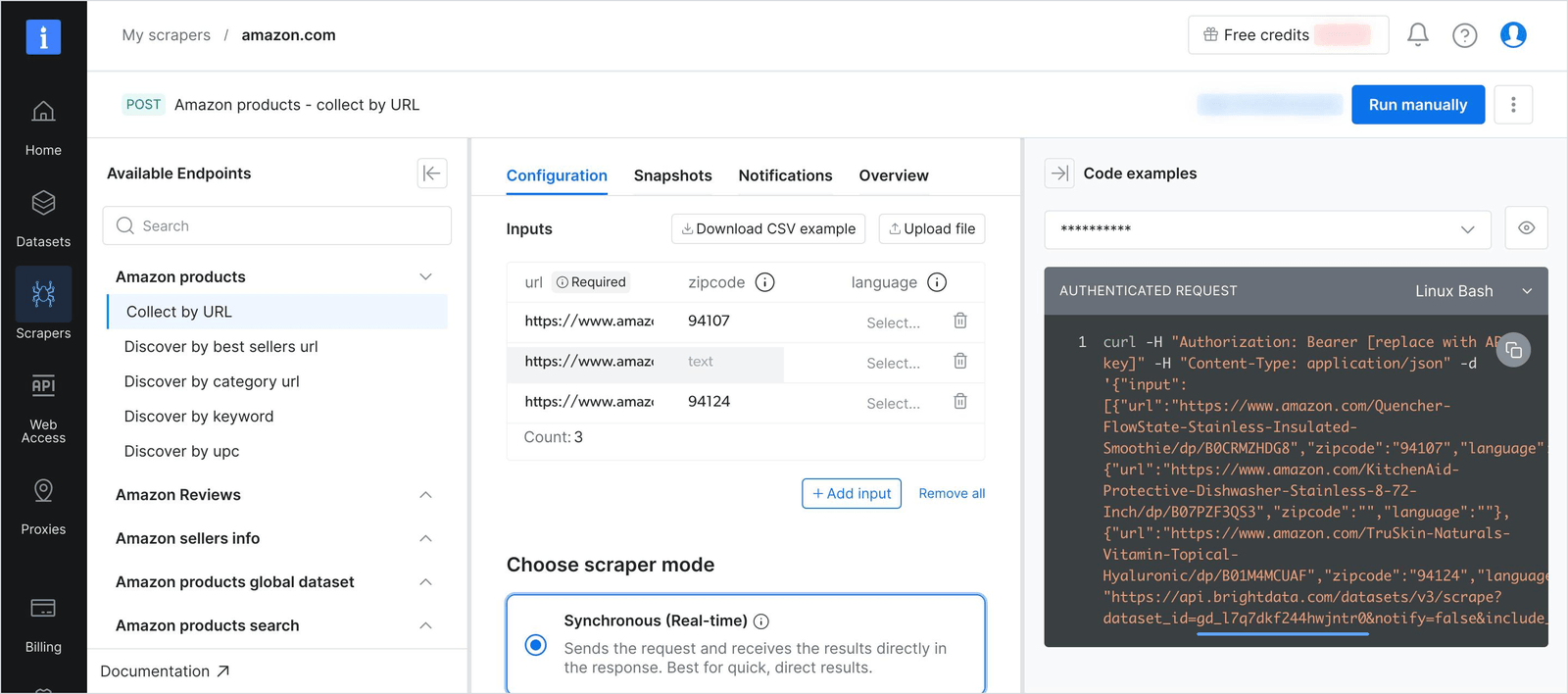
Bright Data Datasets contain pre-collected records, and the Web Scraper API collects new ones with pre-built scrapers. The Amazon products dataset and scraper share one ID. For 2 Amazon products, the dataset records and the newly scraped records loaded into one table without any field mapping.
The scraper’s page under Scrapers shows that ID in its sample request:
This script filters the dataset for 2 products, scrapes the same products, and appends both sets of records to one history table. It also scrapes a third URL, a removed product page, to show how the scraper reports it. Dataset filtering bills per record in the resulting snapshot, and an empty result isn’t billed.
The script reads the same BRIGHTDATA_API_KEY environment variable. Save it as backfill_and_increment.py:
"""Backfill from a Bright Data dataset, then add fresh scrapes with matching fields."""

import json
import os
import time

import duckdb
import requests

API = "https://api.brightdata.com"
HEADERS = {"Authorization": f"Bearer {os.environ['BRIGHTDATA_API_KEY']}"}
# Amazon products: the dataset and the scraper share this ID
DATASET_ID = "gd_l7q7dkf244hwjntr0"
ASINS = ["B09XS7JWHH", "B0863TXGM3"]


def download(status_url: str, file_url: str, deadline_s: int = 1800) -> list[dict]:
    """Poll a snapshot until it is ready, then download it as JSON."""
    deadline = time.monotonic() + deadline_s
    status = "unknown"
    while time.monotonic() < deadline:
        try:
            resp = requests.get(status_url, headers=HEADERS, timeout=60)
            resp.raise_for_status()
            status = resp.json()["status"]
        except requests.RequestException:  # A network blip should not end the job
            status = "unknown"
        if status == "ready":
            break
        if status in ("failed", "canceled"):
            raise RuntimeError(f"snapshot {status}")
        time.sleep(10)
    else:
        raise TimeoutError(f"snapshot not ready after {deadline_s} s: {status}")
    while True:
        resp = requests.get(file_url, headers=HEADERS, params={"format": "json"}, timeout=300)
        if resp.status_code != 202:  # 202 means the file is still being built
            break
        time.sleep(10)
    resp.raise_for_status()
    return resp.json()


# 1. Backfill: filter the pre-collected dataset instead of crawling the past yourself.
# An ASIN repeats across Amazon marketplaces, so filter by domain as well.
backfill_filter = {
    "operator": "and",
    "filters": [
        {"name": "asin", "operator": "in", "value": ASINS},
        {"name": "domain", "operator": "=", "value": "https://www.amazon.com/"},
    ],
}
resp = requests.post(
    f"{API}/datasets/filter",
    headers=HEADERS,
    json={"dataset_id": DATASET_ID, "filter": backfill_filter},
    timeout=60,
)
resp.raise_for_status()
snap = resp.json()["snapshot_id"]
backfill = download(
    f"{API}/datasets/snapshots/{snap}", f"{API}/datasets/snapshots/{snap}/download"
)

# 2. Increment: scrape the same products now.
# include_errors=true returns each failed input as a row with an error_code.
inputs = [{"url": f"https://www.amazon.com/dp/{a}"} for a in ASINS + ["B0BX2L8PBT"]]
resp = requests.post(
    f"{API}/datasets/v3/trigger",
    headers=HEADERS,
    json=inputs,
    params={"dataset_id": DATASET_ID, "include_errors": "true"},
    timeout=60,
)
resp.raise_for_status()
snap = resp.json()["snapshot_id"]
fresh = download(f"{API}/datasets/v3/progress/{snap}", f"{API}/datasets/v3/snapshot/{snap}")

# 3. Write each source to its own file, and keep failed inputs apart
files = {
    "dataset.json": backfill,
    "scraper.json": [r for r in fresh if "error_code" not in r],
    "dead.json": [r for r in fresh if "error_code" in r],
}
for name, rows in files.items():
    with open(name, "w") as f:
        json.dump(rows, f)

# 4. Append both sources to one history table. union_by_name lines up the columns
# when one file has fields the other lacks. Prices become integer cents (USD).
con = duckdb.connect("amazon.duckdb")
select = """
    SELECT * EXCLUDE (filename), filename AS _source, now() AS _loaded_at,
           CAST(round(final_price * 100) AS BIGINT) AS final_price_minor
    FROM read_json(['dataset.json', 'scraper.json'], union_by_name = true,
                   filename = true)"""
con.execute(f"CREATE TABLE IF NOT EXISTS products AS {select} LIMIT 0")
con.execute(f"INSERT INTO products BY NAME {select}")
print(con.sql(
    "SELECT _source, asin, final_price_minor, currency, reviews_count "
    "FROM products ORDER BY asin, _source"
))
if files["dead.json"]:
    print(con.sql("SELECT input.url AS url, error_code FROM read_json('dead.json')"))
The script printed:
┌──────────────┬────────────┬───────────────────┬──────────┬───────────────┐
│   _source    │    asin    │ final_price_minor │ currency │ reviews_count │
│   varchar    │  varchar   │       int64       │ varchar  │     int64     │
├──────────────┼────────────┼───────────────────┼──────────┼───────────────┤
│ dataset.json │ B0863TXGM3 │             22699 │ USD      │         42881 │
│ scraper.json │ B0863TXGM3 │             29500 │ USD      │         42887 │
│ dataset.json │ B09XS7JWHH │             19999 │ USD      │         20246 │
│ scraper.json │ B09XS7JWHH │             22800 │ USD      │         20247 │
└──────────────┴────────────┴───────────────────┴──────────┴───────────────┘

┌──────────────────────────────────────┬────────────┐
│                 url                  │ error_code │
│               varchar                │  varchar   │
├──────────────────────────────────────┼────────────┤
│ https://www.amazon.com/dp/B0BX2L8PBT │ dead_page  │
└──────────────────────────────────────┴────────────┘
The example keeps these rows in its own amazon.duckdb file. In production, map the fields you need into the table your pipeline loads. The output shows 3 results that matter for that table design:
- The dataset gives you an earlier capture. Its rows show fewer reviews than the new scrape. Load the dataset records as your starting point, and use the scraper for the current state. Keep the source, the capture time, and the load time on every row.
- Add the domain to the ASIN key. An ASIN is Amazon’s product ID, and one ASIN can appear on several Amazon marketplaces. For example,
B0CCZ1L489listed at £399.99 on amazon.co.uk and $327.99 on amazon.com, so a filter withoutdomaincan return either price. Key Amazon records on(domain, asin)plus the capture time. For a scheduled job, upsert on that key so a rerun doesn’t duplicate the rows, and add columns as the scraper adds fields. - With
include_errors=true, every input is returned as a row, including removed pages. Failed records are not billed. Checkerror_codein your code, not the message text.
A scheduled scraper job can also deliver its results to object storage, Snowflake, or a webhook, so you don’t have to poll it. From object storage, you can load the files with the loader your team already runs, such as Snowpipe, Databricks Auto Loader, or AWS Glue.
File delivery can also store the raw HTML, WARC, or screenshot of each page next to the records. You can then re-parse the stored pages later, like the raw pages in your own pipeline.
Build or buy the extract step
An in-house web pipeline often spends much of its engineering time on unblocking and parsing. Of the 8 retail sites tested, 5 needed a custom parser. Choose the extraction option that fits your sites and your team:
| Your situation | Extraction option |
|---|---|
| The site offers an official API or data feed with the fields you need | Use it, and scrape only the fields it lacks |
| A few sites with little bot protection, and engineers who maintain the parsers | Your own HTTP client, plus content validation on every page |
| Pages that need JavaScript, at a scale your team can operate | Your own Playwright or Puppeteer cluster |
| Sites that block standard HTTP clients, with parsers you want to keep | Web Unlocker API, which returns HTML or markdown and the site’s HTTP status code |
| Pages that need JavaScript, clicks, or scrolling, on sites that block your own headless browsers | Browser API, a remote browser for Playwright, Puppeteer, or Selenium |
| Records instead of pages, with no parser to maintain | Web Scraper API, whose pre-built scrapers return structured records and deliver them to your storage |
| A site you want as records, with the scraper built for you | Scraper Studio, whose AI Agent builds a scraper from the URL and a plain-language description |
| Records collected before your first run, or a large bulk load | Datasets, filtered and downloaded through the Dataset API |
Compare the options on cost per 1K records that pass your checks, including the engineering time each option needs. Our guide on choosing between datasets and scraping APIs covers cost and data freshness in more detail.
Whatever you choose, collect only public data, and limit concurrent requests per site. The Bright Data Acceptable Use Policy describes which data you can collect.
Scraped pages can also contain personal data, which can create GDPR or CCPA obligations. Remove the fields you don’t need before the load. Hashing only pseudonymizes a field. Because you can still match the hashes to people, they remain personal data under GDPR.
Final thoughts
For a web source, the extract step determines whether the later steps of an ETL pipeline get usable data. HTTP 200 shows only that the request worked, so check each page for the item and fields you expect. Put the country and capture date in the primary key, and store the raw page, because a website doesn’t serve its past versions.
When maintaining parsers costs more than buying records, get the records from the Web Scraper API or Scraper Studio, and backfill from Bright Data Datasets. To start with the Web Unlocker API, run the pipeline on the pages of one item you track, and read each reject reason it logs.
FAQ
What is the difference between an ETL pipeline and a data pipeline?
An ETL pipeline is one type of data pipeline. A data pipeline is any process that moves data from one system to another. An ETL pipeline also transforms the data into a consistent format before loading it into a destination such as a data warehouse. Some replication and streaming pipelines move data without that transform step.
What is an example of an ETL pipeline?
A price-monitoring pipeline extracts product pages from retail websites with the Bright Data Web Unlocker API. It then transforms each page into a typed record with the item, price, currency, and country. Finally, it loads the records into a warehouse table that analysts query.
Is web scraping part of ETL?
Yes. Web scraping is the extract step of an ETL pipeline when the source is a website. A page can return HTTP 200 and still be a challenge page with no data. Validate each page’s content, and store the raw HTML before you transform and load it.
Is Python an ETL tool?
Python is a programming language, not an ETL tool, but it’s widely used to write ETL pipelines. Libraries such as requests, Scrapy, Polars, dlt, and DuckDB handle extraction, transformation, and loading. Orchestrators such as Airflow, Dagster, and Prefect schedule Python ETL jobs.
Is SQL an ETL tool?
SQL is a query language, not a complete ETL tool. It handles the transform step well, especially in ELT pipelines where dbt runs SQL models inside the warehouse. SQL isn’t built to fetch and render web pages, so a web pipeline needs a separate extraction step.


Technical Writer
 5 years experience
Satyam Tripathi helps SaaS and data startups turn complex tech into actionable content, boosting developer adoption and user understanding.